testimonial-reviews
 Raju V
. Testimonial collection and display SaaS Strong revenue evidence - Customer: agencies, coaches, SaaS founders. - Problem: businesses struggle to collect customer reviews and display them on websites. - Product: automatic review requests, video testimonials and website widgets. - Revenue proof: Senja reached $1 million ARR with a tiny team in 2025. - Suggested price: ₹299–₹999/month. - Difficulty: Low–medium. build me this micro SaaS

Comments (0)
Sign in to leave a comment
System Requirements
System Requirements Document for Testimonial Collection SaaS
1. Introduction
Testimonial Collection SaaS (project name: testimonial-reviews) is a micro SaaS product for agencies, coaches, and SaaS founders who need to collect customer reviews and display them on websites. The product solves a concrete business problem: businesses struggle to collect customer reviews and display them on their websites. The product addresses this with three core capabilities: automatic review requests, video testimonials, and website widgets.
The audience is small businesses and independent professionals — agencies, coaches, and SaaS founders — who sell on trust and need visible social proof without building a review pipeline themselves. The product is positioned at a suggested price of ₹299–₹999 per month, reflecting a low-to-medium build difficulty and a lean operating model.
This document is the System Requirements Document for the product. It defines the accepted current behavior, the personas who use it, the pages that own that behavior, the flows that connect them, and the visual and technical direction.
2. System Overview
2a. Product Interpretation and Delivery Boundary
The product is a first-party web application delivered as a React frontend, a shared FastAPI backend, and a MariaDB database. Business owners and agencies sign up for an account, create review requests that the product sends automatically to their customers, view the written and video testimonials that come back, and configure website widgets that display those testimonials on their own or their clients' websites.
Two access boundaries exist. The business-facing workspace (Review Requests, Testimonials, Widgets) is protected and requires login. The reviewer-facing submission surface (Submit Testimonial) is public and requires no account: a reviewer reaches it through the request link the product sends, and submits a written or video testimonial without signing up. The Landing, Sign Up, and Login pages are public entry and identity surfaces.
The product owns identity for business users (self-service sign-up and returning login). It does not own reviewer identity; reviewers are external recipients who interact only through the request link. Automatic review requests are a background automation owned by the product, with the customer as the external recipient. Website widgets are configured in the product and embedded on external websites the user controls.
Current scope is limited to the accepted capabilities: automatic review requests, written and video testimonial collection, testimonial viewing, and website widget configuration and display. Billing, plan management, team roles, and analytics are not part of the accepted current scope.
2b. Source Content Inventory
Not applicable — no reference directive with content_source was supplied.
2c. Page Content and Component Coverage
Landing
- Information/state: Public marketing entry explaining testimonial collection and display for agencies, coaches, and SaaS founders. Presents the product's three capabilities (automatic review requests, video testimonials, website widgets) and the value of visible social proof. Hero copy: headline "Turn happy customers into loud proof"; subline "Send review requests automatically. Collect video and written testimonials. Show them on your site."; call to action "Start free".
- Primary actions: "Start free" leads to Sign Up. A secondary path leads to Login for returning users.
- Supporting actions: Navigation to Sign Up and Login; scrolling through capability and social-proof sections.
- Domain entities: None persisted; presents product capabilities and testimonial-style proof content.
- Component responsibilities: Full-bleed midnight navy hero block (left 58 percent) with three-row Archivo Black headline and tangerine pill CTA; ice blue right field with tilted quote-card stack (written review, video thumbnail, star row) and tangerine sticker badge; full-width ice blue marquee band of short testimonial quotes; diagonal midnight navy colour-band section titles; arc and squiggle props.
- States: Loading (static content, no data fetch required); empty (not applicable); success (page renders fully); error (static fallback if any asset fails); recovery (navigation links remain usable).
Sign Up
- Information/state: Public self-service enrollment for a new business owner or agency. Collects the minimum identity information needed to create an account and reach the protected workspace.
- Primary actions: Submit enrollment to create an account and enter the workspace.
- Supporting actions: Navigate to Login if already enrolled; return to Landing.
- Domain entities: Business account (owner identity, business name, email, credential).
- Component responsibilities: Enrollment form with validation; submit control; link to Login; error and success messaging.
- States: Loading (submission in progress); empty (blank form); success (account created, redirected to protected workspace); error (invalid or duplicate email, weak credential, network failure) with inline recovery; recovery (retry submission or switch to Login).
Login
- Information/state: Public returning verification for an existing business owner or agency.
- Primary actions: Submit credentials to verify identity and reach the protected workspace.
- Supporting actions: Navigate to Sign Up if not yet enrolled; return to Landing.
- Domain entities: Business account credential.
- Component responsibilities: Credential form; submit control; link to Sign Up; error messaging.
- States: Loading (verification in progress); empty (blank form); success (verified, redirected to protected workspace); error (invalid credentials, network failure) with inline recovery; recovery (retry or switch to Sign Up).
Review Requests
- Information/state: Protected workspace page where the user creates a review request and the product sends it automatically to a customer. Shows the user's review requests and their send status.
- Primary actions: Create a review request (customer recipient details and request content) and trigger automatic sending.
- Supporting actions: View existing review requests and their status; revisit a request.
- Domain entities: Review request (recipient, message, send status, request link).
- Component responsibilities: Request creation form; recipient input; send control; request list with status; confirmation and error messaging.
- States: Loading (fetching requests); empty (no requests yet, with a prompt to create the first); success (request created and sent, status visible); error (invalid recipient, send failure) with retry; recovery (resend or edit before sending).
Testimonials
- Information/state: Protected workspace page where the user views collected written and video testimonials submitted by reviewers.
- Primary actions: Browse and open collected testimonials, including playing video testimonials.
- Supporting actions: Review testimonial content and metadata (reviewer, type, date).
- Domain entities: Testimonial (reviewer, type written/video, content or media, submission date).
- Component responsibilities: Testimonial list; written testimonial display; video testimonial player; empty-state prompt.
- States: Loading (fetching testimonials); empty (no testimonials collected yet, with guidance to send review requests); success (testimonials listed and viewable); error (media load failure) with retry; recovery (reload or open individual testimonial).
Widgets
- Information/state: Protected workspace page where the user configures a website widget that shows collected testimonials on a website.
- Primary actions: Configure a widget (which testimonials to show and how it is presented) and obtain the embed for a website.
- Supporting actions: Preview the widget; revisit and adjust configuration.
- Domain entities: Widget (configuration, selected testimonials, embed reference).
- Component responsibilities: Widget configuration form; testimonial selection; preview; embed output; save control.
- States: Loading (fetching configuration and testimonials); empty (no testimonials available to display, with guidance); success (widget saved and embed available); error (save failure) with retry; recovery (re-edit and resave).
Submit Testimonial
- Information/state: Public reviewer-facing page reached through the request link, requiring no account. The reviewer submits a written or video testimonial.
- Primary actions: Submit a written testimonial or record/upload a video testimonial.
- Supporting actions: Review the request context; confirm submission.
- Domain entities: Testimonial submission (reviewer, type, content or media).
- Component responsibilities: Written testimonial form; video capture/upload control; submit control; confirmation and error messaging.
- States: Loading (request context loading); empty (blank submission form); success (testimonial submitted and confirmed); error (invalid link, upload failure, submission failure) with retry; recovery (retry submission or re-record/re-upload).
3. Functional Requirements
FR-1 — Testimonial collection and display for agencies, coaches, and SaaS founders (explicit) As a Business owner or Agency or coach, I should use a testimonial collection and display SaaS built for agencies, coaches, and SaaS founders, so that I can run social proof for my business or my clients.
- Trigger/input: The user reaches the product through the Landing page.
- Observable result: The product presents testimonial collection and display capabilities for the target audience.
- Access state: Public.
- Failure/recovery: Static fallback if assets fail; navigation remains usable.
- Continuation: The user proceeds to Sign Up or Login.
FR-2 — Collect customer reviews and video testimonials (explicit) As a Business owner or Agency or coach, I should collect customer reviews and video testimonials, so that I have written and video proof to display.
- Trigger/input: A reviewer submits through the request link.
- Observable result: The submitted written or video testimonial becomes available in the Testimonials page.
- Access state: Reviewer submission is public; viewing requires login.
- Failure/recovery: Submission or upload failure is surfaced to the reviewer with retry; the user can resend a request.
- Continuation: The user views the collected testimonial and selects it for a widget.
FR-3 — Send automatic review requests (explicit) As a Business owner or Agency or coach, I should send automatic review requests to customers, so that reviews are collected without manual follow-up.
- Trigger/input: The user creates a review request with recipient details on the Review Requests page.
- Observable result: The product sends the request automatically to the customer and shows the send status.
- Access state: Login required.
- Failure/recovery: Invalid recipient or send failure is surfaced with retry; the user can correct and resend.
- Continuation: The reviewer receives the request and opens the link to Submit Testimonial.
FR-4 — Display testimonials on websites with website widgets (explicit) As a Business owner or Agency or coach, I should display collected testimonials on websites with website widgets, so that visitors see social proof.
- Trigger/input: The user configures a widget on the Widgets page and obtains the embed.
- Observable result: The widget configuration is saved and the embed is available for placement on a website.
- Access state: Login required.
- Failure/recovery: Save failure is surfaced with retry; the user can re-edit and resave.
- Continuation: The user places the embed on the target website.
FR-5 — Suggested price range ₹299–₹999 per month (explicit) As a Business owner or Agency or coach, I should see the product positioned at ₹299–₹999 per month, so that I understand the pricing band.
- Trigger/input: The user reviews the product's pricing positioning.
- Observable result: The suggested price range ₹299–₹999 per month is reflected in the product's positioning.
- Access state: Public.
- Failure/recovery: Not applicable.
- Continuation: The user proceeds with enrollment.
- Constraint: This is a hard constraint; the product's pricing positioning stays within ₹299–₹999 per month.
FR-6 — Self-service enrollment or returning verification (required_inference) As a Business owner or Agency or coach, I should complete self-service enrollment or returning verification, so that I can reach protected workspace pages.
- Trigger/input: The user submits the Sign Up form or the Login form.
- Observable result: An account is created or identity is verified, and the user reaches the protected workspace.
- Access state: Public entry; protected workspace after success.
- Failure/recovery: Invalid or duplicate email, weak credential, or invalid credentials are surfaced with inline recovery; the user can retry or switch between Sign Up and Login.
- Continuation: The user proceeds to Review Requests, Testimonials, or Widgets.
FR-7 — Reviewer opens the request link without an account (required_inference) As a Reviewer, I should open the request link without an account, so that I can submit a testimonial without signing up.
- Trigger/input: The reviewer opens the request link received from the product.
- Observable result: The Submit Testimonial page loads with the request context and a submission form.
- Access state: Public, no account.
- Failure/recovery: An invalid or expired link is surfaced with guidance; the reviewer can request a new link from the business.
- Continuation: The reviewer submits a written or video testimonial.
FR-8 — Reviewer submits a written or video testimonial (required_inference) As a Reviewer, I should submit a written or video testimonial, so that my feedback becomes available for display.
- Trigger/input: The reviewer completes the written form or records/uploads a video and confirms submission.
- Observable result: The testimonial is submitted and confirmed to the reviewer, and becomes available in the business's Testimonials page.
- Access state: Public, no account.
- Failure/recovery: Upload or submission failure is surfaced with retry; the reviewer can re-record or re-upload.
- Continuation: The business views the testimonial and can select it for a widget.
4. User Personas
Business owner
- Product context: Runs a small business and sells on trust. Needs visible customer proof on the business website but has no review pipeline of their own.
- Primary goal: Collect customer reviews and video testimonials and show them on the business website.
- Distinct accepted responsibilities: Creates review requests and sends them automatically to customers; views collected written and video testimonials; configures website widgets that display testimonials.
- Relevant inputs or decisions: Recipient details for review requests; which testimonials to display in a widget; widget configuration.
- Interactions with other accepted participants: Sends review requests to Reviewers, who submit testimonials; the business owner then views and displays those testimonials.
- Observable success: Review requests are sent automatically, testimonials arrive and are viewable, and a widget embed is available for the website.
Agency or coach
- Product context: Collects testimonials for client businesses and for coaching clients. Needs to run social proof across multiple client websites.
- Primary goal: Collect testimonials for clients and display them on client websites.
- Distinct accepted responsibilities: Creates and sends review requests on behalf of client businesses; views collected testimonials; configures widgets for client websites.
- Relevant inputs or decisions: Which client and recipients a request targets; which testimonials belong to which client display; widget configuration per client website.
- Interactions with other accepted participants: Sends review requests to Reviewers; displays the resulting testimonials on client websites.
- Observable success: Client review requests are sent, client testimonials are collected and viewable, and widget embeds are available for client websites.
Reviewer
- Product context: A customer of a business or agency who receives a review request. Has no account and interacts only through the request link.
- Primary goal: Give a written or video testimonial in response to the request.
- Distinct accepted responsibilities: Opens the request link without an account; submits a written or video testimonial; confirms submission.
- Relevant inputs or decisions: The content of the written testimonial or the video to record/upload.
- Interactions with other accepted participants: Responds to a review request from a Business owner or Agency or coach; the submitted testimonial becomes available for display.
- Observable success: The testimonial is submitted and confirmed, and the business can view and display it.
5. Core User Flows
Flow 1 — Business owner enrolls and reaches the workspace
- The Business owner opens the Landing page and reads the hero and capability sections.
- The Business owner selects "Start free" and arrives at Sign Up.
- The Business owner enters the minimum identity information and submits.
- On success, the account is created and the Business owner reaches the protected workspace.
- If submission fails (invalid or duplicate email, weak credential, network failure), inline recovery is shown; the Business owner retries or switches to Login.
- Continuation: the Business owner proceeds to Review Requests.
Flow 2 — Business owner sends an automatic review request
- From the protected workspace, the Business owner opens Review Requests.
- The Business owner creates a review request with the customer recipient details and request content.
- The Business owner triggers sending; the product sends the request automatically to the customer.
- The Review Requests page shows the send status.
- If the recipient is invalid or sending fails, the failure is surfaced with retry; the Business owner corrects and resends.
- Continuation: the Reviewer receives the request and opens the link.
Flow 3 — Reviewer submits a testimonial
- The Reviewer opens the request link received from the product, without an account.
- The Submit Testimonial page loads with the request context and a submission form.
- The Reviewer writes a testimonial or records/uploads a video testimonial.
- The Reviewer confirms submission; the testimonial is submitted and confirmed to the Reviewer.
- If the link is invalid or the upload/submission fails, the failure is surfaced with retry; the Reviewer retries or re-records/re-uploads.
- Continuation: the testimonial becomes available in the business's Testimonials page.
Flow 4 — Business owner views collected testimonials
- The Business owner opens Testimonials in the protected workspace.
- The Business owner browses the collected written and video testimonials.
- The Business owner opens a testimonial, including playing a video testimonial.
- If no testimonials exist yet, an empty state guides the Business owner to send review requests.
- If media fails to load, a retry is offered.
- Continuation: the Business owner selects testimonials for a widget.
Flow 5 — Business owner configures a website widget
- The Business owner opens Widgets in the protected workspace.
- The Business owner configures a widget, selecting which testimonials to show and how it is presented.
- The Business owner previews the widget and saves the configuration.
- On success, the widget is saved and the embed is available.
- If saving fails, the failure is surfaced with retry; the Business owner re-edits and resaves.
- Continuation: the Business owner places the embed on the website.
Flow 6 — Agency or coach collects and displays testimonials for a client
- The Agency or coach logs in through Login and reaches the protected workspace.
- The Agency or coach creates a review request on behalf of the client business and sends it automatically.
- The client's Reviewer opens the request link and submits a written or video testimonial.
- The Agency or coach views the collected testimonial in Testimonials.
- The Agency or coach configures a widget for the client website and obtains the embed.
- Continuation: the Agency or coach places the embed on the client website.
6. Visuals Colors and Theme
Muse and headline: Playful maximalism after Jessica Walsh — "Turn happy customers into loud proof."
Mode: Light mode.
Colour tokens (exact hex by role):
- Background (ice blue ground, 60 percent):
#E9F0F5 - Surface / primary (midnight navy colour blocks, 30 percent):
#172C45 - Text (ink):
#172C45 - Accent (tangerine, 10 percent — one button and one sticker only):
#FF693D - Muted:
#6B5E7A
Palette distribution constraint: Ice blue #E9F0F5 covers 60 percent of each surface, midnight navy #172C45 covers 30 percent, and tangerine #FF693D covers 10 percent. Tangerine is reserved for the single primary button and the single sticker badge; it is never used as a large field.
Typography:
- Headings: Archivo Black — uppercase, heavy, tight tracking at
-0.02em; lines stack in two or three rows; one word gets a tangerine highlight block. - Body: Syne.
- Scale: 1.5 modular —
clamp(44px, 9vw, 132px)/ 40 / 28 / 20 / 16.
Shape language: Hard colour rectangles with sharp corners. Round sticker badges and pill buttons sit on top. Big arc and squiggle props cut across sections.
Layout: Asymmetric poster grid. A full-bleed midnight navy block takes the left 58 percent of the hero. Content sections use a 12-column grid with wide colour bands and no card grid.
Imagery style: Surreal staged props — an oversized quotation-mark sculpture, a giant speech bubble, glossy 3D hearts. No stock office photos.
Readability constraint: Headlines, wordmarks, labels, numbers, cards' text and controls stay entirely inside the viewport and their container at 375px, 768px, and 1280px, wrapping or scaling to fit; no other element covers any part of them. Imagery, decoration, and motion may be cropped, bled, rotated, overlapped, or cut as the direction asks, as long as they cover no readable text or control. Moving and scrollable content may cross the viewport edge by design and is judged by whether it moves and whether every item becomes fully readable as it passes. With prefers-reduced-motion, provide a usable static arrangement (wrap items into rows or allow horizontal scrolling).
Forbidden: The generic indigo/blue-on-white SaaS template; white-first layout with a small blue button; grid of identical hover-lift cards; gradient blobs or glass panels; stock office photography; centred headline with subtext and a generic CTA; any palette other than ice blue #E9F0F5 (60 percent), midnight navy #172C45 (30 percent), and tangerine #FF693D (10 percent).
7. Signature Design Concept
The public entry is a poster, not a dashboard. A full-bleed midnight navy #172C45 block covers the left 58 percent of the screen. Inside it, a three-row Archivo Black headline at clamp(44px, 9vw, 132px) fills the block edge to edge: "Turn happy customers into loud proof," with one word carrying a tangerine #FF693D highlight block. Under the headline sits the tangerine pill CTA "Start free." The right side holds an ice blue #E9F0F5 field with a tilted stack of three quote cards — a written review, a video thumbnail, and a star row — and one tangerine sticker badge with a star icon overlapping the headline block corner at a 12-degree tilt.
Below the hero, a full-width ice blue marquee band scrolls short testimonial quotes slowly. Section titles sit inside solid midnight navy colour bands that cut diagonally into the next section. Arc and squiggle props cut across sections. The composition recomposes only accepted content — the product's three capabilities, the hero copy, and testimonial-style proof — and introduces no new behavior or destination.
8. Interaction Model & Motion Direction
Interaction Model: Animated Motion Tempo: expressive Hero Dimensionality: layered_2d
Landing Hero Motion Brief
- Focal subject: The three-row Archivo Black headline inside the full-bleed midnight navy block, with the tangerine sticker badge overlapping its corner and the tilted quote-card stack on the ice blue right field.
- Input → transformation → outcome thesis: On load, the hero sticker badge performs one bouncy scale-in; the tilted quote-card stack settles into its tilt; the ice blue marquee band below begins a slow continuous scroll of short testimonial quotes. Hovering the tangerine pill CTA flips its colour. The outcome is a composed, celebratory first frame that presents the product's proof-making promise.
- Motion vocabulary: One bouncy scale-in on the hero sticker; a slow marquee of testimonial quotes; colour flips on hover.
- Composed first frame: Midnight navy block left 58 percent with the three-row headline and tangerine pill CTA; ice blue right field with the tilted quote-card stack and tangerine sticker badge at 12 degrees; ice blue marquee band below.
- Reduced-motion state: All motion stops. The sticker badge appears at its final scale and tilt; the marquee becomes a static wrapped row (or horizontally scrollable row) in which every quote is fully readable; hover colour flips are suppressed.
9. Non-Functional Requirements
- NFR-1 — Persistent durable state (required_inference): Business accounts, review requests, testimonials, and widget configurations persist in MariaDB so that users can resume work across sessions. Rationale: the accepted workflows create durable relationships and state that must survive revisits.
- NFR-2 — Protected workspace access (required_inference): Review Requests, Testimonials, and Widgets require login; Landing, Sign Up, Login, and Submit Testimonial are public. Rationale: business-owned state must remain bound to the correct account, while reviewers must submit without an account.
- NFR-3 — Automatic sending (explicit): Review requests are sent automatically to customers after the user triggers creation, without manual follow-up. Rationale: explicit product capability.
- NFR-4 — Video testimonial handling (explicit): The product accepts and stores video testimonials submitted by reviewers and plays them back in the Testimonials page. Rationale: explicit product capability.
- NFR-5 — Widget embeddability (explicit): Widgets configured in the product produce an embed that displays collected testimonials on external websites. Rationale: explicit product capability.
- NFR-6 — Readability across viewports (explicit design constraint): Readable text and controls stay whole at 375px, 768px, and 1280px; motion respects
prefers-reduced-motion. Rationale: explicit creative direction constraint. - NFR-7 — Pricing band (explicit): The product's pricing positioning stays within ₹299–₹999 per month. Rationale: explicit hard constraint.
10. Tech Stack
- Frontend: React application UI.
- Backend: Shared FastAPI process for application APIs and domain modules (accounts, review requests, testimonials, widgets).
- Database: MariaDB for application-owned persistent data.
- Infrastructure: Docker/docker-compose with the provisioned services:
backend(FastAPI),database(MariaDB),frontend(React). Feature APIs extend the shared backend rather than adding new services.
11. Assumptions and Constraints
- A-1 (required_inference): Business accounts are self-service; no invitation or provisioning flow is accepted.
- A-2 (required_inference): Reviewers are external recipients with no account; they interact only through the request link.
- A-3 (required_inference): The product owns identity for business users only; reviewer identity is not owned by the product.
- A-4 (explicit): The suggested price range ₹299–₹999 per month is a positioning constraint, not a billing feature; billing and plan management are not in current scope.
- A-5 (explicit): The product targets agencies, coaches, and SaaS founders.
- A-6 (required_inference): Widgets are configured in the product and embedded on external websites the user controls; the product does not host those websites.
- A-7 (explicit): Team roles, analytics, and adjacent account-management capabilities are not part of the accepted current scope.
12. Glossary
- Review request: A request created by a business user and sent automatically to a customer, containing a link to Submit Testimonial.
- Testimonial: A written or video review submitted by a reviewer in response to a review request.
- Reviewer: A customer of a business or agency who receives a review request and submits a testimonial without an account.
- Widget: A configurable display of collected testimonials, produced as an embed for placement on a website.
- Embed: The output of a widget configuration that is placed on an external website to display testimonials.
- Business owner: A persona who runs a small business and collects and displays testimonials for that business.
- Agency or coach: A persona who collects testimonials for client businesses and coaching clients and displays them on client websites.
- Protected workspace: The login-gated area containing Review Requests, Testimonials, and Widgets.
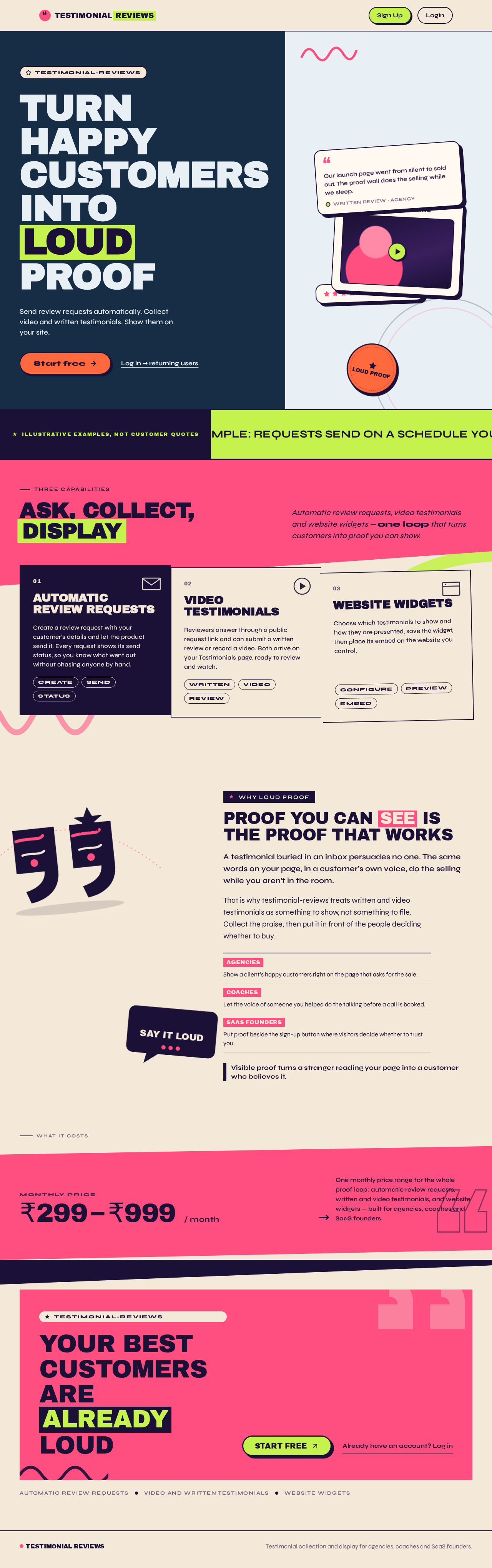
Turn happycustomers intoLoud proof
Send review requests automatically. Collect video and written testimonials. Show them on your site.
Our launch page went from silent to sold out. The proof wall does the selling while we sleep.
Illustrative examples, not customer quotes
Ask, collect, display
Automatic review requests, video testimonials and website widgets — one loop that turns customers into proof you can show.
- 01
Automatic review requests
Create a review request with your customer’s details and let the product send it. Every request shows its send status, so you know what went out without chasing anyone by hand.
- 02
Video testimonials
Reviewers answer through a public request link and can submit a written review or record a video. Both arrive on your Testimonials page, ready to review and watch.
- 03
Website widgets
Choose which testimonials to show and how they are presented, save the widget, then place its embed on the website you control.
Why loud proof
Proof you can see is the proof that works
A testimonial buried in an inbox persuades no one. The same words on your page, in a customer’s own voice, do the selling while you aren’t in the room.
That is why testimonial-reviews treats written and video testimonials as something to show, not something to file. Collect the praise, then put it in front of the people deciding whether to buy.
- AgenciesShow a client’s happy customers right on the page that asks for the sale.
- CoachesLet the voice of someone you helped do the talking before a call is booked.
- SaaS foundersPut proof beside the sign-up button where visitors decide whether to trust you.
Visible proof turns a stranger reading your page into a customer who believes it.
What it costs
₹299₹999 / month
One monthly price range for the whole proof loop: automatic review requests, written and video testimonials, and website widgets — built for agencies, coaches and SaaS founders.
Your bestcustomers arealready loud
Automatic review requestsVideo and written testimonialsWebsite widgets
Turn happycustomers intoLoud proof
Send review requests automatically. Collect video and written testimonials. Show them on your site.
Our launch page went from silent to sold out. The proof wall does the selling while we sleep.
Illustrative examples, not customer quotes
Ask, collect, display
Automatic review requests, video testimonials and website widgets — one loop that turns customers into proof you can show.
- 01
Automatic review requests
Create a review request with your customer’s details and let the product send it. Every request shows its send status, so you know what went out without chasing anyone by hand.
- 02
Video testimonials
Reviewers answer through a public request link and can submit a written review or record a video. Both arrive on your Testimonials page, ready to review and watch.
- 03
Website widgets
Choose which testimonials to show and how they are presented, save the widget, then place its embed on the website you control.
Why loud proof
Proof you can see is the proof that works
A testimonial buried in an inbox persuades no one. The same words on your page, in a customer’s own voice, do the selling while you aren’t in the room.
That is why testimonial-reviews treats written and video testimonials as something to show, not something to file. Collect the praise, then put it in front of the people deciding whether to buy.
- AgenciesShow a client’s happy customers right on the page that asks for the sale.
- CoachesLet the voice of someone you helped do the talking before a call is booked.
- SaaS foundersPut proof beside the sign-up button where visitors decide whether to trust you.
Visible proof turns a stranger reading your page into a customer who believes it.
What it costs
₹299₹999 / month
One monthly price range for the whole proof loop: automatic review requests, written and video testimonials, and website widgets — built for agencies, coaches and SaaS founders.
Your bestcustomers arealready loud
Automatic review requestsVideo and written testimonialsWebsite widgets
No comments yet. Be the first!