terra-single
 Diya Trivedi
create a project to build simple single page project calculayor

Comments (0)
Sign in to leave a comment
System Requirements
System Requirements Document for terra-single
1. Introduction
terra-single is a simple, single-page project calculator. It exists so that anyone — a student checking homework, a freelancer pricing a side project, a person splitting a bill — can open one page, punch in numbers, and read an answer without navigating anywhere else, creating an account, or learning a workflow.
The product intent is deliberately narrow and is taken directly from the authoritative requirement thread: build a simple single-page project calculator, contained on a single page, and keep it simple. There is no second page, no dashboard, no history, no account, and no audience to flatter. The page is the product.
The audience is the Calculator User: the single active human role who opens the page, enters values, runs the calculation, and reads the computed result on that same page. The emotional register of the product is a friendly, warm, tactile desk tool rather than a fintech dashboard — a well-made object whose only job is clarity.
2. System Overview
terra-single is delivered as one first-party custom page, Calculator, which is anonymously reachable and contains the entire product lifecycle: expression input, calculation, and result viewing. There is no login, no account, no persistence requirement, and no second destination.
The page is composed of two regions. The left region is the calculator itself: a running expression line in small uppercase type above an oversized tabular result numeral, followed by a 4×5 keypad of equal cells separated by hairlines. The right region is a solid teal column carrying the wordmark "TERRA", a one-line explanation, three preset example buttons, and a small key legend. On mobile the teal column collapses to a top band and the page becomes a single column with no horizontal scroll.
Actors:
- Calculator User (active human, closed catalog) — the only human actor; enters values, selects operators, commits the calculation, and reads the result.
- Calculator Page Runtime (system process) — evaluates the entered expression and produces the result value; supports the human interaction but is not itself a human-facing owner.
Current delivery is a single anonymous page with no identity establishment, because no accepted journey requires durable actor-specific state, a commitment, an entitlement, or a value transfer bound to a participant. Explicit exclusions: no additional pages, no account or login flow, no history or saved calculations, no multi-user or shared state, no differentiated permissions or role-based visibility.
2a. Product Interpretation and Delivery Boundary
The whole product is one anonymously reachable page. A visitor arrives, sees the calculator immediately, and can begin entering numbers with no gate of any kind. Nothing on the page is protected, because nothing on the page needs continuity across visits: the calculator holds no durable state, makes no commitment on the user's behalf, and transfers no value to another participant. Adding an identity step would be an adjacent capability the source never asked for, so none is included.
The delivery boundary is equally tight. Everything the user does — entering digits, choosing an operator, clearing, backspacing, committing with equals, and reading the result — happens on the Calculator page. The only supporting work outside the user's direct interaction is the arithmetic evaluation itself, which is a system process behind the page and never a separate destination. There is no current requirement for saved history, sharing, export, or a second view of the same data.
Future ideas are not part of this delivery. Anything not listed in Section 3 is out of scope for the current build.
2b. Source Content Inventory
Not applicable. No reference directive in the supplied material declares content_source, so no source content inventory is produced.
2c. Page Content and Component Coverage
Calculator
The single page of the product, anonymously reachable, containing the complete input → calculate → read-result lifecycle.
Information and state
- Running expression line — small uppercase tracked type showing the expression as it is being built (operands, operators, and the walnut fraction-bar rule that doubles as a divider in the expression line).
- Result numeral — the largest object on the page, set at the 128px display step in tabular figures, flush-left, with a tomato "=" glyph locked to its baseline. The numeral never reflows the page when digits change.
- Operator-state indicator — a small circular "moulded dot" motif showing which operator is currently active.
- Key legend — a short list in the teal column explaining the key roles (digits, operators, equals, clear/backspace).
- One-line explanation — a single sentence in the teal column stating what the page does.
Primary actions
- Enter digits 0–9 into the current operand.
- Select an operator (add, subtract, multiply, divide); the active operator is signalled in tomato and held for as long as it is active.
- Commit the calculation with the equals bar, which sweeps a teal fill from left to right on commit.
- Clear the current entry or the whole expression, and backspace the last entered character; the clear/backspace key is one of the three tomato-coloured elements.
Supporting actions
- Choose one of three preset examples — "Split a bill", "Hourly rate", "Percent of" — which populate the expression line with a starting expression the user can then edit.
- Read the key legend to confirm what each key does.
Domain entities
- Expression — the ordered sequence of operands and operators currently entered.
- Operand — a numeric value entered by the user.
- Operator — one of add, subtract, multiply, divide.
- Result — the numeric value produced by evaluating the expression.
Component responsibilities
- Expression line component — renders the current expression, including the walnut rule used as a fraction bar, and reflects edits as they happen.
- Result plate component — renders the result numeral on a 0px-radius printed band (no card, no shadow), cross-fading over 180ms when the value changes and never counting up.
- Keypad component — a 4×5 grid of equal cells separated by 1px walnut hairlines, drawn as a visible grid with no gaps and no shadows; each key has a 2px darker bottom edge and depresses 2px on press.
- Operator keys — teal structural keys; the active one holds a tomato underline.
- Equals bar — the commit control, sweeping a teal fill on commit.
- Clear/backspace key — tomato-coloured, the third and final use of the hot signal colour.
- Preset example buttons — three buttons in the teal column that seed the expression line.
- Key legend component — the small explanatory list in the teal column.
- Wordmark — "TERRA" in 13px uppercase tracked type at the top of the teal column.
States
- Loading — the page is a static single page with no remote data dependency; there is no loading state for the calculator itself. The only load-time behaviour is the single keypad reveal: cells fade and rise 6px in a 40ms stagger, played once and never repeated.
- Empty — on first arrival the expression line is empty and the result plate shows its zero/empty resting value; the keypad and presets are fully available.
- Success — after the equals bar is committed, the result plate shows the computed value, cross-fading over 180ms; the expression line retains the committed expression so the user can continue from it.
- Error — if the expression is incomplete or malformed (for example, an operator with no following operand, or division by zero), the result plate does not present a computed value; the page keeps the expression intact so the user can correct it.
- Recovery — the user corrects the expression using backspace or clear, or edits the operand, and commits again; the result plate updates on the next successful commit. No state is lost and no navigation is required.
3. Functional Requirements
FR-1 — Open the calculator on a single page As a Calculator User, I should open one page and immediately see the calculator, so that I can begin calculating without navigating anywhere else.
- Provenance: explicit
- Lifecycle: Trigger — the user opens the page. Input — none. Observable result — the Calculator page renders with the expression line, result plate, keypad, presets, and key legend visible. Access state — anonymous; no identity is required to view or use the page. Failure/recovery — if the page fails to render, the user reloads and the same anonymous entry is available again. Continuation — the user begins entering digits.
- Acceptance: the entire product is reachable at one page; no second page, route, or destination is required to complete any calculation.
FR-2 — Enter numeric values As a Calculator User, I should enter digits into the calculator, so that I can build the numbers I want to compute with.
- Provenance: explicit
- Lifecycle: Trigger — the user presses a digit key. Input — a digit 0–9. Observable result — the digit is appended to the current operand and the expression line updates. Access state — anonymous. Failure/recovery — an invalid or ignored key press leaves the expression unchanged. Continuation — the user continues entering digits or selects an operator.
- Acceptance: each digit key press appends exactly one digit to the current operand and is visible in the expression line.
FR-3 — Select an operator As a Calculator User, I should choose an operator, so that I can tell the calculator what operation to perform.
- Provenance: explicit
- Lifecycle: Trigger — the user presses an operator key (add, subtract, multiply, divide). Input — the chosen operator. Observable result — the operator is inserted into the expression and the active operator is signalled in tomato with a held underline. Access state — anonymous. Failure/recovery — pressing an operator with no preceding operand leaves the expression unchanged. Continuation — the user enters the next operand.
- Acceptance: the selected operator appears in the expression line and the active-operator indicator reflects the current selection.
FR-4 — Commit the calculation As a Calculator User, I should commit my expression with the equals bar, so that the calculator computes and shows me the answer.
- Provenance: explicit
- Lifecycle: Trigger — the user presses the equals bar. Input — the current expression. Observable result — the equals bar sweeps a teal fill from left to right over 240ms and the result plate shows the computed value, cross-fading over 180ms. Access state — anonymous. Failure/recovery — if the expression is incomplete or malformed, no computed value is presented and the expression is preserved for correction. Continuation — the user reads the result, or edits the expression and commits again.
- Acceptance: a valid expression produces a numeric result on the result plate; the result numeral does not reflow the page when its digit count changes.
FR-5 — Read the result As a Calculator User, I should read the computed result on the same page, so that I get my answer without leaving the calculator.
- Provenance: explicit
- Lifecycle: Trigger — a successful commit. Input — the computed value. Observable result — the result numeral is displayed at the largest display scale, flush-left, with the tomato "=" glyph locked to its baseline. Access state — anonymous. Failure/recovery — when no valid result exists, the plate shows its resting state rather than a misleading value. Continuation — the user continues calculating from the result or clears the expression.
- Acceptance: the result is visible on the Calculator page immediately after commit, with no navigation and no separate result view.
FR-6 — Clear and backspace As a Calculator User, I should clear my entry or remove the last character, so that I can correct mistakes without starting over.
- Provenance: explicit
- Lifecycle: Trigger — the user presses the clear/backspace key. Input — the current expression. Observable result — the last entered character is removed, or the expression is cleared, and the expression line updates accordingly. Access state — anonymous. Failure/recovery — pressing clear/backspace on an empty expression leaves it empty. Continuation — the user re-enters the corrected value.
- Acceptance: backspace removes exactly the last entered character; clear empties the expression; the clear/backspace key is rendered in tomato.
FR-7 — Use a preset example As a Calculator User, I should pick a preset example, so that I can start from a common calculation instead of typing it from scratch.
- Provenance: explicit
- Lifecycle: Trigger — the user presses one of the three preset buttons ("Split a bill", "Hourly rate", "Percent of"). Input — the selected preset. Observable result — the expression line is populated with a starting expression the user can edit. Access state — anonymous. Failure/recovery — if the user does not want the preset, clear/backspace restores an empty expression. Continuation — the user edits the values and commits.
- Acceptance: exactly three presets are offered, named "Split a bill", "Hourly rate", and "Percent of"; selecting one populates the expression line.
FR-8 — Evaluate the expression As the Calculator Page Runtime, I should evaluate the entered expression, so that the Calculator User receives a correct computed result.
- Provenance: required_inference
- Lifecycle: Trigger — the user commits the expression with the equals bar. Input — the ordered operands and operators in the expression. Observable result — a numeric result value handed back to the result plate, or a non-result state when the expression cannot be evaluated. Access state — not applicable; this is a system process behind the page. Failure/recovery — an unevaluable expression (incomplete operator sequence, division by zero) returns a non-result state that the page surfaces without discarding the expression. Continuation — the page presents the result or the correction state.
- Acceptance: a well-formed expression yields the arithmetic result of its operands and operators; a malformed expression yields no computed value and does not clear the user's input.
4. User Personas
Calculator User
Product context. The Calculator User is the only active human role in terra-single. They arrive at the page with a number problem in hand and no interest in the product itself — they want the answer and nothing else. They may be a student checking arithmetic, a freelancer working out an hourly rate, or someone splitting a bill among friends. They did not sign up for anything and do not expect to.
Primary goal. Enter an expression and read its computed result on the same page, without navigating, registering, or learning a workflow.
Distinct accepted responsibilities. The Calculator User is the sole initiator and the sole beneficiary of every action on the page. They enter digits, select operators, commit with the equals bar, read the result, and correct mistakes with clear/backspace. They may also seed the expression from one of the three presets. No other human participant is involved in any step: there is no counterparty, no approver, and no recipient of the result.
Relevant inputs and decisions. Inputs are digit presses, operator selections, the equals commit, clear/backspace presses, and preset selections. The one decision the user makes is which operator and operands to use, and whether to accept or edit a preset expression.
Interactions with other accepted participants. None. The Calculator User is the only accepted human actor. The only other actor is the Calculator Page Runtime, a system process that evaluates the expression and returns a value; it never initiates, decides, or holds state on the user's behalf.
Observable success. The result numeral appears on the result plate immediately after commit, at the largest display scale, with no page reflow and no navigation. The user can continue calculating from that result or clear the expression and start again.
Constraints carried from source. The product is a single page; the calculator must remain simple. The user's work is anonymous and ephemeral — nothing is saved, and no account exists.
5. Core User Flows
Flow 1 — Perform a calculation from scratch
- The Calculator User opens the terra-single page. The Calculator page renders anonymously: the expression line is empty, the result plate shows its resting value, and the keypad, presets, and key legend are visible. The keypad cells fade and rise 6px in a 40ms stagger, once.
- The user presses digit keys to enter the first operand. Each digit appends to the current operand and appears in the expression line.
- The user presses an operator key. The operator is inserted into the expression, and the active-operator indicator turns tomato with a held underline.
- The user presses digit keys to enter the second operand. The expression line now shows the full expression.
- The user presses the equals bar. The bar sweeps a teal fill from left to right over 240ms; the Calculator Page Runtime evaluates the expression and returns the result value.
- The result plate cross-fades over 180ms to the computed value, displayed at the largest display scale, flush-left, with the tomato "=" glyph locked to its baseline. The page does not reflow.
- Continuation: the user either continues calculating from the displayed result, or presses clear to empty the expression and begin again.
Flow 2 — Correct a mistake mid-entry
- The Calculator User is mid-expression on the Calculator page and notices an incorrect digit.
- The user presses the clear/backspace key (rendered in tomato). The last entered character is removed and the expression line updates.
- If the whole expression is wrong, the user presses clear to empty it; the expression line becomes empty and the result plate returns to its resting value.
- The user re-enters the correct digits and operator.
- The user presses the equals bar and reads the corrected result on the result plate.
Flow 3 — Start from a preset example
- The Calculator User opens the Calculator page and does not want to type the whole expression.
- The user presses one of the three preset buttons in the teal column: "Split a bill", "Hourly rate", or "Percent of".
- The expression line is populated with a starting expression for that scenario.
- The user edits the values using the digit keys and clear/backspace, and adjusts the operator if needed.
- The user presses the equals bar; the Calculator Page Runtime evaluates the edited expression.
- The result plate shows the computed value. The user reads it and continues or clears.
Flow 4 — Recover from an unevaluable expression
- The Calculator User presses the equals bar on the Calculator page with an incomplete expression — for example, an operator with no following operand, or a division by zero.
- The Calculator Page Runtime cannot produce a computed value and returns a non-result state.
- The result plate does not present a misleading value, and the expression line keeps the user's input intact.
- The user corrects the expression using backspace or clear, or enters the missing operand.
- The user presses the equals bar again. The runtime evaluates the corrected expression and the result plate shows the computed value.
- Continuation: the user reads the result and continues calculating, or clears the expression.
6. Visuals, Colors and Theme
The creative direction is authoritative for this section: Warm modular modernism after Charles & Ray Eames. The headline idea is a tiny, general-purpose utility treated as a well-made object — friendly, warm, tactile, unhurried, the opposite of a fintech dashboard. The product's only job is clarity, so the design's job is to make arithmetic feel like a milled instrument.
Colour tokens (light mode)
| Role | Hex | Use |
|---|---|---|
| Background | #F4EDE0 | Warm cream paper ground filling the whole page |
| Surface | #FBF7EF | Slightly lighter panel under the keypad so the grid reads as a physical plate |
| Text | #26221C | Ink for all numerals and labels — never pure black |
| Primary | #1F5A5E | Teal structural colour: section rules, operator keys, equals bar, focus rings, the full-height right column |
| Accent | #E4572E | Tomato red, the single hot signal, used exactly three times: the running result value, the active operator, and the backspace/clear key |
| Muted | #8A7E6B | Walnut-grey for secondary labels, memory hints, and hairline dividers |
Colour proportion is roughly 70% cream, 20% teal, 8% muted, 2% tomato. Colour is a material, not decoration.
Typography
- Headings: Jost, 600–700 weight, uppercase, wide tracking (0.14em) for the wordmark and key labels; small caps for panel titles.
- Body: Jost.
- Display numerals: Jost at 500 weight, very large scale (clamp 72–128px), tabular figures, slightly tightened tracking so the result reads as a machined plate.
- Type scale: 1.25 modular on a 16px base — 128 / 80 / 48 / 32 / 20 / 16 / 13. Display numerals use the 128 step; keypad labels use the 20 step; helper text uses the 13 step in uppercase with 0.1em tracking.
Shape language
- 4px radii on keys and panels; 2px on chips; 0px on the result plate so it reads as a printed band rather than a card.
- Hard-edged colour blocks butt directly against each other with no gaps and no shadows; separation comes from 1px walnut hairlines and colour contrast, not depth.
- Keys are square-ish (1:1.15) with a 2px bottom edge in a darker tone of their own colour, like a moulded plastic keycap.
- No blobs, no glass, no pill buttons.
Layout
- A single viewport with no scroll on desktop. Left 62% is the calculator: a full-bleed cream panel with the running expression in small uppercase Jost above an oversized tabular result numeral, then a 4×5 keypad of equal cells separated by 1px hairlines — the grid is visible, like an Eames storage unit.
- Right 38% is a teal column, edge-to-edge top to bottom, holding the wordmark "TERRA", a one-line explanation, the three preset example buttons, and a small key-legend list.
- On mobile the teal column collapses to a top band, the keypad keeps its 4 columns, and the page becomes a single column with no horizontal scroll.
Imagery
- No photography, no illustration, no 3D. The imagery is the interface itself, plus two hand-drawn-style mid-century accents: a thin walnut rule that doubles as a fraction bar in the expression line, and a small circular "moulded dot" motif used as the operator-state indicator.
- If a hero image is ever required, it is a flat vector diagram of the keypad grid in teal on cream — a schematic, not a picture.
Forbidden
- No blue or indigo anywhere — no
#0057FF,#2563EB,#4F46E5, no "bootstrap blue" equals button. The generic indigo/blue-on-white SaaS template is forbidden for this project. - No Inter, Roboto, Arial, Helvetica, Poppins, or system-ui for any text.
- No gradient blobs, glassmorphism, frosted panels, or soft drop shadows on cards.
- No grid of identical hover-lift cards — keys depress physically instead of floating.
- No rounded-pill buttons, no 24px+ radii, no blob shapes.
- No centred headline + subtext + CTA hero pattern.
- No counting-up number animation, no bounce easing, no particles.
- No photography, no stock people, no 3D renders — the interface is the image.
7. Signature Design Concept
The first screen is the calculator, treated as an oversized mid-century instrument.
The public entry is the Calculator page itself, and its composition is the signature: a full-bleed cream ground split by a single vertical teal column on the right. The left side opens with the wordmark "TERRA" in 13px uppercase tracked Jost, then a 128px tabular result numeral sitting flush-left on the same baseline as a tomato "=" glyph, then the 4×5 keypad whose cells are separated only by hairlines so the whole thing reads as one milled plate. The dominant element is the result numeral at roughly one-sixth of the viewport height; the teal column is a solid colour block, not a card. Nothing is centred, nothing floats, no button is blue, and there is no gradient anywhere on the screen.
The signature moves that carry the concept:
- The result numeral is set at 128px tabular Jost, flush-left, with a tomato "=" glyph locked to its baseline, so the answer is the largest object on the page and the page never reflows when digits change.
- The keypad is drawn as a visible grid: 1px walnut hairlines between every cell, no card, no gaps, no shadows — it reads as an Eames storage unit rather than a set of buttons.
- A solid teal column runs the full height of the right edge as a colour block, carrying the wordmark, the three preset examples, and the key legend.
- Every key has a 2px darker bottom edge so presses depress the cap 2px in 90ms — a physical keycap, not a hover-lift card.
- Colour is rationed: tomato appears exactly three times (result value, active operator, clear key) and teal is the only structural colour; nothing else on the page is coloured.
This concept only recomposes accepted content, states, and controls. It introduces no new behaviour, page, or destination.
8. Interaction Model & Motion Direction
Interaction Model: Static Motion Tempo: restrained Hero Dimensionality: flat
Landing Hero Motion Brief
- Focal subject. The result numeral on the Calculator page — the largest object on the screen, set at 128px tabular Jost, flush-left, with the tomato "=" glyph locked to its baseline.
- Input → transformation → outcome thesis. The user presses keys (input); each key depresses 2px with a 90ms ease-out and returns in 140ms, the expression line accumulates the entered operands and operators, and the active operator holds a tomato underline (transformation); on commit the equals bar sweeps a 240ms teal fill from left to right and the result numeral cross-fades over 180ms to the computed value (outcome). The numeral never counts up.
- Motion vocabulary. Restrained and physical: 2px key depression (90ms ease-out down, 140ms return), 180ms result cross-fade, held tomato underline on the active operator, 240ms left-to-right teal sweep on the equals bar, and a single load reveal in which keypad cells fade and rise 6px in a 40ms stagger, played once and never repeated. No bounce, no particles, no parallax.
- Composed first frame. The cream ground fills the viewport; the teal column runs edge-to-edge down the right; the wordmark "TERRA" sits at the top of the column; the result numeral rests at its 128px scale on the left with the tomato "=" glyph on its baseline; the 4×5 keypad grid sits below, separated only by walnut hairlines. The keypad cells are at the start of their single 6px rise.
- Reduced-motion state. When the user prefers reduced motion, the load reveal is skipped and the keypad appears in place; key presses still register but without the 2px travel; the result numeral changes instantly with no cross-fade; the equals bar commits without the sweep. All state changes remain fully legible through colour and the expression line alone.
9. Non-Functional Requirements
- Single-page constraint. The product must be contained on one page. No additional pages, routes, or destinations may be introduced. Provenance: explicit. Rationale: the authoritative requirement states the calculator is contained on a single page and that no additional pages are requested.
- Simplicity constraint. The calculator must remain simple. Provenance: explicit. Rationale: the authoritative requirement states the calculator must remain simple; scope must not expand into adjacent calculator features.
- Anonymous access. The Calculator page must be reachable without identity establishment. Provenance: required_inference. Rationale: no accepted journey requires durable actor-specific state, a commitment, an entitlement, or a value transfer bound to a participant, so no identity continuity is needed and no account capability may be added.
- No page reflow on digit change. The result numeral must use tabular figures so the page never reflows when the number of digits changes. Provenance: explicit (creative direction). Rationale: the signature move requires the answer to be the largest object on the page without layout shift.
- No horizontal scroll on mobile. On mobile the page must become a single column with the keypad retaining its 4 columns and no horizontal scroll. Provenance: explicit (creative direction). Rationale: the layout direction specifies a single-column mobile presentation.
- No scroll on desktop. The desktop presentation must fit a single viewport with no scroll. Provenance: explicit (creative direction). Rationale: the layout direction specifies a single viewport.
- Accessibility of state. Because colour is rationed and motion is restrained, every state change (active operator, committed result, cleared expression) must remain legible through the expression line and the result plate, not through colour alone. Provenance: required_inference. Rationale: the direction's reduced-motion state and colour rationing require state to survive without motion or colour cues.
10. Tech Stack
- React for the single-page front end. [Default — not specified by user]
- Vite as the build tool for the single-page app. [Default — not specified by user]
- Plain CSS with custom properties for the design tokens (cream, surface, ink, teal, tomato, walnut) and the Jost type scale. [Default — not specified by user]
- Jost loaded as the sole typeface for headings, body, and display numerals. Provenance: explicit (creative direction).
- Client-side arithmetic evaluation in the page runtime; no server round-trip is required for a calculation. [Default — not specified by user]
- No database, no authentication provider, and no backend service are required, because the product holds no durable state and has no identity requirement. Provenance: explicit (single-page, simple constraint).
11. Assumptions and Constraints
- Assumption: the calculator performs the four basic arithmetic operations (add, subtract, multiply, divide) on entered operands. This is the minimum reading of "calculator" consistent with the source and is marked
required_inference; no scientific, memory, or programmable functions are included. - Assumption: the three preset examples ("Split a bill", "Hourly rate", "Percent of") are supplied by the creative direction as the page's example buttons and seed the expression line only; they do not add new calculation modes.
- Assumption: the result is ephemeral. Nothing is saved, and no history is retained, because no accepted requirement asks for persistence.
- Constraint: the product is a single page; no additional pages are requested. This is binding.
- Constraint: the calculator must remain simple. This is binding.
- Constraint: no blue or indigo may appear anywhere in the interface, and the generic indigo/blue-on-white SaaS template is forbidden for this project. This is binding.
- Constraint: no Inter, Roboto, Arial, Helvetica, Poppins, or system-ui may be used for any text. This is binding.
- Constraint: no photography, illustration, or 3D renders; the interface is the image. This is binding.
- Out of scope (current): accounts, login, saved history, sharing, export, multi-user state, differentiated permissions or role-based visibility, and any second destination.
12. Glossary
- Calculator User — the single active human persona; the person who opens the page, enters values, commits the calculation, and reads the result.
- Calculator Page Runtime — the system process that evaluates the entered expression and returns a result value; it supports the user's interaction but is not a human-facing owner.
- Expression — the ordered sequence of operands and operators currently entered on the page.
- Operand — a numeric value entered by the user.
- Operator — one of add, subtract, multiply, or divide.
- Result — the numeric value produced by evaluating the expression, displayed on the result plate.
- Result plate — the 0px-radius printed band on which the result numeral is displayed at the largest display scale.
- Keypad — the 4×5 grid of equal key cells separated by 1px walnut hairlines.
- Preset example — one of the three starting expressions offered in the teal column: "Split a bill", "Hourly rate", "Percent of".
- Teal column — the full-height solid colour block on the right edge carrying the wordmark, the one-line explanation, the preset examples, and the key legend.
- Walnut hairline — the 1px muted divider used to separate keypad cells and to double as a fraction bar in the expression line.
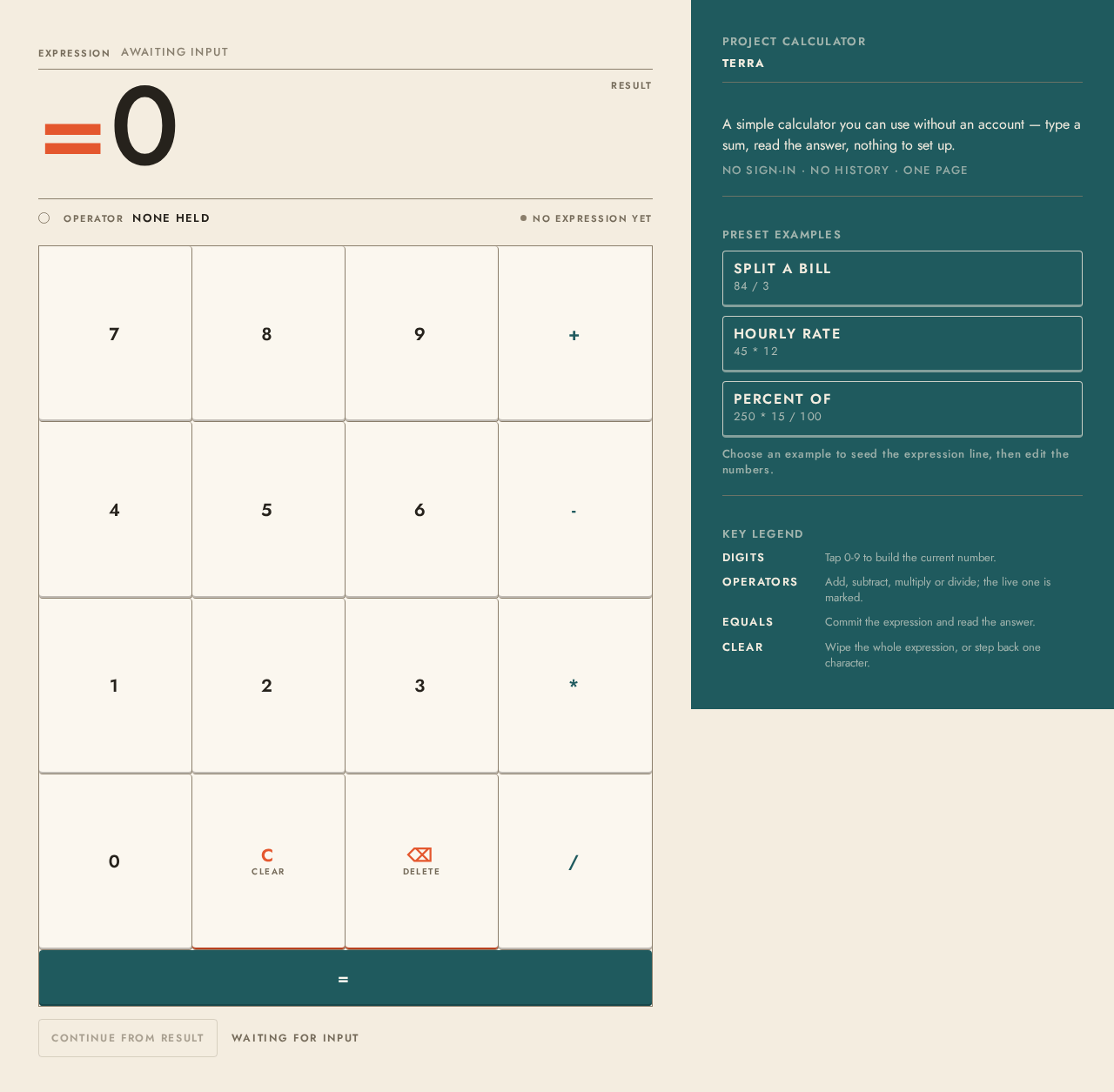
0
Project calculator
TERRA
A simple calculator you can use without an account — type a sum, read the answer, nothing to set up.
No sign-in · No history · One page
Preset examples
Choose an example to seed the expression line, then edit the numbers.
Key legend
Digits
Tap 0-9 to build the current number.
Operators
Add, subtract, multiply or divide; the live one is marked.
Equals
Commit the expression and read the answer.
Clear
Wipe the whole expression, or step back one character.
0
Project calculator
TERRA
A simple calculator you can use without an account — type a sum, read the answer, nothing to set up.
No sign-in · No history · One page
Preset examples
Choose an example to seed the expression line, then edit the numbers.
Key legend
Digits
Tap 0-9 to build the current number.
Operators
Add, subtract, multiply or divide; the live one is marked.
Equals
Commit the expression and read the answer.
Clear
Wipe the whole expression, or step back one character.
No comments yet. Be the first!