terra-simple
 Diya Trivedi
build a simple single page design of calculator

Comments (0)
Sign in to leave a comment
System Requirements
System Requirements Document for terra-simple
1. Introduction
The project "terra-simple" aims to deliver a simple calculator application. The primary intent is to provide a straightforward, single-page calculator that allows users to perform basic arithmetic operations with a clear and intuitive design. The target audience is any user needing a basic calculator for everyday use.
2. System Overview
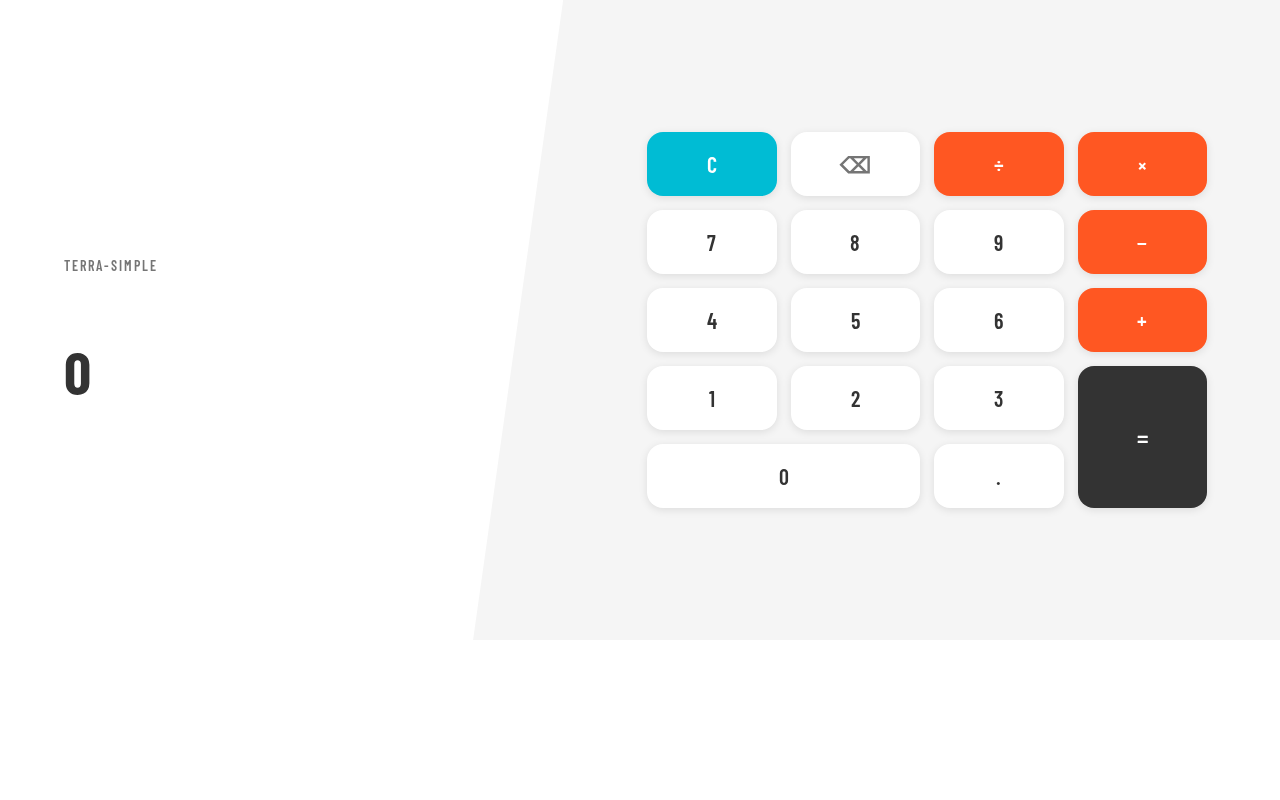
The terra-simple project will deliver a single-page calculator application. The application will allow users to input values and operations, evaluate expressions, and display results. The design will focus on simplicity and clarity, ensuring a user-friendly experience. The calculator will be accessible without any login or identity requirements.
2a. Product Interpretation and Delivery Boundary
The calculator will be delivered as a web application with a single-page interface. The application will not require user accounts or identity management, ensuring immediate access for all users. The design will adhere to the constraints of being simple and single-page, with no additional functionalities beyond basic arithmetic operations.
2b. Source Content Inventory
Not applicable as there is no content_source directive.
2c. Page Content and Component Coverage
Calculator
-
Numerical Input and Display
- Users can input numbers and view the current expression.
- Display area for showing the result of calculations.
-
Operation Buttons
- Buttons for basic arithmetic operations: addition, subtraction, multiplication, and division.
- A clear button to reset the current calculation.
-
Evaluation and Result Display
- Mechanism to evaluate the entered expression and display the result.
- Error handling for invalid inputs or operations.
-
User Interaction
- Hover effects on buttons to enhance interaction.
- Split-screen layout with a clear division between input/display and operation buttons.
3. Functional Requirements
- As a Calculator User, I should be able to enter numerical values and arithmetic operations on the Calculator page. (Provenance: required_inference)
- As a Calculator User, I should be able to evaluate the current calculation and see the result displayed on the Calculator page. (Provenance: required_inference)
- As a Calculator User, I should be able to clear or reset the current calculation to start a new one. (Provenance: required_inference)
4. User Personas
- Calculator User
- Responsibilities: Enter expressions or values, perform calculations, and obtain results.
- Outcomes: Successfully perform basic arithmetic operations and view results.
5. Core User Flows
-
Performing a Calculation
- The Calculator User accesses the Calculator page.
- The user inputs numerical values and selects arithmetic operations.
- The user presses the evaluate button to compute the result.
- The result is displayed on the screen.
- The user can clear the current calculation to start a new one.
-
Clearing a Calculation
- The Calculator User presses the clear button.
- The current input and result are reset, allowing the user to start a new calculation.
6. Visuals Colors and Theme
- Muse: Adham Dannaway
- Palette:
- Background: #FFFFFF
- Surface: #F5F5F5
- Text: #333333
- Primary: #FF5722
- Accent: #00BCD4
- Muted: #BDBDBD
- Typography:
- Headings: Barlow Condensed — Large, bold, all-caps, tight tracking
- Body: Space Mono
- Scale: 1.25 modular, 48/32/24/18/16
- Shape Language: Split-screen layout with rounded inputs
- Layout: Split-screen with numerical input/display on one side and operation buttons on the other
- Motion: Subtle reveal-by-hover effects on buttons and inputs
7. Signature Design Concept
The public entry page will feature a split-screen design, with the calculator interface on one side and a wireframe overlay demonstrating use on the other. The design will use a diagonal divide with contrasting color schemes, large bold numerical displays, and interactive wireframe overlays during hover states.
8. Interaction Model & Motion Direction
- Interaction Model: Static
- Motion Tempo: Restrained
- Hero Dimensionality: Flat
- Landing Hero Motion Brief:
- Focal Subject: Calculator interface with wireframe overlay
- Input→Transformation→Outcome: User inputs values, selects operations, and sees results
- Motion Vocabulary: Subtle hover effects
- Composed First Frame: Calculator interface with clear input and operation sections
- Reduced-Motion State: Static display without hover effects
9. Non-Functional Requirements
- The application must be responsive and accessible on various devices.
- The design must prioritize clarity and simplicity, avoiding excessive animations or unclear interaction cues.
10. Tech Stack
- Frontend: React
- Backend: None required for basic calculator functionality
- Deployment: Static web hosting
11. Assumptions and Constraints
- The calculator will only perform basic arithmetic operations.
- The design will remain a single-page application.
- No user accounts or identity management will be implemented.
12. Glossary
- Calculator User: The individual using the calculator application to perform arithmetic operations.
- Arithmetic Operations: Basic mathematical operations including addition, subtraction, multiplication, and division.
No comments yet. Be the first!