terra-page
 Diya Trivedi
start a project to build a simple single page design of calcualtor

Comments (0)
Sign in to leave a comment
System Requirements
System Requirements Document for terra-page
1. Introduction
terra-page is a simple calculator delivered as a single-page design. The product intent is narrow and complete: one anonymous visitor opens one page, enters numbers and arithmetic operators to build a calculation, sees the current expression and the computed result, and can clear the calculation to start a new one. There is no account, no second page, no modal flow, and no onboarding overlay.
The audience is the everyday person who needs quick arithmetic — a single anonymous "Calculator User" who wants a correct answer without leaving the page. The page is also the product's public entry: it explains itself by being the working instrument, presented as a labelled industrial object rather than a sterile utility.
This document is the System Requirements Document for terra-page, written for the requester, Diya Trivedi.
Success Criteria
- A visitor can complete a calculation — enter digits and operators, read the expression, read the result — entirely on the single Calculator page.
- The result shown is arithmetically correct for the entered expression.
- The visitor can clear the calculation and begin a new one without reloading or navigating.
- The page remains a single page at 375px, 768px, and 1280px, with all readable text and controls whole and inside the viewport and their containers.
2. System Overview
terra-page is a single-page calculator. The current delivery is one custom page, Calculator, which is the anonymous public entry and the only destination. It composes digits and operators into an expression, evaluates and displays the result, and clears the calculation. The page is served by a React frontend, with a shared FastAPI backend available for application APIs and a MariaDB database provisioned for application-owned persistent data; neither the backend nor the database is required to add product behavior for this calculator, and no domain entities, authentication, or persistence are introduced by this product.
The only active human actor is the Calculator User. There are no system, provider, or external actors in the accepted product behavior; arithmetic evaluation is a local page responsibility.
Removed from scope
- None. No concepts were removed from the authoritative requirement thread.
2a. Product Interpretation and Delivery Boundary
The product is a single page with no access barrier. The Calculator page is anonymously reachable and requires no identity, sign-in, or account; there is no application-owned identity, no session continuity requirement, and no differentiated permissions or role-based visibility. Every visitor sees the same calculator and the same behavior.
Everything the product does happens on that one page: building the expression, showing the result, and clearing. There is no second page, no modal flow, no onboarding overlay, and no future-horizon capability accepted in the current requirements. The backend and database are provisioned infrastructure that the calculator does not need to fulfill its accepted behavior; they remain available for application APIs but add no product requirement here.
2c. Page Content and Component Coverage
Calculator
The single page and anonymous public entry. It presents the calculator as a labelled industrial object and is the sole owner of all accepted calculator behavior.
Information and state
- Current expression: the sequence of entered digits and arithmetic operators, displayed small and right-aligned above the result.
- Computed result: the evaluated answer, displayed as the largest element on the page, left-aligned and bleeding to the slab edge.
- Operator-selection state: which operator (if any) is currently selected, reflected by the hazard-stripe band's 12px shift.
- Spec-tag identity: "TERRA-PAGE — CALCULATOR — No. 001" in quoted, letterspaced caps.
Primary actions
- Enter digits (0–9) and a decimal point to build the expression.
- Select arithmetic operators (+, −, ×, ÷) to compose the calculation.
- Press equals to evaluate and display the result.
- Clear the calculation to start a new one.
Supporting actions and controls
- Keypad of hard 4px-radius bone tiles with ink hairlines and one-line all-caps labels, in a strict 4-column grid, with the equals key alone in solid safety orange spanning two columns.
- Hazard-stripe band across the slab's top edge acting as the only status light.
- Thin ruled measurement scale down the slab's left edge.
- A single 14px muted instruction line below the slab, separated by a hairline rule.
Domain entities
- Expression (ordered digits, decimal point, and operators).
- Result (numeric value of the evaluated expression).
- Selected operator (current operator state).
Component responsibilities
- Spec-tag header: narrow top strip with "TERRA-PAGE", "CALCULATOR", and the numbered model tag.
- Calculator slab: bone-white surface with 2px ink outline and flat offset black shadow, containing the expression line, result numeral, and keypad.
- Expression line: 18–24px, right-aligned, shows the current expression.
- Result numeral: Archivo 200 tabular figures, clamp(56px, 12vw, 120px), left-aligned.
- Keypad: 4-column grid of keys; equals key spans two columns in safety orange.
- Instruction line: 14px muted plain instructions below the slab.
States
- Loading: not applicable; the page renders its calculator immediately with no data fetch.
- Empty: no expression entered; the result area shows an initial zero/empty state and the expression line is blank.
- Success: expression and result displayed; result updates as the calculation is evaluated.
- Error: an invalid or incomplete expression (for example a trailing operator) does not produce a spurious result; the page retains the entered expression so the user can correct it.
- Recovery: the clear action resets expression, result, and selected-operator state to the empty state, allowing a new calculation.
3. Functional Requirements
FR-1 — Single-page calculator delivery (explicit) As a Calculator User, I should use the calculator on a single page, so that I can do arithmetic without navigating anywhere.
- Trigger/input: opening the product.
- Observable result: the Calculator page renders as the only destination, with the calculator available immediately.
- Access state: anonymous; no identity required.
- Failure/recovery: not applicable; the page is the product.
- Continuation: the user proceeds to enter a calculation.
FR-2 — Enter numbers and arithmetic operators (explicit) As a Calculator User, I should enter numbers and arithmetic operators to build a calculation, so that I can express the arithmetic I want performed.
- Trigger/input: pressing digit keys, the decimal point, and operator keys (+, −, ×, ÷).
- Observable result: the current expression updates to reflect the entered digits and operators; the selected operator is reflected by the hazard-stripe band's 12px shift.
- Access state: anonymous.
- Failure/recovery: an incomplete expression (for example a trailing operator) is retained rather than discarded, so the user can correct it.
- Continuation: the user presses equals to evaluate, or continues entering.
FR-3 — See the current expression and computed result (explicit) As a Calculator User, I should see the current expression and the computed result, so that I can confirm what I entered and read the answer.
- Trigger/input: entering digits/operators and pressing equals.
- Observable result: the expression line shows the current expression (18–24px, right-aligned); the result numeral shows the evaluated answer (clamp(56px, 12vw, 120px), left-aligned, tabular figures).
- Access state: anonymous.
- Failure/recovery: an invalid expression does not display a spurious result; the expression remains visible for correction.
- Continuation: the user reads the result or continues the calculation.
FR-4 — Clear the calculation and start a new one (explicit) As a Calculator User, I should clear the calculation and start a new one, so that I can reuse the calculator for a fresh calculation.
- Trigger/input: pressing the clear control.
- Observable result: expression, result, and selected-operator state reset to the empty state.
- Access state: anonymous.
- Failure/recovery: not applicable; clear always returns to the empty state.
- Continuation: the user begins a new calculation.
4. User Personas
Calculator User
Product context. An anonymous everyday person who needs quick arithmetic. They arrive at the single Calculator page with no account and no prior state; the page is both the product's public entry and the working instrument.
Primary goal. Get a correct arithmetic result quickly, on one page, without leaving it.
Distinct accepted responsibilities.
- Enter numbers and arithmetic operators to build a calculation.
- Read the current expression and the computed result.
- Clear the calculation and start a new one.
Relevant inputs and decisions. Which digits, decimal point, and operators to enter; when to press equals to evaluate; when to clear and start over. The user decides when the calculation is complete and when to reset.
Interactions with other accepted participants. None. The Calculator User is the only active human actor; arithmetic evaluation is a local page responsibility with no handoff to another participant.
Observable success. The correct result appears as the largest element on the page, the expression is visible above it, and the user can clear and start a new calculation without reloading or navigating.
5. Core User Flows
Flow 1 — Perform a calculation
- Starting context: The Calculator User opens terra-page anonymously; the Calculator page renders with an empty expression and initial result state.
- Enter the calculation: The user presses digit keys and operator keys to build the expression. The expression line updates; the hazard-stripe band shifts 12px when an operator is selected.
- Evaluate: The user presses the equals key (solid safety orange, spanning two columns). The result numeral updates with a 120ms crossfade to the computed answer.
- Observable result: The expression is shown small and right-aligned above the oversized result numeral, which is the largest element on the page.
- Continuation: The user reads the result and either continues the calculation or clears it.
Flow 2 — Correct an incomplete expression
- Starting context: The user has entered an expression ending in an operator or otherwise incomplete.
- Observe: Pressing equals does not produce a spurious result; the entered expression remains visible.
- Recover: The user adds the missing operand or corrects the expression using the keypad.
- Continuation: The user presses equals again to evaluate the corrected expression.
Flow 3 — Clear and start a new calculation
- Starting context: The user has completed or abandoned a calculation on the Calculator page.
- Clear: The user presses the clear control.
- Observable result: Expression, result, and selected-operator state reset to the empty state.
- Continuation: The user begins a new calculation following Flow 1.
6. Visuals Colors and Theme
The creative direction is authoritative: "Quoted arithmetic — a calculator as a tagged industrial object", muse Virgil Abloh.
Colour tokens (light mode)
- Background (concrete ground):
#E9E7E2 - Surface (bone-white slab):
#F7F6F3 - Text / primary (ink black):
#111111 - Accent (safety orange):
#FF4A00— rationed to exactly three places: the equals key, the spec-tag stripe, and the quoted label. - Muted:
#6E6B66
Contrast is black-on-bone and bone-on-black, both far above 4.5:1. No second accent colour; no indigo or Bootstrap-blue anywhere.
Typography
- Headings: Archivo — all-caps, wide letterspacing (0.14em) for labels and tags, set in quotation marks; display line in Archivo Expanded at heavy weight with tight leading.
- Body: Archivo.
- Result numerals: Archivo at 200 weight, tabular, so digits never jitter.
- Scale: 1.25 modular on a 4pt baseline — 12/14/18/24/32/48/64/96 with clamp for display. Result numerals
clamp(56px, 12vw, 120px); expression line 18–24px; key labels 20–24px; micro-labels 11px caps.
Shape language
- Hard-edged industrial framing: 0–4px radii only on keys; 2px ink outlines on the calculator slab; exposed hairline grid lines; a hazard-stripe bar as the only decoration; label/tag motifs with clipped corners. Nothing soft, nothing glassy; one flat offset ink shadow under the slab only.
Layout
- Single centred column on a 12-column grid. Top strip is a narrow spec-tag header ("TERRA-PAGE" + "CALCULATOR" + a numbered model tag). The calculator slab occupies columns 3–10 on desktop (max 560px), full width minus 16px gutters at 375px. Inside the slab: expression line top-right, oversized result bottom-left, then a 4-column keypad with the equals key spanning two columns in orange. Below the slab, one thin ruled line of plain instructions in 14px muted type.
Imagery
- No photography and no illustration. Visual content is the interface itself plus graphic artefacts: a hazard-stripe band, a clipped-corner spec tag, a thin ruled measurement scale along the slab's left edge, and a halftone-dot texture at 4% opacity on the concrete ground.
Avoid
- Bootstrap-blue or indigo anywhere; no
#2563EB-family accents; rounded pill buttons, soft drop shadows, or glass panels; centred marketing hero with subheadline and CTA button; stock photography, 3D blobs, or gradient meshes; more than one accent colour (orange stays rationed); Inter, Roboto, Poppins, or system-ui type; decorative bounce or spring easing on key presses; any second page, modal flow, or onboarding overlay.
7. Signature Design Concept
The first screen is the calculator itself as a physical object: a bone-white slab (#F7F6F3) with a 2px ink outline and a flat offset black shadow, sitting slightly off-centre on a concrete-grey field (#E9E7E2), with a safety-orange hazard-stripe bar running across its top edge and a clipped-corner spec tag reading "TERRA-PAGE — CALCULATOR — No. 001" pinned above it in quoted, letterspaced caps.
The dominant element is the oversized result numeral (up to 120px, Archivo 200, tabular) bleeding to the left edge inside the slab, with the expression line small and right-aligned above it. There is no headline-plus-subtext-plus-button stack, no gradient, and no centred marketing hero — the working instrument is the hero. A thin ruled measurement scale runs down the slab's left edge like a ruler on a tool, and a single 14px muted instruction line sits below the slab, separated by a hairline rule.
8. Interaction Model & Motion Direction
Interaction Model: Animated Motion Tempo: restrained Hero Dimensionality: flat
Landing Hero Motion Brief
- Focal subject: the calculator slab as a labelled industrial object, with the oversized result numeral as the dominant element.
- Input → transformation → outcome thesis: a key press (input) depresses the key 2px and collapses its ink shadow (transformation), and the result numeral crossfades to the new value (outcome) — using only the accepted calculator behavior.
- Motion vocabulary: snappy and mechanical — key press is a 90ms
translateY(2px)with the ink shadow collapsing; result numerals swap with a 120ms crossfade; the hazard stripe slides 12px on operator selection. No bounces, no easing theatrics, no ambient loops. - Composed first frame: the bone-white slab with 2px ink outline and flat offset black shadow, slightly off-centre on the concrete ground, hazard-stripe band across the top edge, clipped-corner spec tag above, oversized result numeral bleeding to the left edge, expression line small and right-aligned above it.
- Reduced-motion state: with
prefers-reduced-motion, key presses and result updates apply instantly with no translate or crossfade; the hazard stripe reflects operator selection by position without sliding; the static arrangement keeps all readable text and controls whole and inside the viewport and their containers.
9. Non-Functional Requirements
- Single-page constraint (explicit): The design must be a single page. No second page, modal flow, or onboarding overlay.
- Simplicity constraint (explicit): The design must be a simple single-page calculator.
- Readable text and controls (explicit): Headlines, wordmarks, labels, numbers, cards' text, and controls stay entirely inside the viewport and their container at 375px, 768px, and 1280px, wrapping or scaling (for example
font-size: clamp(...)with its mobile size) to fit, and no other element covers any part of them. Decoration and texture may be cropped or bled, but never over readable text or controls. - Accessibility contrast (required_inference): Black-on-bone and bone-on-black contrast far above 4.5:1; the single accent is rationed and never carries meaning alone.
- Reduced motion (required_inference): A usable static arrangement is provided under
prefers-reduced-motion. - No identity or persistence requirement (explicit): The calculator is anonymous and stateless across visits; no account, session, or stored history is required.
10. Tech Stack
- Frontend: React application UI (the Calculator page).
- Backend: shared FastAPI process for application APIs and domain modules (provisioned; not required for the calculator's accepted behavior).
- Database: MariaDB for application-owned persistent data (provisioned; no domain entities or persistence are introduced by this product).
- Containerization: Docker / docker-compose for the frontend, backend, and database services.
- Typography: Archivo (including Archivo Expanded for the display line), loaded as a web font.
11. Assumptions and Constraints
- Assumption (required_inference): Arithmetic evaluation happens locally on the page; no backend call is required to compute a result.
- Assumption (required_inference): The calculator supports the four basic arithmetic operators (+, −, ×, ÷), digits 0–9, and a decimal point, as the minimum needed to "enter numbers and arithmetic operators."
- Constraint (explicit): The product is exactly one page.
- Constraint (explicit): The design is simple; no adjacent calculator features (history, memory, scientific functions, unit conversion) are accepted.
- Constraint (explicit): No identity, authentication, or account management.
- Constraint (explicit): The visual direction is authoritative; the generic indigo/blue-on-white SaaS template is forbidden.
12. Glossary
- Calculator page: The single page of terra-page; the anonymous public entry and the only destination.
- Expression: The sequence of entered digits, decimal point, and arithmetic operators shown in the expression line.
- Result: The evaluated numeric answer of the expression, shown as the largest element on the page.
- Slab: The bone-white calculator surface with 2px ink outline and flat offset black shadow.
- Spec tag: The clipped-corner label reading "TERRA-PAGE — CALCULATOR — No. 001".
- Hazard stripe: The safety-orange striped band across the slab's top edge that shifts 12px on operator selection.
- Calculator User: The single active human persona; an anonymous everyday user performing quick arithmetic.
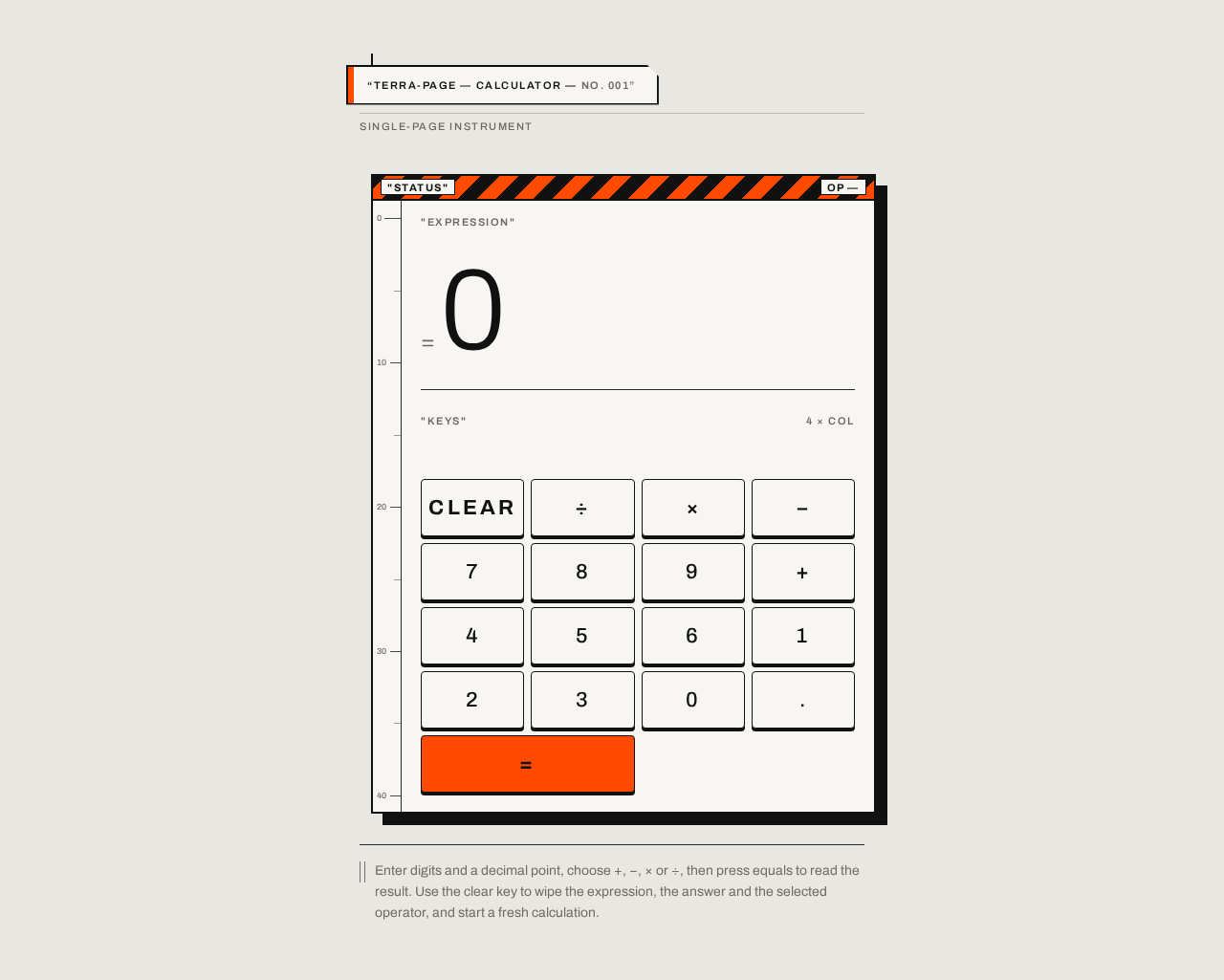
Enter digits and a decimal point, choose +, −, × or ÷, then press equals to read the result. Use the clear key to wipe the expression, the answer and the selected operator, and start a fresh calculation.
Enter digits and a decimal point, choose +, −, × or ÷, then press equals to read the result. Use the clear key to wipe the expression, the answer and the selected operator, and start a fresh calculation.
No comments yet. Be the first!