Dopamine Menu
Create personalized activity routines
 Meow Meow Messages
A premium, next-level interactive website UI based on the provided Figma flows, with a sleek modern layout, immersive 3D elements, smooth micro-interactions, layered depth, glassmorphism accents, and high-end motion design. A refined dark-to-vibrant color palette with bold gradients, clean sans-serif typography, spacious sections, visually rich cards, dynamic hover states, and polished transitions that elevate every page while preserving the original user flows, content hierarchy, and usability. i m providing u with figma file link including all required flows Enhance the UI of whole website in to next level Use 3 d elements and build and interactive website https://www.figma.com/design/nf2XsxrC54IYaF677GMxjd/Dopamine-Menu-Figma-File?node-id=3311-3&t=qMQS3zNxAPjQUk7j-1 Master Flow Landing Page │ ├── Create Dopamine Menu │ ├── Morning Menu │ ├── My Menus │ ├── Brain Snacks │ ├── Hamburger Menu │ └── Profile Flow 1 — First Time User Landing ↓ Create Your Own Dopamine Menu ↓ Introduction ↓ Personalization ↓ Your Core ↓ Your Energy ↓ Your World ↓ Your Aspirations ↓ Morning Routine ↓ Final Touch ↓ Generating Menu ↓ Menu Created ↓ Choose Template ↓ Preview ↓ Print (optional) ↓ Dashboard Flow 2 — Returning User Landing ↓ Login ↓ Dashboard ↓ Continue Streak ↓ Morning Menu ↓ Today's Brain Snacks ↓ Reflection ↓ History Flow 3 — Morning Menu Dashboard ↓ Morning Menu ↓ Today's Routine ↓ Wake Up ↓ Hydrate ↓ Movement ↓ Deep Work ↓ Journal ↓ Morning Complete ↓ Dashboard Flow 4 — My Menus Dashboard ↓ My Menus ↓ Select Menu ↓ Preview ↓ Edit ↓ Duplicate ↓ Delete ↓ Print Again Flow 5 — Brain Snacks Dashboard ↓ Brain Snacks ↓ Choose Time 5 min 10 min 20 min ↓ Activity ↓ Done ↓ Next Snack ↓ Complete Session ↓ Rewards Flow 6 — Activity Session Choose Activity ↓ Instruction Card ↓ Timer ↓ Mark Complete ↓ Reflection ↓ Earn XP ↓ Recommended Next Step Flow 7 — Profile Dashboard ↓ Profile ↓ Personal Stats ↓ Achievements ↓ Current Streak ↓ Warrior Level ↓ Edit Profile ↓ Settings Flow 8 — Activity Tracker Dashboard ↓ Activity Tracker ↓ Calendar ↓ Completed Activities ↓ Mood Timeline ↓ Weekly Summary ↓ Monthly Summary Flow 9 — Insights Dashboard ↓ Insights ↓ Behaviour Trends ↓ Most Productive Hours ↓ Most Used Activities ↓ Avoided Triggers ↓ Recommendations Flow 10 — Goals Dashboard ↓ Goals ↓ Create Goal ↓ Attach Activities ↓ Track Progress ↓ Milestones ↓ Completed Flow 11 — Journal Dashboard ↓ Journal ↓ Today's Entry ↓ Templates ↓ Previous Entries ↓ Search ↓ Export Flow 12 — Rewards Dashboard ↓ Rewards ↓ Current Points ↓ Unlockables ↓ Claim Reward ↓ Reward History Flow 13 — Breathing Dashboard ↓ Breathing ↓ Choose Exercise ↓ Animation ↓ Complete ↓ Continue Day Flow 14 — Focus Timer Dashboard ↓ Focus Timer ↓ Choose Duration ↓ Start ↓ Pause ↓ Finish ↓ Statistics Flow 15 — Reminders Dashboard ↓ Reminders ↓ Create Reminder ↓ Repeat ↓ Notification ↓ History Flow 16 — Settings Dashboard ↓ Settings ↓ Account ↓ Notifications ↓ Privacy ↓ Appearance ↓ Data ↓ Logout Flow 17 — Hamburger Overlay From the screen you uploaded, the hamburger overlay acts as a command center rather than just navigation. It exposes: Quick Access: Morning Menu My Menus Create Menu Brain Snacks Vague Bazaar All Features: My Profile Activity Tracker Journal Breathing Focus Timer Insights Goals Rewards Reminders Settings Footer: What's New Help Center Share Dopamine Menu Logout One architectural recommendation I would add a true Home Dashboard immediately after login that becomes the user's daily hub, instead of treating the landing page as the operational interface. Dashboard Today's Streak ↓ Morning Menu ↓ Continue Today's Menu ↓ Resume Activity ↓ Recommended Brain Snack ↓ Insights Snapshot ↓ Journal Prompt ↓ Quick Actions This keeps returning users focused on continuing their journey rather than re-navigating the site each day. From everything we've designed together, this dashboard would become the core of the Dopamine Menu ecosystem, while the personalization flow, Brain Snacks, Morning Menu, printing, and profile features branch off from it.


Sign in to leave a comment
The project "terra-a" aims to create a premium, next-level interactive website UI. This document outlines the system requirements for the project, focusing on enhancing the user interface with immersive 3D elements, smooth micro-interactions, and a refined dark-to-vibrant color palette. The design will incorporate glassmorphism accents and high-end motion design to elevate the user experience while maintaining usability and content hierarchy.
The terra-a project is designed to provide users with an engaging and interactive experience through a sleek modern layout. The website will feature spacious sections, visually rich cards, dynamic hover states, and polished transitions. The core functionality revolves around user flows that guide both first-time and returning users through a personalized journey.
First Time User Flow:
Returning User Flow:
Morning Menu Flow:
My Menus Flow:
Brain Snacks Flow:
The homepage of terra-a will feature an interactive 3D galaxy map where each star represents a feature or section of the website. Users can click on a star to open a task card, drag to rotate the cluster, and hover to highlight connections. This concept will be built using @react-three/fiber and @react-three/drei for 3D interactions. The galaxy map will provide an immersive experience, allowing users to explore the platform's features in a visually captivating manner.
The landing hero will depict a dynamic transformation of a user's daily routine into a vibrant, animated scene. Using motion/react and GSAP, the animation will show inputs like "Morning Routine" and "Brain Snacks" gathering around a central artifact, which then transforms into a completed, colorful Dopamine Menu. The scene will loop every 10 seconds, with interactive elements allowing users to explore different sections of their routine. The animation will maintain clarity and readability, even in a reduced-motion state.
@react-three/fiber, @react-three/drei, GSAP, motion/reactThis document serves as a comprehensive guide for the development and design of the terra-a project, ensuring all user requirements and design specifications are met.
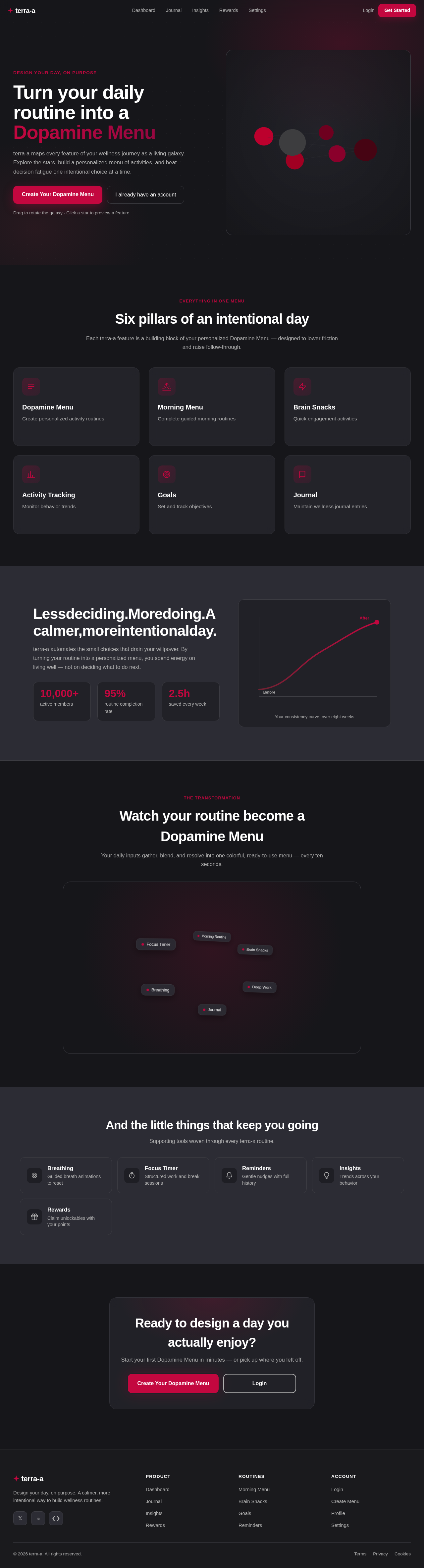
terra-a maps every feature of your wellness journey as a living galaxy. Explore the stars, build a personalized menu of activities, and beat decision fatigue one intentional choice at a time.
Drag to rotate the galaxy · Click a star to preview a feature.
Each terra-a feature is a building block of your personalized Dopamine Menu — designed to lower friction and raise follow-through.
Create personalized activity routines
Complete guided morning routines
Quick engagement activities
Monitor behavior trends
Set and track objectives
Maintain wellness journal entries
terra-a automates the small choices that drain your willpower. By turning your routine into a personalized menu, you spend energy on living well — not on deciding what to do next.
Your daily inputs gather, blend, and resolve into one colorful, ready-to-use menu — every ten seconds.
Supporting tools woven through every terra-a routine.
Guided breath animations to reset
Structured work and break sessions
Gentle nudges with full history
Trends across your behavior
Claim unlockables with your points
Start your first Dopamine Menu in minutes — or pick up where you left off.
terra-a maps every feature of your wellness journey as a living galaxy. Explore the stars, build a personalized menu of activities, and beat decision fatigue one intentional choice at a time.
Drag to rotate the galaxy · Click a star to preview a feature.
Each terra-a feature is a building block of your personalized Dopamine Menu — designed to lower friction and raise follow-through.
Create personalized activity routines
Complete guided morning routines
Quick engagement activities
Monitor behavior trends
Set and track objectives
Maintain wellness journal entries
terra-a automates the small choices that drain your willpower. By turning your routine into a personalized menu, you spend energy on living well — not on deciding what to do next.
Your daily inputs gather, blend, and resolve into one colorful, ready-to-use menu — every ten seconds.
Supporting tools woven through every terra-a routine.
Guided breath animations to reset
Structured work and break sessions
Gentle nudges with full history
Trends across your behavior
Claim unlockables with your points
Start your first Dopamine Menu in minutes — or pick up where you left off.
No comments yet. Be the first!