termux-secure-it-all
 Shaine York
Termux program to get women

Comments (0)
Sign in to leave a comment
System Requirements
System Requirements Document for termux-secure-it-all
1. Introduction
termux-secure-it-all is a web application for documenting do-it-yourself fishing rigs and the catch results they produce. Its audience is people who improvise fishing lines and rigs out of whatever is at hand — a phone cord, 20-lb monofilament, a coat-hanger guide — and who want a durable, shareable record of the build and of what it actually caught. The product's intent is to turn improvised rig experiments into a legible, revisitable logbook: each record captures the rig's build details and the catch it produced, and those records can be browsed by others who want to compare rigs against real outcomes.
The product is deliberately playful and tactile in tone — a show-offy field log for absurd-but-working rigs — while remaining a documentation tool, not a dating, matchmaking, or "get women" product. It is delivered as a web application, not a Termux program.
2. System Overview
termux-secure-it-all is a first-party web application with application-owned identity. Anonymous visitors arrive at a public Landing page that explains the product. Signed-in users browse documented rig builds and catch results on the Rigs page, and DIY Rig Experimenters record new experiments — build details plus resulting catch — on the New Rig page. Returning users verify identity on Login; new users enroll on Sign Up.
The system comprises a React frontend, a shared FastAPI backend process serving all application APIs and domain modules, and a MariaDB database holding application-owned persistent data (user identities and rig/catch records). Identity is application-owned: users self-enroll and return to their own durable records.
Removed from scope
- A tool for finding, tracking, or targeting women (also: "get women", dating, matchmaking).
- Copyright filing assistance (also: copyright registration help).
- Termux program delivery (also: Termux app, terminal-based program).
2a. Product Interpretation and Delivery Boundary
The product is a web app, not a Termux program. All current behavior is delivered by the first-party React frontend and the shared FastAPI backend, with MariaDB persisting identities and rig records. Identity is application-owned and self-service: visitors enroll on Sign Up and verify on Login. The Landing page is anonymously reachable; Rigs and New Rig require a signed-in session. No provider-owned or external surfaces carry product behavior. No security-hardening or "protect from hackers" capability is part of the current product; the request for a Termux security program is not carried into current scope, and no adjacent security, account-management, or moderation capabilities are added.
2c. Page Content and Component Coverage
Landing
- Information/state: Anonymous public entry. Explains that the product documents DIY fishing rig builds and their catch results. Presents the hero color-block composition with headline "Log the rig. Not the rumour.", a one-line subline, and a lime pill CTA "Start a rig log". A glossy white capsule card shows a sample rig record ("Phone-cord rig · 20 lb · caught 4.2 kg") with a lime "caught" stamp.
- Primary actions: "Start a rig log" CTA → Sign Up (or Login for returning users). Navigation pill bar links to Rigs, New Rig, Account/Login.
- Supporting actions: Navigate to Login; navigate to Sign Up.
- Domain entities: None persisted; sample rig record is illustrative display content only.
- Component responsibilities: Hero color-block (pink field, oversized Unbounded headline, lime CTA), floating pill nav, glossy sample rig card with drifting phone-cord coil decoration, curved SVG section boundaries, oversized blob decoration.
- States: Loading — static content, no async load. Empty — not applicable. Success — page renders fully. Error — not applicable. Recovery — not applicable.
Rigs
- Information/state: Signed-in browse view of documented rig builds and catch results contributed by others. 2-up capsule-card grid at 768px, 3-up at 1280px. Each rig card shows rig name, line type, line rating, and catch result; cards holding a caught result tint their top third pink and show a lime weight pill and rounded species-silhouette badge.
- Primary actions: Browse rig cards; open a rig record's details.
- Supporting actions: Navigate to New Rig; navigate to Account.
- Domain entities: Rig record (name, line type, line rating, build details, catch result — species and weight, contributor).
- Component responsibilities: Capsule-card grid, species-silhouette badge, lime weight pill, pink top-third tint for caught results, floating pill nav / bottom pill dock.
- States: Loading — card grid skeleton while records load. Empty — message that no rigs have been documented yet, with a prompt to start a rig log. Success — grid of rig cards. Error — inline message that records could not be loaded, with retry. Recovery — retry reloads the grid.
New Rig
- Information/state: Signed-in focused create form for recording a DIY rig experiment. Single column of pill inputs (rig name, line type, line rating, build details, catch species, catch weight). Live-updating glossy preview capsule of the rig record as the user types; at desktop the preview sits to the right, below at mobile.
- Primary actions: Submit the rig record (build details + catch result).
- Supporting actions: Navigate to Rigs; navigate to Account.
- Domain entities: Rig record (name, line type, line rating, build details, catch species, catch weight, contributor).
- Component responsibilities: Pill inputs, live preview capsule, lime "caught" stamp on preview when a catch is entered, submit control.
- States: Loading — submit in progress, control disabled. Empty — blank form with preview placeholder. Success — record saved, confirmation, navigation to Rigs. Error — validation message for missing/invalid fields; save-failure message with retry. Recovery — user corrects fields or retries save without losing entered values.
Login
- Information/state: Anonymous returning-verification surface. Email and password pill inputs.
- Primary actions: Verify identity and enter the signed-in session.
- Supporting actions: Navigate to Sign Up; navigate to Landing.
- Domain entities: User identity.
- Component responsibilities: Pill inputs, submit control, error messaging.
- States: Loading — verification in progress. Empty — blank form. Success — session established, redirect to Rigs. Error — invalid credentials message. Recovery — user re-enters credentials or navigates to Sign Up.
Sign Up
- Information/state: Anonymous self-service enrollment surface. Email and password pill inputs.
- Primary actions: Create an application-owned identity.
- Supporting actions: Navigate to Login; navigate to Landing.
- Domain entities: User identity.
- Component responsibilities: Pill inputs, submit control, error messaging.
- States: Loading — enrollment in progress. Empty — blank form. Success — identity created, session established, redirect to Rigs. Error — duplicate email or invalid input message. Recovery — user corrects input or navigates to Login.
3. Functional Requirements
FR-1 — Record a rig experiment (explicit) As a DIY Rig Experimenter, I should log a DIY fishing rig experiment including the rig build and the catch results, so that my improvised rig and its outcome are durably documented.
- Trigger/input: signed-in user submits rig name, line type, line rating, build details, and catch result (species, weight) on New Rig.
- Observable result: a new rig record is persisted and appears in the Rigs browse view.
- Access: requires signed-in session.
- Failure/recovery: validation errors are shown inline; save failure shows a retry without losing entered values.
- Continuation: user is returned to Rigs where the new record is visible.
FR-2 — View others' documented rigs and catches (explicit) As a Rig Result Reader, I should view documented rig builds and catch results contributed by others, so that I can compare rigs against real outcomes.
- Trigger/input: signed-in user opens Rigs.
- Observable result: a grid of rig cards showing build details and catch results.
- Access: requires signed-in session.
- Failure/recovery: load failure shows a retry; empty state prompts starting a rig log.
- Continuation: user can open a rig record or navigate to New Rig.
FR-3 — Self-service enrollment (required_inference) As a new user, I should create an application-owned identity before creating rig experiment records, so that my records are bound to me.
- Trigger/input: anonymous visitor submits email and password on Sign Up.
- Observable result: identity created, session established, redirect to Rigs.
- Access: anonymous.
- Failure/recovery: duplicate email or invalid input shows an error; user corrects or navigates to Login.
- Continuation: signed-in session enables New Rig and Rigs.
FR-4 — Returning verification (required_inference) As a returning user, I should verify my identity before accessing protected rig records, so that my durable records remain mine.
- Trigger/input: anonymous visitor submits credentials on Login.
- Observable result: session established, redirect to Rigs.
- Access: anonymous.
- Failure/recovery: invalid credentials show an error; user retries or navigates to Sign Up.
- Continuation: signed-in session grants access to Rigs and New Rig.
4. User Personas
DIY Rig Experimenter
- Product context: Improvises fishing rigs from household materials (phone cord, 20-lb mono, coat-hanger guides) and wants a durable record of each build and what it caught.
- Primary goal: A documented record of each rig and its catch result.
- Distinct responsibilities: Records rig experiments on New Rig; browses Rigs to compare against others.
- Inputs/decisions: Rig name, line type, line rating, build details, catch species and weight.
- Interactions: Contributes records read by Rig Result Readers; enrolls via Sign Up and returns via Login.
- Observable success: Their rig record appears in Rigs with its catch result.
Rig Result Reader
- Product context: Wants to see what rigs others built and what results they got, since this information is otherwise undocumented.
- Primary goal: Find documented rig builds and catch results to compare against.
- Distinct responsibilities: Browses Rigs; may also record experiments.
- Inputs/decisions: Which rig records to open and compare.
- Interactions: Reads records contributed by DIY Rig Experimenters; enrolls via Sign Up and returns via Login.
- Observable success: Finds documented rig builds and catch results.
5. Core User Flows
Flow A — New user enrolls and records a rig
- Anonymous visitor lands on Landing and reads the product explanation.
- Visitor selects "Start a rig log" → Sign Up.
- Visitor enters email and password and submits; identity is created and a session is established.
- User is redirected to Rigs (empty state prompts starting a rig log).
- User navigates to New Rig, enters rig name, line type, line rating, build details, catch species and weight; the live preview capsule updates as they type.
- User submits; the record is saved and the user is returned to Rigs where the new record appears.
- Failure: validation or save errors are shown inline; the user corrects or retries without losing input.
Flow B — Returning user verifies and browses rigs
- Returning user opens Login and enters credentials.
- On success, session is established and the user is redirected to Rigs.
- User browses the capsule-card grid of rig builds and catch results, opening records to compare.
- Failure: invalid credentials show an error; the user retries or navigates to Sign Up.
Flow C — Reader compares rig outcomes
- Signed-in Rig Result Reader opens Rigs.
- Reader scans rig cards, noting line type, rating, and catch results (pink-tinted cards with lime weight pills indicate caught results).
- Reader opens a rig record to compare build details against its catch.
- Failure: load failure shows a retry; empty state prompts starting a rig log.
6. Visuals Colors and Theme
Muse: Karim Rashid — sensual pop minimalism for a rig logbook. Headline: "Log the rig. Not the rumour."
Light mode tokens
- Background:
#FFF3F6(blush-white) - Surface:
#FFFFFF(glossy white) - Text:
#241726(ink-plum, ~13:1 on blush) - Primary:
#FF3D8B(bubblegum pink) - Accent:
#B6FF3B(acid lime — one per screen) - Muted:
#7C6B80(mauve-grey)
Typography
- Headings: Unbounded, 600–700, tracking -0.01em, sentence case.
- Body: Quicksand.
- Eyebrow labels: Quicksand 700, 0.18em tracking, lime, tiny all-caps only here.
- Scale (1.333): display
clamp(44px, 9vw, 112px)/ h1clamp(36px, 6.5vw, 72px)/ h2clamp(26px, 4vw, 44px)/ h3 24px / body 17px / label 13px / caption 12px. Body line-height 1.6; headings 1.05–1.15.
Shape language: Full pill radius (999px) for buttons and inputs; cards 28–36px radii with 1px white inner top highlight at 60% opacity; soft curved SVG section boundaries; capsule "pills" for tables and catch stats; one oversized blob bleeding off each page edge.
Layout: Single 720px reading column; Rigs grid 2-up at 768px, 3-up at 1280px. Floating pill nav top-centre with pink active capsule; collapses to bottom three-item pill dock (Rigs, New Rig, Account) under 768px. New Rig single-column pill inputs with live preview capsule (right at desktop, below at mobile).
Imagery: Glossy 3D-rendered props on blush grounds — candy-pink phone-cord coil, lime hook, capsule float, rounded line-art rig schematic. Catches as rounded silhouette badges (species icon + weight pill). No stock angler photography, no realistic fish photos.
Avoid: Blue/indigo anything; gradient-blob heroes; identical hover-lift card grids; realistic fish photography or wood-and-olive aesthetics; Inter/Roboto/Poppins/Arial/system-ui; more than one lime element per screen; dating/matchmaking framing; bouncy cartoon springs, confetti, emoji-heavy copy; hard 90° corners or dense spreadsheet tables.
7. Signature Design Concept
The Landing hero is a two-tone color block: a bubblegum-pink (#FF3D8B) field filling the left 60% and bleeding off the bottom edge, with the oversized Unbounded headline "Log the rig. Not the rumour." in ink-plum stacked in three lines flush-left, a one-line Quicksand subline beneath, and a lime pill CTA "Start a rig log" pinned under it. Overlapping the pink block's right edge floats a glossy white capsule card showing a sample rig record — "Phone-cord rig · 20 lb · caught 4.2 kg" with a lime "caught" stamp — rotated -3deg, with a slow-drifting glossy 3D phone-cord coil blob behind it. A floating pill nav sits top-centre. No gradient blob, no centred button. This recomposes only accepted content (product explanation, CTA to Sign Up, sample rig record display) and introduces no new behavior.
8. Interaction Model & Motion Direction
Interaction Model: Animated Motion Tempo: expressive Hero Dimensionality: layered_2d
Landing Hero Motion Brief
- Focal subject: the glossy white rig-record capsule card with its lime "caught" stamp, backed by a drifting candy-pink phone-cord coil.
- Thesis: on load, a glossy highlight sweeps once across the hero card → the card settles at -3deg over the pink block edge → the lime "caught" stamp pops with a single 240ms spring, signaling a documented catch.
- Motion vocabulary: pill buttons scale to 0.97 with 180ms ease-out on press; cards fade-and-rise 12px on scroll with 60ms stagger; a very slow 12s blob drift behind the hero; no infinite loops otherwise.
- Composed first frame: pink field left/bottom, stacked Unbounded headline flush-left, lime CTA beneath, white card overlapping the right edge at -3deg with coil behind.
- Reduced-motion state: blob freezes, highlight sweep and stamp spring are removed, stamp appears statically, card remains at -3deg.
9. Non-Functional Requirements
- NFR-1 — Web delivery (explicit constraint): The product is a web application, not a Termux program.
- NFR-2 — Application-owned identity (required_inference): Identities and rig records are persisted in MariaDB and bound to the signed-in user; protected pages (Rigs, New Rig) require a session.
- NFR-3 — Readable text and controls (explicit design constraint): Headlines, labels, numbers, card text, and controls stay entirely inside the viewport and their container at 375px, 768px, and 1280px, wrapping or scaling via clamp() to fit; decoration may bleed but never covers readable text or controls.
- NFR-4 — Reduced motion (explicit design constraint): Under
prefers-reduced-motion, the blob freezes and the stamp appears statically; a usable static arrangement is provided. - NFR-5 — No dating/matchmaking framing (explicit constraint): The product must never read as a dating or "get women" product.
- NFR-6 — No copyright filing assistance (explicit constraint): The product does not provide copyright filing or legal services.
10. Tech Stack
- Frontend: React application UI.
- Backend: Shared FastAPI process for application APIs and domain modules.
- Database: MariaDB for application-owned persistent data (identities, rig records).
- Infrastructure: docker-compose with backend, database, and frontend services.
11. Assumptions and Constraints
- A-1: Identity is application-owned and self-service (email + password), per Planning Scope
app_owned_identity: true. - A-2: Landing is anonymously reachable; Rigs and New Rig require a signed-in session; Login and Sign Up are anonymous.
- A-3: The sample rig record on Landing is illustrative display content, not persisted data.
- A-4: No security-hardening or "protect from hackers" capability is in current scope; the Termux security request is not carried into the product.
- A-5: No copyright filing assistance and no tool for finding/tracking/targeting women are built.
- A-6: The product is a web app, not a Termux program.
12. Glossary
- Rig: An improvised fishing setup (line, guides, terminal tackle) built from household materials.
- Rig record: A persisted entry capturing a rig's build details and its catch result.
- Catch result: The species and weight of a fish caught with a rig.
- Line rating: The stated strength of the rig's line (e.g., 20 lb).
- DIY Rig Experimenter: Persona who builds and records rig experiments.
- Rig Result Reader: Persona who browses documented rigs and catch results.
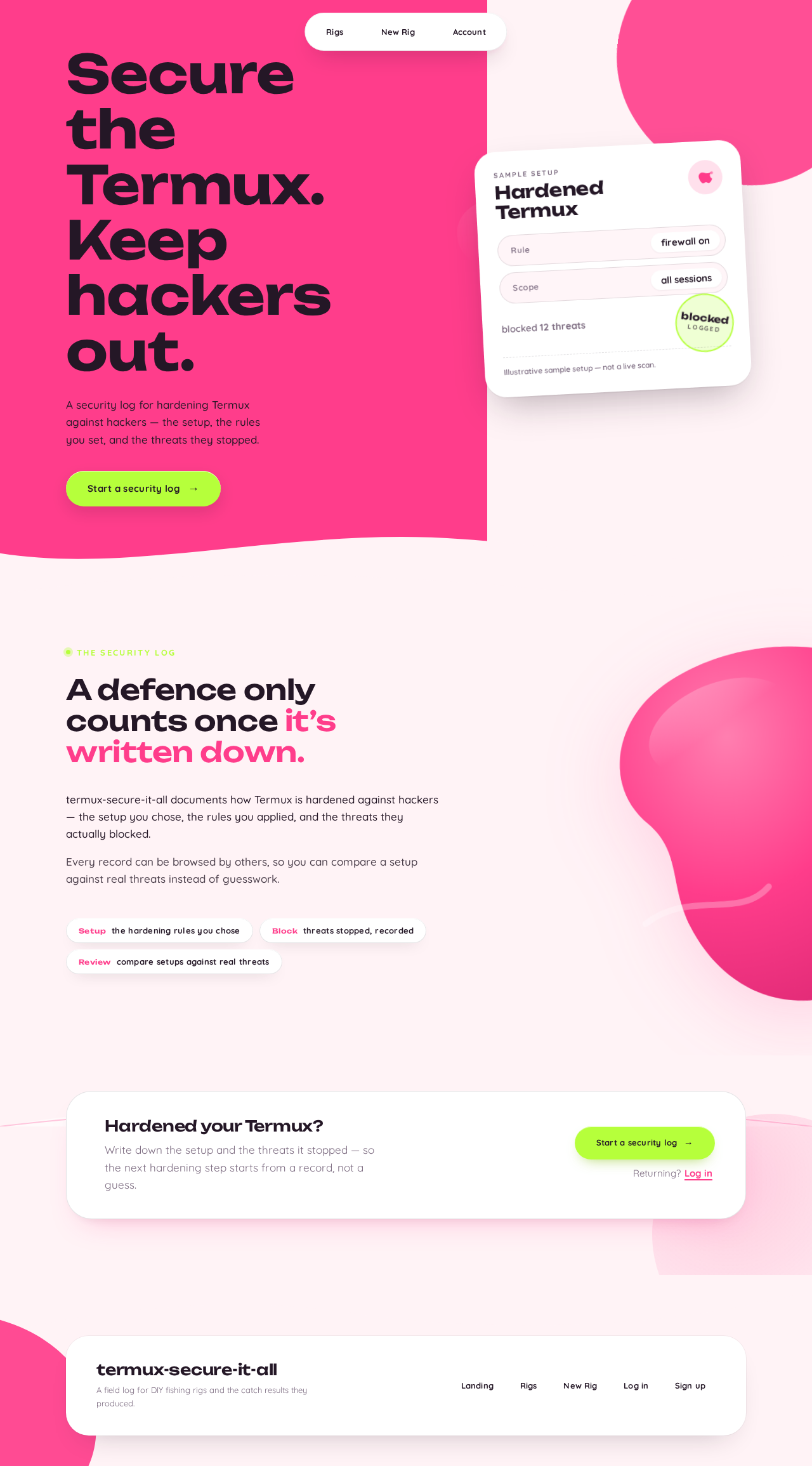
Secure theTermux.Keep hackers out.
A security log for hardening Termux against hackers — the setup, the rules you set, and the threats they stopped.
Sample setup
blocked 12 threats
Illustrative sample setup — not a live scan.
The security log
A defence only counts once it’s written down.
termux-secure-it-all documents how Termux is hardened against hackers — the setup you chose, the rules you applied, and the threats they actually blocked.
Every record can be browsed by others, so you can compare a setup against real threats instead of guesswork.
- Setupthe hardening rules you chose
- Blockthreats stopped, recorded
- Reviewcompare setups against real threats
Hardened your Termux?
Write down the setup and the threats it stopped — so the next hardening step starts from a record, not a guess.
Secure theTermux.Keep hackers out.
A security log for hardening Termux against hackers — the setup, the rules you set, and the threats they stopped.
Sample setup
blocked 12 threats
Illustrative sample setup — not a live scan.
The security log
A defence only counts once it’s written down.
termux-secure-it-all documents how Termux is hardened against hackers — the setup you chose, the rules you applied, and the threats they actually blocked.
Every record can be browsed by others, so you can compare a setup against real threats instead of guesswork.
- Setupthe hardening rules you chose
- Blockthreats stopped, recorded
- Reviewcompare setups against real threats
Hardened your Termux?
Write down the setup and the threats it stopped — so the next hardening step starts from a record, not a guess.
No comments yet. Be the first!