tender-documents-legal
 Yash Patel
I want to build an AI Software which provides complex raw query answers from legal and large amount of documents such as tender documents..... For example... user will upload tender pdfs and then ask how many document they have to submit at bid time, or they can add their doduments and tell to check eligiblity against tender ...etc... any kind of complex query answer user ask about multiple documents...


Comments (0)
Sign in to leave a comment
System Requirements
System Requirements Document for tender-documents-legal
1. Introduction
tender-documents-legal is an AI software product that answers complex, raw natural-language queries over legal and large-volume document sets — most prominently tender documents. A user uploads tender PDFs and then asks questions that require reading across the whole document set, such as "how many documents do I have to submit at bid time?" The user can also add their own documents and ask the system to check their eligibility against a tender. The product's purpose is to answer any kind of complex query the user asks about multiple documents, synthesizing a single correct answer from many sources rather than performing a single-document lookup.
The audience is the Document Analyst / Bidder: bid managers, tender analysts, and small-business owners who must read hundreds of pages of contract language under deadline and need a traceable, correct answer rather than a pile of search hits.
2. System Overview
The current product is a first-party web application with application-owned identity. A Document Analyst / Bidder creates an account, uploads tender PDFs and their own documents, composes complex natural-language questions spanning the uploaded collection, and reviews synthesized answers that cite the exact source pages behind every claim.
Current delivery covers:
- Anonymous public entry explaining the product and its multi-document query purpose.
- Self-service enrollment and returning verification, so uploaded documents, queries, and answers remain bound to the correct analyst and can be resumed.
- Document ingestion of tender PDFs and other source files.
- A revisitable document workspace where the analyst's own documents live alongside tender documents.
- A query workspace for composing complex questions across the whole uploaded collection.
- A destination for reviewing synthesized answers to multi-document queries, with the exact page excerpt behind each citation.
Narrow exclusions: the product does not perform single-document keyword search as its purpose, does not act as a bidding portal or submission channel to any tendering authority, and does not provide legal advice. No future-horizon requirements are currently accepted.
2a. Product Interpretation and Delivery Boundary
The product is delivered as a first-party application with its own custom interface and its own identity. Because uploaded documents, composed queries, and synthesized answers are durable, analyst-specific state that must be resumed across sessions and kept bound to the correct participant, the application owns identity: a first-use enrollment surface and a returning verification surface are prerequisites to the protected workspaces. The anonymous entry surface is a distinct access boundary and cannot itself establish access to the protected destinations.
All document ingestion, query composition, and answer review happen inside first-party pages. The AI reading and synthesis work is backend execution supporting the analyst's interaction; the analyst always initiates the query and always receives and reviews the answer in a first-party destination. No provider-owned or external destination is part of the current delivery, and no headless-only delivery is accepted.
2b. Source Content Inventory
Not applicable — no reference directive with content_source authority was supplied.
2c. Page Content and Component Coverage
Landing
- Information/state: Anonymous public entry. Product name, the purpose of answering complex queries across many legal and tender documents, and the two canonical example capabilities (counting required bid-time submission documents; checking the analyst's own documents for eligibility against a tender). A demo query that types itself, and a vertical transit-style source rail of seven numbered document stops in signal colours, one pulsing as the answer resolves.
- Primary actions: Go to Sign Up; go to Login.
- Supporting actions: Read the product explanation; observe the demo query and its numbered source rail.
- Domain entities: Product explanation, demo query, demo document stops.
- Component responsibilities: Oversized flush-left headline with a single phrase in signal yellow; ruled form field with numbered badge
01carrying the typed sample question; numbered source rail; bottom metadata rule readingTENDER-2024-118 · 412 PAGES · 7 DOCUMENTS · 1 ANSWER. - States: Loading — none required (static entry). Empty — not applicable. Success — entry renders with demo query and rail. Error — not applicable. Recovery — not applicable.
Sign Up
- Information/state: Anonymous first-use enrollment. Fields required to establish the analyst's own account.
- Primary actions: Create the account and enter the protected application.
- Supporting actions: Move to Login if an account already exists.
- Domain entities: Analyst account identity.
- Component responsibilities: Ruled form fields with 4px radius; numbered section label on a 1px rule; submit control; link to Login.
- States: Loading — submission in progress. Empty — blank fields. Success — account created, analyst enters the protected application. Error — invalid or incomplete input, or an account already exists for the supplied identity; the analyst corrects the field and resubmits. Recovery — the entered values remain in the form so the analyst can correct and retry.
Login
- Information/state: Anonymous returning verification for an analyst who already has an account and durable documents, queries, and answers.
- Primary actions: Verify identity and regain access to the protected workspaces.
- Supporting actions: Move to Sign Up if no account exists.
- Domain entities: Analyst account identity.
- Component responsibilities: Ruled form fields with 4px radius; submit control; link to Sign Up.
- States: Loading — verification in progress. Empty — blank fields. Success — verified, analyst returns to the protected application with prior documents, queries, and answers available. Error — credentials not accepted; the analyst corrects and resubmits. Recovery — the entered identity value remains so the analyst can retry without retyping everything.
Upload
- Information/state: Focused document-ingestion destination. The set of files selected for upload, per-file progress, and the resulting ingestion outcome for each file.
- Primary actions: Select and upload tender PDFs and other source files; confirm the upload into the analyst's document collection.
- Supporting actions: Remove a selected file before confirming; retry a failed file; move to Documents to see the resulting collection.
- Domain entities: Uploaded document (title, page count, document class, ingestion status).
- Component responsibilities: File selection control; per-file rows with numbered badge, title, page count, and class colour dot; per-file progress and outcome indicator; retry control on failure.
- States: Loading — per-file upload and ingestion progress. Empty — no files selected yet. Success — each file ingested and added to the collection with its page count and class. Error — a file fails to upload or fails ingestion; the failing file is marked and can be retried without re-selecting the others. Recovery — successfully ingested files remain in the collection; only the failed file needs retry.
Documents
- Information/state: The analyst's revisitable document workspace: every uploaded tender document and every document the analyst added, each as a numbered transit-stop entry with title, page count, and class colour dot.
- Primary actions: Add further documents; open a document's entry to inspect it; select which documents are in scope for upcoming queries.
- Supporting actions: Move to Upload for a focused ingestion pass; move to Queries to ask a question over the current collection.
- Domain entities: Document (number, title, page count, document class, ingestion status).
- Component responsibilities: Numbered source rail listing every document as a stop; class colour dots; page counts; scope selection controls; empty-collection prompt pointing to Upload.
- States: Loading — collection being retrieved. Empty — no documents yet, with a direct prompt to Upload. Success — all documents listed with numbers, titles, page counts, and class dots. Error — collection fails to load; the analyst retries. Recovery — retry restores the list; previously ingested documents are not lost.
Queries
- Information/state: The query workspace. The composed natural-language question at the top of a flush-left ragged-right column at 68ch, the current document scope, and the state of the reading pass across documents.
- Primary actions: Compose and submit a complex natural-language question spanning the uploaded collection; choose the document scope the question should span.
- Supporting actions: Move to Documents to adjust scope; move to Answers to review a completed answer.
- Domain entities: Query (question text, document scope, submission state), Document.
- Component responsibilities: Ruled query input with numbered badge; thin animated progress rule under the input while the model reads across documents; scope indicator tied to the numbered source rail; submission control.
- States: Loading — the reading pass is running, shown by the progress rule. Empty — no question composed yet. Success — the query is submitted and the synthesized answer is available in Answers. Error — the query cannot be processed (for example, no documents in scope); the analyst is told why and can adjust scope or wording and resubmit. Recovery — the composed question text is preserved so the analyst can revise rather than retype.
Answers
- Information/state: The synthesized answer to a multi-document query, rendered as a flush-left ragged-right column at 68ch with the question at top and the answer below, every sentence carrying a small superscript citation chip. The right-hand evidence panel shows the exact page excerpt behind the currently selected citation. The left numbered source rail lists every document as a transit stop.
- Primary actions: Read the synthesized answer; select a citation chip to open the exact page excerpt in the evidence panel; hover a citation chip to scroll and highlight its stop in the source rail.
- Supporting actions: Move to Queries to ask a follow-up question; move to Documents to change the collection.
- Domain entities: Answer (synthesized text, per-sentence citations), Citation (document number, page, excerpt), Document.
- Component responsibilities: Answer column with 1px horizontal rules between answer sections and numbered uppercase 12px section labels sitting on the rules; superscript citation chips (yellow outline, 12px); 320px evidence panel showing the exact page excerpt; 280px numbered source rail with class colour dots and page counts; eligibility results rendered as a ruled checklist with green check or red cross and the tender clause number in the right column.
- States: Loading — answer text reveals in 120ms staggered line groups while the reading pass completes. Empty — no answer selected yet, with a prompt to Queries. Success — answer rendered with citations, evidence panel populated on selection, and eligibility rows (where the question was an eligibility check) showing pass/fail with clause numbers. Error — the answer cannot be produced or a citation's excerpt cannot be retrieved; the analyst is told which part failed and can retry. Recovery — the question and any already-rendered answer sections remain visible so the analyst can retry the failed part or rephrase.
3. Functional Requirements
FR-1 — Complex raw query answering over legal and large document sets (explicit) As a Document Analyst / Bidder, I should be able to ask complex raw natural-language queries over legal and large volumes of documents, such as tender documents, so that I receive a synthesized answer rather than a single-document lookup.
- Trigger/input: a natural-language question composed against an uploaded document collection.
- Observable result: a synthesized answer spanning the documents in scope.
- Access state: protected workspace; the analyst is verified.
- Failure/recovery: if the query cannot be processed, the analyst is told why and can revise and resubmit without losing the composed question.
- Continuation: the analyst can ask a further complex query over the same collection.
FR-2 — Upload tender PDFs and ask how many documents must be submitted at bid time (explicit) As a Document Analyst / Bidder, I should be able to upload tender PDFs and then ask how many documents I have to submit at bid time, so that I know the required submission set.
- Trigger/input: one or more uploaded tender PDFs, plus the question about the number of documents to submit at bid time.
- Observable result: an answer stating how many documents must be submitted at bid time, attributed to the tender sources it was drawn from.
- Access state: protected workspace; the analyst is verified.
- Failure/recovery: if the tender documents are not in scope or the answer cannot be produced, the analyst is told and can adjust scope or rephrase.
- Continuation: the analyst can ask further questions against the same tender set.
FR-3 — Add own documents and check eligibility against a tender (explicit) As a Document Analyst / Bidder, I should be able to add my own documents and ask the system to check my eligibility against a tender, so that I know whether I qualify before bidding.
- Trigger/input: the analyst's own documents added to the collection, plus a request to check eligibility against a tender.
- Observable result: an eligibility result rendered as a ruled checklist with a green check or red cross per row, each row aligned to a label/value pair with the tender clause number in the right column.
- Access state: protected workspace; the analyst is verified.
- Failure/recovery: if the analyst's documents or the tender are not in scope, or a clause cannot be resolved, the affected row is reported as unresolved rather than silently passed, and the analyst can adjust scope and re-run.
- Continuation: the analyst can act on the eligibility result and ask further questions.
FR-4 — Answer any kind of complex query across multiple documents (explicit) As a Document Analyst / Bidder, I should be able to ask any kind of complex query across multiple documents, so that questions spanning several documents are answered as one coherent result.
- Trigger/input: a complex question whose answer requires reading across more than one document in the collection.
- Observable result: one synthesized answer that draws on multiple documents, with each claim traceable to its source.
- Access state: protected workspace; the analyst is verified.
- Failure/recovery: if the question cannot be answered across the available documents, the analyst is told and can broaden scope or rephrase.
- Continuation: the analyst can continue asking complex multi-document questions.
FR-5 — Self-service enrollment before first use (required_inference) As a Document Analyst / Bidder, I should be able to create my own account before first use, so that my uploaded documents, queries, and answers belong to me and can be resumed.
- Trigger/input: first visit to the anonymous entry surface, then the enrollment surface.
- Observable result: an account is created and the analyst enters the protected application.
- Access state: anonymous entry; the enrollment surface is anonymously reachable.
- Failure/recovery: invalid or incomplete input, or an identity that already has an account, is reported and the analyst corrects and resubmits with values preserved.
- Continuation: the analyst proceeds to upload documents.
FR-6 — Returning verification before accessing prior documents, queries, and answers (required_inference) As a Document Analyst / Bidder, I should be able to verify myself on return, so that I regain access to the documents I uploaded and the queries and answers I previously produced.
- Trigger/input: a returning visit to the anonymous entry surface, then the verification surface.
- Observable result: verification succeeds and the analyst's prior documents, queries, and answers are available again.
- Access state: anonymous entry; the verification surface is anonymously reachable; protected destinations remain unavailable until verification succeeds.
- Failure/recovery: unaccepted credentials are reported and the analyst retries with the identity value preserved.
- Continuation: the analyst resumes work on the existing collection.
FR-7 — Upload or add the relevant tender and user documents before submitting a multi-document query (required_inference) As a Document Analyst / Bidder, I should be able to upload or add the relevant tender documents and my own documents before submitting a multi-document query, so that the query has the sources it needs.
- Trigger/input: files selected for ingestion (tender PDFs and the analyst's own documents).
- Observable result: each file is ingested into the collection with its title, page count, and document class, and is available to be placed in scope for a query.
- Access state: protected workspace; the analyst is verified.
- Failure/recovery: a file that fails to upload or fails ingestion is marked and can be retried without re-selecting the others; successfully ingested files remain in the collection.
- Continuation: the analyst proceeds to compose a query over the ingested collection.
4. User Personas
Document Analyst / Bidder
Product context. The analyst works under bid deadline against large volumes of legal and tender material — tender PDFs running to hundreds of pages, plus their own compliance, financial, and eligibility documents. They are not looking for a search box; they are looking for a correct answer they can act on and defend.
Primary goal. A correct, complex answer synthesized across many documents rather than a single-document lookup — for example, how many documents must be submitted at bid time, or whether their own documents make them eligible against a specific tender.
Distinct accepted responsibilities.
- Uploads tender PDFs and other source files into the collection.
- Adds their own documents alongside the tender documents.
- Composes complex natural-language questions that span multiple documents.
- Selects which documents are in scope for a given question.
- Reviews the synthesized answer and follows each citation to the exact page excerpt behind it.
- Reads eligibility results as a ruled checklist and acts on pass/fail rows with their tender clause numbers.
Relevant inputs and decisions. The tender PDFs and the analyst's own documents; the wording of the complex question; the document scope for that question; and the decision of whether the cited evidence supports the answer well enough to act on.
Interactions with other accepted participants. The analyst is the sole accepted human participant. The AI reading and synthesis work is backend execution that the analyst initiates and whose result the analyst receives and reviews; it is not a separate human participant.
Observable success. The analyst receives one synthesized answer to a multi-document question, every sentence of which carries a citation chip that opens the exact page excerpt, and — for eligibility questions — a ruled checklist with green checks or red crosses and the tender clause number in the right column.
What makes this role distinct. The work is cross-document synthesis under deadline pressure, not retrieval. The analyst's value comes from questions whose answers only exist in the relationship between documents, and from being able to trace every claim back to a numbered source.
5. Core User Flows
Flow 1 — First use: enroll, upload tender PDFs, and ask how many documents must be submitted at bid time
- The analyst arrives at Landing anonymously and reads the product explanation, including the demo query typing itself and the numbered source rail of seven document stops.
- The analyst selects the path to Sign Up and creates their account, entering the required identity fields on ruled form fields.
- On success the analyst enters the protected application. (If the input is invalid or an account already exists for that identity, the error is reported, the entered values remain, and the analyst corrects and resubmits.)
- The analyst goes to Upload and selects the tender PDFs for this bid.
- Each file shows its own progress and outcome. Files that ingest successfully appear with a numbered badge, title, page count, and class colour dot. (If a file fails, it is marked and can be retried without re-selecting the others; the successful files stay in the collection.)
- The analyst moves to Documents and confirms the tender documents are listed as numbered transit stops, then places them in scope.
- The analyst moves to Queries, composes the question "how many documents do I have to submit at bid time?" in the ruled query input, and submits it.
- While the model reads across the documents, a thin animated progress rule runs under the query input.
- The analyst moves to Answers and reads the synthesized answer, which states how many documents must be submitted at bid time.
- Every sentence of the answer carries a superscript citation chip. The analyst selects a chip; the exact page excerpt opens in the right-hand evidence panel, and the corresponding numbered stop in the source rail scrolls into view and highlights.
- Continuation: the analyst asks a further complex question over the same tender set, or moves to Documents to add more sources.
Flow 2 — Add own documents and check eligibility against a tender
- The verified analyst is in the protected application with the tender documents already in the collection.
- The analyst goes to Upload and adds their own documents — compliance, financial, and eligibility material.
- Each added document ingests and appears in Documents as a numbered stop with its page count and class colour dot.
- The analyst moves to Queries and composes the request to check their eligibility against the tender, with both the tender documents and their own documents in scope.
- The analyst submits the query; the progress rule runs under the input while the model reads across both sets.
- The analyst moves to Answers and reads the eligibility result rendered as a ruled checklist: each row is a label/value pair with a green check or red cross in the accent colour and the tender clause number in the right column.
- The analyst selects the citation chip on a failing row; the exact tender page excerpt opens in the evidence panel with the cited clause highlighted, and the corresponding stop highlights in the source rail.
- Failure/recovery: if a clause cannot be resolved against the supplied documents, that row is reported as unresolved rather than silently passed; the analyst adjusts scope or adds the missing document and re-runs the check.
- Continuation: the analyst acts on the eligibility result and asks further questions about the tender.
Flow 3 — Returning analyst resumes prior documents, queries, and answers
- The analyst returns to Landing anonymously.
- The analyst selects the path to Login and verifies their identity.
- On success the analyst regains access to the protected workspaces with their previously uploaded documents, composed queries, and synthesized answers available. (If credentials are not accepted, the error is reported, the identity value remains, and the analyst retries.)
- The analyst goes to Documents and sees the existing collection as numbered transit stops.
- The analyst goes to Answers and reopens a prior synthesized answer, selecting citation chips to re-read the exact page excerpts in the evidence panel.
- Continuation: the analyst composes a new complex query over the existing collection in Queries.
Flow 4 — Any kind of complex query spanning multiple documents
- The verified analyst has a collection containing tender documents and their own documents.
- The analyst goes to Queries and composes a complex question whose answer requires reading across more than one document.
- The analyst sets the document scope so the question spans the relevant documents.
- The analyst submits the question; the progress rule runs under the input while the model reads across the documents in scope.
- The analyst moves to Answers and reads one synthesized answer that draws on multiple documents, with 1px horizontal rules and numbered uppercase section labels separating answer sections.
- The analyst follows citation chips to the exact page excerpts in the evidence panel, and hovers chips to scroll and highlight the corresponding stops in the source rail.
- Failure/recovery: if the question cannot be answered across the available documents, the analyst is told and can broaden scope or rephrase; the composed question is preserved.
- Continuation: the analyst continues asking complex multi-document questions against the same collection.
6. Visuals Colors and Theme
Muse and headline. Erik Spiekermann — typography as infrastructure. The interface reads like a well-signed transit station: numbered wayfinding, signal colours used like transit lines, warmth inside order. Headline: "Ask the whole tender. Get the whole answer."
Mode. Dark mode.
Colour tokens (exact hex by role).
| Role | Hex | Use |
|---|---|---|
| Background (ground) | #14120F | Deep warm charcoal page ground |
| Surface | #1E1B17 | Raised panels and cards |
| Text | #F2EDE4 | Warm off-white body and heading text |
| Primary | #E8B23A | Signal yellow — active state, line numbers, currently-selected source citation |
| Accent | #D94F2B | Transit red — eligibility failures, deadline warnings, destructive actions |
| Muted | #8C8578 | Metadata, page numbers, secondary labels |
| Border/hairline | #2C2822 | 1px zone separators |
| Document-class line — green | #5E8C4A | Source-rail document-class line colour only |
| Document-class line — blue | #3E7CA6 | Source-rail document-class line colour only |
Proportion: roughly 70% ground, 20% surface, 10% signal. The green and blue appear only as document-class line colours in the source rail, never as UI chrome. No blue or indigo primary on a white ground; no gradient washes.
Typography. Headings and body: Fira Sans. Headings use Fira Sans SemiBold and Bold at large sizes with tight tracking (-0.02em); sentence case for editorial headings, uppercase with +0.08em tracking for section labels and system metadata. Weight contrast carries the hierarchy — no display face, no serif. Scale: 1.250 modular on a 16px base — 64 / 51 / 41 / 33 / 26 / 21 / 17 / 16 / 14 / 12. Headings 64 and 51 for landing, 33 for page titles, 21 for section heads, 16 body, 14 metadata, 12 uppercase labels.
Shape language. Functional and rectilinear. 4px radius on inputs and buttons, 8px on panels and cards, 0px on the source rail and any element that behaves like a sign. Hairline 1px borders in #2C2822 separate zones instead of shadows. Numbered circular badges (24px, 1px border, signal colour when active) act as wayfinding markers throughout — every document, query, and citation gets a number.
Spacing rhythm. Strict columns with generous 48px gutters; horizontal 1px rules between answer sections.
Imagery style. No stock photography, no 3D renders, no decorative illustration. Visual content is the product's own material: real tender page excerpts rendered as legible document fragments with the cited clause highlighted in signal yellow; schematic transit-style network diagrams of the document set showing which documents a query touched; pictograms for document classes drawn in 2px stroke. The hero uses a single photographed-overhead shot of a physical tender binder on a warm charcoal desk, cropped tight, with a printed page edge visible.
7. Signature Design Concept
The public entry is a station board for the document set. A full-viewport dark warm-charcoal stage (#14120F) is divided on the same grid the workspaces use.
- Left two-thirds: an oversized Fira Sans Bold headline set at 64px, flush left, reading "Ask the whole tender. Get the whole answer." with the words whole tender set in signal yellow (
#E8B23A) and the rest in warm off-white (#F2EDE4). Directly beneath it, a real query input rendered as a ruled form field — not a rounded search bar — carrying a numbered badge01and a typed-in sample question animating across it. - Right third: a vertical transit-style source rail of seven numbered document stops in signal colours, one of them pulsing as the answer resolves.
- Bottom edge: a thin horizontal rule with uppercase 12px metadata — `TENDER-2024-118 · 412 PAGES · 7 DOCUMENTS · 1
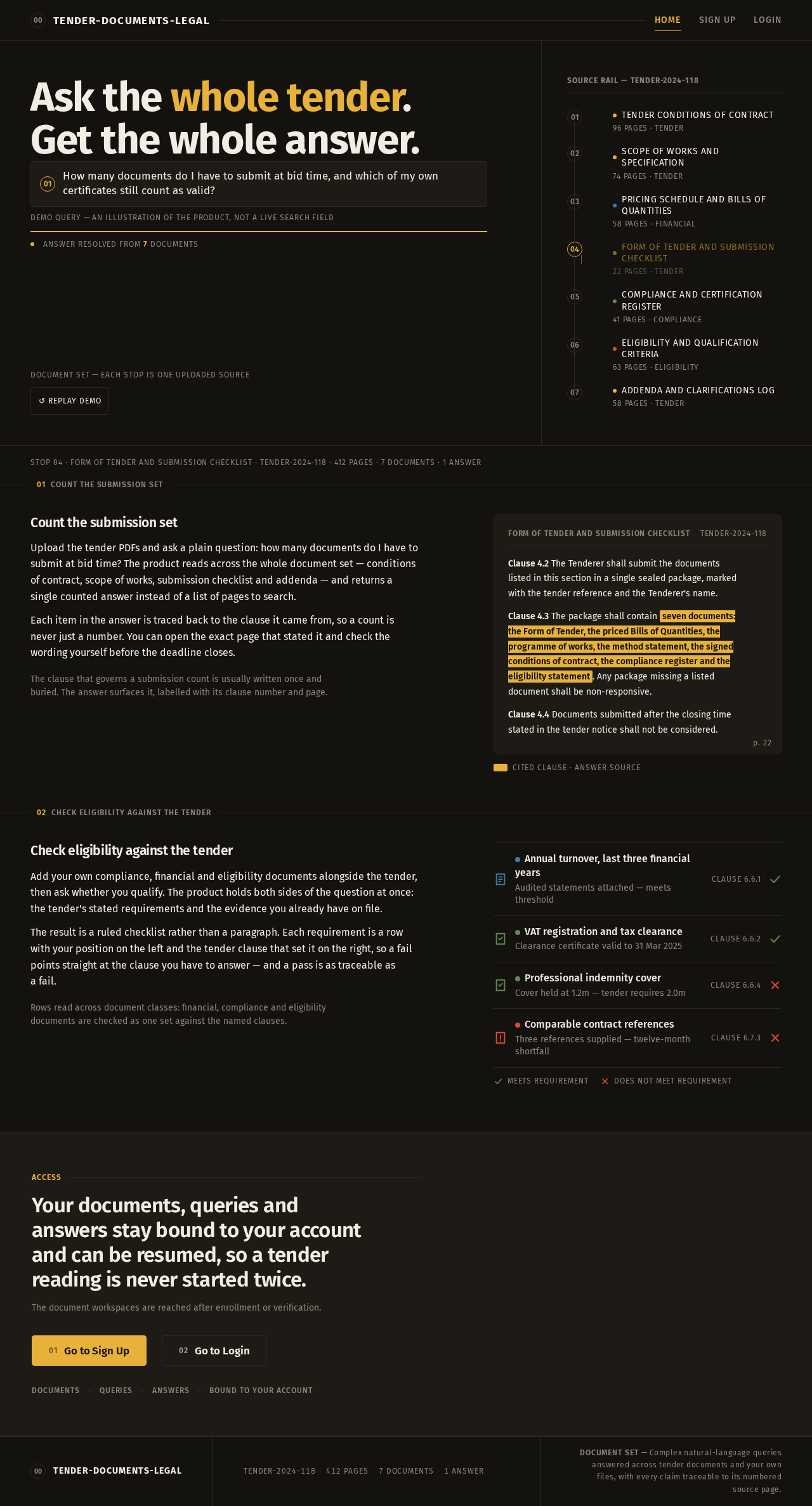
Ask the whole tender. Get the whole answer.
Reading across the document set
Document set — each stop is one uploaded source
Source rail — Tender-2024-118
- Tender Conditions of Contract
- Scope of Works and Specification
- Pricing Schedule and Bills of Quantities
- Form of Tender and Submission Checklist
- Compliance and Certification Register
- Eligibility and Qualification Criteria
- Addenda and Clarifications Log
Count the submission set
Upload the tender PDFs and ask a plain question: how many documents do I have to submit at bid time? The product reads across the whole document set — conditions of contract, scope of works, submission checklist and addenda — and returns a single counted answer instead of a list of pages to search.
Each item in the answer is traced back to the clause it came from, so a count is never just a number. You can open the exact page that stated it and check the wording yourself before the deadline closes.
The clause that governs a submission count is usually written once and buried. The answer surfaces it, labelled with its clause number and page.
Clause 4.2 The Tenderer shall submit the documents listed in this section in a single sealed package, marked with the tender reference and the Tenderer's name.
Clause 4.3 The package shall contain seven documents: the Form of Tender, the priced Bills of Quantities, the programme of works, the method statement, the signed conditions of contract, the compliance register and the eligibility statement. Any package missing a listed document shall be non-responsive.
Clause 4.4 Documents submitted after the closing time stated in the tender notice shall not be considered.
Cited clause · answer source
Check eligibility against the tender
Add your own compliance, financial and eligibility documents alongside the tender, then ask whether you qualify. The product holds both sides of the question at once: the tender's stated requirements and the evidence you already have on file.
The result is a ruled checklist rather than a paragraph. Each requirement is a row with your position on the left and the tender clause that set it on the right, so a fail points straight at the clause you have to answer — and a pass is as traceable as a fail.
Rows read across document classes: financial, compliance and eligibility documents are checked as one set against the named clauses.
- Annual turnover, last three financial years
- Audited statements attached — meets threshold
- VAT registration and tax clearance
- Clearance certificate valid to 31 Mar 2025
- Professional indemnity cover
- Cover held at 1.2m — tender requires 2.0m
- Comparable contract references
- Three references supplied — twelve-month shortfall
Meets requirementDoes not meet requirement
Your documents, queries and answers stay bound to your account and can be resumed, so a tender reading is never started twice.
The document workspaces are reached after enrollment or verification.
Ask the whole tender. Get the whole answer.
Reading across the document set
Document set — each stop is one uploaded source
Source rail — Tender-2024-118
- Tender Conditions of Contract
- Scope of Works and Specification
- Pricing Schedule and Bills of Quantities
- Form of Tender and Submission Checklist
- Compliance and Certification Register
- Eligibility and Qualification Criteria
- Addenda and Clarifications Log
Count the submission set
Upload the tender PDFs and ask a plain question: how many documents do I have to submit at bid time? The product reads across the whole document set — conditions of contract, scope of works, submission checklist and addenda — and returns a single counted answer instead of a list of pages to search.
Each item in the answer is traced back to the clause it came from, so a count is never just a number. You can open the exact page that stated it and check the wording yourself before the deadline closes.
The clause that governs a submission count is usually written once and buried. The answer surfaces it, labelled with its clause number and page.
Clause 4.2 The Tenderer shall submit the documents listed in this section in a single sealed package, marked with the tender reference and the Tenderer's name.
Clause 4.3 The package shall contain seven documents: the Form of Tender, the priced Bills of Quantities, the programme of works, the method statement, the signed conditions of contract, the compliance register and the eligibility statement. Any package missing a listed document shall be non-responsive.
Clause 4.4 Documents submitted after the closing time stated in the tender notice shall not be considered.
Cited clause · answer source
Check eligibility against the tender
Add your own compliance, financial and eligibility documents alongside the tender, then ask whether you qualify. The product holds both sides of the question at once: the tender's stated requirements and the evidence you already have on file.
The result is a ruled checklist rather than a paragraph. Each requirement is a row with your position on the left and the tender clause that set it on the right, so a fail points straight at the clause you have to answer — and a pass is as traceable as a fail.
Rows read across document classes: financial, compliance and eligibility documents are checked as one set against the named clauses.
- Annual turnover, last three financial years
- Audited statements attached — meets threshold
- VAT registration and tax clearance
- Clearance certificate valid to 31 Mar 2025
- Professional indemnity cover
- Cover held at 1.2m — tender requires 2.0m
- Comparable contract references
- Three references supplied — twelve-month shortfall
Meets requirementDoes not meet requirement
Your documents, queries and answers stay bound to your account and can be resumed, so a tender reading is never started twice.
The document workspaces are reached after enrollment or verification.
No comments yet. Be the first!