tellerhub
I need a one-page website that can enable walk in customer in a bank ask the bank to send money to a beneficiary. The bank official that wants to initiate the transaction will have limit they can initiate without approval while the high amount will need approval from high officer. To initiate the official just need to enter the customer phone number which will querry their details and OTP will be send to the customer phone number for authentication. Do you understand this

Comments (0)
Sign in to leave a comment
System Requirements
System Requirements Document for tellerhub
1. Introduction
The tellerhub project aims to create a one-page website that enables bank officials to initiate money transfers for walk-in customers. The system will authenticate transactions using the customer's phone number and an OTP, enforce transaction limits for bank officials, and require high officer approval for transactions exceeding those limits. The target audience includes bank officials, high officers, and walk-in customers.
2. System Overview
tellerhub is designed to facilitate secure and efficient money transfers within a bank setting. It provides a streamlined interface for bank officials to initiate transactions, authenticate customers, and manage approval workflows. The system enforces transaction limits and requires high officer approval for larger transactions, ensuring compliance with bank policies.
2a. Product Interpretation and Delivery Boundary
The tellerhub system is delivered as a single-page web application, accessible to bank officials and high officers within the bank. It requires backend integration for customer detail retrieval and OTP authentication. The system enforces application-owned identity to ensure secure access and transaction management. The one-page constraint ensures a cohesive user experience, with all necessary functionalities integrated into a single interface.
2b. Source Content Inventory
Not applicable as no content_source directive is provided.
2c. Page Content and Component Coverage
Transaction
-
Customer Lookup
- Input: Customer phone number
- Action: Query customer details
- State: Loading, success, error
-
OTP Authentication
- Action: Send OTP to customer phone number
- State: OTP sent, OTP verified, OTP error
-
Transaction Initiation
- Input: Transaction amount
- Action: Initiate transaction
- State: Amount within limit, amount requires approval
-
Approval Workflow
- Action: Request high officer approval for high-amount transactions
- State: Approval pending, approval granted, approval denied
-
Transaction Completion
- Action: Complete transaction
- State: Transaction successful, transaction failed
-
Error and Recovery
- State: Network error, retry option
3. Functional Requirements
- As a Bank Official, I should be able to enter a customer's phone number to query their details. (Provenance: explicit)
- As a Bank Official, I should receive an OTP sent to the customer's phone number for authentication. (Provenance: explicit)
- As a Bank Official, I should be able to initiate a transaction within my permitted amount limit without needing approval. (Provenance: explicit)
- As a Bank Official, I should require high officer approval for transactions above my limit. (Provenance: explicit)
- As a High Officer, I should be able to approve or deny transactions that exceed the bank official's limit. (Provenance: explicit)
- As a Walk-in Customer, I should receive an OTP on my phone to authenticate the transaction. (Provenance: explicit)
4. User Personas
-
Bank Official
- Initiates transactions for walk-in customers.
- Authenticates transactions using customer phone numbers and OTPs.
- Manages transactions within set limits.
-
High Officer
- Approves or denies transactions that exceed the bank official's limit.
-
Walk-in Customer
- Provides phone number for transaction initiation.
- Receives and provides OTP for transaction authentication.
5. Core User Flows
Bank Official Initiating a Transaction
- Enter the walk-in customer's phone number.
- System queries customer details.
- Send OTP to the customer's phone number.
- Customer provides OTP for authentication.
- Enter transaction amount.
- If amount is within limit, initiate transaction.
- If amount exceeds limit, request high officer approval.
- Complete transaction upon approval.
High Officer Approving a Transaction
- Receive notification of a pending transaction approval request.
- Review transaction details.
- Approve or deny the transaction.
- Notify the bank official of the decision.
Walk-in Customer Authentication
- Provide phone number to the bank official.
- Receive OTP on the phone.
- Provide OTP to the bank official for transaction authentication.
6. Visuals Colors and Theme
- Muse: Dieter Rams
- Palette:
- Background: #F5F5F5
- Surface: #FFFFFF
- Text: #333333
- Primary: #FF6600
- Accent: #006400
- Muted: #CCCCCC
- Typography:
- Headings: Saira, Medium weights, small caps
- Body: Source Sans Pro
- Scale: 1.25 modular, 48/32/24/16
- Shape Language: Rounded-rectangle controls, aligned label/value pairs, strict grid
- Layout: Modular grid with clear hierarchy
- Imagery: Diagrammatic line art and minimalistic iconography
7. Signature Design Concept
The public entry page features a structured hero section with a central rounded-rectangle input form. Signal orange highlights key actions, while accent green indicates confirmation. The layout follows a strict grid, ensuring clarity and precision. Small caps for labels enhance clarity and hierarchy, supported by diagrammatic line art to visualize the transaction flow.
8. Interaction Model & Motion Direction
- Interaction Model: Static
- Motion Tempo: Still
- Hero Dimensionality: Flat
- Landing Hero Motion Brief: A composed hero section with a central input form, using signal orange for call-to-action and green for confirmation. The layout is static, focusing on clarity and precision without unnecessary animations.
9. Non-Functional Requirements
- The system must ensure secure transmission of customer details and OTPs.
- The interface should be responsive and accessible on standard web browsers.
- The system should handle concurrent transactions efficiently.
10. Tech Stack
- Frontend: React
- Backend: Python/FastAPI
- Authentication: OTP service integration
- Deployment: Docker/docker-compose
11. Assumptions and Constraints
- The system is designed for use within a bank environment.
- Bank officials and high officers have secure access to the system.
- The system assumes reliable network connectivity for OTP delivery.
12. Glossary
- OTP: One-Time Password, used for authenticating transactions.
- Bank Official: A bank employee authorized to initiate transactions.
- High Officer: A senior bank employee authorized to approve high-amount transactions.
- Walk-in Customer: A customer physically present in the bank requesting a transaction.
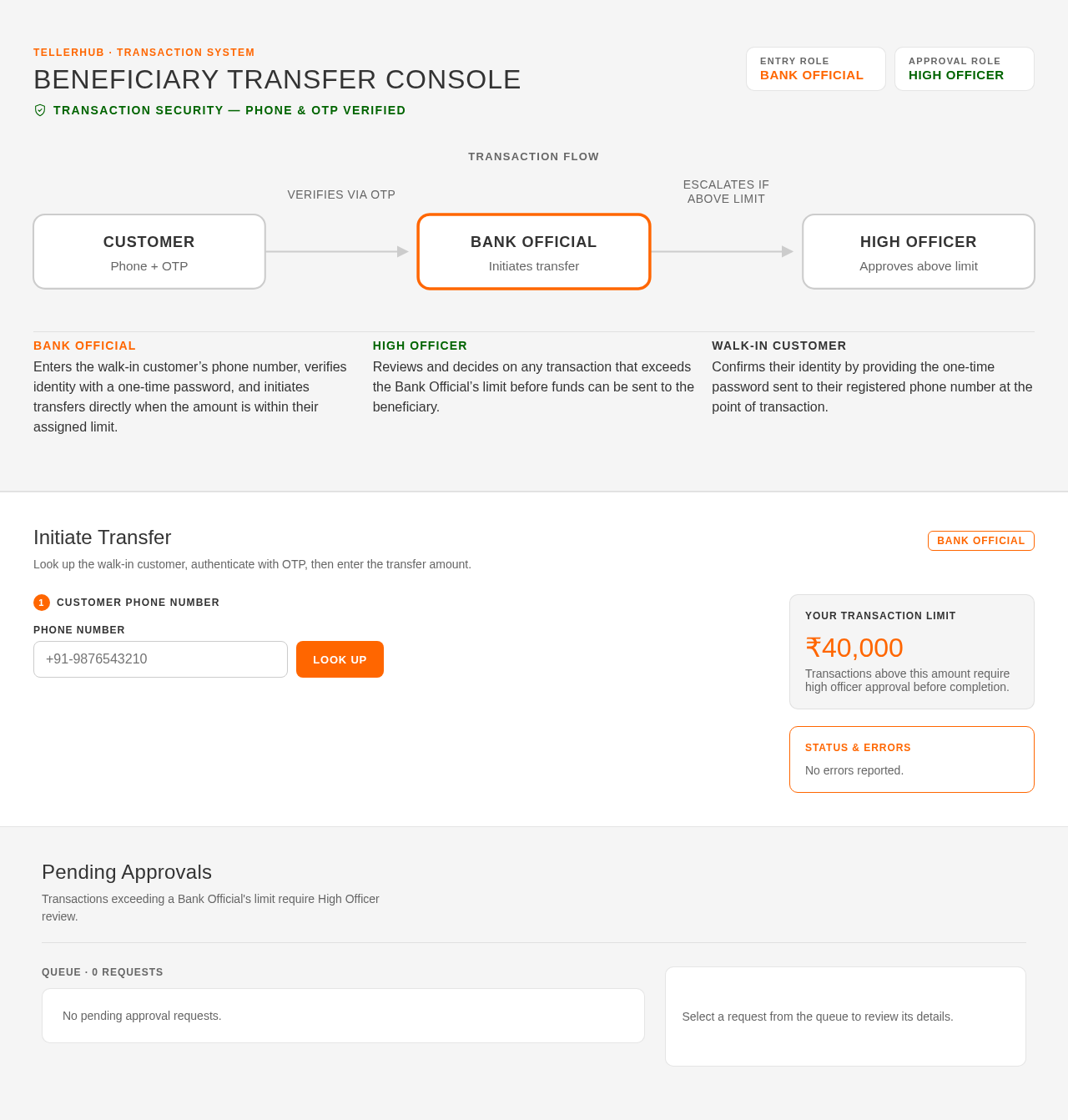
Initiate Transfer
Bank OfficialLook up the walk-in customer, authenticate with OTP, then enter the transfer amount.
1Customer Phone Number
Your Transaction Limit
₹40,000
Transactions above this amount require high officer approval before completion.
Status & Errors
No errors reported.
Pending Approvals
Transactions exceeding a Bank Official's limit require High Officer review.
No pending approval requests.
Select a request from the queue to review its details.
No comments yet. Be the first!