teal-whatsapp
 Ashissh Pattel
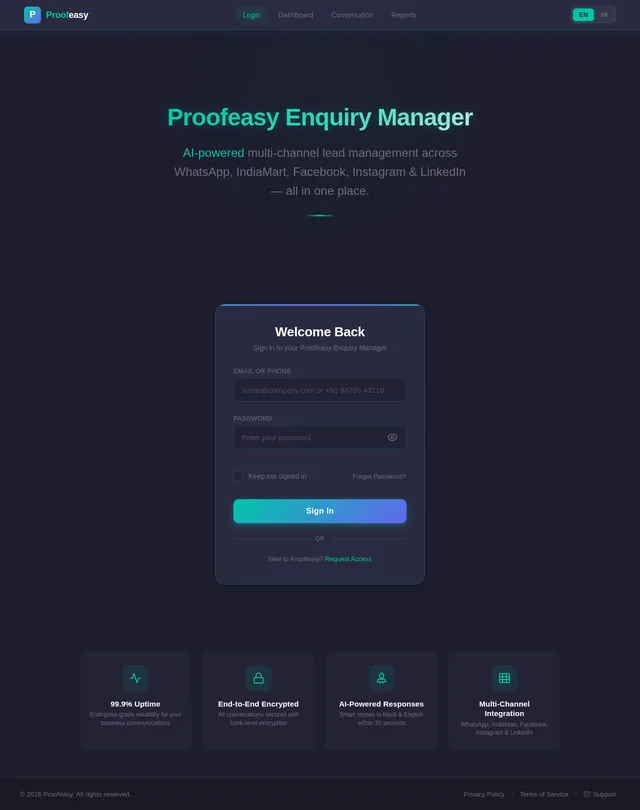
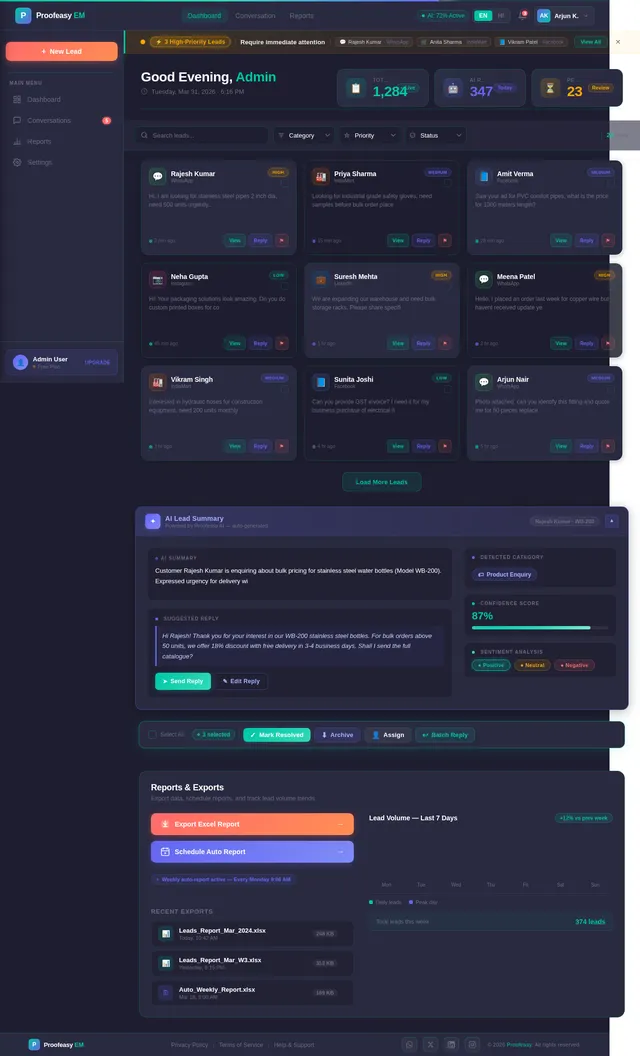
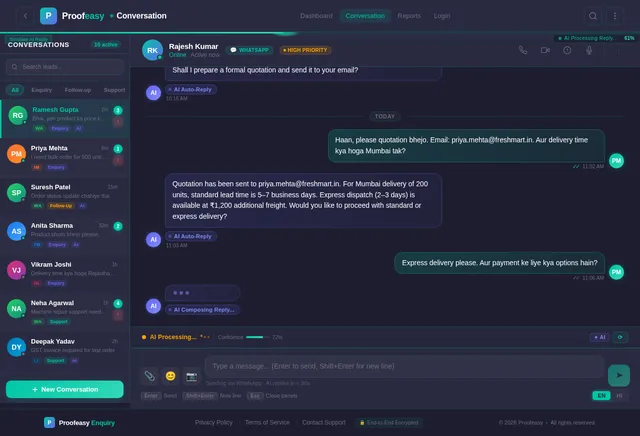
Build a Whatsapp Enquiry Manager named Proofeasy Enquiry Manager from the features attached in the screenshot
Comments (0)
Sign in to leave a comment
System Requirements
System Requirements Document (SRD)
Project Name: teal-whatsapp
1. Introduction
The teal-whatsapp project aims to develop a comprehensive WhatsApp Enquiry Manager named Proofeasy Enquiry Manager. This solution is designed to streamline customer interactions across multiple communication channels, leveraging AI for smart responses, categorization, and prioritization. It caters to MSMEs and micro-businesses, offering both a mobile app and a web-based dashboard for maximum accessibility and functionality.
2. System Overview
The Proofeasy Enquiry Manager will integrate with WhatsApp, IndiaMart, Facebook, Instagram, and LinkedIn APIs to centralize inquiries from these platforms into a single dashboard. The system will utilize AI to provide instant replies, categorize leads, manage conversations, and generate actionable reports. Key features include multi-channel capture, AI-powered responses, photo recognition, priority flagging, and on-demand Excel exports.
3. Functional Requirements
As User:
- I should be able to capture leads from WhatsApp, IndiaMart, Facebook, Instagram, and LinkedIn into one dashboard.
- I should receive instant AI-powered replies in Hindi or English within 30 seconds.
- I should be able to view categorized leads (e.g., Enquiry, Follow-up, Support) with priority tags.
- I should be able to send product photos and receive AI-contextual replies.
- I should be able to export filtered reports in Excel format on-demand or schedule auto-reports.
As Admin:
- I should be able to manage multi-turn AI conversations, ensuring customers stay engaged until I take over.
- I should receive alerts for high-priority leads and be notified immediately on WhatsApp.
- I should be able to view AI summaries and suggested replies for conversations handed off to me.
4. User Personas
1. Admin
- Role: Business owner or team lead managing inquiries.
- Needs: Dashboard access, lead prioritization, AI summaries, and alerts for high-priority leads.
2. User
- Role: Customer service representative handling inquiries.
- Needs: Instant AI replies, categorized leads, and photo recognition for product-related queries.
5. Visuals Colors and Theme
Color Palette:
- Background: #1E1E2F (Dark Navy)
- Surface: #2A2A40 (Deep Slate)
- Text: #FFFFFF (White)
- Accent: #00C6A7 (Teal Green)
- Muted Tones: #6C6C80 (Muted Gray)
Theme:
The design will follow a clean, modern aesthetic with bold typography and high-contrast elements to ensure readability and user engagement.
6. Signature Design Concept
Concept: Interactive AI Dashboard with Dynamic Lead Cards
The homepage will feature an interactive dashboard where leads are represented as dynamic cards. These cards will:
- Flip and stack when clicked, revealing detailed information about the lead (e.g., conversation history, priority tags).
- Include micro-interactions such as hover effects, priority alerts glowing softly, and AI-generated summaries typing themselves in real-time.
- A teal-green progress bar will animate across the top of the dashboard, indicating the status of AI auto-replies.
- The mobile app will feature a swipe-to-manage interface, allowing users to swipe left for follow-ups and right for marking leads as resolved.
This design ensures the platform is visually engaging and intuitive, making lead management effortless and enjoyable.
7. Non-Functional Requirements
- Performance: The system should respond to user actions within 2 seconds.
- Scalability: Support up to 10,000 leads per user account.
- Security: Implement end-to-end encryption for all communication channels.
- Localization: Support Hindi and English languages for AI replies.
- Availability: Ensure 99.9% uptime for both mobile and web platforms.
8. Tech Stack
Frontend:
- React for Web
- React Native for Mobile
Backend:
- Python
- FastAPI
Database:
- MySQL for structured data
- MongoDB for unstructured data
- WeaviateDB for vector-based AI queries
AI Models:
- GPT 5.4 for user-friendly responses
- Claude 4.6 Opas for academic or coding work
- Gemini 3.1 Pro for conversational AI
- Google Nano Banana for image recognition
AI Tools:
- Litellm for LLM routing
- Langchain
Orchestration:
- Docker for local deployment
- Kubernetes for server-side orchestration
9. Assumptions and Constraints
-
Assumptions:
- Users will primarily access the mobile app but will occasionally use the web dashboard for detailed reporting.
- AI models will be pre-trained and optimized for Hindi and English responses.
-
Constraints:
- Integration with external APIs (e.g., WhatsApp, IndiaMart) may have rate limits.
- High-priority alerts depend on the accuracy of AI categorization.
10. Glossary
- Lead: A potential customer inquiry captured from communication channels.
- AI Auto-Reply: Instant responses generated by AI based on predefined templates and conversational context.
- Priority Flagging: Marking leads as high-priority based on urgency or importance.
- Multi-Turn AI Conversation: AI handling follow-up questions until the admin takes over.
- Photo Recognition: AI identifying products from customer-uploaded images and replying contextually.
This document incorporates the latest design reference and aligns with the features and goals of the Proofeasy Enquiry Manager project. Let me know if further refinements are needed!
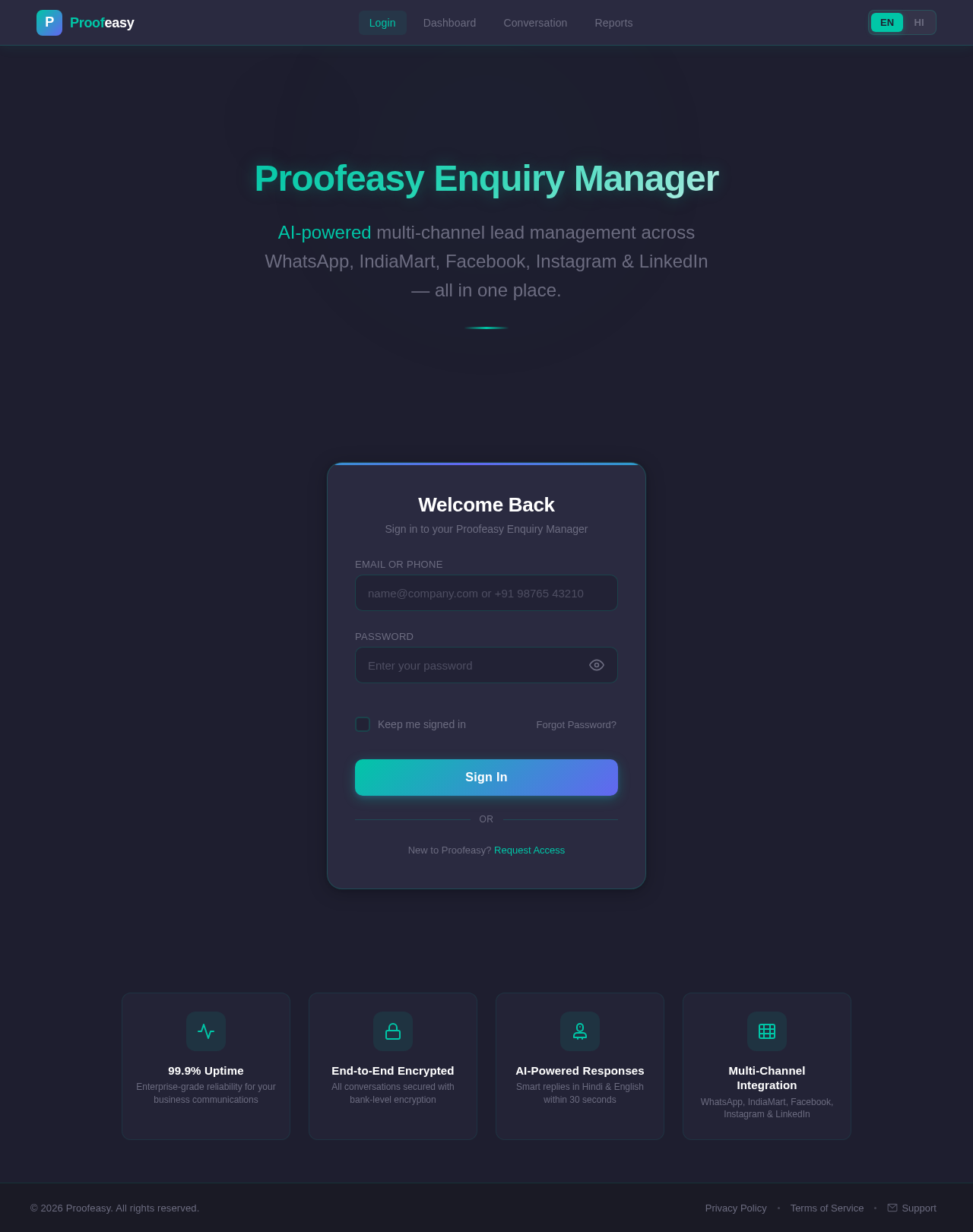
Proofeasy Enquiry Manager
AI-powered multi-channel lead management across WhatsApp, IndiaMart, Facebook, Instagram & LinkedIn — all in one place.
No comments yet. Be the first!