teal-software
 Guna Shalini M
Build me a nda generator software. I'll have to fill the details, have a preview of the document and then email it.

Comments (0)
Sign in to leave a comment
System Requirements
System Requirements Document (SRD) for teal-software
1. Introduction
This document outlines the system requirements for teal-software, a customizable NDA generator software designed for Guna Shalini M's company in India. The software will streamline the process of creating, customizing, previewing, and emailing Non-Disclosure Agreements (NDAs) tailored for specific roles such as Marketing, Designer, and Developer. The goal is to provide an intuitive, secure, and efficient tool that meets the company's needs while ensuring flexibility and ease of use.
2. System Overview
teal-software is a web-based application that allows users to:
- Select from pre-defined NDA templates for Marketing, Designer, and Developer roles.
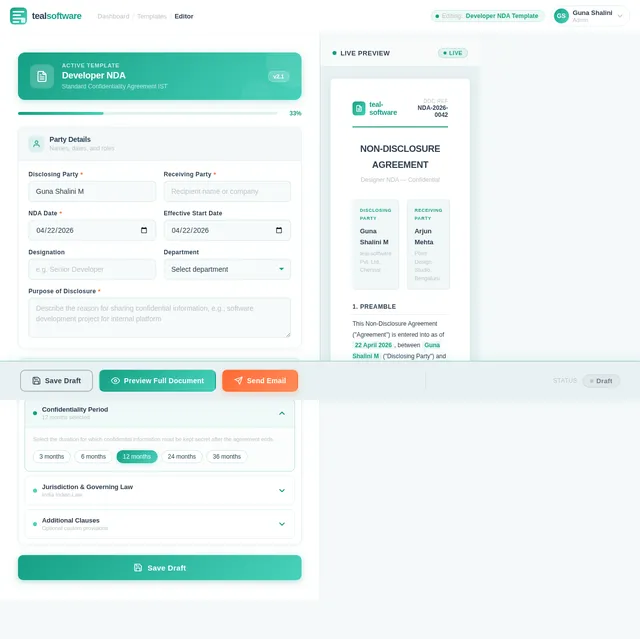
- Input specific details such as names, dates, and parties involved.
- Customize clauses, including confidentiality periods, exclusivity terms, and additional clauses.
- Preview the final NDA document before sending.
- Email the finalized NDA directly to the concerned parties.
The software will prioritize user-friendliness, data security, and adaptability, ensuring it meets the dynamic requirements of Guna's company. Locale-specific defaults, such as Indian time zones (IST) and currency (INR), will be incorporated where applicable.
3. Functional Requirements
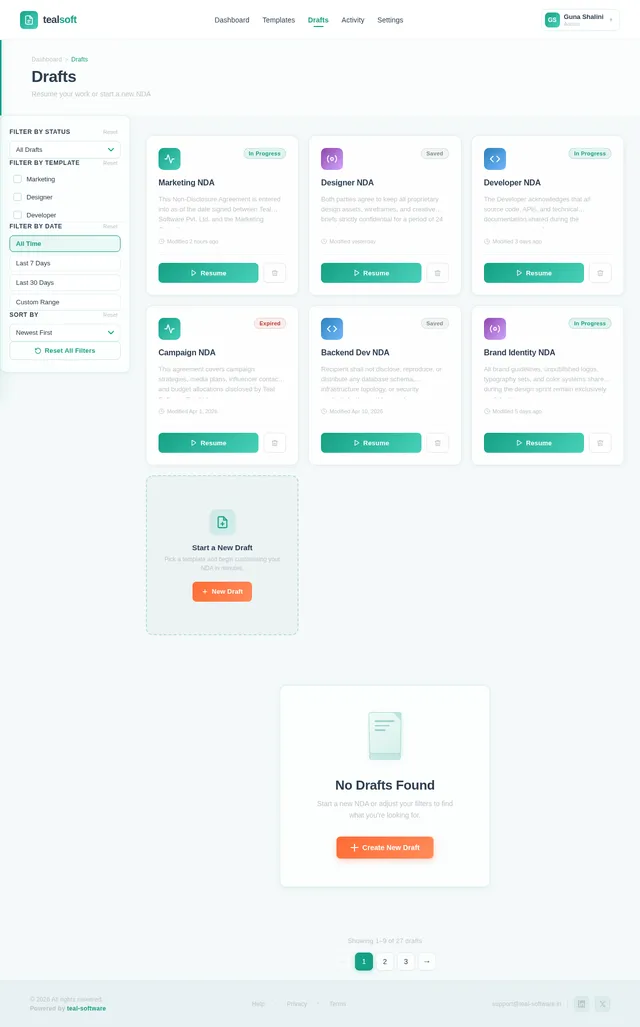
- As a User, I should be able to select a template (Marketing, Designer, Developer).
- As a User, I should be able to fill in details like names, dates, and parties involved.
- As a User, I should be able to customize clauses, such as confidentiality periods or exclusivity terms.
- As a User, I should be able to preview the NDA document before finalizing it.
- As a User, I should be able to email the finalized NDA directly to the concerned parties.
- As a User, I should be able to save drafts securely for later use.
4. User Personas
4.1 Admin
- Role: Oversees the software's usage within the company.
- Responsibilities: Manage templates, monitor usage, and ensure data security.
- Needs: Access to all features, including template creation and user management.
4.2 User
- Role: Company employees responsible for generating NDAs.
- Responsibilities: Create, customize, preview, and email NDAs.
- Needs: Access to templates, customization options, and secure storage for drafts.
5. Visuals Colors and Theme
Color Palette
The color palette for teal-software is designed to evoke professionalism, trust, and modernity:
- Background: #F4F9F9 (Soft Mint White)
- Surface: #E8F1F2 (Light Teal)
- Text: #2C3E50 (Dark Slate Blue)
- Accent: #16A085 (Emerald Green)
- Muted: #BDC3C7 (Silver Gray)
This palette ensures a clean and professional aesthetic while maintaining a fresh and approachable feel.
6. Signature Design Concept
The teal-software homepage will feature an interactive document builder interface.
Key Features:
- Dynamic Template Selection: Users will see a carousel of NDA templates (Marketing, Designer, Developer) with animated previews flipping like pages of a book.
- Live Clause Editor: A split-screen interface where the left side shows editable fields (names, dates, clauses), and the right side displays a real-time preview of the NDA document.
- Interactive Animations: When users hover over editable fields, subtle highlights and tooltips will guide them through the customization process.
- Email Integration Visuals: A sleek animation of an envelope being sealed and sent will play when the user emails the NDA, reinforcing the action visually.
- Micro-Interactions: Buttons and icons will have smooth hover effects, and the preview document will have a "flip" animation when switching between pages.
This design ensures the software is not only functional but also visually engaging and memorable.
7. Non-Functional Requirements
- Performance: The system should load templates and previews within 2 seconds.
- Scalability: The software must support up to 500 concurrent users.
- Security: All data, including drafts and emails, must be encrypted using industry-standard protocols.
- Usability: The interface should be intuitive, requiring minimal training for first-time users.
- Availability: The system should have 99.9% uptime.
8. Tech Stack
Frontend
- React for Web
Backend
- Python
- FastAPI
Database
- MySQL (with Alembic for migrations)
AI Models
- GPT 5.4 for user-friendly responses
AI Tools
- Langchain
- Litellm for LLM Routing
Local Orchestration
- Docker
- docker-compose
Server-Side Orchestration
- Kubernetes
9. Assumptions and Constraints
Assumptions
- Users will primarily access the software from desktop devices.
- The software will be used within the Indian timezone (IST).
- Email functionality will rely on SMTP integration with the company’s email server.
Constraints
- The system must comply with Indian data protection laws.
- Customization options will be limited to predefined clause types to ensure legal validity.
10. Glossary
- NDA: Non-Disclosure Agreement, a legal contract ensuring confidentiality.
- Template: Predefined structure for NDAs tailored to specific roles.
- Clause: A specific provision or section within a legal document.
- SMTP: Simple Mail Transfer Protocol, used for sending emails.
- IST: Indian Standard Time, the time zone for India.
End of Document

Effortless NDA Generation
in Minutes
Customizable templates for Marketing, Designer, and Developer roles. Preview, customize, and email securely.
Build Your NDA in Real Time
Edit fields, toggle clauses, and watch your NDA update instantly. What you see is exactly what gets sent.
Non-Disclosure Agreement
Confidential • Developer Template
This Non-Disclosure Agreement ("Agreement") is entered into as of 22 April 2026 by and between:
Party A (Disclosing Party): Guna Shalini M
Party B (Receiving Party): Acme Corp Pvt. Ltd.
WHEREAS, the Disclosing Party possesses certain confidential and proprietary information and the Receiving Party desires to receive disclosure of such information for the purpose of evaluating a potential business relationship.
Pre-Built NDA Templates for Every Role
Select from professionally crafted templates tailored for Marketing, Designer, and Developer roles. Preview, customize, and send in minutes.
Protect campaign strategies, brand assets, and market research data with tailored confidentiality clauses.
Safeguard creative works, design mockups, and intellectual property with exclusivity terms.
Secure source code, technical specifications, and proprietary algorithms with robust protection.
Customize Your NDA in Real Time
Fill in party details, toggle clauses, and adjust terms. Watch your agreement update instantly in the live preview.
NDA Builder
Customize your agreement details
Non-Disclosure Agreement
Mutual Confidentiality Agreement
Preview Your NDA
See the difference customization makes. Toggle between the default template and your personalized NDA — ready to download or refine further.
Non-Disclosure Agreement
Marketing Role — Customized
1. Parties
This Non-Disclosure Agreement is entered into by and between Guna Shalini M, representing TealSoft Pvt. Ltd. ("Disclosing Party") and Priya Sharma, Marketing Consultant ("Receiving Party"), collectively referred to as the "Parties."
2. Confidential Information
Confidential Information shall include all marketing strategies, campaign data, brand assets, customer analytics, partnership details, and any proprietary business information disclosed by the Disclosing Party, whether oral, written, or electronic.
3. Obligations
Confidentiality period: 3 years from the date of disclosure.
Exclusivity terms: Receiving Party shall not engage with competing firms during the contract period.
Governing law: Laws of India, jurisdiction of Chennai courts.
Additional clause: All marketing materials created during engagement remain the intellectual property of TealSoft Pvt. Ltd.
Disclosing Party
Guna Shalini M, Director
Receiving Party
Priya Sharma, Marketing Consultant
Seal & Send Your NDA Instantly
Watch your finalized NDA get sealed into an envelope and delivered straight to your recipients. Add emails, hit send, and you're done.
Built for Trust & Security
Your legal documents deserve enterprise-grade protection. teal-software is engineered to meet the highest standards of security, performance, and reliability.
Enterprise Security
AES-256 Encryption
All NDA documents are encrypted at rest and in transit using AES-256 bit encryption, ensuring your sensitive legal agreements remain confidential and tamper-proof.
Lightning Fast
<2s Load Time
Generate, preview, and email NDAs in under 2 seconds. Our optimized infrastructure ensures zero lag, even when customizing complex clause configurations.
99.9% Uptime
SLA Guaranteed
Our enterprise-grade SLA guarantees 99.9% platform availability, so your team can generate and send NDAs around the clock without interruption.
Compliance & Certifications
Ready to Streamline Your NDA Process?
Join companies that save hours on legal documentation. Create, customize, and send NDAs in minutes with role-specific templates built for your team.
Frequently Asked Questions
Everything you need to know about creating, customizing, and sending NDAs with teal-software.
teal-software provides three professionally crafted NDA templates tailored for Marketing, Designer, and Developer roles. Each template includes industry-standard clauses specific to that role, ensuring comprehensive legal coverage right out of the box. Templates are regularly reviewed and updated to stay compliant with current Indian data protection regulations.
Absolutely. All data, including drafts and sent emails, is encrypted using AES-256 industry-standard protocols. We comply with Indian data protection laws and maintain 99.9% uptime with enterprise-grade infrastructure. Your sensitive legal documents are stored securely and accessible only to authorized users within your organization.
Yes, our Live Clause Editor allows you to customize confidentiality periods, exclusivity terms, and add additional clauses to any template. The split-screen interface shows your changes in real time on the right panel, so you can see exactly how the final document will look as you edit. All customizations stay within predefined legal frameworks to ensure validity.
Once you have finalized your NDA, simply enter the recipient email addresses and click Send. The platform integrates with your company SMTP server to deliver the signed NDA directly from your corporate email. You will receive confirmation once the document has been delivered, and all sent agreements are logged for audit purposes.
Yes, you can save your NDA at any stage of the creation process. Drafts are securely stored and can be accessed from your Dashboard at any time. All your customizations, filled-in details, and clause modifications are preserved so you can pick up exactly where you left off.
teal-software supports two primary roles: Admin and User. Admins can manage templates, create new ones, monitor platform usage, and manage user accounts. Users can create, customize, preview, and email NDAs using the available templates. Role-based access ensures each team member has the right level of control.
Still have questions? Our support team is here to help.
Get in Touch →
No comments yet. Be the first!