Double Six
66
2 min ago
 Donnie Kettenring
Build me an app that takes a picture and counts domino pips


Sign in to leave a comment
As a developer I want to be able to establish the base theme, color palette, and structural layout system for the teal-picture React Native app using Alice Blue (#F0F8FF) background, Mint Green (#D1E8E2) surface, Dark Slate Blue (#2C3E50) text, Coral Red (#FF6F61) accent, and Light Steel Blue (#B0C4DE) muted colors so that all pages have a consistent visual foundation.
As a developer I want to be able to audit and align all shared UI components and style tokens to the established color theme so that every reusable element reflects the correct palette and typography consistently across the app.
As a user I want to be able to see an interactive domino galaxy showcase on the home page with a gallery entry point so that I can explore the app and navigate to the camera or history sections. Implement based on the existing Home (v2) JSX design.
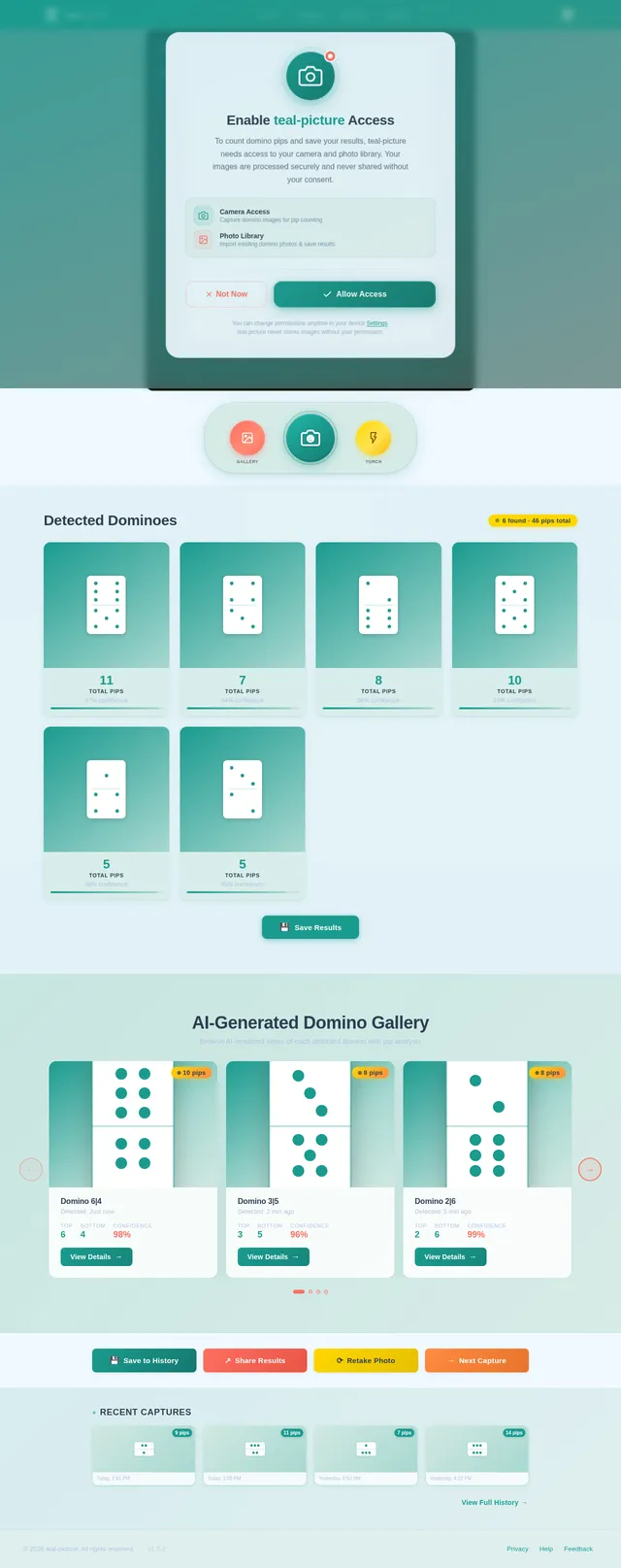
As a user I want to be able to take a photo of multiple dominoes using the camera page so that I can submit the image for pip count analysis and AI rendering. Implement based on the existing Camera (v2) JSX design.
As a user I want to be able to view the pip count for each detected domino alongside its AI-rendered image on the results page so that I can review the analysis output clearly. Implement based on the existing Results (v2) JSX design.
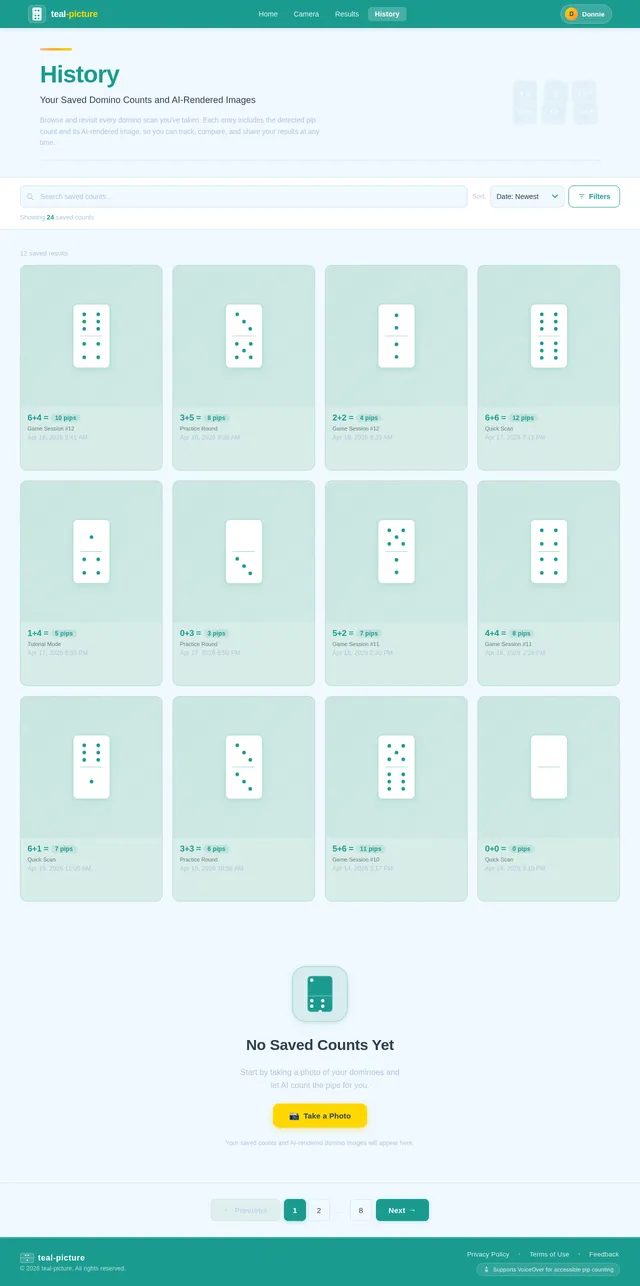
As a user I want to be able to browse, save, and review my history of saved pip counts and AI-rendered domino images on the history page so that I can revisit past analyses at any time. Implement based on the existing History (v2) JSX design.
As a backend developer I want to be able to define and implement the MySQL database schema for storing domino analysis sessions, individual domino pip counts, AI-rendered image URLs, and history records so that all data is persistently and efficiently stored.
As a user I want to be able to upload a captured domino image via the FastAPI backend so that the image can be processed for pip detection and AI rendering.
As a developer I want to be able to set up Langchain workflow orchestration with Litellm routing to coordinate GPT 5.4 pip validation and Google Nano Banana image generation in a unified AI pipeline so that both AI models operate reliably and efficiently.
As a user I want to be able to have my captured domino photo automatically sent to the backend image upload endpoint from the camera page so that the analysis pipeline is triggered seamlessly.
As a developer I want to be able to configure Litellm to route requests between GPT 5.4 and Google Nano Banana models with proper fallback and load handling so that the AI pipeline is resilient and model-agnostic.
As a user I want to be able to have my domino pip counts validated by GPT 5.4 via Litellm routing and Langchain orchestration so that the detected pip values are accurate and reliable.
As a user I want to be able to have multiple individual dominoes automatically detected and segmented from my uploaded photo so that each domino is independently analyzed for pip count and AI rendering.
As a user I want to be able to receive an AI-rendered image of each detected domino generated by Google Nano Banana via Langchain orchestration so that I can view a clean visual representation alongside my pip count.
As a user I want to be able to retrieve the full analysis results including pip counts per domino and AI-rendered image URLs from the FastAPI backend so that the results page can display accurate data.
As a user I want to be able to save my pip count results and AI-rendered images to the history via the FastAPI backend so that my analyses are persisted and retrievable later.
As a user I want to be able to see live pip counts and AI-rendered images on the results page fetched from the backend analysis results API so that my results are dynamically populated after capture.
As a user I want to be able to fetch my full history of saved pip counts and AI-rendered domino images from the FastAPI backend so that the history page displays all past analyses.
As a user I want to be able to see my saved history of pip counts and AI-rendered images on the history page fetched from the backend so that I can browse all past domino analyses.
As a user I want to be able to view a curated gallery of recent AI-rendered domino images on the home page pulled from my history so that the home page feels dynamic and personalized.

Powered by AI image recognition, teal-picture makes counting pips simple and accessible for everyone — whether you have vision challenges or just want a faster way to play.
Explore your recently counted dominoes in an interactive star map
Point at your dominoes and tap to start counting. Our AI will detect and tally every pip instantly.
Example Photos
AI-rendered domino images from your recent history
Count your domino pips in three simple steps
Point your camera at your dominoes and snap a picture. Works with any arrangement of tiles.
Our AI instantly identifies each domino and counts every pip with precision accuracy.
See individual pip counts alongside AI-rendered images. Save results to your history.
Designed from the ground up to be usable by everyone, regardless of vision ability or technical experience.
VoiceOver Support
Full screen reader compatibility ensures every element is announced clearly, so you never miss a pip count.
High-Contrast Text
Dark slate blue on light backgrounds meets WCAG AAA standards for maximum readability.
Large Touch Targets
All buttons and interactive elements are sized at 44px minimum, making every tap confident and accurate.
Simple Navigation
Streamlined menus and clear visual hierarchy guide you through counting in just a few taps.
This app changed how I enjoy game night. I no longer have to squint or ask someone else to read the pips for me. The large buttons, clear text, and voice feedback make counting dominoes effortless and fun again.
Designed for everyone who loves dominoes — from accessibility-first users to competitive players.
Primary User
Age 60+, uses teal-picture to count domino pips effortlessly despite vision challenges. Values clear visuals, large touch targets, and voice-over support.
Recreational
Recreational domino enthusiasts who want a quick, fun way to count pips without slowing down game night with friends and family.
Tournament
Serious players who need fast, accurate pip counting during practice sessions and competitive matches. Speed and multi-domino detection are essential.
Learning
Teachers and learners using dominoes as a hands-on tool for math, pattern recognition, and counting exercises in the classroom.
Powerful features designed to make counting domino pips effortless, accessible, and enjoyable for everyone.
Point your camera at any domino and get an accurate pip count in under 2 seconds, powered by advanced AI recognition.
Each detected domino is paired with a beautiful AI-rendered image, making results visually clear and engaging.
Store up to 1,000 past counts with their AI images so you can review previous games anytime you need.
Core pip detection works without an internet connection, so you can count dominoes anywhere you play.
Capture multiple dominoes in a single photo and get individual pip counts for each one automatically.
Share your pip counts and AI-rendered images with friends or save them for scorekeeping and analysis.
Snap a photo of your dominoes and let our AI instantly detect and count every pip. Accessible, fast, and beautifully simple.
Powered by AI image recognition, teal-picture makes counting pips simple and accessible for everyone — whether you have vision challenges or just want a faster way to play.
Explore your recently counted dominoes in an interactive star map
Point at your dominoes and tap to start counting. Our AI will detect and tally every pip instantly.
Example Photos
AI-rendered domino images from your recent history
Count your domino pips in three simple steps
Point your camera at your dominoes and snap a picture. Works with any arrangement of tiles.
Our AI instantly identifies each domino and counts every pip with precision accuracy.
See individual pip counts alongside AI-rendered images. Save results to your history.
Designed from the ground up to be usable by everyone, regardless of vision ability or technical experience.
VoiceOver Support
Full screen reader compatibility ensures every element is announced clearly, so you never miss a pip count.
High-Contrast Text
Dark slate blue on light backgrounds meets WCAG AAA standards for maximum readability.
Large Touch Targets
All buttons and interactive elements are sized at 44px minimum, making every tap confident and accurate.
Simple Navigation
Streamlined menus and clear visual hierarchy guide you through counting in just a few taps.
This app changed how I enjoy game night. I no longer have to squint or ask someone else to read the pips for me. The large buttons, clear text, and voice feedback make counting dominoes effortless and fun again.
Designed for everyone who loves dominoes — from accessibility-first users to competitive players.
Primary User
Age 60+, uses teal-picture to count domino pips effortlessly despite vision challenges. Values clear visuals, large touch targets, and voice-over support.
Recreational
Recreational domino enthusiasts who want a quick, fun way to count pips without slowing down game night with friends and family.
Tournament
Serious players who need fast, accurate pip counting during practice sessions and competitive matches. Speed and multi-domino detection are essential.
Learning
Teachers and learners using dominoes as a hands-on tool for math, pattern recognition, and counting exercises in the classroom.
Powerful features designed to make counting domino pips effortless, accessible, and enjoyable for everyone.
Point your camera at any domino and get an accurate pip count in under 2 seconds, powered by advanced AI recognition.
Each detected domino is paired with a beautiful AI-rendered image, making results visually clear and engaging.
Store up to 1,000 past counts with their AI images so you can review previous games anytime you need.
Core pip detection works without an internet connection, so you can count dominoes anywhere you play.
Capture multiple dominoes in a single photo and get individual pip counts for each one automatically.
Share your pip counts and AI-rendered images with friends or save them for scorekeeping and analysis.
Snap a photo of your dominoes and let our AI instantly detect and count every pip. Accessible, fast, and beautifully simple.
No comments yet. Be the first!