Broos Mine's AI reconstructs every frame of your upload, pushing resolution up to 8K or 16K without you touching a single setting.
teal-named
by Frost 32
Frost 32Build an app ... Named ( broos mine ) ... Usme unlimited freee kitna bhi use kr skte hai ek ai ka jisme video upload krne pr .... Vo alutomatically resolution badhaega 8k 16k tak... Aur Blur part ko bhi sahi kr dega ... 5 mins ke andar ... Itna powerful chaie .... Koi bhi doubts ho related to puchte jaa ...


Comments (0)
Sign in to leave a comment
System Requirements
Page 1 of 6
System Requirements Document for teal-named
1. Introduction
The project "broos mine" is an AI-driven video enhancement application designed to automatically upscale video resolution to 8K or 16K and correct blurred parts within a five-minute processing window. The application is intended for video creators seeking high-resolution outputs quickly and is available for unlimited free use.
2. System Overview
The "broos mine" application provides a seamless experience for video creators to enhance their video content using advanced AI technology. The system allows users to upload videos, automatically enhance resolution, and correct blurs, all within a five-minute timeframe. The application is designed to be intuitive and accessible, with a focus on high-tech, cinematic aesthetics.
2a. Product Interpretation and Delivery Boundary
The application is named "broos mine" and offers unlimited free use for video enhancement. It supports video resolution enhancement up to 8K or 16K and includes automatic blur correction. The system is designed to process videos within five minutes. The application is delivered as a web-based platform with a custom UI, and it does not require user accounts for access. The primary user is the Video Creator, who interacts with the application to upload videos, initiate enhancement, and review results.
Page 2 of 6
2b. Source Content Inventory
Not applicable as there is no explicit content_source directive.
2c. Page Content and Component Coverage
Landing
- Information/State: Introduction to "broos mine", its AI video enhancement capabilities, supported resolutions, blur improvement, and free unlimited use.
- Primary Actions: Navigate to Upload page.
- Components: Hero section with cinematic visuals, brief app description, call-to-action button.
Upload
- Information/State: Video selection interface.
- Primary Actions: Select video file, initiate upload.
- Components: File upload control, video preview, upload button.
Enhance
- Information/State: Enhancement settings for resolution and blur correction.
- Primary Actions: Choose target resolution (8K or 16K), apply blur correction, start enhancement.
- Components: Resolution selector, blur correction toggle, enhance button.
Processing
- Information/State: Real-time processing status, estimated time to completion.
- Primary Actions: Monitor progress, cancel processing.
- Components: Progress bar, status messages, cancel button.
Page 3 of 6
Results
- Information/State: Display of enhanced video, download options.
- Primary Actions: Review video, download enhanced version.
- Components: Video player, download button, share options.
Help
- Information/State: FAQ and support for video enhancement queries.
- Primary Actions: Submit questions, browse FAQs.
- Components: Search bar, FAQ list, contact form.
3. Functional Requirements
- As a Video Creator, I should be able to upload a video file to the application for enhancement. (Provenance: explicit)
- As a Video Creator, I should be able to select the desired resolution (8K or 16K) for the video enhancement. (Provenance: explicit)
- As a Video Creator, I should be able to apply automatic blur correction to the uploaded video. (Provenance: explicit)
- As a Video Creator, I should be able to monitor the processing status and completion within five minutes. (Provenance: explicit)
- As a Video Creator, I should be able to download the enhanced video once processing is complete. (Provenance: explicit)
- As a Video Creator, I should be able to ask questions related to video enhancement through the Help page. (Provenance: explicit)
4. User Personas
- Video Creator: Responsible for uploading videos, requesting AI enhancement, reviewing processed results, and asking related doubts.
5. Core User Flows
Page 4 of 6
Video Upload and Enhancement Flow
- Landing Page: The Video Creator accesses the Landing page and navigates to the Upload page.
- Upload Page: The Video Creator selects a video file and uploads it.
- Enhance Page: The Video Creator chooses the desired resolution (8K or 16K) and applies blur correction, then starts the enhancement process.
- Processing Page: The Video Creator monitors the processing status, ensuring completion within five minutes.
- Results Page: The Video Creator reviews the enhanced video and downloads it.
Help and Support Flow
- Help Page: The Video Creator accesses the Help page to browse FAQs or submit questions related to video enhancement.
6. Visuals Colors and Theme
- Muse: Gleb Kuznetsov
- Palette:
- Background: #000011
- Surface: #111122
- Text: #E0E0E0
- Primary: #00FFFF
- Accent: #FF00FF
- Muted: #444455
- Typography:
- Headings: Orbitron — Wide, uppercase, tight tracking
- Body: Space Grotesk
- Scale: 1.25 modular, 60/48/32/20/16
- Shape Language: Full-bleed 3D scene with floating glass panels and radial layouts.
- Layout: Floating elements with thin luminous strokes creating a sense of depth and motion.
- Motion: Continuous slow orbit/parallax with light sweeps and data streams.
Page 5 of 6
7. Signature Design Concept
A full-bleed hero section on the Landing page featuring a 3D volumetric form representing data, glowing against a dark navy background with electric cyan and magenta highlights. The design emphasizes the power and depth of the AI technology, with floating volumetric data forms and slow parallax motion.
8. Interaction Model & Motion Direction
- Interaction Model: Animated
- Motion Tempo: Cinematic
- Hero Dimensionality: WebGL
- Landing Hero Motion Brief: A central volumetric form representing data, with slow orbit and parallax motion, light sweeps, and data streams. The first frame shows the volumetric form glowing against the dark background, transitioning to reveal the app's capabilities.
9. Non-Functional Requirements
- The application must process video enhancements within five minutes to meet user expectations. (Provenance: explicit)
- The application must support video resolution enhancement up to 8K or 16K. (Provenance: explicit)
- The application must be accessible without requiring user accounts. (Provenance: explicit)
10. Tech Stack
- Frontend: React
- Backend: Python/FastAPI
- Storage: Appropriate scalable storage solution
- Deployment: Docker/docker-compose
Page 6 of 6
11. Assumptions and Constraints
- The application name "broos mine" is a hard constraint and must be used consistently.
- The application must remain free and offer unlimited use for video enhancement.
- Processing time is constrained to a maximum of five minutes per video.
12. Glossary
- Video Creator: The primary user of the application who uploads and enhances videos.
- AI Video Enhancement: The process of using artificial intelligence to improve video resolution and correct blurs.
- 8K/16K Resolution: High-definition video resolutions supported by the application.
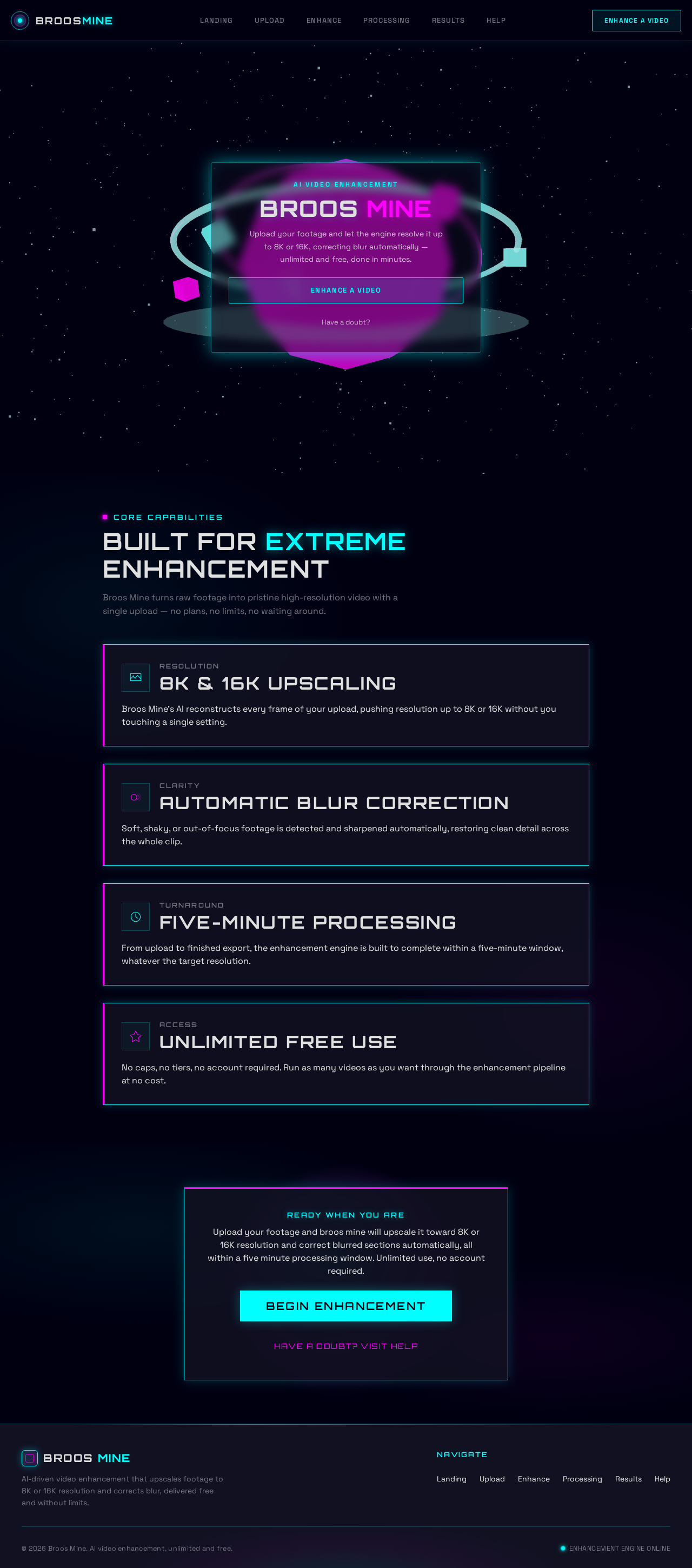
AI Video Enhancement
BROOS MINE
Upload your footage and let the engine resolve it up to 8K or 16K, correcting blur automatically — unlimited and free, done in minutes.
Core Capabilities
Built for extreme enhancement
Broos Mine turns raw footage into pristine high-resolution video with a single upload — no plans, no limits, no waiting around.
Soft, shaky, or out-of-focus footage is detected and sharpened automatically, restoring clean detail across the whole clip.
From upload to finished export, the enhancement engine is built to complete within a five-minute window, whatever the target resolution.
No caps, no tiers, no account required. Run as many videos as you want through the enhancement pipeline at no cost.
Ready When You Are
Upload your footage and broos mine will upscale it toward 8K or 16K resolution and correct blurred sections automatically, all within a five minute processing window. Unlimited use, no account required.
Begin EnhancementHave a doubt? Visit HelpAI Video Enhancement
BROOS MINE
Upload your footage and let the engine resolve it up to 8K or 16K, correcting blur automatically — unlimited and free, done in minutes.
Core Capabilities
Built for extreme enhancement
Broos Mine turns raw footage into pristine high-resolution video with a single upload — no plans, no limits, no waiting around.
Broos Mine's AI reconstructs every frame of your upload, pushing resolution up to 8K or 16K without you touching a single setting.
Soft, shaky, or out-of-focus footage is detected and sharpened automatically, restoring clean detail across the whole clip.
From upload to finished export, the enhancement engine is built to complete within a five-minute window, whatever the target resolution.
No caps, no tiers, no account required. Run as many videos as you want through the enhancement pipeline at no cost.
Ready When You Are
Upload your footage and broos mine will upscale it toward 8K or 16K resolution and correct blurred sections automatically, all within a five minute processing window. Unlimited use, no account required.
Begin EnhancementHave a doubt? Visit Help
No comments yet. Be the first!