tapeindia-tape
 Gaurav. Jain
Make A App Of TapeIndia For Online sHopping And It Has About The Comoany,Page For Products And We Will Upload, And Page Fir Reviews Vidoes And We Will Upload Manually, Blog Page ,Page For Product Information Nad Description we Will Upload Manually, And Enquiry Form Fir Generating Leads Like Name,phone, Company Name, Email id,Requirements, And Has HasNow Button Fir Products People Can Purchase And List Items like Bopp Tape Brown Nad Transperent, Floor Marking Tape,Kraft Paper Tape,Kapton Tape,Copper Cinductive Adhesive Tape,Alumium Foil Tape, Surface Protection Tape,Green Polyester Tape,Cross Filament Tape,3M Fa Tape,Thermal Conductive Tape, Retor Refkective Tape,Grey Reflective Polyesr Tape,Grey Reflective Tc Fabric Tape, Reflective Ribbon Tape,Acrylic Foam Tape,Double sided Tissue Tape,Sunsui Double sided Tape , Red Polyester Tape, And Make As Separte Page, And Save Enquiry Leads Form In This App And Transfer To Google Shettes Lr Crm Sutem Fir Better Lead Managment


Comments (0)
Sign in to leave a comment
System Requirements
System Requirements Document for TapeIndia
1. Introduction
TapeIndia is an online shopping app for TapeIndia, a supplier of industrial adhesive tapes. The app presents the company, a catalogue of tape products that the TapeIndia team uploads, review videos uploaded manually, a blog, and a manually maintained product information and description page for every listed product. Each product carries a Buy Now button so people can purchase, and an enquiry form captures leads — name, phone, company name, email id and requirements — which are saved in the app and transferred to Google Sheets or a CRM system for better lead management.
The audience is buyers, engineers and procurement teams in India who need industrial tapes, plus the TapeIndia staff member who keeps the catalogue, product information and review videos current by manual upload.
2. System Overview
2a. Product Interpretation and Delivery Boundary
TapeIndia is delivered as a first-party web application: a React frontend served alongside a shared FastAPI backend, with MariaDB holding application-owned persistent data. All seven destinations — Landing, About The Company, Products, Product Information And Description, Reviews Videos, Blog and Enquiry Form — are publicly reachable without an account. Visitors browse, read and submit enquiries anonymously; no sign-in, registration or account management is part of the current product.
Content is not authored through a public-facing editor. Products, product information and descriptions, and review videos are uploaded manually by the TapeIndia team, and the app presents that uploaded content to visitors. Blog posts are presented on the Blog page for visitors to read.
Enquiry leads are the one durable, application-owned record created by a visitor. On submission the lead is saved in the app first, then transferred to Google Sheets or a CRM system. The transfer is background work owned by the backend; the visitor's own experience ends with a visible confirmation that the enquiry was received.
Nothing beyond this scope is current: there is no customer account area, no order history, no payment processing module described by the source, and no self-service content administration surface. Buy Now is the accepted purchase entry point on products.
Removed from scope
- None — no concept was explicitly removed by the user.
2c. Page Content and Component Coverage
Landing
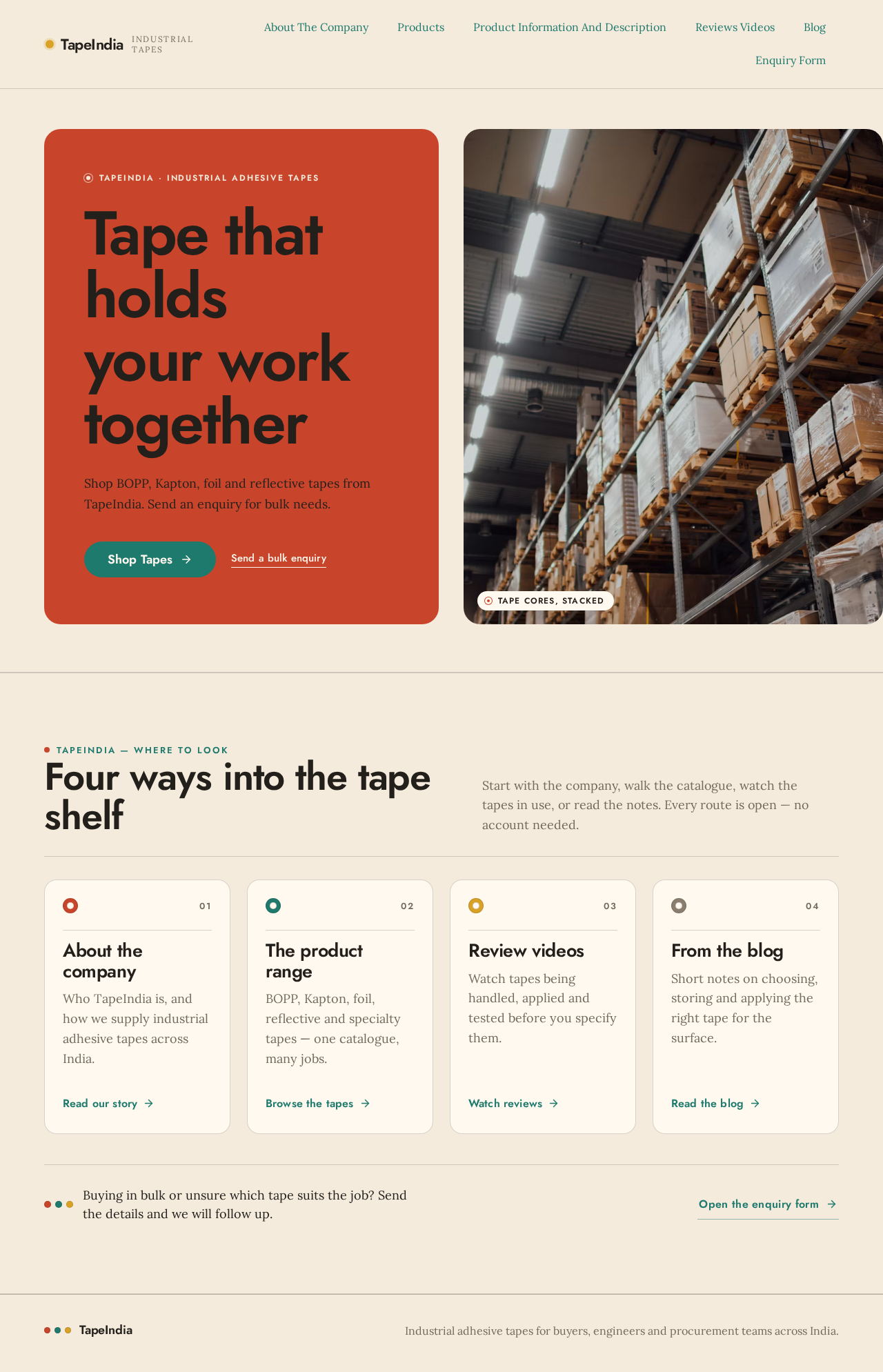
- Information and state: The public entry surface. A full-width cream band holds a large tomato-red colour block on the left carrying the Jost headline "Tape that holds your work together" in walnut ink, with the subline "Shop BOPP, Kapton, foil and reflective tapes from TapeIndia. Send an enquiry for bulk needs." and the teal "Shop Tapes" button beneath it. A warm still-life photograph of stacked tape rolls fills the right half and bleeds off the edge. Below the hero, a gallery sequence introduces the company, the product range, review videos and the blog, each as one restrained reveal.
- Primary actions: "Shop Tapes" routes to Products. Supporting links route to About The Company, Reviews Videos, Blog and Enquiry Form.
- Domain entities: None owned here; the page composes presentation of the company, catalogue and content surfaces.
- Component responsibilities: Hero band (colour block, headline, subline, CTA, bleeding photograph); section gallery panels with thin walnut rules and circular tape-core dots; navigation to every other destination.
- States: Loading — hero copy and imagery render immediately as static layout, gallery panels fade in once. Empty — not applicable. Success — all destinations reachable. Error — if a gallery panel's imagery fails, the panel keeps its heading, rule and link so navigation is never lost. Recovery — visitor uses the persistent navigation to reach any destination directly.
About The Company
- Information and state: Company information about TapeIndia, presented as short reading lines on cream ground with walnut rules dividing sections. Content is the company material the TapeIndia team maintains.
- Primary actions: Read the company information; continue to Products or Enquiry Form via navigation.
- Domain entities: Company information content.
- Component responsibilities: Sectioned prose blocks; thin walnut rules; supporting still-life imagery of tape rolls on wood and paper.
- States: Loading — section skeleton with rules in place. Empty — if a section has no content, it is omitted rather than shown blank. Success — full company information readable. Error — a failed section renders its heading with a short unavailable notice. Recovery — visitor reloads or continues to another destination.
Products
- Information and state: The product list, showing every uploaded product: Bopp Tape Brown, Bopp Tape Transparent, Floor Marking Tape, Kraft Paper Tape, Kapton Tape, Copper Conductive Adhesive Tape, Aluminium Foil Tape, Surface Protection Tape, Green Polyester Tape, Cross Filament Tape, 3M Fa Tape, Thermal Conductive Tape, Retro Reflective Tape, Grey Reflective Polyester Tape, Grey Reflective Tc Fabric Tape, Reflective Ribbon Tape, Acrylic Foam Tape, Double Sided Tissue Tape, Sunsui Double Sided Tape and Red Polyester Tape. On desktop the page runs as a horizontal filmstrip of modular panels; on mobile it becomes a stacked reel. Each tile carries a coloured tape-core dot and a thin walnut rule like a museum label.
- Primary actions: Browse the filmstrip; open a product's separate page. Supporting: reach the Enquiry Form.
- Domain entities: Product (name, tile imagery, link to its product page).
- Component responsibilities: Filmstrip/reel container with horizontal scrolling on desktop and vertical stacking on mobile; product tile with tape-core dot, walnut rule, product name and link; upload-maintained ordering of tiles.
- States: Loading — tiles appear as labelled placeholders with rules and dots. Empty — if no products are uploaded, a short message states the catalogue is being prepared and links to the Enquiry Form. Success — all uploaded products visible and each tile opens its page. Error — a tile whose imagery fails keeps its name, dot and rule and remains openable. Recovery — horizontal scroll or vertical scroll brings every tile fully into view; with reduced motion the reel wraps into rows so each tile can be brought fully into view.
Product Information And Description
- Information and state: A separate page for each listed product, carrying the manually uploaded product information and description, the product name as a large Jost heading, and a Buy Now button rendered as a mustard sticker shape with a small folded corner. Twenty separate pages exist, one per listed product.
- Primary actions: Read the product information and description; press Buy Now to purchase. Supporting: open the Enquiry Form for bulk needs.
- Domain entities: Product information and description content; product identity; Buy Now action.
- Component responsibilities: Product heading; description body in Lora; Buy Now sticker button; supporting macro imagery of adhesive texture and colour; link to Enquiry Form.
- States: Loading — heading and Buy Now render first, description body follows. Empty — if a product's description has not yet been uploaded, the page shows the product name and Buy Now with a short notice that details are being added. Success — description readable and Buy Now available. Error — a failed description load shows the notice and keeps Buy Now usable. Recovery — visitor reloads, or proceeds via Buy Now or the Enquiry Form.
Reviews Videos
- Information and state: Review videos uploaded manually by the TapeIndia team, presented as a gallery of video panels with warm still-life framing and thin walnut rules.
- Primary actions: Play a review video. Supporting: continue to Products or Enquiry Form.
- Domain entities: Review video (title, video media reference).
- Component responsibilities: Video gallery panels; player surface; tape-core dot labels.
- States: Loading — panel frames with rules appear before media. Empty — if no videos are uploaded, a short message states reviews are coming soon. Success — videos play. Error — a video that fails to load shows its title with a retry control. Recovery — retry, or continue browsing.
Blog
- Information and state: Blog posts presented for the visitor to read, laid out as a gallery sequence of modular panels with wide margins and short reading lines.
- Primary actions: Read a blog post. Supporting: continue to Products or Enquiry Form.
- Domain entities: Blog post (title, body, imagery).
- Component responsibilities: Post panels with walnut rules; reading layout with short line lengths.
- States: Loading — post panel skeletons. Empty — if no posts exist, a short message states posts are coming soon. Success — posts readable. Error — a failed post shows its title with an unavailable notice. Recovery — return to the list and open another post.
Enquiry Form
- Information and state: A lead-generating form with exactly these fields: Name, Phone, Company Name, Email id, Requirements. Publicly reachable, no account needed. On submit the lead is saved in the app and then transferred to Google Sheets or a CRM system.
- Primary actions: Enter the five fields and submit the enquiry. Supporting: return to Products.
- Domain entities: Enquiry lead (name, phone, company name, email id, requirements, submission time, transfer status).
- Component responsibilities: Five labelled inputs; validation messaging; submit control in tomato red; confirmation panel; background transfer status handled by the backend.
- States: Loading — submit control shows progress while the lead is saved. Empty — blank form with all five fields. Success — confirmation that the enquiry was received and the company will follow up. Error — field-level validation messages for missing or malformed name, phone, email or requirements; a save failure keeps the entered values and offers retry. Recovery — values are preserved on failure so the visitor can resubmit without retyping.
3. Functional Requirements
FR-1 — Online shopping app for TapeIndia (explicit) As a Shopper I should use a TapeIndia online shopping app so that I can browse and buy industrial tapes.
- Trigger: visitor opens the app. Observable result: the Landing page presents TapeIndia and routes to every destination. Access: public, no account. Failure/recovery: if a destination is unreachable, persistent navigation still exposes the others. Continuation: visitor proceeds to Products.
FR-2 — About the Company page (explicit) As a Shopper I should read an About The Company page so that I understand who TapeIndia is.
- Trigger: visitor opens About The Company. Observable result: company information is displayed in readable sections. Access: public. Failure/recovery: a failed section shows its heading with an unavailable notice. Continuation: visitor moves to Products or the Enquiry Form.
FR-3 — Products page with uploaded products (explicit) As a Shopper I should see a Products page listing the products TapeIndia has uploaded so that I can find the tape I need.
- Trigger: visitor opens Products. Observable result: the uploaded product list is shown as a filmstrip on desktop and a stacked reel on mobile. Access: public. Failure/recovery: a tile with failed imagery keeps its name and link. Continuation: visitor opens a product page.
FR-4 — Manual product upload (explicit) As a Content Uploader I should upload products so that the Products page shows the current catalogue.
- Trigger: Content Uploader adds a product. Observable result: the product appears on Products with its own tile and its separate page. Access: manual upload by the TapeIndia team, outside the visitor-facing surfaces. Failure/recovery: an incomplete upload does not publish a broken tile. Continuation: the product is available to shoppers.
FR-5 — Reviews Videos page with manual video upload (explicit) As a Shopper I should watch review videos on a Reviews Videos page so that I can judge tapes before buying.
- Trigger: visitor opens Reviews Videos. Observable result: manually uploaded review videos are listed and playable. Access: public. Failure/recovery: a failed video shows its title with retry. Continuation: visitor continues to Products or the Enquiry Form.
FR-6 — Manual review video upload (explicit) As a Content Uploader I should upload review videos manually so that the Reviews Videos page stays current.
- Trigger: Content Uploader adds a review video. Observable result: the video appears on Reviews Videos. Access: manual upload by the TapeIndia team. Failure/recovery: an incomplete upload is not published. Continuation: shoppers can play the new video.
FR-7 — Blog page (explicit) As a Shopper I should read a Blog page so that I can learn more from TapeIndia.
- Trigger: visitor opens Blog. Observable result: blog posts are listed and readable. Access: public. Failure/recovery: a failed post shows its title with an unavailable notice. Continuation: visitor returns to the list or moves to Products.
FR-8 — Product Information and Description page with manual upload (explicit) As a Shopper I should read a Product Information And Description page so that I understand a product's details before buying.
- Trigger: visitor opens a product's page. Observable result: the manually uploaded information and description are shown with the product name and Buy Now. Access: public. Failure/recovery: a missing description shows a short notice while Buy Now stays usable. Continuation: visitor presses Buy Now or opens the Enquiry Form.
FR-9 — Manual product information and description upload (explicit) As a Content Uploader I should upload product information and description manually so that each product page carries accurate details.
- Trigger: Content Uploader adds or updates a product's information and description. Observable result: the product page shows the uploaded content. Access: manual upload by the TapeIndia team. Failure/recovery: an incomplete upload leaves the previous content in place. Continuation: shoppers read the updated details.
FR-10 — Enquiry Form generating leads (explicit) As an Enquiry Lead Submitter I should submit an enquiry with my name, phone, company name, email id and requirements so that TapeIndia follows up on my need.
- Trigger: visitor completes the five fields and submits. Observable result: a confirmation that the enquiry was received. Access: public, no account. Failure/recovery: field-level validation for missing or malformed values; a save failure preserves entered values and offers retry. Continuation: the visitor may return to Products.
FR-11 — Buy Now button for products (explicit) As a Shopper I should press Buy Now on a product so that I can purchase it.
- Trigger: visitor presses the mustard sticker Buy Now button on a product page. Observable result: the purchase action for that product is initiated. Access: public. Failure/recovery: if the purchase action cannot start, the button reports the failure and remains available. Continuation: the visitor can retry or send an enquiry instead.
FR-12 — The twenty listed products (explicit) As a Shopper I should find Bopp Tape Brown, Bopp Tape Transparent, Floor Marking Tape, Kraft Paper Tape, Kapton Tape, Copper Conductive Adhesive Tape, Aluminium Foil Tape, Surface Protection Tape, Green Polyester Tape, Cross Filament Tape, 3M Fa Tape, Thermal Conductive Tape, Retro Reflective Tape, Grey Reflective Polyester Tape, Grey Reflective Tc Fabric Tape, Reflective Ribbon Tape, Acrylic Foam Tape, Double Sided Tissue Tape, Sunsui Double Sided Tape and Red Polyester Tape in the catalogue so that I can choose the right tape.
- Trigger: visitor browses Products. Observable result: all twenty named products are present as tiles. Access: public. Failure/recovery: a tile with failed imagery keeps its name. Continuation: visitor opens the product's page.
FR-13 — Separate page per listed product (explicit) As a Shopper I should open a separate page for each listed product so that I can read that product's own information and description.
- Trigger: visitor selects a product tile. Observable result: that product's own page opens with its name, description and Buy Now. Access: public. Failure/recovery: a missing description shows a notice while Buy Now stays usable. Continuation: visitor presses Buy Now or opens the Enquiry Form.
FR-14 — Save enquiry leads in the app (explicit; save-before-transfer mechanics required_inference) As an Enquiry Lead Submitter I should have my enquiry saved in the app so that TapeIndia does not lose my lead.
- Trigger: visitor submits the Enquiry Form. Observable result: the lead is persisted in the app before any transfer is attempted. Access: public submission; the saved record is application-owned. Failure/recovery: if saving fails, the visitor sees an error, keeps entered values and can retry. Continuation: the saved lead is queued for transfer.
FR-15 — Transfer enquiry leads to Google Sheets or a CRM system (explicit; transfer of saved leads required_inference) As a TapeIndia lead manager I should have saved enquiry leads transferred to Google Sheets or a CRM system so that lead management is better.
- Trigger: a lead is saved. Observable result: the lead is transferred to Google Sheets or the CRM system and its transfer status is recorded. Access: background work owned by the backend. Failure/recovery: a failed transfer leaves the saved lead intact and retryable. Continuation: the lead remains available in the app and is retried for transfer.
4. User Personas
Shopper
The Shopper is a buyer, engineer or procurement contact in India looking for industrial adhesive tape. Their context is the public app: they arrive at Landing, read About The Company to judge the supplier, browse the Products filmstrip, open a product's own page to read its information and description, watch review videos, and read the blog. Their primary goal is to find the right tape and either purchase it with Buy Now or send an enquiry for bulk needs. Their distinct decisions are which tape among the twenty listed products fits the job, and whether to buy now or enquire. They interact with the Enquiry Lead Submitter role when they choose to enquire, and with the Content Uploader only indirectly, through the products, descriptions and videos that person keeps current. Observable success: they reach a product page, read its description, and either press Buy Now or submit an enquiry and see confirmation.
Enquiry Lead Submitter
The Enquiry Lead Submitter is a visitor with a concrete requirement — often bulk or specification-driven — who uses the Enquiry Form rather than buying immediately. Their context is the public form; they supply exactly Name, Phone, Company Name, Email id and Requirements. Their primary goal is to have TapeIndia follow up on their requirement. Their distinct responsibility is providing accurate contact and requirement details; their distinct decision is what to state in Requirements. They interact with the Shopper role when a product page routes them to enquire, and with the TapeIndia lead manager on the receiving side, who works from the saved lead and its transfer to Google Sheets or the CRM system. Observable success: a confirmation that the enquiry was received, with their lead saved in the app and transferred onward.
Content Uploader
The Content Uploader is the TapeIndia team member who keeps the catalogue and reviews current. Their context is manual upload work: adding products to the Products page, writing each product's information and description for its separate page, and uploading review videos to the Reviews Videos page. Their primary goal is that shoppers always see the current catalogue and honest product detail. Their distinct responsibility is completeness — a product without a description shows a notice rather than invented copy. They interact with the Shopper, whose browsing depends on their uploads, and with the Enquiry Lead Submitter only indirectly. Observable success: uploaded products appear as tiles, each opens its own page with the uploaded description and Buy Now, and uploaded review videos play.
5. Core User Flows
Flow 1 — Shopper discovers TapeIndia and browses the catalogue
- Shopper opens the app and lands on Landing, seeing the cream band, tomato-red block, headline "Tape that holds your work together", subline and teal Shop Tapes button.
- Shopper presses Shop Tapes and arrives on Products.
- Products shows the filmstrip of modular panels on desktop (stacked reel on mobile), each tile with a coloured tape-core dot and thin walnut rule, covering all twenty listed products.
- Shopper scrolls the filmstrip; every tile becomes fully readable as it passes.
- Shopper selects a tile and continues to Flow 2.
Flow 2 — Shopper reads a product and decides to buy
- Shopper opens the product's own Product Information And Description page; the product name appears as a large Jost heading with the manually uploaded information and description.
- Shopper reads the description and supporting macro imagery.
- Shopper presses the mustard sticker Buy Now button.
- The purchase action for that product is initiated and the Shopper sees it start.
- If the action cannot start, the button reports the failure and stays available; the Shopper retries or continues to Flow 3.
- If the description has not been uploaded, the page shows the product name, Buy Now and a short notice that details are being added.
Flow 3 — Shopper sends an enquiry for bulk needs
- From a product page or navigation, Shopper opens the Enquiry Form.
- Shopper enters Name, Phone, Company Name, Email id and Requirements.
- Shopper submits; the submit control shows progress while the lead is saved in the app.
- If a field is missing or malformed, the form shows a field-level message and the Shopper corrects it.
- If saving fails, the entered values are preserved and the Shopper retries.
- On success the Shopper sees confirmation that the enquiry was received and that TapeIndia will follow up.
Flow 4 — Enquiry Lead Submitter's lead reaches lead management
- The Enquiry Lead Submitter's saved lead is held in the app with its transfer status.
- The backend transfers the lead to Google Sheets or the CRM system.
- The TapeIndia lead manager sees the lead in Google Sheets or the CRM system and follows up with the submitter.
- If the transfer fails, the saved lead remains intact in the app and is retried; nothing the submitter entered is lost.
Flow 5 — Shopper reads about the company, watches reviews and reads the blog
- Shopper opens About The Company and reads the company information in short, ruled sections.
- Shopper opens Reviews Videos and plays a manually uploaded review video; if a video fails, its title shows with a retry control.
- Shopper opens Blog and reads a post; if a post fails, its title shows with an unavailable notice and the Shopper returns to the list.
- Shopper continues to Products or the Enquiry Form.
Flow 6 — Content Uploader keeps the catalogue and reviews current
- Content Uploader adds a product; it appears on Products as a tile and gains its own Product Information And Description page.
- Content Uploader writes that product's information and description; the product page shows the uploaded content.
- Content Uploader uploads a review video; it appears on Reviews Videos and plays for shoppers.
- If an upload is incomplete, it is not published and the previous content stays in place.
- Shoppers now see the current catalogue, descriptions and reviews.
6. Visuals Colors and Theme
Muse and headline: Charles & Ray Eames — warm modernism for an industrial tape catalogue. The app must feel honest, ordered and warm, not cold or technical.
Colour tokens (light mode):
- Background — cream
#F4EBDD(60% of surface) - Surface —
#FFF9EF - Text — walnut ink
#23201C(25%) - Primary — tomato red
#C8452B(Buy Now and active states) - Accent — teal
#1F7A6E(links and labels) - Muted —
#8A7F6E - Tag — mustard
#D9A227(small tags only)
Typography:
- Headings — Jost, weight 600, tight tracking, sentence case, large sizes for product names and section titles.
- Body — Lora.
- Scale — 1.333 modular: 56 / 40 / 30 / 22 / 18 / 16 px; mobile display starts at 36px, desktop reaches 96px. Headlines use
clamp(...)with the mobile size as its floor so they stay whole at 375px, 768px and 1280px. - No Inter, Roboto or system-ui.
Shape language: Soft rounded rectangles and capsule tags; thin walnut rules divide sections; small circular colour dots echo tape cores.
Layout: A gallery sequence on a 12-column grid; products sit in modular panels with wide margins and short reading lines.
Imagery: Warm still-life photographs of tape rolls on wood and paper; close macro shots show adhesive texture and colour.
Avoid: No blue or indigo accents on white; no gradient blobs or glass panels; no identical hover-lift card grid.
7. Signature Design Concept
The public entry is a full-width cream band split by a large tomato-red colour block on the left. Over that block sits the Jost headline "Tape that holds your work together" in walnut ink at 96px on desktop and 36px on mobile, with the subline "Shop BOPP, Kapton, foil and reflective tapes from TapeIndia. Send an enquiry for bulk needs." and the teal Shop Tapes button beneath it. A warm still-life photograph of stacked tape rolls fills the right half and bleeds off the edge — the only element allowed to run past the frame. Below, the gallery sequence introduces the company, the product range, review videos and the blog, each panel carrying a coloured tape-core dot and a thin walnut rule like a museum label. The gesture of the bleeding photograph is carried by imagery alone; every headline, label and control stays whole inside the viewport and its container.
8. Interaction Model & Motion Direction
Interaction Model: Animated Motion Tempo: restrained Hero Dimensionality: layered_2d
Landing Hero Motion Brief
- Focal subject: the warm still-life photograph of stacked tape rolls bleeding off the right edge, against the tomato-red block.
- Input → transformation → outcome thesis: as the page settles, the tomato-red block and the Jost headline fade in as one slow film-like reveal, then the tape photograph pans gently into its bleeding position; the teal Shop Tapes button resolves last, ready to route to Products.
- Motion vocabulary: slow film-like fades and gentle pans; one reveal per section; no bounce.
- Composed first frame: cream band, tomato-red block left, headline and subline in walnut ink, teal button beneath, photograph entering from the right edge.
- Reduced-motion state: the hero renders fully composed and static — block, headline, subline, button and photograph in final position, with no fade or pan.
9. Non-Functional Requirements
- NFR-1 — Public access (explicit via page contract): Every destination — Landing, About The Company, Products, Product Information And Description, Reviews Videos, Blog and Enquiry Form — is reachable without an account. No sign-in or registration exists.
- NFR-2 — Durable lead storage (explicit): Enquiry leads are persisted in application-owned storage (MariaDB) before transfer, so a transfer failure never loses a lead.
- NFR-3 — Transfer resilience (required_inference): Lead transfer to Google Sheets or the CRM system records its status and is retryable without duplicating the visitor's submission.
- NFR-4 — Readable at every viewport (explicit design constraint): Headlines, wordmarks, labels, numbers, card text and controls stay entirely inside the viewport and their container at 375px, 768px and 1280px, wrapping or scaling to fit; no element covers any part of them. Imagery and decoration may bleed, crop or overlap freely.
- NFR-5 — Scrollable content legibility (explicit design constraint): The Products filmstrip may cross the container edge by design; every tile becomes fully readable as it passes. With
prefers-reduced-motion, the reel wraps into rows or scrolls horizontally so each tile can be brought fully into view. - NFR-6 — Manual content integrity (required_inference): An incomplete manual upload never replaces published content with a broken state; the previous content stays in place.
10. Tech Stack
- Frontend: React application UI.
- Backend: shared FastAPI process for application APIs and domain modules, including the enquiry lead save and the background transfer to Google Sheets or the CRM system.
- Database: MariaDB for application-owned persistent data, including saved enquiry leads and their transfer status.
- Infrastructure: docker-compose with the backend, database and frontend services.
11. Assumptions and Constraints
- A-1 (assumption): Products, product information and descriptions, and review videos are uploaded by the TapeIndia team through manual upload work; the app presents that content and does not expose a public content editor.
- A-2 (assumption): Blog posts are presented on the Blog page for visitors to read; the source does not specify an authoring surface for them.
- A-3 (assumption): "Google Sheets or a CRM system" is satisfied by one configured destination; the app records transfer status for whichever is configured.
- A-4 (constraint): Buy Now is the accepted purchase entry point on product pages; no payment or order-management module is specified by the source.
- A-5 (constraint): The twenty listed products each have their own separate page; the list is not collapsed into categories.
- A-6 (constraint): The Enquiry Form collects exactly Name, Phone, Company Name, Email id and Requirements.
- A-7 (constraint): No blue or indigo accents on white, no gradient blobs or glass panels, no identical hover-lift card grid, and no Inter, Roboto or system-ui fonts.
12. Glossary
- BOPP Tape — biaxially oriented polypropylene tape, listed in brown and transparent.
- Kapton Tape — polyimide tape for high-temperature masking.
- Buy Now — the mustard sticker-shaped purchase button on each product page.
- Enquiry Lead — a saved record of Name, Phone, Company Name, Email id and Requirements submitted through the Enquiry Form.
- Filmstrip — the horizontal sequence of product panels on the Products page on desktop; the stacked reel on mobile.
- Tape-core dot — the small circular colour dot on product tiles and panels, echoing a tape roll's core.
- Manual upload — the TapeIndia team's act of adding products, product information and descriptions, and review videos.
Tape that holds your work together
Shop BOPP, Kapton, foil and reflective tapes from TapeIndia. Send an enquiry for bulk needs.

Four ways into the tape shelf
Start with the company, walk the catalogue, watch the tapes in use, or read the notes. Every route is open — no account needed.
- 01
About the company
Who TapeIndia is, and how we supply industrial adhesive tapes across India.
Read our story - 02
The product range
BOPP, Kapton, foil, reflective and specialty tapes — one catalogue, many jobs.
Browse the tapes - 03
Review videos
Watch tapes being handled, applied and tested before you specify them.
Watch reviews - 04
From the blog
Short notes on choosing, storing and applying the right tape for the surface.
Read the blog
Buying in bulk or unsure which tape suits the job? Send the details and we will follow up.
Tape that holds your work together
Shop BOPP, Kapton, foil and reflective tapes from TapeIndia. Send an enquiry for bulk needs.
Four ways into the tape shelf
Start with the company, walk the catalogue, watch the tapes in use, or read the notes. Every route is open — no account needed.
- 01
About the company
Who TapeIndia is, and how we supply industrial adhesive tapes across India.
Read our story - 02
The product range
BOPP, Kapton, foil, reflective and specialty tapes — one catalogue, many jobs.
Browse the tapes - 03
Review videos
Watch tapes being handled, applied and tested before you specify them.
Watch reviews - 04
From the blog
Short notes on choosing, storing and applying the right tape for the surface.
Read the blog
Buying in bulk or unsure which tape suits the job? Send the details and we will follow up.
No comments yet. Be the first!