tapeindia-kapton-tape
 Gaurav. Jain
Hi Make A Landing Page Fir Tapeindia It Has Products,Price And WhatsApp Enquiry And Phone No:[phone] /9841137052 And Enquiry Form For Genrting Leads And Compnay Name,Requrent And Save Leads In Website So We Can Upload Ot In Google Sheets And Separte Page For Blogs, Separte Page For Videos,Separte Page For Products,Separate Page For Applications And Website Loading Speed Should Fast And Make This Landing Page Animated And Show The Vidoe Is Running As Animation Vidoe As Kapton Tape Use For High Temperature Applications For Semiconductors,Batteries


Comments (0)
Sign in to leave a comment
System Requirements
System Requirements Document for Tapeindia
1. Introduction
Tapeindia is a public product website for Kapton (polyimide) tape used in high-temperature industrial applications, specifically semiconductor manufacturing and battery production lines. The site is built for Gaurav Jain and the Tapeindia business to present products with prices, publish application guidance, blogs and videos, and capture sales enquiries as leads that the business can export to Google Sheets.
The audience is twofold. First, engineers, procurement buyers and technical visitors who need fast proof that Kapton tape suits high-temperature semiconductor and battery work, and who want a price and a quick quote. Second, the business's own lead manager, who reviews the leads the website saves and uploads them to Google Sheets.
This document is the System Requirements Document for the Tapeindia website. It specifies the public pages (Landing, Products, Applications, Blogs, Videos), the lead capture and lead management capability (Leads, Login), the contact channels (WhatsApp enquiry and the phone numbers 9840647096 and 9841137052), the animation and running-video requirements, and the fast-loading constraint.
2. System Overview
Tapeindia is delivered as a React front-end served alongside a shared FastAPI backend and a MariaDB database. The public pages are anonymously reachable. The lead manager's Leads page is protected and requires identity verification through the Login page.
Current actors are the Website Visitor, who browses products, prices, applications, blogs and videos and makes contact by WhatsApp, phone or the enquiry form, and the Lead Manager, who signs in, reviews saved leads and uploads them to Google Sheets.
Current accepted behavior:
- A Landing page that shows products with prices, the phone numbers 9840647096 and 9841137052, a WhatsApp enquiry option, an enquiry form collecting company name and requirement, a running video shown as an animation, and animated presentation.
- Separate Products, Applications, Blogs and Videos pages.
- Applications content stating that Kapton tape is used for high-temperature applications in semiconductors and batteries.
- Leads submitted through the enquiry form are saved in the website's own storage.
- The Lead Manager signs in on the Login page and, on the Leads page, views saved leads and uploads them to Google Sheets.
- Fast website loading speed.
Narrow exclusions: the site does not include online checkout, payment, order fulfilment, customer accounts for visitors, or a public lead database. Google Sheets is an export destination controlled by the Lead Manager, not a page of this site.
Removed from scope
- None. No concept from the authoritative requirement thread was removed or superseded.
2a. Product Interpretation and Delivery Boundary
Tapeindia is a first-party marketing and lead-capture website. All public content pages (Landing, Products, Applications, Blogs, Videos) are owned and rendered by the application and are reachable without an account. The enquiry form writes leads into the application's own database; the site does not send leads to a third party at submission time.
The WhatsApp enquiry option hands the visitor off to WhatsApp, which is an external provider surface: the visitor composes and sends the message there, and Tapeindia receives it in its WhatsApp channel. Phone links hand off to the device's dialer. Neither handoff is a page of this site.
Lead management is application-owned and protected. Because saved leads are durable business records that must remain bound to the correct person and be resumable, the Lead Manager has an application-owned identity: the account is provisioned for the lead manager before first login, and the Lead Manager verifies identity on the Login page before viewing or uploading leads. The Login page is anonymously reachable so that verification can occur; the Leads page is not reachable until identity is verified. No visitor-facing account, registration, or profile capability exists.
The running video on the Landing page is a first-party presentation element of the Landing page, not a separate destination; the Videos page is the separate destination for video content.
2b. Source Content Inventory
Not applicable — no reference directive with content_source was supplied.
2c. Page Content and Component Coverage
Landing
- Information and state: Tapeindia identity; hero headline "Kapton tape for high heat"; subline "Polyimide tape for semiconductors and battery lines. Get a price and a quote on WhatsApp."; call to action "Get a quote"; a looping muted running video presented as an animation; product list with prices; the phone numbers 9840647096 and 9841137052; WhatsApp enquiry option; enquiry form; a ticker tape reading HIGH TEMPERATURE APPLICATIONS.
- Primary actions: Watch the running video; browse products and prices; tap a phone number to call; tap WhatsApp enquiry to open WhatsApp; submit the enquiry form.
- Supporting actions: Navigate to Products, Applications, Blogs and Videos; use the "Get a quote" call to action to reach the enquiry form.
- Domain entities: Product (name, price), Lead (company name, requirement, and the contact details captured by the form), Contact channel (phone numbers, WhatsApp).
- Component responsibilities:
- Hero block: headline, subline, call to action, and the running video occupying the right portion of the hero on wide viewports and stacking on narrow ones.
- Phone label tags: render 9840647096 and 9841137052 as tappable call links.
- WhatsApp enquiry control: opens a WhatsApp conversation for the visitor.
- Product and price rows: list products with prices in orange price stamps on exposed hairline grid lines.
- Enquiry form: fields for company name and requirement, styled as industrial shipping labels with small caps field names; submits the lead to the site.
- Ticker tape: slow orange marquee with HIGH TEMPERATURE APPLICATIONS.
- States:
- Loading: hero video poster frame shown while the video loads; page content renders without waiting for the video.
- Empty: if no products are available, the product area shows a plain message rather than an empty grid.
- Success: enquiry form confirms the lead was saved.
- Error: enquiry form shows a validation message when company name or requirement is missing, and a retry message if saving fails, preserving the entered values.
- Recovery: visitor can resubmit after a failed save.
- Reduced motion: ticker and label flips become static; the video does not autoplay and a play control is offered.
Products
- Information and state: The full product list with names and prices.
- Primary actions: Review products and prices; move to the enquiry form or WhatsApp enquiry to ask for a quote.
- Supporting actions: Navigate to Applications, Blogs, Videos and Landing.
- Domain entities: Product (name, price).
- Component responsibilities: Product rows with exposed hairline grid lines and orange price stamps; a route back to the enquiry form on Landing.
- States: Loading (skeleton rows); empty (plain message when no products exist); error (retry message if products fail to load).
Applications
- Information and state: Application guidance stating that Kapton tape is used for high-temperature applications in semiconductors and batteries.
- Primary actions: Read the semiconductor and battery application content; proceed to enquiry.
- Supporting actions: Navigate to Products, Blogs, Videos and Landing.
- Domain entities: Application (name, description) covering semiconductors and batteries.
- Component responsibilities: Application sections for semiconductors and batteries; enquiry call to action.
- States: Loading; empty (plain message if no application content is published); error (retry message).
Blogs
- Information and state: A list of blog entries with titles and readable content.
- Primary actions: Read blog entries.
- Supporting actions: Navigate to Products, Applications, Videos and Landing.
- Domain entities: Blog entry (title, body).
- Component responsibilities: Blog list and reading view.
- States: Loading; empty (plain message when no blogs are published); error (retry message).
Videos
- Information and state: A list of videos with playable playback.
- Primary actions: Play a video.
- Supporting actions: Navigate to Products, Applications, Blogs and Landing.
- Domain entities: Video (title, media reference).
- Component responsibilities: Video list and player.
- States: Loading; empty (plain message when no videos are published); error (retry message if a video fails to load).
Leads
- Information and state: The saved leads, each with company name and requirement, shown only to a verified Lead Manager.
- Primary actions: Review saved leads; upload the saved leads to Google Sheets.
- Supporting actions: Sign out; return to the public site.
- Domain entities: Lead (company name, requirement, captured contact details, saved timestamp); Google Sheets upload result.
- Component responsibilities: Leads table; upload-to-Google-Sheets control with progress and result feedback.
- States: Loading; empty (plain message when no leads have been saved); success (confirmation that leads were uploaded to Google Sheets); error (message and retry when the upload fails); unauthenticated (redirect to Login).
Login
- Information and state: Identity verification form for the provisioned Lead Manager account.
- Primary actions: Enter credentials and verify identity.
- Supporting actions: Return to the public site.
- Domain entities: Lead Manager account (provisioned).
- Component responsibilities: Credential form; error messaging for invalid credentials.
- States: Idle; submitting; error (invalid credentials, with retry); success (redirect to Leads).
3. Functional Requirements
FR-1 — Landing shows products with prices (explicit) As a Website Visitor I should see Tapeindia products with their prices on the Landing page so that I can judge what to buy before enquiring.
- Trigger: visitor opens Landing.
- Observable result: product rows with names and prices render on the Landing page.
- Access: anonymous.
- Failure/recovery: if products fail to load, a retry message appears and the rest of the page remains usable.
- Continuation: visitor can move to Products or the enquiry form.
FR-2 — Landing shows the phone numbers (explicit) As a Website Visitor I should see the phone numbers 9840647096 and 9841137052 on the Landing page so that I can call Tapeindia directly.
- Trigger: visitor opens Landing.
- Observable result: both numbers appear as tappable call links.
- Access: anonymous.
- Failure/recovery: if a device cannot place a call, the number remains visible and readable.
- Continuation: visitor returns to browsing or uses WhatsApp or the enquiry form.
FR-3 — WhatsApp enquiry option (explicit) As a Website Visitor I should have a WhatsApp enquiry option on the Landing page so that I can ask for a quote in a conversation.
- Trigger: visitor activates the WhatsApp enquiry control.
- Observable result: the visitor is handed off to WhatsApp to compose and send the enquiry; Tapeindia receives it in its WhatsApp channel.
- Access: anonymous.
- Failure/recovery: if WhatsApp is unavailable on the device, the phone numbers and enquiry form remain available as alternatives.
- Continuation: visitor may also submit the enquiry form.
FR-4 — Enquiry form collects company name and requirement (explicit) As a Website Visitor I should be able to submit an enquiry form with my company name and my requirement so that Tapeindia can generate a lead from my enquiry.
- Trigger: visitor fills company name and requirement and submits.
- Observable result: the lead is accepted and the visitor sees a confirmation.
- Access: anonymous.
- Failure/recovery: missing company name or requirement shows a validation message; a failed save shows a retry message and preserves entered values.
- Continuation: visitor can submit again or continue browsing.
FR-5 — Leads are saved in the website (explicit) As the website I should save each submitted lead in the website's own storage so that the Lead Manager can later upload the leads to Google Sheets.
- Trigger: a valid enquiry form submission.
- Observable result: a durable lead record with company name and requirement is stored.
- Access: system-side, initiated by the anonymous visitor's submission.
- Failure/recovery: a failed write surfaces the retry state in FR-4 and does not show a false confirmation.
- Continuation: the lead becomes available on the Leads page to a verified Lead Manager.
FR-6 — Separate Blogs page (explicit) As a Website Visitor I should have a separate Blogs page so that I can read Tapeindia's blog content.
- Trigger: visitor navigates to Blogs.
- Observable result: blog entries are listed and readable.
- Access: anonymous.
- Failure/recovery: empty and error states with retry.
- Continuation: visitor navigates to other pages.
FR-7 — Separate Videos page (explicit) As a Website Visitor I should have a separate Videos page so that I can watch Tapeindia's videos.
- Trigger: visitor navigates to Videos.
- Observable result: videos are listed and playable.
- Access: anonymous.
- Failure/recovery: empty and error states with retry.
- Continuation: visitor navigates to other pages.
FR-8 — Separate Products page (explicit) As a Website Visitor I should have a separate Products page so that I can review the full product list with prices.
- Trigger: visitor navigates to Products.
- Observable result: the product list with prices renders.
- Access: anonymous.
- Failure/recovery: empty and error states with retry.
- Continuation: visitor proceeds to enquiry.
FR-9 — Separate Applications page (explicit) As a Website Visitor I should have a separate Applications page so that I can understand where Kapton tape is used.
- Trigger: visitor navigates to Applications.
- Observable result: application content renders.
- Access: anonymous.
- Failure/recovery: empty and error states with retry.
- Continuation: visitor proceeds to enquiry.
FR-10 — Kapton tape high-temperature application content (explicit) As a Website Visitor I should read that Kapton tape is used for high-temperature applications in semiconductors and batteries so that I can confirm it suits my process.
- Trigger: visitor reads the Applications page (and the Landing hero copy).
- Observable result: semiconductor and battery high-temperature applications are stated.
- Access: anonymous.
- Failure/recovery: covered by FR-9 error state.
- Continuation: visitor proceeds to enquiry.
FR-11 — Fast loading (explicit) As a Website Visitor I should experience fast page loading so that I can reach product and price information without waiting.
- Trigger: any page load.
- Observable result: pages render quickly; the hero video does not block first content.
- Access: anonymous.
- Failure/recovery: on slow connections, content renders before media and the video loads progressively.
- Continuation: visitor browses normally.
FR-12 — Animated Landing page (explicit) As a Website Visitor I should see an animated Landing page so that the presentation feels alive and on-brand.
- Trigger: visitor opens Landing.
- Observable result: label flips, the orange ticker tape, and the running video animate.
- Access: anonymous.
- Failure/recovery: with reduced motion, a static arrangement remains fully usable.
- Continuation: visitor browses normally.
FR-13 — Running video shown as animation (explicit) As a Website Visitor I should see a running video presented as an animation on the Landing page so that I can see Kapton tape in a semiconductor and battery line.
- Trigger: visitor opens Landing.
- Observable result: a muted looping video plays in the hero.
- Access: anonymous.
- Failure/recovery: poster frame shown while loading; reduced motion offers a play control instead of autoplay.
- Continuation: visitor browses products or enquires.
FR-14 — Lead Manager signs in (required_inference) As a Lead Manager I should verify my identity on the Login page with my provisioned account so that I can reach the saved leads.
- Trigger: Lead Manager opens Login and submits credentials.
- Observable result: on success the Lead Manager reaches Leads; on failure an error is shown.
- Access: Login is anonymously reachable; Leads is not reachable until verified.
- Failure/recovery: invalid credentials show an error and allow retry.
- Continuation: verified Lead Manager proceeds to Leads.
FR-15 — Lead Manager views saved leads (required_inference) As a Lead Manager I should view the saved leads on the Leads page so that I can review enquiries.
- Trigger: verified Lead Manager opens Leads.
- Observable result: leads with company name and requirement are listed.
- Access: role-restricted to the verified Lead Manager.
- Failure/recovery: unauthenticated access redirects to Login; load errors offer retry.
- Continuation: Lead Manager uploads leads to Google Sheets.
FR-16 — Lead Manager uploads leads to Google Sheets (required_inference) As a Lead Manager I should upload the saved leads to Google Sheets from the Leads page so that the leads live in the business's spreadsheet.
- Trigger: Lead Manager activates upload.
- Observable result: leads are sent to Google Sheets and a success confirmation is shown.
- Access: role-restricted to the verified Lead Manager.
- Failure/recovery: a failed upload shows an error and allows retry without losing the saved leads.
- Continuation: Lead Manager returns to the lead list or signs out.
4. User Personas
Website Visitor
- Product context: An engineer, procurement buyer or technical enquirer evaluating Kapton tape for high-temperature work in semiconductor or battery production. Arrives on the public site with no account.
- Primary goal: Confirm that Tapeindia's Kapton tape suits high-temperature semiconductor and battery applications, see a price, and get a quote quickly.
- Distinct accepted responsibilities: Reads products and prices on Landing and Products; reads application guidance on Applications; reads Blogs and watches Videos; contacts Tapeindia by tapping 9840647096 or 9841137052, by WhatsApp enquiry, or by submitting the enquiry form with company name and requirement.
- Inputs and decisions: Decides which contact channel to use; decides whether to submit the form; supplies company name and requirement.
- Interactions with other participants: The submitted enquiry becomes a lead that the Lead Manager later reviews; the WhatsApp and phone enquiries reach the Tapeindia business.
- Observable success: Sees prices and application proof, and receives a confirmation that the enquiry was saved, or completes a WhatsApp or phone contact.
Lead Manager
- Product context: The Tapeindia staff member responsible for following up sales enquiries. Uses a provisioned account; does not browse as a public visitor for this work.
- Primary goal: Review the leads the website saved and get them into Google Sheets.
- Distinct accepted responsibilities: Verifies identity on Login; reviews saved leads with company name and requirement on Leads; uploads the saved leads to Google Sheets.
- Inputs and decisions: Decides when to upload; supplies credentials at login.
- Interactions with other participants: Consumes leads created by Website Visitors; the upload delivers them to the business's Google Sheets.
- Observable success: Sees the lead list and a confirmation that leads were uploaded to Google Sheets.
5. Core User Flows
Flow A — Visitor evaluates products and prices
- Website Visitor opens Landing; the hero renders with the headline, subline, "Get a quote" call to action, phone label tags and the running video.
- Visitor scrolls to the product and price rows, or navigates to Products for the full list.
- Visitor reads product names and prices in orange price stamps.
- If products fail to load, a retry message appears and the visitor can retry or continue to enquiry.
- Next step: visitor chooses a contact channel (Flow B, C or D).
Flow B — Visitor enquires via WhatsApp
- From Landing, Website Visitor activates the WhatsApp enquiry control.
- The visitor is handed off to WhatsApp and composes the enquiry there.
- Tapeindia receives the enquiry in its WhatsApp channel.
- If WhatsApp is unavailable, the visitor uses a phone number or the enquiry form instead.
Flow C — Visitor calls a phone number
- From Landing, Website Visitor taps 9840647096 or 9841137052.
- The device dialer opens with the number.
- The visitor places the call to Tapeindia.
- If calling is unavailable, the number stays visible and the visitor uses WhatsApp or the form.
Flow D — Visitor submits the enquiry form
- From Landing, Website Visitor activates "Get a quote" and reaches the enquiry form.
- Visitor enters the company name and the requirement in the shipping-label styled fields.
- Visitor submits.
- If a field is missing, a validation message appears and the visitor corrects it.
- On a valid submission the lead is saved in the website and the visitor sees a confirmation.
- If saving fails, a retry message appears with the entered values preserved; the visitor resubmits.
- Next step: the visitor continues browsing or waits for Tapeindia's follow-up.
Flow E — Visitor reads applications, blogs and videos
- Website Visitor opens Applications and reads that Kapton tape is used for high-temperature applications in semiconductors and batteries.
- Visitor opens Blogs and reads blog entries, or opens Videos and plays a video.
- Empty or error states show a plain message with retry where applicable.
- Next step: visitor proceeds to enquiry via Flow B, C or D.
Flow F — Lead Manager signs in
- Lead Manager opens Login (anonymously reachable).
- Lead Manager enters the credentials of the provisioned account and submits.
- On success the Lead Manager reaches Leads; on invalid credentials an error appears and the Lead Manager retries.
- Next step: Flow G.
Flow G — Lead Manager reviews and uploads leads
- Verified Lead Manager opens Leads; if not verified, the Lead Manager is redirected to Login (Flow F).
- Lead Manager reviews saved leads with company name and requirement.
- If no leads exist, a plain empty message is shown.
- Lead Manager activates upload to Google Sheets.
- On success a confirmation appears that leads were uploaded to Google Sheets.
- On failure an error appears and the Lead Manager retries; saved leads are not lost.
- Next step: the Lead Manager signs out or returns to the public site.
6. Visuals Colors and Theme
Authoritative creative direction: Remixed industrial precision after Virgil Abloh.
- Muse and headline: Virgil Abloh — industrial label, tag and hazard-stripe language; the tape itself is the graphic system.
- Mode: Dark.
- Colour tokens:
- Background:
#111112(graphite ground, ~70% of surface) - Surface:
#1C1C1E - Text:
#F4F2ED(off-white, ~20%) - Primary:
#F2F0EA - Accent:
#FF5A00(safety orange — prices, labels, WhatsApp button only) - Muted:
#8A8A8E
- Background:
- Typography: Headings Archivo Black, uppercase, heavy, tight tracking, quoted label phrases in small caps. Body Space Grotesk. Modular scale 1.25; display
clamp(40px, …, 112px); body sizes 28/20/16/14. - Shape language: Hard rectangles, label tags, exposed grid lines, diagonal hazard stripes. Square corners only — no rounded pills.
- Layout: 12-column exposed grid; product rows read like spec labels; prices in orange tag blocks on the right.
- Imagery: Macro shots of amber Kapton rolls on concrete; the running process video is the main image.
- Motion: Snappy 120–200 ms label flips; slow orange ticker tape; hero video muted and looping.
- Avoid: gradient blobs, soft glass panels, blue accents, white ground, rounded pill buttons, stock photos of smiling office people, centred headline with subtext and a blue button.
7. Signature Design Concept
The public entry is a full-bleed graphite stage split 5/7. The left five columns stack a clamp(40px, …, 112px) uppercase off-white headline — "KAPTON" in quotation marks — over three orange label tags carrying the phone numbers 9840647096 and 9841137052 with dashed cut lines, and a solid orange "Get a quote" block beneath. The right seven columns hold the looping muted running video of Kapton tape in a semiconductor and battery line, framed by exposed hairline grid lines. A slow orange ticker tape reading HIGH TEMPERATURE APPLICATIONS crosses the section break. Product price rows below use the same exposed grid and orange price stamps, and the enquiry form fields are drawn as industrial shipping labels with small caps field names. Every readable element stays whole and inside its container at 375px, 768px and 1280px; the gesture is carried by imagery, stripes and the ticker, never by cropping text or controls.
8. Interaction Model & Motion Direction
Interaction Model: Animated Motion Tempo: expressive Hero Dimensionality: flat
Landing Hero Motion Brief
- Focal subject: The running process video of Kapton tape in a semiconductor and battery line, filling the right seven columns.
- Thesis: On load, the graphite ground and exposed grid settle in → the uppercase headline and orange phone label tags flip in at 120–200 ms → the muted video begins looping → the orange ticker tape starts its slow continuous pass. Outcome: the visitor sees heat-resistant Kapton tape in production and the contact channels at once.
- Motion vocabulary: Snappy label flips (120–200 ms), slow orange ticker tape, muted looping hero video.
- Composed first frame: Graphite ground, off-white "KAPTON" headline with quotation marks, three orange phone label tags with dashed cut lines, solid orange "Get a quote" block, video poster frame on the right, ticker at the section break.
- Reduced-motion state: Ticker and label flips become static; the video does not autoplay and a play control is offered; all text and controls remain fully readable.
9. Non-Functional Requirements
- Fast loading (explicit): Pages must load quickly; the hero video must not block first content, using a poster frame and progressive loading. Rationale: explicit user constraint.
- Animation (explicit): The Landing page must be animated per the creative direction. Rationale: explicit user constraint.
- Running video as animation (explicit): The Landing hero must show a muted looping running video. Rationale: explicit user constraint.
- Contact numbers (explicit): 9840647096 and 9841137052 must appear on the Landing page as call links. Rationale: explicit user constraint.
- Enquiry form fields (explicit): The form must collect company name and requirement. Rationale: explicit user constraint.
- Lead durability (required_inference): Saved leads must persist in the application database so the Lead Manager can upload them later. Rationale: makes the accepted upload journey executable.
- Access control (required_inference): The Leads page must be reachable only by a verified Lead Manager; Login must be anonymously reachable. Rationale: keeps durable business records bound to the correct person.
- Readability and containment: Readable text and controls must stay whole and inside the viewport and their container at 375px, 768px and 1280px; moving content may cross edges by design but each item must become fully readable as it passes, with a usable static arrangement under
prefers-reduced-motion. - Accessibility: Sufficient contrast for off-white text on graphite and for orange accents used for prices, labels and the WhatsApp button.
10. Tech Stack
- Frontend: React application UI.
- Backend: Shared FastAPI process for application APIs and domain modules (products, applications, blogs, videos, leads, lead-manager identity, Google Sheets upload).
- Database: MariaDB for application-owned persistent data, including saved leads and the provisioned Lead Manager account.
- Google Sheets: External destination for the Lead Manager's upload; owned by Google, not a page of this site.
- WhatsApp: External provider surface for the WhatsApp enquiry handoff.
- Deployment: Docker/docker-compose for the backend, database and frontend services.
11. Assumptions and Constraints
- Assumption: The Lead Manager account is provisioned by the business before first login; there is no self-service registration. (required_inference)
- Assumption: Product, application, blog and video content is supplied by the business and served by the shared backend. (required_inference)
- Assumption: The Google Sheets upload targets a spreadsheet the business controls; the site does not manage that spreadsheet's structure beyond delivering leads. (required_inference)
- Constraint: The Landing page must be animated and must show a running video as an animation. (explicit)
- Constraint: The website loading speed must be fast. (explicit)
- Constraint: The phone numbers are exactly 9840647096 and 9841137052. (explicit)
- Constraint: The enquiry form must collect company name and requirement. (explicit)
- Constraint: The visual direction is dark graphite with safety-orange accents, Archivo Black and Space Grotesk, square corners, no blue or white ground, no rounded pills. (creative direction)
12. Glossary
- Kapton tape: Polyimide tape used for high-temperature applications, including semiconductors and batteries.
- Lead: A saved enquiry record containing the visitor's company name and requirement.
- Lead Manager: The provisioned Tapeindia staff member who verifies identity, reviews saved leads and uploads them to Google Sheets.
- Website Visitor: An anonymous public user of the site.
- WhatsApp enquiry: The handoff from the Landing page to WhatsApp for a quote conversation.
- Ticker tape: The slow orange marquee reading HIGH TEMPERATURE APPLICATIONS.
- Google Sheets upload: The Lead Manager's action that sends saved leads to the business's Google Sheets.
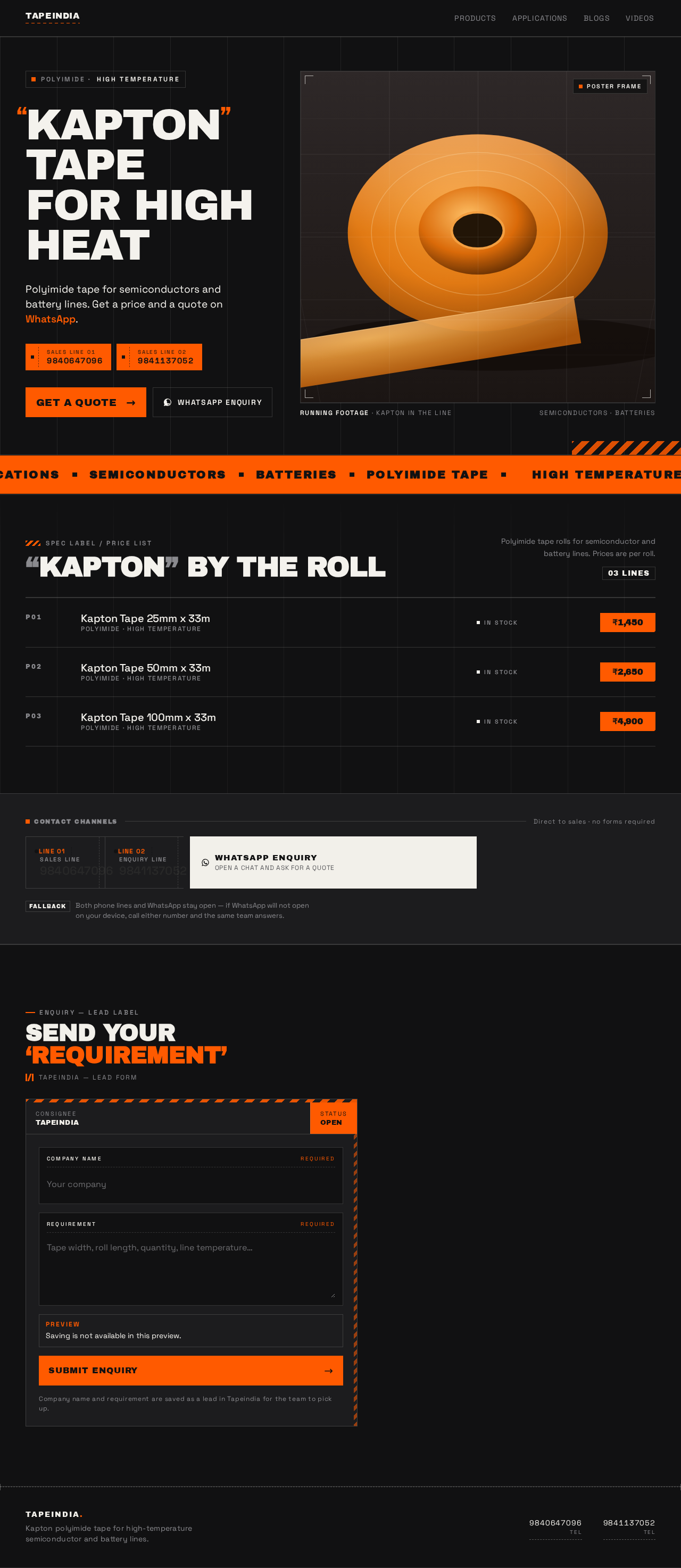
Kapton tapefor high heat
Polyimide tape for semiconductors and battery lines. Get a price and a quote on WhatsApp.
Spec label / Price list
“KAPTON” by the roll
Polyimide tape rolls for semiconductor and battery lines. Prices are per roll.
03 Lines- In stockKapton Tape 25mm x 33mPolyimide · High temperature₹1,450
- In stockKapton Tape 50mm x 33mPolyimide · High temperature₹2,650
- In stockKapton Tape 100mm x 33mPolyimide · High temperature₹4,900
3 products listed
Contact channels
Direct to sales · no forms requiredFallbackBoth phone lines and WhatsApp stay open — if WhatsApp will not open on your device, call either number and the same team answers.
Enquiry — lead label
Send your ‘requirement’
PreviewSaving is not available in this preview.
Company name and requirement are saved as a lead in Tapeindia for the team to pick up.
No comments yet. Be the first!