tama-25
 Razor Ez
buatkan saya codingan javascript portofolio data diri dengan beberapa componen index.js,index.html,index.css,style css di vscode

Comments (0)
Sign in to leave a comment
System Requirements
System Requirements Document for tama-25
1. Introduction
The purpose of this document is to outline the system requirements for the project named "tama-25". This project involves creating a JavaScript portfolio with specific components using Visual Studio Code (VSCode).
2. System Overview
The "tama-25" project is designed to create a personal portfolio using JavaScript. The portfolio will consist of several components, including index.js, index.html, index.css, and style.css. The development environment will be Visual Studio Code.
3. Functional Requirements as Story Points
- As a Developer, I should be able to create an
index.htmlfile to serve as the main HTML structure of the portfolio. - As a Developer, I should be able to create an
index.jsfile to handle the JavaScript logic for the portfolio. - As a Developer, I should be able to create an
index.cssfile to define the styles specific to the HTML structure. - As a Developer, I should be able to create a
style.cssfile to manage additional styling for the portfolio. - As a User, I should be able to view my personal information displayed on the portfolio page.
4. User Personas
- Developer: Responsible for creating and maintaining the portfolio components.
- User: The individual whose personal information is displayed on the portfolio.
5. Core User Flows
- Developer opens VSCode -> Creates
index.html,index.js,index.css, andstyle.css-> Writes code for each component -> Saves and tests the portfolio in a browser.
6. Visuals Colors and Theme
[Default — not specified by user]
- primary: #3498db (a vibrant blue for brand identity)
- primary_light: #5dade2 (a lighter blue for hover states)
- secondary: #2ecc71 (a green for supporting elements)
- accent: #e74c3c (a red for call-to-action buttons)
- highlight: #f1c40f (a yellow for notifications)
- bg: #ecf0f1 (a light grey for the background)
- surface: #ffffff (white for card/panel backgrounds)
- text: #2c3e50 (a dark grey for primary text)
- text_muted: #95a5a6 (a softer grey for secondary text)
- border: #bdc3c7 (a subtle grey for borders)
7. Signature Design Concept
The homepage of the "tama-25" portfolio will feature an interactive "Personal Timeline" concept. Users can scroll horizontally to navigate through a timeline of personal achievements and milestones. Each milestone will be represented by a card that flips to reveal more information when clicked. The timeline will be animated using motion/react to provide smooth transitions and interactions.
LANDING HERO MOTION BRIEF
The landing hero will feature a dynamic illustration of a timeline that changes as the user scrolls. The timeline will start with a central image representing the user and expand to show various achievements. Each achievement will animate into view with a smooth transition, and clicking on an achievement will expand it to show detailed information. The animation will loop every 10 seconds, highlighting different achievements. The design will be responsive, adjusting to different screen sizes while maintaining clarity and engagement.
8. Interaction Model & Motion Direction
- Intended Interaction Model: Animated
- The landing page will feature moderate scroll-triggered reveals and hover transitions. Interactive elements will have spring physics for a polished feel.
- Internal Pages: Static
- Internal pages will focus on layout clarity with minimal motion to ensure ease of use and accessibility.
9. Non-Functional Requirements
- The portfolio must be responsive and accessible across different devices and screen sizes.
- The code should be well-documented and maintainable.
10. Tech Stack
- Frontend: JavaScript, HTML, CSS
- Development Environment: Visual Studio Code
11. Assumptions and Constraints
- The portfolio will be developed using Visual Studio Code.
- The project will not require backend integration or database connectivity.
12. Glossary
- VSCode: Visual Studio Code, a source-code editor developed by Microsoft.
- JavaScript: A programming language commonly used to create interactive effects within web browsers.
- HTML: HyperText Markup Language, the standard markup language for documents designed to be displayed in a web browser.
- CSS: Cascading Style Sheets, a style sheet language used for describing the presentation of a document written in HTML.
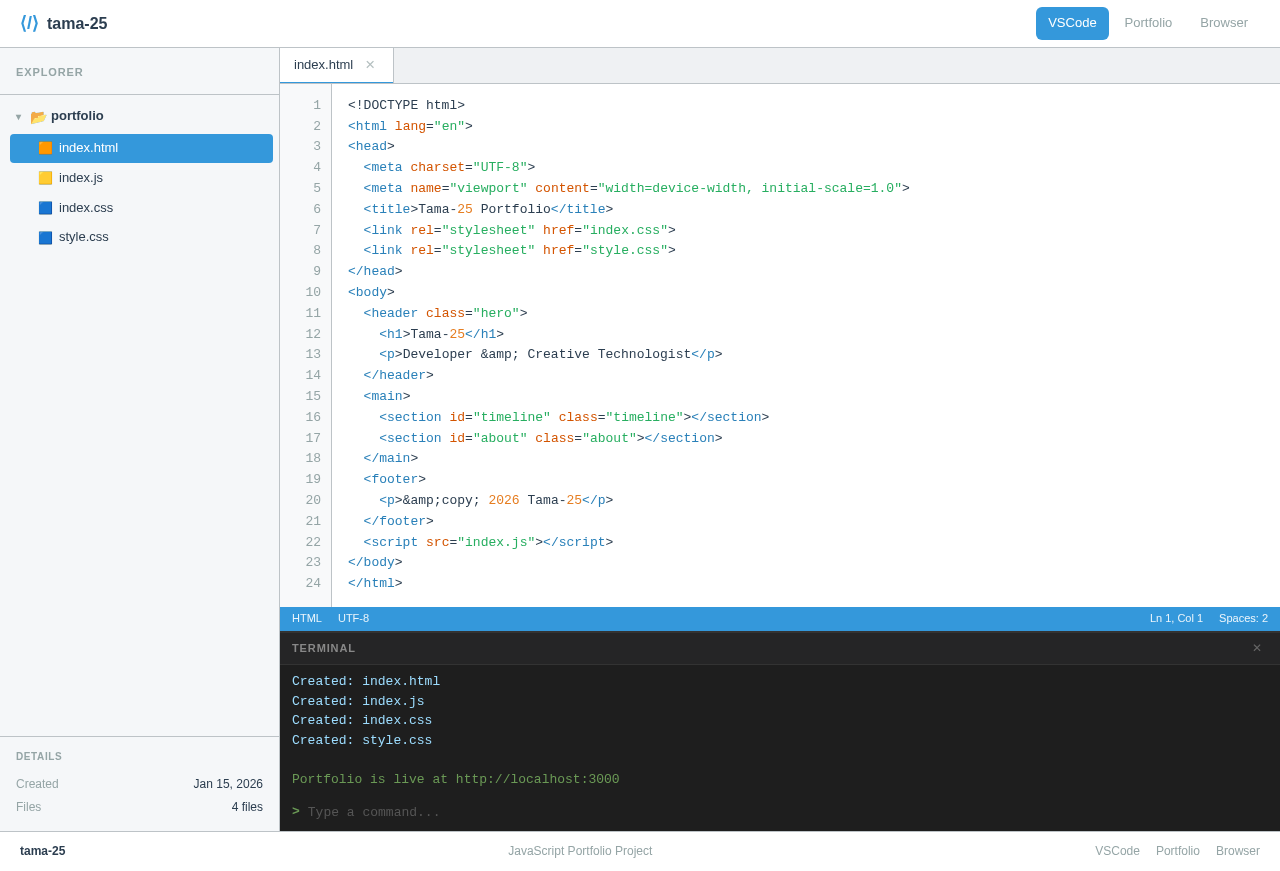
<!DOCTYPE html><html lang="en"><head><meta charset="UTF-8"><meta name="viewport" content="width=device-width, initial-scale=1.0"><title>Tama-25 Portfolio</title><link rel="stylesheet" href="index.css"><link rel="stylesheet" href="style.css"></head><body><header class="hero"><h1>Tama-25</h1><p>Developer & Creative Technologist</p></header><main><section id="timeline" class="timeline"></section><section id="about" class="about"></section></main><footer><p>&copy; 2026 Tama-25</p></footer><script src="index.js"></script></body></html>
<!DOCTYPE html><html lang="en"><head><meta charset="UTF-8"><meta name="viewport" content="width=device-width, initial-scale=1.0"><title>Tama-25 Portfolio</title><link rel="stylesheet" href="index.css"><link rel="stylesheet" href="style.css"></head><body><header class="hero"><h1>Tama-25</h1><p>Developer & Creative Technologist</p></header><main><section id="timeline" class="timeline"></section><section id="about" class="about"></section></main><footer><p>&copy; 2026 Tama-25</p></footer><script src="index.js"></script></body></html>
No comments yet. Be the first!