Page 1 of 19
System Requirements Document for tally-gold-prime
1. Introduction
tally-gold-prime is a finance and accounting application built in the spirit of Tally Gold Prime: a precision instrument for keeping books. It exists so that a small finance function can record and maintain financial transactions and ledgers, and then produce financial statements and reports from that recorded data.
The product serves two working roles. A Finance Team Member records and maintains accounting entries and ledgers day to day, keeping the books accurate and up to date. A Finance Manager / Account Owner reviews the recorded books and generates financial statements and reports such as balance sheets and profit-and-loss statements, succeeding when accurate financial reporting is available on demand.
The audience is small-business bookkeepers and account owners — people who work in ruled rows, vouchers, and balances, and who need the tool to feel heavy, machined, and legible under pressure rather than cheerful or consumer-grade.
Page 2 of 19
2. System Overview
tally-gold-prime is a custom-UI web application with an application-owned identity and a backend that persists accounting records. It delivers:
- Anonymous product entry on a public Landing surface that explains the finance and accounting application, its intended users, and its core accounting and reporting purpose.
- Self-service enrollment on Sign Up, and returning verification on Login, so that durable accounting records and reports remain bound to the correct participant.
- Transaction recording and maintenance on Transactions and Transaction Entry, owned by the Finance Team Member.
- Ledger records and balances on Ledgers, revisitable independently by both roles.
- Financial statements and reports on Reports, owned by the Finance Manager / Account Owner.
Actors:
- Finance Team Member (active human persona) — records and maintains accounting entries and ledgers.
- Finance Manager / Account Owner (active human persona) — reviews the books and produces financial statements and reports.
- Application backend (non-persona system actor) — persists transactions, ledger balances, and generated reports; enforces role-aware authorization.
Narrow exclusions: this document does not add inventory, payroll, taxation filing, banking integrations, multi-company consolidation, or any other adjacent accounting module. The product is scoped to recording and maintaining financial transactions and ledgers, and producing financial statements and reports from that recorded data.
Page 3 of 19
2a. Product Interpretation and Delivery Boundary
Delivery ownership. tally-gold-prime is delivered as a first-party application with its own custom interface and its own backend. There is no provider-owned or external-only surface in the current scope, and no headless-only delivery: every accepted capability has a first-party page that a human uses.
Access ownership. Identity is application-owned. A self-starting finance user enrolls on Sign Up with no invitation or provisioning boundary, and returning users verify on Login. Landing, Sign Up, and Login are anonymously reachable; the accounting surfaces (Transactions, Transaction Entry, Ledgers, Reports) require an established identity so that durable records, balances, and reports stay bound to the correct participant.
Role-aware authorization. The application distinguishes finance team transaction maintenance from finance manager / account owner reporting and review responsibilities. Transaction Entry is the Finance Team Member's focused recording surface. Reports is the Finance Manager / Account Owner's reporting surface. Transactions and Ledgers are shared review surfaces available to both roles.
Current vs. future. Everything described in this document is current. No future-horizon requirements were accepted; see Section 11 for the explicit boundary.
2c. Page Content and Component Coverage
Page 4 of 19
Landing
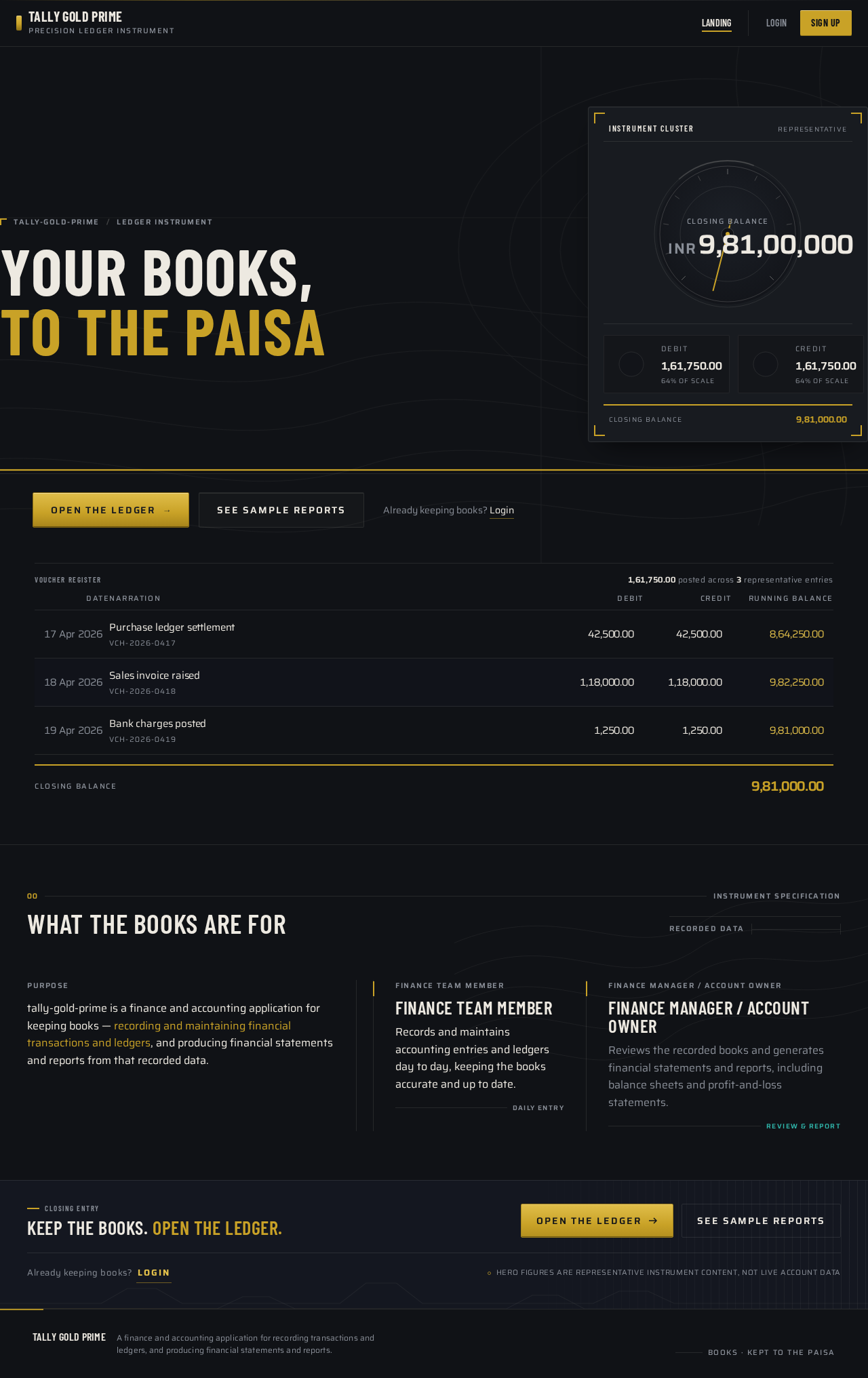
- Information/state: Anonymous product entry. Explains the finance and accounting application, its intended users (Finance Team Member, Finance Manager / Account Owner), and its core accounting and reporting purpose. Presents the instrument-board hero: an oversized condensed headline, a dimensional CSS instrument cluster (a 220px circular bezel gauge reading "Closing Balance" with a brass needle and counting tabular figure, flanked by two smaller teal-arc dials for "Debit" and "Credit" totals), and a ruled three-row ledger strip showing a real voucher (date, narration, debit, credit, running balance).
- Primary actions: "Open the ledger" (machined brass button) leading to Sign Up; "See sample reports" (ghost button) leading to Sign Up.
- Supporting actions: Navigate to Login for returning users.
- Domain entities: Voucher (date, narration, debit, credit, running balance); Closing Balance; Debit total; Credit total.
- Component responsibilities: Hero headline block; brass full-width rule; instrument cluster panel with corner brackets; bezel gauge with needle and counting figure; two teal-arc mini-dials; ruled ledger strip with 2px brass total rule; CTA pair; faint topographic contour background art at 6% opacity.
- States: Loading — gauge and figures render at final value with no count-up when reduced motion is preferred. Empty — not applicable; the hero shows a representative voucher and balance. Success — visitor understands the product and chooses a CTA. Error — not applicable. Recovery — not applicable.
Sign Up
- Information/state: Anonymous self-service enrollment for a first-use finance user. No invitation, provisioning, or existing-account boundary applies.
- Primary actions: Submit enrollment details to establish an application-owned identity.
- Supporting actions: Navigate to Login if the user already has an account; return to Landing.
- Domain entities: Finance user identity; role selection between Finance Team Member and Finance Manager / Account Owner.
- Component responsibilities: Enrollment form; role selection control; submit key; link to Login.
- States: Loading — submit key shows an in-progress state. Empty — blank form with field labels. Success — identity established and the user continues to the accounting surfaces. Error — invalid or incomplete details are reported inline against the offending field. Recovery — the form retains entered values so the user can correct and resubmit.
Login
- Information/state: Shared returning verification surface for both personas, regaining access to durable accounting records and reports.
- Primary actions: Submit credentials to verify identity.
- Supporting actions: Navigate to Sign Up for a new user; return to Landing.
- Domain entities: Finance user identity; session.
- Component responsibilities: Credential form; submit key; link to Sign Up.
- States: Loading — submit key shows an in-progress state. Empty — blank credential fields. Success — identity verified and the user continues to the accounting surfaces. Error — unrecognized credentials are reported without revealing which field was wrong. Recovery — the user can retry; entered identity value is retained.
Page 5 of 19
Transactions
- Information/state: Revisitable overview of recorded transactions, available to both roles. Ruled, tabular presentation with right-aligned numeric columns and alternating row tint.
- Primary actions: Open a recorded transaction to review it; for the Finance Team Member, proceed to Transaction Entry to record or maintain an entry.
- Supporting actions: Filter and scan the transaction list; navigate to Ledgers and Reports.
- Domain entities: Transaction record (date, narration, debit, credit, running balance); voucher.
- Component responsibilities: Ruled transaction table with tabular numerals; 2px brass total rule; row hover raising a 1px brass left edge; entry point to Transaction Entry.
- States: Loading — ruled skeleton rows in place of data. Empty — no transactions recorded yet, with a direct route to Transaction Entry for the Finance Team Member. Success — recorded transactions listed with correct totals. Error — list fails to load, with a retry action. Recovery — retry reloads the list without losing the current filter.
Transaction Entry
- Information/state: Focused recording and maintenance of accounting entries, owned by the Finance Team Member. A ruled two-column debit/credit sheet with brass debit emphasis and teal credit emphasis, and a running balance pinned to the bottom edge.
- Primary actions: Create a new transaction record; edit an existing transaction record; post the voucher via the machined brass "Post voucher" key.
- Supporting actions: Discard the in-progress entry; return to Transactions.
- Domain entities: Voucher (date, narration, debit, credit); running balance; ledger account.
- Component responsibilities: Two-column debit/credit ruled sheet; date and narration fields; debit column with brass emphasis; credit column with teal emphasis; pinned running-balance bar; "Post voucher" key with 1px top-edge highlight.
- States: Loading — existing entry being edited loads into the sheet. Empty — blank ruled sheet with a zero running balance. Success — voucher posted and the running balance updates; the user continues to Transactions or Ledgers. Error — unbalanced or incomplete entry is reported against the offending column and posting is blocked. Recovery — the sheet retains all entered values so the user can correct and repost.
Ledgers
- Information/state: Independently revisitable ledger records and balances for maintaining and reviewing the books, available to both roles.
- Primary actions: Select a ledger to review its ruled entries and balance.
- Supporting actions: Navigate to Transactions and Reports.
- Domain entities: Ledger account; ledger entry; ledger balance.
- Component responsibilities: Ledger selector; ruled ledger table with tabular right-aligned numeric columns; 2px brass total rule under the balance; gauge or readout for the ledger balance.
- States: Loading — ruled skeleton rows in place of ledger entries. Empty — a ledger with no entries shows a zero balance and a route to Transaction Entry for the Finance Team Member. Success — ledger entries and balance displayed correctly. Error — ledger fails to load, with a retry action. Recovery — retry reloads the selected ledger.
Page 6 of 19
Reports
- Information/state: Financial statements and reports generated from recorded transactions and ledger data, owned by the Finance Manager / Account Owner. Each report opens with a 1px full-width steel rule, a condensed uppercase title, and a right-aligned instrument readout (period, generated-at, total) in tabular numerals.
- Primary actions: Select a report type (balance sheet, profit-and-loss) and generate it for a chosen period.
- Supporting actions: Change the reporting period; navigate to Ledgers and Transactions to inspect the underlying records.
- Domain entities: Balance sheet; profit-and-loss statement; reporting period; generated-at timestamp; report total.
- Component responsibilities: Report type selector; period selector; instrument readout header; ruled statement body with tabular numerals; 2px brass total rule.
- States: Loading — ruled skeleton statement rows while the report generates. Empty — no recorded data for the selected period, stated plainly with a route to Transactions. Success — statement rendered with correct totals and readout. Error — report generation fails, with a retry action. Recovery — retry regenerates for the same report type and period.
Page 7 of 19
3. Functional Requirements
FR-1 — Finance/accounting application of the Tally Gold Prime kind (explicit)
As a finance user, I should use a finance and accounting application that works like Tally Gold Prime in kind, so that my bookkeeping is done in a purpose-built accounting tool.
- Trigger/input: the user opens the application.
- Observable result: a finance and accounting application is available with accounting and reporting surfaces.
- Access state: Landing is anonymous; accounting surfaces require an established identity.
- Failure/recovery: not applicable at this level.
- Continuation: the user proceeds to enroll or verify identity.
FR-2 — Record and maintain financial transactions and ledgers (explicit)
As a Finance Team Member, I should record and maintain financial transactions and ledgers, so that the books stay accurate and up to date.
- Trigger/input: the Finance Team Member opens Transaction Entry and enters a voucher (date, narration, debit, credit).
- Observable result: the voucher is posted, the running balance updates, and the entry appears in Transactions and in the affected Ledgers.
- Access state: role-restricted to the Finance Team Member.
- Failure/recovery: an unbalanced or incomplete entry is reported against the offending column and posting is blocked; the sheet retains entered values for correction and reposting.
- Continuation: the Finance Team Member reviews the posted entry in Transactions or Ledgers, or records the next entry.
FR-3 — Maintain existing transaction records (explicit)
As a Finance Team Member, I should edit an existing transaction record, so that corrections and adjustments are reflected in the books.
- Trigger/input: the Finance Team Member opens a recorded transaction from Transactions into Transaction Entry and changes its values.
- Observable result: the corrected voucher is posted and the running balance and affected ledger balances reflect the change.
- Access state: role-restricted to the Finance Team Member.
- Failure/recovery: an invalid correction is reported against the offending column and posting is blocked; entered values are retained.
- Continuation: the Finance Team Member returns to Transactions to confirm the corrected record.
FR-4 — Review recorded transactions (explicit)
As a Finance Team Member or Finance Manager / Account Owner, I should review recorded transactions in a revisitable overview, so that I can confirm what has been entered.
- Trigger/input: the user opens Transactions.
- Observable result: recorded transactions are listed in ruled tabular rows with right-aligned debit, credit, and running balance, under a 2px brass total rule.
- Access state: role-restricted; available to both personas.
- Failure/recovery: if the list fails to load, a retry action reloads it without losing the current filter.
- Continuation: the user opens a transaction for detail, or moves to Ledgers or Reports.
FR-5 — Maintain and review ledger records and balances (explicit)
As a Finance Team Member or Finance Manager / Account Owner, I should maintain and review ledger records and balances, so that the books can be kept and inspected.
- Trigger/input: the user opens Ledgers and selects a ledger.
- Observable result: the ledger's ruled entries and its balance are displayed, with the balance under a 2px brass total rule.
- Access state: role-restricted; available to both personas.
- Failure/recovery: if the ledger fails to load, a retry action reloads the selected ledger.
- Continuation: the user returns to Transactions to record an entry, or moves to Reports.
FR-6 — Produce financial statements and reports (explicit)
As a Finance Manager / Account Owner, I should produce financial statements and reports from the recorded data, so that accurate financial reporting is available on demand.
- Trigger/input: the Finance Manager / Account Owner opens Reports, selects a report type (balance sheet, profit-and-loss) and a period, and generates it.
- Observable result: the statement renders from recorded transactions and ledger data, headed by a 1px full-width steel rule, a condensed uppercase title, and a right-aligned instrument readout (period, generated-at, total) in tabular numerals.
- Access state: role-restricted to the Finance Manager / Account Owner.
- Failure/recovery: if generation fails, a retry action regenerates for the same report type and period; if no data exists for the period, that is stated plainly with a route to Transactions.
- Continuation: the Finance Manager / Account Owner inspects the underlying records in Ledgers or Transactions, or generates another report.
FR-7 — Self-service enrollment for a first-use finance user (required_inference)
As a first-use finance user, I should enroll myself on Sign Up, so that I can begin keeping books without an invitation or provisioning step.
- Trigger/input: the user chooses a CTA on Landing and submits enrollment details, including whether they work as a Finance Team Member or a Finance Manager / Account Owner.
- Observable result: an application-owned identity is established and the user continues to the accounting surfaces.
- Access state: Sign Up is anonymously reachable.
- Failure/recovery: invalid or incomplete details are reported inline against the offending field and the form retains entered values for correction.
- Continuation: the user proceeds to record transactions or review the books according to their role.
FR-8 — Returning verification through Login (required_inference)
As a returning finance user, I should verify my identity on Login, so that I regain access to my durable accounting records and reports.
- Trigger/input: the user opens Login and submits credentials.
- Observable result: identity is verified and the user continues to the accounting surfaces with their records intact.
- Access state: Login is anonymously reachable; the accounting surfaces remain unavailable until verification succeeds.
- Failure/recovery: unrecognized credentials are reported without revealing which field was wrong, and the user can retry.
- Continuation: the user resumes work in Transactions, Ledgers, or Reports.
FR-9 — Role-aware authorization (required_inference)
As the application, I should distinguish finance team transaction maintenance from finance manager or account owner reporting and review responsibilities, so that each role reaches the work it owns.
- Trigger/input: a verified user navigates to an accounting surface.
- Observable result: the Finance Team Member reaches Transaction Entry for recording and maintenance; the Finance Manager / Account Owner reaches Reports for statements and review; Transactions and Ledgers are available to both.
- Access state: role-restricted surfaces enforce the distinction.
- Failure/recovery: a user without the required role does not reach the restricted surface and is returned to a surface their role owns.
- Continuation: the user continues in the surface their role owns.
Page 8 of 19
4. User Personas
Finance Team Member
Product context. This is the person who keeps the books current. Their working day is a sequence of vouchers: a date, a narration, a debit, a credit, and a running balance that must stay correct. They live in the ruled two-column sheet of Transaction Entry and check their work in Transactions and Ledgers.
Primary goal. Keep the books accurate and up to date.
Distinct accepted responsibilities. Recording financial transactions (FR-2), maintaining existing transaction records (FR-3), and maintaining ledger records and balances (FR-5). They are the only role that owns Transaction Entry.
Relevant inputs and decisions. Date, narration, debit amount, and credit amount for each voucher; whether an entry balances before posting; which existing record needs correction.
Interactions with other accepted participants. The Finance Team Member's posted vouchers become the recorded data that the Finance Manager / Account Owner reviews and reports on. The Finance Team Member does not produce statements; that work belongs to the other role.
Observable success. A complete, correct set of financial records — every voucher posted, every running balance and ledger balance correct, and no unbalanced entry left in the sheet.
Page 9 of 19
Finance Manager / Account Owner
Product context. This is the person accountable for the books. They do not enter daily vouchers; they verify what has been recorded and turn it into statements. Their working surface is Reports, with Transactions and Ledgers available for inspection of the underlying records.
Primary goal. Verify recorded transactions and generate financial statements and reports such as balance sheets and profit-and-loss statements.
Distinct accepted responsibilities. Reviewing recorded transactions (FR-4), reviewing ledger records and balances (FR-5), and producing financial statements and reports (FR-6). They are the only role that owns Reports.
Relevant inputs and decisions. Which report type to generate (balance sheet, profit-and-loss); which period to report on; whether the recorded data supports the statement they need.
Interactions with other accepted participants. The Finance Manager / Account Owner depends on the Finance Team Member's posted vouchers and maintained ledgers as the source data for every statement. When a statement looks wrong, they inspect the underlying records in Ledgers and Transactions rather than editing them.
Observable success. Accurate financial reporting available on demand — the right statement, for the right period, with correct totals and a clear readout of when it was generated.
5. Core User Flows
Page 10 of 19
Flow A — A first-use finance user enrolls and starts keeping books (Finance Team Member)
- The visitor arrives at Landing anonymously. The instrument board shows a closing-balance gauge, debit and credit dials, and a ruled voucher strip.
- The visitor chooses "Open the ledger" and is taken to Sign Up.
- On Sign Up, the visitor enters their enrollment details and selects the Finance Team Member role, then submits.
- The application establishes the identity and the user continues to the accounting surfaces.
- Failure/recovery: if a detail is invalid or missing, the error is reported inline against that field and the form keeps the entered values so the user can correct and resubmit.
- Continuation: the Finance Team Member proceeds to Flow B.
Flow B — The Finance Team Member records a voucher
- The Finance Team Member opens Transaction Entry.
- They enter the voucher: date, narration, debit amount, and credit amount on the ruled two-column sheet. Debit values carry brass emphasis; credit values carry teal emphasis.
- The pinned running-balance bar at the bottom edge updates as the entry is composed.
- The Finance Team Member presses the machined brass "Post voucher" key.
- The voucher is posted and the running balance updates.
- Failure/recovery: if the entry is unbalanced or incomplete, the error is reported against the offending column and posting is blocked; the sheet retains every entered value so the Finance Team Member can correct and repost.
- Continuation: the Finance Team Member opens Transactions to confirm the posted record, or opens Ledgers to see the affected balance.
Flow C — The Finance Team Member corrects an existing transaction record
- The Finance Team Member opens Transactions and scans the ruled rows to find the record to correct.
- They open that record into Transaction Entry.
- They change the date, narration, debit, or credit value.
- They press "Post voucher".
- The corrected voucher is posted and the running balance and affected ledger balances reflect the change.
- Failure/recovery: an invalid correction is reported against the offending column and posting is blocked; entered values are retained.
- Continuation: the Finance Team Member returns to Transactions to confirm the corrected record.
Page 11 of 19
Flow D — The Finance Team Member maintains and reviews a ledger
- The Finance Team Member opens Ledgers and selects a ledger.
- The ledger's ruled entries and its balance are displayed, with the balance under a 2px brass total rule.
- Empty state: a ledger with no entries shows a zero balance and a route to Transaction Entry.
- Failure/recovery: if the ledger fails to load, a retry action reloads the selected ledger.
- Continuation: the Finance Team Member returns to Transaction Entry to record the next voucher, or moves to Reports if their role permits.
Flow E — The Finance Manager / Account Owner reviews the books
- The Finance Manager / Account Owner opens Transactions and reviews the recorded transactions in ruled tabular rows with right-aligned debit, credit, and running balance under a 2px brass total rule.
- They open Ledgers and select a ledger to review its entries and balance.
- Failure/recovery: if either list fails to load, a retry action reloads it without losing the current filter or selection.
- Continuation: the Finance Manager / Account Owner proceeds to Flow F to produce a statement, or returns to reviewing records.
Flow F — The Finance Manager / Account Owner produces a financial statement
- The Finance Manager / Account Owner opens Reports.
- The page opens with a 1px full-width steel rule, a condensed uppercase title, and a right-aligned instrument readout showing period, generated-at, and total in tabular numerals.
- They select the report type — balance sheet or profit-and-loss — and the reporting period.
- They generate the report.
- The statement renders from the recorded transactions and ledger data, with correct totals under a 2px brass total rule.
- Empty state: if no recorded data exists for the selected period, that is stated plainly with a route to Transactions.
- Failure/recovery: if generation fails, a retry action regenerates for the same report type and period.
- Continuation: the Finance Manager / Account Owner inspects the underlying records in Ledgers or Transactions, or generates another report for a different period.
Page 12 of 19
Flow G — A returning user verifies identity and resumes work
- The returning user opens Login anonymously.
- They submit their credentials.
- Identity is verified and they continue to the accounting surfaces with their durable records and reports intact.
- Failure/recovery: unrecognized credentials are reported without revealing which field was wrong, and the user can retry.
- Continuation: the Finance Team Member resumes at Flow B or Flow C; the Finance Manager / Account Owner resumes at Flow E or Flow F.
Page 13 of 19
6. Visuals Colors and Theme
Muse and headline. MARQ by Garmin — luxury instrument aesthetic. The books as a precision instrument: heavy, machined, legible under pressure. The calm of a well-kept ledger, not the cheer of a consumer app.
Mode. Dark mode.
Colour tokens by role.
| Role | Token | Value |
|---|
| Background | --bg | #101216 |
| Surface (raised instrument panel) | --surface | #181B20 |
| Text (body, warm off-white) | --text | #EDE9E1 |
| Primary (brass-amber signal) | --primary | #C9A227 |
| Accent (secondary instrument accent) | --accent | #2FB3A8 |
| Muted (labels, metadata, secondary rows) | --muted | #8A8F98 |
| Hairline steel rule | --rule | rgba(237, 233, 225, 0.10) |
| Alternating row tint | --row-alt | #141720 at 40% opacity |
Colour usage rules. Brass-amber #C9A227 is the primary signal: debit/credit emphasis, active gauge needles, the primary CTA fill, and ledger totals. It is never used as a large flat field. Teal #2FB3A8 is reserved for credit-side values, positive variance, and focus rings. Muted #8A8F98 carries labels, metadata, and secondary rows. Proportion: 70% graphite, 20% off-white type and rules, 7% brass, 3% teal. No gradients on text; gradients appear only as a subtle top-light on bezel rings and gauge arcs.
Typography.
- Headings: Barlow Condensed, uppercase, 600–700 weight, tracking
0.02em, tight leading 0.92–1.0. Headlines read like instrument dial engraving: short, wide-set, condensed.
- Body: Saira.
- Numeric display: Saira with tabular numerals and tight tracking, so ledger columns align to the pixel.
- Scale: 1.25 modular with a condensed display ramp —
72 / 56 / 40 / 28 / 20 / 16 / 14. Mobile display starts at 40px (clamp(40px, 9vw, 96px) for the hero figure). Section headings 28–40px. Ledger rows 15–16px. Micro-labels 11–12px uppercase with 0.14em tracking.
Shape language. Instrument geometry: 2px and 4px radii only — no soft pills, no blobs. Circular bezels and gauge arcs are true circles with a 1px inner ring and a 1px outer ring. Ledger rows are ruled with hairline dividers; totals sit under a 2px brass rule. Buttons are machined rectangles with a 1px inner highlight on the top edge and a subtle inset shadow, like a physical key. Corner brackets (2px brass L-marks) frame the primary data panel.
Layout. A ruled, edge-to-edge instrument board. Fixed left rail (64px collapsed / 232px expanded) with condensed uppercase nav items and a small brass index number per item. Content is a 12-column grid with 24px gutters at 1280px, 16px at 768px, single column at 375px. Ledger and transaction tables use tabular right-aligned numeric columns with alternating row tint rather than card grids. Gauges and KPI dials sit in a top instrument strip; the voucher entry form is a two-column debit/credit ruled sheet with a running balance pinned to the bottom edge. Section transitions are hard 1px steel rules, never rounded card stacks.
Imagery. Macro material and instrument imagery only: brushed titanium textures, engraved dials, topographic contour lines used as faint background art at 6% opacity, and diagrammatic ledger schematics drawn in 1px brass/steel strokes. No stock people, no photography of hands, no illustration for decoration. Data is the imagery — sparklines, gauge arcs, and ruled tables carry the visual weight.
Forbidden. Blue or indigo primary/accent on white (no #0057FF, #2563EB, #4F46E5, or bootstrap-blue buttons anywhere); rounded pill buttons, 16px+ card radii, or soft blob shapes; grids of identical hover-lift cards with soft drop shadows; gradient-blob heroes, glassmorphism panels, or pastel gradient washes; Inter, Roboto, Arial, Helvetica, Open Sans, Lato, Poppins, or system-ui for headings or body; playful illustration, cartoon characters, emoji, or sticker motifs; neon cyan/violet glow effects or particle fields — the only glow is a subtle top-light on bezel rings.
Viewport integrity. Headlines, wordmarks, labels, numbers, ledger rows, and controls stay entirely inside the viewport and their container at 375px, 768px, and 1280px, wrapping or scaling to fit, with no other element covering any part of them. Crops, bleeds, and off-edge placement are for decoration only — shapes, textures, rules, and background art.
Page 14 of 19
7. Signature Design Concept
The instrument board. The Landing page is a dark titanium instrument board, not a centred SaaS pitch.
- Left two-thirds: an oversized condensed headline in Barlow Condensed uppercase at
clamp(40px, 9vw, 96px) — "YOUR BOOKS, TO THE PAISA" — set flush left against the graphite ground, with a 2px brass rule running the full viewport width beneath it.
- Right third: a dimensional CSS instrument cluster — a 220px circular bezel gauge showing "Closing Balance" with a brass needle and a counting tabular figure, flanked by two smaller teal-arc dials for "Debit" and "Credit" totals, all sitting on a raised
#181B20 panel with corner brackets.
- Below the headline: a ruled three-row ledger strip showing a real voucher (date, narration, debit, credit, running balance) in tabular Saira with hairline steel rules and a 2px brass total rule.
- CTAs: "Open the ledger" cut into the panel as a machined brass button, and a secondary ghost button "See sample reports".
- Background: faint topographic contour lines drift behind the panel at 6% opacity.
No gradient blob, no centred stack, no blue button. The first thing a visitor sees is a balance, not a headline and a button.
Signature moves carried across the product.
- Instrument-cluster hero — a real circular bezel gauge with a brass needle and counting tabular figure as the dominant right-hand element, flanked by two teal-arc mini-dials.
- Ruled ledger strip as the hero's proof — an actual voucher row rendered in tabular Saira with hairline steel rules and a 2px brass total rule, directly under the oversized condensed headline.
- Numbered instrument navigation — the left rail labels each item with a condensed uppercase name and a small brass index (
01 LEDGERS, 02 TRANSACTIONS, 03 REPORTS), and the active item draws a 120ms brass underline that extends across the content gutter.
- Gauge-and-rule report headers — every report page opens with a 1px full-width steel rule, a condensed uppercase title, and a right-aligned instrument readout (period, generated-at, total) in tabular numerals — never a rounded card header.
- Debit/credit voucher sheet — transaction entry is a ruled two-column sheet with brass debit emphasis and teal credit emphasis, a pinned running-balance bar at the bottom edge, and a machined brass "Post voucher" key with a 1px top-edge highlight.
Page 15 of 19
8. Interaction Model & Motion Direction
Interaction Model: Animated
Motion Tempo: restrained
Hero Dimensionality: dimensional_css
Landing Hero Motion Brief
- Focal subject: the dimensional CSS instrument cluster — the 220px circular bezel gauge reading "Closing Balance" with its brass needle and counting tabular figure, flanked by the two teal-arc dials for Debit and Credit totals.
- Input → transformation → outcome thesis: on mount, the gauge needle sweeps once to the closing balance while the tabular figure counts up to the same value and the two teal arcs fill to the debit and credit totals — the visitor's first frame resolves into a settled, readable balance, which is exactly the state the product produces for a kept ledger.
- Motion vocabulary: a single purposeful needle sweep on gauge mount (600ms,
cubic-bezier(0.2, 0.7, 0.2, 1)); numbers counting up over 400ms with tabular figures so digits never jitter; a 120ms brass underline that draws under the active nav item; hover on a ledger row raising a 1px brass left edge rather than a lift shadow. No bounce, no particles, no parallax.
- Composed first frame: graphite ground
#101216; the condensed uppercase headline flush left with the 2px brass rule running the full viewport width beneath it; the raised #181B20 instrument panel with corner brackets on the right; the ruled three-row ledger strip below the headline; the machined brass "Open the ledger" key and the ghost "See sample reports" button; topographic contour lines at 6% opacity behind the panel.
- Reduced-motion state: with
prefers-reduced-motion, gauges render at their final value and count-ups are skipped; the needle, figures, and arcs are shown settled and fully readable, and the brass nav underline appears without drawing.
Page 16 of 19
9. Non-Functional Requirements
NFR-1 — Application-owned identity and durable records (required_inference)
Accounting records, ledger balances, and generated reports must remain bound to the correct participant across sessions, so that a returning user regains their own books. Rationale: the accepted journeys require durable, resumable accounting state owned by the person who created it.
NFR-2 — Role-aware authorization enforcement (required_inference)
Role restrictions on Transactions, Transaction Entry, Ledgers, and Reports must be enforced by the application, not merely by hiding controls. Rationale: the accepted role-aware authorization requirement distinguishes finance team transaction maintenance from finance manager or account owner reporting and review.
NFR-3 — Numeric legibility and alignment (explicit, from the creative direction)
All monetary figures use tabular numerals with tight tracking so ledger columns align to the pixel, and body text on the dark ground maintains high contrast (warm off-white #EDE9E1 on #101216, approximately 14:1). Rationale: the product is a money instrument and must be legible under pressure.
NFR-4 — Viewport integrity (explicit, from the creative direction)
Headlines, wordmarks, labels, numbers, ledger rows, and controls stay entirely inside the viewport and their container at 375px, 768px, and 1280px. Rationale: readable text and needed content must stay whole at every viewport.
NFR-5 — Reduced-motion support (explicit, from the creative direction)
With prefers-reduced-motion, gauges render at final value and count-ups are skipped. Rationale: the direction specifies a reduced-motion state for its restrained instrument motion.
NFR-6 — Report generation from recorded data (explicit)
Financial statements and reports must be produced from the recorded transactions and ledger data, not from separately maintained figures. Rationale: the accepted requirement is to produce statements and reports from the recorded data.
Page 17 of 19
10. Tech Stack
- Frontend: React (custom UI, dark instrument-board theme, dimensional CSS hero).
- Backend: Python / FastAPI, providing the accounting API for transactions, ledgers, reports, and identity.
- Storage: a relational database appropriate to double-entry accounting records — transactions, ledger entries, ledger balances, and generated reports.
- Containerization: Docker and docker-compose for local and single-host deployment.
Kubernetes is not included: no deployment requirement in the accepted scope calls for it.
Page 18 of 19
11. Assumptions and Constraints
Assumptions.
- A-1 (required_inference) — Enrollment is self-service with no invitation, provisioning, or existing-account boundary, because no such boundary was established in the source.
- A-2 (required_inference) — A user selects their role (Finance Team Member or Finance Manager / Account Owner) during enrollment, since role-aware authorization is required and no other role-assignment mechanism was established.
- A-3 (required_inference) — Transactions and Ledgers are shared review surfaces for both roles; Transaction Entry is the Finance Team Member's surface and Reports is the Finance Manager / Account Owner's surface.
- A-4 (required_inference) — The Landing hero's voucher, closing balance, and debit/credit totals are representative instrument content illustrating the product's purpose, not live account data.
Constraints.
- C-1 (explicit) — The product is a finance and accounting application of the Tally Gold Prime kind; it is not a general-purpose business suite.
- C-2 (explicit) — Scope is limited to recording and maintaining financial transactions and ledgers, and producing financial statements and reports from that recorded data. Inventory, payroll, taxation filing, banking integrations, and multi-company consolidation are out of scope.
- C-3 (explicit, from the creative direction) — The generic indigo/blue-on-white SaaS template is forbidden. No
#0057FF, #2563EB, #4F46E5, or bootstrap-blue buttons anywhere.
- C-4 (explicit, from the creative direction) — Radii stay at 2–4px; circles are true instrument bezels. No pill buttons, no 16px+ card radii, no soft blobs.
- C-5 (explicit, from the creative direction) — Headings and body use Barlow Condensed and Saira. Inter, Roboto, Arial, Helvetica, Open Sans, Lato, Poppins, and system-ui are not used for headings or body.
- C-6 (explicit, from the creative direction) — No gradient-blob heroes, glassmorphism panels, pastel gradient washes, neon cyan/violet glow, or particle fields. The only glow is a subtle top-light on bezel rings.
- C-7 (explicit, from the creative direction) — No playful illustration, cartoon characters, emoji, or sticker motifs.
- C-8 (explicit, from the creative direction) — No bounce, no particles, no parallax in motion.
Future horizon. No future-horizon requirements were accepted. Nothing in this document is deferred; everything described is current.
Page 19 of 19
12. Glossary
- Voucher — a single accounting entry composed of a date, a narration, a debit amount, and a credit amount, posted from Transaction Entry.
- Ledger — a named account holding ruled entries and a resulting balance.
- Ledger balance — the net result of a ledger's entries, displayed under a 2px brass total rule.
- Running balance — the balance carried forward as vouchers are composed and posted, pinned to the bottom edge of the voucher sheet.
- Transaction record — a posted voucher as it appears in the Transactions overview.
- Balance sheet — a financial statement of the recorded position, generated on Reports.
- Profit-and-loss statement — a financial statement of recorded income and expense, generated on Reports.
- Reporting period — the date range a generated statement covers, shown in the report's instrument readout.
- Instrument readout — the right-aligned tabular header on a report showing period, generated-at, and total.
- Finance Team Member — the accepted persona who records and maintains accounting entries and ledgers.
- Finance Manager / Account Owner — the accepted persona who reviews the books and produces financial statements and reports.
- Role-aware authorization — the application's distinction between finance team transaction maintenance and finance manager or account owner reporting and review responsibilities.
 Kishanu Raj

No comments yet. Be the first!