talenthook-ai

byLucifer

Build a premium, high-converting, mobile-responsive full-stack web application named "TalentHook AI" that operates as an exclusive human-sounding job post generator. The entire system must be architected as a 100% serverless, client-side application to handle massive viral traffic spikes across different devices simultaneously without database lag or server crashes. 1. PROMPT BAR CONSOLE & PLATFORM ENGINE: - CENTER VIEW: Design a prominent, wide search-engine style prompt input console with the placeholder: "Enter job details (e.g., Remote Node.js Dev, 3 Yrs exp, $20k salary)..." accompanied by an "Engine Start" button. - MULTI-PLATFORM DROPDOWN: Immediately next to the prompt bar, place a stylized interactive selection dropdown component titled "Target Platform" with pre-configured filters: [Universal Omni-Post, LinkedIn Feed, Naukri Elite, Indeed Standard, Corporate Portal]. 2. ANTI-MISUSE VALIDATION FIREWALL: - Hardcode a robust client-side string-filtering security middleware layer that scans all inputs before processing. - If a user attempts to input phrases or tokens related to image generation, video creation, coding assignments, or non-recruitment chat topics, block the execution. Immediately display a bold red warning notification banner across the screen: "❌ Access Denied: TalentHook AI exclusively processes job vacancies and hiring specifications. Media generation modules are deactivated." 3. CONVERTING GENERAL LLM FRICTION TO THE NATIVE ENGINE: - Hardcode a secret system prompt context routing logic inside the generator loop. The output engine must act as an elite executive headhunter, automatically stripping all robotic AI clichés ("Are you ready to level up?", "Look no further", "Exciting opportunity"). - The text must open immediately with a pattern-interrupting human hook line designed to stop the scroll on LinkedIn. It must automatically structure the generation into three clear, transparent segments that job seekers love: The Reality (What you'll do), What We Need (The actual skills/stack), and The Trade-Offs (Salary, Remote setup, Benefits). 4. AUTHENTICATION & INFRASTRUCTURE PAGES (CLIENT-SIDE MODALS): - SIGN-IN MODAL: Position a glowing "Sign In / Join" action controller in the header navigation navbar. When clicked, toggle a beautiful modal window featuring two distinct, styled social authentication vectors: "Continue with Google" and "Continue with LinkedIn". Manage the toggle state purely in local React memory so clicking updates the UI instantly to an "Authenticated" profile view. - STATIC FOOTER LINKS: Build high-fidelity overlay modal cards accessible via navigation links for: * "How It Works": A clean, bulleted operational tutorial checklist showing how TalentHook AI hooks top talent. * "Pricing Plans": A beautiful tier comparison matrix presenting a $0 Free Tier alongside a $39/month Corporate Tier. * "Terms & Conditions": Legal copy stating a strict 100% Stateless Privacy Policy—declaring that zero job details or user search strings are ever stored on an external server, and everything is permanently purged upon closing or refreshing the tab. 5. ENGINE INTERACTION COMPONENTS: - RENDER PIPELINE: Show a high-fidelity loading skeleton text animation loop during generation ("Purging corporate AI cliches...", "Formatting for Naukri standard layouts..."). - OUTPUT CARDS: Render the finalized text into a beautiful obsidian copy card. Include a functional "Copy to Clipboard" trigger with a floating success animation, alongside a client-side "Download Text File" button.

LandingPricing PlansGeneratorHow It WorksTerms & ConditionsSign In / Join
Landing

Comments (0)

No comments yet. Be the first!

System Requirements

Page 1 of 9

System Requirements Document for talenthook-ai

1. Introduction

TalentHook AI is a premium, high-converting, mobile-responsive web application that operates as an exclusive human-sounding job post generator. Its product intent is singular and deliberately narrow: a recruiter, hiring manager, or founder types raw job details into a search-engine-style prompt console, selects a target platform, and receives a finished job vacancy post that reads as though an elite executive headhunter wrote it — free of robotic AI clichés, opening with a pattern-interrupting human hook line, and structured into three transparent segments job seekers actually want to read: The Reality, What We Need, and The Trade-Offs.

The audience is the viral, creator-led, social-first slice of recruitment: founders, solo recruiters, and hiring managers who publish on LinkedIn and Naukri and are judged by how human their job post looks. The product is positioned as a creative studio instrument rather than an HR portal — it sells a voice, and it performs that claim on screen by visibly striking out banned clichés during generation.

The entire system is architected as a 100% serverless, client-side application so that it can absorb massive viral traffic spikes across many devices simultaneously without database lag or server crashes. No job details and no user search strings are ever stored on an external server; everything is permanently purged upon closing or refreshing the tab.

Page 2 of 9

2. System Overview

TalentHook AI is delivered as a client-side web application. All generation, validation, authentication state, clipboard feedback, and file download behavior execute in the browser. There is no external server storage of job details or user search strings, and no database that could lag or crash under viral load.

Current actors

  • Job Post Creator — the primary working actor. Enters job details, selects a target platform, starts the engine, watches the loading pipeline, and takes delivery of the finished post via clipboard or text file download.
  • Platform Visitor / Prospective Member — the exploration and identity actor. Reads How It Works, Pricing Plans, and Terms & Conditions, and uses the header Sign In / Join controller to reach the Authenticated profile view.

Accepted behavior, at a glance

  • A prominent, wide, search-engine-style prompt console with the exact placeholder text and an "Engine Start" button.
  • A "Target Platform" selection control immediately next to the prompt bar with five pre-configured filters: Universal Omni-Post, LinkedIn Feed, Naukri Elite, Indeed Standard, Corporate Portal.
  • A client-side string-filtering security middleware layer that scans all inputs before processing and blocks image generation, video creation, coding assignments, and non-recruitment chat topics, showing a bold red denial banner.
  • A secret system prompt context routing logic inside the generator loop that makes the engine behave as an elite executive headhunter, strips named robotic clichés, opens with a human hook line, and structures output into three segments.
  • A glowing "Sign In / Join" controller in the header navbar that toggles a modal containing a streamlined, zero-friction client-side local name input profile form, with toggle state held purely in local React memory and an instant switch to an Authenticated profile view.
  • Footer navigation links opening high-fidelity overlay modal cards for How It Works, Pricing Plans, and Terms & Conditions.
  • A loading skeleton text animation loop during generation, and an obsidian output card with Copy to Clipboard (floating success animation) and Download Text File.

Narrow exclusions

  • TalentHook AI exclusively processes job vacancies and hiring specifications. Media generation modules are deactivated: image generation, video creation, coding assignments, and non-recruitment chat topics are blocked at input.
  • Authentication is a local, in-memory UI state only. There is no real backend authentication, no account record, and no server-side session.
  • No job details or user search strings are stored on an external server, and nothing survives a tab close or refresh.
Page 3 of 9

2a. Product Interpretation and Delivery Boundary

TalentHook AI is a stateless, client-side instrument. The browser is the whole product: it holds the prompt console, the platform selector, the validation firewall, the generation loop, the loading pipeline, the output card, the clipboard and download actions, the in-memory authentication toggle, and the informational overlay modals. Because nothing is written to an external server, the product can be opened by an unlimited number of visitors on unlimited devices at the same moment without any shared state to contend over — which is precisely the property that makes it safe under viral traffic.

Access is intentionally open. The Landing entry is anonymous and precedes any generator use or authentication interaction. The Generator workspace is reachable without identity because generation is stateless and creates no durable, actor-bound record that would need to be resumed or protected. The Sign In / Join destination is likewise an anonymous entry surface: it presents the two social authentication vectors and, on selection, flips local React memory to an Authenticated profile view. Because that state lives only in memory, it is a presentation state, not a protected boundary — no destination in the current product is gated behind it.

The current delivery horizon covers everything described in this document. There is no accepted future phase in the authoritative requirements; the product's boundaries are the five platform filters, the four blocked input categories, the three output segments, and the stateless privacy guarantee.

2b. Source Content Inventory

Not applicable. No reference directive in this project declares a content_source; all product facts originate in the authoritative user requirement thread and the accepted Planning Scope.

Page 4 of 9

2c. Page Content and Component Coverage

Landing

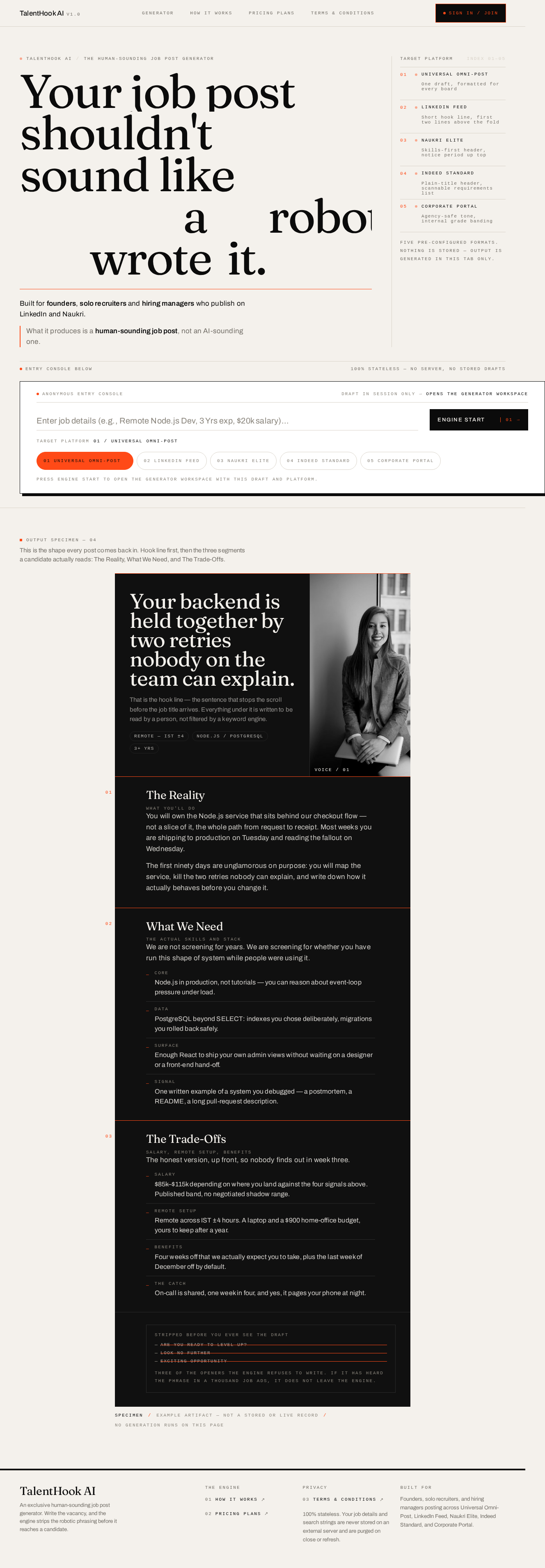
  • Information and state: The anonymous first impression. A bone-paper editorial spread explaining what TalentHook AI is, who it is for (founders, solo recruiters, hiring managers posting on LinkedIn and Naukri), and what it produces (a human-sounding job post, not an AI-sounding one). No identity required, no prior state.
  • Primary action: Enter the Generator workspace to start a job post.
  • Supporting actions: Open the Sign In / Join destination from the header navbar; open How It Works, Pricing Plans, and Terms & Conditions overlay modals from the footer.
  • Domain entities: Target Platform (the five pre-configured filters), the job-post artifact as a concept, the pricing tiers ($0 Free Tier, $39/month Corporate Tier).
  • Component responsibilities:
    • Header navigation navbar with the glowing "Sign In / Join" action controller.
    • Editorial hero: oversized display headline, a single accent rule beneath it, and a narrow vertical mono specimen rail listing the five target platforms as a numbered index with live dot indicators.
    • Prompt console slab: the wide search-style input carrying the exact placeholder "Enter job details (e.g., Remote Node.js Dev, 3 Yrs exp, $20k salary)..." and the "Engine Start" button, with the Target Platform selector docked inside the slab.
    • Footer: dense mono link block exposing How It Works, Pricing Plans, and Terms & Conditions.
  • States:
    • Loading: none — the Landing is static content.
    • Empty: default state; no generation has occurred.
    • Success: the visitor reaches the Generator, or opens an informational modal, or enters the Sign In / Join destination.
    • Error: not applicable to static content; the denial banner is owned by the Generator.
    • Recovery: not applicable.
Page 5 of 9

Generator

  • Information and state: The primary cohesive workspace. Holds the current prompt input text, the currently selected Target Platform, the validation state of the input, the generation-in-progress state, and the finalized post. All of this state is in-memory and is purged on tab close or refresh.
  • Primary action: Enter job details and press "Engine Start" to generate the post.
  • Supporting actions: Select a Target Platform from the five pre-configured filters; copy the finalized post to clipboard; download the finalized post as a text file; re-run generation with edited details.
  • Domain entities: Prompt input (job details string), Target Platform (Universal Omni-Post, LinkedIn Feed, Naukri Elite, Indeed Standard, Corporate Portal), the generated post with its hook line and three segments (The Reality, What We Need, The Trade-Offs), the banned-cliché list, the blocked-topic categories.
  • Component responsibilities:
    • Prompt input console: wide search-engine-style input with the exact placeholder text.
    • "Engine Start" button: triggers validation, then generation.
    • "Target Platform" selection control: interactive dropdown with the five pre-configured filters, positioned immediately next to the prompt bar.
    • Anti-misuse validation firewall: client-side string-filtering middleware that scans all inputs before processing and blocks image generation, video creation, coding assignments, and non-recruitment chat topics.
    • Denial banner: bold red, full-width, reading exactly "\xe2\x9d\x8c Access Denied: TalentHook AI exclusively processes job vacancies and hiring specifications. Media generation modules are deactivated."
    • Loading skeleton text animation loop: cycles pipeline messages including "Purging corporate AI cliches..." and "Formatting for Naukri standard layouts...".
    • Cliché purge display: a mono counter that strikes through banned phrases as generation runs.
    • Obsidian output card: renders the finalized text with the hook line and the three segments, each introduced by an accent hairline and a mono 01/02/03 numeral.
    • "Copy to Clipboard" trigger with a floating success animation.
    • "Download Text File" button, executed client-side.
  • States:
    • Loading: the loading skeleton text animation loop runs, cycling the pipeline messages, with the cliché purge counter striking through banned phrases.
    • Empty: no prompt entered — the console shows the placeholder and the Engine Start button is present but generation has not run.
    • Success: the finalized post renders in the obsidian output card with its hook line and three segments; Copy to Clipboard and Download Text File become available.
    • Error: the input contains a blocked topic — execution is blocked before processing and the bold red denial banner appears across the screen with the exact denial copy.
    • Recovery: the creator edits the prompt to describe a job vacancy and hiring specification, the denial banner clears, and "Engine Start" runs generation again.
Page 6 of 9

Sign In / Join

  • Information and state: The source-named header authentication destination. Presents a streamlined, zero-friction client-side local name input profile form and reflects the current local authentication state — unauthenticated (name input view) or authenticated (profile view).
  • Primary action: Choose "Continue with Google" or "Continue with LinkedIn".
  • Supporting actions: Close the modal and return to the underlying page; reopen it from the header navbar.
  • Domain entities: Authentication vector (Google, LinkedIn), local authentication state, Authenticated profile view.
  • Component responsibilities:
    • Modal window toggled by the glowing "Sign In / Join" action controller in the header navigation navbar.
    • "Continue with Google" styled vector.
    • "Continue with LinkedIn" styled vector.
    • Local React memory state holder that flips the UI instantly to the Authenticated profile view on selection.
  • States:
    • Loading: none — the state transition is instantaneous and purely local.
    • Empty: unauthenticated — both social authentication vectors are presented.
    • Success: the modal updates instantly to the Authenticated profile view.
    • Error: not applicable — no backend authentication call is made, so no network failure state exists.
    • Recovery: the state is in-memory only; closing or refreshing the tab returns the product to the unauthenticated state.
Page 7 of 9

How It Works

  • Information and state: A high-fidelity overlay modal card presenting a clean, bulleted operational tutorial checklist showing how TalentHook AI hooks top talent.
  • Primary action: Read the checklist.
  • Supporting actions: Close the overlay and return to the underlying page.
  • Domain entities: The operational steps of the TalentHook AI workflow.
  • Component responsibilities: Overlay modal card; bulleted tutorial checklist; the single black-and-white photograph of a real human face used once in this modal.
  • States:
    • Loading: none — static content.
    • Empty: not applicable.
    • Success: the visitor reads the checklist and closes the overlay.
    • Error: not applicable.
    • Recovery: not applicable.

Pricing Plans

  • Information and state: A high-fidelity overlay modal card presenting a single static message: "TalentHook AI is currently 100% Free for Alpha Launch Users."
  • Primary action: Compare the two tiers.
  • Supporting actions: Close the overlay and return to the underlying page.
  • Domain entities: $0 Free Tier, $39/month Corporate Tier, the comparison matrix rows.
  • Component responsibilities: Overlay modal card; tier comparison matrix.
  • States:
    • Loading: none — static content.
    • Empty: not applicable.
    • Success: the visitor understands the two tiers and closes the overlay.
    • Error: not applicable.
    • Recovery: not applicable.
Page 8 of 9

Terms & Conditions

  • Information and state: A high-fidelity overlay modal card containing legal copy stating a strict 100% Stateless Privacy Policy — zero job details or user search strings are ever stored on an external server, and everything is permanently purged upon closing or refreshing the tab.
  • Primary action: Read the terms.
  • Supporting actions: Close the overlay and return to the underlying page.
  • Domain entities: The 100% Stateless Privacy Policy, the purge-on-close-or-refresh guarantee.
  • Component responsibilities: Overlay modal card; legal copy block.
  • States:
    • Loading: none — static content.
    • Empty: not applicable.
    • Success: the visitor reads the terms and closes the overlay.
    • Error: not applicable.
    • Recovery: not applicable.
Page 9 of 9

3. Functional Requirements

FR-1 — Product identity and delivery shape (explicit) As a Job Post Creator, I should use a premium, high-converting, mobile-responsive web application named "TalentHook AI" that operates as an exclusive human-sounding job post generator, so that I can produce hiring posts that read as human-written.

  • Trigger/input: Opening the application on any device.
  • Observable result: The product presents itself as TalentHook AI, an exclusive human-sounding job post generator, and remains usable and legible across device sizes.
  • Access state: Anonymous.
  • Failure/recovery: Not applicable.
  • Continuation: The creator proceeds to the Generator workspace.

FR-2 — Serverless, client-side architecture under viral load (explicit) As a Job Post Creator, I should have the entire system architected as a 100% serverless, client-side application, so that massive viral traffic spikes across different devices simultaneously cause no database lag and no server crashes.

  • Trigger/input: Many visitors using the product at the same moment on different devices.
  • Observable result: Generation, validation, authentication state, clipboard feedback, and download all execute client-side; no shared database is queried and no server-side bottleneck degrades the experience.
  • Access state: Anonymous.
  • Failure/recovery: Not applicable — there is no server-side dependency to fail.
  • Continuation: The creator continues to use the product uninterrupted.

FR-3 — Prompt bar console (explicit) As a Job Post Creator, I should see a prominent, wide, search-engine-style prompt input console in the center view with the placeholder "Enter job details (e.g., Remote Node.js Dev, 3 Yrs exp, $20k salary)..." accompanied by an "Engine Start" button, so that I can describe a vacancy in plain language and start generation.

  • Trigger/input: Typing job details into the console and pressing "Engine Start".
  • Observable result: The console accepts the job details text and the Engine Start button initiates the generation pipeline.
  • Access state: Anonymous.
  • Failure/recovery: If the input is blocked by the validation firewall, the denial banner appears and generation does not run (see FR-6).
  • Continuation: The creator watches the loading pipeline and receives the finalized post.

FR-4 — Target Platform dropdown (explicit) As a Job Post Creator, I should have a stylized interactive selection dropdown component titled "Target Platform" placed immediately next to the prompt bar, with pre-configured filters [Universal Omni-Post, LinkedIn Feed, Naukri Elite, Indeed Standard, Corporate Portal], so that I can shape the post for the platform where I will publish it.

  • Trigger/input: Selecting one of the five pre-configured filters.
  • Observable result: The selected platform becomes the active filter and governs the formatting of the generated post.
  • Access state: Anonymous.
  • Failure/recovery: Not applicable — the five filters are pre-configured and always available.
  • Continuation: The creator presses "Engine Start" and the post is generated for the selected platform.

FR-5 — Client-side input scanning before processing (explicit) As a Job Post Creator, I should have a robust client-side string-filtering security middleware layer scan all inputs before processing, so that misuse is caught before any generation work begins.

  • Trigger/input: Any input submitted to the engine.
  • Observable result: The input is scanned client-side before processing; only inputs describing job vacancies and hiring specifications proceed.
  • Access state: Anonymous.
  • Failure/recovery: Blocked inputs never reach the generator loop.
  • Continuation: Clean inputs proceed to generation; blocked inputs trigger FR-6.

FR-6 — Anti-misuse validation firewall and denial banner (explicit) As a Job Post Creator, I should have execution blocked when my input contains phrases or tokens related to image generation, video creation, coding assignments, or non-recruitment chat topics, and I should immediately see a bold red warning notification banner across the screen reading "\xe2\x9d\x8c Access Denied: TalentHook AI exclusively processes job vacancies and hiring specifications. Media generation modules are deactivated.", so that I understand the product's exclusive scope.

  • Trigger/input: Input containing phrases or tokens related to image generation, video creation, coding assignments, or non-recruitment chat topics.
  • Observable result: Execution is blocked and the bold red warning banner appears across the screen with the exact denial copy.
  • Access state: Anonymous.
  • Failure/recovery: The creator edits the prompt to describe a job vacancy and hiring specification; the banner clears and generation can run.
  • Continuation: The creator re-runs "Engine Start" with a compliant prompt.

FR-7 — Executive headhunter system prompt and cliché stripping (explicit) As a Job Post Creator, I should have a secret system prompt context routing logic inside the generator loop that makes the output engine act as an elite executive headhunter and automatically strip all robotic AI clichés — including "Are you ready to level up?", "Look no further", and "Exciting opportunity" — so that the resulting post never sounds machine-written.

  • Trigger/input: A validated prompt reaching the generator loop.
  • Observable result: The generated text contains none of the named robotic AI clichés and reads in the voice of an elite executive headhunter.
  • Access state: Anonymous.
  • Failure/recovery: Not applicable — the routing logic is hardcoded into the generator loop.
  • Continuation: The creator reviews the cliché-free post in the output card.

FR-8 — Pattern-interrupting human hook line (explicit) As a Job Post Creator, I should have the generated text open immediately with a pattern-interrupting human hook line designed to stop the scroll on LinkedIn, so that the post earns attention in a crowded feed.

  • Trigger/input: A validated prompt reaching the generator loop.
  • Observable result: The finalized post begins with a human hook line rather than a conventional opening.
  • Access state: Anonymous.
  • Failure/recovery: Not applicable.
  • Continuation: The creator reads the hook line and the segments that follow.

FR-9 — Three-segment transparent structure (explicit) As a Job Post Creator, I should have the generated text automatically structured into three clear, transparent segments — The Reality (What you'll do), What We Need (The actual skills/stack), and The Trade-Offs (Salary, Remote setup, Benefits) — so that job seekers get exactly the information they care about.

  • Trigger/input: A validated prompt reaching the generator loop.
  • Observable result: The finalized post contains all three segments with their stated content: The Reality covering what the hire will do, What We Need covering the actual skills and stack, and The Trade-Offs covering salary, remote setup, and benefits.
  • Access state: Anonymous.
  • Failure/recovery: Not applicable.
  • Continuation: The creator copies or downloads the structured post.

FR-10 — Sign In / Join controller and social authentication vectors (explicit) As a Platform Visitor / Prospective Member, I should see a glowing "Sign In / Join" action controller in the header navigation navbar that, when clicked, toggles a beautiful modal window featuring two distinct, styled social authentication vectors — "Continue with Google" and "Continue with LinkedIn" — so that I can choose how to sign in.

  • Trigger/input: Clicking the glowing "Sign In / Join" controller in the header navbar.
  • Observable result: The modal window toggles open and presents both styled social authentication vectors.
  • Access state: Anonymous.
  • Failure/recovery: The modal can be closed and reopened from the header navbar.
  • Continuation: The visitor selects one of the two vectors.

FR-11 — In-memory authentication state and Authenticated profile view (explicit) As a Platform Visitor / Prospective Member, I should have the authentication toggle state managed purely in local React memory so that clicking a social authentication vector updates the UI instantly to an "Authenticated" profile view, so that sign-in feels immediate and requires no server round trip.

  • Trigger/input: Clicking "Continue with Google" or "Continue with LinkedIn".
  • Observable result: The UI updates instantly to the Authenticated profile view, held purely in local React memory.
  • Access state: Anonymous entry; the resulting state is local and in-memory only.
  • Failure/recovery: Because the state is in-memory, closing or refreshing the tab returns the product to the unauthenticated state; the visitor can sign in again from the header navbar.
  • Continuation: The visitor continues browsing or generating with the Authenticated profile view shown.

FR-12 — How It Works overlay modal (explicit) As a Platform Visitor / Prospective Member, I should be able to open a high-fidelity overlay modal card for "How It Works" from a navigation link, containing a clean, bulleted operational tutorial checklist showing how TalentHook AI hooks top talent, so that I understand the workflow before generating.

  • Trigger/input: Activating the "How It Works" navigation link.
  • Observable result: The overlay modal card opens and displays the bulleted operational tutorial checklist.
  • Access state: Anonymous.
  • Failure/recovery: The overlay can be closed and reopened at any time.
  • Continuation: The visitor proceeds to the Generator or to another informational overlay.

FR-13 — Pricing Plans overlay modal (explicit) As a Platform Visitor / Prospective Member, I should be able to open a high-fidelity overlay modal card for "Pricing Plans" from a navigation link, containing a beautiful tier comparison matrix presenting a $0 Free Tier alongside a $39/month Corporate Tier, so that I can judge which tier fits me.

  • Trigger/input: Activating the "Pricing Plans" navigation link.
  • Observable result: The overlay modal card opens and displays the tier comparison matrix with the $0 Free Tier and the $39/month Corporate Tier.
  • Access state: Anonymous.
  • Failure/recovery: The overlay can be closed and reopened at any time.
  • Continuation: The visitor proceeds to the Generator or to another informational overlay.

FR-14 — Terms & Conditions overlay modal with stateless privacy policy (explicit) As a Platform Visitor / Prospective Member, I should be able to open a high-fidelity overlay modal card for "Terms & Conditions" from a navigation link, containing legal copy stating a strict 100% Stateless Privacy Policy — declaring that zero job details or user search strings are ever stored on an external server, and that everything is permanently purged upon closing or refreshing the tab — so that I can trust the product with my hiring details.

  • Trigger/input: Activating the "Terms & Conditions" navigation link.
  • Observable result: The overlay modal card opens and displays the legal copy stating the 100% Stateless Privacy Policy and the purge-on-close-or-refresh guarantee.
  • Access state: Anonymous.
  • Failure/recovery: The overlay can be closed and reopened at any time.
  • Continuation: The visitor proceeds to the Generator with confidence in the privacy guarantee.

FR-15 — Loading skeleton text animation loop (explicit) As a Job Post Creator, I should see a high-fidelity loading skeleton text animation loop during generation, cycling messages such as "Purging corporate AI cliches..." and "Formatting for Naukri standard layouts...", so that I can see the engine working and understand what it is doing.

  • Trigger/input: Pressing "Engine Start" with a validated prompt.
  • Observable result: The loading skeleton text animation loop runs, cycling the pipeline messages including the two named examples.
  • Access state: Anonymous.
  • Failure/recovery: If generation cannot proceed because the input was blocked, the denial banner appears instead (see FR-6).
  • Continuation: The loop resolves into the finalized post in the obsidian output card.

FR-16 — Obsidian output card (explicit) As a Job Post Creator, I should have the finalized text rendered into a beautiful obsidian copy card, so that the finished post is presented as a distinct, premium artifact.

  • Trigger/input: Completion of the generation pipeline.
  • Observable result: The finalized text renders in the obsidian copy card, showing the hook line and the three segments.
  • Access state: Anonymous.
  • Failure/recovery: Not applicable.
  • Continuation: The creator copies or downloads the post.

FR-17 — Copy to Clipboard with floating success animation (explicit) As a Job Post Creator, I should have a functional "Copy to Clipboard" trigger on the output card with a floating success animation, so that I can move the post into LinkedIn, Naukri, Indeed, or a corporate portal with one action and know it worked.

  • Trigger/input: Activating "Copy to Clipboard" on the obsidian output card.
  • Observable result: The finalized post text is copied to the clipboard and a floating success animation plays.
  • Access state: Anonymous.
  • Failure/recovery: If the copy does not register, the creator can activate the trigger again; the post remains visible in the output card.
  • Continuation: The creator pastes the post into the target platform.

FR-18 — Download Text File (explicit) As a Job Post Creator, I should have a client-side "Download Text File" button alongside the copy trigger, so that I can save the finalized post locally without any server involvement.

  • Trigger/input: Activating "Download Text File" on the obsidian output card.
  • Observable result: A text file containing the finalized post is downloaded to the creator's device, generated entirely client-side.
  • Access state: Anonymous.
  • Failure/recovery: If the download does not start, the creator can activate the button again; the post remains visible in the output card.
  • Continuation: The creator opens or shares the downloaded text file.

**FR-19 —

Landing design preview
Landing: Enter as anonymous creator
Generator: Enter job details
Generator: Select target platform
Generator: 1. Press Engine Start
Generator: 2. See access denied banner
Generator: 3. Edit prompt to compliant vacancy
Generator: 4. Watch loading pipeline and cliché purge
Generator: 5. Review hook line and three segments
Generator: 6. Copy post to clipboard
Generator: 7. Download post as text file
Generator: 8. Re-run with edited details
Landing design preview
Landing: Enter as anonymous creator
Generator: Enter job details
Generator: Select target platform
Generator: 1. Press Engine Start
Generator: 2. See access denied banner
Generator: 3. Edit prompt to compliant vacancy
Generator: 4. Watch loading pipeline and cliché purge
Generator: 5. Review hook line and three segments
Generator: 6. Copy post to clipboard
Generator: 7. Download post as text file
Generator: 8. Re-run with edited details