swift-saas
 ship shop
make for me a boring saas idea from your head that solve boring problem


Comments (0)
Sign in to leave a comment
System Requirements
System Requirements Document for swift-saas
1. Introduction
swift-saas is a deliberately mundane, working web application that solves an unglamorous everyday business problem: the recurring operational chore that someone has to remember, perform, and then have someone else check, over and over, forever.
The product is a recurring workflow automation and run-review tool for small and mid-sized businesses. An Operations Coordinator sets up a recurring workflow once, the product executes it on a regular cadence, and a Team Reviewer checks the generated results on a recurring basis and flags anything that looks wrong. The successful outcome is that the boring recurring problem is handled reliably without anyone chasing it, and that the routine output is trusted without being redone by hand.
The audience is practical, non-designer, desktop-based operations staff who use the tool daily and often have many records on screen at once. The product is intentionally boring: it addresses an unglamorous, repetitive, back-office problem rather than an exciting or novel one, and it is built to feel like dependable infrastructure rather than a startup pitch.
2. System Overview
swift-saas is delivered as a first-party web application with a custom interface and application-owned identity. It has two active human participants and one background execution capability.
Actors
- Operations Coordinator — the person who owns the recurring operational chore. They enroll themselves, configure the recurring workflow, run it on a regular cadence, and monitor executions.
- Team Reviewer — the person who checks the routine output. They accept an invitation, review generated results on a recurring basis, and flag items needing attention.
- Workflow execution engine (system actor, not a persona) — executes configured workflows on their recurring cadence and produces run records and generated results.
Current accepted behavior
- A deliberately mundane, working web application with a usable interface — not a concept or a description.
- Self-service enrollment for the Operations Coordinator.
- Invitation acceptance for the Team Reviewer.
- Returning verification for both personas.
- Configuration of a recurring workflow, execution of that workflow on its cadence, and review of the generated results with the ability to flag items needing attention.
Ownership
- All seven destinations are first-party application pages owned by the application.
- Identity is application-owned: the Operations Coordinator establishes it through self-service enrollment; the Team Reviewer establishes it through invitation acceptance; both return through shared verification.
- Workflow execution is background automation owned by the system, with its human-visible state surfaced on the Runs page.
Narrow exclusions
- No photography of people, no stock office imagery, no gradient-blob heroes, no glassmorphism, no decorative motion.
- No blue–indigo primary on white; the generic indigo/blue-on-white SaaS template is forbidden for this project.
- No adjacent account-management capabilities beyond enrollment, invitation acceptance, and returning verification.
2a. Product Interpretation and Delivery Boundary
swift-saas is a first-party web application. Everything a participant sees and acts on — the public explanation of the product, enrollment, invitation acceptance, returning verification, workflow configuration, run monitoring, and result review — is delivered by the application itself through its own custom interface. There is no provider-owned or external surface in the current scope.
Access is application-owned and is established in three ways, each matching a distinct accepted journey. The Operations Coordinator starts independently and enrolls themselves on the Sign Up page. The Team Reviewer does not self-enroll; they arrive through an invitation and accept it, entering through the Login page. Both then return through the same shared verification surface. The Landing page is anonymous and explains what the product does and who it is for before any access is established. The four working destinations — Workflows, Workflow Setup, Runs, and Review — are protected and require an established identity; Workflows, Workflow Setup, and Runs are the Operations Coordinator's working surfaces, and Review is the Team Reviewer's working surface.
Workflow execution itself is background automation: once a workflow is configured with its cadence, the system executes it without a human initiating each occurrence. The human-visible side of that automation — which runs happened, what state they are in, and what they produced — is surfaced on the Runs and Review pages, so no human progress or recovery is hidden inside a background step.
Everything described in this document is current. No future-horizon capabilities are accepted, and none are planned here.
2c. Page Content and Component Coverage
Landing
- Information and state: Anonymous public entry. Explains the boring recurring-workflow problem, who the product is for (operations staff at small and mid-sized businesses), and what the product does: configure a recurring workflow once, let it run on its cadence, and have the routine output reviewed. No personalized or account state is shown.
- Primary actions: Proceed to self-service enrollment (Sign Up); proceed to returning verification (Login).
- Supporting actions: Read the workflow schematic and its step labels; read the section-transition labels that structure the page.
- Domain entities: Workflow (conceptual), workflow step, run, review status.
- Component responsibilities:
- Oversized typographic hero headline in ink on the warm paper ground, spanning roughly nine of twelve columns, with a short muted subline of no more than two lines and a rectangular primary call to action.
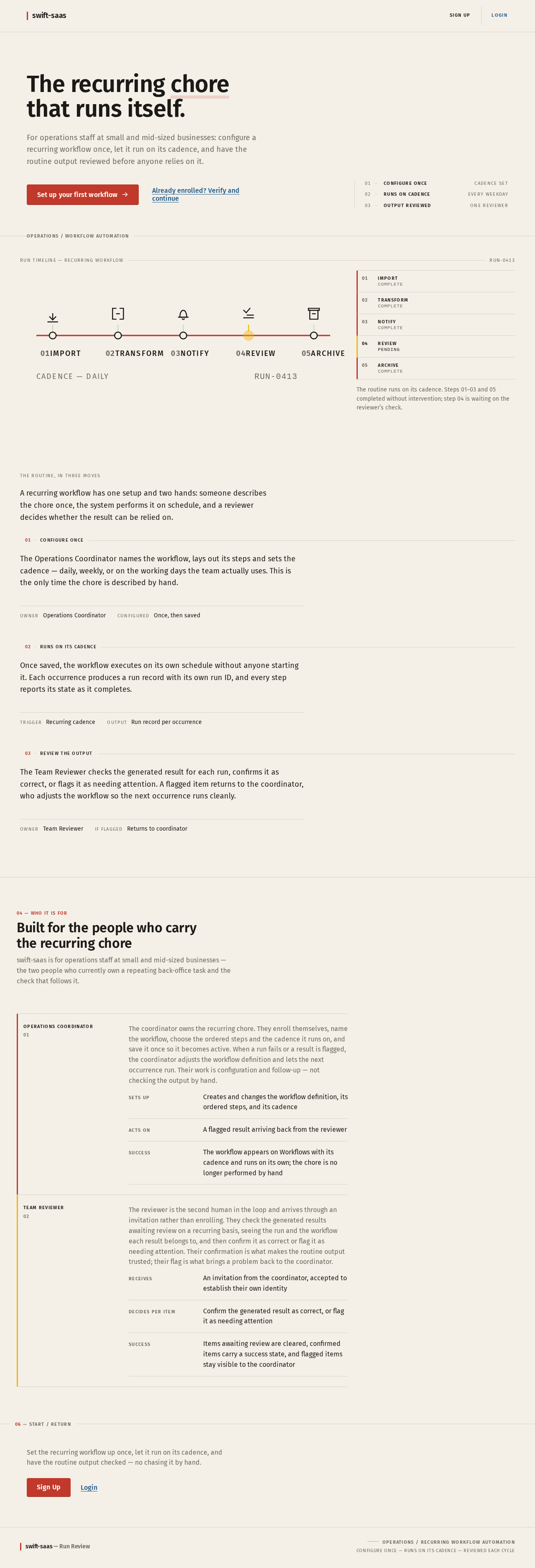
- Diagrammatic workflow schematic in the right four columns: five numbered nodes connected by a 2px signal-red line, each node labelled with an uppercase 11px micro-label, one node marked as pending review in signal yellow. The diagram is the image; there is no product screenshot or illustration.
- Full-bleed 1px rule beneath the hero carrying a small uppercase label identifying the domain.
- Numbered section transitions, each a full-width 1px rule with a small uppercase label sitting on the rule.
- States: Loading — static content, no data fetch; a brief 100ms opacity fade on entry. Empty — not applicable. Success — the page renders fully for anonymous visitors. Error — not applicable to static content; if the page fails to load, the browser's standard retry applies. Recovery — no in-page recovery is needed.
Login
- Information and state: Shared returning-verification surface for both personas and the entry point for an invited Team Reviewer. Collects the credentials of an already-established identity and, for invited reviewers, the invitation context that binds the acceptance to the correct invited person.
- Primary actions: Verify an existing identity and continue to the appropriate working destination; accept an invitation as the Team Reviewer.
- Supporting actions: Move to self-service enrollment if no identity exists yet; return to the Landing page.
- Domain entities: Identity, invitation, session.
- Component responsibilities:
- Credential entry fields with aligned label/value pairs in ruled rows and tabular numerals where numeric.
- Primary submit control as a rectangular button with a 4px radius and a 1px darker bottom edge.
- Invitation context display for an invited reviewer, showing which invitation is being accepted.
- Inline error region for failed verification or an expired or already-used invitation.
- States: Loading — submit control enters a pending state while verification is in flight. Empty — fields render empty with labels visible. Success — identity is established and the participant continues to their working destination. Error — incorrect credentials, unknown identity, or an invitation that is expired or already accepted produce an inline message that preserves entered values and allows retry. Recovery — the participant can retry verification, request a fresh invitation path from the Operations Coordinator, or move to Sign Up.
Sign Up
- Information and state: Self-service enrollment for the Operations Coordinator, who starts independently with no invitation. Collects the minimum information needed to establish an application-owned identity and the business context the workflows belong to.
- Primary actions: Establish a new identity and enter the working application.
- Supporting actions: Move to returning verification if an identity already exists; return to the Landing page.
- Domain entities: Identity, business/organization context, session.
- Component responsibilities:
- Enrollment fields with aligned label/value pairs in ruled rows.
- Primary submit control as a rectangular button with a 4px radius and a 1px darker bottom edge.
- Inline validation and error region.
- States: Loading — submit control enters a pending state while enrollment is in flight. Empty — fields render empty with labels visible. Success — the new identity is established and the Operations Coordinator lands in the working application with no workflows configured yet. Error — invalid or already-used enrollment information produces an inline message that preserves entered values and allows retry. Recovery — the participant can correct the entry and resubmit, or move to Login if an identity already exists.
Workflows
- Information and state: Revisitable overview of the recurring workflows configured for the business, showing each workflow's identity, its cadence, and its current standing. This is the Operations Coordinator's home surface and the return point after configuring a workflow or following up on runs.
- Primary actions: Open a workflow to configure or adjust it; start the setup of a new recurring workflow.
- Supporting actions: Move to Runs to follow up on executions; move to Review to see what is awaiting the Team Reviewer.
- Domain entities: Workflow, cadence/schedule, workflow step, run, review status.
- Component responsibilities:
- Persistent left rail as a numbered wayfinding column (01 Workflows, 02 Runs, 03 Review, 04 Settings) in uppercase 11px with wide tracking, the active item marked by a 3px signal-red bar.
- Ruled data rows with tabular numerals and a hairline rule between every row, so the list reads like a printed timetable.
- Status carried by a 3px left-edge bar in the signal colour rather than a coloured fill or pill.
- Section transition rule with a small uppercase label and numbered index.
- States: Loading — rows render as ruled placeholders while the workflow list is fetched. Empty — no workflows configured yet; the page states this plainly and offers the single action of setting up the first recurring workflow. Success — configured workflows are listed with cadence and standing. Error — a failed fetch shows an inline message with a retry action that does not discard the page. Recovery — retry the fetch, or proceed to Workflow Setup if the failure concerns a specific workflow.
Workflow Setup
- Information and state: Focused workspace for setting up and configuring the recurring boring workflow. Holds the workflow's name, its recurring cadence, and its ordered steps, and shows the workflow as a line with numbered stations.
- Primary actions: Define the workflow's steps in order; set the recurring cadence; save the workflow so it becomes active and begins executing on its cadence.
- Supporting actions: Reorder or remove a step before saving; leave without saving and return to Workflows.
- Domain entities: Workflow, workflow step, step type (import, transform, notify, review), cadence/schedule.
- Component responsibilities:
- Run timeline component reused as the configuration view: a horizontal transit-line with each step a numbered node on a 2px rail, completed nodes filled in signal colour, the run ID printed as a monospace ticket number at the end of the line.
- Step editor with 1.5px stroke pictograms for each step type on a 24px grid.
- Cadence control with tabular numerals.
- Primary save control as a rectangular button with a 4px radius and a 1px darker bottom edge.
- Section transition rule with a small uppercase label and numbered index.
- States: Loading — the existing workflow definition renders as ruled placeholders while it is fetched. Empty — a new workflow starts with no steps defined and states that a cadence and at least one step are required before it can run. Success — the workflow is saved, becomes active, and the participant returns to Workflows where it appears with its cadence. Error — invalid or incomplete configuration (for example, no cadence or no steps) produces an inline message identifying the missing element and preserves all entered work. Recovery — correct the identified element and save again, or leave without saving.
Runs
- Information and state: Overview of recurring workflow executions and their current status for operational follow-up. Shows each run's identity, which workflow it belongs to, when it ran, its current state, and its outcome.
- Primary actions: Inspect a run's timeline and outcome; follow up on a run that failed or is awaiting review.
- Supporting actions: Move to Workflows to adjust the workflow that produced a run; move to Review to see the reviewer's side.
- Domain entities: Run, run ID, workflow, run step, run status, timestamp, generated result.
- Component responsibilities:
- Run timeline: a horizontal transit-line where each step is a numbered node on a 2px rail, completed nodes filled in signal colour, the in-progress node pulsing once per second, and the run ID printed as a monospace ticket number at the end of the line. When a run is in progress, a thin red line advances along the track with a small counter ticking up, and completed steps get a 180ms fill-in of their node.
- Ruled data rows with tabular numerals and a hairline rule between every row.
- Status carried by a 3px left-edge bar in red, yellow, or green rather than a coloured pill.
- Section transition rule with a small uppercase label and numbered index.
- States: Loading — rows render as ruled placeholders while runs are fetched. Empty — no runs have occurred yet; the page states this plainly and points back to the workflow's cadence. Success — runs are listed with status, timestamps, and outcomes, and an in-progress run animates its advancing line and ticking counter. Error — a failed fetch shows an inline message with a retry action. Recovery — retry the fetch; a failed run is visible with its failing step marked so the Operations Coordinator can adjust the workflow and let the next occurrence run.
Review
- Information and state: Focused review destination where the Team Reviewer checks generated results and flags items needing attention. Shows the generated results awaiting review, the run and workflow each belongs to, and the current review standing of each item.
- Primary actions: Confirm a generated result as correct; flag a result as needing attention.
- Supporting actions: Inspect the run timeline that produced a result; move between items awaiting review.
- Domain entities: Generated result, run, run ID, workflow, review status, flag/attention marker, reviewer identity.
- Component responsibilities:
- Ruled data rows with tabular numerals and a hairline rule between every row, so the review list reads like a printed timetable.
- Status carried by a 3px left-edge bar in red, yellow, or green rather than a coloured pill; pending and needs-attention states use signal yellow.
- Run timeline component for the run under review, with the run ID printed as a monospace ticket number.
- Confirm and flag controls as rectangular buttons with a 4px radius and a 1px darker bottom edge.
- Section transition rule with a small uppercase label and numbered index.
- States: Loading — rows render as ruled placeholders while results are fetched. Empty — nothing is awaiting review; the page states this plainly rather than showing an empty table. Success — a result is confirmed or flagged, its status bar updates, and the reviewer moves to the next item. Error — a failed fetch or a failed confirm/flag action shows an inline message with a retry action that preserves the reviewer's position. Recovery — retry the action; a flagged item remains visible with its attention marker so the Operations Coordinator can see it on the Runs side.
3. Functional Requirements
FR-1 — Deliberately mundane product scope (explicit) As an Operations Coordinator, I should use a product that addresses an unglamorous, everyday recurring operational problem rather than an exciting or novel one, so that the tool I depend on daily is boring, predictable, and dependable.
- Trigger/input: the participant opens the product.
- Observable result: the product's stated purpose, its pages, and its language all concern routine recurring operational work.
- Access state: applies across the product.
- Failure/recovery: not applicable; this is a scope constraint on the product as a whole.
- Continuation: the participant proceeds to configure or review recurring work.
FR-2 — Working web application with a usable interface (explicit) As an Operations Coordinator, I should use a working web application with a usable interface rather than a concept or a description, so that I can actually complete the recurring work.
- Trigger/input: the participant navigates to the application.
- Observable result: every accepted destination renders and every accepted action produces its stated result.
- Access state: anonymous on Landing; established identity on the protected working destinations.
- Failure/recovery: a failed page load or failed action surfaces an inline message with a retry path.
- Continuation: the participant continues within the application.
FR-3 — Anonymous product explanation (required_inference) As an Operations Coordinator, I should be able to understand what the product does and who it is for before establishing access, so that I can decide whether it addresses my recurring chore.
- Trigger/input: the participant arrives at the Landing page with no established identity.
- Observable result: the page explains the recurring-workflow problem, the intended business users, and what the product does, and offers enrollment and returning verification.
- Access state: anonymous; no protected state is available.
- Failure/recovery: static content; a failed load is retried by the browser.
- Continuation: the participant proceeds to Sign Up or Login.
FR-4 — Self-service enrollment for the Operations Coordinator (required_inference) As an Operations Coordinator, I should be able to enroll myself without an invitation, so that I can start using the product independently.
- Trigger/input: the participant submits enrollment information on the Sign Up page.
- Observable result: an application-owned identity is established and the participant enters the working application with no workflows configured yet.
- Access state: anonymous entry; the enrollment interaction itself is the access boundary and is not protected.
- Failure/recovery: invalid or already-used enrollment information produces an inline message that preserves entered values and allows retry; the participant may instead move to Login.
- Continuation: the participant lands on Workflows and begins setting up a recurring workflow.
FR-5 — Invitation acceptance for the Team Reviewer (required_inference) As a Team Reviewer, I should be able to accept an invitation and establish my own identity, so that I can review the routine output without enrolling myself.
- Trigger/input: the invited participant opens the Login page with invitation context and accepts it.
- Observable result: an application-owned identity bound to that invitation is established and the participant reaches the Review destination.
- Access state: anonymous entry through the shared verification surface; the invitation binds the acceptance to the correct invited person.
- Failure/recovery: an expired or already-accepted invitation produces an inline message; the participant can request a fresh invitation from the Operations Coordinator.
- Continuation: the participant lands on Review and begins checking generated results.
FR-6 — Returning verification for both personas (required_inference) As an Operations Coordinator or a Team Reviewer, I should be able to verify my existing identity and return to my work, so that my durable state and my review standing remain bound to me across sessions.
- Trigger/input: the participant submits credentials on the Login page.
- Observable result: the session is established and the participant continues to their working destination.
- Access state: anonymous entry; protected state remains unavailable until verification succeeds.
- Failure/recovery: incorrect credentials or an unknown identity produce an inline message that preserves entered values and allows retry.
- Continuation: the participant continues to Workflows (Operations Coordinator) or Review (Team Reviewer).
FR-7 — Revisitable overview of configured workflows (required_inference) As an Operations Coordinator, I should be able to see the recurring workflows configured for my business and their current standing, so that I can return to them and follow up.
- Trigger/input: the participant opens the Workflows page.
- Observable result: each configured workflow is listed with its cadence and current standing, in ruled rows with tabular numerals.
- Access state: protected; requires an established Operations Coordinator identity.
- Failure/recovery: a failed fetch shows an inline message with a retry action that does not discard the page.
- Continuation: the participant opens a workflow to configure it, or starts a new one.
FR-8 — Setting up and configuring the recurring workflow (required_inference) As an Operations Coordinator, I should be able to define the ordered steps of my recurring workflow and set its cadence, so that the boring recurring problem is handled without me performing it each time.
- Trigger/input: the participant defines steps in order and sets a recurring cadence on the Workflow Setup page.
- Observable result: the workflow is saved, becomes active, and appears on Workflows with its cadence; the system begins executing it on that cadence.
- Access state: protected; requires an established Operations Coordinator identity.
- Failure/recovery: an incomplete configuration (no cadence or no steps) produces an inline message identifying the missing element and preserves all entered work.
- Continuation: the participant returns to Workflows, or leaves without saving.
FR-9 — Background execution on the recurring cadence (required_inference) As an Operations Coordinator, I should have the configured workflow execute automatically on its cadence, so that the routine task completes without manual effort.
- Trigger/input: the configured cadence elapses.
- Observable result: a run is created with its own run ID, its steps execute in order, and the run's state and outcome become visible on the Runs page.
- Access state: system-owned background execution; no human initiates each occurrence, and no human interaction is required for it to run.
- Failure/recovery: a step that fails marks the run as failed with the failing step identified, so the Operations Coordinator can adjust the workflow and let the next occurrence run.
- Continuation: the run's generated results become available for review.
FR-10 — Overview of recurring executions and their status (required_inference) As an Operations Coordinator, I should be able to see which runs happened, when, and in what state, so that I can follow up on anything that needs attention.
- Trigger/input: the participant opens the Runs page.
- Observable result: runs are listed with their run ID, workflow, timestamp, status, and outcome in ruled rows with tabular numerals; an in-progress run shows its advancing timeline and ticking counter.
- Access state: protected; requires an established Operations Coordinator identity.
- Failure/recovery: a failed fetch shows an inline message with a retry action; a failed run is visible with its failing step marked.
- Continuation: the participant inspects a run's timeline, adjusts the workflow, or moves to Review.
FR-11 — Reviewing generated results (required_inference) As a Team Reviewer, I should be able to check the generated results of recurring runs and confirm or flag them, so that the routine output is trusted without being redone by hand.
- Trigger/input: the participant opens the Review page and acts on an item awaiting review.
- Observable result: the item's review standing updates — confirmed as correct, or flagged as needing attention with a visible attention marker.
- Access state: protected; requires an established Team Reviewer identity.
- Failure/recovery: a failed fetch or a failed confirm/flag action shows an inline message with a retry action that preserves the reviewer's position.
- Continuation: the reviewer moves to the next item awaiting review; a flagged item remains visible to the Operations Coordinator on the Runs side.
FR-12 — Flagged items remain visible to the Operations Coordinator (required_inference) As an Operations Coordinator, I should be able to see which generated results the Team Reviewer flagged as needing attention, so that I can act on the reviewer's finding.
- Trigger/input: the Team Reviewer flags a result on the Review page.
- Observable result: the flagged item carries a visible attention marker on the Operations Coordinator's side of the lifecycle.
- Access state: protected; requires an established Operations Coordinator identity.
- Failure/recovery: if the flagged state cannot be loaded, an inline message with a retry action is shown.
- Continuation: the Operations Coordinator adjusts the workflow or otherwise follows up.
4. User Personas
Operations Coordinator
Product context. The Operations Coordinator owns the recurring, unglamorous operational chore that the product automates. They work at a small or mid-sized business, on a desktop, often with many records on screen at once. They are practical and not a designer; they want the tool to be legible and predictable, not delightful. They are the person who currently remembers the chore, performs it, and then waits for someone else to check it.
Primary goal. The boring recurring problem is handled reliably without them chasing it.
Distinct accepted responsibilities.
- Enroll themselves independently, with no invitation, establishing their own application-owned identity.
- Return through shared verification so their configured workflows remain bound to them.
- See the recurring workflows configured for the business and their current standing.
- Define the ordered steps of a recurring workflow and set its cadence, saving it so it becomes active.
- Follow up on recurring executions: which runs happened, when, in what state, and with what outcome.
- See which generated results the Team Reviewer flagged as needing attention, and act on that finding.
Relevant inputs and decisions. The workflow's name, its ordered steps and step types, and its recurring cadence. The decision to save a workflow so it becomes active. The decision, after a failed run or a flagged result, to adjust the workflow and let the next occurrence run.
Interactions with other accepted participants. The Operations Coordinator is the originator of the invitation the Team Reviewer accepts, and the recipient of the reviewer's flags. The reviewer's confirmation is what makes the routine output trusted; the reviewer's flag is what brings a problem back to the coordinator.
Observable success. The workflow appears on Workflows with its cadence and runs on its own; runs appear on Runs with their status; flagged results are visible and actionable; the coordinator is not performing the chore by hand.
What makes this role different. The Operations Coordinator is the only participant who creates and changes the workflow definition and its cadence, and the only one who acts on a flagged result. Their work is configuration and follow-up, not verification of output.
Team Reviewer
Product context. The Team Reviewer is the second human in the loop. A boring operational workflow still requires someone to confirm the recurring results are correct before they are relied upon. They arrive through an invitation rather than enrolling themselves, and they work on a recurring basis, checking what the automation produced.
Primary goal. Confidence that the automated routine output is accurate, without redoing the work by hand.
Distinct accepted responsibilities.
- Accept an invitation and establish their own application-owned identity, bound to the correct invited person.
- Return through shared verification so their review standing remains bound to them.
- Check generated results awaiting review, seeing the run and workflow each belongs to.
- Confirm a generated result as correct.
- Flag a result as needing attention, producing a visible attention marker the Operations Coordinator can act on.
Relevant inputs and decisions. The generated result itself, the run timeline that produced it, and the run ID. The decision to confirm or to flag, made per item.
Interactions with other accepted participants. The Team Reviewer depends on the Operations Coordinator's configured workflow and cadence for the results they review, and their flags are the mechanism by which a problem reaches the coordinator. Their confirmations are what allow the routine output to be relied upon.
Observable success. Items awaiting review are visible and can be cleared; confirmed items carry a success state; flagged items carry an attention marker that the coordinator can see; the reviewer never has to reproduce the work by hand.
What makes this role different. The Team Reviewer never configures a workflow and never changes a cadence. Their work is per-item judgement on output that already exists, and their only outputs are a
The recurring chore that runs itself.
For operations staff at small and mid-sized businesses: configure a recurring workflow once, let it run on its cadence, and have the routine output reviewed before anyone relies on it.
Run timeline — recurring workflowRUN-0413
The routine runs on its cadence. Steps 01–03 and 05 completed without intervention; step 04 is waiting on the reviewer’s check.
A recurring workflow has one setup and two hands: someone describes the chore once, the system performs it on schedule, and a reviewer decides whether the result can be relied on.
- 01Configure once
The Operations Coordinator names the workflow, lays out its steps and sets the cadence — daily, weekly, or on the working days the team actually uses. This is the only time the chore is described by hand.
- Owner
- Operations Coordinator
- Configured
- Once, then saved
- 02Runs on its cadence
Once saved, the workflow executes on its own schedule without anyone starting it. Each occurrence produces a run record with its own run ID, and every step reports its state as it completes.
- Trigger
- Recurring cadence
- Output
- Run record per occurrence
- 03Review the output
The Team Reviewer checks the generated result for each run, confirms it as correct, or flags it as needing attention. A flagged item returns to the coordinator, who adjusts the workflow so the next occurrence runs cleanly.
- Owner
- Team Reviewer
- If flagged
- Returns to coordinator
04 — Who it is for
Built for the people who carry the recurring chore
swift-saas is for operations staff at small and mid-sized businesses — the two people who currently own a repeating back-office task and the check that follows it.
- Operations Coordinator 01
- The coordinator owns the recurring chore. They enroll themselves, name the workflow, choose the ordered steps and the cadence it runs on, and save it once so it becomes active. When a run fails or a result is flagged, the coordinator adjusts the workflow definition and lets the next occurrence run. Their work is configuration and follow-up — not checking the output by hand.Sets upCreates and changes the workflow definition, its ordered steps, and its cadenceActs onA flagged result arriving back from the reviewerSuccessThe workflow appears on Workflows with its cadence and runs on its own; the chore is no longer performed by hand
- Team Reviewer 02
- The reviewer is the second human in the loop and arrives through an invitation rather than enrolling. They check the generated results awaiting review on a recurring basis, seeing the run and the workflow each result belongs to, and then confirm it as correct or flag it as needing attention. Their confirmation is what makes the routine output trusted; their flag is what brings a problem back to the coordinator.ReceivesAn invitation from the coordinator, accepted to establish their own identityDecides per itemConfirm the generated result as correct, or flag it as needing attentionSuccessItems awaiting review are cleared, confirmed items carry a success state, and flagged items stay visible to the coordinator
The recurring chore that runs itself.
For operations staff at small and mid-sized businesses: configure a recurring workflow once, let it run on its cadence, and have the routine output reviewed before anyone relies on it.
Run timeline — recurring workflowRUN-0413
The routine runs on its cadence. Steps 01–03 and 05 completed without intervention; step 04 is waiting on the reviewer’s check.
A recurring workflow has one setup and two hands: someone describes the chore once, the system performs it on schedule, and a reviewer decides whether the result can be relied on.
- 01Configure once
The Operations Coordinator names the workflow, lays out its steps and sets the cadence — daily, weekly, or on the working days the team actually uses. This is the only time the chore is described by hand.
- Owner
- Operations Coordinator
- Configured
- Once, then saved
- 02Runs on its cadence
Once saved, the workflow executes on its own schedule without anyone starting it. Each occurrence produces a run record with its own run ID, and every step reports its state as it completes.
- Trigger
- Recurring cadence
- Output
- Run record per occurrence
- 03Review the output
The Team Reviewer checks the generated result for each run, confirms it as correct, or flags it as needing attention. A flagged item returns to the coordinator, who adjusts the workflow so the next occurrence runs cleanly.
- Owner
- Team Reviewer
- If flagged
- Returns to coordinator
04 — Who it is for
Built for the people who carry the recurring chore
swift-saas is for operations staff at small and mid-sized businesses — the two people who currently own a repeating back-office task and the check that follows it.
- Operations Coordinator 01
- The coordinator owns the recurring chore. They enroll themselves, name the workflow, choose the ordered steps and the cadence it runs on, and save it once so it becomes active. When a run fails or a result is flagged, the coordinator adjusts the workflow definition and lets the next occurrence run. Their work is configuration and follow-up — not checking the output by hand.Sets upCreates and changes the workflow definition, its ordered steps, and its cadenceActs onA flagged result arriving back from the reviewerSuccessThe workflow appears on Workflows with its cadence and runs on its own; the chore is no longer performed by hand
- Team Reviewer 02
- The reviewer is the second human in the loop and arrives through an invitation rather than enrolling. They check the generated results awaiting review on a recurring basis, seeing the run and the workflow each result belongs to, and then confirm it as correct or flag it as needing attention. Their confirmation is what makes the routine output trusted; their flag is what brings a problem back to the coordinator.ReceivesAn invitation from the coordinator, accepted to establish their own identityDecides per itemConfirm the generated result as correct, or flag it as needing attentionSuccessItems awaiting review are cleared, confirmed items carry a success state, and flagged items stay visible to the coordinator
No comments yet. Be the first!