swift-energy

byMike Automation

Build me a Complete PWA website for only Solar distributors,Manufacturer, Marketers and Customers. michaelautomationng@gmail.com make it the super admin, add different kinds of Solars,their details and current Market prices

LandingMarket PricesProduct Details
Landing

Comments (0)

No comments yet. Be the first!

System Requirements

System Requirement Document
Page 1 of 9

System Requirements Document for swift-energy

1. Introduction

The swift-energy project aims to develop a Progressive Web Application (PWA) specifically for solar distributors, manufacturers, marketers, and customers. The platform will provide a comprehensive catalog of solar products, including their details and current market prices. The super admin role will be assigned to michaelautomationng@gmail.com, who will oversee the platform's administration.

2. System Overview

The swift-energy PWA is designed to serve as a centralized platform for various stakeholders in the solar industry, including distributors, manufacturers, marketers, and customers. The application will facilitate the management and dissemination of solar product information and market prices. The super admin, designated as michaelautomationng@gmail.com, will have exclusive access to administrative functionalities.

2a. Product Interpretation and Delivery Boundary

The application will be delivered as a PWA, ensuring accessibility across various devices and platforms. The system will enforce role-based access control, with specific functionalities available to different user roles. The super admin will have comprehensive control over the platform, including the ability to manage solar product listings and market prices. The application will not support users outside the specified roles of solar distributors, manufacturers, marketers, and customers.

Page 2 of 9

2b. Source Content Inventory

Not applicable as no content source directive was provided.

2c. Page Content and Component Coverage

Landing

  • Purpose: Public entry point explaining the platform's purpose and user roles.
  • Components:
    • Overview of the platform and its benefits.
    • Introduction to user roles and functionalities.
    • Call-to-action for sign-up or login.

Login

  • Purpose: Identity verification for returning users.
  • Components:
    • Username and password fields.
    • "Forgot Password" recovery option.
    • Login button.

Sign Up

  • Purpose: Enrollment for new users.
  • Components:
    • User role selection (Distributor, Manufacturer, Marketer, Customer).
    • Registration form with necessary personal and professional details.
    • Submit button.
Page 3 of 9

Solar Catalog

  • Purpose: Browse available solar products.
  • Components:
    • List of solar products with brief details.
    • Search and filter options.
    • Links to detailed product pages.

Product Details

  • Purpose: Detailed view of a selected solar product.
  • Components:
    • Comprehensive product information.
    • Technical specifications.
    • Related products and recommendations.

Market Prices

  • Purpose: Display and manage current market prices.
  • Components:
    • List of solar products with current prices.
    • Price trend graphs.
    • Update price option for authorized users.

Product Editor

  • Purpose: Add and maintain solar product details.
  • Components:
    • Form for entering product details.
    • Save and publish options.
    • Role-restricted access.
Page 4 of 9

Price Editor

  • Purpose: Manage market prices.
  • Components:
    • Interface for updating prices.
    • Historical price data.
    • Role-restricted access.

Admin

  • Purpose: Platform administration by the super admin.
  • Components:
    • User management tools.
    • System settings and configurations.
    • Access to all platform functionalities.

3. Functional Requirements

  • As a Solar Distributor, I should be able to manage solar product listings and view current market prices to facilitate distribution activities. (explicit)
  • As a Solar Manufacturer, I should be able to provide and manage solar products, their details, and market-price information. (explicit)
  • As a Solar Marketer, I should be able to access solar product details and current market prices for marketing activities. (explicit)
  • As a Customer, I should be able to browse solar types, product details, and current market prices. (explicit)
  • As the Super Admin, I should be able to oversee platform, catalog, and pricing administration. (explicit)
  • As a user, I must complete enrollment or receive any necessary role assignment before accessing protected workspaces. (required_inference)
  • As a returning user, I must verify my identity through Login. (required_inference)
Page 5 of 9

4. User Personas

  • Solar Distributor: Manages solar product listings and market prices for distribution.
  • Solar Manufacturer: Provides and manages solar products and pricing information.
  • Solar Marketer: Utilizes product details and prices for marketing.
  • Customer: Browses solar products and pricing.
  • Super Admin: Administers the platform and manages catalog and pricing.

5. Core User Flows

Solar Distributor

  1. Log in to the platform.
  2. Access the Solar Catalog to manage product listings.
  3. View and update market prices in the Market Prices section.
  4. Log out.

Solar Manufacturer

  1. Log in to the platform.
  2. Access the Product Editor to add or update product details.
  3. Manage market prices in the Price Editor.
  4. Log out.
Page 6 of 9

Solar Marketer

  1. Log in to the platform.
  2. Browse the Solar Catalog for product details.
  3. Access Market Prices for pricing information.
  4. Log out.

Customer

  1. Visit the Landing page.
  2. Sign up for an account.
  3. Browse the Solar Catalog and view Product Details.
  4. Log out.

Super Admin

  1. Log in to the platform.
  2. Access the Admin page for platform management.
  3. Oversee user roles and permissions.
  4. Manage solar products and pricing.
  5. Log out.
Page 7 of 9

6. Visuals Colors and Theme

  • Muse: Rasmus Andersson
  • Palette:
    • Background: #F6F3EE
    • Surface: #FFFFFF
    • Text: #141517
    • Primary: #F9A825
    • Accent: #FF5722
    • Muted: #CCCCCC
  • Typography:
    • Headings: Space Grotesk, Bold, uppercase
    • Body: Work Sans
    • Scale: 56/40/28/18/16
  • Shape Language: 4/8-pt spacing, compact controls, hairline borders
  • Layout: Precise grid, structured for navigation and data presentation
  • Motion: Fast, functional transitions (120–200ms)
  • Imagery: Interface-focused, schematic diagrams

7. Signature Design Concept

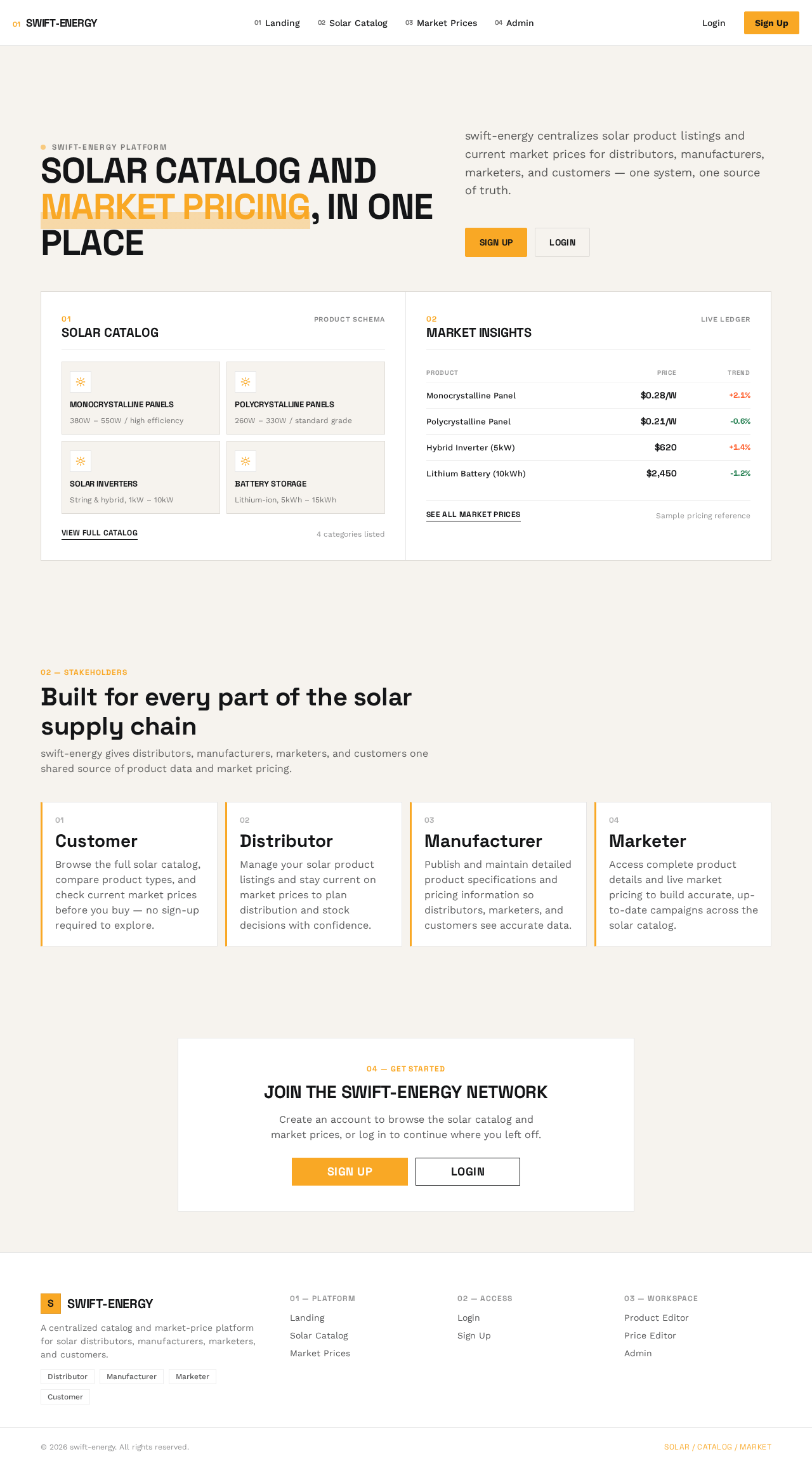
A split-screen hero on the Landing page, showcasing the solar product catalog on one side and market insights on the other. The design uses a warm off-white background with vibrant accents for call-to-action elements, adhering to the structured and professional aesthetic inspired by Rasmus Andersson.
Page 8 of 9

8. Interaction Model & Motion Direction

  • Interaction Model: Static
  • Motion Tempo: Restrained
  • Hero Dimensionality: Flat
  • Landing Hero Motion Brief: The hero section will feature a split-screen layout with static imagery of the solar catalog and market insights. Interactive elements will use bright accent colors for emphasis, ensuring clarity and focus on the platform's core functionalities.

9. Non-Functional Requirements

  • The PWA must be accessible on various devices and platforms, ensuring a consistent user experience.
  • The system must enforce role-based access control to protect sensitive functionalities.
  • The application should load within 3 seconds on standard network conditions.

10. Tech Stack

  • Frontend: React
  • Backend: Python/FastAPI
  • Database: PostgreSQL
  • Deployment: Docker, Kubernetes (if required for scaling)
  • Hosting: Cloud-based solution (e.g., AWS, Azure)

11. Assumptions and Constraints

  • The platform is exclusively for solar distributors, manufacturers, marketers, and customers.
  • michaelautomationng@gmail.com is the sole super admin.
  • The application will not support any user roles outside the specified ones.
Page 9 of 9

12. Glossary

  • PWA: Progressive Web Application, a type of application software delivered through the web.
  • Super Admin: A user with the highest level of access, capable of managing all aspects of the platform.
  • Solar Catalog: A collection of solar products available on the platform.
  • Market Prices: Current pricing information for solar products.
Landing design preview
Landing: Visit landing page
Sign Up: Create account
Solar Catalog: Browse solar products
Product Details: View product details
Market Prices: View current prices
Landing design preview
Landing: Visit landing page
Sign Up: Create account
Solar Catalog: Browse solar products
Product Details: View product details
Market Prices: View current prices