swift-design
create a project to build todo application with single page design and minimal design as well

Comments (0)
Sign in to leave a comment
System Requirements
swift-design System Requirements Document
Introduction
The swift-design project aims to develop a todo application with a single-page layout and minimal design. This application is tailored for personal use, focusing on simplicity and ease of use to provide an efficient task management experience.
System Overview
The swift-design application will be a web-based todo list designed for individual users. The application will feature a single-page interface that allows users to add, view, and manage tasks in a straightforward manner. The emphasis will be on a clean and minimalistic design to ensure a distraction-free user experience.
Functional Requirements
- As a User, I should be able to add new tasks to my checklist.
- As a User, I should be able to view all my tasks on a single page.
- As a User, I should be able to mark tasks as completed.
- As a User, I should be able to delete tasks from my checklist.
User Personas
- User: An individual looking to manage personal tasks efficiently using a simple checklist format.
Visuals Colors and Theme
- primary: #2A9D8F (teal)
- primary_light: #A8DADC (light teal)
- secondary: #E76F51 (coral)
- accent: #F4A261 (sandy orange)
- highlight: #FFB703 (amber)
- bg: #F1FAEE (off-white)
- surface: rgba(233, 233, 233, 0.8)
- text: #264653 (dark slate)
- text_muted: #6D6875 (muted gray)
- border: rgba(38, 70, 83, 0.2)
Signature Design Concept
The swift-design application will feature an interactive "Task Canvas" on the homepage. This canvas will allow users to drag and drop tasks to reorder them dynamically. The interface will have a smooth, fluid animation using framer-motion to enhance the user experience. When a task is marked as completed, it will gently fade and slide to a "Completed Tasks" section at the bottom of the page, providing a sense of accomplishment. The design will incorporate a minimalistic aesthetic with ample white space and subtle animations to keep the focus on task management.
Interaction Model & Motion Direction
The landing page will utilize an "animated" interaction model. This will include moderate scroll-triggered reveals and hover transitions for task interactions. The use of spring physics on interactive elements will ensure a polished and responsive user experience. Internal pages will maintain a "static" layout to prioritize readability and task management efficiency.
Non-Functional Requirements
- The application should load within 2 seconds on a standard broadband connection.
- The interface should be responsive and accessible on both desktop and mobile devices.
- The application should support the latest versions of major web browsers.
Tech Stack
- Frontend: React for Web
- Backend: FastAPI
- Database: MySQL
- Local orchestration: Docker
- Server-side orchestration: Kubernetes
Assumptions and Constraints
- The application is intended for personal use and does not require multi-user support.
- The design will prioritize minimalism and simplicity over complex features.
- The application will not include advanced features like task reminders or categories.
Glossary
- Single-page application (SPA): A web application that interacts with the user by dynamically rewriting the current page rather than loading entire new pages from the server.
- Minimal design: A design approach that emphasizes simplicity and the use of essential elements only.
- Task Canvas: The interactive area where users can manage their tasks.
This document outlines the requirements and design direction for the swift-design todo application, ensuring a focused and user-friendly experience.
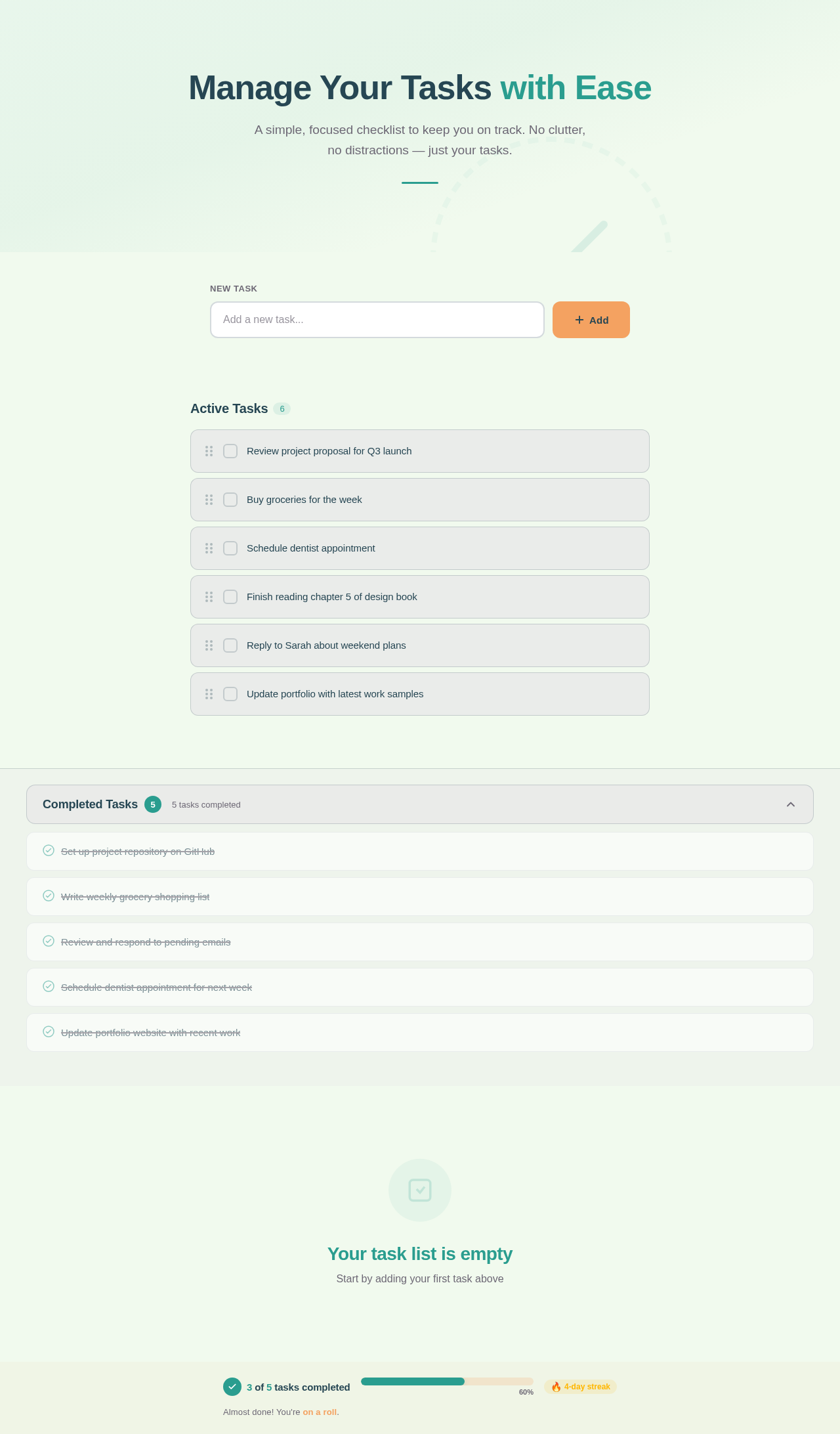
Manage Your Tasks with Ease
A simple, focused checklist to keep you on track. No clutter, no distractions — just your tasks.
Your task list is empty
Start by adding your first task above
Almost done! You're on a roll.
No comments yet. Be the first!