swift-construction
 Monin Modi
I want to build my construction site


Comments (0)
Sign in to leave a comment
System Requirements
System Requirements Document (SRD)
Project: swift-construction
1. Introduction
The swift-construction project aims to create a user-friendly, visually appealing, and functional website tailored for Monin Modi's construction business in the United States. The primary audience for this platform is homeowners seeking construction services. The system will provide features such as project galleries, service details, contact forms, and additional tools to enhance user engagement and streamline communication.
This document outlines the system requirements for the swift-construction project, including functional and non-functional requirements, user personas, and design concepts.
2. System Overview
The swift-construction platform will serve as a digital hub for homeowners to explore construction services, view completed projects, and easily contact the business. The system will prioritize simplicity, aesthetic appeal, and functionality to ensure a seamless user experience.
Key objectives include:
- Showcasing construction services and completed projects.
- Providing an intuitive interface for homeowners to navigate.
- Offering tools like contact forms and potential cost estimation features.
- Supporting scalability for future enhancements.
The platform will be designed with a focus on the U.S. market, adhering to local preferences, currency (USD), and time zones.
3. Functional Requirements
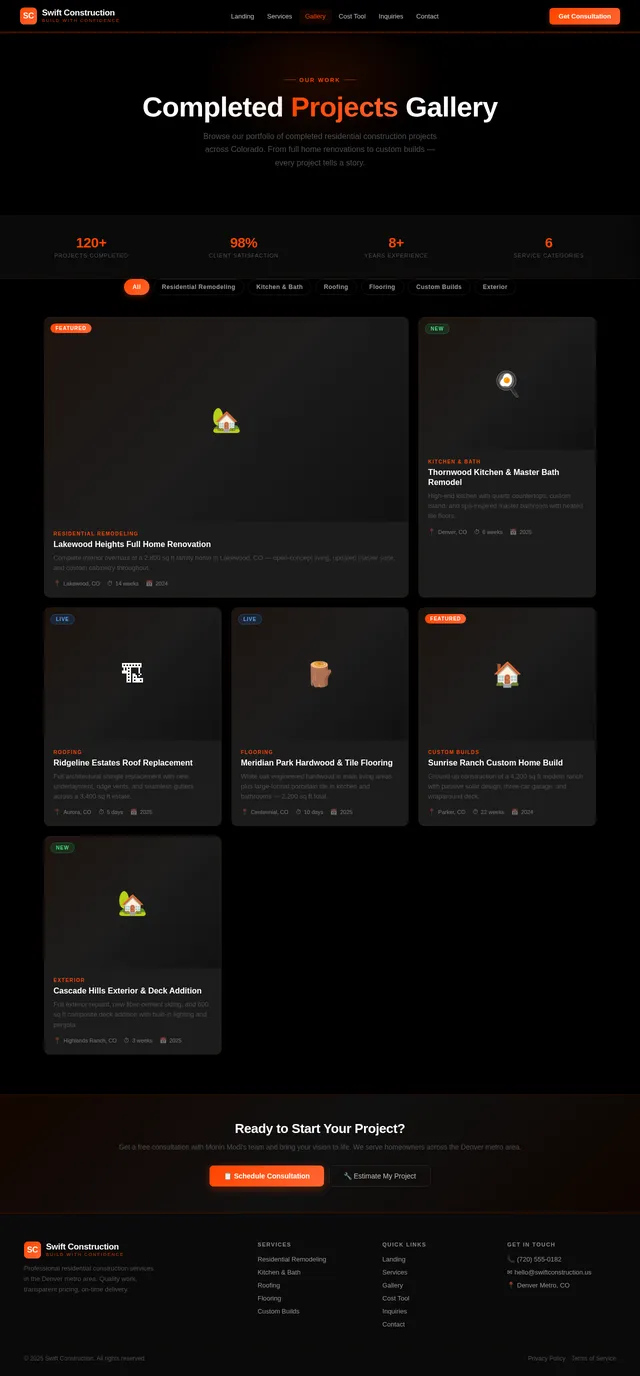
- As a Homeowner, I should be able to view a gallery of completed projects with high-quality images and descriptions.
- As a Homeowner, I should be able to browse detailed descriptions of available construction services.
- As a Homeowner, I should be able to fill out a contact form to request more information or schedule a consultation.
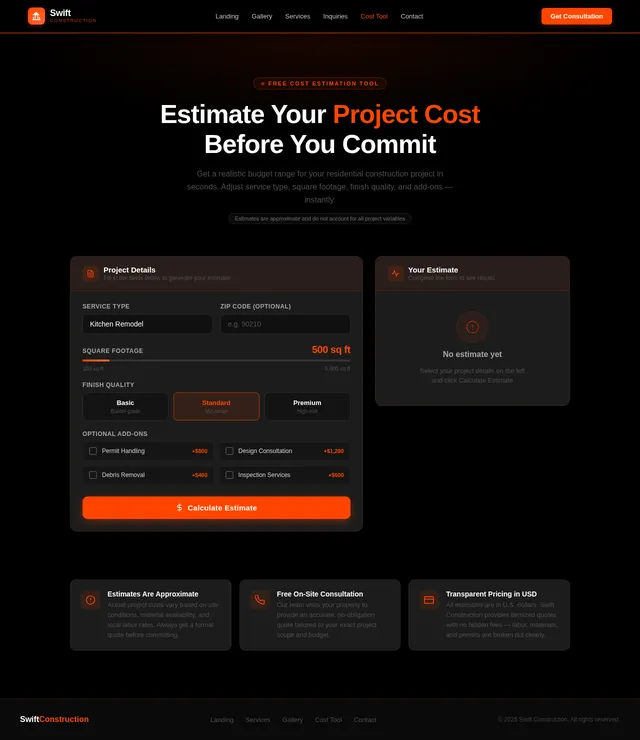
- As a Homeowner, I should be able to access a cost estimation tool for basic construction projects.
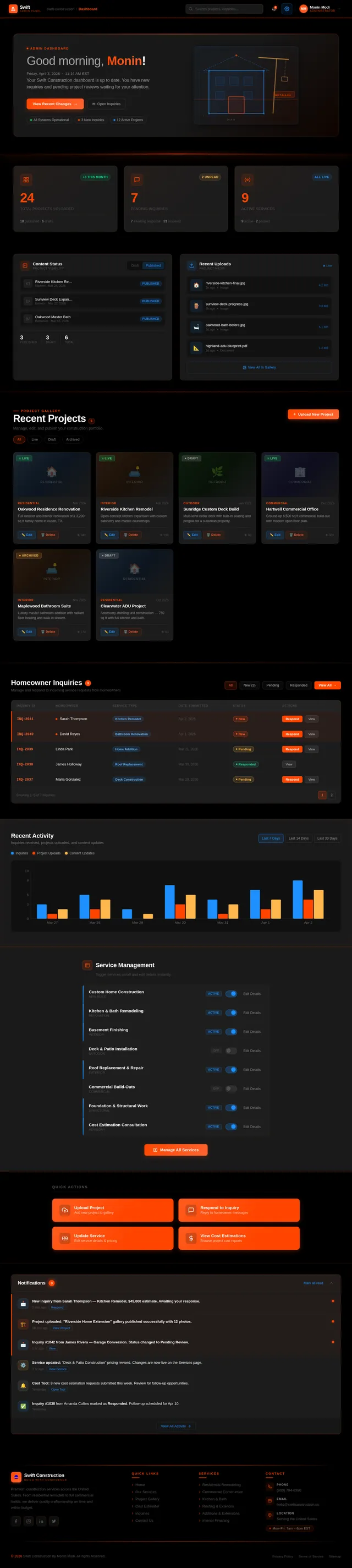
- As an Admin, I should be able to upload and manage project images and descriptions for the gallery.
- As an Admin, I should be able to update service details dynamically.
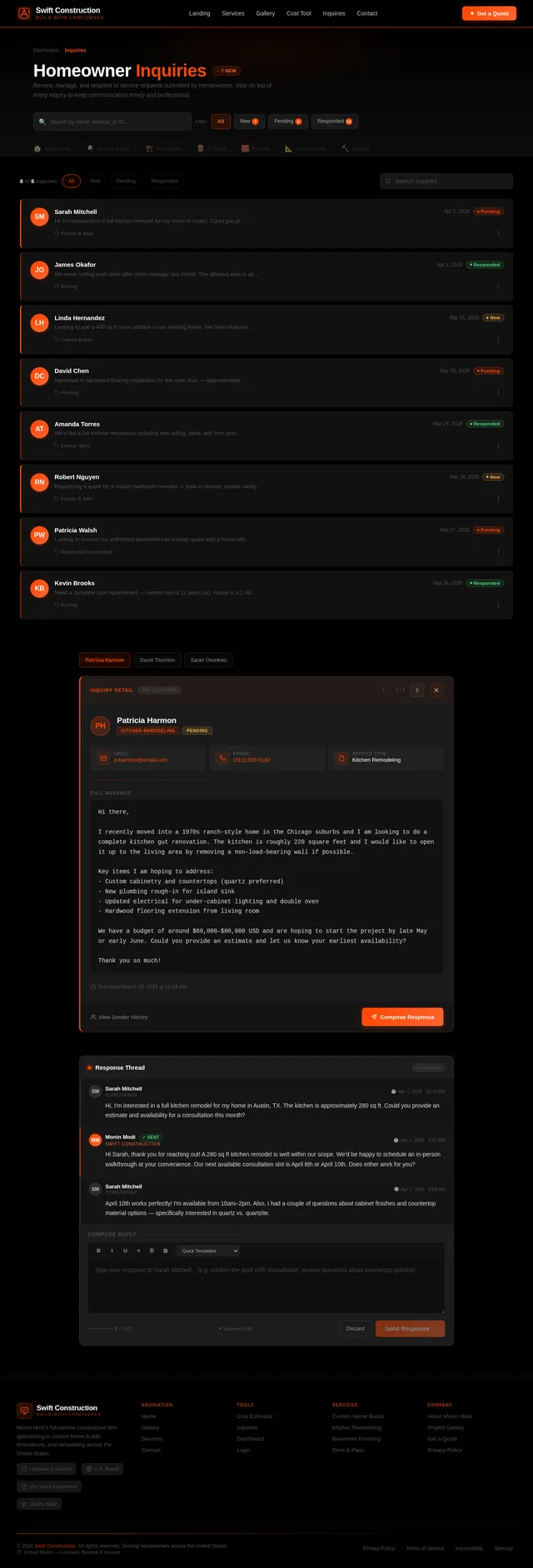
- As an Admin, I should be able to view and respond to homeowner inquiries submitted through the contact form.
- As a User, I should be able to trigger a selective re-run capability to regenerate specific sections of the SRD as needed.
4. User Personas
4.1 Homeowner
- Description: Primary users of the platform. Typically individuals or families looking for construction services for their homes.
- Goals: Explore services, view completed projects, and contact the business for inquiries or consultations.
- Pain Points: Lack of clarity about services, difficulty in finding reliable contractors, and inability to estimate costs.
4.2 Admin
- Description: Internal users responsible for managing the website content and responding to inquiries.
- Goals: Keep the website updated with the latest projects and services, and maintain communication with homeowners.
- Pain Points: Time-consuming content updates and managing multiple inquiries efficiently.
5. Visuals Colors and Theme
The swift-construction platform will feature a sleek, modern, and professional aesthetic with a black-themed design. The color palette is designed to evoke sophistication, trust, and creativity, aligning with the construction industry.
Color Palette:
- Background: #000000 (deep black for a bold, modern backdrop)
- Surface: #1C1C1C (charcoal gray for cards and sections)
- Text: #FFFFFF (pure white for high contrast and readability)
- Accent: #FF4500 (bright orange-red for buttons and highlights)
- Muted Tones: #4F4F4F (soft gray for secondary elements)
6. Signature Design Concept
Interactive Construction Timeline Landing Page
The homepage will feature an immersive, interactive timeline that visually narrates the construction process, creating an engaging and memorable first impression.
-
Visual Elements:
- A dark, sleek background with animated construction elements (e.g., cranes, blueprints, and tools) that subtly move as the user scrolls.
- The timeline will be represented as a glowing orange-red line (matching the accent color) that guides users through the sections: "Our Services," "Gallery," "Cost Estimation," and "Contact Us."
- Each section will appear as a "milestone" on the timeline, with animated icons and labels.
-
Interactive Features:
- Hovering over a milestone will display a preview of the section with a smooth fade-in effect.
- Clicking on a milestone will "zoom in" to reveal detailed content, with a transition effect resembling a construction site being built in real-time.
- Micro-interactions, such as animated tool icons and glowing effects, will enhance user engagement.
-
Color Shifts:
- The background will feature subtle gradients of black and charcoal gray, with glowing orange-red accents to highlight interactive elements.
This design concept will create a visually stunning and interactive experience, immediately conveying the brand's focus on construction and innovation.
7. Non-Functional Requirements
- The system must load the homepage within 2 seconds for users in the U.S.
- The platform must be mobile-responsive and accessible on devices with varying screen sizes.
- The system must comply with ADA accessibility standards.
- The backend must support at least 1,000 concurrent users.
- Data submitted through the contact form must be encrypted for security.
- The system must support selective re-run capability to allow users to regenerate specific sections of the SRD on demand.
8. Tech Stack
Frontend
- React for Web
Backend
- Python
- FastAPI
Database
- MySQL (with Alembic for migrations)
AI Models
- GPT 5.4 for user-friendly responses
AI Tools
- Langchain
Local Orchestration
- Docker
- docker-compose
Server-Side Orchestration
- Kubernetes
9. Assumptions and Constraints
- The platform will primarily target U.S.-based homeowners, and all content will be in English.
- The cost estimation tool will provide rough estimates and will not account for all variables in a construction project.
- The system will not include e-commerce functionality in the initial release.
- The project will adhere to a development timeline of 6 months.
- The selective re-run capability will be limited to regenerating specific sections of the SRD and will not affect other system functionalities.
10. Glossary
- Homeowner: The primary user of the platform, seeking construction services for residential properties.
- Admin: The individual(s) responsible for managing the website content and responding to inquiries.
- Blueprint: A technical drawing or design plan, used metaphorically in the website's design concept.
- ADA Accessibility Standards: Guidelines to ensure web content is accessible to individuals with disabilities.
- Cost Estimation Tool: A feature allowing users to calculate rough estimates for construction projects.
- Selective Re-run Capability: A feature that allows users to regenerate specific sections of the SRD on demand.

Swift Construction: Building Your Dreams
From blueprint to reality, we bring precision craftsmanship and transparent pricing to every project. Explore our services, view completed projects, and get your free estimate today.
Explore Our Blueprint
Navigate through our specialized zones to discover how Swift Construction can bring your vision to life.
Our Services
From full-scale renovations to new builds, explore our comprehensive construction services tailored for homeowners across the U.S.
Explore→Zone Details
We offer residential construction, kitchen and bathroom remodeling, room additions, structural repairs, and complete home renovations. Every project is managed by licensed professionals with a commitment to quality craftsmanship.
Go to Our Services →Project Gallery
Browse our portfolio of completed projects with high-quality images showing the transformation from blueprint to finished home.
Explore→Zone Details
View before-and-after galleries of 500+ completed projects, organized by category. Each project includes detailed descriptions, timelines, materials used, and client testimonials to help you envision your own transformation.
Go to Project Gallery →Cost Estimation Tool
Get an instant ballpark estimate for your project. Select your project type, area, and materials to see projected costs in USD.
Explore→Zone Details
Our interactive cost calculator factors in project type, square footage, material quality, labor rates, and regional pricing. Receive a detailed breakdown instantly and schedule a consultation for a precise, personalized quote.
Go to Cost Estimation Tool →Featured Projects
Explore a selection of our completed projects showcasing quality craftsmanship, thoughtful design, and homeowner satisfaction.
Estimate Your Project Cost
Get an instant ballpark estimate for your construction project. Adjust the inputs below to see your estimate update in real time.
Featured Project
A closer look at one of our premium residential transformations
Modern Farmhouse Full Renovation
A complete transformation of a 1970s ranch-style home into a stunning modern farmhouse. The project included open-concept living areas, a chef-grade kitchen with custom cabinetry, spa-inspired bathrooms, and a wraparound porch. Every detail was crafted to blend contemporary comfort with timeless farmhouse character.
Materials Used
What Homeowners Are Saying
Hear from families who trusted Swift Construction to bring their vision to life. Our commitment to quality and communication speaks for itself.
Swift Construction transformed our outdated kitchen into a modern masterpiece. The team was professional, on-time, and the final result exceeded our expectations. We couldn't be happier with the craftsmanship.
Sarah Mitchell
Austin, TX
From the initial consultation to the final walkthrough, every step was transparent and stress-free. Our home addition was completed on budget and the quality of work is outstanding. Highly recommend!
James & Linda Park
Denver, CO
We used the cost estimation tool to plan our bathroom renovation and the final price was spot-on. The crew was respectful of our home and delivered a beautiful result ahead of schedule.
Michael Torres
Phoenix, AZ
After interviewing several contractors, we chose Swift Construction for our whole-home remodel. Best decision we made. Their attention to detail and communication throughout the project was exceptional.
Rebecca Chen
Portland, OR
How It Works
From your first call to the final walkthrough, here is exactly how we turn your blueprint into reality — with complete transparency at every step.
Free Consultation
Schedule a free on-site consultation where our experts assess your project, discuss your vision, and understand your goals. We listen carefully to ensure every detail is captured before moving forward.
Design & Estimate
Our team creates detailed blueprints and a transparent, itemized estimate for your approval. We walk you through material options, timelines, and costs so there are no surprises down the road.
Build & Manage
Construction begins with a dedicated project manager overseeing every phase. You receive regular progress updates, and our licensed crews ensure quality craftsmanship at every step.
Final Walkthrough
We conduct a thorough final walkthrough with you to ensure every detail meets your expectations. Your satisfaction is our priority, backed by our comprehensive warranty on all work performed.
Ready to Transform Your Space?
From concept to completion, Swift Construction delivers exceptional craftsmanship and transparent communication. Let us bring your vision to life with a personalized consultation or explore our portfolio of completed projects.
Frequently Asked Questions
Find answers to common questions about our construction services, process, and what to expect when working with Swift Construction.
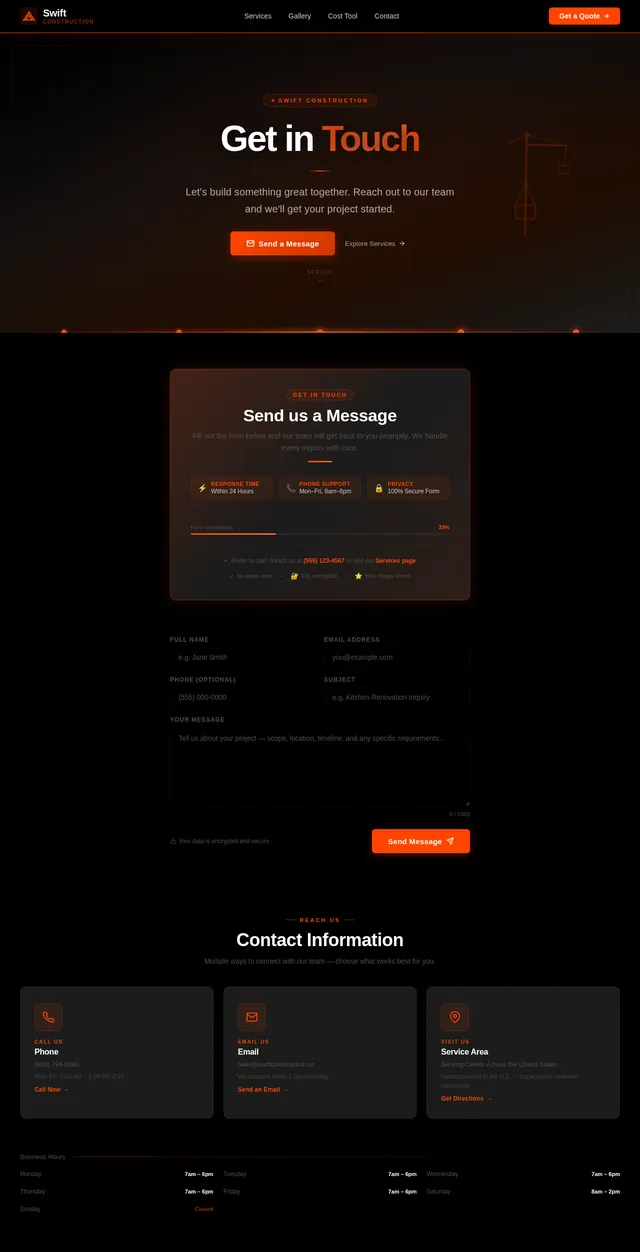
Get in Touch
Ready to start your construction project? Fill out the form below and our team will get back to you within 24 hours with a personalized consultation.
Request a Consultation
Contact Information
Service Area
Business Hours
Trusted by Homeowners Nationwide
Swift Construction has earned the confidence of hundreds of families through quality craftsmanship, transparent pricing, and reliable project delivery.
No comments yet. Be the first!