swift-calculator
 Diya Trivedi
create a project to build a simple single page design of calculator

Comments (0)
Sign in to leave a comment
System Requirements
System Requirements Document for swift-calculator
1. Introduction
swift-calculator is a single-page calculator product. Its intent is deliberately narrow: one anonymous visitor opens one page, sees a calculator, presses keys, and reads the resulting number. The product is a small consumer utility — a household object rather than a software platform.
The audience is any person who needs to do quick arithmetic in a browser without installing anything, signing in, or navigating a multi-screen application. The experience should feel like a well-made mid-century appliance: warm, tactile, honest, and immediately legible.
The product is defined by two hard constraints carried from the authoritative requirement thread:
- The design must be a single page.
- The calculator must be simple.
Everything in this document is subordinate to those two constraints. No account system, history archive, settings area, onboarding sequence, or secondary destination is in scope.
2. System Overview
swift-calculator is delivered as a custom first-party web UI consisting of exactly one page, Calculator, which is anonymously reachable and requires no identity, session, or stored state. The page hosts the entire product: the calculator case, its display, its keypad, and the surrounding editorial framing described in the creative direction.
Actors
- Calculator User (active human persona) — the sole human actor. Opens the page and performs arithmetic using the on-screen controls.
- No other human personas exist in the current product. There are no administrators, editors, reviewers, or recipients of calculator output within the product.
Accepted behavior
- Number entry, decimal entry, and the four basic arithmetic operations, plus clear, sign toggle, and percent, with the result shown in the display.
- A visible expression tape showing the tokens entered so far.
- Immediate, observable feedback on every key press.
Ownership
- All human-facing behavior is owned by the single first-party page, Calculator.
- Arithmetic evaluation is a client-side computation supporting that page; it is not a separately invoked product capability and has no independent destination.
Narrow exclusions
- No multi-page navigation, no routing between destinations.
- No user accounts, sign-in, profiles, or saved preferences.
- No persistent calculation history archive, export, or sharing.
- No scientific, programmer, or unit-conversion modes.
- No server-side persistence of any entered expression or result.
2a. Product Interpretation and Delivery Boundary
The authoritative request is to build "a simple single page design of calculator." That phrasing establishes both the product (a calculator) and the delivery shape (one page). The Planning Scope fixes the page count at exactly one and names that page Calculator; this document treats that as the final information architecture and does not add, split, rename, or reorder it.
Access is public and anonymous. The page is the public entry surface and the working surface at the same time. Because no accepted behavior requires a human to privately own or resume durable state, no application-owned identity is introduced. There is no anonymous pre-identity lifecycle separate from the calculator itself, because there is no protected state behind it.
The current horizon contains only the calculator page and its arithmetic behavior. Nothing in the source establishes a future roadmap; the future section records only that no future requirements are currently accepted.
2b. Source Content Inventory
Not applicable. No reference directive in this request declares a content_source, so no factual inventory is reproduced.
2c. Page Content and Component Coverage
Calculator
The sole page of the product. It is anonymously reachable, has no authentication gate, and contains the complete product experience.
Information and state
- Current display value — the large tabular number shown in the calculator display. It is the largest type on the page. It shows the number being entered, or the result after evaluation.
- Expression tape — a horizontal strip of the tokens entered so far (operands and operators), separated by hairline ticks, with a small tomato caret marking the current position. It sits under the display above a thin mustard rule.
- Active operator state — when an operator key has been pressed and is awaiting its right operand, that operator key is rendered in the tomato operational accent so the user can see which operation is pending.
- Pending-entry state — after an operator is pressed, the next digit begins a new operand rather than appending to the previous one.
- Error state — when an operation cannot produce a number (for example division by zero), the display shows an explicit error indication instead of a number, and the expression tape reflects the offending expression. Any subsequent digit, clear, or operator entry recovers the calculator to a usable state.
- Idle/initial state — on first load the display shows a single zero and the expression tape is empty.
Primary actions
- Digit keys 0–9 — append a digit to the current operand, or begin a new operand if an operator is pending.
- Decimal point key — begins a fractional part on the current operand; a second decimal point in the same operand is ignored.
- Operator keys +, −, ×, ÷ — record the pending operation and mark that key active.
- Equals key — a full-width tomato pill bar at the base of the case; evaluates the entered expression and replaces the display with the result.
- AC (all clear) — clears the display to zero, empties the expression tape, and clears any pending operator.
- ± (sign toggle) — flips the sign of the current operand or displayed result.
- % (percent) — converts the current operand or displayed result to its percentage value.
Supporting content and ornament
- Wordmark — "SWIFT CALCULATOR" in Jost 600, wide-tracked uppercase, with a small tomato "swift" dot.
- Three material chips — walnut, teal, and mustard rounded squares with a 1px ink hairline, in the top bar. Decorative only; they are not controls.
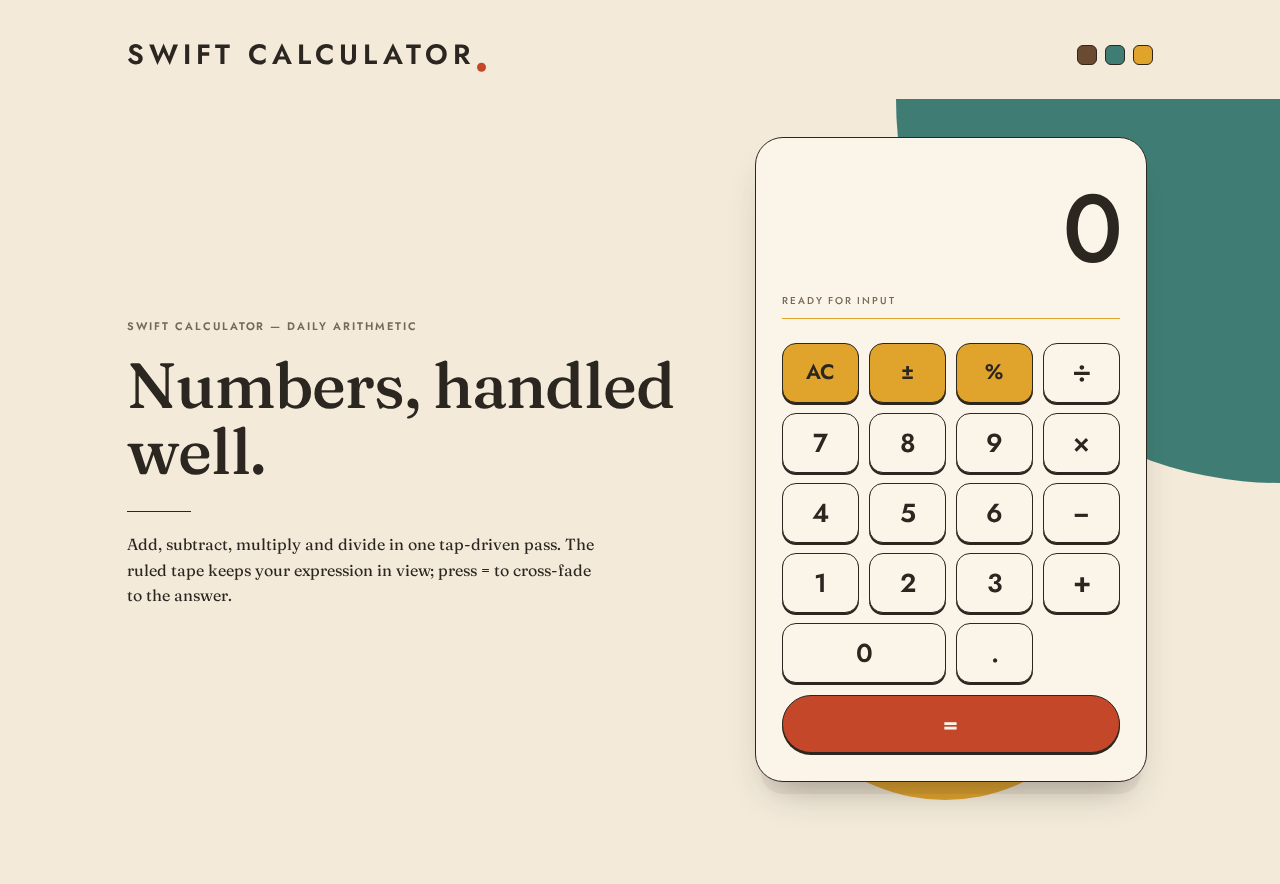
- Editorial statement — "Numbers, handled well." in Fraunces, flush-left, with a Jost uppercase micro-label above and one line of Fraunces helper text below.
- Geometric decoration — a teal quarter-arc cropped by the top-right viewport corner and a mustard half-disc behind the calculator's base. These never overlap the display, key labels, or wordmark.
Domain entities
- Expression — the ordered sequence of operands and operators currently entered.
- Operand — a numeric value being typed or already committed.
- Operator — one of addition, subtraction, multiplication, division.
- Result — the numeric outcome of evaluating the expression, or an error indication.
Component responsibilities
- Calculator case — the single rounded rectangle (28px radius desktop, 20px mobile) with a 1px ink hairline and soft offset shadow that contains display, tape, and keypad.
- Display — renders the current value at
clamp(48px, 11vw, 96px)in Jost 500 with tabular figures and −0.02em tracking, right-aligned against the mustard hairline rule. - Expression tape — renders the token strip with hairline ticks and the tomato caret.
- Keypad — a 4×5 grid of keys with 8px gaps at mobile, function column in mustard, digits and operators in surface cream, equals as a full-width tomato pill.
- Key — a 14px-radius squarish capsule with a 2px ink bottom lip that compresses 2px on
:activeover 90ms ease-out and releases without bounce. - Top bar — wordmark left, three material chips right.
- Editorial panel — the Fraunces statement, micro-label, and helper line.
States
- Loading — the page is a static client-rendered surface; there is no data fetch. On load the calculator case rises 12px and fades in once over 400ms.
- Empty — the expression tape is empty and the display reads zero.
- Success — pressing equals cross-fades the display digits over 120ms to the computed result, and the tape reflects the completed expression.
- Error — an unevaluable expression shows an explicit error in the display; the user recovers by pressing AC or entering a new digit or operator.
- Recovery — AC always returns the calculator to the idle state from any state, including error.
- Reduced motion — with
prefers-reduced-motion, the rise and the cross-fade are removed; only the 2px key press remains.
3. Functional Requirements
FR-1 — Open the calculator As a Calculator User, I should open the single Calculator page and immediately see a working calculator, so that I can begin arithmetic without any setup.
- Provenance:
explicit(single-page calculator) withrequired_inferencefor the anonymous entry surface. - Lifecycle: trigger = navigating to the product URL; input = none; observable result = the Calculator page renders with the display showing zero and an empty expression tape; access state = anonymous, no identity required; failure/recovery = if the page fails to load, reloading the URL restores the same idle state; continuation = the user begins entering digits.
- Acceptance: the page loads with no sign-in prompt, no modal, and no intermediate screen; the display reads zero.
FR-2 — Enter digits As a Calculator User, I should press digit keys and see each digit appear in the display, so that I can build the number I want to calculate with.
- Provenance:
explicit(calculator behavior) withrequired_inferencefor the specific key set. - Lifecycle: trigger = pressing a digit key 0–9; input = the digit; observable result = the digit is appended to the current operand and the display updates immediately; access state = anonymous; failure/recovery = none material; continuation = further digits append, or an operator key commits the operand.
- Acceptance: pressing 4 then 2 shows 42; a leading zero is replaced rather than accumulated.
FR-3 — Enter a decimal point As a Calculator User, I should press the decimal key to begin a fractional part, so that I can calculate with non-integer values.
- Provenance:
required_inference(indispensable for a usable calculator). - Lifecycle: trigger = pressing the decimal key; input = the decimal key; observable result = a decimal point appears in the current operand; access state = anonymous; failure/recovery = a second decimal point in the same operand is ignored and the display is unchanged; continuation = further digits extend the fractional part.
- Acceptance: pressing 3, decimal, 5 shows 3.5; pressing decimal twice still shows 3.5.
FR-4 — Choose an arithmetic operation As a Calculator User, I should press +, −, ×, or ÷ and see that operator become active, so that I know which operation is pending.
- Provenance:
explicit(calculator behavior) withrequired_inferencefor the active-operator indication. - Lifecycle: trigger = pressing an operator key; input = the operator; observable result = the operator is recorded in the expression tape and that key renders in the tomato accent; access state = anonymous; failure/recovery = pressing a different operator before entering a right operand replaces the pending operator; continuation = the next digit begins a new operand.
- Acceptance: after entering 8 and pressing ×, the × key is visibly active and the tape shows 8 ×.
FR-5 — Evaluate the expression As a Calculator User, I should press the equals key and see the result replace the expression in the display, so that I get my answer.
- Provenance:
explicit(calculator behavior). - Lifecycle: trigger = pressing equals; input = the entered expression; observable result = the display cross-fades over 120ms to the computed numeric result and the tape reflects the completed expression; access state = anonymous; failure/recovery = if the expression is incomplete (for example a trailing operator), the calculator evaluates the expression as entered where a value is defined, otherwise it shows the error state described in FR-8; continuation = the result becomes the left operand for a subsequent operation.
- Acceptance: entering 7 × 6 and pressing equals shows 42.
FR-6 — Clear the calculator As a Calculator User, I should press AC and see the calculator return to zero with an empty tape, so that I can start a fresh calculation.
- Provenance:
explicit(AC key named in the creative direction's function column) withrequired_inferencefor the full reset semantics. - Lifecycle: trigger = pressing AC; input = the AC key; observable result = display reads zero, expression tape is empty, no operator is active; access state = anonymous; failure/recovery = AC works identically from the error state; continuation = the user begins a new expression.
- Acceptance: from any state, pressing AC yields a display of zero and an empty tape.
FR-7 — Toggle sign and apply percent As a Calculator User, I should press ± to flip the sign of the current value and % to convert it to a percentage, so that I can handle negative and percentage values.
- Provenance:
explicit(± and % keys named in the creative direction's function column) withrequired_inferencefor their exact effect. - Lifecycle: trigger = pressing ± or %; input = the key; observable result = the display value's sign flips, or the display value is divided by one hundred; access state = anonymous; failure/recovery = pressing ± twice returns the original value; pressing % on an error state has no effect until the calculator is cleared; continuation = the transformed value can be used as an operand.
- Acceptance: 25 followed by % shows 0.25; 25 followed by ± shows −25.
FR-8 — See and recover from an error As a Calculator User, I should see a clear error indication when an operation cannot produce a number, and be able to recover, so that I am never stuck.
- Provenance:
required_inference(indispensable failure handling for division and malformed expressions). - Lifecycle: trigger = an operation with no numeric result, such as division by zero; input = the offending expression; observable result = the display shows an explicit error indication rather than a number, and the tape shows the offending expression; access state = anonymous; failure/recovery = pressing AC returns to the idle state, and entering a new digit or operator also begins a fresh expression; continuation = normal arithmetic resumes.
- Acceptance: 5 ÷ 0 then equals shows an error indication; pressing AC then shows zero.
FR-9 — Read the expression tape As a Calculator User, I should see the tokens I have entered strung along a ruled tape under the display, so that I can confirm what I am calculating before I commit.
- Provenance:
explicit(the ruled expression tape is a named signature move in the creative direction). - Lifecycle: trigger = any entry action; input = the entered tokens; observable result = the tape updates to show the current token sequence with hairline ticks and a tomato caret; access state = anonymous; failure/recovery = the tape empties on AC; continuation = the user continues entering or presses equals.
- Acceptance: entering 1, 2, +, 3 shows a tape reading 12 + 3 with the caret after the 3.
FR-10 — Perceive key press feedback As a Calculator User, I should feel each key depress when I press it, so that the calculator feels like a physical object and I trust that my input registered.
- Provenance:
explicit(the 2px key press is specified in the creative direction). - Lifecycle: trigger = pressing any key; input = pointer or keyboard activation; observable result = the key compresses 2px over 90ms ease-out and releases without bounce; access state = anonymous; failure/recovery = with
prefers-reduced-motion, the 2px press is retained while the load rise and display cross-fade are removed; continuation = the corresponding value change appears in the display. - Acceptance: every key visibly depresses on activation at all three breakpoints.
4. User Personas
Calculator User
Product context. The Calculator User is an anonymous visitor who arrives at the single Calculator page with a small arithmetic task in mind — a total, a split, a percentage, a quick multiplication. They did not come to learn a tool, configure anything, or manage an account. They expect the page to be the calculator, fully usable on arrival.
Primary goal. Get a correct number quickly, with confidence that the keys they pressed were the keys that registered.
Distinct accepted responsibilities.
- Entering operands with the digit and decimal keys.
- Selecting one of the four arithmetic operations and seeing which one is pending.
- Committing the expression with equals and reading the result.
- Resetting with AC, flipping sign with ±, and applying percent with %.
- Reading the expression tape to confirm the expression before committing.
- Recovering from an error state without reloading the page.
Relevant inputs and decisions. The user decides when an operand is complete (by pressing an operator or equals), which operation applies, and whether to clear and start over. Their inputs are key presses on the on-screen keypad.
Interactions with other accepted participants. None. The Calculator User is the only human actor in the product; there is no counterparty, recipient, approver, or administrator. The calculator's output is consumed by the same person who produced it.
Observable success. The display shows the expected number after equals; the tape shows the expression that produced it; every key press produced visible feedback; an error, if it occurred, was recoverable with AC.
What makes this role distinct. The role's entire work is a tight input–feedback loop measured in seconds, with no durable state, no collaboration, and no identity. Its quality bar is tactile responsiveness and legibility of the number, not workflow completeness.
5. Core User Flows
Flow A — Perform a basic calculation
- The Calculator User navigates to the product URL. The Calculator page loads anonymously; the case rises 12px and fades in once over 400ms (or appears immediately under reduced motion). The display reads 0 and the expression tape is empty.
- The user presses digit keys. Each key depresses 2px over 90ms; each digit appends to the current operand and the display updates. The tape shows the digits entered.
- The user presses an operator key (for example ×). That key renders in the tomato accent, the operator appears on the tape, and the calculator enters the pending-entry state.
- The user presses digit keys for the right operand. A new operand begins rather than appending to the left operand; the display and tape update.
- The user presses the tomato equals bar. The display digits cross-fade over 120ms to the computed result, and the tape reflects the completed expression.
- Continuation: the result becomes the left operand. The user may press another operator to continue calculating, or press AC to start fresh.
Failure and recovery: if the user presses a second operator before entering a right operand, the pending operator is replaced and the tape updates accordingly — no error state is entered.
Flow B — Calculate with decimals, sign, and percent
- On the Calculator page, the user presses digits, then the decimal key, then more digits. The display shows the fractional value; a second decimal press in the same operand is ignored.
- The user presses ± to flip the sign. The display value's sign changes immediately; pressing ± again restores it.
- The user presses % to convert the current value to a percentage. The display shows the value divided by one hundred.
- The user presses an operator and a second operand, then equals. The result appears in the display with the same cross-fade.
- Continuation: the user reads the result and either continues or presses AC.
Flow C — Recover from an error
- On the Calculator page, the user enters an expression that cannot produce a number, such as 5 ÷ 0, and presses equals.
- The display shows an explicit error indication instead of a number, and the tape shows the offending expression. The user is not left with a blank or frozen display.
- The user presses AC. The display returns to 0, the tape empties, and no operator is active.
- Continuation: the user enters a new expression normally. Alternatively, entering a new digit or operator directly from the error state also begins a fresh expression.
Flow D — Confirm an expression before committing
- On the Calculator page, the user enters a multi-token expression. The ruled expression tape under the display shows the tokens separated by hairline ticks, with a tomato caret at the current position.
- The user reads the tape to confirm the expression is what they intended.
- If the expression is wrong, the user presses AC and re-enters it; if it is right, the user presses equals.
- Continuation: the result appears in the display and the user proceeds as in Flow A.
6. Visuals, Colors and Theme
Muse and headline. Charles & Ray Eames — Warm modernism for a calculator you actually enjoy pressing. The register is everyday optimism: a well-made mid-century household appliance, not a tech demo.
Mode. Light only.
Color tokens (exact hex, by role)
| Role | Hex | Use |
|---|---|---|
| Background | #F3EADA | Warm cream page ground |
| Surface | #FBF5E9 | Calculator case, digit and operator keys |
| Text | #2B2620 | All numerals, labels, hairlines, key lips |
| Primary | #C4472A | Equals bar, active operator, "swift" dot, tape caret |
| Accent | #E0A32B | Function column (AC, ±, %), mustard rule under the display, half-disc |
| Muted | #7A6E5C | Secondary labels (4.9:1 on cream) |
| Teal | #3F7D74 | Quarter-arc decoration and material chip only — never behind text |
| Walnut | #6B4A32 | Material chip only — never behind text |
Typography
- Headings and wordmark: Jost — 600 for the wordmark and section labels, wide-tracked uppercase at 0.18em; the display number is Jost 500 with tabular figures and −0.02em tracking.
- Body: Fraunces — 16px with 1.6 leading for the one-line helper under the keypad.
- Scale: 1.333 modular on a 4/8pt base. Display number
clamp(48px, 11vw, 96px); wordmarkclamp(20px, 4vw, 28px); key labelsclamp(20px, 3.2vw, 26px); micro-labels 11px uppercase tracked. - Inter, Roboto, Helvetica, and
system-uiare excluded from the type stack.
Shape language. Organic-modern. The calculator is a single rounded rectangle — 28px radius at desktop, 20px at mobile — with no inner card borders. Keys are 14px-radius squarish capsules with a 2px ink bottom lip reading as a physical key throw. The equals key is a full-width tomato bar with a 999px pill end. One large quarter-circle teal arc bleeds off the top-right of the page; a mustard half-disc sits under the keypad. These are the only curves that are not part of the product.
Layout. Gallery-like single column on cream. A slim top bar holds the wordmark left and three material chips right. At 1280px an asymmetric two-panel stage places an oversized Fraunces editorial statement and the "how it works" line on the left, with the calculator body pinned to the top of the fold on the right. At 768px the panels stack with the calculator first. At 375px everything is one column, the calculator is full-bleed to a 16px gutter, and keys sit in a 4×5 grid with 8px gaps. Outer margins are 96px / 64px / 40px by breakpoint.
Imagery. No photography and no illustration of people. The visual material is the object itself plus three flat material chips (walnut #6B4A32, teal #3F7D74, mustard #E0A32B) rendered as 20px rounded squares with a 1px ink hairline, and the thin ruled expression tape under the display.
Accessibility of text and controls. Headlines, wordmarks, labels, numbers, and controls stay entirely inside the viewport and their container at 375px, 768px, and 1280px, wrapping or scaling via clamp(...) to fit. Decorative shapes may bleed off edges but never cover readable text or controls.
7. Signature Design Concept
"The number is the hero."
The first screen is a warm cream room with a single oversized product on the right: a cream calculator case, 420px wide at desktop, sitting on a soft offset shadow with a mustard half-disc peeking from behind its bottom edge and a large teal quarter-arc cropped by the top-right viewport corner.
Left of it, flush-left and spanning seven of twelve columns, a Fraunces statement at clamp(32px, 5vw, 64px) in ink reads "Numbers, handled well." — with a Jost uppercase micro-label above it and one Fraunces line of 16px helper below.
Inside the case, the display number is the largest type on the page at clamp(48px, 11vw, 96px), right-aligned against a hairline mustard rule, so the eye lands on the product's own output before the headline. Under it, the ruled expression tape strings the entered tokens with hairline ticks and a small tomato caret, like an Eames exhibition label strip. The tomato equals bar is the only saturated full-width element and anchors the bottom of the case.
At 375px the calculator moves above the statement and the teal arc drops to a 120px sliver behind it. The concept recomposes only accepted content — the display, the tape, the keypad, the wordmark, and the editorial line — and introduces no new behavior or destination.
8. Interaction Model & Motion Direction
Interaction Model: Animated Motion Tempo: restrained Hero Dimensionality: layered_2d
Landing Hero Motion Brief
- Focal subject. The calculator case itself, with its oversized tabular display number as the brightest and largest element on the page.
- Input → transformation → outcome thesis. A key press depresses the key 2px over 90ms ease-out and releases without bounce; the display and tape update immediately; pressing equals cross-fades the display digits over 120ms from the expression to the result. The motion thesis is mechanical acknowledgement, then a quiet reveal of the answer — never a bounce, spring, or loop.
- Motion vocabulary. 90ms ease-out key depression with no release bounce; 120ms digit cross-fade on result replacement; a single 400ms rise-and-fade of the calculator case on load. No parallax, no loops, no marquees.
- Composed first frame. Cream ground; teal quarter-arc cropped at the top-right; mustard half-disc behind the case's base; the case rising 12px into place as it fades in; the display reading 0 against the mustard rule; the empty tape awaiting its first token; the Fraunces statement flush-left in ink.
- Reduced-motion state.
prefers-reduced-motionremoves the load rise and the display cross-fade. The 2px key press is retained, because it is the product's core tactile feedback rather than decoration. The page renders in its final composed arrangement immediately.
9. Non-Functional Requirements
- NFR-1 — Single page. The product consists of exactly one page, Calculator. No routing to additional destinations, no modals that constitute a second screen, no navigation chrome beyond the top bar. Provenance:
explicit. - NFR-2 — Simplicity. The interface exposes only the display, the expression tape, the digit and decimal keys, the four operators, equals, AC, ±, and %. No settings, history, or mode switches. Provenance:
explicit. - NFR-3 — Anonymous access. The page is reachable without identity, session, cookie consent gate, or stored state. No application-owned accounts exist. Provenance:
required_inferencefrom the absence of any accepted identity-bearing behavior. - NFR-4 — Responsive legibility. Readable text and controls remain whole and inside the viewport at 375px, 768px, and 1280px. Provenance:
explicit(creative direction). - NFR-5 — Reduced motion. A usable static arrangement is provided under
prefers-reduced-motion, retaining only the 2px key press. Provenance:explicit(creative direction). - NFR-6 — Contrast. Muted secondary labels meet at least 4.9:1 against the cream ground; ink on surface and ink on mustard meet normal-text contrast. Provenance:
explicit(creative direction states the 4.9:1 figure). - NFR-7 — Client-side responsiveness. Key press feedback and display updates occur without a network round trip; arithmetic evaluation is local to the page. Provenance:
required_inferencefor a usable calculator. - NFR-8 — No forbidden visual patterns. No blue or indigo accents on white, no gradient blobs, no glassmorphism or frosted panels, no grid of identical hover-lift cards, no bouncy or springy key animations, no photography of people, no rotated or skewed readable text, and no decorative shape overlapping the display, key labels, or wordmark. Provenance:
explicit(creative direction).
10. Tech Stack
- Frontend: React with a single-page client application. The entire product is one route rendering the Calculator page.
- Styling: CSS with custom properties for the color tokens,
clamp()for the type scale, and media queries for the 375 / 768 / 1280 breakpoints andprefers-reduced-motion. - Fonts: Jost and Fraunces, self-hosted or loaded from a font service, with tabular-figure support for the display.
- Arithmetic: client-side evaluation in the browser; no backend service is required for the accepted behavior.
- Backend and storage: none. No server-side persistence, no database, and no API are needed for the current scope.
- Deployment: static hosting of the built single-page application. Docker or Kubernetes is not required for this scope.
11. Assumptions and Constraints
Constraints (binding)
- The design must be a single page. (explicit)
- The calculator must be simple. (explicit)
- The product is "a simple single page design of calculator." (explicit)
- The page count is exactly one, named Calculator. (explicit, page contract)
- The palette, fonts, shape language, layout, motion, and exclusions in the creative direction are binding. (explicit)
- The generic indigo/blue-on-white SaaS template is forbidden. (explicit)
Assumptions (narrow, labeled)
- A-1. The four basic operations (+, −, ×, ÷) plus AC, ±, and % constitute the accepted key set, because the creative direction names the function column and the equals bar. No scientific functions are assumed. (required_inference)
- A-2. The calculator evaluates a single binary operation at a time, with the result becoming the left operand for a continuation. Chained multi-operator precedence is not assumed beyond what a simple calculator conventionally does. (required_inference)
- A-3. Division by zero and malformed expressions produce a visible error state rather than a silent failure. (required_inference)
- A-4. No calculation history is retained across reloads, because no accepted behavior requires durable state. (required_inference)
- A-5. The product is delivered as a web page; no native mobile application is assumed. (required_inference from "single page design")
Future requirements
No future requirements are currently accepted. The authoritative thread contains no roadmap, deferred feature, or future-horizon item. Any future addition — history, scientific mode, themes — would require a new explicit user requirement and would be evaluated against the single-page constraint at that time.
12. Glossary
- Calculator page — the sole page of the product; the anonymous public entry surface and the working surface for all arithmetic.
- Calculator User — the sole active human persona; an anonymous visitor performing arithmetic.
- Display — the large tabular number area at the top of the calculator case showing the current value or result.
- Expression tape — the ruled horizontal strip under the display showing entered tokens separated by hairline ticks, with a tomato caret.
- Operand — a numeric value being typed or already committed in the expression.
- Operator — one of addition, subtraction, multiplication, or division.
- Pending operator — an operator that has been pressed and is awaiting its right operand; rendered in the tomato accent.
- Equals bar — the full-width tomato pill key at the base of the case that commits the expression.
- AC — all clear; resets the display to zero, empties the tape, and clears any pending operator.
- Error state — the display condition when an expression cannot produce a number, such as division by zero.
- Material chips — the three decorative walnut, teal, and mustard rounded squares in the top bar.
- Reduced motion — the
prefers-reduced-motioncondition under which the load rise and display cross-fade are removed while the 2px key press remains.
Swift Calculator — Daily Arithmetic
Numbers, handled well.
Add, subtract, multiply and divide in one tap-driven pass. The ruled tape keeps your expression in view; press = to cross-fade to the answer.
Swift Calculator — Daily Arithmetic
Numbers, handled well.
Add, subtract, multiply and divide in one tap-driven pass. The ruled tape keeps your expression in view; press = to cross-fade to the answer.
No comments yet. Be the first!