sweet-todo
 Diya Trivedi
start a project to build a simple single page design of todo

Comments (0)
Sign in to leave a comment
System Requirements
System Requirements Document for sweet-todo
1. Introduction
sweet-todo is a simple todo application delivered as a single page design. Its product intent is narrow and complete: one person opens one page, adds todo items, sees their todo items on that page, and marks todo items as complete. The design constraint is explicit and hard — the product is a single page, and the design must remain simple.
The audience is a single individual capturing and clearing small tasks in a spare minute. The page is the whole product: there is no navigation, no second destination, and no account requirement. The experience should read as a beautifully printed notebook page — confident, unhurried, instantly legible — rather than a dashboard or a feature-rich productivity suite.
2. System Overview
sweet-todo is a one-page web application. The single page, Todo, is the public entry surface and the only destination. It anonymously hosts the complete accepted lifecycle: adding a todo item, viewing the current list of todo items, and marking a todo item complete.
Current delivery comprises three provisioned services:
- frontend — a React application that renders the single Todo page, its editorial typography, the composer, the list, and the remaining-count footer.
- backend — a shared FastAPI process that owns the application APIs and domain modules for todo items. All feature APIs live in this process; no additional service is introduced for the current scope.
- database — MariaDB, holding application-owned persistent todo item data so the list survives reloads and revisits.
Actors:
- Todo user (active human persona) — the single person who adds, views, and completes todo items.
- frontend, backend, database — system actors that render, serve, and persist the accepted behavior. They are not personas.
Accepted behavior in scope: add a todo item; view todo items on the single page; mark a todo item complete; see the remaining count. Access is anonymous — no identity, sign-in, or account is required or established, because the accepted journeys do not require private per-user continuity and the page contract specifies access requirement none.
Narrow exclusions: no additional pages, no navigation or menu, no editing or deleting of todo items, no due dates, priorities, tags, projects, or categories, no sharing or collaboration, no notifications, no accounts or authentication, no reporting or analytics surfaces.
Removed from scope
- Additional pages beyond the single Todo page (also: multi-page navigation, routes, sidebar, menu)
- Todo item editing and deletion
- Due dates, priorities, tags, projects, and categories
- User accounts, sign-in, and authentication
- Sharing, collaboration, and multi-user access
- Notifications and reminders
- Reporting, analytics, and dashboards
2a. Product Interpretation and Delivery Boundary
The product is delivered entirely as one first-party page owned by the application. The Todo page is anonymously reachable: a visitor lands on it and can immediately add, view, and complete todo items without establishing identity. Because the accepted scope contains no per-user private state, no commitment bound to a specific participant, and no entitlement or value transfer, no application-owned identity is introduced. There is no sign-in, registration, invitation, or provisioning flow, and none is implied by the page.
The frontend renders the page and its states; the backend exposes the todo item APIs; the database persists todo items so the list is present on return. All three are current. Nothing in the accepted thread establishes a future horizon; the boundaries above are exclusions, not deferred work.
2b. Page Content and Component Coverage
Todo
The single page of the product, anonymously accessible, hosting the full add / view / complete lifecycle.
Information and state
- The current list of todo items, each with its task text, a completion state (open or complete), and a small-caps timestamp.
- The remaining count of open todo items, displayed as a large Playfair numeral paired with a small-caps "LEFT" label in the footer.
- Page-level states: loading (list being fetched), empty (no todo items yet), populated (one or more todo items), success (item added or completed), error (add or completion failed), and recovery (retry).
Primary actions
- Type a task into the composer's single underlined input and submit via the square vermilion Add button (or Enter).
- Toggle a todo item's square checkbox to mark it complete; toggling again returns it to open.
Supporting actions
- Retry a failed add or completion.
- Scroll from the hero into the list.
Domain entities
- Todo item — identifier, task text, completion state, created timestamp.
Component responsibilities
- Hero headline block — oversized Playfair Display "Things to do." with the full stop in vermilion, anchored bottom-left, spanning columns 1–9, with a full-bleed hairline rule beneath.
- Composer — single underlined input in columns 1–7 with the square vermilion Add button flush right; validates that task text is non-empty; shows inline error on failure.
- Todo list — stack of full-width rows, each with a left square checkbox, task text, and right-aligned small-caps timestamp, separated by hairlines. Completed rows drop to muted grey with a strike rule drawn left to right.
- Footer folio — large Playfair remaining-count numeral with small-caps "LEFT" label above a thin footer line.
- Empty state — a quiet editorial line in the list area indicating there are no todo items yet, with the composer still available.
- Loading state — a restrained placeholder in the list area while todo items are fetched; the composer remains usable.
- Error and recovery state — a hairline-bordered inline message near the composer or affected row with a retry control; the typed task text is preserved so the user can resubmit.
2c. Functional Requirements
Each requirement is stated as a story point with provenance, lifecycle facts, and observable acceptance.
FR-1 — Add a todo item (explicit)
As a Todo user I should add a todo item so that a task I need to do is captured on the page.
- Trigger/input: the user types task text into the composer input and activates the Add button (or presses Enter).
- Observable result: the new todo item appears in the list with its task text, an open checkbox, and a small-caps timestamp; the remaining count increases by one; the input clears.
- Access state: anonymous; no sign-in required.
- Failure/recovery: if the add request fails, an inline error appears and the typed task text is preserved so the user can retry; on retry success the item appears normally.
- Continuation: the user can immediately add another item or mark an existing one complete.
- Acceptance: after submitting non-empty task text, the item is visible in the list and the remaining count reflects it.
FR-2 — View todo items on the single page (explicit)
As a Todo user I should view my todo items on the single page so that I can see everything I have to do in one place.
- Trigger/input: the user opens the Todo page or returns to it.
- Observable result: the list renders every stored todo item with task text, completion state, and timestamp; open items render in ink, completed items in muted grey with a strike rule; the footer shows the remaining count.
- Access state: anonymous.
- Failure/recovery: if loading fails, an inline error with a retry control appears in the list area; retry reloads the list.
- Continuation: the user can add a new item or toggle any item's completion.
- Acceptance: the list on the page matches the stored todo items, and the remaining count equals the number of open items.
FR-3 — Mark a todo item complete (explicit)
As a Todo user I should mark a todo item complete so that I can see what I have finished.
- Trigger/input: the user activates the square checkbox on a todo item row.
- Observable result: the checkbox fills vermilion with a tick, the row's text drops to muted grey, a strike-through draws left to right in 200ms, and the remaining count decreases by one.
- Access state: anonymous.
- Failure/recovery: if the completion request fails, the row returns to its prior state and an inline error with a retry control appears; retry re-applies the completion.
- Continuation: the user can mark further items complete or add new items. Toggling a completed item's checkbox returns it to open and increments the remaining count.
- Acceptance: after toggling, the item's completion state and the remaining count both reflect the change.
FR-4 — See the remaining count (required_inference)
As a Todo user I should see how many todo items remain so that I know at a glance what is left.
- Trigger/input: any add or completion change.
- Observable result: the footer folio numeral updates to the number of open todo items, paired with the small-caps "LEFT" label.
- Access state: anonymous.
- Failure/recovery: if the list fails to load, the count is not shown as a stale value; it appears once the list loads.
- Continuation: the user continues adding or completing items.
- Acceptance: the numeral always equals the count of open items currently displayed.
FR-5 — Persist todo items across visits (required_inference)
As a Todo user I should find my todo items still on the page when I return so that the list is a durable record of what I have to do.
- Trigger/input: the user revisits the Todo page.
- Observable result: previously added items and their completion states are rendered from the database.
- Access state: anonymous; persistence is application-wide, not per-account.
- Failure/recovery: if retrieval fails, the error and retry state from FR-2 applies.
- Continuation: normal add / view / complete behavior resumes.
- Acceptance: an item added in one session is visible with the same completion state in a later session.
3. User Personas
Todo user
Product context. A single individual with a short list of small tasks, opening sweet-todo in a spare minute on whatever device is at hand. There is no team, no shared workspace, and no account — the page is a personal notebook page.
Primary goal. Capture a task the moment it comes to mind, see the whole list at a glance, and cross items off with a small, satisfying gesture.
Distinct accepted responsibilities.
- Composing and submitting new todo items through the composer.
- Reading the list to see what is open and what is done.
- Deciding when an item is finished and toggling its checkbox.
- Reading the remaining count to gauge what is left.
Relevant inputs and decisions. The task text typed into the composer; the decision of which item to mark complete; whether to retry after a failed add or completion.
Interactions with other accepted participants. None. The Todo user is the only active human persona; the frontend, backend, and database serve the user's actions without requiring any response from another person.
Observable success. The new item appears in the list and the input clears; completed items show a vermilion tick and a strike rule; the footer numeral matches the number of open items; the list is still there on return.
What makes this role distinct. The role's entire work is a three-gesture ritual — type, submit, cross off — on one page. There is no administration, no configuration, no collaboration, and no permission to reason about; the design, not the feature set, carries the experience.
4. Core User Flows
Flow 1 — Add a todo item
- The Todo user opens the Todo page. The hero headline "Things to do." reveals with a staggered 400ms rise-and-fade, then the composer rule draws across; the list loads below the fold.
- The user clicks the composer input and types the task text.
- The user activates the square vermilion Add button (or presses Enter). On hover the button's label has slid up to reveal the red arrow; on activation the item is submitted.
- The backend stores the todo item in the database and returns it; the frontend appends the row with an open checkbox, the task text, and a small-caps timestamp, and clears the input.
- The footer numeral increments to reflect the new open item.
- Failure/recovery: if the request fails, an inline error appears beside the composer and the typed text is preserved; the user retries and the item appears normally.
- Continuation: the user adds another item or scrolls into the list to review it.
Flow 2 — View todo items
- The Todo user opens or returns to the Todo page.
- The list area shows a restrained loading state while todo items are fetched from the backend.
- The list renders every stored item: open items in ink with an empty square checkbox; completed items in muted grey with a filled vermilion checkbox and a strike rule; each row separated by a hairline with a right-aligned small-caps timestamp.
- The footer folio shows the large Playfair numeral of remaining open items with the small-caps "LEFT" label.
- If there are no items, the list area shows a quiet empty-state line and the composer remains available.
- Failure/recovery: if loading fails, an inline error with a retry control appears in the list area; the user retries and the list loads.
- Continuation: the user adds a new item or toggles an existing one.
Flow 3 — Mark a todo item complete
- From the loaded list on the Todo page, the Todo user identifies an item that is finished.
- The user activates that row's square checkbox.
- The checkbox fills vermilion with a tick, the row's text drops to muted grey, and the strike-through draws left to right in 200ms; the footer numeral decrements.
- The backend persists the completion state so it survives a reload.
- Failure/recovery: if the request fails, the row reverts to its prior state and an inline error with a retry control appears; the user retries and the completion is applied.
- Continuation: the user marks further items complete, or toggles a completed item's checkbox to return it to open, which increments the remaining count.
Flow 4 — Return to a persisted list
- The Todo user revisits the Todo page in a later session.
- The frontend requests the stored todo items from the backend, which reads them from the database.
- The list renders with each item's prior completion state, and the footer numeral matches the number of open items.
- The user continues with Flow 1 or Flow 3.
5. Visuals Colors and Theme
The creative direction is authoritative for this section. Muse: Tobias van Schneider; headline: "Things to do." — editorial swagger for a one-page todo: oversized type, warm paper, one hot red.
Colour tokens (light mode)
| Role | Hex | Use |
|---|---|---|
| Background | #F4F0E8 | Warm off-white paper ground |
| Surface | #FBF8F1 | Barely-lighter card surface holding the todo list |
| Text | #141210 | Near-black ink for all type |
| Primary | #E0351F | Hot vermilion: headline full stop, Add button, active checkbox, count numeral |
| Accent | #E0351F | Same single vermilion — no second accent |
| Muted | #8A8073 | Metadata, hairline rules, completed-task strikethroughs |
No gradients, no second accent colour, no blue, indigo, or violet anywhere.
Typography
- Headings: Playfair Display at 800–900 weight, leading 0.88, tracking -0.03em, sentence case, set enormous so the headline is the hero; the final word or full stop rendered in vermilion.
- Body and UI: Archivo at 400/500/600, normal tracking; small-caps Archivo for labels and the task counter.
- Scale (1.5 editorial ratio): hero
clamp(48px, 11vw, 152px); section title 40/28; task text 20/18; UI labels 13px small caps tracked +0.12em; body 17/16. Line-height 0.9 for display, 1.5 for body. - Inter, Roboto, Arial, and system-ui are excluded for headings and body.
Shape language. Sharp corners everywhere — zero border-radius on cards, inputs, and buttons. Hairline 1px rules in muted grey divide the list; the Add control is a solid vermilion rectangle with square edges. Generous whitespace, no shadows, no pills, no rounded blobs.
Layout. Asymmetric editorial grid on a 12-column frame: the headline block occupies columns 1–9 and bleeds its baseline rule full width; the composer sits in columns 1–7 as a single underlined input with the square red Add button flush right; the list below is a stack of full-width rows with a left checkbox, task text, and a right-aligned small-caps timestamp, each separated by a hairline. A thin footer line holds the remaining-count numeral in large Playfair. Single column at 375px, composer and list full-bleed with 24px gutters.
Imagery. No photography and no illustration — typography and the paper ground are the image. Optional single gesture: an oversized vermilion full stop after the headline, and a faint warm grain texture on the background at 3% opacity.
Readability constraint. Headlines, labels, numbers, task text, and controls stay entirely inside the viewport and their container at 375px, 768px, and 1280px, wrapping or scaling to fit; no element covers any part of them. Decoration and texture may bleed or overlap, but never readable text or controls.
6. Signature Design Concept
The first screen is a printed page, not a SaaS hero. A near-full-viewport warm paper ground (#F4F0E8) carries an enormous Playfair Display headline — "Things to do." — anchored bottom-left at clamp(48px, 11vw, 152px), spanning columns 1–9, with the full stop in vermilion #E0351F. A single hairline rule runs edge to edge beneath it. Immediately under the rule, left-aligned, sits the composer: one underlined input with the square vermilion Add button flush right — the only interactive element above the fold. There is no subheadline, no centred stack, no button pair, and no gradient. The list begins below the fold on desktop, partially visible as a cue to scroll.
Signature moves, all recomposing accepted content and controls:
- The oversized headline as the hero, its vermilion full stop the single hot colour moment of the type.
- The square-edged solid vermilion Add button whose label slides up on hover to reveal a red arrow — a label swap, not a lift.
- Todo rows as editorial list items: hairline dividers, a square checkbox that fills vermilion with a hand-drawn-feel tick, small-caps tracked metadata at the right, and a strike-through that draws left to right in 200ms on completion.
- A large Playfair numeral counting remaining tasks, set in the footer like a magazine folio, paired with a small-caps "LEFT" label.
- Load choreography: headline lines rise 12px and fade in staggered over 400ms, followed by the composer rule drawing across — a single slow type reveal, then stillness.
7. Interaction Model & Motion Direction
Interaction Model: Animated Motion Tempo: restrained Hero Dimensionality: flat
Landing Hero Motion Brief
- Focal subject: the oversized Playfair Display headline "Things to do." on the warm paper ground, its full stop in vermilion, with the full-bleed hairline rule beneath it.
- Input → transformation → outcome thesis: on load, the headline lines rise 12px and fade in staggered over 400ms; the composer rule then draws across; the page settles into stillness with the composer ready for input. On hover, the Add button's label slides up to reveal the red arrow. On completion, the row crossfades to muted grey and its strike-through draws left to right in 200ms.
- Motion vocabulary: slow staggered type reveal, rule draw, label swap, left-to-right strike draw. Nothing bouncy, no parallax, no scroll-jacking.
- Composed first frame: warm paper ground; headline anchored bottom-left with vermilion full stop; hairline rule edge to edge; composer and square vermilion Add button beneath the rule; the top of the list peeking below the fold.
- Reduced-motion state: with
prefers-reduced-motion, the headline and rule appear immediately in their final positions, the Add button shows its label without the hover swap animation, and completion applies the muted grey and strike-through instantly with no draw. All content and controls remain fully usable and whole.
8. Non-Functional Requirements
- Single page (explicit). The product is delivered as exactly one page, Todo. No additional routes, navigation, or destinations exist.
- Simplicity (explicit). The design remains simple: one composer, one list, one remaining count. No feature beyond add, view, and complete is introduced.
- Anonymous access (explicit, page contract). The Todo page is reachable without sign-in; no authentication, account, or session identity is required.
- Persistence (required_inference). Todo items and their completion states are stored in MariaDB so the list survives reloads and revisits.
- Readability and containment (explicit, creative direction). Readable text and controls stay whole and inside the viewport and their container at 375px, 768px, and 1280px.
- Accessibility of motion (explicit, creative direction). A usable static arrangement is provided under
prefers-reduced-motion. - Performance (required_inference). The list loads promptly on page open so the user can act in a spare minute; the composer remains usable during loading.
9. Tech Stack
- Frontend: React application rendering the single Todo page, with Playfair Display and Archivo loaded as web fonts.
- Backend: shared FastAPI process owning the todo item APIs and domain modules; all feature APIs live in this process.
- Database: MariaDB for application-owned persistent todo item data.
- Deployment: Docker and docker-compose for the frontend, backend, and database services.
10. Assumptions and Constraints
- Assumption (narrow): Todo items are application-wide rather than per-account, because the accepted scope establishes no identity and the page contract specifies anonymous access. This is consistent with a single-user personal utility.
- Assumption (narrow): Each todo item carries a created timestamp rendered as small-caps metadata, as the creative direction specifies a right-aligned timestamp per row.
- Constraint (explicit): The design must be a single page; the page count is exactly one.
- Constraint (explicit): The design must remain simple.
- Constraint (explicit): The palette, fonts, sharp-cornered shape language, and editorial layout of the creative direction are preserved; the generic indigo/blue-on-white SaaS template is forbidden.
- Constraint (explicit): No photography, illustration, gradients, rounded cards, pill buttons, or drop shadows.
11. Glossary
- Todo page — the single page of the product; the anonymous public entry surface hosting add, view, and complete.
- Todo item — a task with task text, a completion state (open or complete), and a created timestamp.
- Composer — the single underlined input plus square vermilion Add button used to add a todo item.
- Remaining count — the number of open todo items, shown as a large Playfair numeral with a small-caps "LEFT" label in the footer folio.
- Strike rule — the left-to-right strike-through drawn over a completed todo item's text in 200ms.
- Footer folio — the thin footer line holding the remaining-count numeral, styled like a magazine folio.
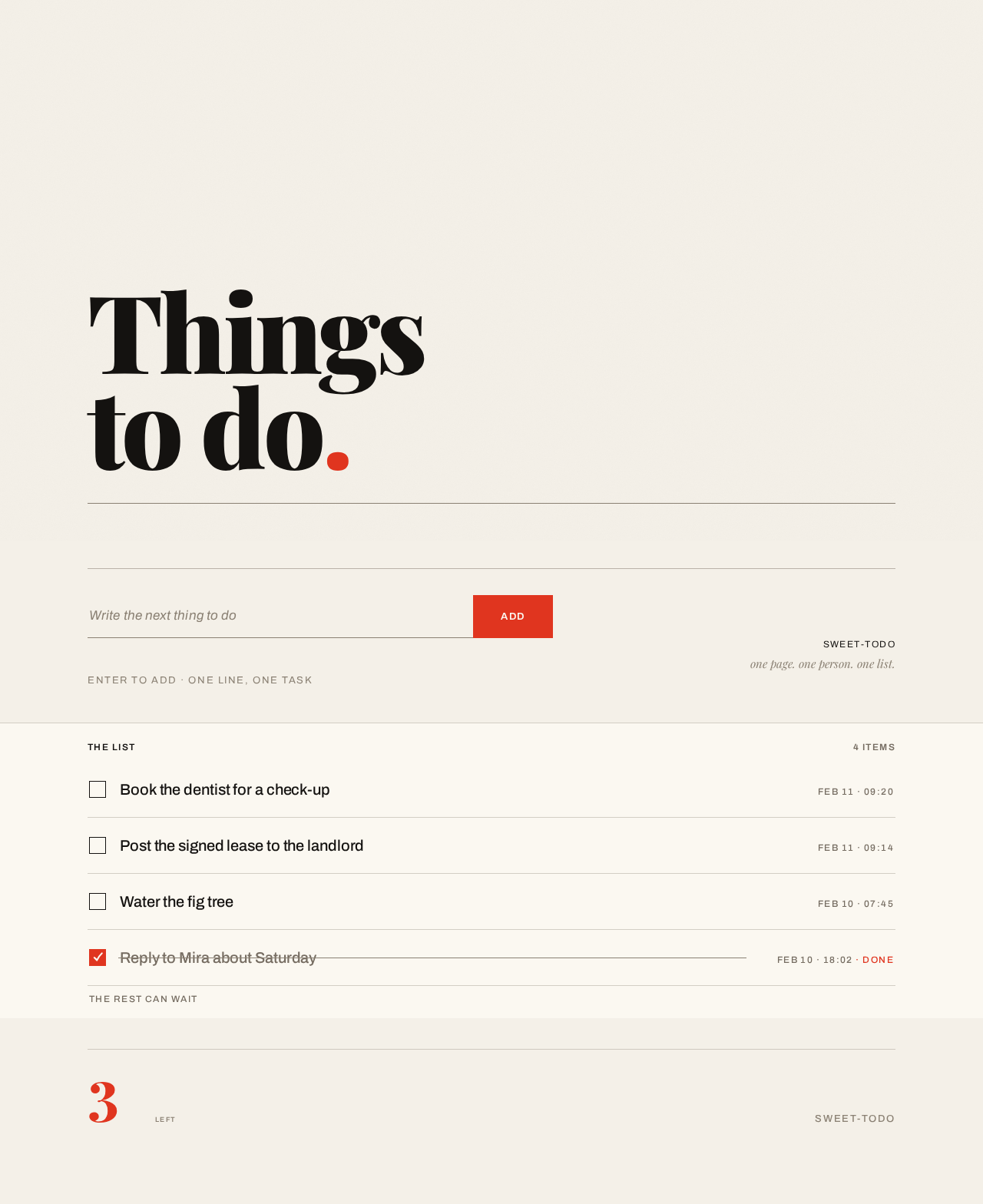
Thingsto do.
Enter to add · one line, one task
Book the dentist for a check-up
Feb 11 · 09:20Post the signed lease to the landlord
Feb 11 · 09:14Water the fig tree
Feb 10 · 07:45Reply to Mira about Saturday
Feb 10 · 18:02 · Done
The rest can wait
Thingsto do.
Enter to add · one line, one task
Book the dentist for a check-up
Feb 11 · 09:20Post the signed lease to the landlord
Feb 11 · 09:14Water the fig tree
Feb 10 · 07:45Reply to Mira about Saturday
Feb 10 · 18:02 · Done
The rest can wait
No comments yet. Be the first!