sweet-mangas
 Nassim Riahi
build me a new visual style to read mangas . use only one mange to test . i want to give users new experience

Comments (0)
Sign in to leave a comment
System Requirements
System Requirements Document for sweet-mangas
1. Introduction
sweet-mangas is a manga reading experience built around a single, deliberate idea: a new visual style for reading manga, tested with exactly one manga title, so that readers feel a genuinely different reading experience from conventional manga viewers.
The product intent is subtraction and veneration. Where conventional manga readers are dense, dark, chrome-heavy, and organized as grids of identical thumbnails, sweet-mangas presents the manga page as a single calm artefact resting on a vast paper-white ground. The interface whispers; the page is the only object that speaks.
The audience is a Manga Reader — a leisure reader who wants to be absorbed rather than managed, who reads one page at a time, and who should be able to move through the single test manga and complete a reading session in the new style.
The scope is intentionally narrow and current:
- One new visual style for reading manga.
- One manga title only, used as the test content.
- A new reading experience for users.
2. System Overview
sweet-mangas is a first-party web application with three custom pages, all reachable without an account:
| Page | Access | Purpose |
|---|---|---|
| Landing | Anonymous, no account | First impression: explains the new visual manga-reading experience and presents the single test manga before reading begins. |
| Reader | Anonymous, no account | The focused reading workspace for opening and reading the single test manga in the new visual style. |
| Pages | Anonymous, no account | The revisitable page-to-page reading context used to continue through the single test manga. |
Actors. The only active human actor is the Manga Reader. There are no other personas, no administrators, no editors, no accounts, and no differentiated permissions. The application itself is a non-persona system actor that supplies the single test manga's page content and page ordering.
Accepted behavior. The reader arrives anonymously, understands the new reading style and the single test title, opens the reader, reads one page at a time in the new visual style, moves between pages, sees their position through a single hairline progress rule with one vermilion tick, can mark a page with a hanko-style seal, and can revisit the page-to-page context to continue reading.
Ownership. All three pages are application-owned custom UI. There is no provider-owned surface, no external destination, and no headless delivery. The manga content is served by the application as the single test title.
Narrow exclusions. No second manga title, no library, no catalogue browsing, no search, no chapter list, no thumbnail grid, no dark mode, no night-reading theme, no accounts, no social features, no comments, no ratings, no notifications, no sidebars, no floating toolbars, and no decorative animation or parallax.
2a. Product Interpretation and Delivery Boundary
Delivery. sweet-mangas is delivered as a first-party web application with custom UI. Every accepted interaction happens inside the application's own pages. Nothing in the accepted requirements is delegated to a provider surface, an external destination, or a headless API.
Access. All three pages are anonymous and require no account. The reader never signs in, never registers, and never establishes an identity. Reading position and the bookmark seal are session-scoped reading context, not a durable account-bound record; the product does not need application-owned identity to deliver the accepted experience, and no identity, login, registration, or account-management capability is introduced.
Current vs. future. Current scope is exactly the three pages above, the single test manga, and the new visual style. Anything beyond one manga title — additional titles, libraries, catalogues, accounts, or social reading — is out of current scope and is not built, not implied, and not reachable from any current page.
2b. Source Content Inventory
Not applicable. No reference directive with content_source authority was supplied.
2c. Page Content and Component Coverage
Landing
- Information and state. The new visual manga-reading experience explained in one calm statement; the single test manga identified as the only test content; the reader's entry point into reading. No account state, no session state, no personalization.
- Primary action. Open the reader.
- Supporting actions. Navigate to Pages (the page-to-page reading context); navigate to Reader from the top rule.
- Domain entities. The single test manga title; a representative page from that title; the reading experience description.
- Component responsibilities.
- Top hairline rule — a thin 1px rule (#1C1B18 at 15% opacity) carrying three small tracked text links mixing Latin and Japanese (Read / Pages / Seal). No logo mark, no pill buttons, no icons.
- Display headline — light-weight serif, mixed case, wide tracking, spanning 9 of 12 columns, reading "One manga. Read differently." at
clamp(40px, 7vw, 96px). - Artefact page — one page from the single test manga shown large, rotated 1.5°, with a soft diffuse paper shadow, occupying ~55% of viewport height at 1280px and ~40vh at 375px, placed off-centre-right.
- Vermilion text link — "Open the reader →" in #B54A2E, a text link only, never a button or pill.
- Empty paper ground — roughly 60% of the first screen deliberately empty, with section transitions separated by 160px of empty paper and a single hairline.
- States.
- Loading — the artefact page image resolves in place; the ground, headline, and link are present immediately and never blocked.
- Empty — not applicable; the single test manga is always present as the only content.
- Success — the reader sees the headline, the artefact page, and the vermilion entry link, all fully inside the viewport at 375px, 768px, and 1280px.
- Error — if the artefact page image fails to load, the page plane renders as an empty paper rectangle (#FBFAF6) with its soft shadow, the headline and entry link remain fully readable, and the reader can still open the reader.
- Recovery — the reader can retry by reloading the Landing page; the entry link to the reader is never disabled by an image failure.
Reader
- Information and state. The current page of the single test manga, displayed one page at a time and vertically centred; the reader's position within the title; whether the current page carries the bookmark seal.
- Primary action. Turn to the next page.
- Supporting actions. Turn to the previous page; mark or unmark the current page with the hanko-style seal; navigate to Pages; navigate to Landing.
- Domain entities. The single test manga; its ordered pages; the current page index; the bookmark seal state for the current page.
- Component responsibilities.
- Page plane — the manga page as the only shape in the interface, a perfect rectangle with square corners, surface #FBFAF6, slightly lighter than the ground so it floats, centred with at least 20% viewport width as empty ground on each side at 1280px and 24px gutters at 375px.
- Progress rule — a single hairline rule beneath the page with one vermilion tick (#B54A2E) marking position; no percentage, no scrubber, no chapter list. The tick eases between positions over 300ms.
- Seal mark — a 24px circular vermilion seal stamped at the bottom of the active page when the reader marks it, echoing a hanko stamp; the only colour in the interface.
- Top hairline rule — the same three tracked text links (Read / Pages / Seal) as on Landing.
- Page-turn transition — a slow cross-dissolve (400–600ms ease-out); the page never slides.
- States.
- Loading — the next page cross-dissolves in; the current page remains visible until the incoming page is ready, so the reader never faces a blank plane.
- Empty — not applicable; the single test manga always has pages.
- Success — the reader sees one page at a time, vertically centred, with the progress tick at the correct position and the seal visible if marked.
- Error — if a page fails to load, the page plane shows an empty paper rectangle with a hairline rule and a short retry text link in vermilion; the reader's position is preserved and previous/next remain available.
- Recovery — the reader retries the failed page from the plane itself, or turns to an adjacent page and back; the position is not lost.
- Boundary — at the first page, previous is unavailable; at the last page, next is unavailable; the progress tick sits at the corresponding end of the rule and the reader is told the session is complete.
Pages
- Information and state. The page-to-page reading context for the single test manga: the ordered pages and the reader's current position within them, so reading can be resumed and continued.
- Primary action. Select a page to read.
- Supporting actions. Return to the Reader at the current position; return to Landing.
- Domain entities. The single test manga; its ordered pages; the current page index; the bookmark seal state.
- Component responsibilities.
- Page sequence — the ordered pages of the single test manga presented as tiny paper rectangles with the same soft shadow, never as glossy cards and never as a hover-lift thumbnail grid.
- Current-position marker — the vermilion seal mark identifying the page the reader is on or has marked.
- Top hairline rule — the same three tracked text links (Read / Pages / Seal).
- Hairline dividers — 1px rules (#1C1B18 at 15% opacity) as the only separators.
- States.
- Loading — the page sequence resolves in place; the current-position marker appears once the position is known.
- Empty — not applicable; the single test manga always has pages.
- Success — the reader sees the ordered pages, the current position marked in vermilion, and can select any page to read.
- Error — if the sequence fails to load, the page shows a hairline rule and a short retry text link in vermilion, and the reader can still return to the Reader.
- Recovery — the reader retries from the page itself or returns to the Reader, which continues from the preserved position.
3. Functional Requirements
FR-1 — New visual style for reading manga (explicit) As a Manga Reader, I should read manga in a new visual style so that my reading experience feels unlike conventional manga viewers.
- Trigger/input: The reader opens the Reader page.
- Observable result: The manga page is presented as a single calm artefact on a paper-white ground (#F4F1EA), one page at a time, vertically centred, with square corners, a soft diffuse shadow, and no chrome competing for attention.
- Access state: Anonymous; no account required.
- Failure/recovery: If the page plane fails to render, the reader sees an empty paper rectangle with a retry text link and can turn to an adjacent page.
- Continuation: The reader turns to the next page and continues reading in the same style.
- Owner: Reader page.
FR-2 — Single test manga only (explicit) As a Manga Reader, I should read exactly one manga title so that the new visual style is tested on a single, focused work.
- Trigger/input: The reader arrives at Landing or Reader.
- Observable result: Only one manga title is present anywhere in the product; no second title, library, catalogue, or search is offered.
- Access state: Anonymous; no account required.
- Failure/recovery: Not applicable; the single title is always the only content.
- Continuation: The reader reads that title's pages.
- Owner: Landing, Reader, and Pages pages (the single title is the only content in all three).
FR-3 — New reading experience for users (explicit) As a Manga Reader, I should feel a noticeably different reading experience so that the product delivers on its promise of a new way to read manga.
- Trigger/input: The reader moves from Landing into the Reader and turns pages.
- Observable result: The reader encounters vast empty paper, a single artefact page, a hairline progress rule with one vermilion tick, and slow cross-dissolve page turns — none of the dense, dark, thumbnail-grid conventions of standard manga viewers.
- Access state: Anonymous; no account required.
- Failure/recovery: If a page fails to load, the calm presentation is preserved with an empty paper plane and a retry link rather than an error dialog or broken layout.
- Continuation: The reader completes a reading session in the new style.
- Owner: Landing and Reader pages.
FR-4 — Anonymous entry and understanding of the experience (required_inference) As a Manga Reader, I should understand the new reading style and the single test manga before reading begins, without creating an account.
- Trigger/input: The reader opens the Landing page.
- Observable result: The reader sees the headline "One manga. Read differently.", one page from the single test manga presented as a rotated artefact, and a single vermilion text link "Open the reader →".
- Access state: Anonymous; no account, no sign-in, no registration.
- Failure/recovery: If the artefact image fails, the page plane renders as an empty paper rectangle and the headline and entry link remain fully readable.
- Continuation: The reader follows the vermilion link into the Reader.
- Owner: Landing page.
FR-5 — Open and read the single test manga (required_inference) As a Manga Reader, I should open the single test manga and read its pages one at a time in the new visual style.
- Trigger/input: The reader activates "Open the reader →" on Landing, or selects a page on Pages.
- Observable result: The Reader displays the current page of the single test manga, vertically centred on the paper ground, with the progress rule beneath it.
- Access state: Anonymous; no account required.
- Failure/recovery: If the page fails to load, the plane shows an empty paper rectangle with a retry text link; the reader's position is preserved.
- Continuation: The reader turns to the next page.
- Owner: Reader page.
FR-6 — Move between pages (required_inference) As a Manga Reader, I should move to the next or previous page so that I can read through the single test manga.
- Trigger/input: The reader turns forward or backward from the current page.
- Observable result: The current page cross-dissolves to the adjacent page over 400–600ms ease-out, and the vermilion tick on the progress rule eases to the new position over 300ms.
- Access state: Anonymous; no account required.
- Failure/recovery: If the incoming page fails to load, the current page remains visible and the reader can retry or turn back.
- Continuation: The reader continues turning pages until the last page.
- Owner: Reader page.
FR-7 — See reading position (required_inference) As a Manga Reader, I should see where I am in the single test manga so that I can gauge my progress without a percentage, scrubber, or chapter list.
- Trigger/input: The reader turns a page.
- Observable result: A single hairline rule beneath the page carries one vermilion tick (#B54A2E) at the reader's position; the tick eases between positions over 300ms.
- Access state: Anonymous; no account required.
- Failure/recovery: If the position cannot be determined, the rule renders without a tick and the reader can still turn pages.
- Continuation: The reader keeps reading with position feedback intact.
- Owner: Reader page.
FR-8 — Mark a page with the seal (required_inference) As a Manga Reader, I should mark the page I am on with a hanko-style seal so that I can hold my place in the single test manga.
- Trigger/input: The reader activates the Seal control in the top hairline rule.
- Observable result: A 24px circular vermilion seal (#B54A2E) is stamped at the bottom of the active page; activating Seal again removes it.
- Access state: Anonymous; no account required.
- Failure/recovery: If the seal state cannot be applied, the page remains readable and the reader can retry the Seal control.
- Continuation: The reader continues reading with the seal visible on the marked page.
- Owner: Reader page.
FR-9 — Revisit the page-to-page reading context (required_inference) As a Manga Reader, I should revisit the page-to-page context so that I can resume and continue through the single test manga.
- Trigger/input: The reader activates the Pages link in the top hairline rule.
- Observable result: The Pages page shows the ordered pages of the single test manga as tiny paper rectangles with soft shadows, with the current position marked in vermilion.
- Access state: Anonymous; no account required.
- Failure/recovery: If the sequence fails to load, the page shows a hairline rule and a retry text link, and the reader can return to the Reader.
- Continuation: The reader selects a page and returns to the Reader at that position.
- Owner: Pages page.
FR-10 — Complete a reading session (required_inference) As a Manga Reader, I should reach the end of the single test manga and know my session is complete.
- Trigger/input: The reader turns past the last page.
- Observable result: The progress tick sits at the end of the hairline rule, next is unavailable, and the reader is told the session is complete in the same quiet voice.
- Access state: Anonymous; no account required.
- Failure/recovery: If the final page fails to load, the reader can retry from the plane or return to Pages.
- Continuation: The reader can return to Pages or Landing, or start again from the first page.
- Owner: Reader page.
4. User Personas
Manga Reader
Product context. The Manga Reader is a leisure reader who wants to be absorbed by a manga, not managed by an interface. They arrive at sweet-mangas anonymously, with no account and no history, and they encounter a product whose entire premise is that one manga, presented calmly, is enough.
Primary goal. To read the single test manga in a new visual style and complete a reading session that feels noticeably different from conventional manga viewers.
Distinct accepted responsibilities.
- Understand the new reading style and the single test manga from the Landing page before reading begins.
- Open the reader and read the single test manga one page at a time.
- Turn forward and backward through the pages.
- Read their position from the hairline progress rule and its single vermilion tick.
- Mark the page they are on with the hanko-style seal, and remove the mark.
- Revisit the page-to-page context to resume and continue.
- Reach the end of the single test manga and recognize that the session is complete.
Relevant inputs and decisions. The reader decides when to open the reader, when to turn a page, when to mark a page with the seal, and when to revisit the page sequence. Their only inputs are the page-turn action, the Seal control, and the three tracked text links in the top hairline rule.
Interactions with other accepted participants. There are none. The Manga Reader is the only active human actor in the product; the application supplies the single test manga's pages and ordering. No other persona, counterparty, or recipient is affected by the reader's actions.
Observable success. The reader moves through the single test manga's pages, sees their position on the hairline rule, can mark a page with the vermilion seal, and completes a reading session in the new visual style — all without creating an account.
What makes this role's work different. The Manga Reader's work is absorption, not operation. There is no configuration, no library management, no account, and no social layer. The role is defined by the absence of management tasks: the reader's only job is to read one manga, one page at a time, in a style that gets out of the way.
5. Core User Flows
Flow 1 — Discover the new reading style and enter the reader
- The Manga Reader opens sweet-mangas and lands on the Landing page anonymously, with no account.
- The reader sees a vast paper-white ground (#F4F1EA), a light-weight serif headline "One manga. Read differently." spanning 9 of 12 columns, and one page from the single test manga placed off-centre-right, rotated 1.5°, with a soft diffuse shadow.
- The reader reads the headline and understands that this is one manga, read differently.
- The reader activates the single vermilion text link "Open the reader →" (#B54A2E).
- Observable result: the Reader page opens at the current page of the single test manga.
- Failure/recovery: if the artefact page image failed to load, the reader saw an empty paper rectangle with its soft shadow, the headline and link remained fully readable, and the link still opened the reader.
- Next step: the reader begins reading (Flow 2).
Flow 2 — Read the single test manga page by page
- The Manga Reader is on the Reader page, anonymous, with no account.
- The reader sees one page of the single test manga, vertically centred on the paper ground, with at least 20% viewport width as empty ground on each side at 1280px and 24px gutters at 375px.
- Beneath the page, the reader sees a single hairline progress rule with one vermilion tick marking their position.
- The reader turns to the next page.
- Observable result: the current page cross-dissolves to the next page over 400–600ms ease-out, and the vermilion tick eases to the new position over 300ms.
- The reader turns back to the previous page.
- Observable result: the page cross-dissolves back and the tick eases to the previous position.
- Failure/recovery: if a page fails to load, the page plane shows an empty paper rectangle with a short retry text link in vermilion; the reader's position is preserved, previous and next remain available, and the reader retries from the plane or turns to an adjacent page and back.
- Next step: the reader continues turning pages, or marks a page (Flow 3), or revisits the page sequence (Flow 4).
Flow 3 — Mark a page with the hanko-style seal
- The Manga Reader is on the Reader page, reading a page of the single test manga.
- The reader activates the Seal link in the top hairline rule.
- Observable result: a 24px circular vermilion seal (#B54A2E) is stamped at the bottom of the active page — the only colour in the interface.
- The reader activates Seal again.
- Observable result: the seal is removed from the page.
- Failure/recovery: if the seal state cannot be applied, the page remains fully readable and the reader can retry the Seal control.
- Next step: the reader continues reading (Flow 2), and the seal remains visible on the marked page.
Flow 4 — Revisit the page-to-page context and resume
- The Manga Reader is on the Reader page and activates the Pages link in the top hairline rule.
- The reader arrives on the Pages page, anonymous, with no account.
- Observable result: the reader sees the ordered pages of the single test manga as tiny paper rectangles with the same soft shadow — never glossy cards, never a hover-lift thumbnail grid — with the current position marked in vermilion.
- The reader selects a page to read.
- Observable result: the Reader opens at that page, with the progress tick at the corresponding position on the hairline rule.
- Failure/recovery: if the page sequence fails to load, the Pages page shows a hairline rule and a short retry text link in vermilion, and the reader can return to the Reader, which continues from the preserved position.
- Next step: the reader continues reading (Flow 2).
Flow 5 — Complete a reading session
- The Manga Reader is on the Reader page, reading the final pages of the single test manga.
- The reader turns past the last page.
- Observable result: the progress tick sits at the end of the hairline rule, next is unavailable, and the reader is told the session is complete in the same quiet voice.
- Failure/recovery: if the final page fails to load, the reader retries from the plane or returns to Pages.
- Next step: the reader returns to Pages or Landing, or starts again from the first page.
6. Visuals Colors and Theme
Muse and headline. Kenya Hara — Emptiness as content: paper-white silence around one manga.
Mode. Light mode only. Dark mode, near-black grounds, and any "night reading" theme are excluded by the creative direction.
Colour tokens (light mode).
| Role | Hex | Usage |
|---|---|---|
| Background (paper ground) | #F4F1EA | ~80% of every screen; the vast empty paper |
| Surface (page plane) | #FBFAF6 | The manga page plane, slightly lighter than the ground so the page floats |
| Text / primary (ink) | #1C1B18 | All reading text and rules |
| Accent (vermilion seal) | #B54A2E | The single active state only: current page number, bookmark mark, the one progress tick that matters |
| Muted | #8A857B | Metadata and secondary labels |
No other colours exist. Contrast of #1C1B18 on #F4F1EA is approximately 14:1, well past AA at body size. Blue, indigo, and violet accents are forbidden anywhere in the interface.
Typography.
- Headings: Noto Serif JP, Light weight (300), very large sizes, wide tracking (0.08em), mixed case, never bold. Headings whisper at scale rather than shout at weight.
- Body: Zen Kaku Gothic New.
- Scale: 1.333 modular — 56 / 40 / 28 / 18 / 14.
- Display headline:
clamp(40px, 7vw, 96px). - Section titles: 28–40px.
- Body: 16–18px with 1.75 line-height.
- Metadata: 13–14px with 0.12em tracking, uppercase.
- Inter, Roboto, Arial, Helvetica, Poppins, and system-ui are forbidden for headings and body.
Shape language. Almost no shape. Rectangles with square corners only — the manga page itself is the only "shape" in the interface, and it is a perfect rectangle. Thin 1px hairline rules (#1C1B18 at 15% opacity) are the only dividers. Controls are text, not pills. The single exception is a small circular vermilion seal mark (24px) used as the bookmark indicator, echoing a hanko stamp. Rounded corners larger than 2px, glossy surfaces, glassmorphism, and gradient blobs are forbidden.
Layout. Centred single-column reading measure with vast margins — the manga page is centred with at least 20% viewport width as empty ground on each side at 1280px, and 24px gutters at 375px. Navigation is a thin top rule with three text links (読む / 頁 / 印) in mixed Latin and Japanese, small and tracked. The reader shows one manga page at a time, vertically centred, with a single hairline progress rule beneath it and a small vermilion tick marking position. No sidebars, no thumbnail grids, no floating toolbars. Section transitions on the landing page are separated by 160px of empty paper and a single hairline.
Imagery style. The manga itself is the only imagery — treated as an artefact. On the landing page, one page from the single test manga is shown large, slightly rotated 1.5°, with a soft paper shadow, as if placed on a table. No stock photography, no illustrations, no icons beyond typographic marks. Page thumbnails are tiny paper rectangles with the same soft shadow, never glossy cards.
Readable text and controls. Headlines, wordmarks, labels, numbers, and controls stay entirely inside the viewport and their container at 375px, 768px, and 1280px, wrapping or scaling (for example font-size: clamp(...) with its mobile size) to fit, and no other element covers any part of them. Imagery and decoration may be cropped, rotated, or overlapped exactly as the direction asks, as long as they cover no readable text or control.
7. Signature Design Concept
"One page on a studio table."
The Landing first screen is not a SaaS hero. It is a composed still life:
- A vast paper-white ground (
#F4F1EA) fills the viewport. - A single page from the single test manga is placed off-centre-right, rotated 1.5°, casting a soft diffuse shadow — as if laid on a studio table. It occupies ~55% of viewport height at 1280px and ~40vh at 375px.
- To its left, a stacked, left-aligned, light-weight serif headline in
#1C1B18reads "One manga. Read differently." atclamp(40px, 7vw, 96px)with 0.08em tracking, spanning 9 columns of a 12-column grid. - Beneath the headline, a single text link in vermilion (
#B54A2E) reads "Open the reader →" — no button, no pill, no gradient. - The remaining ~40% of the screen is empty paper. No blue, no gradient blob, no centred stack, no illustration.
The concept recomposes only accepted content and controls: the single test manga, the headline, and the entry link into the reader. It introduces no new behaviour, page, or destination.
8. Interaction Model & Motion Direction
Interaction Model: Static (direction) Motion Tempo: still Hero Dimensionality: flat
Landing Hero Motion Brief
- Focal subject. One page from the single test manga, presented as a physical artefact on paper-white ground — rotated 1.5°, soft diffuse shadow, off-centre-right.
- Input → transformation → outcome thesis. The reader's arrival is the only input; the page does not animate in. The composed still frame is the outcome: a calm object on empty paper, with the headline and the vermilion entry link as the only other elements. Motion is reserved for the reader's own action of opening the reader and turning pages.
- Motion vocabulary. Slow fades only (400–600ms ease-out) when a page turns; the page cross-dissolves rather than slides. The progress tick eases between positions over 300ms. No parallax, no hover-lift, no bounce, no decorative animation.
- Composed first frame. Paper-white ground; headline spanning 9 of 12 columns at left; artefact page off-centre-right with soft shadow; vermilion text link beneath the headline; ~60% of the first screen deliberately empty.
- Reduced-motion state. With
prefers-reduced-motion, all transitions become instant: page turns swap immediately, the progress tick jumps to its position, and the composed first frame is unchanged.
9. Non-Functional Requirements
NFR-1 — Readable text and controls at every viewport (explicit, from creative direction) Headlines, wordmarks, labels, numbers, and controls stay entirely inside the viewport and their container at 375px, 768px, and 1280px, wrapping or scaling to fit. No other element covers any part of them. Imagery and decoration may be cropped, rotated, or overlapped as the direction asks, as long as they cover no readable text or control.
NFR-2 — Reduced-motion compliance (explicit, from creative direction)
With prefers-reduced-motion, all transitions become instant. Page turns swap immediately and the progress tick jumps to its position.
NFR-3 — Colour contrast (explicit, from creative direction)
#1C1B18 on #F4F1EA is approximately 14:1, well past AA at body size. The vermilion accent #B54A2E is used only for the single active state and never for body text.
NFR-4 — No dark mode (explicit, from creative direction) Dark mode, near-black grounds, and any "night reading" theme are excluded. The product is paper, not void.
NFR-5 — No competing chrome (explicit, from creative direction) No floating toolbars, sidebars, or any chrome that competes with the page for attention. Navigation is a thin top hairline rule with three small tracked text links.
NFR-6 — Single-title content constraint (explicit, from user) Only one manga title may be used as test content for the new reading experience. No second title, library, catalogue, or search is present anywhere in the product.
NFR-7 — Anonymous access (required_inference) All three pages are reachable without an account. No sign-in, registration, or account-management capability is introduced, because the accepted experience does not require durable identity continuity.
NFR-8 — Page-turn performance (required_inference) Page turns cross-dissolve over 400–600ms ease-out without a blank plane; the current page remains visible until the incoming page is ready.
10. Tech Stack
- Frontend: React (web), custom UI, single-page application with three routes: Landing, Reader, Pages.
- Backend: Python / FastAPI, serving the single test manga's page content and ordering.
- Storage: Application-managed storage for the single test manga's page assets and ordering. No user accounts, no user records, no durable per-user reading history.
- Containerization: Docker / docker-compose for local and deployment packaging.
- Kubernetes: Not required; the deployment does not require orchestration beyond container packaging.
No technology choice in this section overrides the creative direction's palette, typography, shape language, layout, or motion constraints.
11. Assumptions and Constraints
Assumptions.
- A-1 (required_inference) The single test manga is supplied by the application as its only content; the reader does not upload, import, or select a title.
- A-2 (required_inference) Reading position and the bookmark seal are session-scoped reading context, not durable account-bound records, because no account is required and no identity continuity is needed for the accepted experience.
- A-3 (required_inference) The single test manga has a finite, ordered set of pages with a first and a last page, so a reading session can be completed.
- A-4 (basic_default) The application is delivered as a web application with custom UI, as established by the planning scope's delivery shape.
Constraints.
- C-1 (explicit) Only one manga title may be used as test content for the new reading experience.
- C-2 (explicit) The visual style must be new and must deliver a new reading experience for users.
- C-3 (explicit) Dark mode, near-black grounds, and night-reading themes are excluded.
- C-4 (explicit) Blue, indigo, and violet accents are forbidden anywhere in the interface.
- C-5 (explicit) Pill buttons, rounded corners larger than 2px, glossy surfaces, glassmorphism, and gradient blobs are forbidden.
- C-6 (explicit) Bold or heavy heading weights are forbidden; headings stay at 300 weight and gain presence through size and tracking.
- C-7 (explicit) Thumbnail grids of identical cards with hover-lift shadows are forbidden.
- C-8 (explicit) Floating toolbars, sidebars, and competing chrome are forbidden.
- C-9 (explicit) Inter, Roboto, Arial, Helvetica, Poppins, and system-ui are forbidden for headings and body.
- C-10 (explicit) Decorative animation, parallax, and page-slide transitions are forbidden; page turns cross-dissolve.
- C-11 (explicit) The generic indigo/blue-on-white SaaS template is forbidden for this project.
- C-12 (explicit) No accounts, no social features, no comments, no ratings, and no notifications are in current scope.
12. Glossary
- Artefact page — A page from the single test manga presented as a physical object: rotated 1.5°, with a soft diffuse paper shadow, on the paper-white ground.
- Cross-dissolve — The page-turn transition in which the current page fades out while the next fades in over 400–600ms ease-out; the page never slides.
- Hanko seal — The 24px circular vermilion mark (
#B54A2E) stamped at the bottom of the active page as the bookmark indicator, echoing a traditional Japanese seal. - Hairline rule — A 1px divider in
#1C1B18at 15% opacity; the only divider in the interface. - Manga Reader — The single active human persona: an anonymous leisure reader who reads the single test manga in the new visual style.
- Paper ground — The
#F4F1EAbackground covering roughly 80% of every screen. - Page plane — The
#FBFAF6surface on which the manga page floats, slightly lighter than the paper ground. - Progress rule — The single hairline rule beneath the reader's page, carrying one vermilion tick that marks the reader's position.
- Single test manga — The one manga title used as the only test content for the new reading experience.
- Vermilion tick — The single
#B54A2Emark on the progress rule indicating the reader's current position.
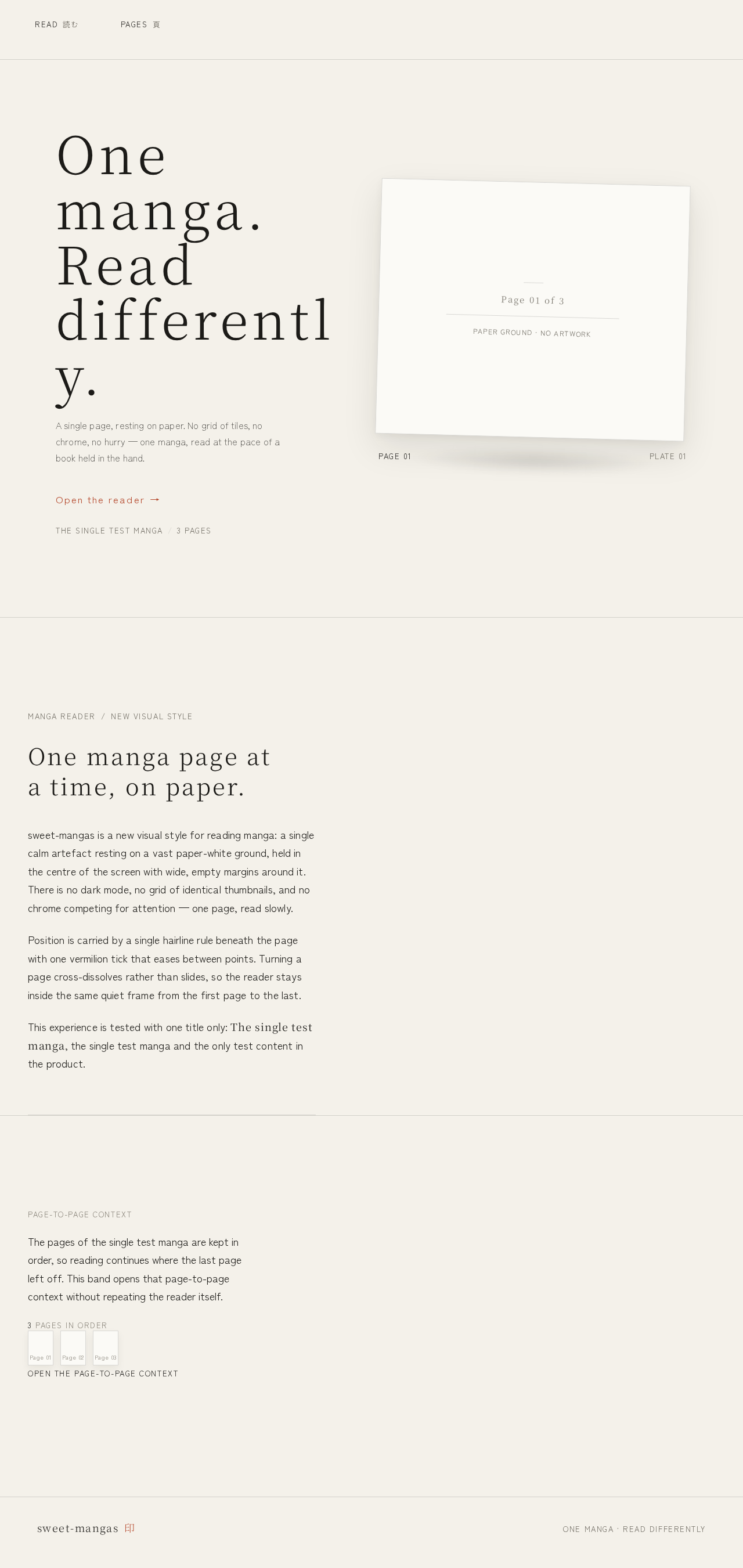
One manga.Read differently.
A single page, resting on paper. No grid of tiles, no chrome, no hurry — one manga, read at the pace of a book held in the hand.
Open the readerOne manga page at a time, on paper.
sweet-mangas is a new visual style for reading manga: a single calm artefact resting on a vast paper-white ground, held in the centre of the screen with wide, empty margins around it. There is no dark mode, no grid of identical thumbnails, and no chrome competing for attention — one page, read slowly.
Position is carried by a single hairline rule beneath the page with one vermilion tick that eases between points. Turning a page cross-dissolves rather than slides, so the reader stays inside the same quiet frame from the first page to the last.
This experience is tested with one title only: The single test manga, the single test manga and the only test content in the product.
The pages of the single test manga are kept in order, so reading continues where the last page left off. This band opens that page-to-page context without repeating the reader itself.
3 pages in order
Open the page-to-page contextOne manga.Read differently.
A single page, resting on paper. No grid of tiles, no chrome, no hurry — one manga, read at the pace of a book held in the hand.
Open the readerOne manga page at a time, on paper.
sweet-mangas is a new visual style for reading manga: a single calm artefact resting on a vast paper-white ground, held in the centre of the screen with wide, empty margins around it. There is no dark mode, no grid of identical thumbnails, and no chrome competing for attention — one page, read slowly.
Position is carried by a single hairline rule beneath the page with one vermilion tick that eases between points. Turning a page cross-dissolves rather than slides, so the reader stays inside the same quiet frame from the first page to the last.
This experience is tested with one title only: The single test manga, the single test manga and the only test content in the product.
The pages of the single test manga are kept in order, so reading continues where the last page left off. This band opens that page-to-page context without repeating the reader itself.
3 pages in order
Open the page-to-page context
No comments yet. Be the first!