sweet-hug
Hug

Comments (0)
Sign in to leave a comment
Project Tasks13
Align theme and colors
Implement the global color theme and design system across all pages to match the mock designs exactly. Set up CSS variables and/or a Tailwind/styled-components theme config using: Background #FDF6E3 (Soft Cream), Surface #F4E3C1 (Warm Beige), Text #4A2C2A (Deep Brown), Accent #D97A5C (Warm Coral), Muted #B8A89A (Soft Taupe). Establish shared typography, spacing, border-radius, and component base styles so all pages inherit a consistent visual language. This task is independent and must be completed before any page implementation.
Build photo upload API
As a user I want to be able to use the backend API for uploading two photos. Implement a FastAPI endpoint POST /api/upload that accepts two image files (multipart/form-data), validates file type (JPEG/PNG) and size (max 10MB each), stores them temporarily in a session-scoped ephemeral location (no persistent DB storage), and returns a session token plus temporary file references for downstream processing. Enforce rate limiting and basic input sanitization. Temporary files must be automatically cleaned up after session expiry or download completion.
Integrate face preservation
As a user I want to be able to use the AI API for face preservation so original facial features are retained in the composite. Integrate a face detection and preservation layer using face landmark detection (e.g., MediaPipe or dlib) to extract face regions from each uploaded photo. Apply face-swapping or inpainting guidance to the generative model via conditioning or ControlNet-style inputs to anchor facial features. Validate output quality with perceptual similarity metrics (LPIPS or SSIM) against input faces.
Implement Landing page
Build the Landing page (v2 design) in React so it is pixel-perfect against the existing mock. Include hero section with the interactive photo frame concept, value proposition copy, CTA button navigating to the Upload flow, dynamic animation with warm glow, Omani-inspired floral motifs, and micro-interactions (shimmer/heartbeat on hover). Apply the global theme from the theme alignment task. Ensure the page is responsive for mobile and desktop. Wire the primary CTA to route to the Upload Photo One page.
Implement Upload page
Build the Upload page (v1 design) in React supporting two sequential photo upload steps: Upload Photo One and Upload Photo Two. Each step should show a drag-and-drop zone, file browser fallback, image preview thumbnail after selection, and a clear progress indicator showing which step the user is on (1 of 2 vs 2 of 2). Apply validation for file type (JPEG/PNG) and size limits. Apply the global theme. On completion of both uploads, route to the Preview page. Integrate with the photo upload API once available; use mock responses until then.
Implement Preview page
Build the Preview page (v1 design) in React to display the AI-generated composite hugging photo. Include a loading/generation state with animated placeholder while the image is being produced. Once ready, render the composite image prominently. Provide filter/style preference controls (warmth, brightness, style presets) and an Apply Filters button. Include a Download CTA routing to the Download page and a Back/Retake option. Apply the global theme. Use mock image data until the compositing API is ready.
Implement Download page
Build the Download page (v1 design) in React to present the final composite image ready for download. Display the image at high-resolution preview, show a prominent Download button that triggers the high-res download API, and include share affordances (copy link, optional social share). Add a Start Over CTA that clears session state and routes back to Landing. Apply the global theme. Ensure the download button gracefully handles loading and error states.
Build image generation pipeline
As a user I want to be able to use the AI API for generating a realistic hugging composite photo from two source images. Build the end-to-end AI image generation pipeline using a suitable generative model (e.g., Stable Diffusion with img2img/inpainting). Design the prompt engineering strategy to produce a warm, natural-looking hug pose between two subjects. Integrate the face preservation module as a conditioning step. Expose the pipeline as an internal Python service callable by the compositing API. Optimize for inference latency under 10 seconds per SRD requirements.
Build compositing API
As a user I want to be able to use the backend API for triggering image compositing with optional filter preferences. Implement FastAPI endpoints: POST /api/composite (accepts session token and preferences, triggers AI pipeline, returns job ID) and GET /api/composite/{job_id}/status (returns progress and signed temporary URL to generated preview image). Ensure all intermediate artifacts are session-scoped and ephemeral.
Build preview generation API
As a user I want to be able to use the backend API for retrieving a compressed preview of the generated composite image. Implement FastAPI endpoint GET /api/preview/{job_id} that returns a reduced-resolution (max 1024px) version of the composite image as a signed temporary URL with short TTL, suitable for fast display in the Preview page.
Build high-res download API
As a user I want to be able to use the backend API for downloading the final composite image in high resolution (minimum 300 DPI). Implement FastAPI endpoint GET /api/download/{job_id} that streams or redirects to the full-resolution composite image. Set appropriate Content-Disposition headers for browser download. Enforce download availability only within the session TTL. After download or session expiry, trigger cleanup of all temporary files. Log download events without storing any PII or image content persistently.
Implement session and privacy
As a user I want to be able to trust that my uploaded photos are never stored permanently. Implement a session management layer ensuring no uploaded or generated images are persisted beyond the active user session. Use short-lived signed session tokens (JWT) tied to ephemeral storage (tmpfs or Redis with TTL). Implement automatic cleanup jobs purging all temporary files and session data upon expiry (default TTL: 1 hour) or after successful download. Ensure no personal data or images are written to the MySQL database.
Connect frontend to APIs
As a user I want to be able to use the frontend seamlessly with live backend data. Wire all frontend pages (Upload, Preview, Download) to their respective backend API endpoints: replace mock responses with real API calls to /api/upload, /api/composite, /api/preview, and /api/download. Implement global loading states, error boundaries, and user-friendly error messages for API failures. Handle session token storage (in-memory or sessionStorage) and pass it across pages.
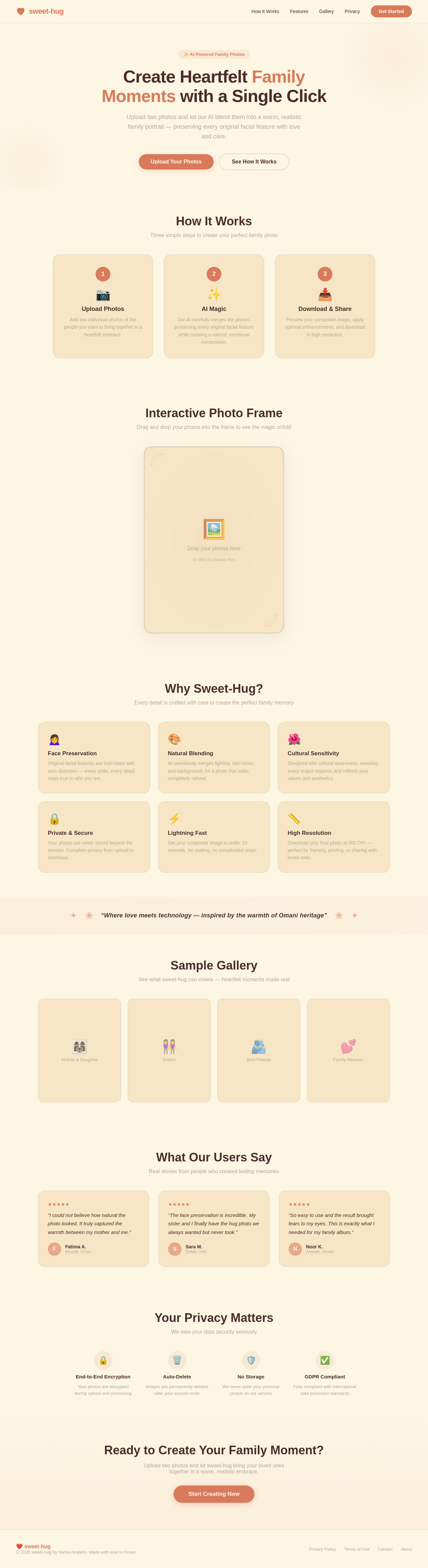
Create Heartfelt Family Moments with a Single Click
Upload two photos and let our AI blend them into a warm, realistic family portrait — preserving every original facial feature with love and care.
How It Works
Three simple steps to create your perfect family photo
Upload Photos
Add two individual photos of the people you want to bring together in a heartfelt embrace.
AI Magic
Our AI carefully merges the photos, preserving every original facial feature while creating a natural, emotional composition.
Download & Share
Preview your composite image, apply optional enhancements, and download in high resolution.
Interactive Photo Frame
Drag and drop your photos into the frame to see the magic unfold
Why Sweet-Hug?
Every detail is crafted with care to create the perfect family memory
Face Preservation
Original facial features are kept intact with zero distortion — every smile, every detail stays true to who you are.
Natural Blending
AI seamlessly merges lighting, skin tones, and backgrounds for a photo that looks completely natural.
Cultural Sensitivity
Designed with cultural awareness, ensuring every output respects and reflects your values and aesthetics.
Private & Secure
Your photos are never stored beyond the session. Complete privacy from upload to download.
Lightning Fast
Get your composite image in under 10 seconds. No waiting, no complicated steps.
High Resolution
Download your final photo at 300 DPI — perfect for framing, printing, or sharing with loved ones.
Sample Gallery
See what sweet-hug can create — heartfelt moments made real
What Our Users Say
Real stories from people who created lasting memories
“I could not believe how natural the photo looked. It truly captured the warmth between my mother and me.”
“The face preservation is incredible. My sister and I finally have the hug photo we always wanted but never took.”
“So easy to use and the result brought tears to my eyes. This is exactly what I needed for my family album.”
Your Privacy Matters
We take your data security seriously
Ready to Create Your Family Moment?
Upload two photos and let sweet-hug bring your loved ones together in a warm, realistic embrace.
No comments yet. Be the first!