sweet-chat
 Aaron
AaronReal-Time Chat Application Build a chat application where users can communicate instantly. The system should support message storage and retrieval. Include features like online status and notifications. Ensure smooth and secure communication. • User registration and login • Send and receive messages • Create chat rooms/groups • Display online/offline status • Store message history • Push notifications • File/media sharing • Performance: Messages delivered instantly (<1 second) • Security: Encryption of messages • Scalability: Handle multiple users • Usability: Simple and user-friendly interface • Reliability: System uptime should be high • Compatibility: Works on web/mobile html,css,javascript node.js mongodb should work on vs code

Comments (0)
Sign in to leave a comment
System Requirements
System Requirements Document (SRD)
Project Name: sweet-chat
1. Introduction
The sweet-chat project is a real-time chat application designed as a university project by Aaron in India. The primary goal of this project is to create a functional and user-friendly platform where users can communicate instantly, share files, and organize group chats. The application will demonstrate key features such as message storage, online status, notifications, and secure communication, tailored to meet the needs of academic environments.
This document outlines the system requirements for sweet-chat, including functional and non-functional specifications, user personas, design concepts, and technical considerations.
2. System Overview
sweet-chat is a real-time chat application aimed at facilitating seamless communication among users, particularly in a university setting. The system will allow students, faculty, and staff to register, create chat rooms or groups, and exchange messages securely and efficiently.
Key features include:
- Instant messaging with message storage and retrieval.
- Online/offline status display for users.
- Push notifications for new messages or updates.
- File and media sharing capabilities.
- A simple and intuitive interface optimized for both web and mobile platforms.
The system will prioritize performance, security, scalability, and reliability to ensure a smooth user experience.
3. Functional Requirements
As User:
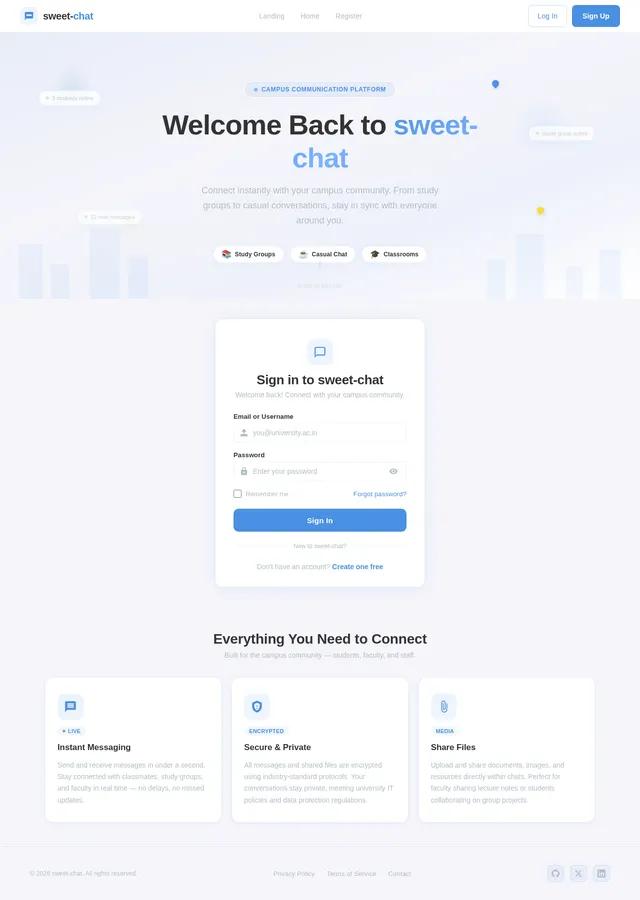
- I should be able to register and log in to the application.
- I should be able to send and receive messages instantly.
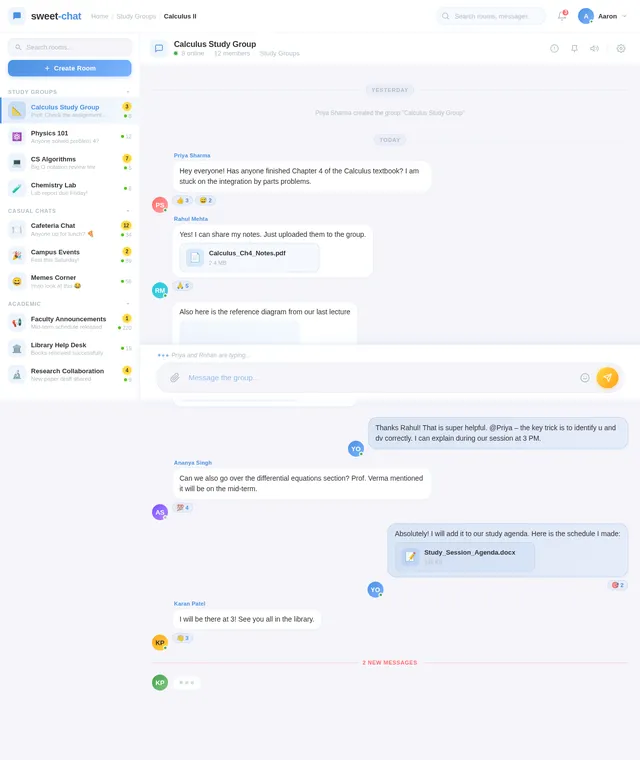
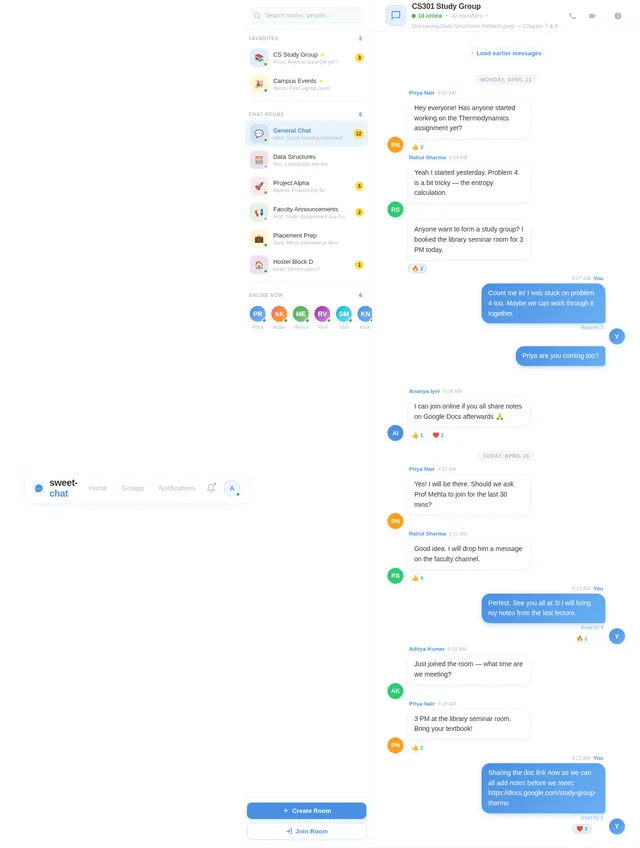
- I should be able to create chat rooms or groups for communication.
- I should be able to view the online/offline status of other users.
- I should be able to access message history.
- I should receive push notifications for new messages or updates.
- I should be able to share files and media within chats.
4. User Personas
1. Student
- Description: Primary users of the application. Students use the platform for study groups, event planning, and casual communication.
- Needs: Instant messaging, group chats, file sharing, and notifications.
2. Faculty
- Description: Professors and academic staff who use the platform for sharing resources, announcements, and coordinating with students.
- Needs: Secure communication, file sharing, and group creation.
3. Admin
- Description: System administrators responsible for managing user accounts, monitoring system performance, and ensuring security.
- Needs: User management, system monitoring, and access to logs.
5. Visuals Colors and Theme
Color Palette:
The sweet-chat application will feature a vibrant yet professional color scheme to appeal to university users:
- Background: #F5F5FA (Soft Lavender Gray)
- Surface: #FFFFFF (Pure White)
- Text: #333333 (Charcoal Black)
- Accent: #4A90E2 (University Blue)
- Muted Tones: #B0BEC5 (Cool Gray)
This palette ensures readability, professionalism, and a welcoming aesthetic suitable for academic environments.
6. Signature Design Concept
Interactive Campus Map Homepage
The homepage of sweet-chat will feature an interactive campus map design. Users will see a stylized map of a university campus, with clickable buildings representing different chat functionalities:
- Library: Study group chats.
- Cafeteria: Casual chats.
- Classrooms: Academic discussions.
- Admin Office: System settings and admin controls.
Hovering over each building will display animations like glowing outlines or subtle pulsations. Clicking on a building will transition users into the respective chat room or feature with smooth zoom-in animations.
The map will include micro-interactions such as:
- Animated pins for active chat rooms.
- A dynamic day/night cycle reflecting the user’s local time.
- A subtle background soundtrack of campus ambiance (optional).
This design concept will make the application visually engaging and memorable while reinforcing its academic theme.
7. Non-Functional Requirements
- Performance: Messages must be delivered in under 1 second.
- Security: All messages and files must be encrypted using industry-standard protocols.
- Scalability: The system should handle concurrent usage by multiple users without degradation.
- Usability: The interface must be simple, intuitive, and accessible for users of varying technical expertise.
- Reliability: The system uptime should exceed 99.9%.
- Compatibility: The application must function seamlessly on both web and mobile platforms.
8. Tech Stack
Frontend:
- React for Web
- React Native for Mobile
Backend:
- Python
- FastAPI
Database:
- MySQL (preferred for relational data)
- MongoDB (for NoSQL requirements)
AI Models:
- GPT 5.4 for user-friendly responses.
- Claude 4.6 Opas for academic or coding assistance.
AI Tools:
- Litellm for LLM Routing.
- Langchain for advanced AI workflows.
Orchestration:
- Docker and docker-compose for local development.
- Kubernetes for server-side orchestration.
9. Assumptions and Constraints
Assumptions:
- Users will primarily access the application via university-provided devices or personal smartphones.
- Internet connectivity will be stable within the university campus.
- The application will be used for academic and casual communication, not for commercial purposes.
Constraints:
- Development must be completed within the academic semester timeline.
- The system must adhere to university IT policies and data protection regulations.
- Limited budget for hosting and infrastructure.
10. Glossary
- Real-Time Messaging: Communication where messages are delivered instantly without noticeable delay.
- Push Notifications: Alerts sent to users’ devices to notify them of new messages or updates.
- Encryption: The process of converting data into a secure format to prevent unauthorized access.
- Scalability: The ability of the system to handle increased user load without performance degradation.
- LLM Routing: The process of directing queries to the appropriate large language model for optimal responses.
End of Document

Connect Your Campus
in Real Time
Sweet-Chat: Instant messaging designed for university communities. Create study groups, share resources, and stay connected with your campus — all in one place.
Explore Your Campus
Navigate through campus buildings to find study groups, casual chats, academic discussions, and more — all in one interactive map.
Library
12 active chats
Cafeteria
8 active chats
Classrooms
15 active chats
Admin Office
3 active chats
Everything You Need to Stay Connected
Sweet-Chat brings together the essential communication tools for university life, all in one seamless platform.
Instant Messaging
Send and receive messages in real time across campus. Whether coordinating study groups or catching up with friends, every conversation is delivered instantly with read receipts and typing indicators.
File & Media Sharing
Share lecture notes, project files, images, and documents directly within your chats. Drag-and-drop uploads make it effortless to collaborate on assignments and share resources with classmates.
Online Status & Notifications
See who is online across campus at a glance. Receive push notifications for new messages, mentions, and group updates so you never miss an important conversation or announcement.
Built for Every Campus Role
sweet-chat is designed to meet the unique communication needs of students, faculty, administrators, and the broader campus community.
Student
Primary platform users for study and social life
Key Needs
- ✓Instant messaging with classmates
- ✓Group chats for study sessions
- ✓File sharing for notes & resources
- ✓Push notifications for updates
sweet-chat makes coordinating study groups so much easier. I never miss an important message from my team.
Faculty
Professors and academic staff
Key Needs
- ✓Secure communication channels
- ✓Share lecture materials easily
- ✓Create class announcement groups
- ✓Coordinate with teaching assistants
I can share resources and announcements with my entire class instantly. It has streamlined my workflow.
Admin
System administrators and IT staff
Key Needs
- ✓User account management
- ✓System performance monitoring
- ✓Access to activity logs
- ✓Security and compliance controls
The admin dashboard gives me full visibility into system health and user activity at a glance.
Campus Community
Clubs, organizations and campus groups
Key Needs
- ✓Event planning and coordination
- ✓Cross-department communication
- ✓Broadcast announcements campus-wide
- ✓Media sharing for campus events
Organizing campus events has never been simpler. Everyone stays informed and connected in real time.
Messages That Arrive Instantly
Sweet-Chat is built for speed. Every message, notification, and status update reaches you the moment it happens — keeping your campus connected without delay.
Instant Message Delivery
Messages arrive in under one second with our optimized real-time infrastructure built for campus networks.
Typing Indicators
See when your classmates or professors are composing a reply in real time.
Read Receipts
Know exactly when your messages have been seen with clear double-check indicators.
Message History Access
Scroll back through full conversation history anytime. Never lose an important discussion.
Your Data, Protected at Every Layer
sweet-chat is built with security at its core. From encrypted messages to university-approved compliance, your campus communication is safe with us.
AES-256
End-to-End Encryption
Every message, file, and media shared on sweet-chat is protected with military-grade AES-256 encryption. Your academic discussions stay private.
FERPA
University-Compliant
Built to meet FERPA, GDPR, and institutional data governance standards. Approved for use across partner university networks.
99.9%
Uptime Guarantee
Reliable infrastructure with 99.9% uptime SLA ensures sweet-chat is always available, even during peak exam and enrollment periods.
Trusted by universities and certified worldwide
Ready to Transform Campus Communication?
Join thousands of students, faculty, and staff who use sweet-chat to stay connected across campus. Instant messaging, group chats, and file sharing — all in one secure platform built for universities.
Frequently Asked Questions
Everything you need to know about sweet-chat. Can't find your answer? Reach out to our support team.
How do I create a group chat?
Creating a group is simple. Navigate to the Groups page, click "Create Group," name your group, and invite classmates or faculty. You can create study groups, project teams, or club channels in seconds.
Is my data secure on sweet-chat?
Absolutely. All messages and files are encrypted using industry-standard protocols. sweet-chat complies with university IT policies and data protection regulations to keep your conversations private and secure.
Can I use sweet-chat on my phone?
Yes! sweet-chat is fully compatible with both web and mobile platforms. Access it through your browser on any device, or use the React Native mobile app for a native experience on iOS and Android.
How do notifications work?
You receive push notifications whenever you get a new message, group invite, or important update. You can customize notification preferences in your Settings page to control what alerts you receive.
Can I share files and media in chats?
Yes, sweet-chat supports file and media sharing within any chat or group. Share documents, images, presentations, and other files directly in the conversation for easy collaboration.
How do I see who is online?
Online and offline status is displayed next to each user in your contact list and within chat rooms. A green indicator shows active users, so you always know who is available for a quick conversation.
Can faculty create announcement channels?
Yes. Faculty members can create dedicated groups for course announcements, resource sharing, and academic discussions. Students in the group receive instant notifications for any new posts.
Is there a message history limit?
No. sweet-chat stores your complete message history, so you can scroll back and search through past conversations anytime. Your chat data is always accessible when you need it.
Still have questions? Get in touch with our team.
No comments yet. Be the first!