super-clone
 Oliver
i want a clone of david basokee
Comments (0)
Sign in to leave a comment
Project Tasks20
Implement Theme & Design Structure
As a frontend developer, I want to implement the global theme, colour tokens, and design structure across all existing scaffold pages (home, login, signup, welcome, dashboard/overview, dashboard/ai-assistant, dashboard/settings) so they visually align with the mock-design pages. This includes: applying the Electric Blue (#007BFF), Charcoal Grey (#333333), Vibrant Orange (#FF6600), and dark-mode background (#0A0A0F) colour palette as CSS custom properties; setting up the Inter font family; establishing global animation utilities (glow pulse, glassmorphism surfaces, backdrop-blur); and removing any scaffold pages that are not represented in the design (e.g. standalone signup/welcome pages if superseded). This task must be completed before all other frontend page tasks.
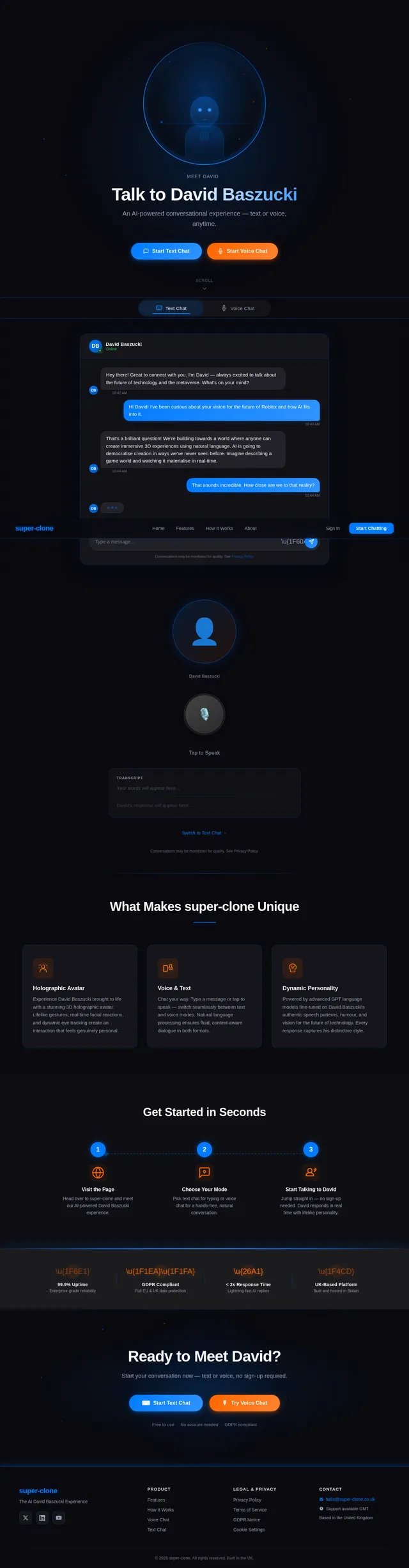
Build Landing Page
As a user, I want to use the Landing page to view the holographic avatar of David Baszucki, start a text chat, or start a voice chat. Implement the Landing page based on the existing JSX design (Landing v2). Sections include: NavBar (sticky frosted-glass), HolographicHero (3D avatar with rotating halo, galaxy background), InteractionModePicker (Text/Voice tab toggle), TextChatInterface (chat panel), VoiceChatInterface (mic activation button with sonar rings), FeatureHighlights (3-card grid), HowItWorks (3-step flow), TrustAndCompliance (4 trust badges), CallToAction, and Footer. The page is the primary user entry point — links out to Chat and Voice pages. Fully responsive: mobile-first, avatar scales to 280px, CTAs stack vertically.
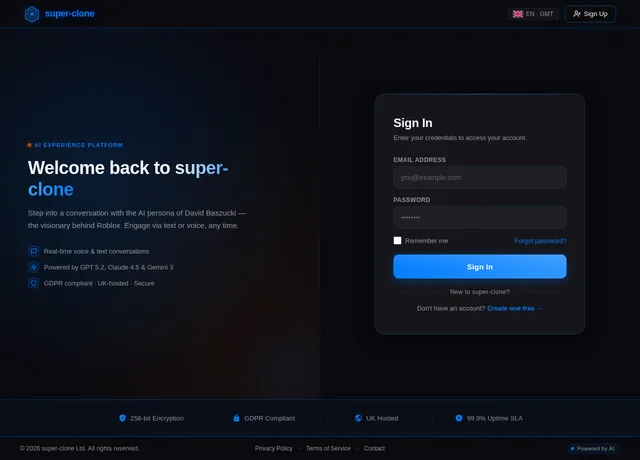
Build Login Page
As a user, I want to use the Login page to sign in to my account so that I can access the platform. Implement the Login page based on the existing JSX design (Login v2). Includes: email and password fields with Electric Blue focus states, 'Sign In' CTA button, ghost 'Sign Up' link, frosted-glass card on galaxy background, GDPR-compliant notice. Entry point for the Admin flow (Login → Dashboard). Connects to: Dashboard page on success. Fully responsive.
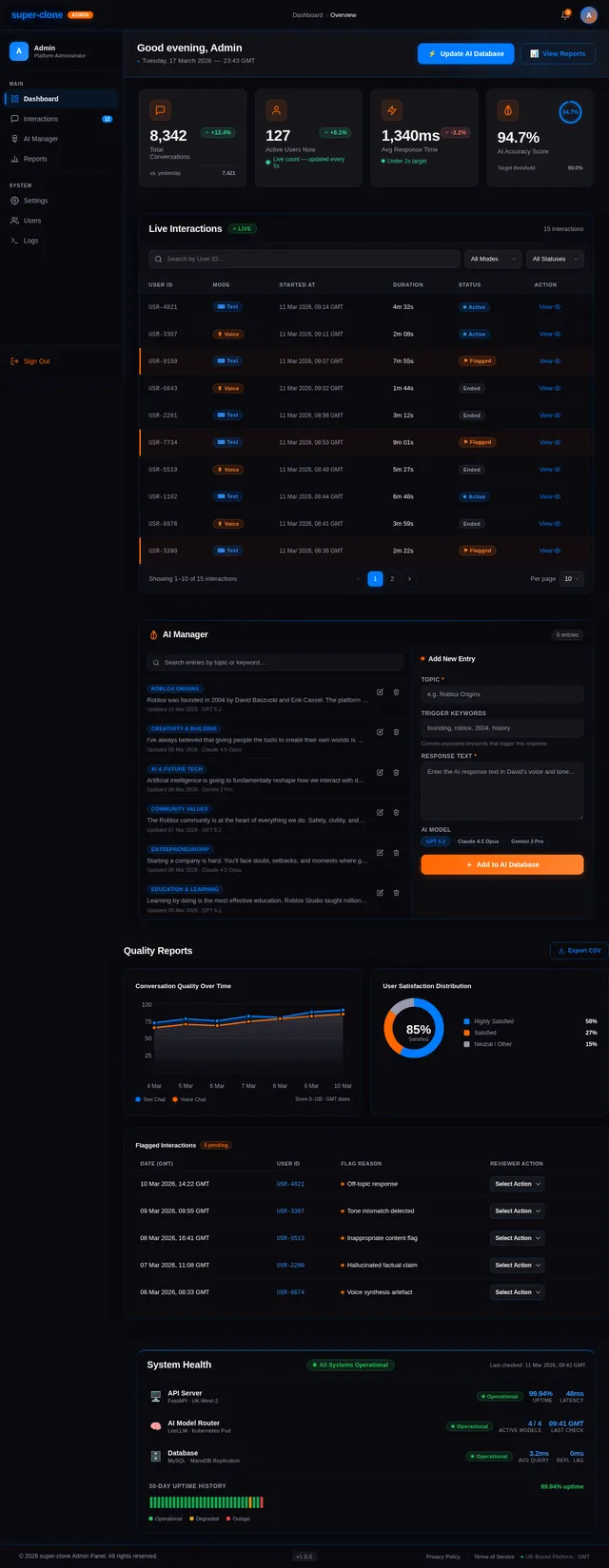
Build Dashboard Page
As an admin, I want to use the Dashboard page to view an overview of platform health so that I can monitor performance. Implement the Dashboard page based on the existing JSX design (Dashboard v2). Sections include: AdminTopBar (sticky nav, notification bell, admin avatar dropdown), AdminSidebar (off-canvas on mobile, nav groups for Dashboard/Interactions/AI Manager/Reports/Settings), OverviewBanner (greeting, GMT datetime, quick-action CTAs), StatsCards (Total Conversations, Active Users, Avg Response Time, AI Accuracy), InteractionsMonitor (live chat table with filters), AIManagerPanel (split-pane response editor), QualityReports (line + donut charts), SystemHealth (API/DB/LiteLLM status rows), AdminFooter. Links to: Interactions page, AI Manager page, Reports page. Fully responsive with sidebar drawer on mobile.
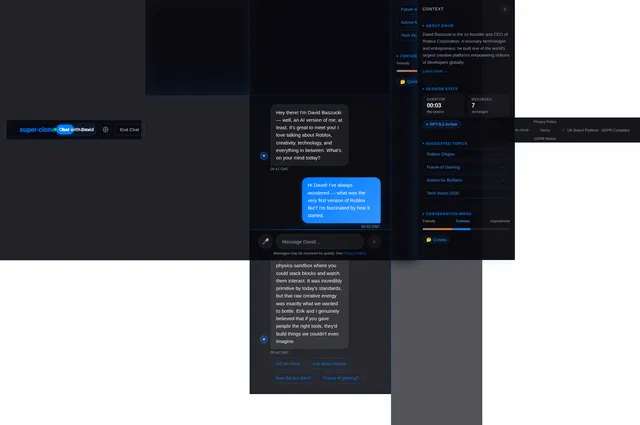
Build Chat Page
As a user, I want to use the Chat page to send text messages to David Baszucki's AI and read responses so that I can have a lifelike conversation. Implement the Chat page based on the existing JSX design (Chat v2). Includes: NavBar, scrollable message thread (right-aligned user bubbles in Electric Blue, left-aligned David responses in dark surface with avatar icon), animated three-dot typing indicator, rounded text input with send button (Electric Blue → Vibrant Orange hover), emoji picker, GDPR notice below input. Entry from Landing 'Start Text Chat' CTA. Links to: Profile page. Fully responsive: input pinned to bottom on mobile, messages scroll freely.
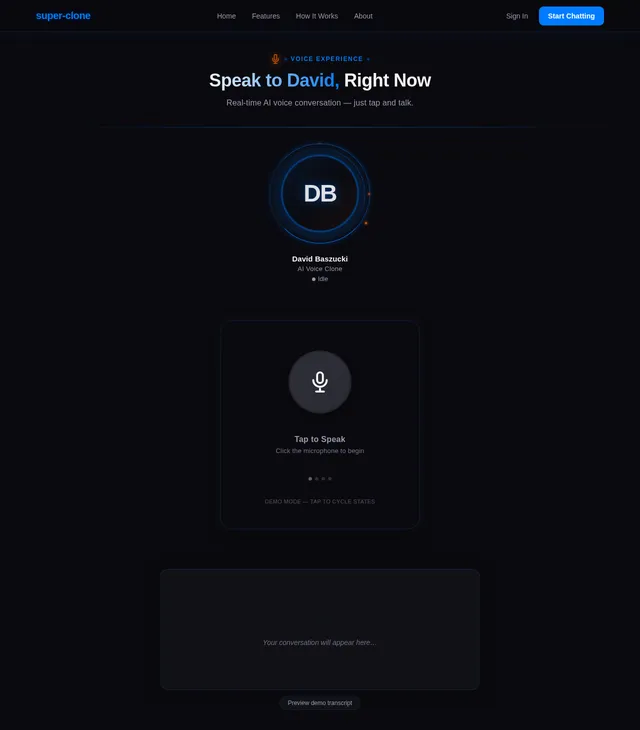
Build Voice Page
As a user, I want to use the Voice page to speak to David Baszucki's AI and hear responses so that I can have a real-time voice conversation. Implement the Voice page based on the existing JSX design (Voice v2). Includes: NavBar, VoiceHeroIntro (eyebrow label, headline 'Speak to David, Right Now'), AvatarStage (200px holographic avatar with state-driven animations: idle/listening/processing/speaking, rotating ring halo, sound-wave bars), VoiceActivation (120px orange mic button with sonar rings, 4 state labels), TranscriptPanel (scrollable user/David transcript bubbles), VoiceStatusBar (session timer, mute/end-call controls), VoiceFeatureCallouts (3 feature chips), SwitchModePrompt ('Switch to Text Chat →' link), TrustAndCompliance, Footer. Entry from Landing 'Start Voice Chat' CTA. Fully responsive: mic button 96px on mobile.
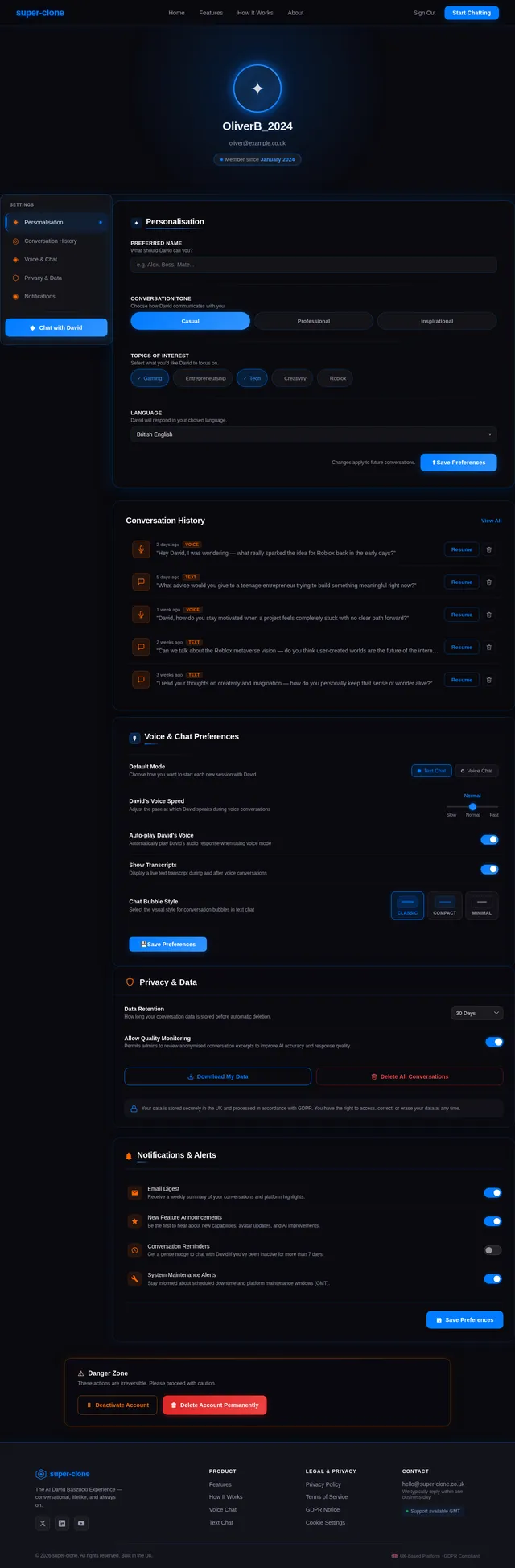
Build Profile Page
As a user, I want to use the Profile page to personalise my settings so that I can customise my conversational experience. Implement the Profile page based on the existing JSX design (Profile v2). Includes: NavBar, profile avatar with name/email display, editable display name and preferences, conversation history settings, notification preferences, GDPR data export/delete controls, save CTA in Electric Blue. Entry point from Chat page ('Personalise Settings' link). Fully responsive with stacked form layout on mobile.
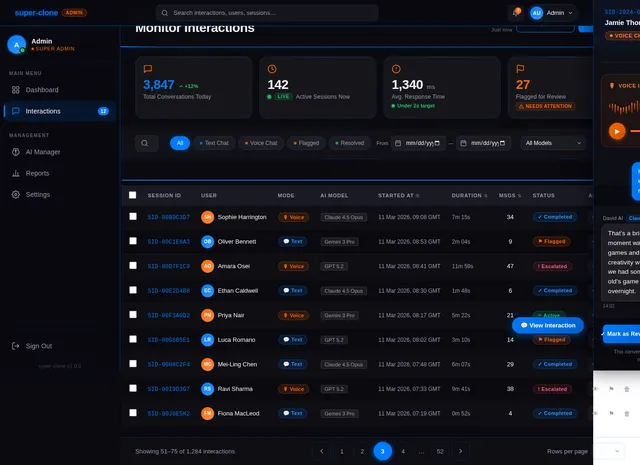
Build Interactions Page
As an admin, I want to use the Interactions page to monitor live and historical chats so that I can ensure quality and flag issues. Implement the Interactions page based on the existing JSX design (Interactions v2). Includes: AdminTopBar, AdminSidebar (Interactions active state), page header with 'Live Interactions' label and pulsing green badge, filter bar (search input, Mode dropdown, Status dropdown, date range), interaction table (User ID anonymised, Mode chip, Started At GMT, Duration, Status: Active/Ended/Flagged, View action), flagged rows with Vibrant Orange left border, pagination, detail drawer on row click. Entry from Dashboard sidebar. Links to: Reports page. Fully responsive: card-list view on mobile.
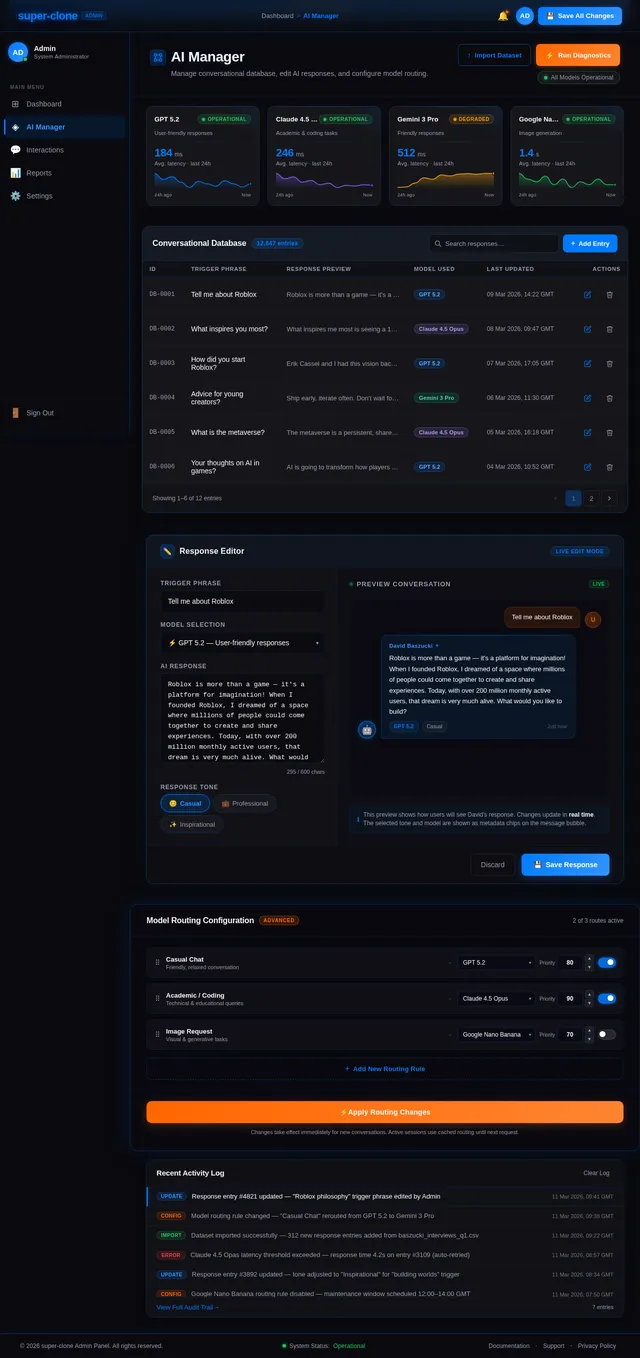
Build AI Manager Page
As an admin, I want to use the AI Manager page to manage and update the AI conversational database so that I can keep responses accurate and relevant. Implement the AI Manager page based on the existing JSX design (AI Manager v2). Includes: AdminTopBar, AdminSidebar (AI Manager active state), page heading 'AI Manager', left pane — searchable list of AI response entries (topic tag chip, response preview, last-updated date, Edit/Delete actions, inline expandable editor with textarea and Save/Cancel), right pane — 'Add New Entry' form (Topic, Trigger Keywords, Response Text, AI Model selector: GPT 5.2 / Claude 4.5 Opus / Gemini 3 Pro, Submit in Vibrant Orange), 1px Electric Blue vertical divider between panes. Entry from Dashboard. Fully responsive: panes stack vertically on mobile.
Implement Text Chat API
As a user, I want to use the backend API for text chat so that my messages are processed by the AI and I receive David Baszucki-style responses within 2 seconds. Implement a FastAPI endpoint POST /api/v1/chat/text that accepts a user message and conversation history, routes the request via LiteLLM to the appropriate LLM (GPT 5.2 for user-friendly responses), applies the David Baszucki personality prompt, and returns the AI response. Include conversation session management and GDPR-compliant data handling.
Implement Voice Chat API
As a user, I want to use the backend API for voice chat so that my spoken input is transcribed, processed, and I receive a synthesised David Baszucki voice response within 3 seconds. Implement FastAPI endpoints for: POST /api/v1/chat/voice/transcribe (speech-to-text), POST /api/v1/chat/voice/respond (LLM response generation via LiteLLM), POST /api/v1/chat/voice/synthesise (text-to-speech output). Handle streaming responses for low-latency delivery. GDPR-compliant voice data handling.
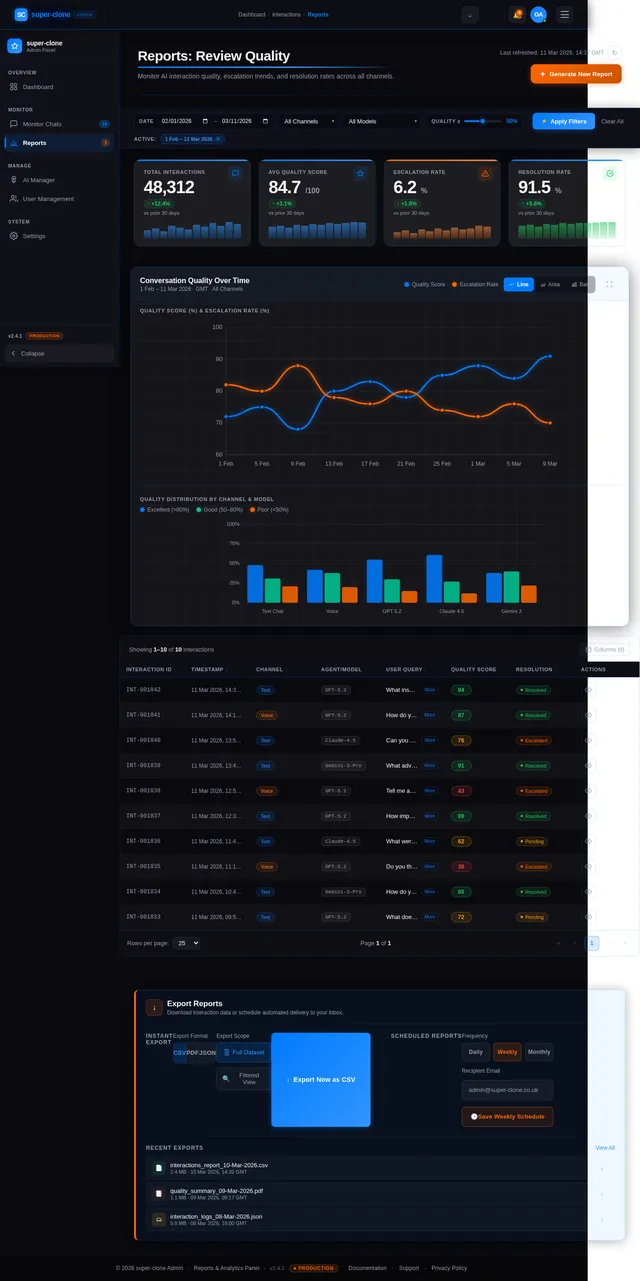
Build Reports Page
As an admin, I want to use the Reports page to review conversation quality metrics so that I can identify issues and improve the platform. Implement the Reports page based on the existing JSX design (Reports v2). Includes: TopNavigationHeader (breadcrumb: Dashboard > Interactions > Reports), AdminSidebar (Reports active state), PageHeaderBar (title 'Reports: Review Quality', Generate New Report CTA in Vibrant Orange), FilterControlsBar (date range picker, channel multi-select, agent/model filter, quality score range slider, Apply/Clear), KPISummaryCards (Total Interactions, Avg Quality Score, Escalation Rate, Resolution Rate — each with trend delta and sparkline), ConversationQualityChart (multi-line time series in Electric Blue + Vibrant Orange, secondary bar chart, chart type toggle), InteractionLogsTable (Interaction ID, Timestamp GMT, Channel, Agent/Model, User Query, quality score badge colour-coded, Resolution Status, detail drawer on click, pagination), ExportDownloadSection (CSV/PDF/JSON format selector, scheduled reports form, recent exports list), Footer. Entry from Interactions page and Dashboard sidebar. Fully responsive.
Implement AI Personality Engine
As a user, I want the AI to respond in David Baszucki's authentic conversational style so that the interaction feels lifelike and enjoyable. Build the LangChain-based personality engine: create a David Baszucki system prompt capturing his speech style, key phrases, and personality traits; implement LiteLLM routing logic to select the appropriate model (GPT 5.2 for friendly, Claude 4.5 Opus for academic/coding, Gemini 3 Pro for general); add conversation memory management for context continuity across turns.
Build Admin Interactions API
As an admin, I want to use the backend API for the Interactions page so that I can retrieve, filter, and monitor live and historical user conversations. Implement FastAPI endpoints: GET /api/v1/admin/interactions (list with filters: mode, status, date range, search), GET /api/v1/admin/interactions/{id} (detail view), PATCH /api/v1/admin/interactions/{id}/flag (flag an interaction). Include pagination, GMT timestamp formatting, and role-based access control (admin only).
Build AI Manager CRUD API
As an admin, I want to use the backend API for the AI Manager page so that I can create, read, update, and delete AI response entries in the conversational database. Implement FastAPI endpoints: GET /api/v1/admin/ai-entries (list with search/filter), POST /api/v1/admin/ai-entries (create new entry with topic, trigger keywords, response text, model selector), PUT /api/v1/admin/ai-entries/{id} (update entry), DELETE /api/v1/admin/ai-entries/{id} (delete entry). Admin-only access. Alembic migration for the ai_entries table.
Build User Profile API
As a user, I want to use the backend API for the Profile page so that I can save and retrieve my personalisation settings and manage my GDPR data rights. Implement FastAPI endpoints: GET /api/v1/user/profile (fetch profile: display name, preferences, notification settings), PUT /api/v1/user/profile (update profile settings), GET /api/v1/user/conversation-history (retrieve own conversation history), DELETE /api/v1/user/data (GDPR right-to-erasure: delete all user data), GET /api/v1/user/data-export (GDPR data portability: export user data as JSON). Authenticated user access only.
Build Reports & Quality API
As an admin, I want to use the backend API for the Reports page so that I can retrieve quality metrics, trend data, and export interaction logs. Implement FastAPI endpoints: GET /api/v1/admin/reports/kpis (Total Interactions, Avg Quality Score, Escalation Rate, Resolution Rate with delta vs prior period), GET /api/v1/admin/reports/quality-trend (time series data for quality chart, GMT dates), GET /api/v1/admin/reports/interaction-logs (paginated, filterable log table), POST /api/v1/admin/reports/export (generate CSV/PDF/JSON export), POST /api/v1/admin/reports/schedule (set up automated email delivery). Admin-only.
Integrate Chat API with Frontend
As a user, I want the Chat page to send and receive real messages via the text chat API so that I can have live AI-powered conversations. Connect the Chat page (t5) to the POST /api/v1/chat/text endpoint (t11): wire up the send button to POST the message, display the animated typing indicator while awaiting the response, render David's AI response in the left-aligned bubble, handle errors gracefully with an Electric Blue toast notification, and maintain conversation session state via session ID cookie or local storage.
Integrate Voice API with Frontend
As a user, I want the Voice page to capture my speech, send it to the voice API, and play David's synthesised response so that I can have a real-time voice conversation. Connect the Voice page (t6) to the voice API endpoints (t12): wire up the mic button to capture browser microphone input (Web Audio API), POST audio to /transcribe, pass transcript to /respond, stream synthesised audio from /synthesise and play it, update AvatarStage and VoiceActivation state (idle/listening/processing/speaking) in sync with API response lifecycle, display real-time transcripts in TranscriptPanel.
Integrate Admin APIs with Dashboard
As an admin, I want the Dashboard page to display live platform metrics fetched from the backend so that I can monitor the system in real time. Wire up the Dashboard (t4) to backend APIs: fetch KPI stats for StatsCards, fetch recent interactions for InteractionsMonitor table, fetch system health status for SystemHealth rows, fetch quality chart data for QualityReports. Implement polling (30s interval) for live data updates. Handle loading skeletons and error states. Secure all API calls with admin auth token.
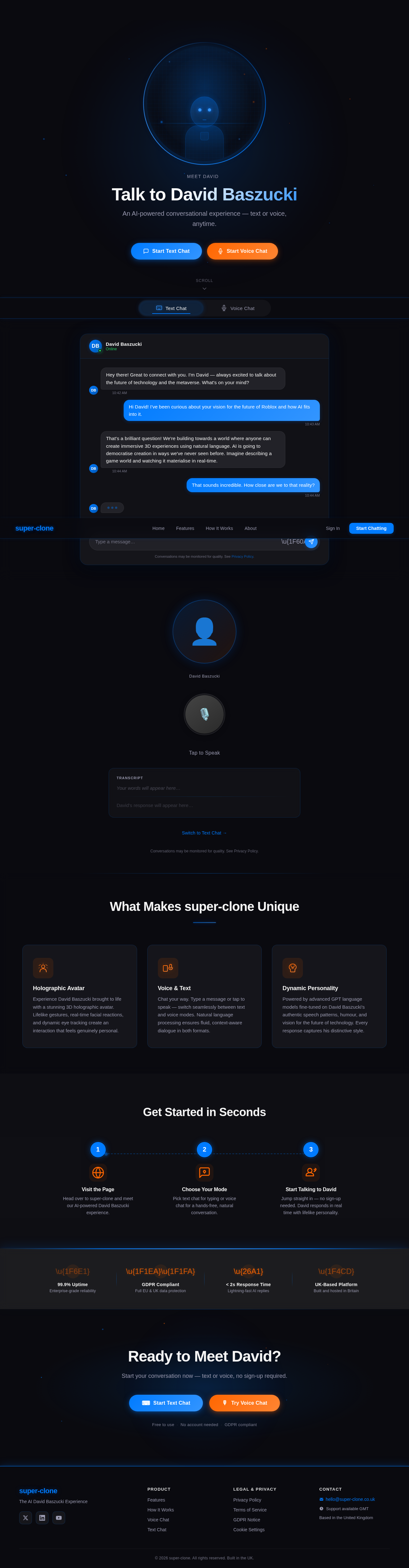
Talk to David Baszucki
An AI-powered conversational experience — text or voice, anytime.
Conversations may be monitored for quality. See Privacy Policy.
What Makes super-clone Unique
Holographic Avatar
Experience David Baszucki brought to life with a stunning 3D holographic avatar. Lifelike gestures, real-time facial reactions, and dynamic eye tracking create an interaction that feels genuinely personal.
Voice & Text
Chat your way. Type a message or tap to speak — switch seamlessly between text and voice modes. Natural language processing ensures fluid, context-aware dialogue in both formats.
Dynamic Personality
Powered by advanced GPT language models fine-tuned on David Baszucki's authentic speech patterns, humour, and vision for the future of technology. Every response captures his distinctive style.
Get Started in Seconds
Visit the Page
Head over to super-clone and meet our AI-powered David Baszucki experience.
Choose Your Mode
Pick text chat for typing or voice chat for a hands-free, natural conversation.
Start Talking to David
Jump straight in — no sign-up needed. David responds in real time with lifelike personality.
Ready to Meet David?
Start your conversation now — text or voice, no sign-up required.
Free to use·No account needed·GDPR compliant
No comments yet. Be the first!