sunny-do
 mutaz zuhairy
DO YOU KNOW https://trophymanager.com

Comments (0)
Sign in to leave a comment
System Requirements
System Requirements Document for sunny-do
Introduction
The project "sunny-do" is a modern rebuild of a classic browser-based football management game, "Trophy Manager: Next Gen." This document outlines the system requirements for developing a responsive React application with Tailwind CSS and a default dark theme. The application will initially focus on the app shell, Dashboard, and Matches page, using mock data and a persistent sidebar and top navigation.
System Overview
The "sunny-do" project aims to recreate the experience of managing a football club in a national league system. The game will include features such as squad and training management, transfers with auctions, tactics, finances, stadium management, youth academy, national team elections, and continental competitions. The application will be designed to cater to stat-loving power users, providing a dense but scannable interface with strong numeric typography and color semantics.
Functional Requirements as Story Points
- As a Manager, I should be able to view the next match countdown, last result, league position widget, finances snapshot, training report highlights, transfer deadlines, and news/inbox feed on the Dashboard.
- As a Manager, I should be able to view fixtures and results with filters for league, cup, friendly, and continental matches.
- As a Manager, I should be able to view live match events with an animated pitch, minute-by-minute updates, live ratings, momentum graph, and substitutions panel.
- As a Manager, I should be able to view detailed match reports including lineups, ratings, stats, key events timeline, and head-to-head history.
- As a Manager, I should be able to view the league table with form, promotion/relegation zones, top scorers/assists/ratings, and round-by-round results.
- As a Manager, I should be able to view an interactive league pyramid showing divisions above/below my club.
- As a Manager, I should be able to view an interactive knockout bracket for cup and continental competitions.
- As a Manager, I should be able to view group stage tables and knockout brackets for the Champions League.
- As a Manager, I should be able to view a 3D-ish trophy cabinet with details of league titles, cups, and CL wins.
- As a Manager, I should be able to view a club history timeline with seasons, final positions, and manager milestones.
- As a Manager, I should be able to view records of the biggest win, top all-time scorers, and most appearances.
- As a Manager, I should be able to view a world map or searchable country grid for national teams.
- As a Manager, I should be able to view the national team page with the current squad, upcoming qualifiers, and coach election status.
- As a Manager, I should be able to view my players called up for international duty with injury risk flags.
- As a Manager, I should be able to manage my squad list with sortable and filterable options, and a compare mode.
- As a Manager, I should be able to design a weekly training program with drag intensity sliders and view training reports.
- As a Manager, I should be able to search the transfer market with advanced filters and manage a shortlist with active auctions and watched players.
- As a Manager, I should be able to view finances with income/expenses breakdown charts and budget projections.
- As a Manager, I should be able to plan stadium expansions with cost/revenue simulations.
- As a Manager, I should be able to view a youth academy prospects list with potential ratings.
User Personas
- Manager: The primary user who manages a football club, responsible for making strategic decisions regarding the squad, training, transfers, and finances.
Core User Flows
- Manager logs in -> views Dashboard -> checks next match countdown and last result -> navigates to Matches page -> views live match events.
- Manager navigates to League page -> views league table and pyramid -> checks top scorers and assists.
- Manager navigates to Cup & Continental page -> views knockout bracket -> checks Champions League group stage.
- Manager navigates to Trophies/Honours page -> views trophy cabinet and club history timeline.
- Manager navigates to Countries/National Teams page -> views world map -> checks national team page and player call-ups.
- Manager navigates to Squad & Training page -> manages squad list -> designs training program.
- Manager navigates to Transfers & Shortlist page -> searches transfer market -> manages shortlist.
- Manager navigates to Club page -> views finances -> plans stadium expansion -> checks youth academy prospects.
Visuals Colors and Theme
- primary: #1A1A1A (dark gray for the overall dark theme)
- primary_light: #333333 (lighter gray for hover states)
- secondary: #006400 (green for positive outcomes)
- accent: #FF4500 (orange for CTAs and active states)
- highlight: #FF0000 (red for losses or danger)
- bg: #000000 (black for the background)
- surface: #1C1C1C (dark surface for cards/panels)
- text: #FFFFFF (white for primary text)
- text_muted: #B0B0B0 (light gray for secondary text)
- border: #444444 (subtle gray for borders)
Signature Design Concept
The landing page will feature an interactive "Football Data Universe" concept. Users will see a dynamic 3D globe representing the football world, with clubs and competitions as orbiting satellites. As users hover over each satellite, detailed statistics and club information will animate into view, creating an engaging and informative experience. The globe will rotate slowly, and users can click on satellites to dive deeper into specific areas, such as their club's dashboard or the league table. This concept will be built using @react-three/fiber and @react-three/drei for 3D interactions.
Landing Hero Motion Brief
The landing hero will depict a football pitch transforming into a bustling stadium filled with cheering fans. As the animation progresses, the pitch will morph into a digital interface displaying live match statistics and player data. This transformation will highlight the transition from traditional football to a data-driven management experience. The animation will loop every 10 seconds, with interactive elements allowing users to explore different data points. The motion will be created using motion/react for smooth transitions and interactions.
Interaction Model & Motion Direction
- Intended Interaction Model: Parallax
- The landing page will utilize a parallax effect to create a sense of depth, with layers of data and statistics moving at different speeds as users scroll. This will enhance the storytelling aspect and provide a visually rich first impression.
- Internal Pages: Animated
- Internal pages will feature moderate scroll-triggered reveals and hover transitions to maintain a polished and interactive experience.
Non-Functional Requirements
- The application must be responsive and optimized for both desktop and mobile devices.
- The application must support multiple languages, as indicated by the domain context.
- The application must adhere to accessibility standards, ensuring all users can interact with the interface effectively.
Tech Stack
- Frontend: React with Tailwind CSS
- Backend: None (mock data only)
- Database: None (mock data only)
- AI Models: None specified
- Local Orchestration: Docker, docker-compose
- Server-Side Orchestration: None specified
Assumptions and Constraints
- The application will initially use mock data, with no backend integration.
- The design will follow a dark theme by default, with a focus on a "football data platform" aesthetic.
- The application will be built as a multi-page app with a persistent sidebar and top bar navigation.
Glossary
- Manager: The user who manages a football club within the game.
- Mock Data: Simulated data used for development and testing purposes.
- Parallax: A visual effect where background images move slower than foreground images, creating an illusion of depth.
- Animated: Incorporating motion graphics and transitions to enhance user interaction.
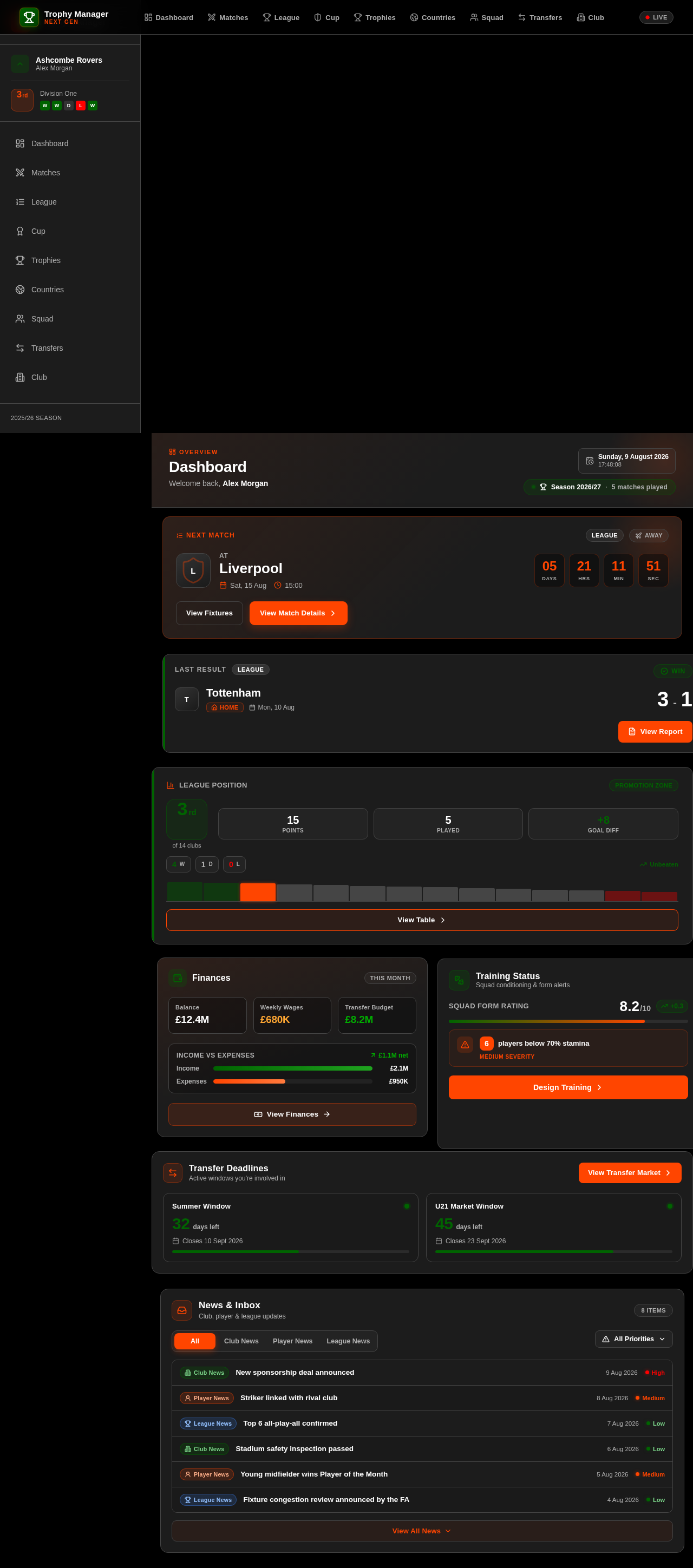
Dashboard
Welcome back, Alex Morgan
Liverpool
Finances
Training Status
Squad conditioning & form alertsTransfer Deadlines
Active windows you're involved in
News & Inbox
Club, player & league updates
Dashboard
Welcome back, Alex Morgan
Liverpool
Finances
Training Status
Squad conditioning & form alertsTransfer Deadlines
Active windows you're involved in
News & Inbox
Club, player & league updates
No comments yet. Be the first!