studysprint-students
 Cambay Vivencio III
StudySprint — A student study app MVP Product concept · Minimum Viable Product · Designed for students The biggest problem with studying isn't always a lack of motivation. It's that students often don't know what to study, how to start, or whether they've actually learned anything. Instead of building another notes app or complicated AI tutor, let's build a simple app that helps students turn overwhelming schoolwork into manageable study sessions. dribbble 1. The problem we're solving Students commonly struggle with: Procrastination: They know they need to study but keep putting it off. Overwhelming workloads: They have multiple subjects, deadlines, and exams. Ineffective studying: They reread notes but struggle to remember the material during tests. Poor planning: They don't know which subject deserves their attention first. The MVP solution StudySprint takes a student's upcoming schoolwork and turns it into a clear daily plan, then helps them study using short sessions and quick quizzes. Core promise: Open the app, know exactly what to study next, and finish one meaningful task. 2. Try the app prototype Here is an interactive MVP prototype. You can add study tasks, mark them complete, and start a focused study session. StudySprint Your study day, simplified 0/3 done DAILY PROGRESS 0% One task at a time. You've got this. Today Focus Today's tasks 3 remaining Review Biology: Cell Division Biology · 25 min Study Practice 10 Algebra Problems Math · 30 min Study Review History Notes History · 20 min Study Add a task General 25 minutes Add study task Interactive demo only — the timer does not run automatically, and tasks are not saved after the prototype resets. 3. MVP feature set The first version should focus on just four features. 1. Simple study planner Add tasks, assign a subject, and set how long each task should take. Must have 2. Focus timer Use a 25-minute focus session or choose a shorter or longer duration. Must have 3. Active-recall quizzes Answer a few questions after studying to check whether you remember the material. Must have 4. Progress tracking See completed tasks, study time, and quiz scores. Must have What NOT to build yet Avoid features that make the first version expensive and complicated: Social feeds, followers, and leaderboards. Video lessons or a full online classroom. An elaborate AI chatbot. Complex calendars and school management systems. Paid subscriptions before you've validated demand. The goal is to find out whether students actually use the planner and return to study with it. 4. How the app works Add schoolwork The student enters an assignment, exam, or topic they need to study. Choose the next task The app shows a short, manageable task instead of an overwhelming to-do list. Start a focus session The student studies without distractions for a set period. Test what they learned The student answers a few questions without looking at their notes. Track progress The app records completion and encourages the student to return tomorrow. 5. Who should use it first? Initial target market Primary users High school students Initial market Students in the Philippines Platform Mobile-first web app Business model Free initially Starting with a mobile-friendly web app lets you test the idea without paying to build separate Android and iOS applications. 6. How to validate the MVP Before investing heavily in development, test it with 20–30 students. Metric Initial target Students who complete their first task 70%+ Students who return within 7 days 30%+ Students who complete a quiz 50%+ Students who say it helped them study 70%+ These are proposed validation targets, not established industry benchmarks. Ask students three questions after a week: Did the app help you start studying when you didn't feel like it? Did it help you remember what you studied? What made you stop using it, if anything? The most important metric isn't how many people download the app. It's how many students return and use it to complete real study sessions. 7. Recommended development plan Two-week MVP roadmap 14 days Days 1–3: Validate Interview students, identify their biggest study frustrations, and test the prototype. Days 4–7: Build the core Implement accounts, study tasks, a working timer, and persistent storage. Days 8–10: Add learning tools Add short quizzes, scoring, and basic progress tracking. Days 11–14: Test and launch Let a small group use the app, fix the biggest problems, and measure retention. Final recommendation Build StudySprint around one core habit: plan → focus → recall → repeat. The prototype above demonstrates the basic interface, but a production MVP still needs persistent data, a functioning timer, and a reliable way to create quizzes. Start with those essentials rather than adding dozens of features. Your biggest competitive advantage won't be having the most features. It will be making studying feel easy enough that students actually do it. Generate a flash card review that takes pdf and general a study guide and quizzes you after reviewing the pdf upload make it into a MVP format use the same format like what you previously showed me DocFlash — MVP Product Plan PDF-to-study-guide, flashcard, and quiz generator 1. The problem we're solving Students spend hours reading PDFs, textbooks, and lecture notes but often struggle to remember the information. Creating flashcards and practice quizzes manually takes even more time. The solution: DocFlash turns one uploaded PDF into three study tools automatically: An easy-to-understand study guide. Flashcards for active recall. A quiz to test understanding after reviewing. 2. MVP feature set Feature What it does Priority PDF upload Extracts text from uploaded PDFs Must have AI study guide Summarizes key concepts, definitions, and explanations Must have Flashcards Generates question-and-answer cards Must have Quiz generator Creates multiple-choice and short-answer questions Must have Results page Shows quiz score and topics to review Must have Save study sets Lets students revisit previous materials Next version Spaced repetition Schedules reviews based on recall performance Next version 3. How the app works Step 1 — Upload Upload a PDF containing class notes, textbook chapters, or lecture materials. Step 2 — Generate a study guide Extract the important concepts and explain them in clear, organized language. Step 3 — Review flashcards Answer questions, reveal explanations, and mark concepts you find difficult. Step 4 — Take a quiz Answer questions generated from the PDF and receive a score with explanations. 4. Interactive app demo The image above illustrates the proposed interface. The following is a separate interactive demonstration of the flashcard and quiz experience using sample biology content. DocFlash Sample content Biology — Photosynthesis Demo study set · Not extracted from an uploaded PDF Flashcards Quiz Card 1 of 3 33% reviewed QUESTION What is the main function of chlorophyll? Reveal answer Previous Next card Demo only. PDF processing, AI generation, and saved study history are not connected in this prototype. 5. Recommended technology for the MVP Component Suggested technology Frontend Next.js or React Mobile-friendly design Responsive web app PDF text extraction PDF.js or a server-side PDF parser Study guide and quiz generation An AI API with structured output Database and login Supabase File storage Private cloud storage Deployment Vercel or a similar hosting service A critical requirement: generated questions and answers should be grounded in the uploaded document, and the app should indicate when the PDF doesn't contain enough information to answer a question. 6. Two-week development roadmap Days 1–3: Upload and extract Accept PDFs, extract text, handle scanned PDFs with OCR if needed, and show processing errors. Days 4–6: Study guide Generate summaries, key terms, definitions, and topic sections. Days 7–9: Flashcards and quizzes Generate question-answer pairs and multiple-choice quizzes with explanations. Days 10–12: Results and storage Save study sets, track quiz results, and identify weak topics. Days 13–14: Student testing Test with 20–30 students, fix confusing features, and measure whether students finish their study sessions. 7. How to know if it works Metric Initial target Students who successfully upload a PDF 70%+ Students who review generated flashcards 60%+ Students who finish a quiz 50%+ Students who return within 7 days 30%+ Students who find the study guide useful 70%+ These are proposed validation targets, not proven benchmarks. Final recommendation Build the first release around this single workflow: Upload PDF → Generate study guide → Review flashcards → Take quiz → See weak topics. Don't start by building a full AI tutor or an elaborate learning management system. First prove that students can upload their materials and use the generated learning tools to prepare more effectively for real exams. The next step is to turn this prototype into a working application with real PDF uploads, AI-generated study materials, and persistent student accounts


Comments (0)
Sign in to leave a comment
Project Tasks
67 planning tasksGenerate system requirement document
Generate personas & user flows
Create flow for Student
Landing
Fix Landing review findings: Preview-card text is clipped at the viewport edge on… (+2 more)
Landing / Header Bar
Landing / Upload Desk
Landing / Workflow Strip
Landing / Footer
Footer
Sign Up
Fix Sign Up review findings: frontend/src/components/Sign Up Enrollment Card.jsx: this… (+2 more)
Sign Up / Header Bar
Sign Up / Enrollment Card
Sign Up / Footer Slot
Login
Login / Header Bar
Login / Verification Card
Login / Footer
Upload
Fix Upload review findings: Q1 as reviewed now: Tablet card column is constrained to… (+2 more)
Upload / Header Bar
Upload / Study Set Rail
Upload / Desk Card
Upload / Footer
Fix Upload: Desktop layout does not follow the requested centered 1040px two-column frame with a…
Fix Upload: The page never selects a document on load, so starts as and is ; the file summary row…
Fix Upload: Sets and does the same, but nothing ever advances a document to, so the success state…
Study Guide
Fix Study Guide review findings: frontend/src/components/Study Guide Reading Card.jsx: the… (+1 more)
Study Guide / Upload Header Bar
Study Guide / Study Set Rail
Study Guide / Reading Card
Study Guide / Footer
Fix Study Guide: The guide body is hardcoded sample content ( with 'Sample content — not extracted from…
Fix Study Guide: The 'Continue to Flashcards' control hardcodes instead of carrying the currently…
Flashcards
Fix Flashcards review finding: Q2 as reviewed now…
Fix Flashcards review findings: frontend/src/components/Flashcards Card Deck.jsx: the retry… (+1 more)
Fix Flashcards: The rail's card index is hardcoded — and — instead of deriving from the collection, so…
Flashcards / Header Bar
Flashcards / Study Set Rail
Flashcards / Card Deck
Flashcards / Footer
Fix Flashcards: The retry path is dead — calls but from is and returns , so is always and the code…
Quiz
Fix Quiz review findings: frontend/src/components/Quiz Question Card.jsx: the… (+1 more)
Quiz / Header Bar
Quiz / Study Set Rail
Quiz / Question Card
Quiz / Footer
Fix Quiz: The short-answer question can never be answered. for reads , but is only written inside…
Fix Quiz: The insufficient-information question (q4) is treated as automatically answered () and…
Results page
Fix Results page review findings: frontend/src/components/Results Body Frame.jsx: the layout… (+1 more)
Results page / Results Header Slot
Results page / Results Body Frame
Results page / Results Study Set Rail
Results page / Results Score Card
Results page / Results Footer Slot
Fix Results page: The layout frame renders two empty placeholder divs ( and ) and never receives or…
Fix Results page: The quiz score, per-question outcomes and weak-topic chips are driven by a hardcoded…
Login Header Bar
Upload Header Bar
Retry Failed Pages
Architecture
Workspace task plan
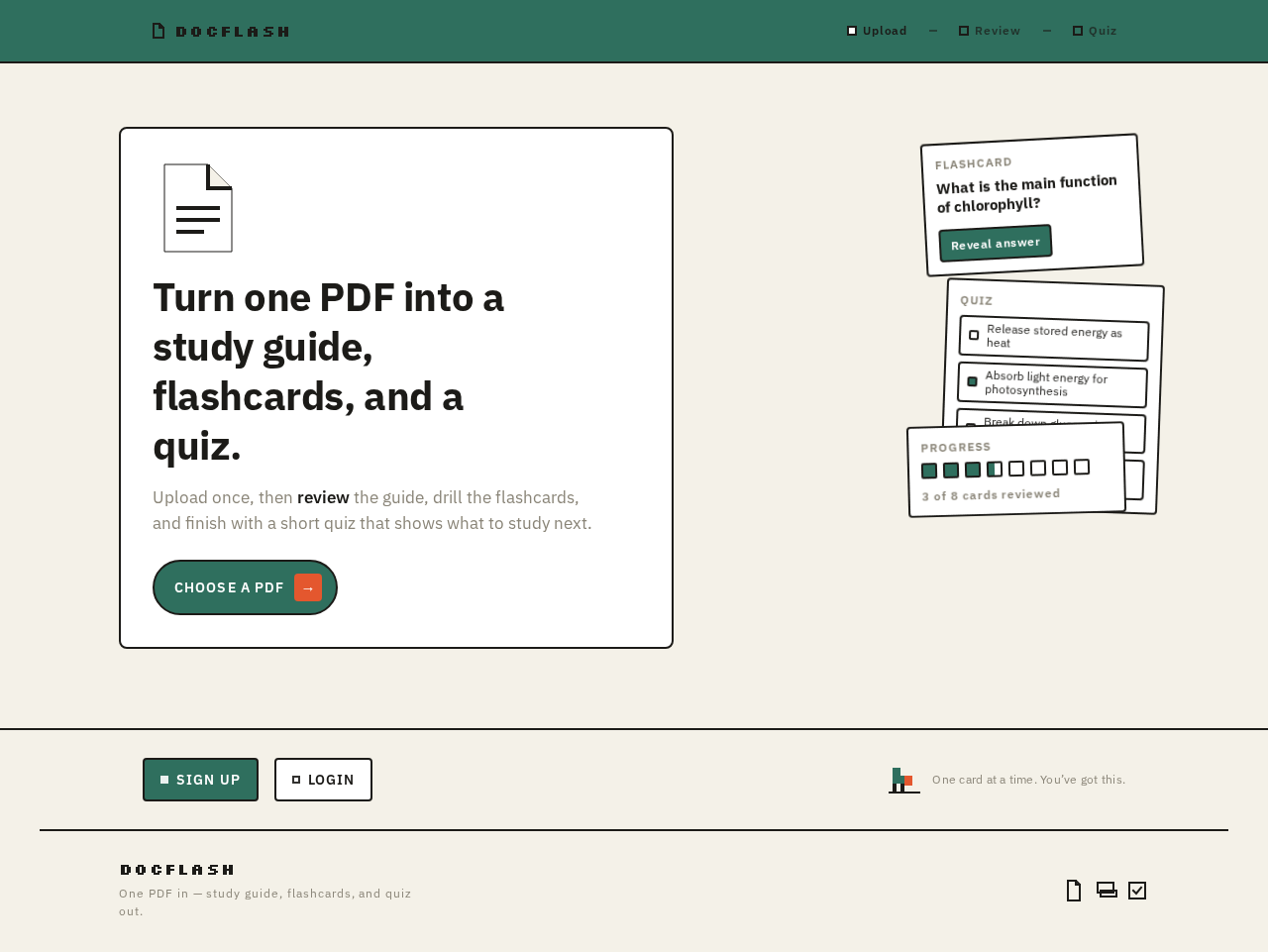
Turn one PDF into a study guide, flashcards, and a quiz.
Upload once, then review the guide, drill the flashcards, and finish with a short quiz that shows what to study next.
Choose a PDFTurn one PDF into a study guide, flashcards, and a quiz.
Upload once, then review the guide, drill the flashcards, and finish with a short quiz that shows what to study next.
Choose a PDF
No comments yet. Be the first!