studymate
 Bassey Etim
“I want you to help me create a student study-assistant website/app that reminds students when it’s time to study, creates personalized study schedules, tracks their progress, helps them research topics and understand assignments, and prepares them for upcoming exams.”

Comments (0)
Sign in to leave a comment
System Requirements
System Requirements Document for studymate
1. Introduction
The "studymate" project aims to create a student study-assistant website/app designed to help students manage their study schedules effectively. The platform will remind students when it's time to study, create personalized study schedules, track their progress, assist in researching topics, help understand assignments, and prepare them for upcoming exams. The target audience is students who require a supportive and engaging tool to enhance their study habits and academic performance.
2. System Overview
Studymate is a web-based application that provides students with a comprehensive suite of tools to manage their study routines. The platform focuses on creating a personalized and engaging experience through features such as study reminders, schedule creation, progress tracking, research assistance, assignment understanding, and exam preparation. The design is inspired by Pablo Stanley's warm and approachable style, ensuring a user-friendly interface that encourages student engagement.
2a. Product Interpretation and Delivery Boundary
Studymate will be delivered as a web application accessible to students via a browser. The application will not require differentiated permissions or role-based access controls, as it is designed for individual student use. The current scope includes all features necessary for study management, while future expansions may consider additional educational tools or integrations.
2b. Source Content Inventory
Not applicable as no content source directive was provided.
2c. Page Content and Component Coverage
Home
- Welcome Illustration: A full-width illustration of a cheerful character using the app.
- Navigation: Access to Study Schedule, Progress Tracker, Research Assistant, Assignment Helper, and Exam Prep.
- Notifications: Alerts for upcoming study sessions and deadlines.
Study Schedule
- Schedule Creation: Interface for creating and managing personalized study schedules.
- Reminders: Notifications for upcoming study sessions.
- Calendar View: Visual representation of study plans.
Progress Tracker
- Progress Overview: Dashboard displaying study progress and achievements.
- Detailed Reports: Breakdown of time spent on different subjects and tasks.
- Goal Setting: Tools for setting and tracking study goals.
Research Assistant
- Topic Search: Interface for researching study topics.
- Resource Links: Curated links to articles, papers, and other educational resources.
- Notes Section: Area for taking and organizing notes.
Assignment Helper
- Assignment Breakdown: Tools for understanding and organizing assignments.
- Task List: Checklist for assignment components and deadlines.
- Collaboration Tools: Options for sharing notes and collaborating with peers.
Exam Prep
- Exam Schedule: Calendar view of upcoming exams.
- Study Materials: Access to past papers, quizzes, and study guides.
- Practice Tests: Interactive tests to prepare for exams.
3. Functional Requirements
- As a student, I should receive reminders when it's time to study so that I can stay on track with my study schedule. (explicit)
- As a student, I should be able to create personalized study schedules to manage my study time effectively. (explicit)
- As a student, I should be able to track my study progress to understand how well I am doing and where I need to improve. (explicit)
- As a student, I should have access to research tools to help me find information on study topics. (explicit)
- As a student, I should be able to understand my assignments better through tools that break down tasks and deadlines. (explicit)
- As a student, I should be able to prepare for exams using practice tests and study materials. (explicit)
4. User Personas
- Student: The primary user of the platform, responsible for managing their study schedules, tracking progress, conducting research, understanding assignments, and preparing for exams.
5. Core User Flows
Student Flow
- Access Home Page: Student logs into the application and is greeted by a welcoming illustration.
- Create Study Schedule: Student navigates to the Study Schedule page to create or update their study plan.
- Receive Study Reminders: Notifications alert the student of upcoming study sessions.
- Track Progress: Student visits the Progress Tracker to review their study achievements and set new goals.
- Conduct Research: Student uses the Research Assistant to find resources and take notes on study topics.
- Understand Assignments: Student accesses the Assignment Helper to break down tasks and organize their workload.
- Prepare for Exams: Student uses the Exam Prep tools to review study materials and take practice tests.
6. Visuals Colors and Theme
- Muse: Pablo Stanley
- Palette:
- Background: #FFFBF0
- Surface: #FFFFFF
- Text: #2D2D2D
- Primary: #FF6F61
- Accent: #FFD700
- Muted: #B0BEC5
- Typography:
- Headings: Nunito — Bold, rounded, large size, relaxed tracking
- Body: DM Sans
- Scale: 1.333 modular, 56/42/28/18/16
- Shape Language: Big radii, pill buttons, blob and sticker shapes, cards with soft offset shadows
- Layout: Generous spacing with card-based layouts
- Imagery: Modular vector people and objects, cheerful illustrations, custom hand-drawn accents
7. Signature Design Concept
The public entry page features a large welcoming illustration of a cheerful character using the app on a sunny background. Oversized friendly typography welcomes students, with primary coral and sunny yellow as dominant colors. Pill-shaped buttons and playful hover animations enhance interactivity, while illustrative section dividers nod or wave upon scroll.
8. Interaction Model & Motion Direction
- Interaction Model: Animated
- Motion Tempo: Expressive
- Hero Dimensionality: Layered_2d
- Landing Hero Motion Brief: The hero illustration features a cheerful character interacting with the app. As users scroll, the character waves, and elements like buttons and cards exhibit springy micro-interactions. In reduced-motion settings, animations are minimized to ensure accessibility.
9. Non-Functional Requirements
- Performance: The application should load within 3 seconds on standard broadband connections to ensure a smooth user experience.
- Accessibility: The platform must comply with WCAG 2.1 AA standards to ensure accessibility for all students.
- Scalability: The system should support up to 10,000 concurrent users without performance degradation.
10. Tech Stack
- Frontend: React
- Backend: Python/FastAPI
- Database: PostgreSQL
- Containerization: Docker/docker-compose
- Deployment: Kubernetes (if required for scaling)
11. Assumptions and Constraints
- Assumption: Students have access to a device with internet connectivity.
- Constraint: The application will not include role-based access controls, as it is designed for individual use.
12. Glossary
- Study Schedule: A personalized plan outlining study sessions and topics.
- Progress Tracker: A tool for monitoring study achievements and setting goals.
- Research Assistant: A feature for finding and organizing study resources.
- Assignment Helper: Tools for breaking down and managing assignments.
- Exam Prep: Resources and tools for preparing for exams.
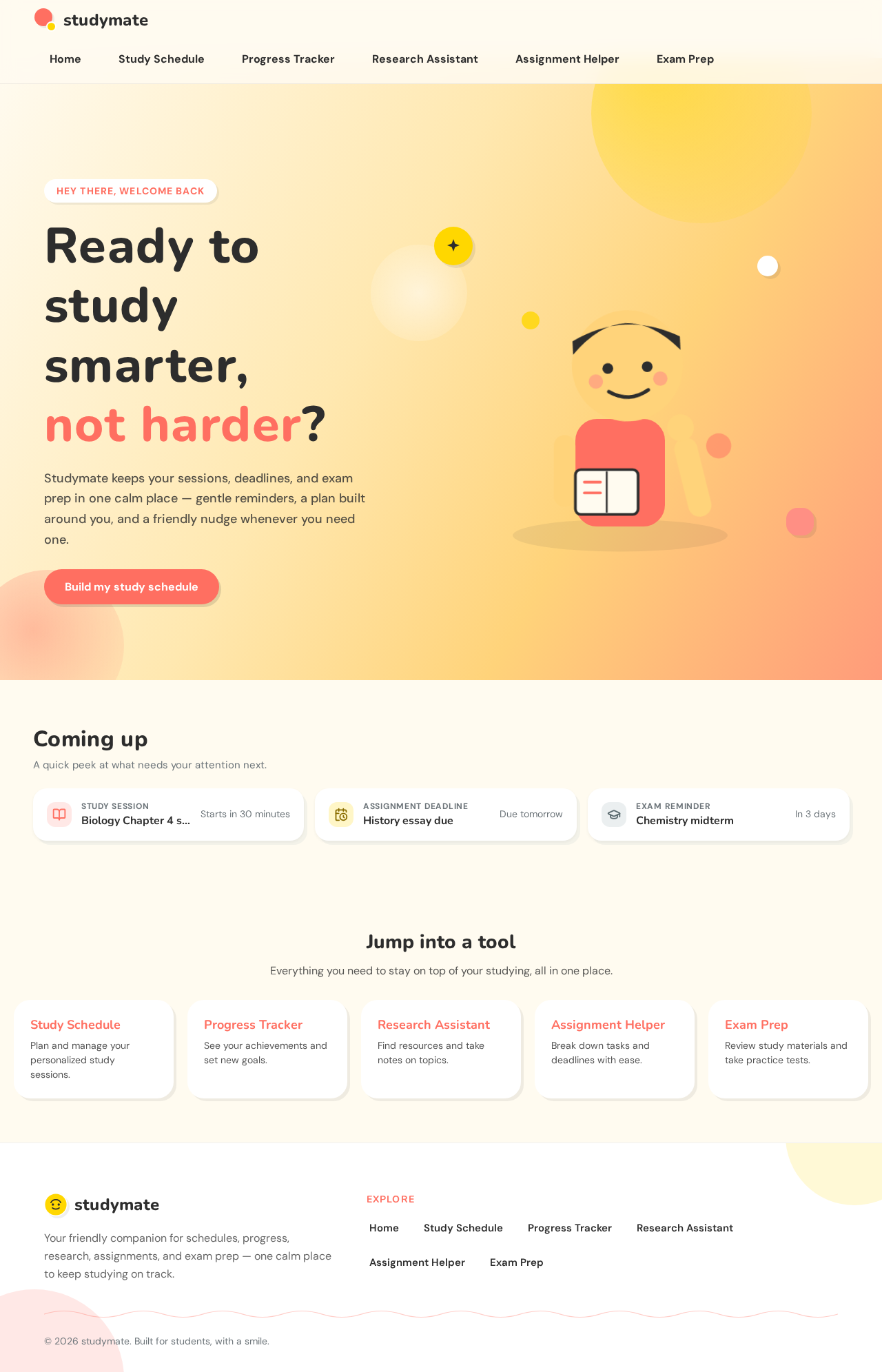
Ready to study smarter, not harder?
Studymate keeps your sessions, deadlines, and exam prep in one calm place — gentle reminders, a plan built around you, and a friendly nudge whenever you need one.
Coming up
A quick peek at what needs your attention next.
- Study sessionBiology Chapter 4 study sessionStarts in 30 minutes
- Assignment deadlineHistory essay dueDue tomorrow
- Exam reminderChemistry midtermIn 3 days
Ready to study smarter, not harder?
Studymate keeps your sessions, deadlines, and exam prep in one calm place — gentle reminders, a plan built around you, and a friendly nudge whenever you need one.
Coming up
A quick peek at what needs your attention next.
- Study sessionBiology Chapter 4 study sessionStarts in 30 minutes
- Assignment deadlineHistory essay dueDue tomorrow
- Exam reminderChemistry midtermIn 3 days
No comments yet. Be the first!