strong-start
 Diya Trivedi
start a project to build a simple single page of calculator

Comments (0)
Sign in to leave a comment
System Requirements
System Requirements Document for strong-start
1. Introduction
strong-start is a simple, single-page calculator. It exists for one job: an anonymous visitor opens the page, enters numbers and arithmetic operations, and reads the computed result. There is no account, no marketing funnel, no second page, and no navigation beyond the calculator itself.
The product intent is deliberately narrow. The authoritative requirement is to "build a simple single page of calculator," and the accepted behavior is that the calculator page lets a user enter numbers and arithmetic operations and see the computed result. Everything in this document serves that single page and that single job.
The audience is the everyday, anonymous calculator user — someone who needs a quick, correct arithmetic answer and nothing more. The visual and tonal register (see Sections 6–8) treats this plain utility as a designed industrial object, but the design never adds a feature, a page, or a flow.
2. System Overview
strong-start is delivered as a single custom web page — the Calculator — that is publicly reachable with no identity, no sign-in, and no account. The page both introduces the calculator and hosts the working calculator: a numeric readout, digit keys, arithmetic operator keys, an equals key, and a clear key.
Actors.
- Calculator User (human, active) — the sole human actor. Opens the page, enters numbers and operations, and reads the computed result.
- Calculator Engine (system, non-persona) — the in-page arithmetic logic that evaluates the entered expression and produces the result shown in the readout.
Accepted behavior. Number entry, arithmetic operation entry (add, subtract, multiply, divide), computation of the result, display of the result, and clearing the current entry/expression. These are the only product capabilities.
Ownership. All accepted behavior is owned by the single first-party Calculator page. There is no backend service, no persistence, no provider surface, and no external destination in the current scope.
Narrow exclusions. No second page, no navigation bar, no sign-up or account flow, no history, no memory keys, no scientific functions, and no persistence of calculations. These are excluded because the source limits the product to a simple single page of calculator.
2a. Product Interpretation and Delivery Boundary
strong-start is a public, anonymous, single-page utility. The visitor lands directly on the Calculator page and can immediately use it — there is no gate, no onboarding, and no identity establishment, because the accepted product has no account concept and no durable actor-specific state to protect. The calculator's working state (the current entry and expression) lives only for the session on the page and is not persisted.
The current delivery horizon is exactly one page with the calculator behavior described above. Nothing beyond that page is current. There is no future-horizon feature set accepted in the source; the "simple single page" constraint is a hard, current boundary, and any richer calculator capability (history, memory, scientific functions, accounts) is explicitly out of scope rather than deferred.
2b. Source Content Inventory
Not applicable. No reference directive in the supplied material declares a content_source, so no source content inventory is produced.
2c. Page Content and Component Coverage
The reconciled page inventory is exactly one page, matching the versioned page contract and the exact page-count constraint of one.
Calculator
The single public entry surface and the working calculator. It introduces the calculator to an anonymous visitor and lets the Calculator User enter numbers and operations and read the computed result.
- Information and state
- The current numeric entry / expression being built.
- The computed result after an equals operation.
- The active operator state (which arithmetic operator is currently selected), surfaced visually via the accent color.
- An error state when an operation cannot be computed (for example, division by zero).
- Primary actions
- Enter digits (0–9) and a decimal point.
- Select an arithmetic operator: add, subtract, multiply, divide.
- Press equals to compute and display the result.
- Press clear to reset the current entry/expression.
- Supporting actions
- Continue a calculation from a displayed result by entering a new operator or number.
- Domain entities
- Entry — the sequence of digits and operators currently being composed.
- Operator — one of add, subtract, multiply, divide.
- Result — the numeric output of evaluating the entry.
- Component responsibilities
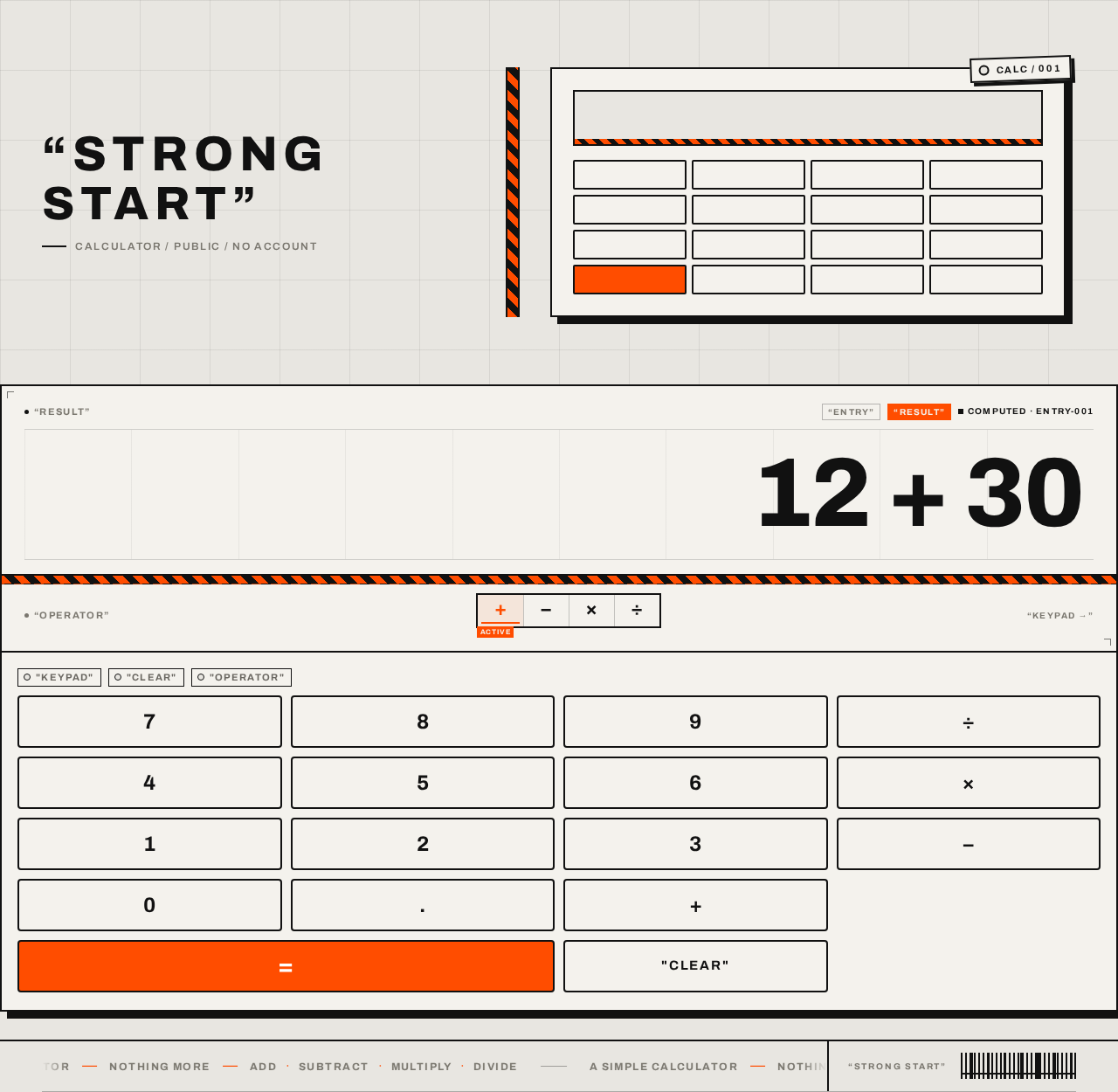
- Readout — displays the current entry or result, right-aligned, oversized, tabular numerals; labeled "RESULT".
- Keypad — a grid of digit keys, operator keys, the equals key, and the clear key; each key at least 56px tall at 375px in a 4-column grid.
- Operator state indicator — highlights the active operator using the safety-orange accent.
- Equals key — the only solid safety-orange element; triggers computation.
- Clear key — resets the entry/expression.
- Wordmark and label graphics — the quoted "STRONG START" wordmark, hazard-stripe bands, tag motifs, and footer label ticker (presentation only; no product behavior).
- States
- Loading — not applicable; the calculator is client-side and renders immediately with an empty/zero readout.
- Empty — initial state shows a zero/empty readout awaiting input.
- Success — the readout shows the computed result after equals.
- Error — an invalid operation (e.g., division by zero) shows an error indication in the readout; the user can press clear to recover and continue.
- Recovery — clear resets state; entering a new number after an error resumes normal use.
3. Functional Requirements
Each requirement is a distinct story point with provenance, lifecycle facts, and observable acceptance.
FR-1 — Single-page calculator delivery (explicit) As a Calculator User, I should reach a single calculator page so that I can perform arithmetic without navigating elsewhere.
- Lifecycle: initiator = Calculator User; trigger = opening the page; observable result = the Calculator page renders with a working keypad and readout; access = public, anonymous, no identity; failure/recovery = not applicable (static page load); continuation = the user proceeds to enter numbers.
- Acceptance: exactly one page exists; the calculator is usable on that page with no navigation to any other page.
FR-2 — Enter numbers (explicit) As a Calculator User, I should enter numbers so that I can build the value I want to compute.
- Lifecycle: initiator = Calculator User; input = digit keys (0–9) and decimal point; observable result = the readout displays the entered digits; access = public; failure/recovery = clear resets the entry; continuation = the user selects an operator or presses equals.
- Acceptance: pressing digit keys appends digits to the readout in order.
FR-3 — Enter arithmetic operations (explicit) As a Calculator User, I should select arithmetic operations (add, subtract, multiply, divide) so that I can combine numbers.
- Lifecycle: initiator = Calculator User; input = operator keys; observable result = the selected operator is recorded and visually indicated as active; access = public; failure/recovery = selecting a different operator replaces the active operator; continuation = the user enters the next number or presses equals.
- Acceptance: each of add, subtract, multiply, and divide can be selected and is reflected in the active-operator state.
FR-4 — Compute and display the result (explicit) As a Calculator User, I should press equals to compute and see the result so that I get the arithmetic answer.
- Lifecycle: initiator = Calculator User; input = equals key; observable result = the readout shows the computed numeric result; access = public; failure/recovery = an invalid operation shows an error state recoverable via clear; continuation = the user can continue from the result or clear and start again.
- Acceptance: for a valid entry, pressing equals displays the correct arithmetic result in the readout.
FR-5 — Clear the current entry (required_inference) As a Calculator User, I should clear the current entry so that I can correct a mistake or start a new calculation.
- Lifecycle: initiator = Calculator User; input = clear key; observable result = the readout resets to its empty/zero state and the active operator is cleared; access = public; failure/recovery = not applicable; continuation = the user enters a new number.
- Acceptance: pressing clear resets the entry/expression and the readout returns to its initial state.
- Rationale: an indispensable recovery mechanic for the accepted number-entry and computation lifecycle; without it a mistaken entry could not be corrected.
FR-6 — Handle invalid operations (required_inference) As a Calculator User, I should see an error indication when an operation cannot be computed (such as division by zero) so that I understand the result is not a valid number.
- Lifecycle: initiator = Calculator User; trigger = pressing equals on an invalid expression; observable result = the readout shows an error indication; access = public; failure/recovery = clear resets the state; continuation = the user clears and continues.
- Acceptance: an invalid operation does not display a misleading numeric result and is recoverable via clear.
- Rationale: an indispensable failure/recovery mechanic for the accepted computation lifecycle.
4. User Personas
Calculator User
Product context. The Calculator User is an anonymous everyday visitor who needs a quick arithmetic answer. They arrive at the single Calculator page with no account, no prior setup, and no expectation of anything beyond a working calculator. The product's whole surface is this one page.
Primary goal. Enter numbers and arithmetic operations and read a correct computed result — quickly, on the page, without navigating anywhere.
Distinct accepted responsibilities.
- Enter numbers using the digit keys.
- Select an arithmetic operator (add, subtract, multiply, divide).
- Press equals to compute and read the result.
- Clear the current entry to correct a mistake or start over.
- Recognize and recover from an invalid operation.
Relevant inputs and decisions. Which digits to enter, which operator to apply, when to press equals, and when to clear. These are the only decisions the role makes.
Interactions with other participants. The Calculator User interacts only with the in-page Calculator Engine (system), which evaluates the entered expression and returns the result to the readout. There are no other human participants.
Observable success. The readout shows the correct arithmetic result after equals; the user can continue from that result or clear and start a new calculation. Success requires no account and no navigation.
What makes this role distinct. It is the sole human actor and its entire work is confined to one page and one job — arithmetic entry and result reading. There is no administrative, authoring, or multi-participant dimension.
5. Core User Flows
Flow A — Compute a basic arithmetic result
- The Calculator User opens the Calculator page (public, anonymous). The page renders with the readout in its initial empty/zero state and the keypad ready.
- The user presses digit keys to enter the first number. The readout displays the entered digits (FR-2).
- The user presses an arithmetic operator key (add, subtract, multiply, or divide). The selected operator is recorded and shown as the active operator via the accent color (FR-3).
- The user presses digit keys to enter the second number. The readout displays the entered digits.
- The user presses the equals key. The Calculator Engine evaluates the expression and the readout displays the computed result (FR-4).
- Continuation: the user may enter a new operator or number to continue from the result, or press clear to start a new calculation.
Flow B — Correct a mistake with clear
- The Calculator User is on the Calculator page and has entered a number or expression.
- The user recognizes an incorrect entry.
- The user presses the clear key. The readout resets to its initial state and the active operator is cleared (FR-5).
- The user re-enters the intended numbers and operations and continues as in Flow A.
Flow C — Recover from an invalid operation
- The Calculator User has entered an expression that cannot be computed (for example, division by zero).
- The user presses the equals key. The readout shows an error indication rather than a misleading numeric result (FR-6).
- The user presses the clear key to reset the state (FR-5).
- The user enters a valid expression and continues as in Flow A.
6. Visuals Colors and Theme
The creative direction is authoritative for this section. The muse is Virgil Abloh; the headline concept is "Remixed arithmetic — a calculator wearing its own label." The register is confident and a little wry — utility with streetwear swagger, not a SaaS landing page.
Color tokens (light mode)
- Background (concrete ground):
#E8E6E1 - Surface (calculator body, off-white paper):
#F4F2ED - Text / ink (all type, keys, hairline borders):
#111111 - Primary (ink black):
#111111 - Accent (safety orange — equals key, tape stripe, quoted labels, active-operator state):
#FF4D00 - Muted (secondary labels, metadata):
#7A776F - No blue anywhere. The accent is used on roughly 8% of the surface.
Typography
- Headings: Archivo — all-caps, wide
0.12emletterspacing, 700–800 weight, wrapped in literal quotation marks ("STRONG START", "RESULT"). - Display readout: Archivo Expanded at heavy weight, tabular numerals, right-aligned, oversized.
- Small labels: 11–12px caps in muted grey, like a garment tag.
- Body: Archivo.
- Type scale: 1.25 modular with a display jump — readout
clamp(48px, 9vw, 112px); wordmarkclamp(28px, 5vw, 56px); key labels 20–24px; tag/label 11–12px; body 15–16px.
Shape language
- Hard industrial geometry: 2px black borders; 0 radius on the calculator body; 4px radius on keys maximum.
- Hairline rules everywhere as exposed grid lines.
- Hazard-stripe bands (45° orange/black) as section dividers and as a thin tape running under the readout.
- Tag motifs — small rectangles with a punched-hole dot — hanging off the calculator corner.
Layout
- Single page, asymmetric: a full-height left column holding the oversized quoted wordmark and a vertical hazard stripe; the calculator as a physical object on the right, sitting on the concrete ground with a hard offset shadow (no blur).
- At 768px the wordmark stacks above the calculator; at 375px everything is one column with the calculator full-width and keys in a 4-column grid, each key at least 56px tall.
- Exposed grid lines run behind the calculator to the page edges.
Imagery. No photography. The imagery is the interface itself plus industrial graphics: hazard stripes, punched tag shapes, exposed grid lines, a barcode-like block near the footer, and the calculator rendered as a drawn object with a hard shadow. Typography and label graphics are the art.
Readability constraint. All readable text and controls stay whole and inside the viewport and their container at 375px, 768px, and 1280px, wrapping or scaling (e.g., clamp(...)) to fit; no element covers any part of them. Decoration may bleed, crop, or overlap freely as long as it covers no readable text or control.
7. Signature Design Concept
The public entry — the Calculator page — is a single industrial object composition on a full-bleed concrete-grey ground (#E8E6E1).
- An oversized quoted wordmark "STRONG START" set in heavy expanded Archivo caps, stacked in two lines and bleeding to the left viewport edge.
- A 12px vertical safety-orange hazard stripe running the full height between the wordmark and the calculator.
- The calculator itself is the dominant element: off-white body (
#F4F2ED), black hairline grid, one solid orange equals key (#FF4D00), floating with a hard 8px black offset shadow. - A punched paper tag hangs from the calculator's top-right corner reading "CALC / 001".
- Every section and control label sits in literal quotation marks as an Off-White-style tag ("RESULT", "OPERATOR", "CLEAR").
- A 45° orange/black hazard-stripe band divides the readout from the keypad.
- A slow label ticker across the footer reads "A SIMPLE CALCULATOR — NOTHING MORE — ADD · SUBTRACT · MULTIPLY · DIVIDE", pausing on hover and wrapping statically under reduced motion.
No centred headline, no gradient, no button-blue. The concept recomposes only accepted content, states, and controls — it adds no behavior, page, or destination.
8. Interaction Model & Motion Direction
Interaction Model: Animated Motion Tempo: expressive Hero Dimensionality: flat
Landing Hero Motion Brief
- Focal subject: the calculator as a physical tagged object on the concrete ground, with the oversized quoted "STRONG START" wordmark to its left and the vertical hazard stripe between them.
- Input → transformation → outcome thesis: a key press depresses the key 2px with a 90ms linear snap; the readout digits flip in with a 120ms frame-step; on equals the tape stripe sweeps once across the readout in 240ms — the outcome is the computed result displayed in the readout. Only accepted calculator behavior is animated.
- Motion vocabulary: snappy, mechanical, linear — no easing theatrics or bounce. Key hover inverts to black with white label. The footer label ticker scrolls slowly, pausing on hover.
- Composed first frame: concrete-grey ground, the quoted wordmark bleeding off the left edge, the vertical orange hazard stripe, and the calculator with its hard offset shadow and "CALC / 001" tag — all static and fully readable before any interaction.
- Reduced-motion state: the ticker wraps statically (or becomes horizontally scrollable so each item can be brought fully into view); key-press and readout transitions resolve instantly; the equals tape sweep is omitted. All content remains readable and every control remains usable.
9. Non-Functional Requirements
- Single-page constraint (explicit): The product is limited to exactly one page. No second page, navigation bar, or sign-up flow may exist. Rationale: the authoritative requirement is "build a simple single page of calculator."
- Anonymous access (explicit / required_inference): The Calculator page is publicly reachable with no identity, sign-in, or account. Rationale: the accepted product has no account concept and no durable actor-specific state to protect.
- Client-side immediacy (required_inference): The calculator renders and responds immediately with no server round-trip required for computation. Rationale: a simple single-page calculator's computation is local and instantaneous.
- Responsive readability (explicit, from creative direction): Readable text and controls stay whole and inside the viewport and their container at 375px, 768px, and 1280px; keys are at least 56px tall at 375px in a 4-column grid.
- Reduced-motion support (explicit, from creative direction): Under
prefers-reduced-motion, the ticker wraps or scrolls statically and decorative motion is suppressed while all content remains readable and usable. - No blue/indigo (explicit, from creative direction): No blue or indigo accents of any kind appear in the interface.
10. Tech Stack
- Frontend: React (single-page application) rendering the Calculator page.
- Styling: CSS with the Archivo / Archivo Expanded typefaces and the token palette defined in Section 6.
- Computation: client-side arithmetic logic in the frontend; no backend service is required for the accepted behavior.
- Storage: none — no persistence of calculations or user state.
- Deployment: static hosting of the single-page frontend. No Docker, database, or Kubernetes is required for the current scope.
(These are the minimal items needed for the accepted single-page calculator; no source-specified technology overrides them.)
11. Assumptions and Constraints
Constraints (binding)
- The product is exactly one page ("build a simple single page of calculator").
- The page lets a user enter numbers and arithmetic operations and see the computed result.
- No second page, navigation bar, or sign-up flow.
- No blue or indigo accents; no photography or 3D renders; graphics stay flat and industrial.
Assumptions (narrow, labeled)
- Assumption: The calculator supports the four basic arithmetic operations (add, subtract, multiply, divide) plus digit entry, decimal point, equals, and clear — the minimal set implied by "enter numbers and arithmetic operations and see the computed result."
- Assumption: Calculation state is session-only and not persisted, since no persistence is requested and the product is a simple single page.
- Assumption: The page is publicly accessible without identity, since no account concept is present in the source.
- Assumption: The clear key and invalid-operation error handling are indispensable recovery mechanics inferred to make the accepted entry-and-compute lifecycle usable (FR-5, FR-6).
12. Glossary
- Calculator — the single page that hosts the calculator and is the product's entire surface.
- Calculator User — the sole human actor; an anonymous visitor who enters numbers and operations and reads results.
- Calculator Engine — the in-page arithmetic logic that evaluates the entered expression and produces the result.
- Entry — the sequence of digits and operators currently being composed on the page.
- Operator — one of add, subtract, multiply, or divide.
- Result — the numeric output of evaluating the entry, shown in the readout after equals.
- Readout — the oversized, right-aligned display of the current entry or result, labeled "RESULT".
- Keypad — the grid of digit, operator, equals, and clear keys.
- Clear — the action that resets the current entry/expression and active operator.
- Hazard stripe — the 45° orange/black industrial band used as a divider and vertical tape.
- Tag motif — a small punched-hole rectangle label (e.g., "CALC / 001") used as industrial decoration.
“STRONGSTART”
12 + 30
“STRONGSTART”
12 + 30
No comments yet. Be the first!