storm-learning
 Xohaiv YT
E LEARMIMG MANAGEMENT SYSTEM

Comments (0)
Sign in to leave a comment
System Requirements
System Requirements Document (SRD) for Storm-Learning
1. Introduction
The Storm-Learning project is an innovative e-learning management system designed to provide a seamless and engaging online education experience. Developed with a focus on accessibility, scalability, and user-centric design, this platform aims to cater to diverse audiences, including students, professionals, and educational institutions in India and beyond.
This document outlines the system requirements for the Storm-Learning platform, ensuring alignment with the project's goals and user expectations.
2. System Overview
Storm-Learning is a comprehensive e-learning platform that enables users to create, manage, and participate in online courses. The system will support features such as course creation, user progress tracking, live sessions, and interactive learning tools. Designed for scalability, the platform will cater to a wide range of users, from individual learners to large educational institutions.
Key objectives:
- Provide an intuitive interface for course creation and management.
- Enable real-time progress tracking and analytics for learners and educators.
- Support live sessions and interactive learning experiences.
- Ensure compatibility with mobile and desktop devices for maximum accessibility.
3. Functional Requirements
As User:
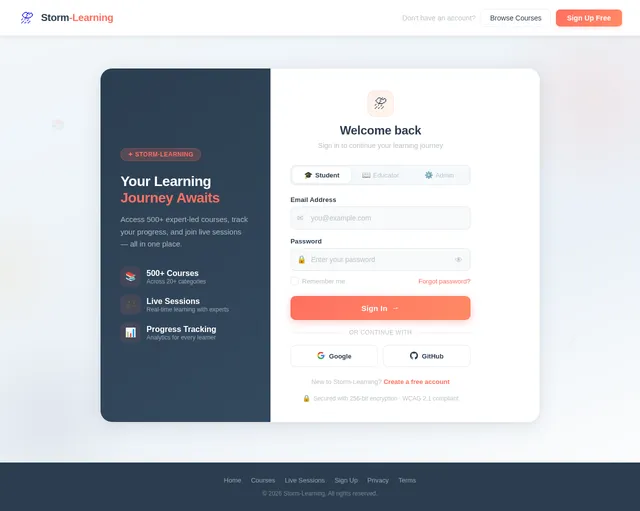
- I should be able to register and log in to the platform.
- I should be able to browse and enroll in courses.
- I should be able to track my progress in enrolled courses.
- I should be able to participate in live sessions.
- I should be able to download course materials.
As Admin:
- I should be able to create and manage courses.
- I should be able to monitor user activity and progress.
- I should be able to manage live session schedules.
- I should be able to generate reports on platform usage.
As Guest:
- I should be able to browse available courses.
- I should be able to view limited course previews.
4. User Personas
1. Student
- Primary user of the platform.
- Interested in enrolling in courses, tracking progress, and participating in live sessions.
2. Educator
- Responsible for creating and managing courses.
- Tracks student progress and conducts live sessions.
3. Admin
- Oversees platform operations.
- Manages user accounts, courses, and analytics.
4. Guest
- Unregistered user exploring the platform.
- Can view course previews but cannot enroll or participate.
5. Visuals Colors and Theme
Unique Color Palette for Storm-Learning:
- Background: #F3F7FA (Soft Sky Blue)
- Surface: #FFFFFF (Pure White)
- Text: #2C3E50 (Deep Navy Blue)
- Accent: #FF6F61 (Vivid Coral)
- Muted: #BDC3C7 (Light Gray)
This palette reflects a professional yet approachable aesthetic, ideal for an educational platform.
6. Signature Design Concept
The Storm-Learning homepage will feature an interactive "learning storm" animation.
Concept Details:
- Visuals: A swirling storm of knowledge icons (books, lightbulbs, graduation caps) that dynamically respond to user interactions. As the user moves their cursor, the storm shifts and reveals key sections of the platform (e.g., "Courses," "Live Sessions," "Progress Tracking").
- Transitions: Smooth animations with subtle color shifts as users hover over elements.
- Micro-interactions: Clicking on an icon zooms into a specific feature, such as course categories or live session schedules.
- Mood: A sense of energy and discovery, emphasizing the transformative power of learning.
This bold and memorable design will make the platform instantly captivating and encourage exploration.
7. Non-Functional Requirements
- Performance: The platform must handle up to 10,000 concurrent users without performance degradation.
- Scalability: The system should support future expansion to accommodate additional features and user growth.
- Security: Implement robust authentication and encryption mechanisms to protect user data.
- Localization: Support for multiple languages, starting with English and Hindi.
- Accessibility: Ensure compliance with WCAG 2.1 standards for accessibility.
8. Tech Stack
Frontend:
- React for Web
- React Native for Mobile App
Backend:
- Python
- FastAPI
Database:
- MySQL (with Alembic for migrations)
AI Models:
- GPT 5.4 for user-friendly responses
- Claude 4.6 Opas for academic or coding work
- Gemini 3.1 Pro for friendly responses
- Google Nano Banana for image generation
AI Tools:
- Litellm for LLM Routing
- Langchain
Orchestration:
- Docker and docker-compose for local development
- Kubernetes for server-side orchestration
9. Assumptions and Constraints
Assumptions:
- Users will primarily access the platform via modern web browsers or mobile devices.
- The platform will initially target users in India, with potential for global expansion.
- Internet connectivity is required for most features, including live sessions and progress tracking.
Constraints:
- Development must adhere to a strict timeline of six months.
- Budget limitations may restrict the use of certain third-party tools or services.
- Compliance with Indian data protection laws (e.g., IT Act, 2000) is mandatory.
10. Glossary
- E-learning: The use of electronic media and information technologies in education.
- WCAG: Web Content Accessibility Guidelines, a set of standards for making web content accessible.
- LLM: Large Language Model, an AI model designed for natural language processing tasks.
- Orchestration: The automated configuration, coordination, and management of computer systems and software.
End of Document

Unleash Your Learning Potential
Join thousands exploring the future of education. Interactive courses, live sessions, and progress tracking — all in one powerful platform.
Trusted by 10,000+ learners and 500+ educators worldwide
Discover the Learning Storm
Click on any element to explore how Storm-Learning transforms your educational experience with powerful, interconnected tools.
Everything You Need to Learn & Teach
Storm-Learning brings together powerful tools designed for students, educators, and institutions to create transformative learning experiences.
Course Creation
Build rich, interactive courses with multimedia content, quizzes, and structured learning paths.
Progress Tracking
Monitor your learning journey with real-time dashboards and milestone achievements.
Live Sessions
Join real-time classes and workshops with educators from around the world.
Certifications
Earn verified certificates upon course completion to showcase your expertise.
Analytics Dashboard
Gain actionable insights on learner engagement, performance, and course effectiveness.
Mobile Access
Learn anywhere on any device with a fully responsive, mobile-first experience.
Accessibility
Inclusive design with screen reader support, captions, and keyboard navigation built in.
Community
Connect with peers, join discussion forums, and collaborate on group projects.
Your Path to Knowledge in 5 Simple Steps
Getting started on Storm-Learning is quick and easy. Follow these steps and begin transforming your learning experience today.
Sign Up
Create your free account in under a minute. Just your name, email, and a password to get started on your learning journey.
Browse Courses
Explore hundreds of expert-crafted courses across categories like technology, business, design, and personal development.
Enroll
Pick the courses that match your goals. Enroll instantly with one click and access materials right away.
Learn
Engage with interactive lessons, join live sessions, track your progress in real-time, and learn at your own pace.
Succeed
Complete courses, earn certificates, and unlock new opportunities. Your achievements are recognized and shareable.
Everything You Need to Learn Smarter
Storm-Learning combines cutting-edge technology with intuitive design to deliver a comprehensive educational experience for students and educators alike.
- Real-time AnalyticsTrack learner engagement, course completion rates, and performance metrics with live dashboards.
- Interactive ContentEngage with quizzes, simulations, and multimedia-rich lessons that adapt to your pace.
- Peer CollaborationConnect with classmates through discussion forums, group projects, and study rooms.
- AI-Powered LearningReceive personalized recommendations and intelligent tutoring based on your learning patterns.
- Offline AccessDownload course materials and continue learning without an internet connection.
- Adaptive Learning PathsFollow customized curricula that evolve based on your strengths and areas for improvement.
- Mobile-First DesignSeamless experience across all devices with a responsive, touch-optimized interface.
- Secure InfrastructureEnterprise-grade encryption and data protection ensure your information stays safe.
Trusted by Thousands of Learners
Hear from students, educators, and administrators who have transformed their learning experience with Storm-Learning.
“Storm-Learning completely transformed how I approach online education. The interactive courses and real-time progress tracking kept me engaged and motivated throughout my data science certification.”
“As an educator, the course creation tools are incredibly intuitive. I built my entire curriculum in under a week, and the live session feature lets me connect with students across the country seamlessly.”
“The mobile-first design means I can learn anywhere. During my commute, at lunch breaks — the adaptive learning paths adjust perfectly to my schedule and pace.”
“The analytics dashboard gives me deep insights into student engagement. I can see exactly where learners struggle and tailor my content to address those gaps in real time.”
“I tried several e-learning platforms before finding Storm-Learning. The peer collaboration features and community forums make learning feel like a shared journey, not a solitary task.”
“Managing our institution's transition to online learning was effortless with Storm-Learning. The reporting tools and user management capabilities handle over 5,000 students without any performance issues.”
Choose Your Learning Plan
Start free and scale as you grow. Unlock the full power of Storm-Learning with a plan that fits your goals.
Free
Perfect for getting started with online learning
Free forever
What's included
- Access to 5 free courses
- Basic progress tracking
- Community forum access
- Mobile app access
- Course completion certificates
- Live session participation
- Downloadable materials
- Priority support
- AI-powered learning paths
- Analytics dashboard
Pro
Best for serious learners and educators
Billed monthly
What's included
- Unlimited course access
- Advanced progress analytics
- Live session participation
- Course completion certificates
- Downloadable course materials
- AI-powered learning paths
- Priority email support
- Offline access on mobile
- Custom study schedules
- Dedicated account manager
Enterprise
For institutions and organizations at scale
per seat
What's included
- Everything in Pro plan
- Unlimited team members
- Custom branding & white-label
- Dedicated account manager
- SSO & advanced security
- Custom course creation tools
- API access & integrations
- Real-time usage reports
- Custom study schedules
- SLA & 24/7 phone support
Frequently Asked Questions
Everything you need to know about Storm-Learning. Can't find what you're looking for? Reach out to our support team.
Ready to Transform Your Learning Journey?
Join thousands of students and educators already using Storm-Learning to create, manage, and experience courses like never before.
Empowering learners worldwide with innovative tools, live sessions, and interactive courses. Join thousands exploring the future of education.
No comments yet. Be the first!