Page 1 of 22
System Requirements Document for storage-cleaner
1. Introduction
storage-cleaner is an iOS application for a Device Owner who wants to identify storage-consuming content on their iPhone, review the items found, select items they choose to clean up, and complete cleanup to free storage space.
The current product scope is a self-service, application-owned experience with identity continuity for returning users. It supports the end-to-end storage-cleaning journey: enrollment, returning verification, device-storage permission, scan, review, selection, cleanup, and an observable cleanup result.
Page 2 of 22
2. System Overview
storage-cleaner is a custom iOS application delivered through application-owned screens. It serves one active human persona: the Device Owner.
The application enables the Device Owner to:
- Learn what the iOS storage cleaner does before beginning protected work.
- Establish an application identity during first use.
- Verify their identity when returning to resume durable scan and cleanup state.
- Grant the required iOS device-storage access permission before scanning.
- Scan the device for storage-consuming content.
- Review scan results and select content to clean.
- Remove selected content and receive a clear result showing that cleanup completed and storage was freed where applicable.
The application requires backend integration to support application-owned identity and durable scan and cleanup continuity.
Page 3 of 22
2a. Product Interpretation and Delivery Boundary
The product is an iOS storage-cleaner application, not a general device-management suite, cloud backup service, account-management product, or file-sharing product.
The application owns the Landing, Sign Up, Login, Scan, Storage Review, and Cleanup experiences. The Device Owner interacts with the app directly to initiate, review, select, and complete cleanup work.
The application must request device-storage access before performing a scan. iOS remains responsible for presenting and granting or denying the operating-system permission request. The application must respond honestly to the permission outcome and must not scan when required permission is unavailable.
Current scope is limited to scanning device storage, reviewing identified storage-consuming content, selecting items to clean, and removing the selected content. No additional storage-management capabilities, such as cloud synchronization, subscriptions, sharing, backups, recommendations beyond scan results, account administration, or multi-user collaboration, are included in the current scope.
2c. Page Content and Component Coverage
Page 4 of 22
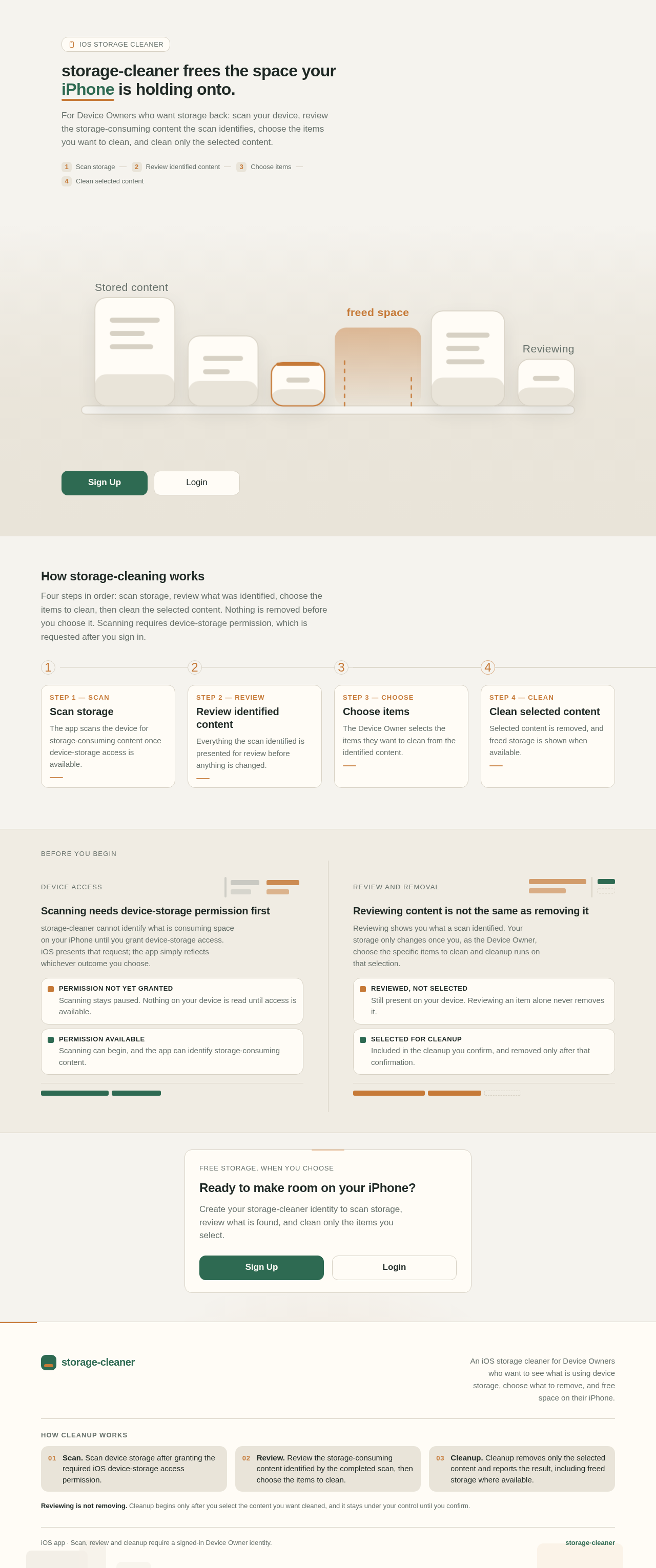
Landing
-
Access and purpose
- Available without login.
- Introduces storage-cleaner as an iOS storage cleaner for Device Owners who want to free storage space.
- Explains the core journey: scan storage, review identified content, choose items, and clean selected content.
-
Primary actions
- Start first-use enrollment by navigating to Sign Up.
- Navigate to Login for a returning Device Owner.
-
Supporting information
- Concise explanation that scanning requires device-storage permission before the app can identify storage-consuming content.
- Clear distinction between reviewing content and removing content: cleanup occurs only after the Device Owner selects content to clean.
-
Components
- Product headline and purpose statement.
- Brief workflow explanation.
- Sign Up call to action.
- Login call to action.
-
States and recovery
- The page must remain usable without identity or device-storage permission.
- If navigation to Sign Up or Login cannot complete, show an understandable error and allow the Device Owner to retry.
Page 5 of 22
Sign Up
-
Access and purpose
- Available without login.
- Allows a first-time Device Owner to establish an application identity.
-
Primary actions
- Submit the enrollment information required to create the Device Owner’s application identity.
- Continue to the protected Scan experience after successful enrollment.
-
Supporting actions
- Navigate to Login when the Device Owner already has an identity.
- Return to Landing.
-
Domain entities
- Device Owner application identity.
- Authenticated application session.
-
Components
- Enrollment form.
- Submission control.
- Login navigation link.
- Validation and enrollment-status messaging.
-
States and recovery
- Validate required enrollment inputs before submission.
- On successful enrollment, establish the authenticated state and continue to Scan.
- If enrollment fails, preserve entered information where feasible, explain that enrollment did not complete, and allow retry.
- If the submitted identity cannot be created because it is already recognized, direct the Device Owner to Login without creating a duplicate identity.
Page 6 of 22
Login
-
Access and purpose
- Available without login.
- Allows a returning Device Owner to verify their identity and resume durable scan and cleanup state.
-
Primary actions
- Submit returning-verification information.
- Continue to Scan after successful verification.
-
Supporting actions
- Navigate to Sign Up when the Device Owner does not yet have an application identity.
- Return to Landing.
-
Domain entities
- Device Owner application identity.
- Authenticated application session.
- Durable scan and cleanup state associated with the Device Owner.
-
Components
- Login form.
- Verification submission control.
- Sign Up navigation link.
- Authentication-status and error messaging.
-
States and recovery
- On successful verification, establish an authenticated state and make the Device Owner’s durable scan and cleanup state available.
- If verification fails, do not expose protected scan or cleanup state; explain that verification did not complete and allow retry.
- If service availability prevents verification, show an error and allow the Device Owner to retry later.
Page 7 of 22
Scan
-
Access and purpose
- Requires login.
- Owns the Device Owner’s storage-scan lifecycle.
-
Primary actions
- Request the required iOS device-storage access permission when permission is not available.
- Start a scan after permission is available.
- Continue to Storage Review after scan results are available.
-
Supporting actions
- Retry a failed scan.
- Recheck permission availability after denial or interruption.
-
Domain entities
- Device-storage permission state.
- Scan state.
- Identified storage-consuming content.
- Durable scan result associated with the Device Owner.
-
Components
- Permission explanation and permission-request control.
- Scan-start control.
- Scan-progress state.
- Scan completion summary.
- Error and retry state.
- Continue-to-review control.
-
States and recovery
- Permission required: Explain why access is required and present the action that invokes the iOS permission request.
- Permission granted: Enable scanning.
- Permission denied or unavailable: Do not start the scan; explain that scanning cannot continue without access and provide a path to recheck permission.
- Scanning: Show that scanning is in progress and prevent the same scan from being started repeatedly.
- Scan complete: Store and show an observable result indicating that storage-consuming content was identified, then allow continuation to Storage Review.
- Scan failure: Explain that the scan did not complete and allow the Device Owner to retry.
Page 8 of 22
Storage Review
-
Access and purpose
- Requires login.
- Owns review of the identified storage-consuming content and selection of items to clean.
-
Primary actions
- View the content identified by the completed scan.
- Select and deselect identified items for cleanup.
- Continue to Cleanup with the current selection.
-
Supporting actions
- Return to Scan when no usable scan result is available.
- Adjust the selection before cleanup begins.
-
Domain entities
- Stored scan result.
- Identified storage-consuming content.
- Cleanup selection.
-
Components
- Scan-result summary.
- Reviewable list of identified content.
- Per-item selection controls.
- Selected-item summary.
- Continue-to-cleanup control.
-
States and recovery
- Loading: Show that scan results are being retrieved.
- No scan result: Explain that review requires a completed scan and direct the Device Owner to Scan.
- Empty result: Show that no storage-consuming content was identified by the scan and provide a path back to Scan.
- Review available: Display identified content and reflect each selection change.
- No selection: Do not allow cleanup to begin until the Device Owner selects at least one item.
- Result retrieval failure: Explain that review data could not be loaded and allow retry or return to Scan.
Page 9 of 22
Cleanup
-
Access and purpose
- Requires login.
- Owns removal of the Device Owner’s selected content and presentation of the cleanup result.
-
Primary actions
- Review the current cleanup selection.
- Confirm cleanup of selected content.
- View the observable cleanup outcome.
-
Supporting actions
- Return to Storage Review to change the selection before confirmation.
- Retry cleanup when removal does not complete.
-
Domain entities
- Cleanup selection.
- Cleanup operation state.
- Cleanup result.
- Freed-storage result where available.
-
Components
- Selected-content summary.
- Cleanup confirmation control.
- Cleanup-progress state.
- Cleanup-success result.
- Cleanup-failure state with retry control.
- Return-to-review control.
-
States and recovery
- No selection: Explain that there is no selected content to clean and direct the Device Owner to Storage Review.
- Ready for confirmation: Show the selected content before cleanup is committed.
- Cleanup in progress: Show that removal is underway and prevent duplicate cleanup submissions.
- Cleanup complete: Display that selected content was removed and show the resulting freed storage when available.
- Cleanup failure: Explain that cleanup did not complete, preserve the actionable selection where possible, and allow retry or return to Storage Review.
- Continuation: After a successful cleanup, allow the Device Owner to return to Scan to identify further storage-consuming content.
Page 10 of 22
3. Functional Requirements
FR-01 — iOS Storage Cleaner Application
As a Device Owner, I should be able to use an iOS application that helps clean up device storage so that I can free storage space on my iPhone.
- Provenance: explicit.
- Access state: The application is delivered as an iOS app. Protected scan, review, and cleanup work requires login.
- Trigger/input: The Device Owner opens storage-cleaner and proceeds through the available journey.
- Observable result: The application provides an end-to-end path from storage scanning through review, selection, cleanup, and a cleanup outcome.
- Failure/recovery: When a required step cannot complete, the application must communicate the failure and provide the applicable retry or return path.
- Continuation: The Device Owner can proceed from Landing to identity establishment or login, then to Scan, Storage Review, and Cleanup.
Acceptance criteria
- The system shall be delivered as an iOS application.
- The system shall provide the Landing, Sign Up, Login, Scan, Storage Review, and Cleanup pages.
- The system shall support the current storage-cleaning journey without introducing unrelated device-management capabilities.
Page 11 of 22
FR-02 — Self-Service Enrollment
As a Device Owner, I should be able to enroll myself so that I can establish an application identity and begin protected storage-cleaning work.
- Provenance: required_inference.
- Access state: Available without login on Sign Up.
- Trigger/input: A first-time Device Owner submits the enrollment information required by the application.
- Observable result/state change: A Device Owner application identity is established and an authenticated session is created.
- Failure/recovery: If enrollment fails, the system shall explain that it did not complete and allow retry. If the identity is already recognized, the system shall direct the Device Owner to Login.
- Continuation: After successful enrollment, the Device Owner continues to Scan.
Acceptance criteria
- The system shall provide self-service enrollment without requiring invitation or administrator provisioning.
- The system shall establish an application identity only after successful enrollment.
- The system shall not expose protected Scan, Storage Review, or Cleanup content before enrollment or successful login.
- The system shall provide a route from Sign Up to Login for a returning Device Owner.
Page 12 of 22
FR-03 — Returning Verification
As a Device Owner, I should be able to verify my identity when returning so that I can resume my durable scan and cleanup state.
- Provenance: required_inference.
- Access state: Available without login on Login.
- Trigger/input: A returning Device Owner submits their verification information.
- Observable result/state change: The system verifies the Device Owner, establishes an authenticated session, and makes their durable scan and cleanup state available.
- Failure/recovery: If verification fails or cannot be completed, the system shall not reveal protected state, shall explain the failure, and shall allow retry.
- Continuation: After successful verification, the Device Owner continues to Scan.
Acceptance criteria
- The system shall provide returning verification on Login.
- The system shall associate durable scan and cleanup state with the verified Device Owner.
- The system shall provide a route from Login to Sign Up for a Device Owner who does not have an application identity.
- The system shall protect Scan, Storage Review, and Cleanup behind successful login.
Page 13 of 22
FR-04 — Device-Storage Permission
As a Device Owner, I should be able to grant device-storage access permission before scanning so that the application can scan for storage-consuming content.
- Provenance: required_inference.
- Access state: Requires login; owned by the Scan journey.
- Trigger/input: The Device Owner attempts to begin scanning when required iOS device-storage access is not available.
- Observable result/state change: The application invokes the applicable iOS permission request and reflects whether access is available.
- Failure/recovery: If permission is denied or unavailable, the system shall not scan and shall explain that access is required before scanning can continue. The Device Owner can recheck permission availability.
- Continuation: When permission is available, the Device Owner can start the storage scan.
Acceptance criteria
- The system shall require device-storage access permission before scanning.
- The system shall request permission through the applicable iOS permission mechanism.
- The system shall not initiate a scan while required permission is unavailable.
- The system shall present an understandable permission-denied or unavailable state and a recheck path.
Page 14 of 22
FR-05 — Storage Scan
As a Device Owner, I should be able to scan my device so that I can identify storage-consuming content.
- Provenance: explicit for device-storage cleanup; required_inference for the scan lifecycle.
- Access state: Requires login and available device-storage permission.
- Trigger/input: The Device Owner starts a scan on Scan.
- Observable result/state change: The system performs a scan, identifies storage-consuming content, records the scan result as durable state, and makes the result available for review.
- Failure/recovery: If scanning fails, the system shall show that the scan did not complete and allow retry.
- Continuation: After scan completion, the Device Owner proceeds to Storage Review.
Acceptance criteria
- The system shall provide a control for the Device Owner to start a scan after required permission is available.
- The system shall show a visible in-progress state while the scan is running.
- The system shall prevent duplicate starts of the same in-progress scan.
- The system shall provide an observable completed-scan result before enabling continuation to Storage Review.
- The system shall retain the scan result for the authenticated Device Owner’s subsequent review.
Page 15 of 22
FR-06 — Storage Review and Selection
As a Device Owner, I should be able to review identified storage-consuming content and select items to clean so that I control what is removed.
- Provenance: required_inference.
- Access state: Requires login and a usable completed scan result.
- Trigger/input: The Device Owner opens Storage Review and selects or deselects identified content.
- Observable result/state change: The system presents identified storage-consuming content and updates the cleanup selection to match the Device Owner’s choices.
- Failure/recovery: If no usable scan result exists, the system shall direct the Device Owner to Scan. If results cannot be retrieved, the system shall show an error and allow retry.
- Continuation: When at least one item is selected, the Device Owner continues to Cleanup.
Acceptance criteria
- The system shall display content identified by the Device Owner’s completed scan.
- The system shall allow the Device Owner to select and deselect identified items.
- The system shall display the current cleanup selection.
- The system shall not allow cleanup to begin with no selected items.
- The system shall provide a path back to Scan when review has no usable scan result.
Page 16 of 22
FR-07 — Cleanup and Storage Release
As a Device Owner, I should be able to confirm removal of my selected content so that I can clean up device storage and free storage space.
- Provenance: explicit for cleaning device storage; required_inference for confirmation, result, and recovery.
- Access state: Requires login and a non-empty cleanup selection.
- Trigger/input: The Device Owner confirms cleanup of the selected content on Cleanup.
- Observable result/state change: The system removes the selected content, records the cleanup outcome, and shows that cleanup completed. The system shows freed storage when available.
- Failure/recovery: If cleanup does not complete, the system shall clearly identify the failed state, preserve the actionable selection where possible, and allow retry or return to Storage Review.
- Continuation: Following a successful cleanup, the Device Owner can return to Scan to identify further storage-consuming content.
Acceptance criteria
- The system shall show the selected content before the Device Owner confirms cleanup.
- The system shall require an explicit cleanup confirmation before removing selected content.
- The system shall show cleanup progress while removal is in progress.
- The system shall prevent duplicate cleanup submissions while cleanup is in progress.
- The system shall display an observable cleanup-complete result.
- The system shall display freed storage when it is available from the cleanup result.
- The system shall allow the Device Owner to return to Storage Review before confirmation to change the selection.
4. User Personas
Page 17 of 22
Device Owner
- Provenance: required_inference.
- Product context: The Device Owner uses an iPhone with storage they want to free up. They use storage-cleaner directly rather than through an administrator, invitation, or shared operational role.
- Primary goal: Identify storage-consuming content, decide what should be removed, and complete cleanup to create more free device storage.
- Distinct responsibilities: Establish an application identity on first use, verify identity when returning, grant required device-storage permission, start a scan, review identified content, make the cleanup selection, confirm cleanup, and interpret the cleanup result.
- Relevant inputs and decisions: Enrollment or returning-verification information; iOS permission decision; scan initiation; selection and deselection of identified content; cleanup confirmation; retry or return decisions when a scan or cleanup does not complete.
- Interactions with other participants: The Device Owner interacts with the iOS operating system when permission is requested. No other active human participant is in current scope.
- Observable success: The Device Owner sees identified storage-consuming content, chooses items to clean, receives a completed cleanup result, and sees freed storage when available.
5. Core User Flows
Flow 1 — First-Time Enrollment and Entry to Scan
- The Device Owner opens Landing without login.
- The Device Owner reads that storage-cleaner scans for storage-consuming content, supports review and selection, and removes selected content only after cleanup is confirmed.
- The Device Owner selects the Sign Up action.
- The application opens Sign Up.
- The Device Owner enters and submits the enrollment information required to establish an application identity.
- The application validates the enrollment submission.
- If enrollment succeeds, the application establishes the Device Owner’s authenticated session.
- The application opens Scan.
- If enrollment fails, Sign Up explains that enrollment did not complete and lets the Device Owner retry.
- If the submitted identity is already recognized, Sign Up directs the Device Owner to Login.
Page 18 of 22
Flow 2 — Returning Verification and Resumption
- The returning Device Owner opens Landing without login.
- The Device Owner selects the Login action.
- The application opens Login.
- The Device Owner enters and submits returning-verification information.
- The application verifies the Device Owner’s identity.
- If verification succeeds, the application establishes an authenticated session and makes the Device Owner’s durable scan and cleanup state available.
- The application opens Scan.
- If verification fails, Login does not reveal protected state, explains that verification did not complete, and lets the Device Owner retry.
- If the Device Owner needs an identity instead, they navigate from Login to Sign Up.
Flow 3 — Grant Permission and Scan Device Storage
- The authenticated Device Owner opens Scan.
- If device-storage permission is not available, Scan explains that access is required before scanning can begin.
- The Device Owner requests device-storage permission from Scan.
- iOS presents the applicable permission request.
- The Device Owner grants or denies permission through iOS.
- If permission is granted, Scan shows that scanning is available.
- The Device Owner starts the scan.
- Scan shows an in-progress state while the application scans for storage-consuming content.
- When the scan completes, Scan shows that storage-consuming content was identified and stores the result for the Device Owner.
- The Device Owner continues to Storage Review.
- If permission is denied or unavailable, Scan does not run the scan and provides a path to recheck permission.
- If the scan fails, Scan explains that it did not complete and lets the Device Owner retry.
Page 19 of 22
Flow 4 — Review Scan Results and Select Content
- The authenticated Device Owner opens Storage Review after a completed scan.
- Storage Review retrieves and displays the Device Owner’s identified storage-consuming content.
- The Device Owner reviews the identified content.
- The Device Owner selects one or more items to clean.
- Storage Review updates the visible cleanup selection.
- The Device Owner may deselect items or adjust the selection before continuing.
- Once at least one item is selected, the Device Owner continues to Cleanup.
- If no usable scan result is available, Storage Review explains that a scan is required and directs the Device Owner to Scan.
- If no storage-consuming content is identified, Storage Review shows the empty result and provides a route to Scan.
- If scan-result retrieval fails, Storage Review explains the error and lets the Device Owner retry or return to Scan.
Flow 5 — Confirm Cleanup and View Result
- The authenticated Device Owner opens Cleanup with a non-empty cleanup selection.
- Cleanup displays the selected content that is ready to be removed.
- The Device Owner reviews the selection.
- The Device Owner either returns to Storage Review to change the selection or confirms cleanup.
- After confirmation, Cleanup shows that removal is in progress.
- The application removes the selected content.
- When cleanup completes, Cleanup displays an observable completed-cleanup result.
- Cleanup displays freed storage when it is available from the cleanup result.
- The Device Owner may return to Scan to identify further storage-consuming content.
- If cleanup fails, Cleanup explains that removal did not complete, preserves the actionable selection where possible, and lets the Device Owner retry or return to Storage Review.
Page 20 of 22
6. Visuals Colors and Theme
The visual system should communicate relief, clarity, and control rather than alarm. The interface should feel like a calm utility that makes storage pressure understandable and removable.
- Design direction: [Default — not specified by user] Calm, practical iOS utility with clear status hierarchy and focused decision-making.
- Mode: [Default — not specified by user] Light interface optimized for legibility in everyday device use.
- Primary background:
#F5F3EE — warm off-white for a less generic utility appearance.
- Primary surface:
#FFFCF6 — elevated cards, forms, scan summaries, and review groups.
- Secondary surface:
#E9E4D9 — subdued summary areas and inactive supporting containers.
- Primary text:
#1F2925 — deep charcoal green for headings and primary content.
- Secondary text:
#66706A — muted green-gray for supporting explanation and metadata.
- Primary action:
#2E6A52 — evergreen for scan, continue, and confirmation actions.
- Primary action pressed state:
#245440.
- Selection accent:
#C67A38 — warm copper for selected items, storage emphasis, and progress highlights.
- Success:
#2F7A58 — cleanup completed and freed-storage result.
- Error:
#B4463B — permission, verification, scan, and cleanup failures.
- Border:
#D7D1C4.
- Headings font: [Default — not specified by user] SF Pro Display.
- Body font: [Default — not specified by user] SF Pro Text.
- Type scale: 32 px page title, 24 px section title, 20 px card title, 17 px body text, 15 px supporting text, and 13 px labels.
- Shape language: [Default — not specified by user] Soft rounded rectangles with 14 px card radius and 12 px control radius. Avoid excessive pill-shaped containers.
- Spacing rhythm: [Default — not specified by user] 8 px base unit, with 16 px standard internal spacing, 24 px section spacing, and 32 px major page spacing.
- Imagery style: [Default — not specified by user] Abstract storage and space motifs, such as layered blocks, clearing pathways, and simplified capacity indicators. Do not imply unsupported file categories or system access.
- Status treatment: Scan, permission, selection, and cleanup states should use clear text labels in addition to color so that state remains understandable without relying on color alone.
Page 21 of 22
7. Signature Design Concept
The Clearing Shelf
The Landing page uses a composed storage metaphor: a set of stacked, softly rounded content blocks occupies a shallow shelf near the lower half of the screen. A clear opening between the blocks represents newly available space. The headline and supporting explanation sit above the composition, followed by distinct Sign Up and Login actions.
The visual treatment may recompose accepted product concepts only: storage-consuming content, selection, cleanup, and freed space. It must not represent unsupported file types, claim a specific amount of recoverable storage before scanning, or introduce a separate feature.
8. Interaction Model & Motion Direction
Interaction Model: Animated
Motion Tempo: restrained
Hero Dimensionality: layered_2d
Landing Hero Motion Brief
- Focal subject: The Clearing Shelf composition of stacked storage blocks and visible free space.
- Input → transformation → outcome thesis: The Device Owner begins with crowded storage, progresses through scan and selected cleanup, and reaches visible free space. This visually supports the accepted storage-cleaning journey without performing cleanup on the Landing page.
- Motion vocabulary: Restrained easing, brief vertical settling, subtle expansion of the open space, and a gentle emphasis on the primary action.
- Composed first frame: Storage blocks are already visible and stable, with the free-space opening apparent before any movement begins.
- Reduced-motion state: Display the same final static clearing composition with no automatic movement. All product information and calls to action remain fully available.
9. Non-Functional Requirements
Page 22 of 22
NFR-01 — iOS Platform Delivery
- Requirement: The system shall be delivered as an iOS application.
- Provenance: explicit.
- Rationale: The requested product is



No comments yet. Be the first!