stitch-personal-finance-operating-system

byVamshi Krishna

[phone] build an app which should track my all types of accounts and sink the password or hints of the password and security questions of the accounts if any to this app (just to track and manager their passwords like a vault) should track the expenses and loans and monthly emis with interest percentage and when is the apr is about to end should track the information about all the accounts(right now its all manual and user needs to edit about their current standing) and should give the clear idea about how much interest paid till date and how much we are going to pay in future and when the loan can be completely cleared off with simple calcuations) should track the salary and monthly emis its like total incoming and outgoing expenditure why because we have so many accounts or credit cards and sometimes we might forget to keep the autopayments or insufficient funds might miss the payments causing the penalties(should be avoided by this ) and savings information and should show us the accurate info by calculating expenses that will occur everymonth should show how long we can survive by the current ssvings able to enter all the information about the payments pending to others as well(example split wise) and also should give an option to invest with the savings there it self like investing options basically this app shouldn't hold any kind of investing or nothing but its should show the info about possible investment ideas since its related to financials security should be higher [phone] build an app which should track my all types of accounts and sink the password or hints of the password and security questions of the accounts if any to this app (just to track and manager their passwords like a vault) should track the expenses and loans and monthly emis with interest percentage and when is the apr is about to end should track the information about all the accounts(right now its all manual and user needs to edit about their current standing) and should give the clear idea about how much interest paid till date and how much we are going to pay in future and when the loan can be completely cleared off with simple calcuations) should track the salary and monthly emis its like total incoming and outgoing expenditure why because we have so many accounts or credit cards and sometimes we might forget to keep the autopayments or insufficient funds might miss the payments causing the penalties(should be avoided by this ) and savings information and should show us the accurate info by calculating expenses that will occur everymonth should show how long we can survive by the current ssvings able to enter all the information about the payments pending to others as well(example split wise) and also should give an option to invest with the savings there it self like investing options basically this app shouldn't hold any kind of investing or nothing but its should show the info about possible investment ideas since its related to financials security should be higher

LandingLoginSign UpDashboardLoans & EMIsIncomeLoan InsightsVaultAccountsSavingsInvestment IdeasPending Payments
Landing

Comments (0)

No comments yet. Be the first!

System Requirements

System Requirements Document for stitch-personal-finance-operating-system

Page 1 of 34

1. Introduction

stitch-personal-finance-operating-system is a private, single-owner personal finance operating system for Vamshi Krishna (US). It exists to bring every account, credential, loan, EMI, income stream, pending payment and savings figure into one calm, ruled ledger so that nothing is forgotten and no penalty is triggered by a missed autopayment or an insufficient balance.

The product intent, derived from the authoritative requirement thread, is fourfold:

  1. Track all types of accounts and sink each account's password, password hints and security questions into a vault — to track and manage them like a password vault.
  2. Track expenses, loans and monthly EMIs with interest percentage and the APR end date, and give a clear idea of how much interest has been paid to date, how much will be paid in future, and when each loan can be completely cleared off with simple calculations.
  3. Track salary and monthly EMIs as total incoming and outgoing expenditure, so that forgotten autopayments or insufficient funds never cause missed payments and penalties.
  4. Track savings and calculate the expenses that will occur every month to show how long the current savings can sustain the owner, plus record payments pending to others (for example Splitwise-style) and show possible investment ideas — while the app itself never holds or performs any investment.

All account information is entered manually today; the owner edits their current standing directly. Because the subject matter is financial, security must be higher than a typical app.

Page 2 of 34

Audience. A single careful owner who holds many accounts, credit cards, loans and EMIs, and who needs order rather than excitement: aligned label-and-value pairs, one signal colour for risk and due dates, and numbers that read at a glance.

Success Criteria and KPIs

  • Zero missed-payment surprises: every upcoming EMI, autopayment and due date is visible on the Dashboard before its date, with penalty risk flagged in the signal colour.
  • Complete account coverage: every account the owner holds has a record with current standing, and every credential the owner chooses to store has a vault entry with password, hint and security questions where applicable.
  • Loan clarity: for each loan, interest paid to date, interest remaining, APR end date and full-clearance date are all shown from simple calculations.
  • Survival accuracy: the Savings page states, in months, how long current savings last after recurring monthly expenses.
  • Investment boundary respected: investment ideas are informational only; no money is held, moved or invested by the app.
  • Security posture: credentials are protected at rest and in transit, and protected records are reachable only after identity verification.

2. System Overview

Page 3 of 34

2a. Product Interpretation and Delivery Boundary

The product is a first-party web application with application-owned identity. A visitor arrives at the public Landing page, which explains account, vault, loan and savings tracking before sign-in. From there the visitor either creates a private account on Sign Up or verifies identity on Login. Every financial record — accounts, vault entries, loans and EMIs, income, pending payments, savings and investment ideas — belongs to that one owner and is reachable only after login.

All data entry is manual, as the source states: the owner adds and edits their own current standing. There is no bank connection, no credential autofill into third-party sites, and no automated transaction import. The vault stores passwords, hints and security questions for the owner's own reference and management.

The investment boundary is hard and current: the app does not hold or perform any investment. The Investment Ideas page shows information about possible investment ideas only; it never executes, transfers, custodies or settles anything.

Security is a first-class constraint: financial data and credentials require higher protection, so protected destinations sit behind verified identity, and vault secrets are protected at rest.

Future ideas are not part of this delivery and appear only in Section 11.

Removed from scope

  • Investment execution, custody, brokerage, order placement or money movement of any kind (also: investing, invest with the savings, brokerage, trading).
  • Automated bank or credit-card connections and automatic transaction import (account data is manual).
Page 4 of 34

2b. Source Content Inventory

Not applicable — no reference directive in this request declares content_source.

2c. Page Content and Component Coverage

Landing

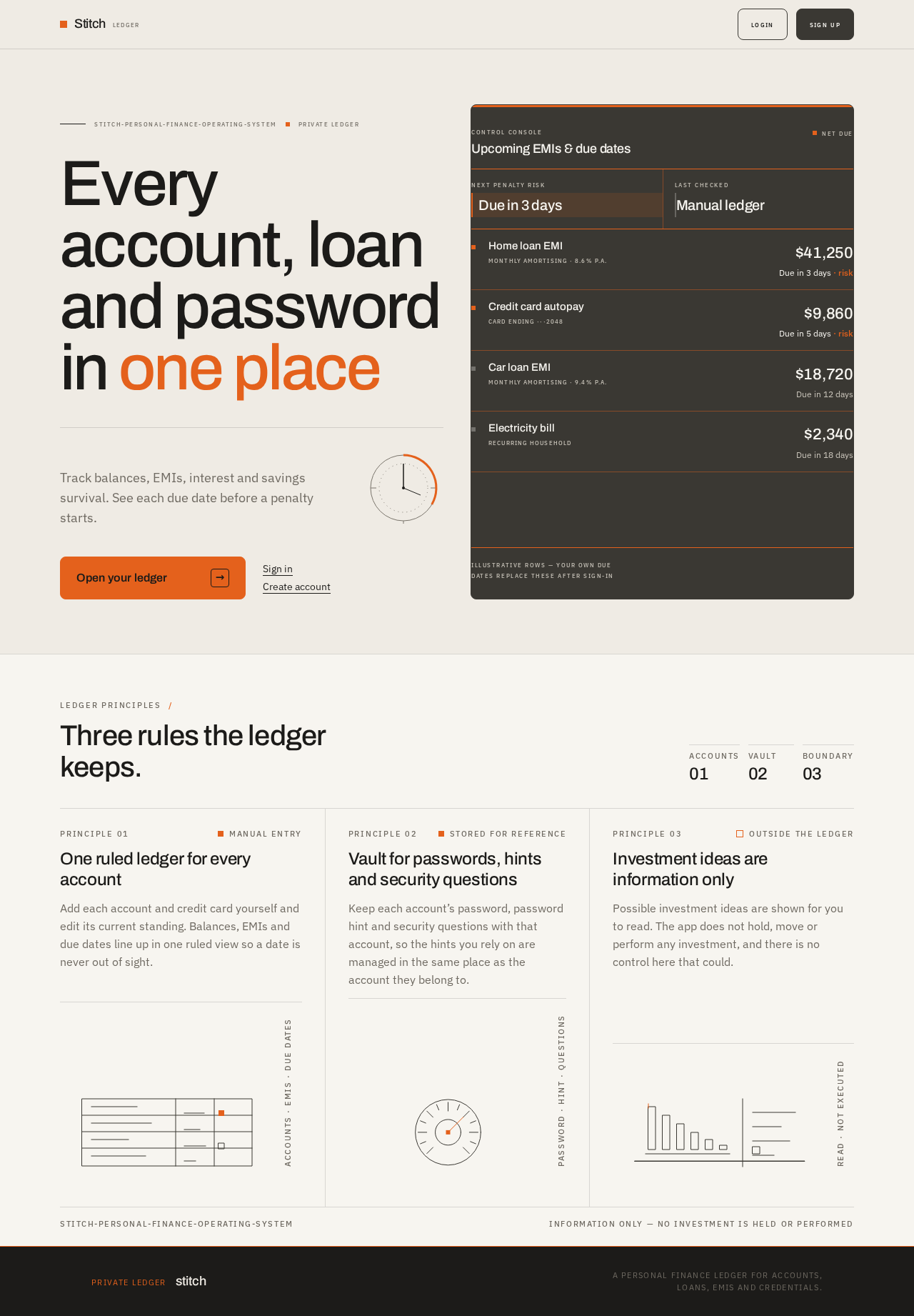
  • Information/state: public entry. Hero headline "Every account, loan and password in one place"; subline "Track balances, EMIs, interest and savings survival. See each due date before a penalty starts."; CTA "Open your ledger". A charcoal control-console panel lists upcoming EMIs and due dates with orange signal marks. Diagrammatic line art of dials and ruled tables; no photography, no stock people.
  • Primary action: "Open your ledger" → Sign Up (new owner) or Login (returning owner).
  • Supporting actions: navigate to Login; navigate to Sign Up.
  • Domain entities: none persisted; the console panel shows illustrative due-date rows only.
  • Component responsibilities: hero type block (flush-left Archivo display headline, square orange CTA), control-console panel (charcoal surface, orange rule lines, ruled due-date list), small-caps 11px labels above every number.
  • States: loading — static content, no spinner; empty — not applicable; success — CTA routes to Sign Up/Login; error — none on this page; recovery — CTA remains available at all viewports.
Page 5 of 34

Sign Up

  • Information/state: anonymous identity-establishment surface. Fields for the owner's identifying credentials to create a private account for durable financial records.
  • Primary action: create the private account and proceed to the protected application.
  • Supporting actions: switch to Login if an account already exists.
  • Domain entities: owner identity record.
  • Component responsibilities: form with aligned label/value pairs, inline validation, submit control in signal orange.
  • States: loading — submit disabled with a linear 120ms state swap; empty — blank form with labels; success — identity established, owner lands in the protected application; error — invalid or incomplete input shown inline beside the field; recovery — correct and resubmit, or switch to Login.

Login

  • Information/state: anonymous returning-verification surface for the owner who already has a private account.
  • Primary action: verify identity and enter the protected application.
  • Supporting actions: switch to Sign Up.
  • Domain entities: owner identity record.
  • Component responsibilities: credential form, inline error region, submit control.
  • States: loading — submit disabled; empty — blank form; success — protected application opens; error — incorrect credentials shown without revealing which field failed; recovery — retry or switch to Sign Up.
Page 6 of 34

Dashboard

  • Information/state: total incoming and total outgoing amounts for the month, shown as aligned label/value pairs; a ruled list of upcoming EMIs and due dates with orange signal marks; penalty-risk flags for autopayments at risk from insufficient funds; a savings-survival readout (months left as a large ruled number with a bar of orange segments).
  • Primary action: review the month's position and act on flagged due dates.
  • Supporting actions: jump to Loans & EMIs, Income, Pending Payments, Savings, Accounts.
  • Domain entities: income entries, EMI/loan schedule items, expenses, savings balance, pending payments.
  • Component responsibilities: totals module (incoming vs outgoing), due-date console (ruled rows, orange marks), penalty-risk flag module, survival readout module.
  • States: loading — ruled skeleton rows; empty — "No records yet" prompts linking to Income, Loans & EMIs and Accounts; success — totals and due dates rendered; error — module-level error with retry; recovery — retry reloads the module without losing other modules.
Page 7 of 34

Accounts

  • Information/state: list of all account types with current standing; each record editable by the owner (manual entry).
  • Primary action: add a new account record.
  • Supporting actions: edit an existing account's current standing; open the linked vault entry for that account.
  • Domain entities: account (type, name, current standing, notes).
  • Component responsibilities: account table with hairline rules, add/edit form, link to Vault.
  • States: loading — ruled skeleton; empty — prompt to add the first account; success — saved record appears in the table; error — validation message beside the field; recovery — correct and resave.

Vault

  • Information/state: per-account credentials: password, password hint, and security questions with their answers where any exist; secrets masked by default.
  • Primary action: add a vault entry for an account.
  • Supporting actions: edit password, hint or security questions; reveal a masked secret on demand; delete an entry.
  • Domain entities: vault entry (linked account, password, hint, security questions and answers).
  • Component responsibilities: masked secret fields with reveal control, hint field, repeating security-question rows, save/delete controls.
  • States: loading — masked skeleton rows; empty — prompt to add the first credential; success — entry saved and masked; error — save failure shown without exposing the secret; recovery — retry save; secrets never echoed in error text.
Page 8 of 34

Loans & EMIs

  • Information/state: loans and monthly EMIs with interest percentage, APR end date, EMI amount and due date; expenses recorded alongside.
  • Primary action: add a loan or EMI.
  • Supporting actions: edit an existing loan/EMI; record an expense; open Loan Insights for a loan.
  • Domain entities: loan (principal, interest percentage, APR end date, EMI amount, due date, tenure), expense.
  • Component responsibilities: loan table with expandable rows, add/edit form, expense entry, link to Loan Insights.
  • States: loading — ruled skeleton; empty — prompt to add the first loan or EMI; success — row appears with due date and APR end date; error — validation beside the field; recovery — correct and resave.

Loan Insights

  • Information/state: for each loan — interest paid to date, interest to pay in future, APR end date, and the date the loan can be completely cleared off, from simple calculations; rows expand into a ruled amortisation table with interest paid and interest to pay columns.
  • Primary action: select a loan to inspect its amortisation.
  • Supporting actions: expand/collapse a loan row; return to Loans & EMIs to correct inputs.
  • Domain entities: loan, amortisation schedule (derived).
  • Component responsibilities: summary tiles (interest paid, interest to pay, APR end, payoff date), expandable ruled amortisation table.
  • States: loading — ruled skeleton; empty — prompt to add a loan first; success — figures and table rendered; error — calculation unavailable message with link to correct loan inputs; recovery — fix inputs in Loans & EMIs and return.
Page 9 of 34

Income

  • Information/state: salary and other incoming amounts, with amounts and dates, feeding total incoming.
  • Primary action: add an income entry.
  • Supporting actions: edit or remove an income entry.
  • Domain entities: income entry (source, amount, date/frequency).
  • Component responsibilities: income table, add/edit form.
  • States: loading — ruled skeleton; empty — prompt to add salary; success — entry saved and totals update; error — validation beside the field; recovery — correct and resave.

Pending Payments

  • Information/state: payments pending to others (Splitwise-style), each with counterparty, amount and status.
  • Primary action: add a pending payment.
  • Supporting actions: edit a pending payment; mark it settled.
  • Domain entities: pending payment (counterparty, amount, date, status).
  • Component responsibilities: pending-payment table, add/edit form, settle control.
  • States: loading — ruled skeleton; empty — prompt to add the first pending payment; success — entry saved with status; error — validation beside the field; recovery — correct and resave.
Page 10 of 34

Savings

  • Information/state: current savings balance; calculated recurring monthly expenses; survival time in months shown as a large ruled number with a bar of orange segments.
  • Primary action: update the current savings balance.
  • Supporting actions: review the monthly-expense breakdown feeding the calculation.
  • Domain entities: savings balance, monthly expense total (derived).
  • Component responsibilities: balance input, monthly-expense breakdown, survival readout module.
  • States: loading — ruled skeleton; empty — prompt to enter savings and expenses; success — months-left figure rendered; error — calculation unavailable message; recovery — complete missing inputs and recalculate.

Investment Ideas

  • Information/state: informational list of possible investment ideas for the savings; a clear notice that the app does not hold or perform any investment.
  • Primary action: browse possible investment ideas.
  • Supporting actions: none that move money — no execution, custody or transfer controls exist on this page.
  • Domain entities: investment idea (name, description).
  • Component responsibilities: ruled idea list, non-execution notice.
  • States: loading — ruled skeleton; empty — notice that no ideas are listed yet; success — ideas rendered read-only; error — module error with retry; recovery — retry reload.
Page 11 of 34

3. Functional Requirements

FR-1 — Track all types of accounts (explicit) As the Account owner I should record every type of account I hold so that all of them live in one ledger.

  • Trigger/input: owner adds an account with its type, name and current standing on Accounts.
  • Observable result: the account appears in the Accounts table and is available to link from Vault and Dashboard.
  • Access: login required.
  • Failure/recovery: invalid or incomplete input is shown beside the field; owner corrects and resaves.
  • Continuation: owner can edit the record at any time to reflect current standing.

FR-2 — Store passwords, hints and security questions in a vault (explicit) As the Account owner I should sink each account's password, password hint and security questions into the vault so that I can track and manage them like a password vault.

  • Trigger/input: owner adds a vault entry linked to an account with password, hint and any security questions/answers on Vault.
  • Observable result: the entry is saved masked and listed under its account.
  • Access: login required; secrets masked by default with on-demand reveal.
  • Failure/recovery: save failure is reported without echoing the secret; owner retries.
  • Continuation: owner edits password, hint or security questions later.
Page 12 of 34

FR-3 — Manage account passwords in the vault (explicit) As the Account owner I should edit, reveal and delete vault entries so that credentials stay current.

  • Trigger/input: owner selects an entry and edits, reveals or deletes it on Vault.
  • Observable result: the change is persisted and reflected in the masked list.
  • Access: login required.
  • Failure/recovery: failed save or delete is reported; owner retries.
  • Continuation: owner returns to the list and continues managing other entries.

FR-4 — Track expenses, loans and monthly EMIs with interest percentage and APR end date (explicit) As the Account owner I should record expenses, loans and monthly EMIs with interest percentage and APR end date so that I know what is owed and when the APR ends.

  • Trigger/input: owner adds a loan/EMI (principal, interest percentage, APR end date, EMI amount, due date) or an expense on Loans & EMIs.
  • Observable result: the loan/EMI row shows its due date and APR end date; expenses are recorded.
  • Access: login required.
  • Failure/recovery: validation errors shown beside fields; owner corrects and resaves.
  • Continuation: owner edits records as standing changes.
Page 13 of 34

FR-5 — Track account information with manual entry and editable current standing (explicit) As the Account owner I should manually enter and edit each account's current standing so that the ledger reflects reality.

  • Trigger/input: owner edits an account record on Accounts.
  • Observable result: updated standing is saved and reflected wherever the account is shown.
  • Access: login required.
  • Failure/recovery: save error reported; owner retries.
  • Continuation: owner continues editing other accounts.

FR-6 — Show interest paid to date and interest to pay in future (explicit) As the Loan and savings planner I should see, per loan, how much interest has been paid to date and how much will be paid in future so that I understand the true cost.

  • Trigger/input: planner opens Loan Insights and selects a loan.
  • Observable result: interest paid to date and interest to pay in future are shown, with a ruled amortisation table.
  • Access: login required.
  • Failure/recovery: if inputs are insufficient, a message links back to Loans & EMIs to correct them.
  • Continuation: planner returns to Loan Insights to review updated figures.
Page 14 of 34

FR-7 — Show when each loan can be fully cleared off with simple calculations (explicit) As the Loan and savings planner I should see the payoff date for each loan so that I know when it is completely cleared.

  • Trigger/input: planner views a loan on Loan Insights.
  • Observable result: the full-clearance date is shown alongside APR end date.
  • Access: login required.
  • Failure/recovery: missing inputs produce a correction prompt rather than a wrong date.
  • Continuation: planner reviews other loans.

FR-8 — Track salary and monthly EMIs as total incoming and outgoing expenditure (explicit) As the Account owner I should record salary and other income and see total incoming versus total outgoing so that I understand my monthly position.

  • Trigger/input: owner adds income on Income; EMIs and expenses come from Loans & EMIs.
  • Observable result: Dashboard shows total incoming and total outgoing for the month.
  • Access: login required.
  • Failure/recovery: missing income or EMI data shows an empty-state prompt linking to the relevant page.
  • Continuation: owner updates entries and totals refresh.
Page 15 of 34

FR-9 — Avoid missed payments and penalties from forgotten autopayments or insufficient funds (explicit) As the Loan and savings planner I should see upcoming due dates and penalty risks flagged before they happen so that no payment is missed.

  • Trigger/input: planner opens Dashboard.
  • Observable result: upcoming EMIs and due dates are listed with orange signal marks; at-risk autopayments are flagged for insufficient funds.
  • Access: login required.
  • Failure/recovery: if data is incomplete, the flag module shows a prompt to complete records.
  • Continuation: planner acts on the flagged item and returns to the Dashboard.

FR-10 — Track savings information (explicit) As the Loan and savings planner I should record my current savings so that the survival calculation is accurate.

  • Trigger/input: planner updates the savings balance on Savings.
  • Observable result: the balance is saved and feeds the survival readout.
  • Access: login required.
  • Failure/recovery: invalid amount rejected inline; planner corrects.
  • Continuation: planner reviews the survival figure.
Page 16 of 34

FR-11 — Calculate monthly expenses and show how long current savings can last (explicit) As the Loan and savings planner I should see how many months my current savings last after recurring monthly expenses so that I know my runway.

  • Trigger/input: planner opens Savings with a balance and expense data present.
  • Observable result: months-left is shown as a large ruled number with a bar of orange segments.
  • Access: login required.
  • Failure/recovery: missing inputs produce a calculation-unavailable message with the missing items named.
  • Continuation: planner completes inputs and recalculates.

FR-12 — Enter all information about payments pending to others (explicit) As the Account owner I should record payments pending to others (Splitwise-style) so that I do not lose track of what I owe.

  • Trigger/input: owner adds a pending payment with counterparty, amount and date on Pending Payments.
  • Observable result: the entry is listed with its status; owner can mark it settled.
  • Access: login required.
  • Failure/recovery: validation errors shown inline; owner corrects.
  • Continuation: owner edits or settles entries over time.
Page 17 of 34

FR-13 — Show possible investment ideas for the savings (explicit) As the Loan and savings planner I should see possible investment ideas for my savings so that I can consider options.

  • Trigger/input: planner opens Investment Ideas.
  • Observable result: a read-only ruled list of possible investment ideas is shown.
  • Access: login required.
  • Failure/recovery: module error offers retry.
  • Continuation: planner returns to Savings or Dashboard.

FR-14 — No investment holding or execution (explicit constraint) As the Loan and savings planner I should be able to read investment ideas without the app ever holding or performing an investment, so that the boundary is clear.

  • Trigger/input: any visit to Investment Ideas.
  • Observable result: no execution, custody, transfer or order controls exist; a non-execution notice is shown.
  • Access: login required.
  • Failure/recovery: not applicable — the absence of controls is the guarantee.
  • Continuation: planner leaves the page with information only.
Page 18 of 34

FR-15 — High financial security (explicit constraint) As the Account owner I should have my financial data and credentials protected so that a breach cannot expose my money or passwords.

  • Trigger/input: any access to protected records.
  • Observable result: protected pages require verified identity; vault secrets are masked and protected at rest and in transit.
  • Access: login required for all protected pages.
  • Failure/recovery: failed verification returns to Login without exposing data.
  • Continuation: owner re-verifies and resumes.

FR-16 — Self-service enrollment before first use (required_inference) As the Account owner I should create my private account on Sign Up before first use so that my durable financial records have an owner.

  • Trigger/input: visitor submits the Sign Up form.
  • Observable result: identity is established and the protected application opens.
  • Access: anonymous entry on Sign Up.
  • Failure/recovery: invalid input shown inline; visitor corrects or switches to Login.
  • Continuation: owner begins adding accounts.
Page 19 of 34

FR-17 — Verify identity before access to protected records (required_inference) As the Account owner I should verify identity on Login before reaching protected records so that only I can see my finances.

  • Trigger/input: returning owner submits credentials on Login.
  • Observable result: protected application opens; otherwise access is denied.
  • Access: anonymous entry on Login; protected pages gated.
  • Failure/recovery: incorrect credentials shown without revealing which field failed; owner retries.
  • Continuation: owner resumes work where they left off.

4. User Personas

Page 20 of 34

Account owner

  • Product context: Holds many accounts and credit cards and needs one place to track them all, including the passwords, hints and security questions attached to each. All account information is entered manually, and the owner edits current standing directly as it changes.
  • Primary goal: Keep every account and its credentials in one secure ledger, and record salary, expenses, loans, EMIs and payments pending to others so nothing is lost.
  • Distinct accepted responsibilities: Adding and editing account records and current standing (Accounts); sinking passwords, hints and security questions into the vault and managing them (Vault); recording loans, EMIs and expenses (Loans & EMIs); recording salary and other income (Income); recording payments pending to others (Pending Payments); completing self-service enrollment (Sign Up) and verifying identity (Login).
  • Relevant inputs or decisions: Account type, name and current standing; password, hint and security-question answers; loan principal, interest percentage, APR end date, EMI amount and due date; income source and amount; counterparty, amount and status of pending payments.
  • Interactions with other accepted participants: Supplies the underlying records that the Loan and savings planner reads on Dashboard, Loan Insights and Savings. Shares the same private identity and protected data.
  • Observable success: Every account has a record and, where chosen, a vault entry; income and EMIs are recorded; pending payments are listed and can be settled; the Dashboard reflects the owner's totals.
Page 21 of 34

Loan and savings planner

  • Product context: Reviews the financial picture the owner has recorded — interest paid, future interest, APR end dates, payoff dates, monthly surplus, savings survival and possible investment ideas — to make calm, informed decisions.
  • Primary goal: Understand the true cost of loans, avoid penalties, know how long savings last, and consider investment ideas without the app ever investing.
  • Distinct accepted responsibilities: Reviewing total incoming and outgoing and penalty risks (Dashboard); inspecting interest paid, interest to pay and payoff dates (Loan Insights); updating savings and reading the survival figure (Savings); browsing possible investment ideas (Investment Ideas).
  • Relevant inputs or decisions: Which loan to inspect; whether to update the savings balance; whether an at-risk due date needs action; which investment idea to consider.
  • Interactions with other accepted participants: Depends on the Account owner's recorded accounts, loans, income and expenses; reads the same protected data under the same identity.
  • Observable success: Interest paid and future interest are clear per loan; payoff and APR end dates are visible; the Dashboard flags penalty risks before they occur; the Savings page states months of runway; investment ideas are read without any transaction.

5. Core User Flows

Page 22 of 34

Flow A — First use: enroll and open the ledger (Account owner)

  1. The visitor arrives at Landing and reads the headline, subline and the control-console panel of upcoming EMIs and due dates.
  2. The visitor selects "Open your ledger" and lands on Sign Up.
  3. The visitor enters identifying credentials and submits.
  4. On success, identity is established and the protected application opens at Dashboard with empty-state prompts.
  5. On failure, inline validation appears; the visitor corrects and resubmits, or switches to Login.
  6. The owner proceeds to Accounts to add the first account.

Flow B — Returning verification (Account owner)

  1. The owner opens Login.
  2. The owner submits credentials.
  3. On success, the protected application opens and the owner resumes work.
  4. On failure, an error appears without revealing which field failed; the owner retries or switches to Sign Up.
Page 23 of 34

Flow C — Add an account and its vault entry (Account owner)

  1. On Accounts, the owner adds an account with type, name and current standing.
  2. The record appears in the table; the owner opens its linked vault entry.
  3. On Vault, the owner enters the password, a password hint, and any security questions with answers.
  4. The entry is saved masked; the owner may reveal a secret on demand.
  5. Later, the owner edits the current standing on Accounts or updates the password/hint/questions on Vault.
  6. If a save fails, the error is shown without echoing the secret; the owner retries.

Flow D — Record a loan/EMI and an expense (Account owner)

  1. On Loans & EMIs, the owner adds a loan with principal, interest percentage, APR end date, EMI amount and due date.
  2. The row appears showing its due date and APR end date.
  3. The owner records expenses alongside.
  4. The owner edits records as standing changes; validation errors are corrected inline.

Flow E — Record income (Account owner)

  1. On Income, the owner adds salary and any other incoming amounts.
  2. Entries are saved and feed total incoming on Dashboard.
  3. The owner edits or removes entries as needed.
Page 24 of 34

Flow F — Record a payment pending to another (Account owner)

  1. On Pending Payments, the owner adds a pending payment with counterparty, amount and date.
  2. The entry is listed with its status.
  3. When paid, the owner marks it settled; the status updates.

Flow G — Review the month and act on penalty risk (Loan and savings planner)

  1. The planner opens Dashboard.
  2. The planner reads total incoming versus total outgoing, the ruled list of upcoming EMIs and due dates with orange signal marks, and any penalty-risk flags for autopayments at risk from insufficient funds.
  3. The planner acts on a flagged item — for example by reviewing the loan on Loans & EMIs or the income on Income.
  4. The planner returns to the Dashboard to confirm the flag is resolved.
  5. If data is incomplete, the flag module prompts the planner to complete records.

Flow H — Inspect loan interest and payoff (Loan and savings planner)

  1. The planner opens Loan Insights and selects a loan.
  2. The planner reads interest paid to date, interest to pay in future, APR end date and the full-clearance date.
  3. The planner expands the row into the ruled amortisation table with interest paid and interest to pay columns.
  4. If inputs are insufficient, a message links back to Loans & EMIs; the planner corrects the inputs and returns.
  5. The planner reviews other loans the same way.
Page 25 of 34

Flow I — Check savings survival (Loan and savings planner)

  1. The planner opens Savings and updates the current savings balance.
  2. The planner reviews the calculated recurring monthly expenses.
  3. The planner reads the months-left figure as a large ruled number with a bar of orange segments.
  4. If inputs are missing, the page names them; the planner completes them and recalculates.

Flow J — Browse investment ideas (Loan and savings planner)

  1. The planner opens Investment Ideas.
  2. The planner reads the read-only ruled list of possible investment ideas and the notice that the app does not hold or perform any investment.
  3. No execution, custody or transfer control is available; the planner leaves with information only.
  4. If the module errors, the planner retries.
Page 26 of 34

6. Visuals Colors and Theme

Muse and headline: Dieter Rams — Functional clarity after Dieter Rams. Calm control, not excitement; order for dense money data.

Mode: light.

Colour tokens (exact hex by role):

  • Background: #EFEBE4 (warm off-white, ~85% of screen)
  • Surface: #F7F5F0
  • Text: #1C1B19 (charcoal, carries all reading)
  • Primary: #3A3833
  • Accent: #E4611C (Braun orange — the only signal colour; marks due dates, penalties and the main action)
  • Muted: #7A756C

Typography:

  • Headings: Archivo, Medium weights, tight tracking, flush-left.
  • Body: IBM Plex Sans.
  • Labels: small caps at 11px with wide tracking, sitting above every number.
  • Scale: 1.25 modular — display 40/56/72/96; body 28/24/18/16; labels 11. Display is clamp(40px, 7vw, 96px).

Shape language: rounded-rectangle controls at 8px radius; hairline 1px rules; square data tiles. No shadows, no soft blobs.

Layout: 12-column modular grid with aligned label-and-value pairs; dense modules in ruled panels; hero splits into a type block and a control-console panel.

Page 27 of 34

Imagery: diagrammatic line art of dials and ruled tables. No stock people, no photography.

Avoid: blue or indigo accents on white grounds; gradient blobs and glass panels; soft drop shadows and hover-lift cards; rounded pill buttons with playful bounce.

Readability rule: headlines, wordmarks, labels, numbers, card text and controls stay entirely inside the viewport and their container at 375px, 768px and 1280px, wrapping or scaling to fit; nothing covers them.

Page 28 of 34

7. Signature Design Concept

The public entry is a split ledger: a left type block and a right charcoal control console.

  • Left column: a flush-left 96px Archivo headline in charcoal — "Every account, loan and password in one place" — over the warm off-white ground, with the subline "Track balances, EMIs, interest and savings survival. See each due date before a penalty starts." beneath it, and a square orange button reading "Open your ledger" under the headline.
  • Right panel: a solid charcoal console with orange rule lines holding a live ruled list of upcoming EMIs and due dates, each row carrying an orange signal mark and a small-caps 11px label above its number.
  • Signature moves carried into the product: small-caps labels above every number in aligned pairs; a savings-survival readout with months left as a large ruled number and a bar of orange segments; loan rows that expand into a ruled amortisation table with interest paid and interest to pay columns.
  • Decoration: diagrammatic line art of dials and ruled tables only; no photography.

The concept recomposes only accepted content and controls: the CTA routes to Sign Up/Login, and the console illustrates the due-date tracking the product performs.

Page 29 of 34

8. Interaction Model & Motion Direction

Interaction Model: Static Motion Tempo: restrained Hero Dimensionality: flat

Landing Hero Motion Brief

  • Focal subject: the charcoal control-console panel listing upcoming EMIs and due dates with orange signal marks.
  • Input → transformation → outcome thesis: on load, the ruled due-date rows settle into place and their numbers count once; the orange signal marks appear on the rows that carry risk. The outcome is a calm, readable ledger of what is due — the same information the product tracks after sign-in.
  • Motion vocabulary: instant mechanical feedback; numbers count once on load; state changes use a 120ms linear swap with no bounce.
  • Composed first frame: flush-left Archivo headline and square orange CTA on the left; charcoal console with orange rule lines and a ruled due-date list on the right; small-caps labels above every number.
  • Reduced-motion state: all rows and numbers appear immediately in their final positions with no counting; the console remains fully readable and the CTA remains available.
Page 30 of 34

9. Non-Functional Requirements

  • Security (explicit): financial security must be higher. Protected pages require verified identity; vault secrets are masked by default, protected at rest and in transit, and never echoed in error messages. (explicit)
  • Investment boundary (explicit): the app must not hold or perform any investment; Investment Ideas is informational only, with no execution, custody or transfer controls. (explicit)
  • Manual data integrity (explicit): account information is entered manually and the owner edits current standing; validation must prevent malformed financial records from being saved. (explicit)
  • Calculation transparency (explicit): interest paid, future interest and payoff dates are produced by simple calculations and shown with their inputs so the owner can verify them. (explicit)
  • Readability and responsiveness (direction): text and controls stay whole at 375px, 768px and 1280px; display type uses clamp(40px, 7vw, 96px). (direction)
  • Accessibility (required_inference): the single signal colour is always paired with a label or mark so risk is not conveyed by colour alone; reduced-motion users receive the static arrangement. (required_inference)
  • Durability (required_inference): financial records and vault entries persist across sessions under the owner's identity. (required_inference)
Page 31 of 34

10. Tech Stack

  • Frontend: React application UI, implementing the Rams visual system (Archivo, IBM Plex Sans, the exact palette, 8px radius, hairline rules).
  • Backend: shared FastAPI process for application APIs and domain modules (accounts, vault, loans/EMIs, income, pending payments, savings, investment ideas, identity).
  • Database: MariaDB for application-owned persistent data, including owner identity, financial records and vault entries.
  • Deployment: Docker/docker-compose with the provisioned services — backend (FastAPI), database (MariaDB), frontend (React). No additional infrastructure is required for the current workflows.
Page 32 of 34

11. Assumptions and Constraints

Assumptions

  • The product serves a single owner per private account; no shared or multi-tenant financial state is assumed. (required_inference)
  • All account, loan, income, expense, pending-payment and savings data is entered manually by the owner; no bank or card integration exists. (explicit)
  • Investment ideas are static informational content curated for the owner; the app never executes them. (explicit)
  • The owner's country is the US and amounts are recorded in the owner's currency. (source context)

Constraints

  • The app must not hold or perform any investment; it only shows information about possible investment ideas. (explicit)
  • Financial security must be higher. (explicit)
  • Account information is manual; the owner edits current standing. (explicit)

Future (not part of current delivery)

  • Automated bank or card connections and transaction import.
  • Any investment execution, custody or brokerage capability — explicitly excluded and not planned as current scope.
Page 33 of 34

12. Glossary

  • Account: Any financial account or credit card the owner holds, recorded with type, name and current standing.
  • Vault entry: The stored password, password hint and security questions/answers for an account.
  • EMI: Equated Monthly Instalment — the fixed monthly loan payment.
  • APR end date: The date on which a loan's annual percentage rate period ends.
  • Interest paid to date: Interest already incurred on a loan up to today.
  • Interest to pay in future: Interest remaining over the life of the loan.
  • Payoff date: The date on which a loan can be completely cleared off, from simple calculations.
  • Survival time: The number of months current savings last after recurring monthly expenses.
  • Pending payment: An amount owed to another person, recorded Splitwise-style with counterparty, amount and status.
  • Investment idea: Informational description of a possible investment; never executed by the app.
  • Control console: The charcoal ruled panel in the hero listing upcoming EMIs and due dates with orange signal marks.
Page 34 of 34
Live
Landing design preview

Landing: Read headline and due-date console

Sign Up: 1. Create private account

Sign Up: 2. Correct invalid input and resubmit

Login: Switch to sign in

Login: 1. Submit credentials

Login: 2. Retry after failed verification

Dashboard: Review empty-state prompts

Accounts: 1. Add first account record

Accounts: 2. Correct validation and resave

Vault: Open linked vault entry

Vault: 1. Add password, hint and security questions

Vault: 2. Retry failed save

Vault: Reveal masked secret on demand

Vault: Edit or delete vault entry

Accounts: Edit current standing

Loans & EMIs: 1. Add loan with APR end date

Loans & EMIs: 2. Record expense

Loans & EMIs: 3. Correct validation and resave

Income: Add salary entry

Income: Edit or remove income entry

Pending Payments: Add pending payment

Pending Payments: Mark payment settled

Dashboard: Confirm totals reflect records