stillroom
 Casta
CastaI am building an online study website with an 8-bit vibe where people can study together in a virtual library. the target audience is people taking STEM subjects for A level education. I am making it using next and VS code, can you help me code a library like the one in the image? I have 3 things open, pages.tsx, layout.tsx and globals.css. I have no knowledge of coding but already have a fuinctioning website made. I need you help to code and implement the library.

Comments (0)
Sign in to leave a comment
System Requirements
System Requirements Document for stillroom
1. Introduction
This System Requirements Document describes stillroom, an online study website for people taking A-level STEM subjects. Its purpose is to provide a welcoming, 8-bit virtual library where students can study together.
The requester, Casta, has an existing functioning website and wants the library implemented within it. The site is built with Next.js, and the existing project includes pages.tsx, layout.tsx, and globals.css. The implementation must fit into that project rather than replace it. The requester has no coding knowledge, so the implementation should preserve the existing site and be straightforward to use.
Success criteria
- The existing Next.js website remains intact while the library is added.
- Visitors can enter the virtual library and study together there.
- The library’s visual style is recognizably inspired by the supplied top-down pixel-art library reference.
2. System Overview
stillroom is a web experience with two current pages: Landing, the public entry point, and Library, the shared virtual study space. A-level STEM students are the intended users. The accepted product behavior is to introduce the virtual library, let visitors enter it, and provide a library environment for studying together.
The supplied reference depicts a detailed top-down library with stone flooring, wooden shelves, distinct study areas, warm lamps, and student figures. It is a visual reference, not a source of additional product features. The library should evoke its layout and pixel-art character without implying that the original image itself is available as a reusable asset.
The provisioned application infrastructure consists of a React frontend, a shared FastAPI backend, and a MariaDB database. These are implementation resources, not additional product capabilities. The site must be integrated into the requester’s existing Next.js project; the existing project files and functioning website must not be replaced.
2a. Product Interpretation and Delivery Boundary
Landing is anonymously accessible and provides the entry to Library. Library is also specified with no access requirement; no sign-in, account, or permission system is part of the accepted scope. Students enter the library and study together. The source does not specify particular study tools, subject-selection controls, chat, scheduling, or persistent study records, so these are not assumed.
The current delivery is limited to the Landing and Library pages and the shared study experience described here. The reference image informs visual treatment only. The existing React, FastAPI, and MariaDB services are retained; use of the backend or database for unspecified features is not required.
2b. Page Content and Component Coverage
Landing
- Information and state: A concise introduction to stillroom as an 8-bit virtual library for A-level STEM students. The page presents the library as a place to study together.
- Primary action: “Enter the library” navigates to Library.
- Supporting components: A timber signboard for the headline; a dominant, wide top-down pixel-art library illustration; a clearly visible terracotta entry control.
- Visual responsibilities: The illustration should suggest the reference’s stone interior, wooden shelves, reading and computer areas, warm lamps, and small student figures. Do not use unrelated photography, emoji, or a generic gradient in place of the library scene.
- States: The page should render its introduction and entry action when loaded. If the illustration asset is unavailable, recover or create a closely matching pixel-art asset rather than presenting an unrelated substitute. Navigation should lead to Library; if navigation fails, the entry action remains available for retry.
- Responsive behavior: At 375px, stack the sign, scene, and control; keep text and controls fully visible and use a labeled scrollable viewport if the scene overflows. At 768px and 1280px, expand the scene and place supporting controls beside or beneath it without obscuring important artwork.
Library
- Information and state: A virtual library environment where A-level STEM students can study together. The scene should communicate a shared study space and retain the reference-inspired top-down arrangement.
- Primary action: Enter and use the library as a shared study space. The source does not specify additional study controls or activities.
- Supporting components: A readable library scene with distinct areas suggested by shelves, reading tables, computer desks, lamps, and student figures. Keep navigation and any accepted study controls in clearly separated, high-contrast panels.
- Visual responsibilities: Use a bounded, pixel-art scene with warm stone, timber, lamp-gold, and green reading-area details. Mark a selected study area with a clear outline if area selection is presented; do not obscure the artwork with an overlay.
- States: Show the library scene when loaded. If a scene asset fails to load, recover or create a closely matching pixel-art asset. Keep the scene usable without motion when reduced motion is preferred.
- Responsive behavior: At 375px, stack navigation and controls above or below the scene and scale or scroll the scene within its labeled viewport. At 768px and 1280px, expand the scene and arrange supporting controls beside or beneath it without covering important details.
3. Functional Requirements
-
As an A-level STEM student, I should be able to understand what stillroom offers from the Landing page.
Provenance:explicit— the product is an online study website for A-level STEM students, with an 8-bit virtual library for studying together.
Lifecycle and access: On anonymous arrival at Landing, the student sees a concise introduction to the shared virtual library.
Observable acceptance: The page identifies the intended study context and presents the library as a place to study together.
Failure and continuation: If the page’s library illustration is unavailable, a closely matching pixel-art asset is recovered or created; the student can still use the entry action. -
As an A-level STEM student, I should be able to enter the virtual library from Landing.
Provenance:explicit— Landing and Library are required pages, and the Landing page routes visitors into the library.
Lifecycle and access: From the anonymously accessible Landing page, the student activates “Enter the library” and arrives at Library without an account prerequisite.
Observable acceptance: Library opens and presents the shared virtual study space.
Failure and continuation: If navigation fails, the student can retry the entry action from Landing.
-
As an A-level STEM student, I should be able to study together with other people in the virtual library.
Provenance:explicit— people can study together in a virtual library on the site.
Lifecycle and access: A student enters the anonymously accessible Library page and uses it as a shared study space. Other students can enter the same virtual library and study there as well.
Observable acceptance: The Library presents a shared virtual library environment for students to study together.
Failure and continuation: If the library scene fails to load, the scene is recovered or replaced with a closely matching pixel-art asset; the student can continue in the Library. The source does not specify a separate participant invitation, communication, or study-session control. -
As the site owner / builder, I should be able to add the library to my existing functioning Next.js website without replacing it.
Provenance:explicit— the requester has a functioning website, uses Next.js, and asks for the library to be implemented into that existing site.
Lifecycle and access: The implementation is integrated with the existing project, includingpages.tsx,layout.tsx, andglobals.cssas applicable.
Observable acceptance: The existing site remains in place and the Landing and Library pages work within it.
Failure and recovery: If integration disrupts the existing site, restore the existing behavior and correct the integration before delivery.
Continuation: The site owner can continue using the existing project and its established structure.
4. User Personas
A-level STEM student
Provenance: explicit. The requester identifies people taking STEM subjects at A-level as the target audience.
The student comes to stillroom to study STEM subjects alongside other people in a welcoming virtual library. Their accepted responsibilities are to understand the site’s purpose, enter the library from Landing, and use the shared library environment for studying together. Their key decision in the accepted flow is whether to enter the library. Success is reaching the Library page and finding a shared study space. The source does not specify particular subjects, study tools, or interaction methods between students.
Site owner / builder
Provenance: required_inference from the requester’s stated implementation context and request. The requester has no coding knowledge, already has a functioning website, and asks for the library to be implemented into it.
The site owner’s goal is to add the library without replacing the existing Next.js site. Their accepted responsibility is to integrate the Landing and Library pages into the existing project, using its current files and preserving its functioning behavior. Success is a working library experience within the existing website. This role is distinct from the student: it concerns implementation and preservation of the site, not studying in the library.
5. Core User Flows
A-level STEM student: Understand and enter the library
- The student opens Landing anonymously.
- The student reads the short introduction identifying stillroom as an 8-bit virtual library for A-level STEM students to study together.
- The student activates “Enter the library.”
- Landing navigates to Library. If navigation fails, the student retries the entry action from Landing.
- The student sees the virtual library scene and uses the Library as a shared study space.
- Other students can enter the same Library and study there. The source does not specify a separate invitation, communication, or session-management step.
Site owner / builder: Integrate the library into the existing website
- The site owner starts with the existing functioning Next.js website and its
pages.tsx,layout.tsx, andglobals.cssfiles. - The site owner adds the Landing and Library experience within the existing project rather than replacing the site.
- The site owner checks that Landing presents the library and that its entry action opens Library.
- The site owner checks that the Library presents the shared virtual study space.
- If integration disrupts existing site behavior, the site owner restores that behavior and corrects the integration.
- The work is complete when the existing website remains intact and the library pages work within it.
6. Visuals Colors and Theme
The visual direction is a pixel-built study world: welcoming, warm, and recognizably inspired by the supplied top-down library image. The image is a visual reference; its specific asset is not assumed to be available.
- Muse: Bruno Simon.
- Palette: Dark mode with background
#24252B, surface#373238, text#F4E8D2, primary#E08B52, accent#D7C36A, and muted#9A8C79. Use charcoal stone for the page ground, warm dark timber for panels, cream for readable text, terracotta for the main action and active study areas, and muted gold for lamps, status, and small highlights. Use green in the library artwork for reading areas. - Typography: Press Start 2P for short pixel-display headings and small labels; VT323 for body text and controls. Use a 24px mobile to 40px desktop pixel title, 20px to 32px page headings, 20px to 24px body text, and 18px to 20px controls and labels. Use responsive sizing and wrapping so text remains fully visible.
- Shape and texture: Crisp pixel-art silhouettes, stepped corners, chunky 2–3px outlines, tiled stone and timber textures, and rectangular room zones. Preserve readable text and usable hit areas; pixel rendering is for the illustration, not small text or interactive targets.
- Layout: Frame a large, readable top-down library scene with a warm, dark game-like interface. Keep navigation and study controls in distinct, high-contrast panels. At 375px, stack navigation and controls above or below the scene and use a labeled scrollable viewport if needed. At 768px and 1280px, expand the scene and arrange supporting controls beside or beneath it without covering important details.
- Imagery: Use custom or verified pixel-art library imagery closely matching the reference: a top-down stone interior, wooden shelves, distinct reading and computer areas, warm lamps, and small student figures. If the original asset is unavailable, recover or create a closely matching pixel-art asset. Do not substitute unrelated photography, emoji, or a generic gradient.
- Readability: At 375px, 768px, and 1280px, keep every readable word, label, number, and control fully within the viewport and its container. Wrap or scale content as needed. Imagery and decoration may crop or bleed as directed, but must not cover readable text or controls. Scrollable content must allow each item to be brought fully into view, including with reduced motion enabled.
7. Signature Design Concept
Make Landing feel like entering the pixel-art library rather than a conventional software landing page. Place a short cream Press Start 2P headline on a solid timber signboard above a wide, top-down library illustration. Frame the scene with stepped charcoal-stone borders and include shelves, study tables, computer desks, warm lamps, and small student figures. Place a chunky-outline terracotta “Enter the library” button directly beneath the scene, with a minimum 44px target and a one-pixel press-down state. Use small gold lamp and room-status pixels as restrained wayfinding details. At mobile width, stack the sign, scene, and control, wrapping the headline rather than clipping it. This concept uses only the accepted introduction, library scene, and entry action.
8. Interaction Model & Motion Direction
Interaction Model: Animated
Motion Tempo: restrained
Hero Dimensionality: flat
Landing Hero Motion Brief
- Focal subject: The bounded, top-down pixel-art library scene, with its shelves, study areas, warm lamps, and small student figures.
- Input → transformation → outcome: The visitor activates “Enter the library”; the site navigates to Library; the visitor arrives at the shared study space.
- Motion vocabulary: Use a short pixel-step entrance for the library scene and a small, clear active-state change when a student selects a study area. Avoid camera-follow physics, bouncing, continuous parallax, and motion that competes with reading.
- First frame: A charcoal-stone ground frames the wide library illustration. A timber signboard with a short cream pixel headline sits above it, with the terracotta entry control directly beneath. At 375px, stack these elements and keep all text and controls visible.
- Reduced motion: Present a static scene and fully usable controls. Keep scrollable content accessible without requiring animation.
9. Non-Functional Requirements
- Existing-site preservation —
explicit: The library must be implemented in the requester’s existing functioning Next.js website, not as a replacement. Preserve the existing project and its working behavior. - Responsive readability —
explicit: At 375px, 768px, and 1280px, readable text and controls must remain fully visible within the viewport and their containers. Wrap or scale content as needed; do not let other elements cover text or controls. - Responsive scene access —
explicit: At 375px, the library scene may scale or scroll within its own labeled viewport. At wider specified widths, expand it without covering important details. - Reduced-motion usability —
explicit: Honorprefers-reduced-motionwith a static scene and fully usable controls. - Visual fidelity —
explicit: Use an 8-bit pixel-art style inspired by the supplied library reference, with the specified warm, dark palette and library imagery. If the original asset is unavailable, recover or create a closely matching asset rather than implying the reference can be reproduced exactly. - Implementation simplicity —
explicit: The requester has no coding knowledge and an existing functioning site. Integrate into the existing project rather than requiring a replacement project.
10. Tech Stack
- Frontend: Next.js, as specified by the requester, integrated into the existing project. The provisioned frontend inventory also identifies React.
- Backend: Shared FastAPI process, provisioned for application APIs. No additional API behavior is specified by the accepted product requirements.
- Database: MariaDB, provisioned for application-owned persistent data. No product requirement currently calls for persistent study records or other domain data.
- Existing project files:
pages.tsx,layout.tsx, andglobals.cssare the named files to fit into as applicable. Preserve the existing website and project structure. - Development environment: VS Code, as stated by the requester.
11. Assumptions and Constraints
- Constraint — existing site: The requester already has a functioning website. The library must be integrated into it, not used to replace it.
- Constraint — implementation context: The requester uses Next.js and has
pages.tsx,layout.tsx, andglobals.cssopen. The implementation must fit the existing project. - Constraint — audience: The intended audience is people taking STEM subjects at A-level.
- Constraint — visual reference: The supplied image is inspiration for the 8-bit virtual library’s visual style and layout. Its original asset is not assumed to be available.
- Assumption — shared space: “Study together” means students can enter and use the same virtual library environment. No particular communication, study tool, or persistent session behavior is specified.
- Access boundary: Landing and Library are specified without an access requirement. No account, sign-in, or differentiated permission behavior is assumed.
- Scope boundary: Only Landing and Library are current pages. No additional study features or destinations are inferred.
12. Glossary
- A-level: The education level named by the requester as the target audience.
- Pixel art / 8-bit visual style: A deliberately pixel-built visual treatment used for the library scene and interface.
- Virtual library: stillroom’s shared online study environment for A-level STEM students.
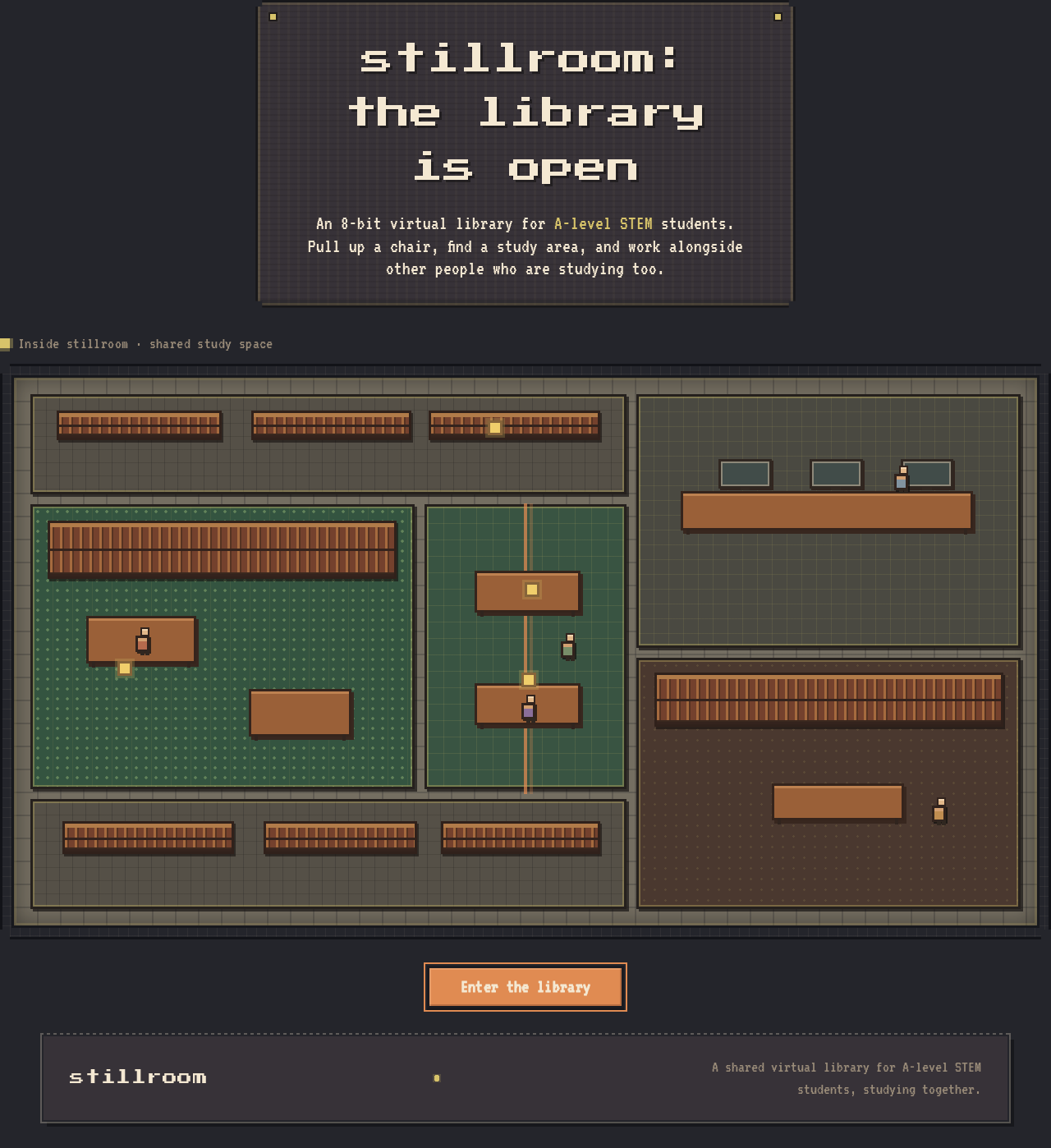
stillroom: the library is open
An 8-bit virtual library for A-level STEM students. Pull up a chair, find a study area, and work alongside other people who are studying too.
stillroom: the library is open
An 8-bit virtual library for A-level STEM students. Pull up a chair, find a study area, and work alongside other people who are studying too.
No comments yet. Be the first!