steel-landscape
 angel westling
Minimal landscape mock up with rock garden
Comments (0)
Sign in to leave a comment
Project Tasks17
Implement Theme & Global Styles
As a frontend developer, I want to implement the steel-landscape design system (color tokens, typography, spacing) across the scaffold project so that all existing pages (home, login, signup, welcome, dashboard, ai-assistant, settings) inherit the correct theme. Apply the palette: Soft Gray (#D3D3D3) backgrounds, Earthy Brown (#8B4513) accents, Sage Green (#9DC183), Stone White (#F5F5F5), and Deep Blue (#4682B4). Set up CSS custom properties / Tailwind config. Remove any pages not present in the user flows or design pages (e.g. standalone welcome page if not in flows). This task must be completed before all other UI tasks.
Implement Templates API
As a user, I want to use the backend API for templates so that I can fetch pre-designed rock garden templates (list, detail, thumbnail URLs) to display on the Templates page. Implement FastAPI endpoints: GET /api/templates (list with filters), GET /api/templates/{id} (detail). Seed initial rock garden template data in MySQL.
Implement Designs CRUD API
As a user, I want to use the backend API for designs so that I can create, read, update, and delete my landscape design mockups from the Editor and Dashboard. Implement FastAPI endpoints: POST /api/designs, GET /api/designs (user's designs), GET /api/designs/{id}, PUT /api/designs/{id}, DELETE /api/designs/{id}. Store design canvas state (element positions, materials, template base) as JSON in MySQL.
Build Home Page
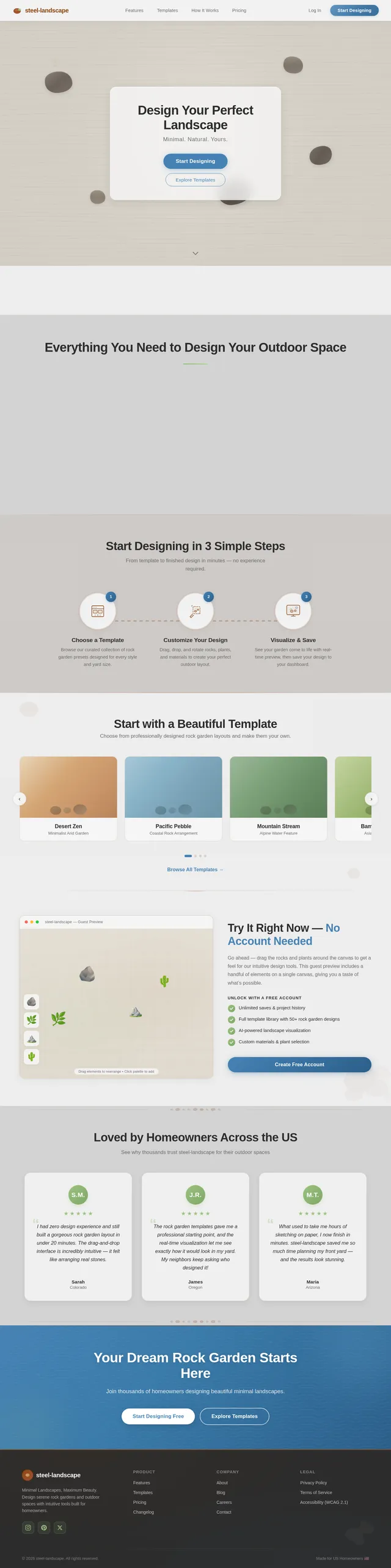
As a user, I want to use the frontend Home page so that I can view the interactive zen garden centerpiece, explore features, and navigate to 'Start Designing' or 'Browse Templates'. Implement the Home (v2) JSX design exactly — including the animated raked-sand zen garden, drifting leaf ambient animations, interactive sand-raking on click/drag, dynamic rock placement, and the pulsing 'Start Designing' CTA button. Follows the Guest and Homeowner flows: Home → Templates. Remove or redirect any placeholder home page content.
Build Signup Page
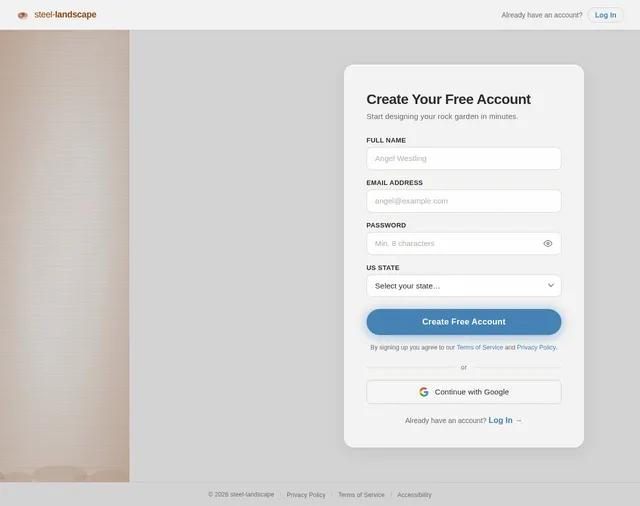
As a user, I want to use the frontend Signup page so that I can create an account after trying the editor demo. Implement the Signup (v2) JSX design exactly — form fields, validation UI, branding, and navigation back to Login or forward to Dashboard. Follows the Guest flow: Editor → Signup → Dashboard.
Build Templates Page
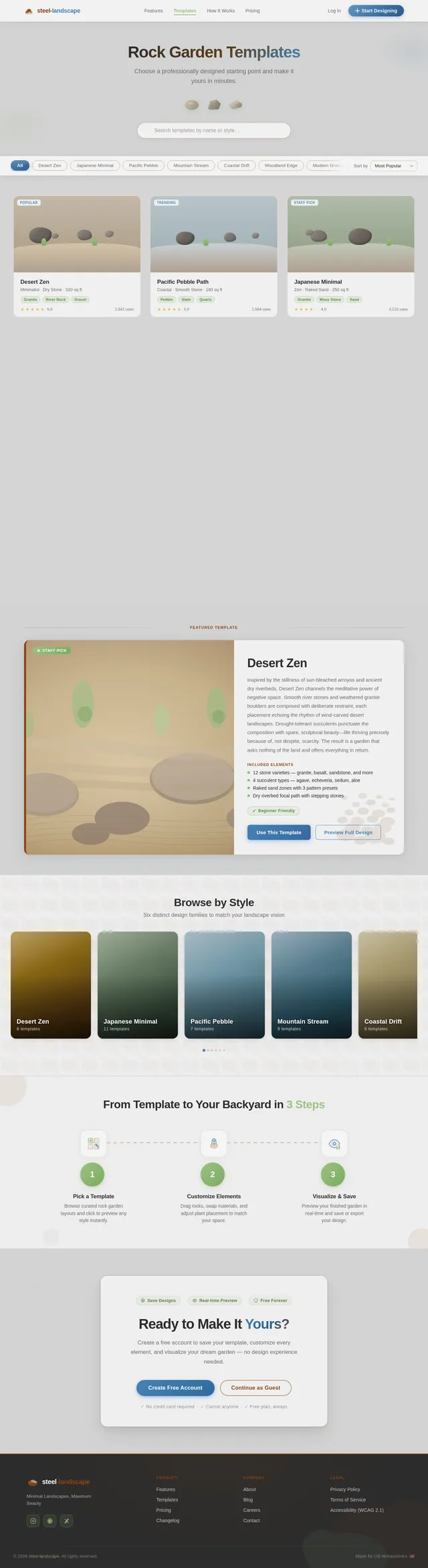
As a user, I want to use the frontend Templates page so that I can browse pre-designed rock garden templates and select one to open in the Editor. Implement the Templates (v2) JSX design exactly — template cards with thumbnails, names, filter/search UI, and 'Use This Template' actions. Follows both flows: Home → Templates → Editor.
Implement AI Landscape Visuals API
As a user, I want to use the AI API so that I can generate realistic landscaping visuals for my rock garden design using Google Nano Banana via Langchain. Implement a FastAPI endpoint POST /api/ai/generate-visual that accepts design parameters (materials, layout dimensions, style) and returns a generated image URL or base64. Integrate Langchain prompt management for the AI model.
Implement PDF Export API
As a user, I want to use the backend API for PDF export so that I can download a printable summary of my rock garden design mockup. Implement FastAPI endpoint GET /api/designs/{id}/export/pdf that renders the design metadata, material list, and canvas snapshot into a PDF file (using a Python PDF library). Return the PDF as a file download.
Build Editor Page
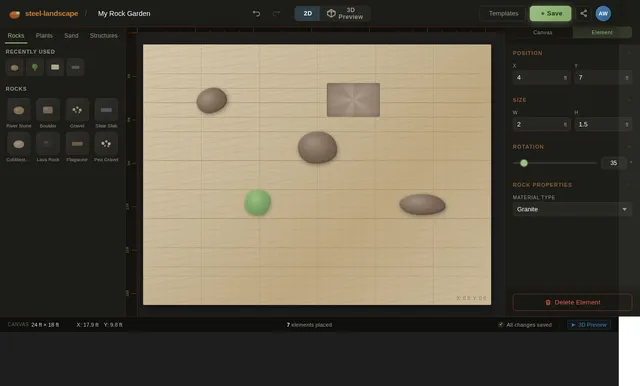
As a user, I want to use the frontend Editor page so that I can drag and drop landscaping elements, customize layouts, select materials, and visualize my rock garden design in real time. Implement the Editor (v2) JSX design exactly — canvas area, element palette, drag-and-drop interactions, undo/redo controls, material selection panel, and navigation to Preview. Follows Homeowner flow: Templates → Editor → Customize → Preview.
Build Dashboard Page
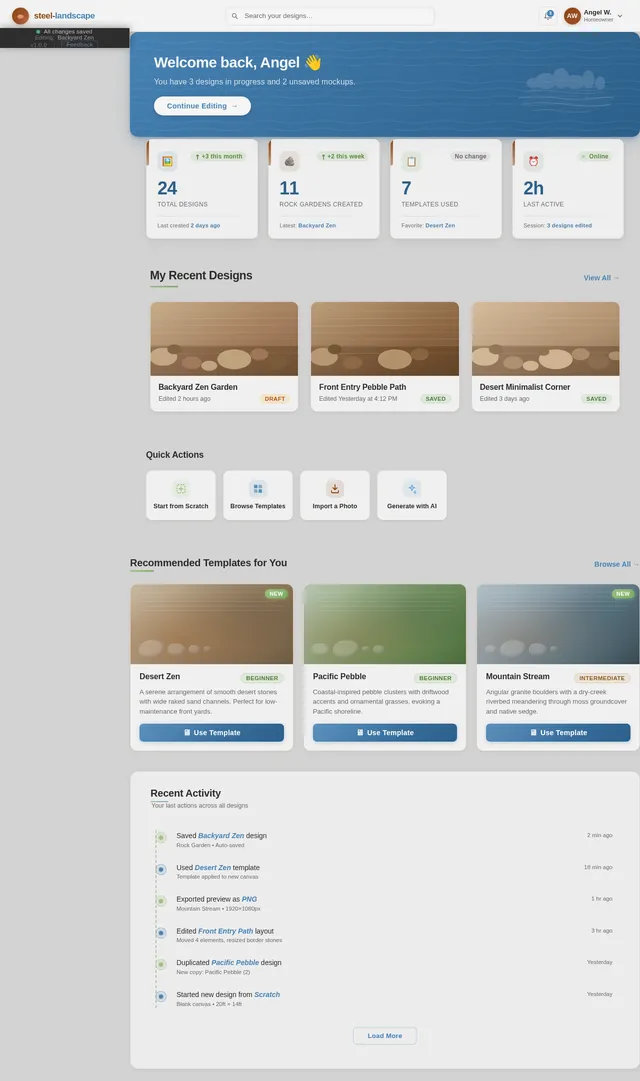
As a user, I want to use the frontend Dashboard page so that I can view, manage, and save my landscape design mockups, access the AI assistant, and configure settings. Implement the Dashboard (v2) JSX design exactly — overview panel with saved designs, quick stats, navigation to Editor, and sidebar links to AI Assistant and Settings sub-pages. Follows both flows: Signup/Preview → Dashboard → Save Mockup.
Integrate Templates Page with API
As a user, I want to use the frontend Templates page so that real template data is fetched from the backend and displayed dynamically. Wire up GET /api/templates with loading states, error handling, and filter/search functionality connected to API query params.
Build AI Assistant Dashboard Page
As a user, I want to use the frontend AI Assistant page in the dashboard so that I can chat with the AI to get landscaping suggestions, generate visuals, and receive design recommendations. Implement the chat UI with message history, input field, and integration with the AI Landscape Visuals API. Accessible from the Dashboard sidebar.
Build Preview Page
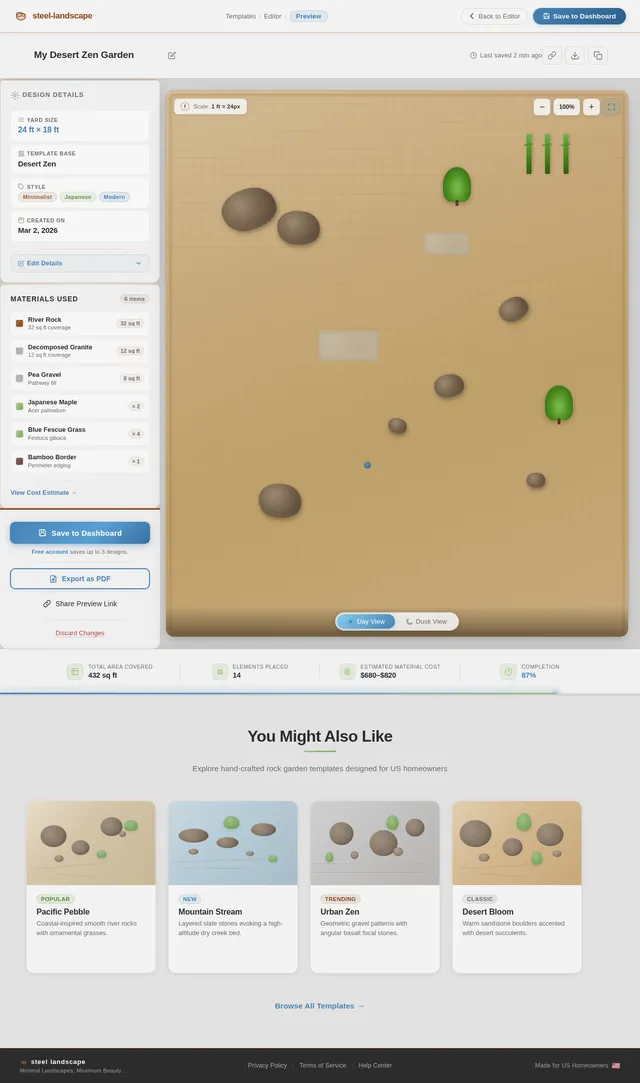
As a user, I want to use the frontend Preview page so that I can visualize my final rock garden design in a high-fidelity read-only canvas, review design stats, see suggested templates, and save or export my mockup. Implement the Preview (v2) JSX design exactly — including PreviewNavBar, DesignSummaryBanner, DesignMetaPanel, MaterialsLegend, ActionsSidebar, CanvasPreviewArea (with Day/Dusk toggle and parallax), DesignStatsBar, SuggestedTemplates, and PreviewFooter sections. Follows Homeowner flow: Editor → Preview → Dashboard.
Integrate Editor with Backend
As a user, I want to use the frontend Editor page so that my drag-and-drop design changes are auto-saved and persisted via the Designs CRUD API. Wire up API calls: load design on open, periodic auto-save (debounced PUT), and explicit save action. Handle loading and error states in the UI.
Integrate Dashboard with Designs API
As a user, I want to use the frontend Dashboard page so that my saved designs are loaded from the backend and I can delete or rename them. Wire up GET /api/designs, DELETE /api/designs/{id}, and PATCH for rename. Show empty state when no designs exist.
Build Settings Dashboard Page
As a user, I want to use the frontend Settings page in the dashboard so that I can update my profile, preferences (measurement units: ft/in, currency: USD), and notification settings. Implement settings form with save/cancel actions, wired to a backend PATCH /api/users/me endpoint. Accessible from the Dashboard sidebar.
Integrate Preview Page with APIs
As a user, I want to use the frontend Preview page so that real design data, material costs, stats, and the AI-generated visual are loaded from the backend. Wire up GET /api/designs/{id} for design metadata and canvas state, GET /api/designs/{id}/export/pdf for the download button, and POST /api/ai/generate-visual for the high-fidelity canvas render. Handle Day/Dusk view toggle on the client side.
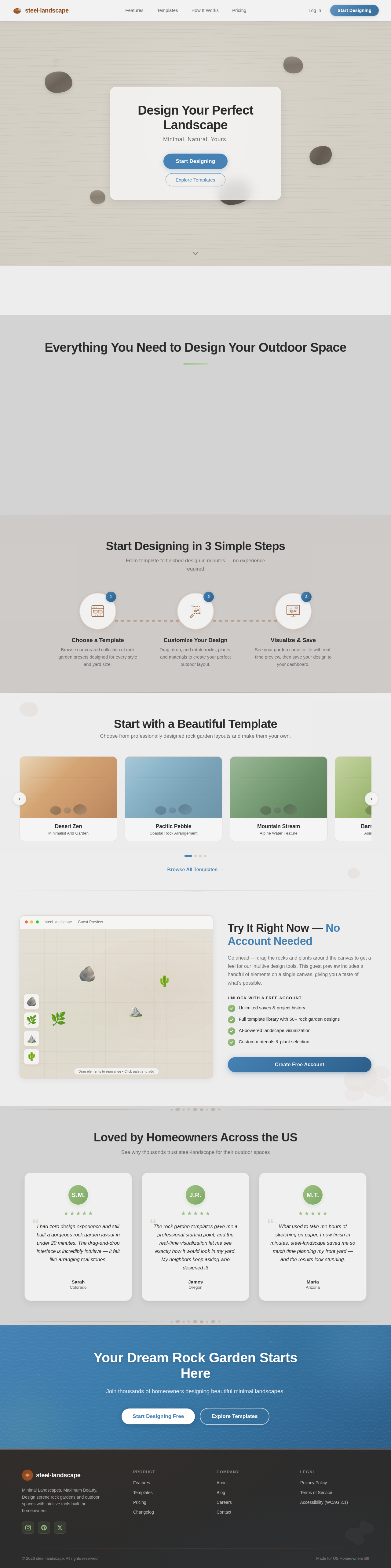
Design Your Perfect Landscape
Minimal. Natural. Yours.
Everything You Need to Design Your Outdoor Space
Drag-and-Drop Interface
Place rocks, plants, and decorative elements with an intuitive drag-and-drop canvas. No design experience required—just click, drag, and watch your garden take shape.
Rock Garden Templates
Browse professionally designed rock garden presets like Desert Zen and Pacific Pebble. Start with a stunning template and customize every detail to your taste.
Real-Time Visualization
See every change instantly as you design. Our real-time preview engine renders your landscape so you can visualize the finished garden before breaking ground.
Custom Material & Plant Selection
Choose from a curated library of stones, gravel, succulents, and ground cover. Mix natural materials to craft a landscape that’s uniquely yours.
Start Designing in 3 Simple Steps
From template to finished design in minutes — no experience required.
Choose a Template
Browse our curated collection of rock garden presets designed for every style and yard size.
Customize Your Design
Drag, drop, and rotate rocks, plants, and materials to create your perfect outdoor layout.
Visualize & Save
See your garden come to life with real-time preview, then save your design to your dashboard.
Start with a Beautiful Template
Choose from professionally designed rock garden layouts and make them your own.
Desert Zen
Minimalist Arid Garden
Pacific Pebble
Coastal Rock Arrangement
Mountain Stream
Alpine Water Feature
Bamboo Harmony
Asian-Inspired Layout
Sunset Mesa
Southwest Boulder Garden
Alpine Retreat
Mountain Rock Terrace
Try It Right Now — No Account Needed
Go ahead — drag the rocks and plants around the canvas to get a feel for our intuitive design tools. This guest preview includes a handful of elements on a single canvas, giving you a taste of what’s possible.
Unlock with a free account
- Unlimited saves & project history
- Full template library with 50+ rock garden designs
- AI-powered landscape visualization
- Custom materials & plant selection
Loved by Homeowners Across the US
See why thousands trust steel-landscape for their outdoor spaces
I had zero design experience and still built a gorgeous rock garden layout in under 20 minutes. The drag-and-drop interface is incredibly intuitive — it felt like arranging real stones.
The rock garden templates gave me a professional starting point, and the real-time visualization let me see exactly how it would look in my yard. My neighbors keep asking who designed it!
What used to take me hours of sketching on paper, I now finish in minutes. steel-landscape saved me so much time planning my front yard — and the results look stunning.

Your Dream Rock Garden Starts Here
Join thousands of homeowners designing beautiful minimal landscapes.
No comments yet. Be the first!