steel-atom
 Вам одобрено 534оо р. от Яндекс. Войдите здесь- https://calendar.app.google/FK5rv6t8wSLLnwACA
1 slide for atom

Comments (0)
Sign in to leave a comment
System Requirements
System Requirements Document for Atom
1. Introduction
Atom is a single personal slide about the atom, made for one viewer: Олексій ProofUp. The product's entire intent is to present one calm, factual, precisely typeset slide that explains the atom as a system of parts — protons, neutrons and electrons — on one clean surface. There is no collection of slides, no editor, no library, and no sharing workflow: the product is one slide, for the user's own use.
The audience is the single viewer who opens the slide to read it. The register is that of a museum information panel: systematic clarity after Massimo Vignelli, where a strict grid, thin rules and colour codes turn dense information into something that reads fast and stays memorable.
2. System Overview
2a. Product Interpretation and Delivery Boundary
Atom is delivered as a first-party web application with one page, Atom Slide, which is the public entry surface and the whole product. The page is reachable without any sign-in, account, invitation or provisioning step: the accepted requirement is a slide for the user's own use, and no accepted journey requires private, resumable or participant-bound state. There is therefore no application-owned identity, no session continuity requirement, and no differentiated permissions or role-based visibility anywhere in the product.
The slide's content — headline, subline, call to action, particle data and the atom diagram — is fixed presentation content served by the application. The shared backend and database exist as provisioned infrastructure for the application, but the accepted product behavior does not require any user-authored, mutable or persisted domain data; the database holds no user-facing records for this product. All reading, hovering and scrolling happens in the browser on the single slide.
Everything beyond this one slide is out of current scope. There is no second slide, no slide navigation, no authoring or editing surface, no export, no sharing, and no account area. Any such capability would be a future addition, not part of this delivery.
2c. Page Content and Component Coverage
Atom Slide
Information and state
- The slide is a single, self-contained information panel about the atom, laid out on a 12-column grid that fills the slide.
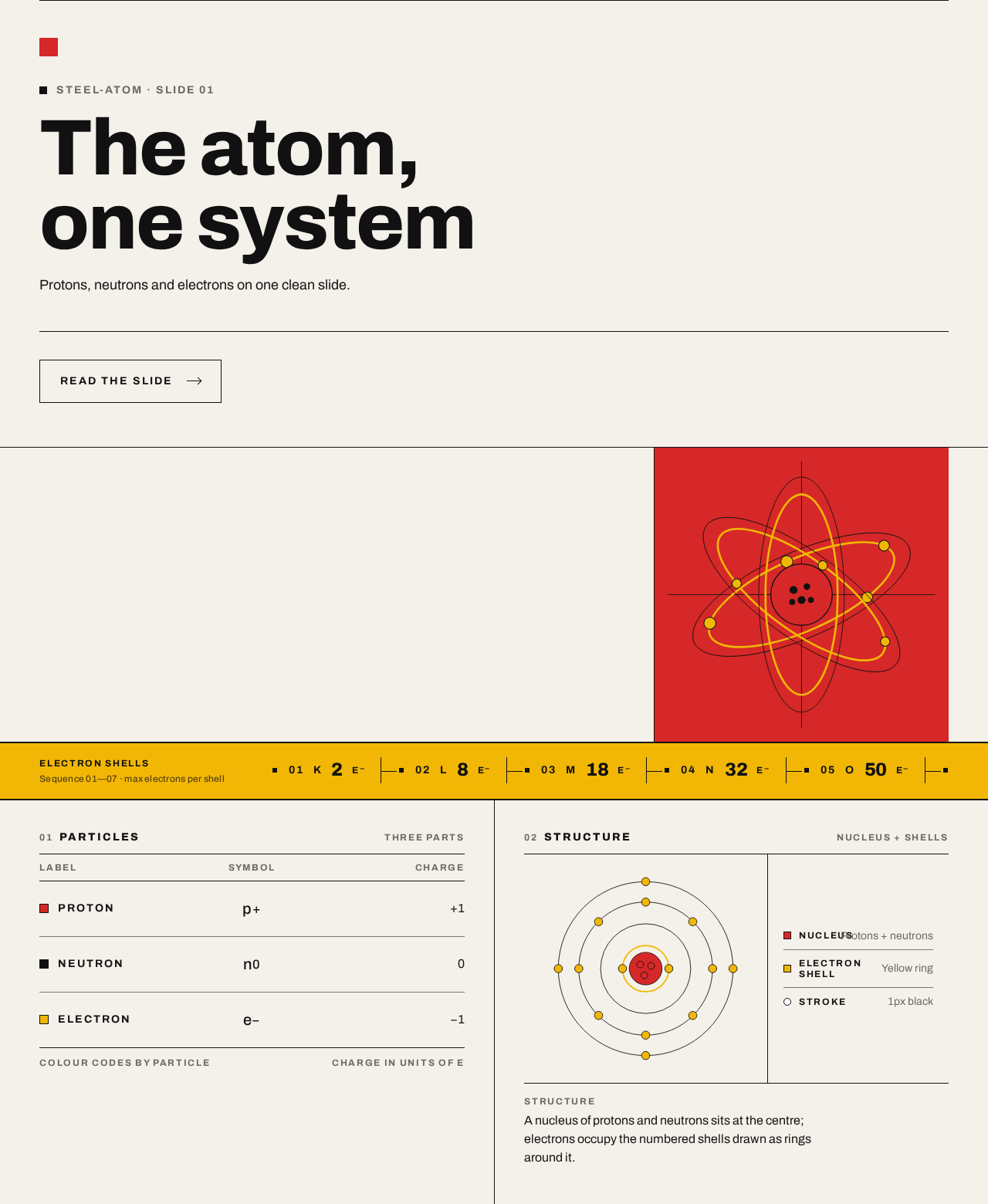
- Fixed content zones, in reading order: a red 24px square as the only mark at the top; the headline; a full-width black rule under the headline; a hero band with the headline block on the left eight columns and a solid red block on the right four columns containing the atom diagram; a yellow electron-count strip below the hero band; and two data columns below — particle rows on the left, structure diagram on the right.
- Headline: "The atom, one system" — Archivo Heavy 800, flush left, sentence case, tight tracking −0.02em, sized 96px–128px on desktop and 40px on mobile via a fluid scale.
- Subline: "Protons, neutrons and electrons on one clean slide."
- Call to action: "Read the slide" — a hard-edged control, not a pill, that brings the reader to the slide content.
- Particle rows: each row aligns label, symbol and charge in three rigid columns separated by hairlines. The proton row is coded red (#D62828); the electron row is coded yellow (#F2B705); the neutron row is coded in black on the warm paper ground.
- Electron shell strip: a yellow horizontal strip listing electron shells as numbered codes, like a transit line.
- Atom diagram: a flat diagram of a red nucleus circle with yellow electron rings and small yellow dots, black stroke lines, no photo and no gradient, set inside the red block.
- No loading state is required: the slide is static content. No empty state exists, because the slide always has its fixed content. No error state is presented to the viewer for content, because there is no user input or remote data fetch on the slide.
Primary and supporting actions
- Primary: read the slide — the viewer reads the headline, subline, particle rows, electron shell strip and diagram.
- Supporting: activate "Read the slide" to move to the slide content.
- Supporting: hover a particle row, which turns that row's label red.
Domain entities
- Atom — the subject of the slide.
- Particle — a constituent of the atom, with a label, a symbol and a charge; the slide presents protons, neutrons and electrons.
- Electron shell — a numbered shell code listed on the yellow strip.
- Nucleus — the red central circle of the diagram, containing protons and neutrons.
- Slide — the single presentation surface itself.
Component responsibilities
- Slide frame: holds the 12-column grid, the warm paper ground (#F4F1EA), and the 1px black rules that divide every zone; hard edges only, no radius, no shadow.
- Top mark: renders the red 24px square above the headline rule.
- Headline block: renders the headline and subline flush left with the specified type scale and tracking; wraps or scales so the text stays entirely inside its container at 375px, 768px and 1280px.
- Headline rule: a full-width 1px black rule separating the headline from the content below.
- Hero band: two-part layout — headline block across the left eight columns, red block across the right four columns.
- Atom diagram: draws the flat red nucleus circle, yellow electron rings and small yellow dots with black strokes inside the red block; decorative, never covering readable text or controls.
- Electron count strip: yellow horizontal strip listing electron shells as numbered codes; if the codes cannot all fit at a narrow viewport, the strip scrolls horizontally so each code can be brought fully into view, and under reduced motion the codes wrap into rows instead.
- Particle table: renders particle rows with label, symbol and charge in three rigid columns separated by hairlines; applies the red code to the proton row and the yellow code to the electron row; handles row hover by turning the hovered row's label red.
- Structure diagram column: the right-hand data column presenting the atom's structure alongside the particle rows.
- Call to action: hard-edged "Read the slide" control, flush left, never a centred pill.
States
- Default: the full slide is visible with all zones rendered.
- Entry: the slide enters with one 240ms fade; under
prefers-reduced-motionthe slide appears immediately with no fade. - Hover: a hovered particle row's label turns red; on pointer-less devices the rows remain in their default colour.
- Narrow viewport: headline scales down to 40px, the hero band stacks so the red block sits below the headline block, and the electron strip scrolls or wraps; all readable text and controls remain whole inside the viewport and their containers.
- Recovery: not applicable — there is no user input, submission or remote data whose failure the viewer could recover from.
3. Functional Requirements
FR-1 — One slide about the atom As a Slide viewer, I should see one slide about the atom, so that I can read the atom's parts on a single surface.
- Provenance: explicit.
- Lifecycle: the viewer opens Atom Slide; the application renders the single slide; the observable result is one slide containing the atom content. There is no second slide and no slide navigation.
- Access: no sign-in required.
- Failure/recovery: not applicable — static content with no user input.
- Continuation: the viewer reads the slide's zones in order.
FR-2 — The slide is for the user's own use As a Slide viewer, I should be able to open and read the slide for my own use, so that the slide serves as my personal reference.
- Provenance: explicit.
- Lifecycle: the viewer opens Atom Slide directly; the slide is readable without any account, invitation or provisioning step; the observable result is the full slide on screen.
- Access: public, no identity established.
- Failure/recovery: not applicable.
- Continuation: the viewer may revisit the same slide at any time.
FR-3 — Headline and subline As a Slide viewer, I should see the headline "The atom, one system" with the subline "Protons, neutrons and electrons on one clean slide.", so that the slide states its subject immediately.
- Provenance: explicit (creative direction entry hero copy).
- Lifecycle: the slide renders the headline flush left in Archivo Heavy 800, sentence case, tracking −0.02em, at 96px–128px on desktop and 40px on mobile; the subline sits beneath it; the observable result is a legible headline and subline fully inside their container at 375px, 768px and 1280px.
- Access: no sign-in required.
- Failure/recovery: at narrow viewports the headline wraps or scales rather than clipping.
- Continuation: the viewer moves on to the particle rows and diagram.
FR-4 — Read the slide call to action As a Slide viewer, I should see and be able to activate "Read the slide", so that I can move from the entry presentation into the slide content.
- Provenance: explicit (creative direction entry hero copy).
- Lifecycle: the viewer activates the hard-edged "Read the slide" control; the slide content is brought into view; the observable result is the reader positioned at the slide's content.
- Access: no sign-in required.
- Failure/recovery: the control remains whole and inside the viewport at every supported width.
- Continuation: the viewer reads the particle rows and diagram.
FR-5 — Particle rows with label, symbol and charge As a Slide viewer, I should see particle rows that align label, symbol and charge in three rigid columns separated by hairlines, so that I can compare protons, neutrons and electrons at a glance.
- Provenance: explicit (creative direction signature moves).
- Lifecycle: the slide renders the particle rows in the left data column; the proton row is coded red (#D62828) and the electron row is coded yellow (#F2B705); the observable result is three aligned columns per row with hairline separators.
- Access: no sign-in required.
- Failure/recovery: at narrow viewports the columns remain readable and inside their container.
- Continuation: the viewer compares rows and reads the structure diagram.
FR-6 — Particle row hover As a Slide viewer, I should see a particle row's label turn red when I hover that row, so that I can focus on one particle at a time.
- Provenance: explicit (creative direction motion).
- Lifecycle: the viewer hovers a particle row; that row's label turns red; the observable result is the highlighted label. No other movement occurs.
- Access: no sign-in required.
- Failure/recovery: on pointer-less devices the rows stay in their default colour; nothing is lost.
- Continuation: the viewer moves the pointer away and the label returns to its default colour.
FR-7 — Electron shell strip As a Slide viewer, I should see a yellow horizontal strip listing electron shells as numbered codes, so that I can read the shell structure like a transit line.
- Provenance: explicit (creative direction signature moves).
- Lifecycle: the slide renders the yellow strip below the hero band with numbered shell codes; the observable result is the ordered shell list.
- Access: no sign-in required.
- Failure/recovery: if the codes cannot all fit, the strip scrolls horizontally so each code can be brought fully into view; under reduced motion the codes wrap into rows.
- Continuation: the viewer reads the particle rows and diagram.
FR-8 — Flat atom diagram in the red block As a Slide viewer, I should see a flat diagram of the atom — a red nucleus circle with yellow electron rings and small yellow dots, black stroke lines — set inside a solid red block, so that the atom's structure is visible as a picture.
- Provenance: explicit (creative direction imagery and hero direction).
- Lifecycle: the slide renders the red block across the right four columns of the hero band with the diagram inside; the observable result is the flat diagram with no photo and no gradient.
- Access: no sign-in required.
- Failure/recovery: the diagram is decorative and may be cropped or scaled, but it never covers readable text or controls.
- Continuation: the viewer reads the structure diagram column below.
FR-9 — Single 240ms entry fade As a Slide viewer, I should see the slide enter with one 240ms fade, so that the slide arrives calmly without distracting motion.
- Provenance: explicit (creative direction motion).
- Lifecycle: the slide loads; it fades in once over 240ms; the observable result is the fully visible slide. No other movement occurs.
- Access: no sign-in required.
- Failure/recovery: under
prefers-reduced-motionthe slide appears immediately with no fade. - Continuation: the viewer reads the slide.
FR-10 — One slide only As a Slide viewer, I should find exactly one slide and no slide navigation, so that the product stays a single personal panel.
- Provenance: explicit (hard constraint).
- Lifecycle: the application exposes Atom Slide as its only page; no next/previous, index or gallery control exists; the observable result is one slide.
- Access: no sign-in required.
- Failure/recovery: not applicable.
- Continuation: the viewer reopens the same slide.
4. User Personas
Slide viewer
Product context. The Slide viewer is Олексій ProofUp, the single person for whom this slide exists. The product is not a service offered to an audience; it is one personal slide about the atom, opened for the viewer's own use. There is no account, no profile and no shared workspace — the viewer simply opens Atom Slide.
Primary goal. Read one clean, precise slide that presents the atom as a system of parts — protons, neutrons and electrons — and understand its structure at a glance.
Distinct accepted responsibilities.
- Opens Atom Slide directly, with no sign-in or setup.
- Activates "Read the slide" to move into the slide content.
- Reads the headline and subline, the particle rows (label, symbol, charge), the yellow electron shell strip, and the flat atom diagram.
- Hovers a particle row to focus on that particle's label.
- Revisits the same single slide whenever needed.
Relevant inputs or decisions. The viewer makes no data input and no configuration decision. The only interaction decisions are whether to activate "Read the slide" and which particle row to hover.
Interactions with other accepted participants. None. The Slide viewer is the only active human participant; there is no counterparty, recipient or beneficiary whose state changes. The application renders the slide; the viewer reads it.
Observable success. The viewer sees the full slide — headline "The atom, one system", subline, particle rows with aligned label/symbol/charge columns, the yellow shell strip, and the red-block atom diagram — all legible and whole at 375px, 768px and 1280px, with the single 240ms entry fade and the red hover on particle labels.
What makes this role different. The viewer is not a user of a tool but a reader of a fixed panel. There is no authoring, no saving, no sharing and no navigation between slides; the role's entire work is reading one carefully composed surface.
5. Core User Flows
Flow 1 — Open and read the slide
- Starting context. The Slide viewer opens Atom Slide in a browser. No sign-in, invitation or setup is required.
- Entry. The slide appears with one 240ms fade (immediately, with no fade, under
prefers-reduced-motion). The red 24px square sits at the top, above the headline. - Headline. The viewer reads "The atom, one system" flush left in Archivo Heavy 800, with the subline "Protons, neutrons and electrons on one clean slide." beneath it, separated from the content by a full-width black rule.
- Hero band. On the left eight columns the viewer sees the headline block; on the right four columns a solid red block holds the flat atom diagram — red nucleus circle, yellow electron rings, small yellow dots, black strokes.
- Call to action. The viewer activates the hard-edged "Read the slide" control; the slide content is brought into view.
- Shell strip. The viewer reads the yellow horizontal strip listing electron shells as numbered codes.
- Particle rows. The viewer reads the particle rows in the left data column, comparing label, symbol and charge across three rigid columns separated by hairlines; the proton row is coded red and the electron row yellow.
- Focus. The viewer hovers a particle row; that row's label turns red. Moving the pointer away returns the label to its default colour.
- Structure diagram. The viewer reads the structure diagram in the right data column.
- Observable result and continuation. The viewer has read the whole slide. The viewer may close the page and later reopen the same single slide; there is no next slide, no saved state and no follow-up action.
Flow 2 — Revisit the slide for personal reference
- Starting context. The Slide viewer returns to Atom Slide later, for the viewer's own use.
- Entry. The same single slide loads with its 240ms fade (or immediately under reduced motion).
- Reading. The viewer re-reads the headline, particle rows, shell strip and diagram exactly as before; the content is unchanged and no history or personal state is shown.
- Observable result and continuation. The viewer has the atom reference again on one clean slide. No account, session or saved preference is involved.
Flow 3 — Read the slide at a narrow viewport
- Starting context. The Slide viewer opens Atom Slide on a 375px-wide screen.
- Entry. The slide loads with its single fade (or immediately under reduced motion).
- Layout adaptation. The headline scales to 40px and wraps inside its container; the hero band stacks so the red block with the diagram sits below the headline block; all readable text and controls remain entirely inside the viewport and their containers.
- Shell strip. If the numbered shell codes cannot all fit, the strip scrolls horizontally so each code can be brought fully into view; under reduced motion the codes wrap into rows.
- Particle rows. The viewer reads the particle rows; the three columns remain readable and inside their container. Hover is unavailable on touch, so labels stay in their default colour.
- Observable result and continuation. The viewer has read the whole slide at mobile width with nothing clipped or covered.
Flow 4 — System rendering of the slide
- Starting context. A browser requests Atom Slide.
- System work. The shared backend serves the application and the slide's fixed content; the frontend renders the 12-column grid, the red top mark, the headline rule, the hero band, the yellow shell strip, the particle rows and the diagram.
- Observable result. The viewer receives one complete slide. There is no user-specific data, no persistence of viewer state and no error path the viewer must recover from.
6. Visuals Colors and Theme
Muse and headline. Systematic clarity after Massimo Vignelli — "The atom, one system". The register is calm, factual and precise, like a museum information panel.
Mode. Light mode only.
Colour tokens (exact hex, by role)
- Background — warm paper ground:
#F4F1EA - Surface:
#FFFFFF - Text:
#111111 - Primary (nucleus, proton row, top mark, hover labels):
#D62828 - Accent (electron row, electron shell strip, electron dots and rings):
#F2B705 - Muted (secondary labels and data):
#6E6A62 - Rules and strokes:
#111111at 1px - No blue appears anywhere in the palette.
Typography
- Headings: Archivo, Heavy 800 weight, flush left, sentence case, tracking −0.02em.
- Labels: Archivo 700 weight, uppercase, tracking +0.14em.
- Body: Archivo.
- Scale: 1.25 modular. Headline sizes 40/64/96/128; labels and data 18/16/14/12.
Shape language. Hard edges only. Thin 1px black rules divide every zone. Colour bars and square blocks mark categories. No radius, no shadow, no glass.
Spacing rhythm. A 12-column grid fills the slide; zones are separated by full-width 1px black rules; the red 24px square is the only mark above the headline rule.
Imagery style. Flat diagram only: a red nucleus circle with yellow electron rings and small yellow dots, black stroke lines. No photo, no gradient, no decorative illustration.
Avoid. Blue or indigo accents on a white ground; rounded cards, soft shadows or glass panels; gradient blobs or decorative illustration; centred hero text with a pill button.
7. Signature Design Concept
The public entry is the slide itself, composed as a Vignelli information panel. A red 24px square sits alone at the top left. Below it, "The atom, one system" fills the left eight columns at 96px–128px on desktop (40px on mobile), flush left, with the subline beneath. A full-width black rule cuts under the headline. To the right, a solid red block across four columns holds the flat atom diagram — red nucleus, yellow rings, small yellow dots, black strokes. Below the hero band, a yellow horizontal strip lists electron shells as numbered codes like a transit line. Under that, two data columns: particle rows on the left with label, symbol and charge in three rigid columns separated by hairlines (proton row red, electron row yellow), and the structure diagram on the right. The hard-edged "Read the slide" control sits flush left. Every zone is divided by a 1px black rule; nothing is rounded, nothing casts a shadow, and no blue appears.
8. Interaction Model & Motion Direction
Interaction Model: Static (direction) Motion Tempo: still Hero Dimensionality: flat
Landing Hero Motion Brief
- Focal subject: the flat atom diagram — red nucleus circle, yellow electron rings, small yellow dots, black strokes — set inside the solid red block at the right four columns.
- Input → transformation → outcome thesis: on load, the whole slide fades in once over 240ms; on hover, a particle row's label turns red and returns to default when the pointer leaves. No other transformation occurs.
- Motion vocabulary: one 240ms fade; a colour change on particle-row hover. Nothing else moves.
- Composed first frame: red 24px square at top left; "The atom, one system" flush left across eight columns; full-width black rule; red block with the flat diagram at right; yellow electron shell strip below; particle rows and structure diagram in two columns beneath.
- Reduced-motion state: the slide appears immediately with no fade; hover colour changes remain as instant state changes; the electron shell strip wraps into rows instead of scrolling.
9. Non-Functional Requirements
- Single-slide constraint. The product has one slide only; no additional slides, slide navigation, index or gallery may be introduced. (explicit)
- Readability at every viewport. Headlines, wordmarks, labels, numbers and controls stay entirely inside the viewport and their container at 375px, 768px and 1280px, wrapping or scaling (for example
font-size: clamp(...)with its mobile size) to fit; no other element covers any part of them. (explicit) - Decoration may bleed, text may not. The atom diagram and colour blocks may be cropped, bled off an edge or overlapped as the direction asks, as long as they cover no readable text or control. (explicit)
- Scrollable strip accessibility. The yellow electron shell strip may scroll horizontally; every code must become fully readable as it passes, and under
prefers-reduced-motionthe codes wrap into rows so each can be brought fully into view. (explicit) - Reduced motion. With
prefers-reduced-motion, the 240ms entry fade is removed and the slide appears immediately in a usable static arrangement. (explicit) - No blue. No blue or indigo accent appears anywhere in the palette. (explicit)
- No rounded or soft surfaces. No border radius, no box shadow, no glass panels. (explicit)
- Access without identity. The slide is reachable without sign-in, account, invitation or provisioning; no session continuity or permission differentiation is required. (required_inference, from the "for me" personal-use requirement and the absence of any accepted private state)
- Static content delivery. The slide's content is fixed presentation content; no user-authored or persisted domain data is required for the accepted behavior. (required_inference)
10. Tech Stack
- Frontend: React application UI rendering the single Atom Slide page.
- Backend: shared FastAPI process for application APIs and domain modules; serves the application and the slide's fixed content.
- Database: MariaDB, provisioned as application-owned persistent storage. The accepted product behavior requires no user-facing records, so no domain schema is mandated by this document.
- Orchestration:
docker-compose.ymlwith thebackend,databaseandfrontendservices as the runnable inventory. No additional services are required for the accepted workflows.
11. Assumptions and Constraints
- Assumption — single viewer. The product serves one viewer, Олексій ProofUp, for personal use; no multi-user, sharing or collaboration behavior is assumed. (explicit)
- Assumption — fixed content. The slide's text, particle data, shell codes and diagram are fixed presentation content, not user-editable data. (required_inference)
- Assumption — no persistence of viewer state. Because no accepted journey requires resumable or private state, the application establishes no identity and stores no viewer-specific records. (required_inference)
- Constraint — one slide only. No second slide, slide navigation, authoring surface, export or sharing capability is in scope. (explicit)
- Constraint — palette and type. The exact palette (
#F4F1EA,#FFFFFF,#111111,#D62828,#F2B705,#6E6A62), Archivo typography, hard edges and 1px black rules are binding. (explicit) - Constraint — motion. Only the single 240ms entry fade and the particle-row hover colour change are permitted. (explicit)
- Default — not specified by user. Deployment target beyond the provisioned docker-compose services is unspecified; no Kubernetes requirement is established.
12. Glossary
- Atom — the subject of the slide: a system of protons, neutrons and electrons.
- Slide — the single presentation surface that constitutes the entire product.
- Particle row — a row in the particle table aligning a particle's label, symbol and charge in three rigid columns.
- Electron shell strip — the yellow horizontal strip listing electron shells as numbered codes.
- Nucleus — the red central circle of the atom diagram, containing protons and neutrons.
- Hero band — the two-part layout with the headline block on the left eight columns and the red block with the diagram on the right four columns.
- Slide viewer — the single active human persona who opens and reads the slide for personal use.
- Reduced motion — the
prefers-reduced-motionbrowser setting under which the entry fade is removed and the shell strip wraps instead of scrolling.
No comments yet. Be the first!