steel-app
 Rushi Devkate
Feature,Description Block planner,"Set a timer (25/50/90 min), write one intention (""Draft intro section"")" Post-block check-in,"Single prompt: ""What happened?"" + optional mood tag (🔥 / 😐 / 😩)" Daily timeline,"Visual strip showing completed blocks, color-coded by mood" Weekly insight,"One auto-generated stat: ""You hit 73% of intentions this week"" or ""Your sharpest hours: 9–11 AM""" Streak counter,Days with ≥3 completed blocks


Comments (0)
Sign in to leave a comment
System Requirements
steel-app System Requirements Document
Introduction
The purpose of this document is to outline the system requirements for the "steel-app," a productivity application designed to help users manage their time and tasks effectively. This document will detail the functional and non-functional requirements, user personas, core user flows, and design elements specific to the steel-app.
System Overview
The steel-app is designed to assist users, particularly students, in organizing their work sessions through time-blocking and reflective practices. The app provides features such as block planning, post-block check-ins, daily timelines, weekly insights, and streak counters to enhance productivity and self-awareness.
Functional Requirements
- As a student, I should be able to set a timer for 25, 50, or 90 minutes and write one intention for the block (e.g., "Draft intro section").
- As a student, I should be able to complete a post-block check-in with a single prompt: "What happened?" and optionally tag my mood (🔥 / 😐 / 😩).
- As a student, I should be able to view a visual strip showing completed blocks, color-coded by mood.
- As a student, I should receive an auto-generated weekly insight, such as "You hit 73% of intentions this week" or "Your sharpest hours: 9–11 AM."
- As a student, I should be able to track my streak of days with three or more completed blocks.
User Personas
- Student: The primary user of the steel-app, seeking to improve productivity and time management skills through structured work sessions and reflective practices.
Core User Flows
- Student sets a timer for a work block -> Completes the task with an intention -> Checks in post-block with mood tagging -> Views daily timeline -> Receives weekly insights -> Tracks streaks of productive days.
Visuals Colors and Theme
- primary: #1E3A8A (Deep Blue)
- primary_light: #3B82F6 (Light Blue)
- secondary: #F59E0B (Amber)
- accent: #EF4444 (Red)
- highlight: #FBBF24 (Gold)
- bg: #F3F4F6 (Light Gray)
- surface: rgba(255, 255, 255, 0.8)
- text: #111827 (Dark Gray)
- text_muted: #6B7280 (Muted Gray)
- border: rgba(209, 213, 219, 0.2)
Signature Design Concept
The steel-app will feature an interactive "Time Garden" on the home page. Users will plant "intention seeds" for each work block, which grow into "productivity flowers" as tasks are completed. The garden will visually represent the user's productivity over time, with flowers changing color based on mood tags. Users can click on flowers to view detailed block information. This concept will be implemented using @react-three/fiber for 3D interactions and framer-motion for smooth animations.
Interaction Model & Motion Direction
The landing page will utilize a "parallax" interaction model, providing a layered depth effect as users scroll through the page. Decorative elements like floating clouds and shifting sunlight will move at different speeds, creating an immersive storytelling experience. Internal pages will adopt a "static" model to ensure clarity and focus on productivity features.
Non-Functional Requirements
- The application should be responsive and accessible on both desktop and mobile devices.
- The system should ensure data privacy and secure access control for all user information.
- The app should perform efficiently with minimal load times and smooth transitions.
Tech Stack
- Frontend: React for Web
- Backend: Python with FastAPI
- Database: MySQL or MariaDB, using Alembic for migrations
- Local Orchestration: Docker, docker-compose
- Server-side Orchestration: Kubernetes
Assumptions and Constraints
- The app is primarily targeted at students in India, considering local time zones and cultural context.
- The system will support English as the primary language for all interfaces and communications.
- Internet connectivity is assumed for all functionalities, including data synchronization and insights generation.
Glossary
- Block Planner: A feature allowing users to set a timer and define an intention for a work session.
- Post-block Check-in: A reflective prompt completed after a work session.
- Daily Timeline: A visual representation of completed work blocks within a day.
- Weekly Insight: An auto-generated summary of productivity metrics for the week.
- Streak Counter: A feature tracking consecutive days with a specified number of completed work blocks.
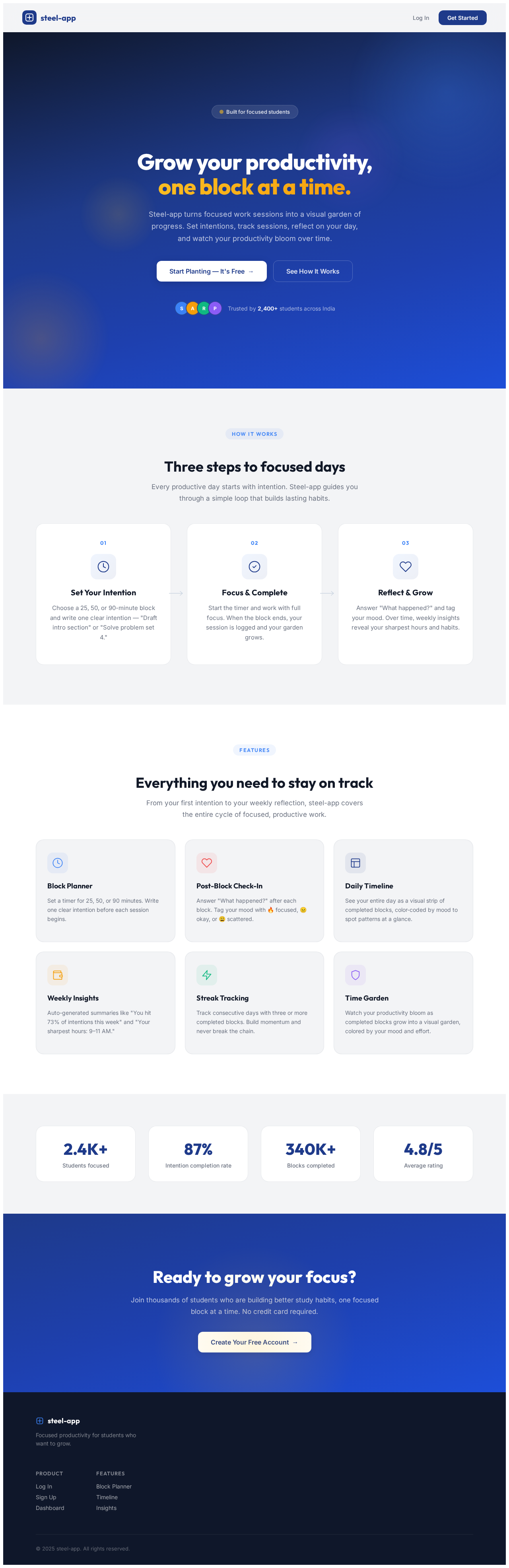
Grow your productivity,
one block at a time.
Steel-app turns focused work sessions into a visual garden of progress. Set intentions, track sessions, reflect on your day, and watch your productivity bloom over time.
Three steps to focused days
Every productive day starts with intention. Steel-app guides you through a simple loop that builds lasting habits.
Set Your Intention
Choose a 25, 50, or 90-minute block and write one clear intention — "Draft intro section" or "Solve problem set 4."
Focus & Complete
Start the timer and work with full focus. When the block ends, your session is logged and your garden grows.
Reflect & Grow
Answer "What happened?" and tag your mood. Over time, weekly insights reveal your sharpest hours and habits.
Everything you need to stay on track
From your first intention to your weekly reflection, steel-app covers the entire cycle of focused, productive work.
Block Planner
Set a timer for 25, 50, or 90 minutes. Write one clear intention before each session begins.
Post-Block Check-In
Answer "What happened?" after each block. Tag your mood with 🔥 focused, 😐 okay, or 😩 scattered.
Daily Timeline
See your entire day as a visual strip of completed blocks, color-coded by mood to spot patterns at a glance.
Weekly Insights
Auto-generated summaries like "You hit 73% of intentions this week" and "Your sharpest hours: 9–11 AM."
Streak Tracking
Track consecutive days with three or more completed blocks. Build momentum and never break the chain.
Time Garden
Watch your productivity bloom as completed blocks grow into a visual garden, colored by your mood and effort.
Ready to grow your focus?
Join thousands of students who are building better study habits, one focused block at a time. No credit card required.
Create Your Free Account→
No comments yet. Be the first!