Page 1 of 5
steady-auditor System Requirements Document
Introduction
The steady-auditor project aims to create a tool that allows users to enter a website URL and receive a downloadable PDF report. This report will include objective performance, SEO, and accessibility scores, along with an AI-written critique of design and content. The issues identified will be mapped to Malayappan Dev's services, effectively serving as a soft pitch for potential clients.
System Overview
steady-auditor is designed as a permanent free lead-generation tool integrated into the existing Malayappan Dev website. It will provide users with a real, useful audit of their own site, highlighting concrete problems and positioning Malayappan Dev as the solution provider. The tool will not charge users but will generate revenue indirectly by capturing leads.
Page 2 of 5
Source Content Inventory
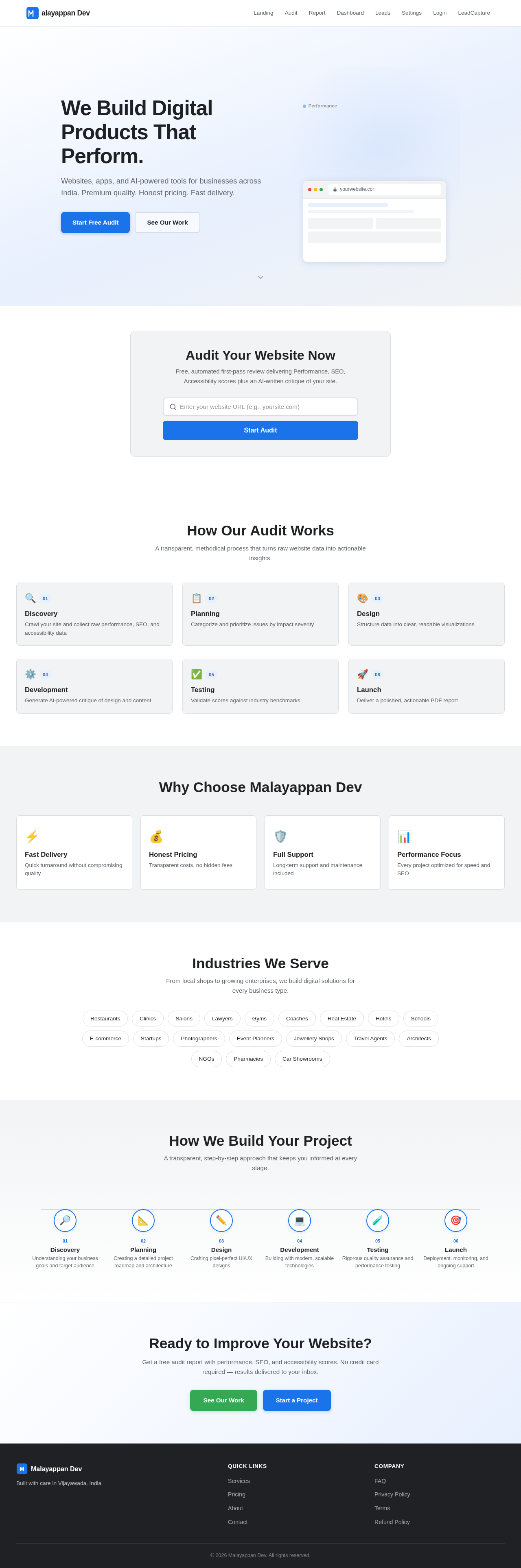
- Site Title: Malayappan Dev — Premium Web Development Agency
- Location: Vijayawada, India
- Headline: We Build Digital Products That Perform.
- Pitch: Websites, apps, and AI-powered tools for businesses across India. Premium quality. Honest pricing. Fast delivery.
- Call to Action Buttons: "See Our Work", "Start a Project"
- Industries Served: Restaurants, Clinics, Salons, Lawyers, Gyms, Coaches, Real Estate, Hotels, Schools, E-commerce, Startups, Photographers, Event Planners, Jewellery Shops, Travel Agents, Architects, NGOs, Pharmacies, Car Showrooms
- Unique Selling Points: Fast Delivery, Any Business Type, Honest Pricing, Full Support
- Trust Elements: Real-world projects, Performance focus, Modern technologies, Clear communication, Long-term support, Quality first
- Process Steps: Discovery, Planning, Design, Development, Testing, Launch
- Footer: Quick Links (Services, Pricing, About, Contact), Company Links (FAQ, Privacy Policy, Terms, Refund Policy), Tagline: Built with care in Vijayawada, India
Functional Requirements as Story Points
- As a User, I should be able to submit a URL on malayappan.dev to initiate an audit.
- As a User, I should receive a downloadable PDF report containing performance, SEO, and accessibility scores.
- As a User, I should receive an AI-written critique of design and content in the report.
- As a User, I should see issues mapped to Malayappan Dev's services in the report.
- As a User, I should be able to provide my name and email before downloading the report.
- As an Admin, I should be able to limit the number of free audits per day/IP to control costs.
- As a User, I should be informed that the audit is an automated first-pass review.
User Personas
- User: A business owner or website manager looking to improve their website's performance, SEO, and accessibility.
- Admin: A member of the Malayappan Dev team responsible for managing the tool and following up on leads.
Page 3 of 5
Core User Flows
- User submits URL -> System pulls data via Google PageSpeed Insights API -> Puppeteer captures screenshot and page signals -> Claude analyzes data and generates critique -> Report is generated and converted to PDF -> User provides name and email -> PDF is downloaded
Visuals Colors and Theme
- primary: #1A73E8 (Blue)
- primary_light: #E8F0FE (Light Blue)
- secondary: #34A853 (Green)
- accent: #EA4335 (Red)
- highlight: #FBBC05 (Yellow)
- bg: #FFFFFF (White)
- surface: #F1F3F4 (Light Gray)
- text: #202124 (Dark Gray)
- text_muted: #5F6368 (Muted Gray)
- border: #DADCE0 (Light Border Gray)
Signature Design Concept
The homepage will feature an interactive "Audit Journey" animation. As users scroll, they will see a visual representation of a website being analyzed. The animation will show data points being extracted and processed, culminating in a dynamic reveal of the PDF report. This will be achieved using motion/react for smooth transitions and interactions. Users can hover over elements to see detailed explanations of each audit step.
Page 4 of 5
Landing Hero Motion Brief
The hero section will depict a website URL being entered into a digital interface. As the URL is processed, visual elements representing data (e.g., graphs, charts) will animate into view, showing the transformation from raw data to a polished PDF report. The animation will loop every 10 seconds, with interactive elements allowing users to explore specific audit components.
Interaction Model & Motion Direction
- Interaction Model: Animated
- The landing page will feature moderate scroll-triggered reveals and hover transitions to engage users and highlight key features of the audit tool.
Non-Functional Requirements
- The system must handle concurrent audit requests efficiently.
- The tool must be integrated seamlessly into the existing Malayappan Dev website.
- The PDF generation process must be fast and reliable.
Tech Stack
- Frontend: React (TanStack Start)
- Backend: Node.js + Express
- AI: Claude (Anthropic API)
- Screenshot/Rendering: Puppeteer
- Data Source: Google PageSpeed Insights API
- Hosting: Hostinger VPS
Page 5 of 5
Assumptions and Constraints
- The tool will be hosted on the existing Hostinger VPS, which must have Chromium installed for Puppeteer.
- The tool will not charge users directly but will serve as a lead-generation mechanism.
Glossary
- Audit: The process of analyzing a website's performance, SEO, and accessibility.
- Lead: A potential client who has shown interest in Malayappan Dev's services by using the audit tool.
- PDF Report: A downloadable document summarizing the audit results and recommendations.
Also, if the website address entered after the audit has any problems, then this agent can suggest our website www.malayappan.dev services with our contact number.



No comments yet. Be the first!