STARRY CALCULATOR
starry-calculator
by Diya Trivedi
Diya Trivedistart a project to build a simple single page design of calculator

Comments (0)
Sign in to leave a comment
System Requirements
System Requirements Document for starry-calculator
1. Introduction
starry-calculator is a single-page calculator design. The product intent, taken directly from the authoritative requirement thread, is to build a simple single page design of calculator: one page, presented as a calculator, with a deliberately simple design. The interface itself is the product — there is no surrounding application, no navigation, and no secondary destinations.
The audience is anyone who needs quick arithmetic — students, desk workers, engineers, shoppers — served by a calm, trustworthy, mechanical instrument rather than a toy or a dashboard. The design language is a Braun-panel calculator in the spirit of Dieter Rams: strict grid, honest controls, warm-grey panel, one signal colour, and functional clarity.
Page 1 of 21
2. System Overview
The current delivery is a single custom page, Calculator, which is the anonymous public entry to the product and the only destination. It hosts number and operator entry with computed output, presented as a physical instrument panel.
Actors
- Calculator User (active human persona) — opens the single-page calculator and performs arithmetic entry to see computed results.
- No other human personas, systems, providers, or external services participate in the current product.
Accepted behavior
- A simple single-page calculator design (explicit).
- The calculator is presented as exactly one page (explicit).
- The design must be simple (explicit).
Ownership
- The Calculator page is owned by the application and is anonymously reachable; no identity, account, or session continuity is required or established.
- All arithmetic entry and computed output happen within the single page.
Narrow exclusions
Page 2 of 21
- No additional pages, routes, or navigable destinations.
- No account creation, sign-in, or user profile.
- No history persistence, memory features, scientific functions, or unit conversion beyond what the simple calculator page presents.
- No dark mode, no marketing hero copy, no card-based layout around the instrument.
2a. Product Interpretation and Delivery Boundary
The product is a single, self-contained calculator page. A visitor arrives anonymously, sees the calculator instrument, and uses it directly. There is no gate, no onboarding, and no protected state: nothing about the calculator requires the application to know who the user is, and no durable user-specific state is created, so no identity establishment or verification journey exists.
The current horizon contains only the one-page calculator design. Anything beyond a simple calculator — persistence, accounts, additional tools, or additional pages — is outside the current delivery boundary and is not part of this document's acceptance.
2b. Source Content Inventory
Not applicable. No reference directive declares a content_source; the only source material is the user requirement thread and the creative direction.
2c. Page Content and Component Coverage
Page 3 of 21
Calculator
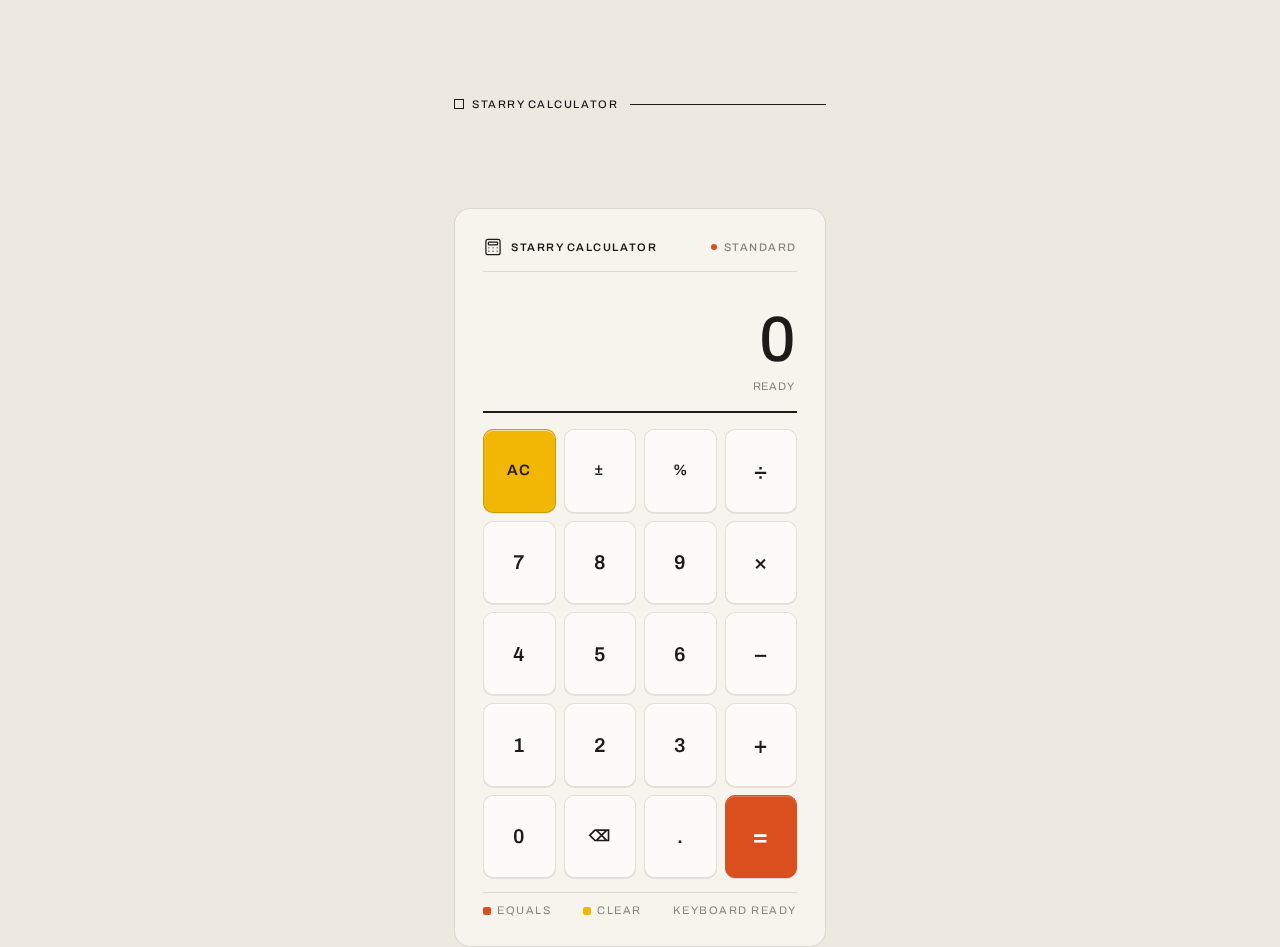
The sole page. It is the anonymous public entry and the complete product surface: a centred instrument panel on a warm page ground.
Information and state
- Page eyebrow: a single line of small-caps ink text reading
STARRY CALCULATOR, with a 1px rule running to the right edge of the panel. It is a small label, not a hero headline. - Instrument panel: a warm off-white rounded rectangle (
#F7F4EE, 16px radius) on the warmer page ground (#EDE8E0), max-width 420px, centred, with a 96px top margin at desktop and 32px at mobile. - Header strip inside the panel: two columns — brand mark left (a 20px line-art calculator or arithmetic-symbol pictogram drawn with 1.5px strokes), mode label right in 11px uppercase Archivo with 0.14em letterspacing.
- Display block: full width, right-aligned tabular result numerals in Archivo at 64px desktop / 44px mobile, with a small muted (
#8A857C) 12px history expression stacked above the result. - A single 2px ink rule separates the display from the key grid.
- Key grid: a 4×5 modular grid of rounded-rectangle keys (10px radius), 1px hairline borders in ink at 12% opacity, each key with a 1px inset top highlight and 1px bottom shadow. Labels and values align on a strict 8-pt grid.
- Signal-colour discipline: exactly one solid orange key (
#D94F1E) — equals — anchoring the bottom-right of the grid; one amber key (#F2B705) — clear; the active operator key holds a solid orange fill; a tiny orange status dot appears in the header strip.
Primary actions
Page 4 of 21
- Enter digits via the number keys.
- Select an operator (add, subtract, multiply, divide) via the operator keys; the selected operator key holds a solid orange fill.
- Evaluate the current expression via the equals key.
- Clear the current entry/expression via the clear key.
Supporting actions
- Read the current result and the muted history expression above it.
Domain entities
- Current entry — the number being typed.
- Expression — the pending operand, operator, and operand.
- Result — the computed value shown in the display.
- History expression — the muted line above the result showing the expression that produced it.
Component responsibilities
- Page shell — warm page ground, centred layout, eyebrow label with rule.
- Instrument panel — rounded body, header strip, display block, 2px rule, key grid.
- Header strip — brand pictogram, mode label, status dot.
- Display block — tabular result, muted history line.
- Key grid — number keys, operator keys, clear key, equals key, with pressed-key physics.
States
Page 5 of 21
- Loading — the panel fades in once with a single 200ms opacity fade; under
prefers-reduced-motionthe fade is removed and the panel appears instantly. - Empty / initial — display shows a zero result with no history expression; no operator is active.
- Entry in progress — digits accumulate in the display; the selected operator key holds a solid orange fill.
- Success — equals produces the computed result in the display, with the originating expression shown as the muted history line above it.
- Error / recovery — an invalid or incomplete expression (for example, an operator with no second operand) does not produce a result; the display retains the last valid entry, and the clear key resets the calculator to the empty state so the user can continue.
- Pressed — a key translates 1px down over 90ms ease-out; the display value updates with a 120ms crossfade between numerals.
Page 6 of 21
3. Functional Requirements
FR-1 — Single-page calculator presentation (explicit) As a Calculator User, I should see the calculator presented as one simple single page, so that I can use it immediately without navigating anywhere.
- Trigger: the user opens the product.
- Observable result: the Calculator page renders as the only destination, with the instrument panel centred on the page ground.
- Access state: anonymous; no identity required.
- Failure/recovery: if the page fails to render, reloading the page restores the calculator; there is no other destination to fall back to.
- Continuation: the user proceeds to enter arithmetic.
- Acceptance: exactly one page exists; the calculator is fully usable on it.
FR-2 — Number entry (required_inference) As a Calculator User, I should enter digits using the number keys, so that I can build the number I want to calculate with.
- Trigger: the user presses a number key.
- Observable result: the digit appears in the display, accumulating with previously entered digits; the display updates with a 120ms crossfade between numerals.
- Access state: anonymous.
- Failure/recovery: the clear key resets the entry to the empty state.
- Continuation: the user selects an operator or evaluates.
- Acceptance: pressed digits are visible in the display in entry order.
Page 7 of 21
FR-3 — Operator selection (required_inference) As a Calculator User, I should select an operator (add, subtract, multiply, divide), so that I can specify the arithmetic to perform.
- Trigger: the user presses an operator key.
- Observable result: the selected operator key holds a solid orange fill, indicating the active operator.
- Access state: anonymous.
- Failure/recovery: selecting a different operator replaces the active operator; the clear key removes it.
- Continuation: the user enters the second operand.
- Acceptance: exactly one operator key shows the active orange fill at a time.
FR-4 — Evaluation and computed result (required_inference) As a Calculator User, I should press equals to compute the result of my expression, so that I can see the answer.
- Trigger: the user presses the equals key with a complete expression.
- Observable result: the computed result appears right-aligned in tabular figures in the display, and the originating expression appears as the muted history line above it.
- Access state: anonymous.
- Failure/recovery: an incomplete or invalid expression does not produce a result; the display retains the last valid entry, and the clear key resets the calculator so the user can continue.
- Continuation: the user can clear and start a new calculation, or continue entering digits.
- Acceptance: the equals key is the only solid orange key in the grid; the result and its history expression are both visible after evaluation.
Page 8 of 21
FR-5 — Clear (required_inference) As a Calculator User, I should clear the current entry or expression, so that I can start over without reloading the page.
- Trigger: the user presses the amber clear key.
- Observable result: the calculator returns to the empty state — zero result, no history expression, no active operator.
- Access state: anonymous.
- Failure/recovery: not applicable; clear always succeeds.
- Continuation: the user begins a new calculation.
- Acceptance: the clear key is the only amber key in the grid; after clearing, no operator key holds the active fill.
FR-6 — Simple, instrument-panel design (explicit) As a Calculator User, I should experience a simple design that reads as a physical instrument, so that the tool feels honest, precise, and dependable.
- Trigger: the user views the page.
- Observable result: a centred instrument panel (max-width 420px) on a warm page ground, with a small-caps eyebrow label, a ruled header strip, a tabular display, and a 4×5 key grid using the specified palette, typography, and shape language.
- Access state: anonymous.
- Failure/recovery: at 375px the panel goes edge-to-edge with 16px padding and keys become 1:1.15 tall; at 768px it stays centred with 24px page padding; readable text and controls stay whole inside the viewport and their container at 375px, 768px, and 1280px.
- Continuation: the user uses the calculator.
- Acceptance: the design matches the palette, typography, shape, and layout constraints in Sections 6–8; no blue/indigo primary, no gradients, no glassmorphism, no card layout, no dark mode.
Page 9 of 21
4. User Personas
Page 10 of 21
Calculator User
Product context. The Calculator User is anyone who needs quick arithmetic — a student checking homework, a desk worker totalling figures, an engineer sanity-checking a value, a shopper comparing prices. They arrive at the single page anonymously, with no account and no prior state, and expect the calculator to be immediately usable.
Primary goal. Perform a simple arithmetic calculation and read a clear, trustworthy result on one page.
Distinct accepted responsibilities.
- Enter digits via the number keys.
- Select an operator, seeing the active operator clearly marked.
- Press equals to compute the result and read it alongside the muted history expression.
- Clear the calculator to start over.
- Read the instrument-panel layout as a calm, precise tool.
Relevant inputs or decisions. Which digits to enter, which operator to apply, when to evaluate, and when to clear. The user decides when an expression is complete enough to evaluate.
Interactions with other accepted participants. None. The Calculator User is the sole active human persona; no other participant is affected by the calculation, and no state is transferred to or awaited from anyone else.
Observable success. The result appears right-aligned in tabular figures with the originating expression above it; the active operator is visibly marked; the clear key returns the calculator to a clean state; the whole instrument reads as a single, simple, dependable panel at every viewport.
Page 11 of 21
5. Core User Flows
Flow 1 — Perform a calculation
- The Calculator User opens the product. The Calculator page loads as the only destination; the instrument panel fades in once over 200ms (instantly under
prefers-reduced-motion). - The user sees the small-caps
STARRY CALCULATOReyebrow with its 1px rule, the instrument panel with its header strip, the display showing a zero result with no history expression, and the 4×5 key grid with the orange equals key at bottom-right and the amber clear key. - The user presses number keys; the digits accumulate in the display with a 120ms crossfade between numerals.
- The user presses an operator key; that key holds a solid orange fill, marking the active operator.
- The user presses number keys for the second operand; the digits accumulate in the display.
- The user presses the equals key. The computed result appears right-aligned in tabular figures, and the originating expression appears as the muted history line above it.
- Failure/recovery: if the expression is incomplete or invalid, no result is produced; the display retains the last valid entry. The user presses the amber clear key, the calculator returns to the empty state (zero result, no history, no active operator), and the user begins again.
- Continuation: the user either continues entering digits from the result or presses clear to start a new calculation.
Page 12 of 21
Flow 2 — Clear and start over
- The Calculator User is on the Calculator page with an entry or expression in progress.
- The user presses the amber clear key.
- The calculator returns to the empty state: zero result, no history expression, and no operator key holding the active fill.
- The user begins a new calculation following Flow 1 from step 3.
Flow 3 — Use the calculator at a small viewport
- The Calculator User opens the product at 375px width.
- The instrument panel goes edge-to-edge with 16px padding; keys become 1:1.15 tall; the display result scales to 44px.
- All labels, numbers, and controls remain whole inside the viewport and their container; nothing is cropped or covered.
- The user performs a calculation following Flow 1.
Page 13 of 21
6. Visuals Colors and Theme
Muse and headline. Dieter Rams — Less, but better arithmetic. A Braun-panel calculator: a single-purpose utility whose interface is the product, calm, trustworthy, and mechanical.
Mode. Light only. No dark mode.
Colour tokens
| Role | Hex | Usage |
|---|---|---|
| Background | #EDE8E0 | Warm off-white page ground |
| Surface | #F7F4EE | Slightly lighter instrument panel body |
| Text | #1C1B18 | Ink text for all readable copy and key labels |
| Primary | #D94F1E | Braun orange — equals key, active operator, one thin rule, status dot |
| Accent | #F2B705 | Amber — clear key, secondary signal |
| Muted | #8A857C | Secondary labels and display history |
Proportion: ~70% warm neutrals, ~20% ink, ~10% signal colour.
Typography
- Headings and body: Archivo. Medium-weight grotesque, tight tracking (-0.02em), sentence case for the page title; all-caps small labels at 11px with 0.14em letterspacing for key groups and section markers.
- Display result numerals: Archivo at large scale with tabular figures — 64px desktop, 44px mobile.
- Scale: 1.333 modular — 48/36/27/20/15/12; labels 11px uppercase.
- Forbidden: Inter, Roboto, Arial, Helvetica, Open Sans, Lato, Poppins, system-ui for headings or body.
Page 14 of 21
Shape language
- Rounded-rectangle controls with a 10px radius (physical Braun button feel).
- 1px hairline borders in ink at 12% opacity.
- A single 2px horizontal rule under the display.
- A rectangular instrument body with a 16px radius.
- No pills, no blobs, no soft offset shadows — only a 1px inset top highlight and a 1px bottom shadow on keys to suggest a real press.
Layout
- A centred instrument panel, max-width 420px, floating on the warm page ground with a generous 96px top margin at desktop and 32px at mobile.
- Inside the panel: a two-column header strip (brand mark left, mode label right), a full-width display block with right-aligned tabular result and a small muted history line, then a 4×5 modular key grid.
- Labels and values align on a strict 8-pt grid; the page title sits above the panel as a small caps eyebrow, not a hero headline.
- At 375px the panel goes edge-to-edge with 16px padding and keys become 1:1.15 tall; at 768px it stays centred with 24px page padding.
Imagery
- No photography. The visual interest is the instrument itself: diagrammatic key legends, a tiny orange status dot, and a thin ruled strip above the display that reads like a Braun label plate.
- A single line-art pictogram of a calculator or arithmetic symbols can sit in the header at 20px, drawn with 1.5px strokes.
Avoid
Page 15 of 21
- Blue or indigo primary on white — the signal colour must stay Braun orange and amber.
- Gradient blobs, glassmorphism, or floating translucent cards behind the calculator.
- Grid of identical hover-lift cards or any card-based layout around the instrument.
- Rounded pill buttons and playful bouncy easing — keys are rounded rectangles with mechanical press.
- Dark mode or glowing neon accents; this is a warm daylight instrument.
- Decorative illustration or stock photography competing with the calculator.
- Marketing hero copy centred above the fold — the eyebrow is a small label, not a headline.
7. Signature Design Concept
Instrument-panel hero. The calculator is the hero, treated as a physical instrument rather than a web card. A large warm off-white rounded rectangle (#F7F4EE, 16px radius) sits centred on the warmer page ground (#EDE8E0), with a 2px ink rule separating the display from the key grid. The dominant element is the display result, set in Archivo at 64px desktop / 44px mobile, right-aligned, with a small muted history expression above it. Above the panel, a single line of small-caps ink text reads STARRY CALCULATOR with a 1px rule running to the right edge of the panel — no centred marketing headline, no gradient, no blue button. The equals key is the only solid orange block in the composition, anchoring the bottom-right of the grid; the clear key is the only amber block. The eye learns the machine instantly: one orange key, one amber key, an otherwise ink-and-cream grid.
Page 16 of 21
8. Interaction Model & Motion Direction
Interaction Model: Animated Motion Tempo: restrained Hero Dimensionality: flat
Landing Hero Motion Brief
- Focal subject: the calculator instrument panel itself — the warm off-white body, the 2px ink rule, the tabular display result, and the 4×5 key grid with its single orange equals key.
- Input → transformation → outcome thesis: a key press depresses the key 1px over 90ms ease-out; the display value updates with a 120ms crossfade between numerals; the active operator key holds a solid orange fill; pressing equals produces the computed result with the originating expression as the muted history line above it. The motion is mechanical and instant — honest feedback, no bounce.
- Motion vocabulary: 90ms ease-out key depression (1px translate), 120ms numeral crossfade, solid orange fill on the active operator, a single 200ms opacity fade of the panel on load. No entrance choreography beyond that fade.
- Composed first frame: the panel fully composed on the warm page ground — eyebrow label with rule, header strip with brand pictogram, mode label, and status dot, display showing zero with no history, 2px ink rule, and the key grid with the orange equals key at bottom-right and the amber clear key.
- Reduced-motion state:
prefers-reduced-motionremoves the 200ms panel fade and keeps only instant state changes; key presses and display updates occur without transition. The static arrangement remains fully usable and every label, number, and control stays whole.
Page 17 of 21
9. Non-Functional Requirements
NFR-1 — Single page (explicit) The product must be presented as exactly one page. No additional pages, routes, or navigable destinations may exist. Rationale: the authoritative requirement states "a simple single page design of calculator" and the planning scope fixes an exact page count of one.
NFR-2 — Simplicity (explicit) The design must be simple. The interface is the product; no surrounding application, navigation, or secondary destinations. Rationale: explicit hard constraint in the authoritative source.
NFR-3 — Anonymous access (required_inference) The Calculator page is anonymously reachable with no identity, account, or session continuity. No durable user-specific state is created, so no identity establishment or verification is required. Rationale: the calculator performs stateless arithmetic; no commitment, decision, entitlement, or value transfer is bound to a participant.
NFR-4 — Responsive readability (explicit)
Readable text and controls stay whole at every viewport: headlines, wordmarks, labels, numbers, and controls stay entirely inside the viewport and their container at 375px, 768px, and 1280px, wrapping or scaling (for example font-size: clamp(...) with its mobile size) to fit, and no other element covers any part of them. Rationale: explicit readability constraint in the creative direction.
NFR-5 — Reduced motion (explicit)
With prefers-reduced-motion, provide a usable static arrangement: the panel fade is removed and only instant state changes remain. Rationale: explicit accessibility constraint in the creative direction.
Page 18 of 21
NFR-6 — Palette and typography fidelity (explicit) The palette, fonts, surfaces, tone, and layout specified in Sections 6–8 must be preserved. The generic indigo/blue-on-white SaaS template is forbidden. Rationale: explicit user design constraints and creative direction.
10. Tech Stack
- Frontend: React — a single-page application rendering the Calculator page. (Default — not specified by user.)
- Styling: CSS with the tokens in Section 6; Archivo loaded as the heading and body typeface. (Default — not specified by user.)
- Backend: None required. The calculator is a client-side, stateless single page; no server-side behavior is accepted by the source. (Default — not specified by user.)
- Storage: None. No durable state is created. (Default — not specified by user.)
- Deployment: Static hosting of the single-page build. Docker/docker-compose and Kubernetes are not required for this delivery. (Default — not specified by user.)
Page 19 of 21
11. Assumptions and Constraints
Assumptions
- A-1 (required_inference): The calculator performs the four basic arithmetic operations (add, subtract, multiply, divide) with a clear key and an equals key, as the minimum mechanics needed to make the accepted "calculator" outcome usable on one page.
- A-2 (required_inference): The calculator is stateless — no history persistence, memory, or user-specific state — because the source accepts only a simple single-page design and no durable relationship or value transfer is created.
- A-3 (Default — not specified by user): The frontend is built with React and deployed as a static single-page build.
Constraints
- C-1 (explicit): The design must be simple.
- C-2 (explicit): The calculator must be a single page; exactly one page exists.
- C-3 (explicit): "a simple single page design of calculator" — the interface itself is the product.
- C-4 (explicit): The palette, fonts, surfaces, tone, and layout in Sections 6–8 are preserved; the generic indigo/blue-on-white SaaS template is forbidden.
- C-5 (explicit): Readable text and controls stay whole at 375px, 768px, and 1280px.
- C-6 (explicit): No dark mode; this is a warm daylight instrument.
Page 20 of 21
12. Glossary
- Calculator page — the sole page of the product; the anonymous public entry that hosts number/operator entry with computed output.
- Instrument panel — the warm off-white rounded body (
#F7F4EE, 16px radius) containing the header strip, display block, 2px ink rule, and key grid. - Display block — the full-width area showing the right-aligned tabular result and the muted history expression above it.
- History expression — the small muted (
#8A857C) 12px line above the result showing the expression that produced it. - Key grid — the 4×5 modular grid of rounded-rectangle keys (10px radius) with 1px hairline borders and pressed-key physics.
- Active operator — the operator key currently holding a solid orange (
#D94F1E) fill. - Signal colour — Braun orange (
#D94F1E) used only on the equals key, the active operator, one thin rule, and the status dot; amber (#F2B705) on the clear key. - Eyebrow — the small-caps
STARRY CALCULATORlabel above the panel with a 1px rule running to the panel's right edge. - Pressed-key physics — a key translating 1px down over 90ms ease-out with a 1px inset top highlight and 1px bottom shadow.
- Calculator User — the sole active human persona; a person who opens the single-page calculator and performs arithmetic entry to see computed results.
Page 21 of 21
Ready
STARRY CALCULATOR
Ready
No comments yet. Be the first!