starbuks-person
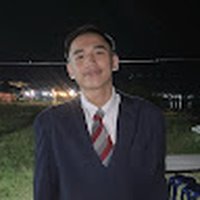 Christian Kho
base on the first picture, transfer that person on the second picture beside the logo "STARBUKS" and make it a whole body picture and shows that he's wearing a gray jogging pants
Comments (0)
Sign in to leave a comment
System Requirements
System Requirements Document for starbuks-person
1. Introduction
starbuks-person produces one edited composite image from two user-supplied photographs. It uses the person in the first photograph as the subject and the second photograph as the destination scene, placing the person beside the “STARBUKS” logo. The result must show the person full-body and wearing gray jogging pants.
The intended user is the Photo editor, who supplies the two images and receives the completed composite.
2. System Overview
The system’s current scope is a single image-editing outcome: transfer the person from the first supplied picture into the second picture beside the “STARBUKS” logo, render the person as a whole-body figure, and show him wearing gray jogging pants.
The two supplied pictures have distinct roles:
- First picture — person reference: the source of the person’s appearance and identity.
- Second picture — destination scene: the scene containing the “STARBUKS” logo where the person is to be placed.
The only accepted active human persona is Photo editor. No other human participant, review role, or recipient is specified. The delivery shape specifies no custom UI; therefore, this document does not define application pages or a custom interaction surface. The editing interaction and image delivery are treated as an external editing activity, not as a first-party application capability.
No additional editing tools, alternate outputs, account features, image library, or ongoing image-management workflow are in scope.
2a. Product Interpretation and Delivery Boundary
The accepted outcome is the edited image, not a specified application or custom interface. The Photo editor provides the two referenced pictures to an editing process or tool outside the defined custom-UI scope and receives the resulting composite. The first picture supplies the person; the second supplies the scene and “STARBUKS” logo. The result must place the person beside that logo, show the person full-body, and depict gray jogging pants.
The source does not specify a particular editing provider, file format, storage destination, or delivery mechanism. No provider or technology is selected here. No future requirements were supplied.
2c. Page Content and Component Coverage
No custom pages are defined. The accepted delivery shape specifies custom_ui: false, and the source does not request a first-party application interface. The image-editing outcome is owned by an external editing activity; this document does not add a page to represent it.
3. Functional Requirements
FR-1 — Use the first picture as the person reference
As a Photo editor, I should use the person in the first supplied picture as the subject of the composite.
- Provenance:
explicit - Trigger/input: The Photo editor supplies the first picture as the person reference.
- Observable result: The edited image depicts the person from that picture.
- Access state: No application identity or access control is specified.
- Failure and recovery: If the first picture is unavailable to the editing activity, the person cannot be transferred; provide the picture to that activity before continuing.
- Continuation: Use the second picture as the destination scene and complete the composite under FR-2 and FR-3.
- Owner: External editing activity.
FR-2 — Place the person beside the logo in the second picture
As a Photo editor, I should place the person from the first picture beside the “STARBUKS” logo in the second picture.
- Provenance:
explicit - Trigger/input: The Photo editor supplies the first picture as the person reference and the second picture as the destination scene.
- Observable result: The composite retains the second picture as its scene and shows the transferred person beside its “STARBUKS” logo.
- Access state: No application identity or access control is specified.
- Failure and recovery: If either picture is unavailable to the editing activity, the composite cannot be completed; provide the missing picture before continuing.
- Continuation: Complete the full-body and gray-jogging-pants requirements in FR-3, then deliver the edited image to the Photo editor.
- Owner: External editing activity.
FR-3 — Make the transferred person full-body and show gray jogging pants
As a Photo editor, I should receive a composite in which the transferred person is shown full-body and wearing gray jogging pants.
- Provenance:
explicit - Trigger/input: The Photo editor requests the composite using the two supplied pictures.
- Observable result: The person is visible as a whole-body figure, including the legs, and is wearing gray jogging pants; the person remains placed beside the “STARBUKS” logo in the second picture.
- Access state: No application identity or access control is specified.
- Failure and recovery: If the result does not show the person full-body or does not depict gray jogging pants, it does not meet the requirement; the editing activity must correct the composite before delivery.
- Continuation: Deliver the completed composite to the Photo editor.
- Owner: External editing activity.
4. User Personas
Photo editor
- Product context: The person commissioning the composite from two supplied photographs.
- Primary goal: Obtain one edited image that transfers the person from the first picture into the second picture beside the “STARBUKS” logo.
- Distinct accepted responsibilities: Supply the first picture as the person reference and the second picture as the destination scene; request a full-body result with gray jogging pants; receive the completed composite.
- Relevant inputs or decisions: The two source pictures and the requested placement and appearance.
- Interactions with other accepted participants: None; no other active human participant is specified.
- Observable success: Receives a composite showing the person from the first picture beside the logo in the second picture, full-body and wearing gray jogging pants.
- Provenance:
required_inferencepersona, grounded in the explicit image-editing request.
5. Core User Flows
Flow 1 — Create and receive the requested composite
- The Photo editor provides the first picture as the person reference and the second picture as the destination scene to the external editing activity.
- The Photo editor’s requested outcome is to transfer the person from the first picture into the second picture beside the “STARBUKS” logo.
- The editing activity produces a composite that retains the second picture as the scene and shows the transferred person full-body, wearing gray jogging pants.
- If either source picture is unavailable, the Photo editor provides the missing picture before the composite can be completed.
- If the result is not full-body or does not show gray jogging pants, the composite is corrected before delivery.
- The Photo editor receives the completed composite. No further workflow is specified.
6. Visuals Colors and Theme
No application interface or visual design direction is specified. The visual requirements apply to the edited image:
- Preserve the second picture as the destination scene.
- Place the person from the first picture beside the “STARBUKS” logo.
- Show the person full-body.
- Show the person wearing gray jogging pants.
No additional palette, typography, interface surface, or image treatment is specified.
7. Signature Design Concept
The signature visual outcome is a single composite that brings the person from the first picture into the second picture’s outdoor scene beside the existing “STARBUKS” sign. The person is shown head-to-toe and wearing gray jogging pants. The concept uses only the requested source subject, destination scene, placement, and clothing detail.
8. Interaction Model & Motion Direction
Interaction Model: Static
Motion Tempo: still
Hero Dimensionality: flat
Landing Hero Motion Brief
There is no public entry page or custom UI in the accepted delivery scope. The image itself is the static outcome: the person from the first picture appears beside the “STARBUKS” logo in the second picture, full-body and wearing gray jogging pants. No motion behavior is specified.
9. Non-Functional Requirements
No additional non-functional requirements are specified. The composite must satisfy the explicit visual outcome in FR-1 through FR-3; no performance, availability, privacy, retention, or file-format constraints are stated.
10. Tech Stack
No technology choices are specified. The accepted delivery shape has no custom UI, and the source does not identify an editing provider or implementation technology. No stack is prescribed.
11. Assumptions and Constraints
- Explicit constraint: The first supplied picture is the source for the person.
- Explicit constraint: The second supplied picture is the destination scene.
- Explicit constraint: Place the person beside the “STARBUKS” logo in the second picture.
- Explicit constraint: Show the person full-body and wearing gray jogging pants.
- Planning Scope constraint: Custom UI is not part of the accepted delivery shape.
- Unspecified: Editing provider, file format, delivery mechanism, storage, and any further image adjustments.
12. Glossary
- Person reference: The first supplied picture, used as the source for the person to transfer.
- Destination scene: The second supplied picture, containing the “STARBUKS” logo and serving as the scene for the composite.
- Composite: The edited image combining the person from the person reference with the destination scene.
No completed page designs yet.
Completed design pages will appear here when they are ready to preview.
No completed page designs yet.
Completed design pages will appear here when they are ready to preview.
No comments yet. Be the first!