AI Design Controls
Direct an AI design panel across color and color blocking, fabric and material, fit, collar, sleeves and cuffs, zippers, pockets, stitching, and text, graphics or embroidery placement.
 Aabida Khatun
Create a premium 3D clothing design website called “ClothForge 3D”. Users can upload a clothing reference image and turn it into an editable 3D garment. Show a realistic 3D model in the center with rotate, zoom, front/back and exploded-view controls. Add an AI design panel where users can change: • Color & color blocking • Fabric/material • Fit • Collar, sleeves & cuffs • Zipper, pockets & stitching • Text, graphics & embroidery Add AI Generate, Generate Variations, and Restyle buttons. Include: • Realistic fabric folds and textures • 360° 3D preview • Exploded technical view • Front/back technical drawings • Measurements & size chart • Automatic tech-pack generator • PNG/JPG/PDF export • Save projects and design versions UI: futuristic dark luxury fashion-tech style, black background, glassmorphism panels, smooth 3D animations, cinematic lighting, responsive mobile-first layout. Use React + TypeScript + Tailwind CSS + shadcn/ui + Three.js.

Sign in to leave a comment
ClothForge 3D is a premium 3D clothing design website that allows users to upload clothing reference images and transform them into editable 3D garments. The platform provides a realistic 3D model with interactive controls and AI-driven customization features. The target audience includes clothing designers who seek a futuristic and luxurious design tool to create and manage garment projects.
ClothForge 3D offers a comprehensive suite of tools for clothing designers to create, customize, and manage 3D garment designs. The system supports AI-driven design modifications, realistic 3D previews, and technical documentation generation. The platform is built using React, TypeScript, Tailwind CSS, shadcn/ui, and Three.js, ensuring a responsive and mobile-first experience. The visual direction is inspired by Gleb Kuznetsov, focusing on a futuristic dark luxury fashion-tech style.
ClothForge 3D is a web-based application that requires user authentication for accessing protected features such as project saving and version management. The application supports backend integration for persistence and execution of design operations. The system adheres to the constraints of using specified technologies and maintaining a futuristic visual style. The delivery scope includes all current requirements, with no additional future capabilities implied.
Not applicable as no explicit content_source directive was provided.
Upload and Edit Garment
Generate and Export Design
Manage Projects and Versions
The landing page features a full-bleed 3D garment model as the focal point, surrounded by glowing UI elements on a dark background. Interactive elements are highlighted with electric cyan and magenta accents. Floating glassmorphic panels provide access to AI design controls, creating a dynamic and luxurious feel.
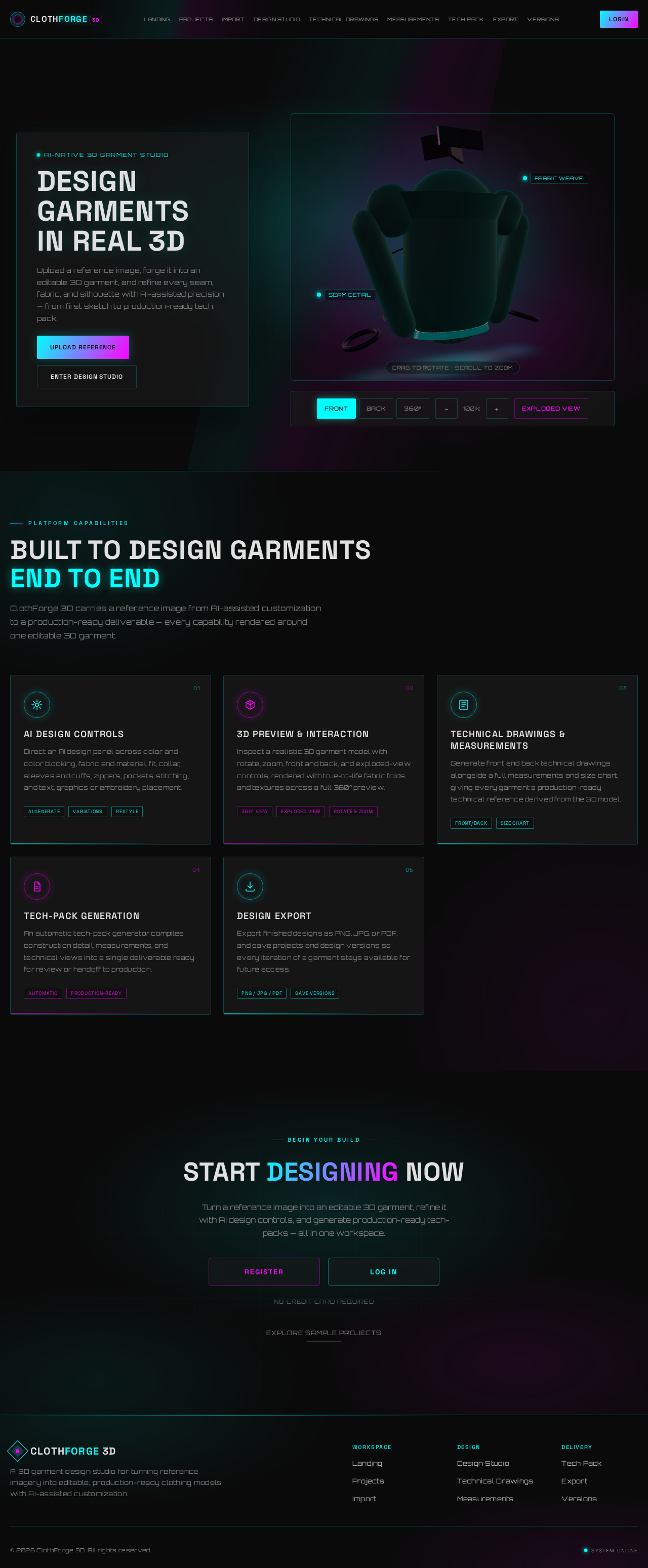
Upload a reference image, forge it into an editable 3D garment, and refine every seam, fabric, and silhouette with AI-assisted precision — from first sketch to production-ready tech pack.
ClothForge 3D carries a reference image from AI-assisted customization to a production-ready deliverable — every capability rendered around one editable 3D garment.
Direct an AI design panel across color and color blocking, fabric and material, fit, collar, sleeves and cuffs, zippers, pockets, stitching, and text, graphics or embroidery placement.
Inspect a realistic 3D garment model with rotate, zoom, front and back, and exploded-view controls, rendered with true-to-life fabric folds and textures across a full 360° preview.
Generate front and back technical drawings alongside a full measurements and size chart, giving every garment a production-ready technical reference derived from the 3D model.
An automatic tech-pack generator compiles construction detail, measurements, and technical views into a single deliverable ready for review or handoff to production.
Export finished designs as PNG, JPG, or PDF, and save projects and design versions so every iteration of a garment stays available for future access.
Turn a reference image into an editable 3D garment, refine it with AI design controls, and generate production-ready tech-packs — all in one workspace.
No credit card required
Explore Sample ProjectsUpload a reference image, forge it into an editable 3D garment, and refine every seam, fabric, and silhouette with AI-assisted precision — from first sketch to production-ready tech pack.
ClothForge 3D carries a reference image from AI-assisted customization to a production-ready deliverable — every capability rendered around one editable 3D garment.
Direct an AI design panel across color and color blocking, fabric and material, fit, collar, sleeves and cuffs, zippers, pockets, stitching, and text, graphics or embroidery placement.
Inspect a realistic 3D garment model with rotate, zoom, front and back, and exploded-view controls, rendered with true-to-life fabric folds and textures across a full 360° preview.
Generate front and back technical drawings alongside a full measurements and size chart, giving every garment a production-ready technical reference derived from the 3D model.
An automatic tech-pack generator compiles construction detail, measurements, and technical views into a single deliverable ready for review or handoff to production.
Export finished designs as PNG, JPG, or PDF, and save projects and design versions so every iteration of a garment stays available for future access.
Turn a reference image into an editable 3D garment, refine it with AI design controls, and generate production-ready tech-packs — all in one workspace.
No credit card required
Explore Sample Projects
No comments yet. Be the first!