staffing-recruiting
 PURVYNTRA Consulting
Make a website for global staffing and recruiting company


Comments (0)
Sign in to leave a comment
System Requirements
System Requirements Document for staffing-recruiting
1. Introduction
This System Requirements Document specifies the public website and protected working surfaces for Purvyntra Consulting, a global staffing and recruiting company. The product intent is to give the firm a credible, precise public presence that explains its staffing and recruiting services and its global reach, lets prospective hiring clients submit inquiries about their staffing needs, and lets job seekers browse open opportunities and submit their details or applications. The firm's own recruiting agency staff then review incoming inquiries and candidate applications in protected working destinations.
The audience is threefold: hiring clients (procurement, HR, and operations leaders) who need to trust the firm as a reliable instrument for placement in unfamiliar markets; job seekers who want to sense serious, well-run placement rather than a hypey job board; and the recruiting agency's own representatives, who present the firm's services and global reach and convert incoming interest into engagements.
The emotional register of the product is confidence, exactness, and quiet luxury — global reach expressed as calibrated data, not as a warm community or a startup launch.
2. System Overview
2a. Product Interpretation and Delivery Boundary
Purvyntra Consulting is delivered as a first-party web application: a React frontend served alongside a shared FastAPI backend process and a MariaDB database for application-owned persistent data. The public website — Landing, Services, Opportunities, Apply, and Hiring Inquiry — is anonymously reachable and requires no account. The protected working destinations — Inquiries and Candidates — are owned by the application and restricted to the recruiting agency's staff, who establish identity through self-service Sign Up and verify it on return through Login. No invitation or provisioning boundary is established by the source, so self-service enrollment is the truthful first-use path.
The public surfaces present the firm's services and global reach and accept inbound interest from hiring clients and job seekers. The protected surfaces let the firm's staff review that inbound interest. All inquiry and candidate records are application-owned and persist in the provisioned database. There is no accepted future horizon beyond the current scope; no additional capabilities, roles, or destinations are introduced.
2b. Source Content Inventory
Not applicable — no reference directive with content_source was supplied.
2c. Page Content and Component Coverage
Landing
- Information/state: Anonymous public entry. Presents the firm's identity as a global staffing and recruiting company, a condensed all-caps headline stack ("GLOBAL TALENT. / CALIBRATED / PLACEMENT."), one supporting sentence, and a circular instrument gauge cluster with ruled readouts (Countries, Placements, Time-to-shortlist) in tabular numerals.
- Primary actions: Navigate to Services, Opportunities, and Hiring Inquiry; rectangular amber CTA "Brief us on a role" leading to Hiring Inquiry.
- Supporting actions: Navigate to Login and Sign Up for recruiting agency staff.
- Domain entities: Global reach figures (countries, placements, retention); service summary.
- Component responsibilities: Hero composition (left 7-column headline stack on hairline rules with amber index ticks; right 5-column CSS gauge cluster with titanium bezel, amber needle, three ruled readouts); persistent left rail of section numerals (01–06) with hairline vertical rule and amber index ticks; topographic line texture at 6% opacity behind hero; navigation to public and identity surfaces.
- States: Loading — gauge renders at resting needle position, counters at zero until first view. Empty — not applicable (static marketing content). Success — counters count up once on first view; needle sweeps once on load. Error — if reach figures fail to load, ruled readouts display muted placeholders without breaking layout. Recovery — reduced-motion users see final values and resting needle immediately.
Services
- Information/state: Public destination describing the firm's staffing and recruiting service offerings and its global presence. Modular instrument-panel grid of unequal tiles (2 large, 4 small) with ruled data inside each tile.
- Primary actions: Read service descriptions; navigate to Hiring Inquiry to brief the firm on a role.
- Supporting actions: Navigate to Opportunities; navigate to Landing.
- Domain entities: Service offerings; global presence information (regions, countries served).
- Component responsibilities: Instrument-panel tile grid; ruled label/value data rows; section numerals in left rail; amber tick marks at section edges.
- States: Loading — tiles render with surface panels and muted skeleton rules. Empty — not applicable (static content). Success — all service tiles and global presence data render. Error — if global presence data fails, tiles display service descriptions with a muted "data unavailable" rule. Recovery — retry on next navigation.
Opportunities
- Information/state: Public browse destination listing open job opportunities as a ruled table with tabular numerals for location, discipline, and posted date — not a card grid.
- Primary actions: Review open opportunities; select an opportunity to proceed to Apply.
- Supporting actions: Navigate to Services; navigate to Landing.
- Domain entities: Job opportunity (title, location, discipline, posted date).
- Component responsibilities: Ruled instrument table with aligned label/value pairs and tabular numerals; row selection leading to Apply; persistent filter bar.
- States: Loading — table renders with ruled header and muted placeholder rows. Empty — a ruled message states no open opportunities are currently listed, with a link to submit details via Apply. Success — opportunities listed with tabular numerals. Error — a ruled error row with retry action. Recovery — retry reloads the list.
Apply
- Information/state: Focused public destination where a job seeker submits an application or candidate details for consideration. Form set as an instrument readout: label on the left in 12px engraved micro-caps, value field on a surface panel with a 2px amber focus rule and chamfered 2px corner, live character-count readout in the corner.
- Primary actions: Enter candidate details and submit the application.
- Supporting actions: Optionally select the opportunity being applied for (carried from Opportunities); navigate back to Opportunities.
- Domain entities: Candidate application (name, contact details, role/discipline, opportunity reference, submitted details).
- Component responsibilities: Instrument-readout form fields; validation rules; submit control with amber underline; confirmation readout on success.
- States: Loading — submit control shows a precise 160ms state change while the request is in flight. Empty — form fields blank with micro-cap labels. Success — a ruled confirmation readout confirms the application was received. Error — field-level validation messages in amber; submission failure shows a ruled error with retry. Recovery — entered values are preserved on failure so the seeker can resubmit.
Hiring Inquiry
- Information/state: Focused public destination where a prospective hiring client submits an inquiry describing their staffing needs. Same instrument-readout form treatment as Apply.
- Primary actions: Enter inquiry details (company, contact, staffing need, roles, regions) and submit.
- Supporting actions: Navigate to Services to review offerings before submitting; navigate to Landing.
- Domain entities: Hiring inquiry (company, contact, staffing need description, roles, regions, submitted date).
- Component responsibilities: Instrument-readout form fields; validation; submit control; confirmation readout.
- States: Loading — submit control shows in-flight state. Empty — blank fields with micro-cap labels. Success — ruled confirmation readout confirms the inquiry was received. Error — field-level validation in amber; submission failure shows ruled error with retry. Recovery — values preserved on failure.
Inquiries
- Information/state: Protected working destination, restricted to recruiting agency staff, where incoming hiring inquiries are reviewed and interest is converted into engagements. Dark ruled worklist with a persistent filter bar.
- Primary actions: Review incoming hiring inquiries; open an inquiry's details; record engagement/conversion status.
- Supporting actions: Filter the worklist; navigate to Candidates.
- Domain entities: Hiring inquiry record with status (new, in review, engaged).
- Component responsibilities: Persistent filter bar; ruled worklist table with tabular numerals; inquiry detail panel; status control.
- States: Loading — worklist renders with ruled header and muted placeholder rows. Empty — ruled message states no inquiries have been received. Success — inquiries listed with status. Error — ruled error row with retry. Recovery — retry reloads; unauthenticated access redirects to Login.
Candidates
- Information/state: Protected working destination, restricted to recruiting agency staff, where incoming candidate applications and details are reviewed for consideration. Dark ruled worklist with a persistent filter bar.
- Primary actions: Review incoming candidate applications; open a candidate's details; record consideration status.
- Supporting actions: Filter the worklist; navigate to Inquiries.
- Domain entities: Candidate application record with status (new, in review, shortlisted).
- Component responsibilities: Persistent filter bar; ruled worklist table with tabular numerals; candidate detail panel; status control.
- States: Loading — worklist renders with ruled header and muted placeholder rows. Empty — ruled message states no applications have been received. Success — candidates listed with status. Error — ruled error row with retry. Recovery — retry reloads; unauthenticated access redirects to Login.
Login
- Information/state: Anonymous identity-access surface for returning recruiting agency staff. Single narrow column centred on graphite with a bezel-framed heading.
- Primary actions: Enter credentials and verify identity to reach protected destinations.
- Supporting actions: Navigate to Sign Up for first use.
- Domain entities: Staff identity (email, password).
- Component responsibilities: Bezel-framed heading; instrument-readout credential fields; submit control; error readout.
- States: Loading — submit control shows in-flight state. Empty — blank fields. Success — redirect to Inquiries. Error — ruled error readout for invalid credentials. Recovery — fields preserved; retry permitted.
Sign Up
- Information/state: Anonymous first-use enrollment for recruiting agency staff. Single narrow column centred on graphite with a bezel-framed heading.
- Primary actions: Establish a staff identity with credentials and enroll.
- Supporting actions: Navigate to Login for returning staff.
- Domain entities: Staff identity (name, email, password).
- Component responsibilities: Bezel-framed heading; instrument-readout enrollment fields; submit control; error readout.
- States: Loading — submit control shows in-flight state. Empty — blank fields. Success — identity established and redirected to Inquiries. Error — ruled error readout for duplicate email or validation failure. Recovery — fields preserved; retry permitted.
3. Functional Requirements
FR-1 — Public website for a global staffing and recruiting company (explicit) As a visitor, I should see a public website that presents Purvyntra Consulting as a global staffing and recruiting company, so that I understand who the firm is and what it does.
- Trigger: visitor opens Landing.
- Observable result: Landing renders the firm's identity, headline stack, supporting sentence, and gauge cluster with reach readouts.
- Access: anonymous, no account.
- Failure/recovery: if reach figures fail to load, muted placeholders render without breaking layout; reduced-motion users see final values.
- Continuation: visitor navigates to Services, Opportunities, or Hiring Inquiry.
FR-2 — Showcase services and global reach (explicit) As a visitor, I should browse the firm's staffing and recruiting services and its global reach, so that I can evaluate whether the firm fits my needs.
- Trigger: visitor opens Services.
- Observable result: instrument-panel grid of service tiles with ruled global-presence data.
- Access: anonymous.
- Failure/recovery: if global presence data fails, service descriptions still render with a muted "data unavailable" rule.
- Continuation: visitor proceeds to Hiring Inquiry or Opportunities.
FR-3 — Submit a hiring inquiry (explicit) As a Hiring Client, I should submit an inquiry describing my staffing needs, so that the firm can engage with me.
- Trigger: Hiring Client completes and submits the Hiring Inquiry form.
- Observable result: a ruled confirmation readout confirms receipt; the inquiry is persisted as an application-owned record visible in Inquiries.
- Access: anonymous.
- Failure/recovery: field-level validation in amber; submission failure shows a ruled error with retry and preserves entered values.
- Continuation: Hiring Client may return to Services or Landing.
FR-4 — Browse open opportunities (explicit) As a Job Seeker, I should browse open job opportunities, so that I can find roles to apply for.
- Trigger: Job Seeker opens Opportunities.
- Observable result: ruled table of open opportunities with tabular numerals for location, discipline, and posted date.
- Access: anonymous.
- Failure/recovery: empty state states no opportunities are listed with a link to Apply; error state offers retry.
- Continuation: Job Seeker selects an opportunity to proceed to Apply.
FR-5 — Submit candidate details or application (explicit) As a Job Seeker, I should submit my details or application for consideration, so that the firm can consider me for roles.
- Trigger: Job Seeker completes and submits the Apply form.
- Observable result: a ruled confirmation readout confirms receipt; the application is persisted as an application-owned record visible in Candidates.
- Access: anonymous.
- Failure/recovery: field-level validation in amber; submission failure shows a ruled error with retry and preserves entered values.
- Continuation: Job Seeker may return to Opportunities.
FR-6 — Self-service enrollment for recruiting agency staff (required_inference) As a Recruiting Agency Representative, I should complete self-service enrollment before accessing protected inquiry and candidate records, so that I can establish an application-owned identity.
- Trigger: staff member opens Sign Up and submits enrollment details.
- Observable result: identity established; redirect to Inquiries.
- Access: anonymous entry; protected state unavailable until identity is established.
- Failure/recovery: duplicate email or validation failure shows a ruled error readout; fields preserved for retry.
- Continuation: staff member proceeds to Inquiries.
FR-7 — Returning identity verification (required_inference) As a Recruiting Agency Representative, I should verify my identity on return before accessing protected working destinations, so that inquiry and candidate records remain bound to the correct staff member.
- Trigger: staff member opens Login and submits credentials.
- Observable result: verified session; redirect to Inquiries.
- Access: anonymous entry; protected destinations unavailable until verified.
- Failure/recovery: invalid credentials show a ruled error readout; fields preserved for retry.
- Continuation: staff member proceeds to Inquiries or Candidates.
FR-8 — Review incoming hiring inquiries (required_inference) As a Recruiting Agency Representative, I should review incoming hiring inquiries and convert interest into engagements, so that the firm can respond to client needs.
- Trigger: verified staff member opens Inquiries.
- Observable result: ruled worklist of inquiries with status; staff can open details and record engagement status.
- Access: role-restricted; unauthenticated access redirects to Login.
- Failure/recovery: empty state states no inquiries received; error state offers retry.
- Continuation: staff member may navigate to Candidates.
FR-9 — Review incoming candidate applications (required_inference) As a Recruiting Agency Representative, I should review incoming candidate applications and details for consideration, so that the firm can evaluate candidates.
- Trigger: verified staff member opens Candidates.
- Observable result: ruled worklist of applications with status; staff can open details and record consideration status.
- Access: role-restricted; unauthenticated access redirects to Login.
- Failure/recovery: empty state states no applications received; error state offers retry.
- Continuation: staff member may navigate to Inquiries.
4. User Personas
Hiring Client
A company representative — typically in procurement, HR, or operations — who needs to fill roles and evaluates the staffing firm's services and expertise. Their product context is the public website: they arrive to judge whether Purvyntra Consulting is a reliable instrument for placement in unfamiliar markets. Their primary goal is to engage the firm to source candidates. Their distinct accepted responsibility is submitting a hiring inquiry describing their staffing needs; they browse Services to assess offerings and global reach, then complete the Hiring Inquiry form. Their relevant inputs are company details, contact information, staffing need description, roles, and regions. They interact with the Recruiting Agency Representative indirectly: their submitted inquiry becomes a record the representative reviews in Inquiries. Their observable success is a ruled confirmation readout confirming the inquiry was received.
Job Seeker
A candidate looking for placement through the staffing company. Their product context is the public Opportunities and Apply surfaces. Their primary goal is to be considered for roles. Their distinct accepted responsibilities are browsing open opportunities and submitting their details or application. Their relevant inputs are the opportunity they select, their contact details, role/discipline, and submitted details. They interact with the Recruiting Agency Representative indirectly: their submitted application becomes a record the representative reviews in Candidates. Their observable success is a ruled confirmation readout confirming the application was received.
Recruiting Agency Representative
The staffing company's own staff member. Their product context is both the public surfaces — where they present the firm's services and global reach — and the protected working destinations. Their primary goal is converting incoming interest into engagements. Their distinct accepted responsibilities are establishing identity through self-service Sign Up, verifying identity on return through Login, reviewing incoming hiring inquiries in Inquiries, and reviewing incoming candidate applications in Candidates. Their relevant inputs are their credentials and the inquiry and candidate records. They interact with Hiring Clients and Job Seekers indirectly through the records those participants submit. Their observable success is a populated, filterable worklist in Inquiries and Candidates where they can record engagement and consideration status.
5. Core User Flows
Flow A — Hiring Client submits a hiring inquiry
- Hiring Client opens Landing (anonymous) and reads the firm's identity and reach readouts.
- Hiring Client navigates to Services to review staffing and recruiting offerings and global presence.
- Hiring Client selects the CTA "Brief us on a role" and arrives at Hiring Inquiry.
- Hiring Client enters company, contact, staffing need, roles, and regions into the instrument-readout form.
- Hiring Client submits; the submit control shows an in-flight state.
- On success, a ruled confirmation readout confirms the inquiry was received; the inquiry is persisted as an application-owned record.
- On failure, field-level validation appears in amber or a ruled error with retry is shown; entered values are preserved.
- Hiring Client may return to Services or Landing.
Flow B — Job Seeker browses opportunities and applies
- Job Seeker opens Opportunities (anonymous) and reviews the ruled table of open opportunities with tabular numerals for location, discipline, and posted date.
- If no opportunities are listed, a ruled empty message appears with a link to Apply.
- Job Seeker selects an opportunity and proceeds to Apply.
- Job Seeker enters candidate details and submits; the submit control shows an in-flight state.
- On success, a ruled confirmation readout confirms the application was received; the application is persisted as an application-owned record.
- On failure, field-level validation appears in amber or a ruled error with retry is shown; entered values are preserved.
- Job Seeker may return to Opportunities.
Flow C — Recruiting Agency Representative enrolls and reviews records
- Recruiting Agency Representative opens Sign Up (anonymous) and submits enrollment details.
- On success, identity is established and the representative is redirected to Inquiries.
- On failure (duplicate email or validation), a ruled error readout appears; fields are preserved for retry.
- In Inquiries, the representative reviews the ruled worklist of incoming hiring inquiries, opens details, and records engagement status.
- The representative navigates to Candidates and reviews the ruled worklist of incoming candidate applications, opens details, and records consideration status.
- On return visits, the representative opens Login, submits credentials, and is redirected to Inquiries on success; invalid credentials show a ruled error readout with fields preserved.
- Unauthenticated access to Inquiries or Candidates redirects to Login.
6. Visuals Colors and Theme
Muse: MARQ by Garmin (luxury instrument aesthetic). Headline: "Precision instrument for a global talent network — dark titanium, champagne dials, amber signal."
Palette (dark mode):
- Background:
#14171A(graphite-titanium ground) - Surface:
#1E2328(lifted panel) - Text:
#F2EEE6(warm off-white) - Primary:
#C9A227(champagne-amber — single instrument accent: dial needles, active nav marker, section numerals, CTA fill with near-black text) - Accent:
#3FA9A0(teal — sparing second signal: availability, verified badges, live counters) - Muted:
#8A9099(labels, captions, ruled data rows)
Champagne-amber covers roughly 8% of any screen; teal under 3%; the rest is graphite, surface, and warm white. Contrast: #F2EEE6 on #14171A and on #1E2328 both exceed 12:1; #14171A on #C9A227 exceeds 9:1.
Typography:
- Headings: Barlow Condensed, all-caps, weight 600–700, tracking -0.01em to 0.02em.
- Data/numerals: Barlow Condensed tabular at 700.
- Body: Saira 400/500 at generous line-height.
- Micro-labels: Saira 600 uppercase with 0.14em tracking.
- Scale (1.333 modular on 4px baseline): display 56px mobile → 128px desktop (
clamp(3.5rem, 9vw, 8rem)); h2 34px → 64px; h3 24px → 36px; data numerals 40px → 72px; body 16px → 18px; micro-label 11px → 12px. Line-height 0.94 on display, 1.6 on body.
Shape language: Circular gauges and bezels; hairline 1px titanium rules with 2px inner bevel highlight; ruled data rows with aligned label/value pairs; edge-to-edge macro photography with hard square crops; chamfered 2px corners on panels (not pill-soft); amber tick marks at section edges like dial indices. Buttons are rectangular with a 2px amber underline that thickens on hover, not rounded pills.
Layout: 12-column grid with a persistent left rail of section numerals (01–06) and a hairline vertical rule; content blocks align to ruled baselines. Hero is full-bleed dark with a large circular gauge cluster on the right and condensed display type stacked on the left. Services uses a modular instrument-panel grid of unequal tiles (2 large, 4 small). Opportunities is a ruled table with tabular numerals. Forms are set as instrument readouts. Login and Sign Up are single narrow columns centred on graphite with a bezel-framed heading. Inquiries and Candidates are dark ruled worklists with a persistent filter bar.
Imagery: Macro photography of titanium, brushed steel, and sapphire surfaces as hero ground and section dividers; topographic line textures at 6% opacity; expedition-style documentary photography of people at work in different regions, treated monochrome-graphite with warm highlights, cropped edge-to-edge; engineered dial and gauge graphics built in CSS. No stock smiling handshakes, no flat clip art, no gradient blobs.
7. Signature Design Concept
The public entry (Landing) is a full-bleed graphite hero with no centred stack. The left 7 columns carry a 56px→128px Barlow Condensed all-caps headline stacked in three tight lines — "GLOBAL TALENT. / CALIBRATED / PLACEMENT." — each line sitting on a hairline rule with a small amber index tick at the left margin. Beneath it, one 18px Saira sentence and a rectangular amber CTA "Brief us on a role" with a 2px amber underline. The right 5 columns carry a large circular instrument gauge cluster (~420px desktop, 240px mobile) rendered in CSS with a titanium bezel, an amber needle resting at a placement figure, and three ruled readouts below it (Countries, Placements, Time-to-shortlist) in tabular numerals. The gauge overlaps the right edge of the viewport by 15% as a deliberate crop, but all text and controls stay fully inside. A faint topographic line texture sits behind the whole hero at 6% opacity. A persistent left rail of section numerals (01–06) with a hairline vertical rule and amber index ticks runs the length of the site, so the whole product reads like a calibrated instrument panel.
8. Interaction Model & Motion Direction
Interaction Model: Animated Motion Tempo: cinematic Hero Dimensionality: dimensional_css
Landing Hero Motion Brief
- Focal subject: The CSS-built circular instrument gauge cluster with titanium bezel and amber needle, resting at a placement figure, with three ruled tabular readouts beneath it.
- Input → transformation → outcome thesis: On load, the amber needle sweeps once (900ms ease-out, never looping) from its zero position to the resting placement figure while the reach counters (42 countries, 1,800 placements, 96% retention) count up once on first view; the outcome is a calibrated instrument at rest, presenting the firm's global reach as measured data.
- Motion vocabulary: Needle sweeps on gauge load (one 900ms ease-out sweep, never looping); counting numerals that count up once on first view; slow 12s product turntable on the hero macro image; precise 160ms state changes on hover and focus; scroll reveals as single-subject fades with 8px rise.
- Composed first frame: Graphite ground with topographic texture at 6% opacity; left headline stack on hairline rules with amber index ticks; right gauge cluster with needle at zero and counters at zero; CTA with amber underline.
- Reduced-motion state: Counters snap to final values; gauges render at their resting needle position; the turntable becomes a static crop; scroll reveals render immediately.
9. Non-Functional Requirements
- NFR-1 — Readable text and controls stay whole (explicit): Headlines, wordmarks, labels, numbers, cards' text, and controls stay entirely inside the viewport and their container at 375px, 768px, and 1280px, wrapping or scaling to fit; no other element covers any part of them. Imagery, decoration, and motion may be cropped, bled, rotated, overlapped, or cut as the direction asks, provided they cover no readable text or control.
- NFR-2 — Reduced motion (explicit): Under
prefers-reduced-motion, counters snap to final values, gauges render at resting needle position, the turntable becomes a static crop, and scrollable rows wrap or allow horizontal scrolling so each item can be brought fully into view. - NFR-3 — Contrast (explicit):
#F2EEE6on#14171Aand on#1E2328exceed 12:1;#14171Aon#C9A227exceeds 9:1. - NFR-4 — Persistent application-owned data (required_inference): Hiring inquiries and candidate applications persist in the provisioned MariaDB database and remain bound to the correct records for staff review.
- NFR-5 — Protected access (required_inference): Inquiries and Candidates are role-restricted to verified recruiting agency staff; unauthenticated access redirects to Login.
- NFR-6 — No forbidden template look (explicit): The generic indigo/blue-on-white SaaS template is forbidden; Inter, Roboto, Arial, Helvetica, Poppins, or system-ui are not used anywhere.
10. Tech Stack
- Frontend: React application UI.
- Backend: Shared FastAPI process for application APIs and domain modules (inquiries, candidates, staff identity).
- Database: MariaDB for application-owned persistent data.
- Deployment: docker-compose with the provisioned services (backend, database, frontend).
11. Assumptions and Constraints
- A-1 (required_inference): Self-service enrollment is the truthful first-use path because no invitation or provisioning boundary is established by the source.
- A-2 (required_inference): Staff identity is application-owned and bound to inquiry and candidate records so that protected state remains with the correct participant.
- A-3 (explicit): The public surfaces (Landing, Services, Opportunities, Apply, Hiring Inquiry) are anonymously reachable and require no account.
- A-4 (explicit): The product is delivered as a first-party web application; no provider-owned or external-only surfaces are accepted.
- A-5 (explicit): No future horizon is accepted beyond the current scope.
12. Glossary
- Hiring Client: A company representative who evaluates the firm's services and submits a hiring inquiry describing staffing needs.
- Job Seeker: A candidate who browses open opportunities and submits details or an application for consideration.
- Recruiting Agency Representative: The staffing company's own staff member who enrolls, verifies identity, and reviews incoming inquiries and candidate applications.
- Hiring Inquiry: A submitted record describing a client's staffing needs, reviewed in Inquiries.
- Candidate Application: A submitted record of a job seeker's details or application, reviewed in Candidates.
- Instrument-readout form: A form styled as a label/value row on a surface panel with a 2px amber focus rule and chamfered 2px corner.
- Gauge cluster: The CSS-built circular instrument with titanium bezel, amber needle, and ruled tabular readouts on the Landing hero.
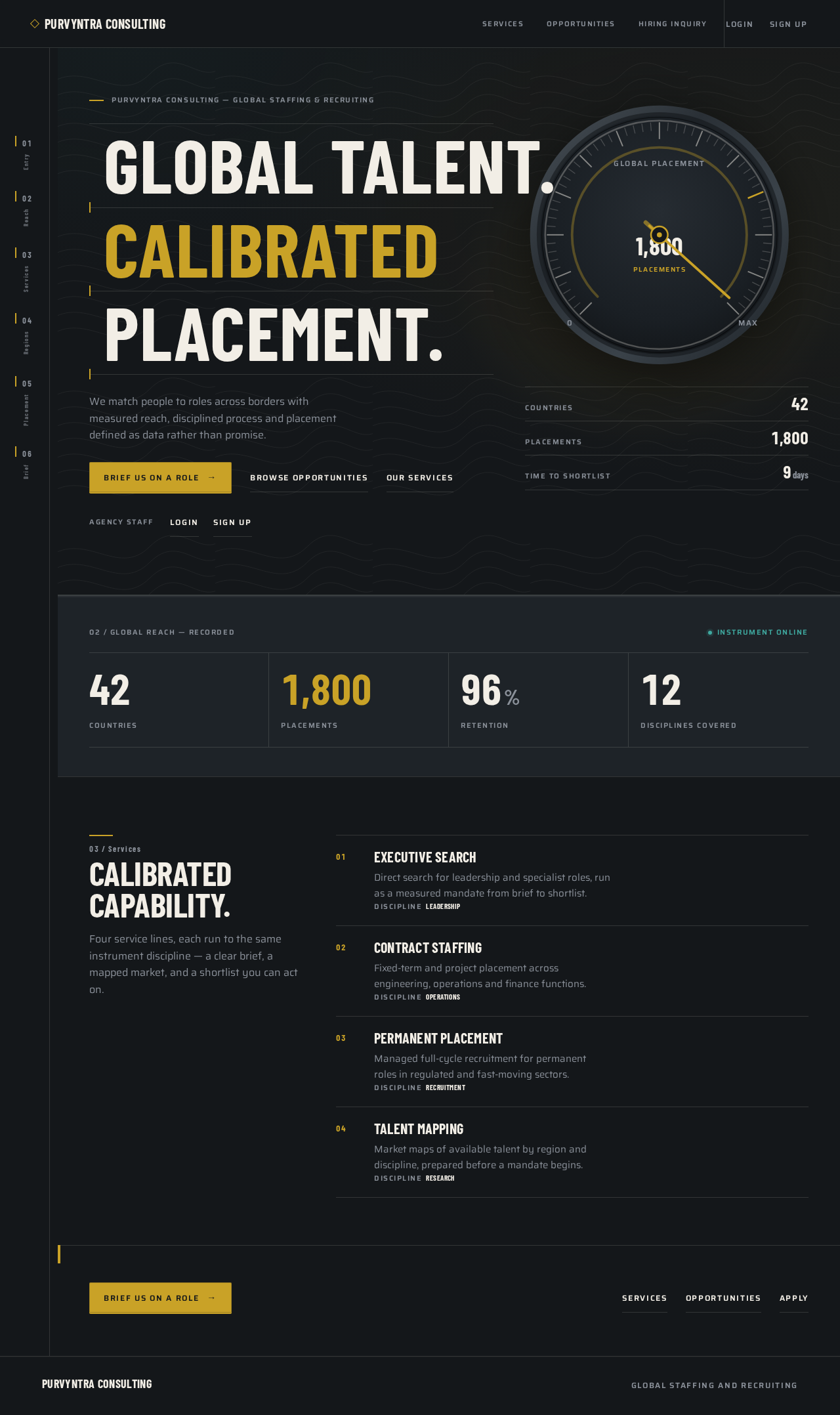
Global Talent.CalibratedPlacement.
We match people to roles across borders with measured reach, disciplined process and placement defined as data rather than promise.
- Countries42
- Placements1,800
- Time to Shortlist9days
- 0Countries
- 0Placements
- 0%Retention
- 0Disciplines Covered
Calibrated
Capability.
Four service lines, each run to the same instrument discipline — a clear brief, a mapped market, and a shortlist you can act on.
- 01
Executive Search
Direct search for leadership and specialist roles, run as a measured mandate from brief to shortlist.
DisciplineLeadership - 02
Contract Staffing
Fixed-term and project placement across engineering, operations and finance functions.
DisciplineOperations - 03
Permanent Placement
Managed full-cycle recruitment for permanent roles in regulated and fast-moving sectors.
DisciplineRecruitment - 04
Talent Mapping
Market maps of available talent by region and discipline, prepared before a mandate begins.
DisciplineResearch
Global Talent.CalibratedPlacement.
We match people to roles across borders with measured reach, disciplined process and placement defined as data rather than promise.
- Countries42
- Placements1,800
- Time to Shortlist9days
- 0Countries
- 0Placements
- 0%Retention
- 0Disciplines Covered
Calibrated
Capability.
Four service lines, each run to the same instrument discipline — a clear brief, a mapped market, and a shortlist you can act on.
- 01
Executive Search
Direct search for leadership and specialist roles, run as a measured mandate from brief to shortlist.
DisciplineLeadership - 02
Contract Staffing
Fixed-term and project placement across engineering, operations and finance functions.
DisciplineOperations - 03
Permanent Placement
Managed full-cycle recruitment for permanent roles in regulated and fast-moving sectors.
DisciplineRecruitment - 04
Talent Mapping
Market maps of available talent by region and discipline, prepared before a mandate begins.
DisciplineResearch
No comments yet. Be the first!