spring-plumbing
 Bhoomi Panchal
Build a professional, modern, and responsive website for a **plumbing business based in the United States**. The website should have a clean and professional design, simple navigation, and an easy-to-use structure that helps potential customers understand the business and get in touch. ### Core Requirements - Professional and modern website design - Responsive experience across desktop, tablet, and mobile - Clear and simple navigation - Homepage introducing the plumbing business - About page - Plumbing services page - Service area/location information - Contact page - Customer inquiry/contact form - Clear call-to-action buttons for customers to get in touch - Business information and contact details - User-friendly layout and experience - Website setup and complete functional implementation - Structure that supports the business's online visibility The final website should be practical, easy to use, visually professional, and focused on helping the plumbing business generate customer inquiries. Do not add complex or unrelated features. Keep the scope focused on a professional plumbing business website and the requirements above.


Comments (0)
Sign in to leave a comment
System Requirements
System Requirements Document for spring-plumbing
1. Introduction
spring-plumbing is the website for a plumbing business based in the United States. The product intent is a professional, modern, and responsive marketing website that helps potential customers understand the business and get in touch, and that is focused on generating customer inquiries.
The site presents the business itself (homepage introduction, about page), what it does (plumbing services page), where it works (service area/location information), and how to reach it (contact page with business information, contact details, a customer inquiry/contact form, and clear call-to-action buttons). The business owner maintains the authoritative business information, contact details, service descriptions, and service-area information so the site stays current and supports the business's online visibility.
The audience is two-fold: prospective customers — homeowners and property owners in the United States who need plumbing help and are evaluating this business — and the business owner / site administrator who keeps the site's content accurate and professional.
The scope is deliberately narrow. The site is a focused professional plumbing business website and the requirements listed here; complex or unrelated features are excluded.
2. System Overview
spring-plumbing is a responsive, multi-page website with a public customer-facing surface and a small protected administrative surface.
Public surface (no sign-in required). Prospective customers browse the Homepage, About page, Plumbing services page, Service area/location information, and Contact page. From any of these they can act on clear call-to-action buttons to get in touch, and on the Contact page they can submit a customer inquiry/contact form with their contact details. Business information and contact details (phone, hours, license/insured status, address) are presented plainly and are never buried below the fold.
Protected surface (business owner only). The business owner / site administrator signs in through the Login page and then maintains the site's authoritative content in two focused working areas: Business Settings (business information and contact details) and Service Management (plumbing service descriptions and service-area information). These protected pages are role-restricted to the signed-in administrator.
Inquiry handling. A submitted customer inquiry is handled by the backend so it reaches the business owner; the customer sees an observable confirmation that their inquiry was received.
Actors. Two accepted human personas: the Prospective Customer and the Business Owner / Site Administrator. The backend inquiry-handling process is a system actor, not a persona.
Exclusions. No complex or unrelated features are added. The site does not include scheduling/booking engines, payments, customer accounts, e-commerce, chat, or any capability beyond a professional plumbing business website and the requirements above.
2a. Product Interpretation and Delivery Boundary
The website is first-party and application-owned. Public pages are openly reachable by anyone; the administrative pages require the business owner to establish and then verify their own identity, because the business information, contact details, service descriptions, and service-area information are durable, authoritative content that must remain bound to the correct owner and be resumable across visits.
The anonymous entry boundary is the Login page, which is reachable without being signed in and which owns the interaction that establishes access to the protected pages. The protected pages (Business Settings, Service Management) never own the interaction that grants access to themselves.
Customer inquiries are delivered to the business owner through backend handling; the customer's own interaction (filling and submitting the form) and its observable confirmation remain on the Contact page.
Everything described in this document is current. No future-horizon capabilities are defined.
2b. Source Content Inventory
Not applicable. No reference directive with content_source authority was supplied, so no verified factual inventory is reproduced here. Business-specific facts (phone number, address, license number, service towns, ZIP codes, response windows) are supplied and maintained by the business owner through Business Settings and Service Management rather than invented in this document.
2c. Page Content and Component Coverage
Homepage
- Information/state: Business introduction; plain-language promise; license/insured/local trust signals; a summary of what the business does; a preview of the service categories; a preview of the service area; primary contact details (phone, hours) visible without scrolling past the fold.
- Primary actions: "Request service" (deep blue, solid) and "Call (business phone)" (outlined, number in tabular figures); navigation to About, Services, Service Area, and Contact.
- Supporting actions: Jump to the service table preview; jump to the service-area diagram preview; open the Contact page form.
- Domain entities: Business profile (name, phone, hours, license/insured status, service region), service category, service area entry.
- Component responsibilities: Hero (asymmetric split, left 7 columns text / right 5 columns annotated documentary photograph); numbered section rail (01 Services, 02 Service Area, 03 About, 04 Contact); full-bleed 2px section rules with flush-left numbered labels; response-time stat counters; sticky mobile action bar at 375px.
- States: Loading (skeleton for hero image and stat counters); empty (if a service or service-area entry has not yet been published, the corresponding preview block is omitted rather than shown blank); success (content rendered, counters counted once, diagram lines drawn once on scroll into view); error (hero image fails → the annotated photograph is replaced by a plain ruled panel with the same labels as text, layout intact); recovery (retry image load; all text and controls remain readable and operable).
Login
- Information/state: Anonymous entry surface for the business owner; identity-establishment (first use) and returning-verification states; no protected content is shown before identity is established.
- Primary actions: Establish identity on first use; verify identity on return; continue to the protected pages.
- Supporting actions: Recover from a failed verification attempt; return to the public site.
- Domain entities: Administrator identity, session.
- Component responsibilities: Label-above form fields; required-field marks in accent orange; rectangular submit control with a 2px darker bottom edge; inline error region.
- States: Loading (submit in progress, control disabled); empty (blank fields with labels and required marks); success (identity established or verified → redirect to the intended protected page); error (invalid credentials or incomplete required fields → inline message, fields preserved, no protected content revealed); recovery (correct and resubmit; the anonymous entry remains reachable).
About page
- Information/state: Who the business is; how it works; license/insured/local credibility; the people and standards behind the work; plain-language, non-promotional copy.
- Primary actions: "Request service" and "Call (business phone)".
- Supporting actions: Navigate to Services, Service Area, and Contact.
- Domain entities: Business profile, credentials/trust signals.
- Component responsibilities: Numbered section rail; full-bleed rules; documentary annotated photographs with 12px uppercase leader-line labels; verified/insured/licensed badges in green.
- States: Loading (text-first render, images deferred); empty (a credential block with no published value is omitted, not shown as a placeholder); success (full content rendered); error (image failure → ruled panel with the same labels as text); recovery (retry; text remains complete).
Plumbing services page
- Information/state: The plumbing services offered, presented as a ruled table: service name, plain-language description, typical response window in tabular figures, and a 3px colour-coded category bar.
- Primary actions: "Request service" and "Call (business phone)" per service row and at page level.
- Supporting actions: Filter or scan by category colour code; navigate to Service Area and Contact.
- Domain entities: Service (name, description, response window, category).
- Component responsibilities: Ruled service table; category colour bars; service pictograms on a 24px grid with 2px strokes; numbered section rail; full-bleed rules.
- States: Loading (ruled skeleton rows); empty (no published services → a single ruled row stating that services are being updated, with the call control still present); success (all published services listed with every label intact); error (a row's data fails to load → that row shows an inline retry rather than disappearing); recovery (retry the row; the rest of the table stays usable).
Service area/location information
- Information/state: A wayfinding diagram of served towns with numbered circular markers, mirrored by a numbered list of towns and ZIP codes; ZIP-code lookup field; coverage notes.
- Primary actions: Enter a ZIP code to check coverage; "Request service" and "Call (business phone)".
- Supporting actions: Select a numbered marker or list entry to highlight the matching pair; navigate to Services and Contact.
- Domain entities: Service area entry (town name, ZIP code, marker number).
- Component responsibilities: 2px-stroke schematic map; numbered markers; mirrored numbered list; ZIP lookup field; accent-orange highlight for the matching marker; numbered section rail; full-bleed rules.
- States: Loading (diagram draws its connecting lines once on scroll into view, then holds); empty (no published service areas → the diagram is replaced by a ruled notice with the call control still present); success (matching marker highlighted in accent orange and its list entry brought into view); error (ZIP not covered → a plain ruled message stating the ZIP is outside the published service area, with the call control offered); recovery (clear the field and try another ZIP; the diagram returns to its unhighlighted state).
Contact page
- Information/state: Business information and contact details (phone, hours, address, license/insured status); the customer inquiry/contact form with label-above fields; required-field marks in accent orange.
- Primary actions: Submit the customer inquiry/contact form; "Call (business phone)".
- Supporting actions: Clear the form; navigate to Services and Service Area.
- Domain entities: Inquiry (customer name, contact details, message, submission timestamp), business contact details.
- Component responsibilities: Two-column form with label-above fields; aligned label/value contact pairs; rectangular submit control with a 2px darker bottom edge; inline validation and confirmation region; sticky "Call now" bar on mobile.
- States: Loading (submit in progress, control disabled, no duplicate submission); empty (blank fields with labels and required marks); success (observable confirmation that the inquiry was received, form reset, reference of what happens next); error (missing required fields or submission failure → inline message, entered values preserved); recovery (correct and resubmit, or use the call control; the confirmation replaces the form only on success).
Business Settings
- Information/state: The authoritative business information and contact details that appear across the public pages; current published values; last-updated indication.
- Primary actions: Edit and save business information and contact details; publish changes.
- Supporting actions: Discard unsaved edits; navigate to Service Management.
- Domain entities: Business profile (name, phone, hours, address, license/insured status, service region).
- Component responsibilities: Label-above fields; aligned label/value pairs; rectangular save control with a 2px darker bottom edge; inline validation and save-status region; numbered section rail.
- States: Loading (current values fetched, fields disabled until loaded); empty (a field with no value shows its label and an empty input, never a fabricated value); success (saved and reflected on the public pages); error (validation or save failure → inline message, edits preserved); recovery (correct and save again; unsaved changes are not silently discarded).
Service Management
- Information/state: The authoritative plumbing service descriptions and service-area information that appear on the public Services and Service Area pages; current published entries.
- Primary actions: Add, edit, and remove service entries (name, description, response window, category); add, edit, and remove service-area entries (town, ZIP code, marker number); publish changes.
- Supporting actions: Discard unsaved edits; navigate to Business Settings.
- Domain entities: Service, service area entry.
- Component responsibilities: Ruled editable table for services; numbered list editor for service areas; category colour-bar selector; label-above fields; rectangular save controls with a 2px darker bottom edge; inline validation and save-status region.
- States: Loading (current entries fetched, controls disabled until loaded); empty (no entries → a ruled empty row with an add control, never fabricated entries); success (saved and reflected on the public pages); error (validation or save failure → inline message, edits preserved); recovery (correct and save again; a failed removal leaves the entry in place).
3. Functional Requirements
FR-1 — Professional, modern website design (explicit) As a Prospective Customer, I should see a professional, modern design so that I trust this business with my plumbing work.
- Trigger/input: I open any public page.
- Observable result: A clean, professional, modern presentation with consistent typography, rules, and signal-colour coding across every page.
- Access state: Public, no sign-in.
- Failure/recovery: If a visual asset fails to load, the page still renders complete, readable text and operable controls.
- Continuation: I can move to any other public page or act on a call-to-action.
FR-2 — Responsive experience across desktop, tablet, and mobile (explicit) As a Prospective Customer, I should get a usable experience on desktop, tablet, and mobile so that I can reach the business from whatever device I have at hand.
- Trigger/input: I open the site at 375px, 768px, or 1280px.
- Observable result: Layout, navigation, the service table, the service-area diagram, and the inquiry form reflow without loss of labels or controls; headlines, wordmarks, labels, numbers, and controls stay entirely inside the viewport and their container.
- Access state: Public, no sign-in.
- Failure/recovery: If a component cannot fit, it wraps or scales rather than clipping readable text or controls.
- Continuation: I can complete any public task at any of these widths.
FR-3 — Clear and simple navigation (explicit) As a Prospective Customer, I should be able to navigate the site simply so that I can find what I need without effort.
- Trigger/input: I use the navigation or the numbered section rail.
- Observable result: Homepage, About, Services, Service Area, and Contact are reachable from every public page; the current section is identifiable.
- Access state: Public, no sign-in.
- Failure/recovery: If the mobile menu fails to open, the same destinations remain reachable from the page content.
- Continuation: I reach the page I intended.
FR-4 — Homepage introducing the plumbing business (explicit) As a Prospective Customer, I should see a homepage that introduces the plumbing business so that I immediately understand who they are and what they do.
- Trigger/input: I open the Homepage.
- Observable result: The business introduction, its plain-language promise, its trust signals, and its primary contact details are presented, with clear paths to learn more or get in touch.
- Access state: Public, no sign-in.
- Failure/recovery: If the hero photograph fails, a ruled panel with the same labels as text replaces it and the layout stays intact.
- Continuation: I go to Services, Service Area, About, or Contact, or I call.
FR-5 — About page (explicit) As a Prospective Customer, I should read an About page so that I can judge whether this business is credible and right for me.
- Trigger/input: I open the About page.
- Observable result: Information about the plumbing business — who it is, how it works, and its credentials — is presented in plain language.
- Access state: Public, no sign-in.
- Failure/recovery: If an image fails, the same information remains as text.
- Continuation: I go to Services, Service Area, or Contact.
FR-6 — Plumbing services page (explicit) As a Prospective Customer, I should see the plumbing services offered so that I know whether they handle my problem.
- Trigger/input: I open the Plumbing services page.
- Observable result: Each published service is listed with its name, plain-language description, typical response window, and category coding.
- Access state: Public, no sign-in.
- Failure/recovery: If a service row fails to load, that row offers an inline retry instead of disappearing.
- Continuation: I request service or call.
FR-7 — Service area/location information (explicit) As a Prospective Customer, I should see the service area and location information so that I know whether the business serves my location.
- Trigger/input: I open the Service area/location information page, or I enter my ZIP code.
- Observable result: The served towns and ZIP codes are shown as a numbered diagram mirrored by a numbered list; a matching ZIP highlights its marker in accent orange.
- Access state: Public, no sign-in.
- Failure/recovery: If my ZIP is not covered, a plain ruled message says so and offers the call control.
- Continuation: I request service, call, or check another ZIP.
FR-8 — Contact page (explicit) As a Prospective Customer, I should reach a Contact page so that I can find the business's contact details and get in touch.
- Trigger/input: I open the Contact page.
- Observable result: Business information and contact details are shown alongside the inquiry form and the call control.
- Access state: Public, no sign-in.
- Failure/recovery: If contact details fail to load, the call control and form remain available.
- Continuation: I submit an inquiry or call.
FR-9 — Customer inquiry/contact form (explicit) As a Prospective Customer, I should submit an inquiry through the contact form so that the business can respond to my request.
- Trigger/input: I complete the form fields and submit.
- Observable result: I see an observable confirmation that my inquiry was received, and the form resets.
- Access state: Public, no sign-in.
- Failure/recovery: If required fields are missing or submission fails, an inline message appears and my entered values are preserved so I can correct and resubmit.
- Continuation: I wait for the business to respond, or I call.
FR-10 — Clear call-to-action buttons for customers to get in touch (explicit) As a Prospective Customer, I should see clear call-to-action buttons so that getting in touch is obvious and immediate.
- Trigger/input: I view any public page.
- Observable result: "Request service" and "Call (business phone)" controls are present and reachable, including a sticky mobile action bar at 375px that never overlaps content.
- Access state: Public, no sign-in.
- Failure/recovery: If a control cannot be rendered in its primary position, an equivalent control remains reachable in the page content.
- Continuation: I land on the Contact page form or my phone dialer.
FR-11 — Business information and contact details (explicit) As a Prospective Customer, I should see the business's information and contact details so that I can identify and reach the business with confidence.
- Trigger/input: I view any public page.
- Observable result: The business's phone number, hours, address, and license/insured status are presented plainly and are not buried below the fold.
- Access state: Public, no sign-in.
- Failure/recovery: If a detail has not been published, it is omitted rather than shown as a fabricated value.
- Continuation: I call or submit an inquiry.
FR-12 — User-friendly layout and experience (explicit) As a Prospective Customer, I should find the layout easy to use so that I can complete what I came to do without confusion.
- Trigger/input: I browse the site.
- Observable result: Content is ordered, labelled, and legible; every control does what its label says.
- Access state: Public, no sign-in.
- Failure/recovery: If I make an input error, the message tells me what to fix and preserves my input.
- Continuation: I complete my task.
FR-13 — Website setup and complete functional implementation (explicit) As a Business Owner / Site Administrator, I should have a fully set-up, functional website so that the site works end to end without missing pieces.
- Trigger/input: The site is deployed and I use it.
- Observable result: Every public page renders, the inquiry form delivers to me, and the protected pages save and publish my content.
- Access state: Public pages open; protected pages require my verified identity.
- Failure/recovery: If a save or submission fails, the failure is reported and my input is preserved.
- Continuation: I retry or continue with other work.
FR-14 — Structure that supports the business's online visibility (explicit) As a Business Owner / Site Administrator, I should have a site structure that supports online visibility so that prospective customers can find the business.
- Trigger/input: The site is published.
- Observable result: Each page has a distinct, descriptive title and purpose; content is organized into clearly named, separately addressable pages; business information is present as text.
- Access state: Public pages open; protected pages require my verified identity.
- Failure/recovery: If a page's content is unpublished, the page still presents a coherent, non-empty state.
- Continuation: Prospective customers reach the right page from search or a link.
FR-15 — Focused scope (explicit) As a Business Owner / Site Administrator, I should have a site limited to a professional plumbing business website and the stated requirements so that it stays practical and easy to use.
- Trigger/input: The site is built and used.
- Observable result: No complex or unrelated features are present; the site contains only the pages and capabilities described here.
- Access state: Not applicable.
- Failure/recovery: Not applicable.
- Continuation: Not applicable.
FR-16 — First-use enrollment for the business owner (required_inference) As a Business Owner / Site Administrator, I should establish my identity on first use so that I can administer the site's content.
- Trigger/input: I open the Login page for the first time and provide my identity details.
- Observable result: My identity is established and I can reach the protected pages.
- Access state: Anonymous entry on the Login page; no protected content is shown before identity is established.
- Failure/recovery: If required details are missing or invalid, an inline message appears, my input is preserved, and no protected content is revealed.
- Continuation: I proceed to Business Settings or Service Management.
FR-17 — Returning verification for the business owner (required_inference) As a Business Owner / Site Administrator, I should verify my identity on return so that I can resume administering the site's content.
- Trigger/input: I open the Login page and provide my credentials.
- Observable result: I am verified and taken to the protected page I intended to reach.
- Access state: Anonymous entry on the Login page; protected pages remain unavailable until verification succeeds.
- Failure/recovery: If verification fails, an inline message appears, my input is preserved, and no protected content is revealed; I can correct and retry.
- Continuation: I continue my administrative work.
FR-18 — Maintain business information and contact details (required_inference) As a Business Owner / Site Administrator, I should maintain the business information and contact details so that the public pages show accurate, current facts.
- Trigger/input: I open Business Settings, edit the values, and save.
- Observable result: The saved values appear on the public pages.
- Access state: Protected; requires my verified identity.
- Failure/recovery: If validation or saving fails, an inline message appears and my edits are preserved; unsaved changes are not silently discarded.
- Continuation: I correct and save again, or move to Service Management.
FR-19 — Maintain service descriptions and service-area information (required_inference) As a Business Owner / Site Administrator, I should maintain the plumbing service descriptions and service-area information so that prospective customers see what is offered and where.
- Trigger/input: I open Service Management, add, edit, or remove service entries and service-area entries, and save.
- Observable result: The saved entries appear on the Plumbing services page and the Service area/location information page.
- Access state: Protected; requires my verified identity.
- Failure/recovery: If validation or saving fails, an inline message appears and my edits are preserved; a failed removal leaves the entry in place.
- Continuation: I correct and save again, or move to Business Settings.
FR-20 — Backend handling of customer inquiries (required_inference) As a Business Owner / Site Administrator, I should have submitted customer inquiries handled by the backend so that inquiries reach me.
- Trigger/input: A Prospective Customer submits the contact form.
- Observable result: The inquiry is recorded and delivered to me, and the customer sees a confirmation.
- Access state: The customer's submission is public; the delivered inquiry is for the business owner.
- Failure/recovery: If handling fails, the customer sees an error and their input is preserved so they can resubmit or call.
- Continuation: I follow up with the customer.
4. User Personas
Prospective Customer
Product context. A homeowner or property owner in the United States who needs plumbing help — a burst pipe, no hot water, a blocked main, or a quote to compare — and who is evaluating this business. They may be in a hurry and holding a phone in one hand next to a leaking sink, or calmly comparing quotes as a property manager.
Primary goal. Understand what the business offers and whether it serves their location, then get in touch easily to request service.
Distinct accepted responsibilities. They browse the Homepage, About page, Plumbing services page, and Service area/location information to judge the business; they check whether their ZIP code is covered; they act on the call-to-action buttons; and they submit the customer inquiry/contact form with their contact details.
Relevant inputs or decisions. Their location (ZIP code) and whether it is covered; which service matches their problem; whether the business looks licensed, insured, and local; whether to submit the form or call.
Interactions with other accepted participants. Their inquiry is delivered to the Business Owner / Site Administrator, who follows up. They never interact with the protected administrative pages.
Observable success. They understand the business, confirm coverage, and see a confirmation that their inquiry was received — or reach the business by phone.
Business Owner / Site Administrator
Product context. The plumbing business operator responsible for the website's business information and contact details, service descriptions, and service area/location information. They are not a developer; they need a focused place to keep the site current.
Primary goal. Keep accurate, professional content across the Homepage, About, Services, Service Area, and Contact pages so the site supports the business's online visibility and generates customer inquiries.
Distinct accepted responsibilities. They establish their identity on first use and verify it on return; they maintain business information and contact details in Business Settings; they maintain plumbing service descriptions and service-area information in Service Management; and they receive and follow up on customer inquiries.
Relevant inputs or decisions. The business's phone number, hours, address, license/insured status, and service region; the service list with descriptions, response windows, and categories; the served towns and ZIP codes; what to publish and when.
Interactions with other accepted participants. They receive inquiries submitted by Prospective Customers and respond to them. They are the only persona with access to the protected pages.
Observable success. The public pages show the current business information, services, and service areas, and inquiries arrive for follow-up.
5. Core User Flows
Flow A — Prospective Customer evaluates the business and gets in touch
- Starting context: The Prospective Customer has a plumbing problem and opens the Homepage on a phone at 375px.
- On the Homepage, they read the business introduction, the plain-language promise, the license/insured/local trust signals, and the phone number and hours, which are visible without scrolling past the fold.
- They act on a call-to-action: they tap "Request service" (deep blue, solid) or "Call (business phone)" (outlined, number in tabular figures). The sticky mobile action bar keeps both reachable without overlapping content.
- They navigate to the Plumbing services page and read the ruled service table: each service name, its plain-language description, its typical response window in tabular figures, and its colour-coded category bar. They identify the service that matches their problem.
- They navigate to the Service area/location information page. The wayfinding diagram draws its connecting lines once on scroll into view, then holds. They enter their ZIP code in the lookup field.
- Observable result: If their ZIP is covered, the matching numbered marker highlights in accent orange and its list entry is brought into view. If it is not covered, a plain ruled message states that the ZIP is outside the published service area and offers the call control.
- Recovery/continuation: If not covered, they clear the field and try another ZIP, or they call. If covered, they continue to the Contact page.
- On the Contact page, they see the business information and contact details and the inquiry form with label-above fields and required-field marks in accent orange. They complete the fields and submit.
- Observable result: They see an observable confirmation that their inquiry was received, and the form resets.
- Failure/recovery: If required fields are missing or submission fails, an inline message appears and their entered values are preserved; they correct and resubmit, or use the call control.
- Next step: They wait for the business to respond, or they call directly.
Flow B — Prospective Customer checks coverage only
- Starting context: The Prospective Customer already knows the service they need and only wants to confirm coverage.
- They open the Service area/location information page directly from navigation.
- They enter their ZIP code in the lookup field.
- Observable result: The matching marker highlights in accent orange, or a plain ruled message states the ZIP is outside the published service area.
- Next step: They act on "Request service" to open the Contact page form, or they call.
Flow C — Prospective Customer learns about the business before deciding
- Starting context: The Prospective Customer is comparing plumbing businesses.
- They open the About page and read who the business is, how it works, and its credentials, with documentary annotated photographs labelled in 12px uppercase type.
- They open the Plumbing services page and scan the ruled service table by category colour code.
- Observable result: They can state what the business does, where it works, and how to reach it.
- Next step: They act on "Request service" or "Call (business phone)".
Flow D — Business Owner establishes identity on first use
- Starting context: The Business Owner / Site Administrator needs to publish the site's business information for the first time.
- They open the Login page, which is reachable without being signed in and shows no protected content.
- They provide their identity details in the label-above fields and submit.
- Observable result: Their identity is established and they are taken to the protected page they intended to reach.
- Failure/recovery: If required details are missing or invalid, an inline message appears, their input is preserved, and no protected content is revealed; they correct and resubmit.
- Next step: They continue to Business Settings or Service Management.
Flow E — Business Owner verifies identity on return and maintains business information
- Starting context: The Business Owner / Site Administrator returns to update the business phone number and hours.
- They open the Login page and provide their credentials.
- Observable result: They are verified and taken to the protected page they intended to reach.
- Failure/recovery: If verification fails, an inline message appears, their input is preserved, and no protected content is revealed; they correct and retry.
- On Business Settings, they edit the business information and contact details and save.
- Observable result: The saved values appear on the public pages.
- Failure/recovery: If validation or saving fails, an inline message appears and their edits are preserved; unsaved changes are not silently discarded. They correct and save again.
- Next step: They move to Service Management, or they sign off.
Flow F — Business Owner maintains services and service areas
- Starting context: The Business Owner / Site Administrator has added a new service and a new served town.
- They verify their identity through the Login page and open Service Management.
- They add or edit a service entry — name, description, response window, and category — and add or edit a service-area entry — town, ZIP code, and marker number.
- Observable result: The saved entries appear on the Plumbing services page and the Service area/location information page.
- Failure/recovery: If validation or saving fails, an inline message appears and their edits are preserved; a failed removal leaves the entry in place. They correct and save again.
- Next step: They move to Business Settings, or they sign off.
Flow G — Customer inquiry reaches the business owner
- Starting context: A Prospective Customer has submitted the contact form (Flow A, step 8).
- The backend records the inquiry and delivers it to the Business Owner / Site Administrator.
- Observable result: The customer sees a confirmation that their inquiry was received; the business owner receives the inquiry with the customer's contact details.
- Failure/recovery: If handling fails, the customer sees an error and their input is preserved so they can resubmit or call.
- Next step: The business owner follows up with the customer.
6. Visuals Colors and Theme
The creative direction is authoritative for this section. The muse is Erik Spiekermann, and the headline idea is typographic infrastructure for a trade that keeps water moving: the site behaves like a municipal service map rather than a generic contractor template — strong weight hierarchy instead of decoration, a real service-area diagram, coded service categories, and Fira Sans, which stays warm and highly legible at 375px on a phone held in one hand next to a leaking sink.
Colour tokens (light mode)
| Role | Hex | Use |
|---|---|---|
| Background | #F7F4EE | Warm paper ground |
| Surface | #FFFFFF | True white panels so form fields and service cards sit like printed cards on a noticeboard |
| Text | #1C1B19 | All body copy and headings |
| Primary | #0F4C81 | Deep municipal blue: navigation, section rules, the service-area diagram, secondary buttons — never a gradient |
| Accent | #E4572E | Emergency signal: 24/7 call button, "we're on the way", active service-zone marker, required-field marks — roughly 5% of the page |
| Muted | #6E6A62 | Metadata, captions, labels, numbered step annotations |
| Verified green | #2F7D4F | Verified/insured/licensed badges |
| Signal yellow | #E8B21C | Review stars and "same-day" tags |
Signal colours are borrowed from wayfinding logic and used as codes, not decoration: blue = service/navigation, orange = urgent action, green = verified/insured/licensed, yellow = review stars and same-day tags.
Typography
- Headings: Fira Sans Condensed, weights 700/800, tight tracking (-0.01em) on display, slightly open (+0.02em) on small-caps labels.
- Body: Fira Sans regular 17px / 1.65 for a warm, readable measure.
- Labels, service codes, and step numbers: Fira Sans uppercase 12–13px with +0.08em tracking.
- Scale: 1.25 modular, mobile-first — display 44px → 76px (clamp), h1 34px → 52px, h2 26px → 36px, h3 20px → 24px, lead 18px → 21px, body 17px, small 15px, label 12px.
- Line-heights: display 0.98, headings 1.1, body 1.65. Measure capped at 68ch.
Shape language. Rectilinear and honest: 4px and 8px radii on buttons, inputs, and cards — no pills, no blobs. Hard 1px and 2px rules do the structural work (section dividers, table rows, diagram borders). Chunky 3px left-edge colour bars code service categories. Buttons are rectangular with a solid fill and a 2px bottom edge in a darker shade so they read as physical controls. Pictograms are drawn on a 24px grid with 2px strokes, matching the type weight.
Layout. A 12-column grid with a persistent left rail of numbered section markers (01 Services, 02 Service Area, 03 About, 04 Contact) that doubles as the desktop navigation anchor. Full-width horizontal rules separate every section like a printed timetable. The services page is a ruled table: service name, plain-language description, typical response window, and a colour-coded category bar — dense but ordered, not a grid of identical hover-lift cards. The service area page is a wayfinding diagram: a schematic map of towns with numbered markers and a matching numbered list beside it, plus ZIP-code lookup. The Contact page is a two-column form with label-above fields, aligned label/value pairs, and a sticky "Call now" bar on mobile.
Imagery. Documentary and diagrammatic, never stock-smiling-technician. Real photography of hands, tools, copper and PEX pipe, a van door, a water heater in a basement — shot in available light, slightly cool, unposed. Overlaid with thin blue annotation lines and 12px uppercase labels ("main shutoff", "½in copper", "T&P valve") turning each photo into a labelled diagram. A schematic service-area map drawn in the same 2px stroke language as the pictograms. Pictograms for each service (drain, water heater, leak, sump, repipe, gas line). No gradient blobs, no 3D renders, no illustrations for their own sake.
Avoid. Centred hero with headline, subhead and one blue button over a gradient blob; a grid of identical rounded cards with hover-lift shadows for services; Inter, Roboto, Arial, Helvetica, Poppins or system-ui for any heading or body text; blue-on-white bootstrap styling with no signal-colour coding and no rules; stock photography of smiling technicians pointing at a wrench with folded arms; pill-shaped buttons, glassmorphism, soft neumorphic shadows, blurred gradient panels; decorative animation, parallax, particle effects or 3D scenes; copy that buries the phone number, license number or service hours below the fold.
Readable text and controls stay whole at every viewport: headlines, wordmarks, labels, numbers, cards' text and controls stay entirely inside the viewport and their container at 375px, 768px, and 1280px, wrapping or scaling (for example font-size: clamp(...) with its mobile size) to fit, and no other element covers any part of them. Imagery and decoration may be cropped, bled off an edge, rotated, overlapped, or cut exactly as the direction asks, as long as they cover no readable text or control.
7. Signature Design Concept
The public entry is an asymmetric split hero, not a centred stack.
- Left 7 columns on the warm paper ground (
#F7F4EE): a small uppercase orange label —LICENSED · INSURED · SERVING CENTRAL IOWA SINCE 1998— then an oversized Fira Sans Condensed 800 headline atclamp(44px, 8vw, 76px)stacked in three tight lines that fill the column edge-to-edge: "WATER WHERE / YOU NEED IT. / WHEN YOU NEED IT." Beneath it, a one-sentence plain-language promise, then a horizontal pair of rectangular controls: a solid deep-blue#0F4C81"Request service" button and an outlined "Call (515) 555-0142" button with the number in tabular figures. - Right 5 columns: a full-bleed documentary photograph of a hand closing a brass shutoff valve, bled off the right viewport edge, with two thin blue annotation lines and 12px uppercase labels pointing to the valve and the pipe.
- Beneath the hero: a 2px black rule runs the full viewport width, with the numbered section rail starting immediately below it.
No gradient, no floating card, no centred headline-plus-blue-button composition. The concept recomposes only accepted content, states, and controls — the business introduction, the trust signals, the contact details, the call-to-action buttons, and the documentary annotated imagery.
8. Interaction Model & Motion Direction
Interaction Model: Static Motion Tempo: restrained Hero Dimensionality: flat
Landing Hero Motion Brief
- Focal subject: The documentary photograph of a hand closing a brass shutoff valve, bled off the right viewport edge, annotated with thin blue leader lines and 12px uppercase labels naming the actual part.
- Input → transformation → outcome thesis: As the visitor scrolls the Homepage into view, the service-area diagram draws its connecting lines once and then holds, and the response-time stat numbers count up once, quickly, and stop — turning a static page into a legible service map that communicates coverage and responsiveness without decoration.
- Motion vocabulary: Functional and short — 160ms ease-out on colour and border changes, 240ms on the mobile menu slide, no bounce, no parallax. Scroll-triggered reveals are limited to a 12px rise plus opacity on section rules.
- Composed first frame: The asymmetric split hero at rest: the orange uppercase label, the three-line condensed headline filling the left column, the plain-language promise, the paired rectangular controls, and the annotated photograph bleeding off the right edge, with the 2px rule beneath.
- Reduced-motion state:
prefers-reduced-motiondisables the diagram draw, the counters, and all reveals, leaving the static diagram and full content — every label, number, and control remains readable and operable.
9. Non-Functional Requirements
NFR-1 — Responsive layout (explicit) The site must render a usable, complete experience at 375px, 768px, and 1280px. Rationale: the source requires a responsive experience across desktop, tablet, and mobile.
NFR-2 — Readable text and controls stay whole (explicit, from the creative direction) Headlines, wordmarks, labels, numbers, cards' text, and controls must stay entirely inside the viewport and their container at every supported width, wrapping or scaling to fit, and no other element may cover any part of them. Imagery and decoration may be cropped or bled off an edge. Rationale: legibility is the product's trust mechanism.
NFR-3 — Professional, modern presentation (explicit) The design must read as professional and modern, with consistent typography, rules, and signal-colour coding across every page. Rationale: the source requires a professional and modern website design.
NFR-4 — Simple, consistent navigation (explicit) Every public page must be reachable from every other public page through clear, simple navigation. Rationale: the source requires clear and simple navigation.
NFR-5 — Inquiry delivery (required_inference) Submitted customer inquiries must be handled by the backend so they reach the business owner, and the customer must receive an observable confirmation. Rationale: the source requires a customer inquiry/contact form focused on generating customer inquiries.
NFR-6 — Content accuracy (required_inference) Business information, contact details, service descriptions, and service-area information shown on public pages must reflect the values the business owner has saved. Rationale: the source requires business information and contact details and a structure that supports the business's online visibility.
NFR-7 — Protected administrative access (required_inference) Business Settings and Service Management must be reachable only after the business owner's identity is established and verified; no protected content may be revealed before verification succeeds. Rationale: durable, authoritative content must remain bound to the correct owner.
NFR-8 — Reduced-motion support (from the creative direction)
prefers-reduced-motion must disable the diagram draw, the counters, and all reveals, leaving a usable static arrangement with full content. Rationale: the direction specifies this behavior.
NFR-9 — Focused scope (explicit) The site must not include complex or unrelated features; it must remain a professional plumbing business website and the requirements above. Rationale: explicit hard constraint in the source.
NFR-10 — United States business context (explicit) The business is based in the United States; contact details, service areas, and content must reflect that context. Rationale: explicit hard constraint in the source.
10. Tech Stack
- Frontend: React (responsive web), styled to the creative direction's tokens — Fira Sans Condensed headings, Fira Sans body, the specified palette, rectilinear shape language, and the 12-column grid with the numbered section rail.
- Backend: Python / FastAPI, extended with routes and modules for the inquiry-handling endpoint and the administrative content endpoints (business information, contact details, services, service areas). This fits inside a single shared backend process.
- Storage: A relational database for the business profile, service entries, service-area entries, and submitted inquiries, plus the administrator identity used for first-use enrollment and returning verification.
- Deployment: Docker / docker-compose for the frontend, backend, and database services. Kubernetes is not required for this scope.
No source-specified technology was overridden; the stack above is the practical minimum for the accepted behavior.
11. Assumptions and Constraints
Assumptions
- A-1 (required_inference) The business owner is a single administrator; the protected pages are role-restricted to that verified identity.
- A-2 (required_inference) Business-specific facts — phone number, address, hours, license/insured status, service region, service list, response windows, towns, and ZIP codes — are supplied and maintained by the business owner through Business Settings and Service Management rather than invented by the site.
- A-3 (required_inference) Customer inquiries are delivered to the business owner through backend handling; no customer account is created.
- A-4 (from the creative direction) The illustrative business details in the direction (for example the phone number and "Central Iowa" region) are placeholders for the business owner's real published values.
Constraints
- C-1 (explicit) Do not add complex or unrelated features.
- C-2 (explicit) Keep the scope focused on a professional plumbing business website and the requirements above.
- C-3 (explicit) The business is based in the United States.
- C-4 (explicit) The site must be professional, modern, and responsive across desktop, tablet, and mobile.
- C-5 (explicit) The site must be practical, easy to use, visually professional, and focused on helping the plumbing business generate customer inquiries.
12. Glossary
- Prospective Customer — A homeowner or property owner in the United States who needs plumbing help and is evaluating this business.
- Business Owner / Site Administrator — The plumbing business operator responsible for the website's business information, contact details, service descriptions, and service-area information.
- Customer inquiry/contact form — The form on the Contact page through which a prospective customer submits their contact details and message.
- Call-to-action button — A clear control such as "Request service" or "Call (business phone)" that leads a customer to get in touch.
- Service area/location information — The page showing the towns and ZIP codes the business serves, presented as a numbered wayfinding diagram mirrored by a numbered list.
- Business Settings — The protected page where the business owner maintains business information and contact details.
- Service Management — The protected page where the business owner maintains plumbing service descriptions and service-area information.
- Login — The anonymous entry page where the business owner establishes identity on first use and verifies identity on return.
- First-use enrollment — Establishing the business owner's identity the first time they access the protected pages.
- Returning verification — Confirming the business owner's identity on subsequent visits before protected pages are shown.
- Ruled service table — The services presentation using service name, plain-language description, typical response window in tabular figures, and a 3px colour-coded category bar.
- Numbered section rail — The persistent left rail of numbered section markers (01 Services, 02 Service Area, 03 About, 04 Contact) that doubles as the desktop navigation anchor.
- Signal colours — Wayfinding-derived colour codes: blue for service/navigation, orange for urgent action, green for verified/insured/licensed, yellow for review stars and same-day tags.
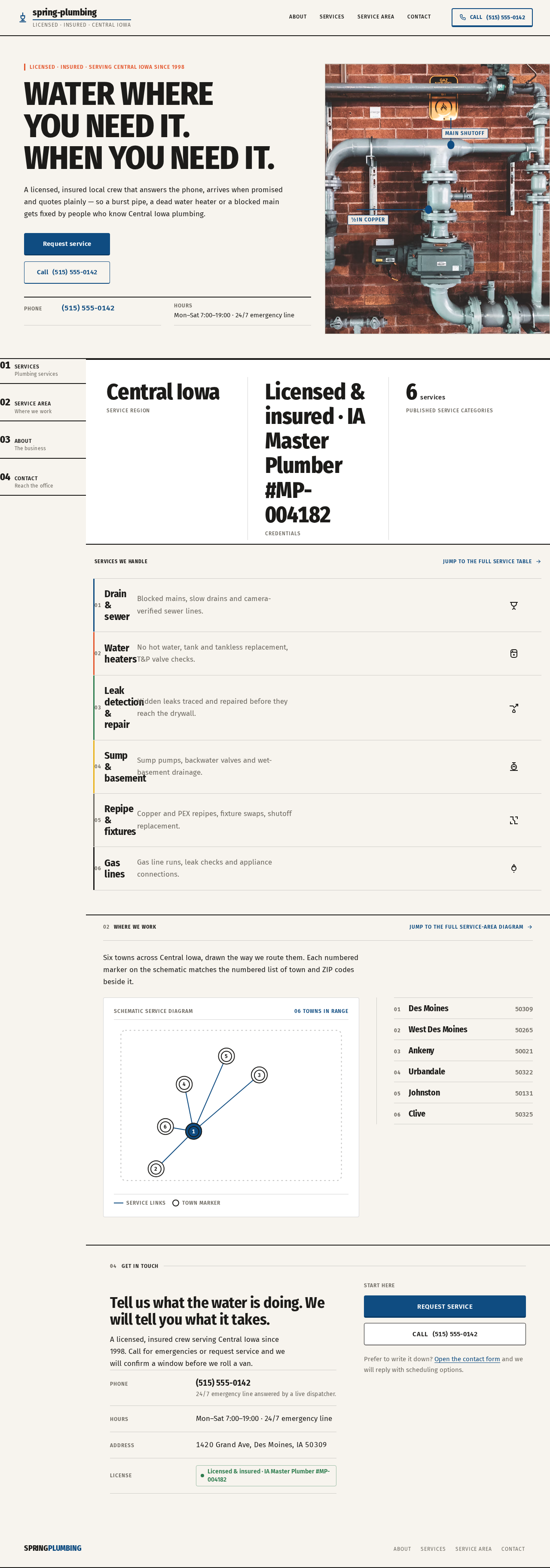
LICENSED · INSURED · SERVING CENTRAL IOWA SINCE 1998
Water whereyou need it.When you need it.
A licensed, insured local crew that answers the phone, arrives when promised and quotes plainly — so a burst pipe, a dead water heater or a blocked main gets fixed by people who know Central Iowa plumbing.
- Phone
- (515) 555-0142
- Hours
- Mon–Sat 7:00–19:00 · 24/7 emergency line

Services we handle
Jump to the full service table- 01
Drain & sewer
Blocked mains, slow drains and camera-verified sewer lines.
- 02
Water heaters
No hot water, tank and tankless replacement, T&P valve checks.
- 03
Leak detection & repair
Hidden leaks traced and repaired before they reach the drywall.
- 04
Sump & basement
Sump pumps, backwater valves and wet-basement drainage.
- 05
Repipe & fixtures
Copper and PEX repipes, fixture swaps, shutoff replacement.
- 06
Gas lines
Gas line runs, leak checks and appliance connections.
Where we work
Jump to the full service-area diagramSix towns across Central Iowa, drawn the way we route them. Each numbered marker on the schematic matches the numbered list of town and ZIP codes beside it.
- 01Des Moines50309
- 02West Des Moines50265
- 03Ankeny50021
- 04Urbandale50322
- 05Johnston50131
- 06Clive50325
04Get in touch
Tell us what the water is doing. We will tell you what it takes.
A licensed, insured crew serving Central Iowa since 1998. Call for emergencies or request service and we will confirm a window before we roll a van.
- Phone
- (515) 555-014224/7 emergency line answered by a live dispatcher.
- Hours
- Mon–Sat 7:00–19:00 · 24/7 emergency line
- Address
- 1420 Grand Ave, Des Moines, IA 50309
- License
- Licensed & insured · IA Master Plumber #MP-004182
Start here
Request serviceCall(515) 555-0142Prefer to write it down? Open the contact form and we will reply with scheduling options.
LICENSED · INSURED · SERVING CENTRAL IOWA SINCE 1998
Water whereyou need it.When you need it.
A licensed, insured local crew that answers the phone, arrives when promised and quotes plainly — so a burst pipe, a dead water heater or a blocked main gets fixed by people who know Central Iowa plumbing.
- Phone
- (515) 555-0142
- Hours
- Mon–Sat 7:00–19:00 · 24/7 emergency line
Services we handle
Jump to the full service table- 01
Drain & sewer
Blocked mains, slow drains and camera-verified sewer lines.
- 02
Water heaters
No hot water, tank and tankless replacement, T&P valve checks.
- 03
Leak detection & repair
Hidden leaks traced and repaired before they reach the drywall.
- 04
Sump & basement
Sump pumps, backwater valves and wet-basement drainage.
- 05
Repipe & fixtures
Copper and PEX repipes, fixture swaps, shutoff replacement.
- 06
Gas lines
Gas line runs, leak checks and appliance connections.
Where we work
Jump to the full service-area diagramSix towns across Central Iowa, drawn the way we route them. Each numbered marker on the schematic matches the numbered list of town and ZIP codes beside it.
- 01Des Moines50309
- 02West Des Moines50265
- 03Ankeny50021
- 04Urbandale50322
- 05Johnston50131
- 06Clive50325
04Get in touch
Tell us what the water is doing. We will tell you what it takes.
A licensed, insured crew serving Central Iowa since 1998. Call for emergencies or request service and we will confirm a window before we roll a van.
- Phone
- (515) 555-014224/7 emergency line answered by a live dispatcher.
- Hours
- Mon–Sat 7:00–19:00 · 24/7 emergency line
- Address
- 1420 Grand Ave, Des Moines, IA 50309
- License
- Licensed & insured · IA Master Plumber #MP-004182
Start here
Request serviceCall(515) 555-0142Prefer to write it down? Open the contact form and we will reply with scheduling options.
No comments yet. Be the first!