spring-hrms
 Priti Tole
# Project: Enterprise HRMS — Human Resource Management System Build a complete, professional, secure, responsive Human Resource Management System (HRMS) for an organization. ## 1. Project objective Create a centralized HR platform that automates employee management, attendance, leave, payroll, performance, recruitment, onboarding, offboarding, training, and HR reporting. This must be a functional full-stack application, not a static UI prototype. All forms, buttons, tables, filters, approvals, dashboards, and reports must connect to working application logic and persistent database records. ## 2. Technology stack Use the following stack if supported by the platform: - Frontend: React + TypeScript + Tailwind CSS - Backend: Python FastAPI - Database: PostgreSQL - Authentication: secure session or token-based authentication - API documentation: OpenAPI/Swagger - Deployment: Docker with environment-based configuration Keep the frontend, backend, database models, business logic, and API layers clearly separated. ## 3. User roles and permissions Implement role-based access control for: 1. Super Admin — system configuration, organization settings, and access management. 2. HR Admin — employee records, recruitment, onboarding, payroll administration, and HR reports. 3. HR Executive — assigned HR operations with limited permissions. 4. Department Manager — team attendance, leave approvals, performance reviews, and team reports. 5. Employee — personal profile, attendance, leave requests, payslips, training, and self-service features. 6. Recruiter — job openings, applicants, interview schedules, and recruitment stages. 7. Payroll Administrator — salary structures, payroll runs, deductions, payslips, and payroll reports. Enforce permissions on the backend, not only by hiding frontend pages. ## 4. Required modules ### A. Employee Management - Employee profiles and unique employee IDs. - Department, designation, reporting manager, employment type, and joining date. - Contact information and emergency contacts. - Secure document storage and access permissions. - Employee status, employment history, and search/filter functionality. ### B. Attendance Management - Check-in and check-out. - Working hours and attendance summaries. - Shift and holiday configuration. - Late arrivals, missing punches, and corrections. - Monthly attendance reports. ### C. Leave Management - Configurable leave types and leave balances. - Leave application with dates, reason, and supporting documents where applicable. - Manager approval and rejection with comments. - Cancellation, leave history, and balance updates. - Notifications and audit history. ### D. Payroll and Salary Management - Salary structures and effective dates. - Earnings, allowances, deductions, and net salary calculations. - Payroll preparation, validation, approval, and processing. - Payslip generation and employee downloads. - Payroll history and reconciliation reports. - Configurable statutory rules and payroll periods. Never hardcode statutory rates or assume legal compliance. Validate calculations against current applicable regulations before production use. ### E. Recruitment and Applicant Tracking - Job requisitions and job postings. - Applicant profiles and resume/document uploads. - Application stages and interview scheduling. - Interview feedback and hiring decisions. - Conversion of selected candidates into employee records. ### F. Onboarding and Offboarding - Joining and exit checklists. - Document verification and policy acknowledgements. - Task assignment and completion tracking. - Asset allocation and return. - Exit interviews, clearance, and final settlement workflow. ### G. Performance Management - Goals, KPIs, and review cycles. - Employee self-assessments. - Manager reviews and feedback. - Review history and performance reports. ### H. Training and Development - Training programs and learning resources. - Employee enrollment and attendance. - Training completion and assessment records. - Skills and certification tracking. ### I. Employee Self-Service - Personal dashboard and profile updates. - Attendance and leave history. - Leave application and approval status. - Payslip access. - Company announcements, holidays, and notifications. - Training and performance information according to permissions. ### J. HR Analytics and Reporting - Total employees and department distribution. - Attendance and leave trends. - Recruitment funnel and hiring statistics. - Payroll summaries. - Employee turnover and onboarding status. - Performance and training reports. - Date, department, employee, and status filters. - CSV and PDF exports where appropriate. ## 5. Design requirements Create a modern enterprise SaaS interface with: - A responsive sidebar and top navigation. - A clear dashboard with relevant KPIs and charts. - Consistent typography, spacing, tables, forms, and status indicators. - Professional employee profile pages. - Search, filtering, sorting, pagination, and useful empty states. - Accessible forms with inline validation and clear error messages. - Responsive layouts for desktop, tablet, and mobile. - Loading states, confirmation dialogs, and success/error feedback. Avoid excessive gradients, unnecessary animations, cluttered dashboards, and decorative components that reduce usability. ## 6. Database and security requirements Design normalized PostgreSQL tables with appropriate foreign keys, constraints, indexes, and migrations. Include: - Secure password hashing and authentication. - Backend-enforced RBAC and organization-level data isolation. - Input validation and safe error handling. - Protection against unauthorized data access and common web vulnerabilities. - Audit logs for sensitive changes and approvals. - Secure document access and file validation. - Environment variables for credentials and secrets. - Automated database backups and a documented recovery strategy. Payroll, employee documents, and personal information must only be accessible to authorized users. ## 7. Business workflow requirements Implement and test complete workflows, including: - Employee creation → onboarding → active employment. - Check-in/check-out → attendance summary. - Leave application → manager approval → balance update. - Salary configuration → payroll validation → authorized approval → payslip generation. - Job requisition → application → interview → selection → onboarding. - Performance review → manager feedback → final review. - Employee exit request → clearance → offboarding completion. Use database transactions where needed to prevent inconsistent updates. ## 8. Development and acceptance criteria Before implementation, produce: 1. A requirements specification. 2. User roles and permission matrix. 3. Screen-by-screen user flows. 4. Database ER diagram and schema. 5. System architecture and API plan. 6. Development milestones and test plan. Build incrementally, keeping the approved requirements and design as the source of truth. After each module: - Run frontend and backend tests. - Validate API authorization. - Test database persistence and error cases. - Check responsive layouts. - Fix broken workflows before moving forward. Do not use fake data as a substitute for implemented functionality. Clearly label any seed/demo data. Deliver maintainable source code, database migrations, API documentation, setup instructions, automated tests, and deployment configuration. Do not claim the system is production-ready until its security, payroll calculations, integration tests, backups, and deployment configuration have been verified.

Comments (0)
Sign in to leave a comment
System Requirements
System Requirements Document for spring-hrms
1. Introduction
spring-hrms is a centralized, full-stack Human Resource Management System (HRMS) for a single organization. Its intent is to replace scattered spreadsheets and disconnected tools with one platform that automates employee management, attendance, leave, payroll, performance, recruitment, onboarding, offboarding, training, and HR reporting.
This is a functional application, not a static UI prototype. Every form, button, table, filter, approval, dashboard, and report must connect to working application logic and persistent database records. The system is compliance-sensitive: payroll, employee documents, and personal information must only be accessible to authorized users, and statutory rates must never be hardcoded.
The audience is the organization's HR operations staff and its workforce: Super Admins who configure the system, HR Admins and HR Executives who run day-to-day HR operations, Department Managers who approve and review their teams, Recruiters who fill roles, Payroll Administrators who run payroll, and Employees who use self-service. The interface is designed as a power tool for keyboard-first operators who care about numbers lining up and audit trails being exact.
2. System Overview
spring-hrms is delivered as a responsive web application with a React + TypeScript + Tailwind CSS frontend, a Python FastAPI backend, and a PostgreSQL database, deployed with Docker and environment-based configuration. Frontend, backend, database models, business logic, and API layers are kept clearly separated. The backend exposes OpenAPI/Swagger documentation.
Seven roles operate the system under backend-enforced role-based access control: Super Admin, HR Admin, HR Executive, Department Manager, Employee, Recruiter, and Payroll Administrator. Permissions are enforced on the backend, not only by hiding frontend pages, and organization-level data isolation applies to all protected state.
The system covers ten functional areas: Employee Management, Attendance Management, Leave Management, Payroll and Salary Management, Recruitment and Applicant Tracking, Onboarding and Offboarding, Performance Management, Training and Development, Employee Self-Service, and HR Analytics and Reporting. Each area is backed by normalized PostgreSQL tables with foreign keys, constraints, indexes, and migrations, and by complete, tested business workflows that use database transactions where needed to prevent inconsistent updates.
2a. Product Interpretation and Delivery Boundary
Delivery ownership. spring-hrms is a first-party application. All working surfaces — dashboards, records, approval queues, payroll runs, reports, and self-service pages — are owned and rendered by the application itself. There is no external or provider-owned surface carrying accepted product behavior.
Identity and access. The application owns identity. Because the system must keep durable, actor-specific state (employee records, leave balances, payslips, approvals, audit history) bound to the correct participant, first-use identity establishment and returning verification are required. Two first-use paths exist:
- Invitation acceptance for privileged and internal roles (Super Admin, HR Admin, HR Executive, Department Manager, Recruiter, Payroll Administrator), who are provisioned by an authorized administrator before they can reach protected state.
- Self-service sign-up for Employees who independently begin using the HRMS.
Returning users verify through sign-in. The public entry surface (Landing) and the three identity surfaces (Login, Sign Up, Invitation Acceptance) are anonymously reachable; every other destination requires an authenticated session and is further restricted by role. A protected destination never owns the interaction that establishes access to itself.
Current vs. future boundary. Everything described in this document is current scope. The system must not be claimed production-ready until its security, payroll calculations, integration tests, backups, and deployment configuration have been verified — that verification is a current acceptance obligation, not a future feature. Statutory rates and legal compliance are explicitly out of scope as hardcoded values: statutory rules are configurable, and calculations must be validated against current applicable regulations before production use.
Explicit exclusions. No excessive gradients, unnecessary animations, cluttered dashboards, or decorative components that reduce usability. No fake data as a substitute for implemented functionality; any seed/demo data must be clearly labeled. No hardcoded statutory rates and no assumption of legal compliance.
2c. Page Content and Component Coverage
Landing
- Information/state: Anonymous public entry. Left 58% graphite panel carries a left-aligned headline ("Every employee record, one system") with a monospace sub-line reading the live counts of the seeded demo organization —
EMPLOYEES 248 · DEPARTMENTS 12 · OPEN REQS 9— set in tabular JetBrains Mono at 14px. Right 42% is a full-height#1B1D20panel showing a real, working slice of the product: a scrollable "Pending approvals" queue with three leave requests, each row a name, a date range in monospace, and a status pill, plus a thin tangerine rule marking the row under the cursor. - Primary actions: Single tangerine 44px-tall "Sign in" button pinned beneath the headline, flush left with the headline's optical edge, routing to Login. Secondary text link to Sign Up for employees who independently begin using the HRMS.
- Supporting actions: None beyond entry routing; the approvals queue is a read-only product slice, not an interactive approval surface.
- Domain entities: Demo organization counts (employees, departments, open requisitions); sample pending leave requests (name, date range, status).
- Component responsibilities: Split hero layout; headline block; monospace count line; primary CTA; live product-slice panel with scrollable approval rows and hover rule.
- States: Loading (counts and queue rows resolve from the backend); empty (queue shows an empty state if no pending approvals exist); success (counts and rows render); error (counts unavailable — show the headline and CTA without the count line, with a muted retry affordance); recovery (retry re-fetches counts and queue).
Login
- Information/state: Anonymous returning-verification surface. Email/username and password fields, inline validation, and a link to Sign Up and to Invitation Acceptance.
- Primary actions: Submit credentials to establish an authenticated session and route to the role-appropriate Dashboard.
- Supporting actions: Navigate to Sign Up; navigate to Invitation Acceptance.
- Domain entities: User account, credential, session/token, role.
- Component responsibilities: Credential form with inline validation; error banner for invalid credentials; submit control with loading state.
- States: Loading (submit in progress); empty (initial form); success (session established, redirect to Dashboard); error (invalid credentials, locked/disabled account, or backend unavailable — clear inline message, no field clearing); recovery (correct input and resubmit).
Sign Up
- Information/state: Anonymous self-service first-use enrollment for Employees. Fields for identity and contact details, password with strength guidance, and acceptance of terms.
- Primary actions: Create the employee account and establish the first session.
- Supporting actions: Navigate to Login; navigate to Invitation Acceptance.
- Domain entities: User account, employee identity, role assignment (Employee), password hash.
- Component responsibilities: Enrollment form with inline validation; password strength indicator; duplicate-account detection; submit control with loading state.
- States: Loading (submit in progress); empty (initial form); success (account created, session established, redirect to Dashboard); error (duplicate email, weak password, validation failure — inline field errors); recovery (correct fields and resubmit).
Invitation Acceptance
- Information/state: Anonymous first-use enrollment for privileged and internal roles provisioned by an authorized administrator. Displays the invited identity, the assigned role, and the organization context from the invitation token.
- Primary actions: Accept the invitation by setting a password and completing required profile fields, establishing the first session.
- Supporting actions: Navigate to Login.
- Domain entities: Invitation token, invited identity, assigned role, organization, user account.
- Component responsibilities: Invitation validation (expired/used/invalid token handling); password creation form; role display; submit control with loading state.
- States: Loading (validating token); empty (no token present — prompt to use the invitation link); success (account activated, session established, redirect to Dashboard); error (expired, already-used, or invalid invitation — clear message with a path to request a new invitation); recovery (re-request invitation or contact administrator).
Dashboard
- Information/state: Role-aware summary. A four-tile KPI strip where each tile is a flat
#1B1D20block with a 1px hairline, a 12px uppercase muted label, and a 40px monospace figure — no icons, no sparkline decoration, no coloured card backgrounds; the only colour is the figure's status tint. Below it, two-thirds/one-third chart rows. Content is scoped to the signed-in role: Super Admin sees system and access KPIs; HR Admin sees headcount, onboarding, and HR report KPIs; HR Executive sees assigned-operation KPIs; Department Manager sees team attendance, pending leave approvals, and review KPIs; Employee sees personal attendance, leave balance, and payslip KPIs; Recruiter sees requisition, applicant, and interview KPIs; Payroll Administrator sees payroll run, validation, and processing KPIs. - Primary actions: Navigate to the working module behind each KPI or chart.
- Supporting actions: Filter the dashboard by date range where the underlying module supports it.
- Domain entities: Headcount, department distribution, attendance and leave trends, recruitment funnel, payroll summaries, turnover, onboarding status, performance and training metrics.
- Component responsibilities: KPI strip with monospace counters that tick up once on first load (400ms, no easing theatrics); chart rows that draw their line once on mount; role-scoped navigation routing.
- States: Loading (skeleton tiles and chart placeholders); empty (no data for the role's scope — explanatory empty state, not zero-filled charts); success (KPIs and charts render); error (per-tile error with retry, remaining tiles still render); recovery (retry the failed tile or chart).
Employees
- Information/state: Dense employee table with sticky header, right-aligned pagination, and a filter bar on one line. Columns include employee ID (monospace), name, department, designation, reporting manager, employment type, joining date, and status pill. Detail view uses a two-column split: 320px record summary (photo, employee ID in monospace, department, manager, status pill) and a tabbed main panel covering profile, contact and emergency contacts, documents, employment history, and status.
- Primary actions: Create employee; edit employee record; change employee status; upload and manage documents; view employment history.
- Supporting actions: Search, filter, sort, paginate; open document access permissions; view reporting manager.
- Domain entities: Employee, unique employee ID, department, designation, reporting manager, employment type, joining date, contact information, emergency contacts, documents, employee status, employment history.
- Component responsibilities: Filter bar; dense table with sticky header; pagination; record summary panel; tabbed detail panel; document upload with file validation; document access-permission control; status change with confirmation dialog.
- States: Loading (table skeleton); empty (no employees match — useful empty state with a clear-filter action); success (rows render, mutations confirm with success feedback); error (load failure with retry; validation errors inline on forms; document upload rejection with reason); recovery (retry, correct input, re-upload).
Attendance
- Information/state: Organization-wide attendance lifecycle owner. Views for daily attendance, late arrivals, missing punches, and corrections, plus shift and holiday configuration and monthly attendance reports. Figures are exact tabular values, never rounded for display.
- Primary actions: Configure shifts and holidays; review and correct late arrivals and missing punches; generate monthly attendance reports.
- Supporting actions: Filter by date, department, employee, and status; export monthly attendance reports.
- Domain entities: Attendance record, check-in, check-out, working hours, shift, holiday, late arrival, missing punch, correction, monthly attendance report.
- Component responsibilities: Filter bar; dense attendance table; correction form with reason and confirmation; shift and holiday configuration panels; monthly report generator with export.
- States: Loading (table skeleton); empty (no attendance records for the filter — useful empty state); success (records and corrections render, corrections confirm); error (load failure with retry; correction validation errors inline); recovery (retry, correct input, re-run report).
Leave Settings
- Information/state: Configuration of leave types and leave balances, with balance updates, notifications, and audit history visible per leave type.
- Primary actions: Create and edit leave types; configure leave balances and accrual; view balance updates and audit history.
- Supporting actions: Filter leave types; view notification history tied to leave events.
- Domain entities: Leave type, leave balance, accrual rule, balance update, notification, audit history entry.
- Component responsibilities: Leave-type list and editor; balance configuration; audit history timeline; notification log.
- States: Loading (list skeleton); empty (no leave types configured — prompt to create the first); success (configuration saved with confirmation); error (validation errors inline; save failure with retry); recovery (correct input, retry save).
Leave Approvals
- Information/state: Department Manager approval queue. Each row is a name, a date range in monospace, and a status pill, with a thin tangerine rule marking the row under the cursor. Detail shows dates, reason, and supporting documents where applicable.
- Primary actions: Approve a leave request; reject a leave request with comments.
- Supporting actions: Open supporting documents; filter the queue by status and date.
- Domain entities: Leave request, leave type, date range, reason, supporting document, approval decision, comment, leave balance.
- Component responsibilities: Approval queue with hover rule; request detail panel; approve/reject controls with mandatory comment on rejection; confirmation dialog; balance-update feedback.
- States: Loading (queue skeleton); empty (no pending requests — useful empty state); success (decision recorded, balance updated, requester notified); error (decision failure with retry; missing comment on rejection blocks submission with inline error); recovery (retry the decision).
Payroll
- Information/state: Salary structures with effective dates; earnings, allowances, deductions, and net salary calculations; payroll preparation, validation, approval, and processing; payslip generation; payroll history and reconciliation reports. Payroll run IDs are printed as a monospace eyebrow (
PAY-2025-07) above the run name. All figures are exact tabular values. - Primary actions: Configure salary structures and effective dates; prepare a payroll run; validate the run; obtain authorized approval; process the run; generate payslips; produce reconciliation reports.
- Supporting actions: Filter payroll history; export reconciliation reports; view per-employee calculation breakdown.
- Domain entities: Salary structure, effective date, earning, allowance, deduction, net salary, payroll period, payroll run, validation result, approval, payslip, reconciliation report.
- Component responsibilities: Salary structure editor with effective dating; payroll run workspace with preparation, validation, approval, and processing stages; validation error list; approval control restricted to authorized roles; payslip generator; reconciliation report with export.
- States: Loading (run workspace skeleton); empty (no payroll runs for the period — prompt to prepare one); success (run validated, approved, processed, payslips generated); error (validation failures listed with the offending records; processing failure with retry; unauthorized approval attempt rejected by the backend); recovery (correct the flagged records, re-validate, retry processing).
Payroll Settings
- Information/state: Configuration of statutory rules and payroll periods. Statutory rates are configurable values, never hardcoded, and the surface states that calculations must be validated against current applicable regulations before production use.
- Primary actions: Create and edit statutory rules; configure payroll periods.
- Supporting actions: View effective dates of statutory rules; view change history.
- Domain entities: Statutory rule, rate, effective date, payroll period.
- Component responsibilities: Statutory rule editor with effective dating; payroll period configuration; validation that no rate is left as an unconfigured placeholder.
- States: Loading (settings skeleton); empty (no statutory rules configured — prominent warning that payroll cannot be validated); success (configuration saved with confirmation); error (validation errors inline; save failure with retry); recovery (correct input, retry save).
Recruitment
- Information/state: Job requisitions and postings; applicant profiles with resume/document uploads; application stages; interview scheduling; interview feedback and hiring decisions; conversion of selected candidates into employee records. Requisition numbers are printed as a monospace eyebrow above the requisition name.
- Primary actions: Create job requisition and posting; manage applicant profiles and documents; move applicants through stages; schedule interviews; record interview feedback and hiring decisions; convert a selected candidate into an employee record.
- Supporting actions: Filter by requisition, stage, and status; search applicants.
- Domain entities: Job requisition, job posting, applicant profile, resume/document, application stage, interview schedule, interview feedback, hiring decision, employee record.
- Component responsibilities: Requisition list and editor; applicant pipeline board or table; document upload with file validation; interview scheduler; feedback form; hiring decision control; candidate-to-employee conversion with confirmation.
- States: Loading (pipeline skeleton); empty (no requisitions or no applicants — useful empty states); success (stage moves, feedback, and decisions recorded; conversion creates the employee record); error (upload rejection with reason; scheduling conflict; conversion failure with retry); recovery (retry, reschedule, correct input).
Onboarding & Offboarding
- Information/state: Joining and exit checklists; document verification and policy acknowledgements; task assignment and completion tracking; asset allocation and return; exit interviews, clearance, and final settlement workflow.
- Primary actions: Start a joining or exit checklist; verify documents; record policy acknowledgements; assign and complete tasks; allocate and return assets; conduct exit interviews; record clearance; run the final settlement workflow.
- Supporting actions: Filter checklists by employee and status; view completion progress.
- Domain entities: Joining checklist, exit checklist, document verification, policy acknowledgement, task, asset allocation, asset return, exit interview, clearance, final settlement.
- Component responsibilities: Checklist workspace per employee; task assignment and completion tracking; document verification control; acknowledgement capture; asset ledger; exit interview form; clearance and final settlement workflow with confirmation.
- States: Loading (checklist skeleton); empty (no active checklists — useful empty state); success (tasks and verifications recorded; checklist progress updates; final settlement completes); error (incomplete mandatory items block completion with inline errors; save failure with retry); recovery (complete missing items, retry).
Performance
- Information/state: Review cycles, goals, and KPIs; employee self-assessments; manager reviews and feedback; review history and performance reports.
- Primary actions: Configure review cycles, goals, and KPIs; submit self-assessment; conduct manager review and provide feedback; finalize the review; view review history and performance reports.
- Supporting actions: Filter reviews by cycle, employee, and status; export performance reports.
- Domain entities: Review cycle, goal, KPI, self-assessment, manager review, feedback, final review, review history, performance report.
- Component responsibilities: Cycle and goal configuration; self-assessment form; manager review form with feedback; finalization control with confirmation; history timeline; report generator with export.
- States: Loading (review skeleton); empty (no active cycle — useful empty state); success (assessment and review recorded; final review locked); error (validation errors inline; finalization blocked until manager feedback is complete); recovery (complete missing feedback, retry).
Training
- Information/state: Training programs and learning resources; employee enrollment and attendance; training completion and assessment records; skills and certification tracking.
- Primary actions: Create training programs and learning resources; enroll employees; record attendance; record completion and assessment results; track skills and certifications.
- Supporting actions: Filter programs by status and department; search employees for enrollment.
- Domain entities: Training program, learning resource, enrollment, training attendance, completion record, assessment record, skill, certification.
- Component responsibilities: Program catalog and editor; resource attachments; enrollment control; attendance capture; completion and assessment forms; skills and certification ledger.
- States: Loading (catalog skeleton); empty (no programs — useful empty state); success (enrollment, attendance, completion, and certification recorded); error (validation errors inline; save failure with retry); recovery (correct input, retry).
Reports
- Information/state: HR analytics across total employees and department distribution, attendance and leave trends, recruitment funnel and hiring statistics, payroll summaries, employee turnover and onboarding status, and performance and training reports. Filters for date, department, employee, and status.
- Primary actions: Run a report; apply filters; export as CSV or PDF where appropriate.
- Supporting actions: Save filter combinations; switch between report types.
- Domain entities: Headcount, department distribution, attendance trend, leave trend, recruitment funnel, hiring statistic, payroll summary, turnover, onboarding status, performance report, training report.
- Component responsibilities: Report selector; filter bar; chart and table renderers; CSV export; PDF export; export progress and completion feedback.
- States: Loading (chart and table skeletons); empty (no data for the selected filters — useful empty state with a clear-filter action); success (report renders; export downloads); error (report failure with retry; export failure with reason); recovery (adjust filters, retry, re-export).
Audit Logs
- Information/state: Audit history of sensitive changes and approvals, presented as an audit timeline. Status pills use the fixed four-colour vocabulary so an HR admin reads state by colour before reading words.
- Primary actions: Review audit entries; filter by actor, entity, action, and date range.
- Supporting actions: Open the affected record from an audit entry.
- Domain entities: Audit log entry, actor, entity, action, before/after values, timestamp, approval event.
- Component responsibilities: Audit timeline; filter bar; entry detail panel; link to the affected record.
- States: Loading (timeline skeleton); empty (no entries for the filter — useful empty state); success (entries render with exact timestamps); error (load failure with retry); recovery (retry, adjust filters).
Settings
- Information/state: System configuration, organization settings, and access/permission management. Includes the user roles and permission matrix that governs backend-enforced RBAC and organization-level data isolation.
- Primary actions: Configure organization settings; manage user access and role assignment; invite users into privileged and internal roles; review the permission matrix.
- Supporting actions: Filter users by role and status; view role assignments.
- Domain entities: Organization setting, user account, role, permission, invitation, access assignment.
- Component responsibilities: Organization settings form; user and access list; role assignment control; invitation issuance; permission matrix view.
- States: Loading (settings skeleton); empty (no users beyond the current administrator — useful empty state with an invite action); success (settings and access changes saved with confirmation); error (validation errors inline; save failure with retry; unauthorized change rejected by the backend); recovery (correct input, retry).
My Attendance
- Information/state: Employee check-in and check-out, personal working hours, and attendance summaries. Figures are exact tabular values.
- Primary actions: Check in; check out; view personal attendance summary.
- Supporting actions: Filter personal attendance by date range; view late arrivals and missing punches affecting the employee's own record.
- Domain entities: Attendance record, check-in, check-out, working hours, attendance summary.
- Component responsibilities: Check-in/check-out control with current state; personal attendance table; summary figures.
- States: Loading (summary skeleton); empty (no attendance records yet — useful empty state); success (check-in/check-out recorded; summary updates); error (check-in/check-out failure with retry; duplicate punch prevented with a clear message); recovery (retry, contact HR for correction).
My Leave
- Information/state: Employee leave application, cancellation, history, approval status, and balance updates. Each request row shows a date range in monospace and a status pill.
- Primary actions: Apply for leave with dates, reason, and supporting documents where applicable; cancel a leave request; view leave history and approval status.
- Supporting actions: Filter leave history by type and status; view current leave balances.
- Domain entities: Leave request, leave type, date range, reason, supporting document, approval status, leave balance, cancellation.
- Component responsibilities: Leave application form with inline validation; document attachment; request list with status pills; cancellation control with confirmation; balance display.
- States: Loading (request list skeleton); empty (no leave requests — useful empty state with an apply action); success (request submitted, status visible, balance reflects the request); error (validation errors inline; insufficient balance blocked with a clear message; cancellation failure with retry); recovery (correct input, retry, re-apply).
My Payslips
- Information/state: Employee payslip viewing and download. Payslips show exact tabular values for earnings, allowances, deductions, and net salary.
- Primary actions: View a payslip; download a payslip.
- Supporting actions: Filter payslips by payroll period.
- Domain entities: Payslip, payroll period, earning, allowance, deduction, net salary.
- Component responsibilities: Payslip list; payslip detail view; download control with progress feedback.
- States: Loading (list skeleton); empty (no payslips yet — useful empty state); success (payslip renders; download completes); error (load or download failure with retry); recovery (retry the load or download).
My Profile
- Information/state: Employee personal profile and dashboard information viewing and updating. Employee ID is shown in monospace as a citable identity.
- Primary actions: View personal profile; update permitted personal details.
- Supporting actions: View contact information and emergency contacts; view employment details.
- Domain entities: Employee profile, employee ID, contact information, emergency contact, employment details.
- Component responsibilities: Profile view; editable personal-details form with inline validation; read-only employment fields.
- States: Loading (profile skeleton); empty (profile incomplete — prompt to complete required fields); success (updates saved with confirmation); error (validation errors inline; save failure with retry); recovery (correct input, retry).
My Performance
- Information/state: Employee self-assessments and performance information according to permissions. Shows goals, KPIs, review cycle status, and review history visible to the employee.
- Primary actions: Submit a self-assessment; view manager feedback and final review where released.
- Supporting actions: View goals and KPIs for the active cycle; view review history.
- Domain entities: Self-assessment, goal, KPI, review cycle, manager feedback, final review, review history.
- Component responsibilities: Self-assessment form with inline validation; goals and KPI display; feedback and final review view; history timeline.
- States: Loading (assessment skeleton); empty (no active review cycle — useful empty state); success (self-assessment submitted; feedback visible when released); error (validation errors inline; submission failure with retry); recovery (correct input, retry).
Announcements
- Information/state: Company announcements, holidays, and notifications for employees.
- Primary actions: Read announcements; view the holiday calendar; review notifications.
- Supporting actions: Filter announcements by date; mark notifications as read.
- Domain entities: Announcement, holiday, notification.
- Component responsibilities: Announcement list; holiday calendar; notification list with read state.
- States: Loading (list skeleton); empty (no announcements — useful empty state); success (announcements, holidays, and notifications render); error (load failure with retry); recovery (retry).
Team Attendance
- Information/state: Department Manager review of team attendance and team reports. Shows team members' attendance, late arrivals, missing punches, and summaries with exact tabular values.
- Primary actions: Review team attendance; generate team reports.
- Supporting actions: Filter by date range, team member, and status; export team reports.
- Domain entities: Team attendance record, late arrival, missing punch, attendance summary, team report.
- Component responsibilities: Team attendance table; filter bar; team report generator with export.
- States: Loading (table skeleton); empty (no team members or no records for the filter — useful empty state); success (records and reports render); error (load failure with retry; export failure with reason); recovery (retry, adjust filters).
HR Operations
- Information/state: HR Executive assigned HR operations with limited permissions. Shows only the subset of HR operational tasks assigned to the signed-in HR Executive, such as supporting employee records, attendance/leave processing, and onboarding tasks.
- Primary actions: Complete assigned HR operational tasks.
- Supporting actions: Filter assigned tasks by type and status; view task detail.
- Domain entities: Assigned HR operation, task, employee record reference, attendance/leave processing item, onboarding task.
- Component responsibilities: Assigned-task list; task detail panel; completion control with confirmation.
- States: Loading (task list skeleton); empty (no assigned tasks — useful empty state); success (task completion recorded); error (completion failure with retry; unauthorized action rejected by the backend); recovery (retry).
3. Functional Requirements
Each requirement is a distinct story point with provenance, lifecycle facts, and observable acceptance. Provenance is explicit (source-stated), basic_default (accepted default), or required_inference (indispensable inferred mechanics).
Identity and Access
FR-1 — Returning verification. As a Super Admin, HR Admin, HR Executive, Department Manager, Employee, Recruiter, or Payroll Administrator, I should sign in with my credentials to establish an authenticated session and reach my role-appropriate Dashboard. Provenance: required_inference. Trigger: submission of credentials on Login. Observable result: an authenticated session is established and the role-appropriate Dashboard renders. Access state: anonymous entry. Failure/recovery: invalid credentials, disabled account, or backend unavailability produce a clear inline message without clearing fields; the user corrects input and resubmits. Continuation: the user proceeds to their role-scoped modules.
FR-2 — Self-service first-use enrollment. As an Employee, I should create my account through Sign Up so I can begin using self-service. Provenance: required_inference. Trigger: submission of the enrollment form. Observable result: the account is created, a first session is established, and the Dashboard renders. Access state: anonymous entry. Failure/recovery: duplicate email, weak password, or validation failure produce inline field errors; the user corrects and resubmits. Continuation: the employee proceeds to My Profile and My Attendance.
FR-3 — Invitation-based first-use enrollment. As a Super Admin, HR Admin, HR Executive, Department Manager, Recruiter, or Payroll Administrator, I should accept an invitation issued by an authorized administrator so I can activate my provisioned account. Provenance: required_inference. Trigger: opening the invitation link and submitting the password-creation form on Invitation Acceptance. Observable result: the account is activated with the assigned role and a first session is established. Access state: anonymous entry with a valid invitation token. Failure/recovery: expired, already-used, or invalid tokens produce a clear message with a path to request a new invitation. Continuation: the user proceeds to their role-scoped modules.
FR-4 — Access provisioning and role assignment. As a Super Admin, I should manage user access and role assignment in Settings so that every role operates within correct permissions and organization-level data isolation. Provenance: explicit. Trigger: creating or editing a user's role assignment, or issuing an invitation. Observable result: the assignment is persisted and enforced by the backend. Access state: role-restricted to Super Admin. Failure/recovery: unauthorized change attempts are rejected by the backend; validation errors are inline. Continuation: the affected user can accept the invitation or sign in with the assigned role.
FR-5 — Backend-enforced RBAC. As the system, I should enforce role-based permissions on the backend for every protected operation, not only by hiding frontend pages. Provenance: explicit. Trigger: any API request to a protected resource. Observable result: authorized requests succeed; unauthorized requests are rejected regardless of frontend state. Access state: authenticated session with role. Failure/recovery: rejection returns a safe error without leaking protected data. Continuation: the user remains on an authorized surface.
FR-6 — Organization-level data isolation. As the system, I should isolate data at the organization level so that records from one organization are never exposed to another. Provenance: explicit. Trigger: any data read or write. Observable result: only in-organization records are returned or mutated. Access state: authenticated session bound to an organization. Failure/recovery: cross-organization access attempts are rejected. Continuation: normal in-organization operation.
Employee Management
FR-7 — Employee records with unique IDs. As an HR Admin or HR Executive, I should create and maintain employee profiles with unique employee IDs so every person has one citable record. Provenance: explicit. Trigger: creating or editing an employee on Employees. Observable result: the record persists with a unique employee ID. Access state: role-restricted. Failure/recovery: duplicate or invalid IDs are rejected with inline errors. Continuation: the record is available for onboarding and downstream modules.
FR-8 — Employment attributes. As an HR Admin or HR Executive, I should record department, designation, reporting manager, employment type, and joining date for each employee. Provenance: explicit. Trigger: editing the employment section of an employee record. Observable result: attributes persist and drive manager-scoped behavior. Access state: role-restricted. Failure/recovery: invalid references are rejected with inline errors. Continuation: the reporting manager relationship governs leave approvals and team views.
FR-9 — Contact and emergency contacts. As an HR Admin or HR Executive, I should maintain contact information and emergency contacts for each employee. Provenance: explicit. Trigger: editing the contact section of an employee record. Observable result: contact and emergency-contact data persist. Access state: role-restricted; personal information is accessible only to authorized users. Failure/recovery: validation errors are inline. Continuation: the data is available to authorized HR users.
FR-10 — Secure document storage and access permissions. As an HR Admin or HR Executive, I should store employee documents securely and control who can access them. Provenance: explicit. Trigger: uploading a document and setting its access permissions. Observable result: the document is stored with validated file type and access is restricted to authorized users. Access state: role-restricted. Failure/recovery: invalid files are rejected with a reason; unauthorized access attempts are rejected by the backend. Continuation: authorized users can retrieve the document.
FR-11 — Employee status and employment history. As an HR Admin or HR Executive, I should change employee status and view employment history so the record reflects the person's actual state over time. Provenance: explicit. Trigger: a status change with confirmation. Observable result: the new status persists and the history entry is appended. Access state: role-restricted. Failure/recovery: invalid transitions are rejected with a clear message. Continuation: downstream modules reflect the new status.
FR-12 — Employee search and filter. As an HR Admin or HR Executive, I should search, filter, sort, and paginate employee records so I can find the right person quickly. Provenance: explicit. Trigger: entering search terms or filter values. Observable result: the table updates to matching rows with useful empty states. Access state: role-restricted. Failure/recovery: no matches produce a useful empty state with a clear-filter action. Continuation: the user opens the record.
Attendance Management
FR-13 — Check-in and check-out. As an Employee, I should check in and check out so my working hours are recorded. Provenance: explicit. Trigger: the check-in or check-out control on My Attendance. Observable result: the punch is recorded with a timestamp and the summary updates. Access state: role-restricted to the signed-in employee's own record. Failure/recovery: duplicate punches are prevented with a clear message; failures allow retry. Continuation: the employee views the updated summary.
FR-14 — Working hours and attendance summaries. As an Employee, I should view my working hours and attendance summaries so I can verify my own record. Provenance: explicit. Trigger: opening My Attendance. Observable result: exact tabular working hours and summaries render. Access state: role-restricted. Failure/recovery: load failure allows retry. Continuation: the employee filters by date range.
FR-15 — Shift and holiday configuration. As an HR Admin or HR Executive, I should configure shifts and holidays so attendance is evaluated against the correct schedule. Provenance: explicit. Trigger: creating or editing shifts and holidays on Attendance. Observable result: configuration persists and applies to attendance evaluation. Access state: role-restricted. Failure/recovery: validation errors are inline. Continuation: attendance records reflect the configured schedule.
FR-16 — Late arrivals, missing punches, and corrections. As an HR Admin, HR Executive, or Department Manager, I should review late arrivals and missing punches and apply corrections so attendance records are accurate. Provenance: explicit. Trigger: selecting a flagged record and submitting a correction with a reason. Observable result: the correction persists and the record updates. Access state: role-restricted. Failure/recovery: corrections require a reason; failures allow retry. Continuation: the corrected record feeds monthly reports.
FR-17 — Monthly attendance reports. As an HR Admin or HR Executive, I should generate monthly attendance reports so attendance can be reviewed and exported. Provenance: explicit. Trigger: selecting a month and generating the report on Attendance. Observable result: the report renders with exact tabular values and can be exported. Access state: role-restricted. Failure/recovery: report failure allows retry. Continuation: the report is exported or reviewed.
FR-18 — Team attendance review. As a Department Manager, I should review my team's attendance and generate team reports so I can act on team-level patterns. Provenance: explicit. Trigger: opening Team Attendance. Observable result: team attendance and reports render with exact tabular values. Access state: role-restricted to the manager's team. Failure/recovery: load or export failure allows retry. Continuation: the manager filters or exports.
Leave Management
FR-19 — Configurable leave types and balances. As an HR Admin or HR Executive, I should configure leave types and leave balances so leave policy is expressed in the system. Provenance: explicit. Trigger: creating or editing a leave type and its balance rules on Leave Settings. Observable result: configuration persists and governs leave applications. Access state: role-restricted. Failure/recovery: validation errors are inline. Continuation: employees can apply against the configured types.
FR-20 — Leave application. As an Employee, I should apply for leave with dates, reason, and supporting documents where applicable so my request enters the approval workflow. Provenance: explicit. Trigger: submitting the leave application form on My Leave. Observable result: the request persists with status pending and the balance reflects the request. Access state: role-restricted to the employee's own requests. Failure/recovery: validation errors are inline; insufficient balance is blocked with a clear message. Continuation: the request appears in the manager's approval queue.
FR-21 — Manager approval and rejection with comments. As a Department Manager, I should approve or reject leave requests with comments so my team's leave is decided and recorded. Provenance: explicit. Trigger: an approve or reject decision on Leave Approvals. Observable result: the decision persists with the comment, the balance updates, and the requester is notified. Access state: role-restricted to the manager's team. Failure/recovery: rejection requires a comment; decision failure allows retry. Continuation: the employee sees the updated status.
FR-22 — Leave cancellation. As an Employee, I should cancel a leave request so my plans and balances stay accurate. Provenance: explicit. Trigger: the cancel control on a request in My Leave, with confirmation. Observable result: the request is cancelled and the balance is restored. Access state: role-restricted to the employee's own requests. Failure/recovery: cancellation of an already-decided request is handled with a clear message; failures allow retry. Continuation: the employee views the updated history.
FR-23 — Leave history and balance updates. As an Employee, I should view my leave history and balance updates so I know where I stand. Provenance: explicit. Trigger: opening My Leave. Observable result: history and current balances render with exact tabular values. Access state: role-restricted. Failure/recovery: load failure allows retry. Continuation: the employee applies for or cancels leave.
FR-24 — Leave notifications and audit history. As an HR Admin or HR Executive, I should view leave notifications and audit history so leave decisions are traceable. Provenance: explicit. Trigger: opening the audit history and notification log on Leave Settings. Observable result: notifications and audit entries render with exact timestamps. Access state: role-restricted. Failure/recovery: load failure allows retry. Continuation: the user reviews or filters the history.
Payroll and Salary Management
FR-25 — Salary structures and effective dates. As a Payroll Administrator, I should configure salary structures with effective dates so pay is correct for the period it applies to. Provenance: explicit. Trigger: creating or editing a salary structure with an effective date on Payroll. Observable result: the structure persists and applies from its effective date. Access state: role-restricted. Failure/recovery: overlapping or invalid effective dates are rejected with inline errors. Continuation: the structure is used in payroll preparation.
FR-26 — Earnings, allowances, deductions, and net salary. As a Payroll Administrator, I should define earnings, allowances, and deductions so net salary is calculated exactly. Provenance: explicit. Trigger: configuring components on a salary structure. Observable result: components persist and net salary is computed with exact tabular values. Access state: role-restricted. Failure/recovery: invalid component values are rejected with inline errors. Continuation: the structure is ready for a payroll run.
FR-27 — Payroll preparation and validation. As a Payroll Administrator, I should prepare a payroll run and validate it so errors are caught before approval. Provenance: explicit. Trigger: preparing a run for a payroll period and running validation. Observable result: the run is prepared and validation returns a pass or a list of offending records. Access state: role-restricted. Failure/recovery: validation failures list the offending records; the administrator corrects them and re-validates. Continuation: a validated run proceeds to approval.
FR-28 — Authorized payroll approval. As an authorized approver (Payroll Administrator or HR Admin), I should approve a validated payroll run so processing is authorized. Provenance: explicit. Trigger: the approval control on a validated run. Observable result: the run is marked approved and the approval is recorded in the audit log. Access state: role-restricted to authorized roles; unauthorized approval attempts are rejected by the backend. Failure/recovery: approval of an unvalidated run is blocked with a clear message. Continuation: the run proceeds to processing.
FR-29 — Payroll processing and payslip generation. As a Payroll Administrator, I should process an approved payroll run and generate payslips so employees are paid and can access their payslips. Provenance: explicit. Trigger: the process control on an approved run. Observable result: the run is processed, payslips are generated, and the run ID is recorded. Access state: role-restricted. Failure/recovery: processing failure allows retry without duplicating results. Continuation: employees can view and download payslips.
FR-30 — Payslip viewing and download. As an Employee, I should view and download my payslips so I have my own pay records. Provenance: explicit. Trigger: opening My Payslips and selecting a payslip. Observable result: the payslip renders with exact tabular values and downloads. Access state: role-restricted to the employee's own payslips. Failure/recovery: load or download failure allows retry. Continuation: the employee filters by payroll period.
FR-31 — Payroll history and reconciliation reports. As a Payroll Administrator, I should view payroll history and produce reconciliation reports so payroll is auditable. Provenance: explicit. Trigger: opening payroll history or generating a reconciliation report on Payroll. Observable result: history and reconciliation reports render with exact tabular values and can be exported. Access state: role-restricted. Failure/recovery: report failure allows retry. Continuation: the report is exported or reviewed.
FR-32 — Configurable statutory rules and payroll periods. As a Payroll Administrator, I should configure statutory rules and payroll periods so calculations follow current applicable regulations without hardcoded rates. Provenance: explicit. Trigger: creating or editing statutory rules and payroll periods on Payroll Settings. Observable result: configuration persists with effective dates; no rate is hardcoded. Access state: role-restricted. Failure/recovery: unconfigured rates are flagged; validation errors are inline. Continuation: payroll validation uses the configured rules.
Recruitment and Applicant Tracking
FR-33 — Job requisitions and postings. As a Recruiter or HR Admin, I should create job requisitions and postings so open roles are tracked. Provenance: explicit. Trigger: creating a requisition and posting on Recruitment. Observable result: the requisition persists with a citable requisition number and the posting is recorded. Access state: role-restricted. Failure/recovery: validation errors are inline. Continuation: applicants can be associated with the requisition.
FR-34 — Applicant profiles and document uploads. As a Recruiter or HR Admin, I should manage applicant profiles and resume/document uploads so candidate information is complete. Provenance: explicit. Trigger: creating an applicant profile and uploading documents. Observable result: the profile and validated documents persist. Access state: role-restricted. Failure/recovery: invalid files are rejected with a reason. Continuation: the applicant moves through stages.
FR-35 — Application stages and interview scheduling. As a Recruiter or HR Admin, I should move applicants through application stages and schedule interviews so the pipeline advances. Provenance: explicit. Trigger: a stage change or interview scheduling action. Observable result: the stage persists and the interview is scheduled. Access state: role-restricted. Failure/recovery: scheduling conflicts are surfaced with a clear message. Continuation: interview feedback is recorded.
FR-36 — Interview feedback and hiring decisions. As a Recruiter or HR Admin, I should record interview feedback and hiring decisions so selection is documented. Provenance: explicit. Trigger: submitting feedback and a hiring decision. Observable result: feedback and the decision persist against the applicant. Access state: role-restricted. Failure/recovery: validation errors are inline. Continuation: a selected candidate is converted into an employee record.
FR-37 — Candidate-to-employee conversion. As a Recruiter or HR Admin, I should convert a selected candidate into an employee record so hiring flows into onboarding. Provenance: explicit. Trigger: the conversion action on a selected candidate, with confirmation. Observable result: an employee record is created and linked to the candidate. Access state: role-restricted. Failure/recovery: conversion failure allows retry without creating duplicates. Continuation: the new employee enters the onboarding checklist.
Onboarding and Offboarding
FR-38 — Joining and exit checklists. As an HR Admin or HR Executive, I should run joining and exit checklists so every start and departure follows the same steps. Provenance: explicit. Trigger: starting a checklist for an employee on Onboarding & Offboarding. Observable result: the checklist persists with its tasks. Access state: role-restricted. Failure/recovery: incomplete mandatory items block completion with inline errors. Continuation: tasks are assigned and tracked.
FR-39 — Document verification and policy acknowledgements. As an HR Admin or HR Executive, I should verify documents and capture policy acknowledgements so compliance is recorded. Provenance: explicit. Trigger: verifying a document or capturing an acknowledgement. Observable result: the verification or acknowledgement persists against the employee. Access state: role-restricted. Failure/recovery: missing or invalid documents are flagged with a reason. Continuation: the checklist advances.
FR-40 — Task assignment and completion tracking. As an HR Admin or HR Executive, I should assign tasks and track their completion so onboarding and offboarding progress is visible. Provenance: explicit. Trigger: assigning a task or marking one complete. Observable result: the task state persists and checklist progress updates. Access state: role-restricted. Failure/recovery: save failure allows retry. Continuation: the checklist proceeds to the next step.
FR-41 — Asset allocation and return. As an HR Admin or HR Executive, I should allocate and record the return of assets so company property is accounted for. Provenance: explicit. Trigger: allocating an asset or recording its return. Observable result: the asset ledger persists the allocation or return. Access state: role-restricted. Failure/recovery: validation errors are inline. Continuation: the checklist reflects the asset state.
FR-42 — Exit interviews, clearance, and final settlement. As an HR Admin or HR Executive, I should conduct exit interviews, record clearance, and run the final settlement workflow so departures complete correctly. Provenance: explicit. Trigger: recording an exit interview, clearing departments, and running final settlement. Observable result: the interview, clearance, and final settlement persist and the offboarding completes. Access state: role-restricted. Failure/recovery: outstanding clearance blocks completion with inline errors. Continuation: the employee record reflects the completed exit.
Performance Management
FR-43 — Goals, KPIs, and review cycles. As an HR Admin or Department Manager, I should configure goals, KPIs, and review cycles so performance is measured consistently. Provenance: explicit. Trigger: creating a review cycle with goals and KPIs on Performance. Observable result: the cycle, goals, and KPIs persist. Access state: role-restricted. Failure/recovery: validation errors are inline. Continuation: employees can submit self-assessments.
FR-44 — Employee self-assessments. As an Employee, I should submit a self-assessment so my perspective is part of the review. Provenance: explicit. Trigger: submitting the self-assessment form on My Performance. Observable result: the self-assessment persists against the active cycle. Access state: role-restricted to the employee's own review. Failure/recovery: validation errors are inline; submission failure allows retry. Continuation: the manager conducts the review.
FR-45 — Manager reviews and feedback. As a Department Manager, I should conduct manager reviews and provide feedback so the review is complete. Provenance: explicit. Trigger: submitting the manager review and feedback. Observable result: the review and feedback persist. Access state: role-restricted to the manager's team. Failure/recovery: finalization is blocked until manager feedback is complete. Continuation: the final review is recorded.
FR-46 — Review history and performance reports. As an HR Admin or Department Manager, I should view review history and generate performance reports so performance is auditable. Provenance: explicit. Trigger: opening review history or generating a performance report. Observable result: history and reports render and can be exported. Access state: role-restricted. Failure/recovery: report failure allows retry. Continuation: the report is exported or reviewed.
Training and Development
FR-47 — Training programs and learning resources. As an HR Admin, I should create training programs and learning resources so employees have structured development. Provenance: explicit. Trigger: creating a program and attaching resources on Training. Observable result: the program and resources persist. Access state: role-restricted. Failure/recovery: validation errors are inline. Continuation: employees can be enrolled.
FR-48 — Employee enrollment and attendance. As an HR Admin or Employee, I should enroll employees in training and record attendance so participation is tracked. Provenance: explicit. Trigger: enrolling an employee or recording training attendance. Observable result: the enrollment and attendance persist. Access state: role-restricted. Failure/recovery: validation errors are inline. Continuation: completion and assessment are recorded.
FR-49 — Training completion and assessment records. As an HR Admin, I should record training completion and assessment results so outcomes are documented. Provenance: explicit. Trigger: recording completion and an assessment result. Observable result: the completion and assessment persist against the employee. Access state: role-restricted. Failure/recovery: validation errors are inline. Continuation: skills and certifications are updated.
FR-50 — Skills and certification tracking. As an HR Admin, I should track skills and certifications so the organization knows its capabilities. Provenance: explicit. Trigger: adding or updating a skill or certification. Observable result: the skill or certification persists with its validity. Access state: role-restricted. Failure/recovery: validation errors are inline. Continuation: the record is available in reports.
Employee Self-Service
FR-51 — Personal dashboard and profile updates. As an Employee, I should view my personal dashboard and update my profile so my information stays current. Provenance: explicit. Trigger: opening My Profile and submitting permitted updates. Observable result: updates persist and the dashboard reflects them. Access state: role-restricted to the employee's own profile. Failure/recovery: validation errors are inline; save failure allows retry. Continuation: the employee returns to the dashboard.
FR-52 — Company announcements, holidays, and notifications. As an Employee, I should view company announcements, holidays, and notifications so I stay informed. Provenance: explicit. Trigger: opening Announcements. Observable result: announcements, the holiday calendar, and notifications render. Access state: role-restricted. Failure/recovery: load failure allows retry. Continuation: the employee marks notifications as read.
FR-53 — Training and performance information according to permissions. As an Employee, I should view my training and performance information according to my permissions so I can act on my own development. Provenance: explicit. Trigger: opening My Performance or Training. Observable result: only information the employee is permitted to see renders. Access state: role-restricted. Failure/recovery: unauthorized access attempts are rejected by the backend. Continuation: the employee submits a self-assessment or completes training.
HR Analytics and Reporting
FR-54 — Headcount and department distribution. As an HR Admin, Department Manager, or Payroll Administrator, I should view total employees and department distribution so I understand the organization's shape. Provenance: explicit. Trigger: running the headcount report on Reports. Observable result: headcount and distribution render with exact tabular values. Access state: role-restricted. Failure/recovery: report failure allows retry. Continuation: the report is filtered or exported.
FR-55 — Attendance and leave trends. As an HR Admin or Department Manager, I should view attendance and leave trends so I can spot patterns. Provenance: explicit. Trigger: running the attendance and leave trend report. Observable result: trends render as charts and tables. Access state: role-restricted. Failure/recovery: report failure allows retry. Continuation: the report is filtered or exported.
FR-56 — Recruitment funnel and hiring statistics. As an HR Admin, I should view the recruitment funnel and hiring statistics so hiring is measurable. Provenance: explicit. Trigger: running the recruitment report. Observable result: funnel and hiring statistics render. Access state: role-restricted. Failure/recovery: report failure allows retry. Continuation: the report is filtered or exported.
FR-57 — Payroll summaries. As a Payroll Administrator or HR Admin, I should view payroll summaries so payroll is reviewable at a glance. Provenance: explicit. Trigger: running the payroll summary report. Observable result: payroll summaries render with exact tabular values. Access state: role-restricted. Failure/recovery: report failure allows retry. Continuation: the report is filtered or exported.
FR-58 — Employee turnover and onboarding status. As an HR Admin, I should view employee turnover and onboarding status so attrition and ramp-up are visible. Provenance: explicit. Trigger: running the turnover and onboarding report. Observable result: turnover and onboarding status render. Access state: role-restricted. Failure/recovery: report failure allows retry. Continuation: the report is filtered or exported.
FR-59 — Performance and training reports. As an HR Admin or Department Manager, I should view performance and training reports so development outcomes are measurable. Provenance: explicit. Trigger: running the performance and training report. Observable result: performance and training reports render. Access state: role-restricted. Failure/recovery: report failure allows retry. Continuation: the report is filtered or exported.
FR-60 — Report filters. As an HR Admin, Department Manager, or Payroll Administrator, I should filter reports by date, department, employee, and status so I can narrow to what matters. Provenance: explicit. Trigger: applying filter values on Reports. Observable result: the report updates to the filtered scope with a useful empty state when nothing matches. Access state: role-restricted. Failure/recovery: no matches produce a useful empty state with a clear-filter action. Continuation: the user adjusts filters or exports.
FR-61 — CSV and PDF exports. As an HR Admin, Department Manager, or Payroll Administrator, I should export reports as CSV or PDF where appropriate so results can be shared. Provenance: explicit. Trigger: the CSV or PDF export control on a report. Observable result: the export downloads with progress and completion feedback. Access state: role-restricted. Failure/recovery: export failure reports the reason and allows retry. Continuation: the user shares or archives the export.
Audit and Administration
FR-62 — Audit logs for sensitive changes and approvals. As a Super Admin, I should review audit logs of sensitive changes and approvals so the system is traceable. Provenance: explicit. Trigger: opening Audit Logs and applying filters. Observable result: audit entries render with actor, entity, action, and exact timestamps. Access state: role-restricted to Super Admin. Failure/recovery: load failure allows retry. Continuation: the user opens the affected record.
FR-63 — System and organization configuration. As a Super Admin, I should configure system and organization settings so the HRMS matches the organization. Provenance: explicit. Trigger: editing settings on Settings. Observable result: settings persist and apply across the system. Access state: role-restricted to Super Admin. Failure/recovery: validation errors are inline; unauthorized changes are rejected by the backend. Continuation: the configuration governs other modules.
FR-64 — HR Executive assigned operations. As an HR Executive, I should complete the HR operational tasks assigned to me within my limited permissions so I can support HR operations. Provenance: explicit. Trigger: opening HR Operations and completing an assigned task. Observable result: the task completion persists. Access state: role-restricted to assigned operations. Failure/recovery: unauthorized actions are rejected by the backend; completion failure allows retry. Continuation: the task leaves the assigned queue.
4. User Personas
Super Admin
Product context. The Super Admin is the system's owner-operator: the person who stands up the HRMS for the organization and keeps it correct. Their work is configuration and control, not day-to-day HR processing.
Primary goal. Keep the system configured, the organization's settings accurate, and access correctly assigned so every other role operates within the right permissions and data isolation.
Distinct accepted responsibilities. Configure system and organization settings; manage user access and role assignment; issue invitations to privileged and internal roles; review audit logs of sensitive changes and approvals.
Relevant inputs or decisions. Organization settings values; role assignments; invitation issuance; audit filters (actor, entity, action, date range).
Interactions with other accepted participants. The Super Admin provisions every other role. Their access decisions determine what HR Admins, HR Executives, Department Managers, Recruiters, Payroll Administrators, and Employees can see and do. Their audit review observes the actions of all other roles.
Observable success. Settings persist and apply system-wide; role assignments are enforced by the backend; invitations activate accounts with the correct role; audit entries render with exact timestamps and link to affected records.
HR Admin
Product context. The HR Admin is the broadest operational role: they own employee records, recruitment, onboarding, payroll administration, and HR reports. They are the person who keeps the organization's HR data complete and correct.
Primary goal. Maintain accurate employee records and run HR operations end to end, from hiring through onboarding, payroll administration, and reporting.
Distinct accepted responsibilities. Maintain employee profiles, employment attributes, contact and emergency contacts, documents and their access permissions, status, and employment history; run joining and exit checklists, document verification, policy acknowledgements, task tracking, asset allocation and return, exit interviews, clearance, and final settlement; administer payroll alongside the Payroll Administrator; produce HR reports across headcount, attendance, leave, recruitment, payroll, turnover, onboarding, performance, and training.
Relevant inputs or decisions. Employee record edits; document uploads and access decisions; checklist task assignments and verifications; report filters and exports.
Interactions with other accepted participants. The HR Admin works with HR Executives on assigned operations, with Recruiters on requisitions and candidate conversion, with Department Managers on team data and reviews, with Payroll Administrators on payroll administration, and with Employees whose records and onboarding they maintain.
Observable success. Employee records persist with unique IDs and complete attributes; documents are stored securely with correct access; checklists complete; reports render and export.
HR Executive
Product context. The HR Executive performs assigned HR operations with limited permissions. Their work is a scoped subset of HR Admin work, and their access is restricted to their assignments.
Primary goal. Complete the HR operational tasks assigned to them accurately and within their permissions.
Distinct accepted responsibilities. Support employee records, attendance and leave processing, and onboarding tasks within the scope assigned to them.
Relevant inputs or decisions. Assigned task list; task detail; completion decisions.
Interactions with other accepted participants. The HR Executive receives assignments from HR Admins and works alongside them on employee records, attendance and leave processing, and onboarding. Their limited permissions mean they see only their assigned scope.
Observable success. Assigned tasks complete and leave the queue; unauthorized actions are rejected by the backend; their work is visible to the HR Admin who assigned it.
Department Manager
Product context. The Department Manager owns team-level oversight: attendance, leave approvals, performance reviews, and team reports. They are the decision-maker for their team's day-to-day HR events.
Primary goal. Keep their team's attendance, leave, and performance accurate and decided, and report on team outcomes.
Distinct accepted responsibilities. Review team attendance and generate team reports; approve or reject leave requests with comments; conduct performance reviews and provide feedback; finalize reviews; view team performance reports.
Relevant inputs or decisions. Team attendance records and corrections; leave requests with dates, reasons, and supporting documents; approve/reject decisions with comments; self-assessments from their team; manager review and feedback.
Interactions with other accepted participants. The Department Manager decides on leave requests submitted by Employees, reviews their self-assessments, and reports to HR Admins. Their team scope is derived from the reporting-manager relationship recorded on employee records.
Observable success. Leave decisions record with comments and update balances; team attendance and reports render with exact values; reviews finalize only after manager feedback is complete.
Employee
Product context. The Employee is the self-service user: the person whose record, attendance, leave, payslips, training, and performance live in the system. They interact with the HRMS most frequently and most personally.
Primary goal. Manage their own HR affairs — attendance, leave, payslips, profile, training, and performance — without going through HR for routine tasks.
Distinct accepted responsibilities. Check in and check out; view working hours and attendance summaries; apply for and cancel leave; view leave history, approval status, and balances; view and download payslips; view and update their profile; submit self-assessments; complete training; view announcements, holidays, and notifications; view training and performance information according to permissions.
Relevant inputs or decisions. Check-in/check-out actions; leave application dates, reason, and supporting documents; cancellation decisions; profile updates; self-assessment content.
Interactions with other accepted participants. The Employee submits leave requests that Department Managers decide; receives payslips generated by Payroll Administrators; receives announcements and notifications; and sees performance feedback from their manager.
Observable success. Punches record and summaries update; leave requests submit, get decided, and update balances; payslips render and download; profile updates persist; self-assessments submit.
Recruiter
Product context. The Recruiter owns the hiring pipeline: job openings, applicants, interview schedules, and recruitment stages. Their work is pipeline-shaped and stage-driven.
Primary goal. Fill open roles by moving candidates through a documented pipeline to a hiring decision and into onboarding.
Distinct accepted responsibilities. Create job requisitions and postings; manage applicant profiles and resume/document uploads; move applicants through application stages; schedule interviews; record interview feedback and hiring decisions; convert selected candidates into employee records.
Relevant inputs or decisions. Requisition details; applicant profiles and documents; stage transitions; interview schedules; feedback and hiring decisions; conversion decisions.
Interactions with other accepted participants. The Recruiter works with HR Admins on requisitions and conversion; converted candidates become Employees who enter the onboarding checklist run by HR Admins and HR Executives.
Observable success. Requisitions persist with citable numbers; applicants move through stages; interviews schedule; feedback and decisions record; conversion creates an employee record without duplicates.
Payroll Administrator
Product context. The Payroll Administrator owns the money: salary structures, payroll runs, deductions, payslips, and payroll reports. Their work is exact, period-driven, and compliance-sensitive.
Primary goal. Run payroll correctly for each period — configured, validated, approved, processed, and reconciled — with exact figures and no hardcoded statutory rates.
Distinct accepted responsibilities. Configure salary structures and effective dates; define earnings, allowances, and deductions; prepare and validate payroll runs; obtain authorized approval; process runs and generate payslips; produce payroll history and reconciliation reports; configure statutory rules and payroll periods.
Relevant inputs or decisions. Salary structure components and effective dates; payroll period selection; validation results and corrections; approval decisions; statutory rule configuration.
Interactions with other accepted participants. The Payroll Administrator works alongside HR Admins on payroll administration; their processed runs produce payslips that Employees view and download; their statutory configuration is reviewed by Super Admins through audit logs.
Observable success. Structures persist with effective dates; validation catches errors before approval; approved runs process and generate payslips; reconciliation reports render and export with exact tabular values.
5. Core User Flows
Flow 1 — Super Admin configures the organization and provisions access
- The Super Admin opens Landing and selects Sign in, reaching Login.
- They submit credentials; the session is established and the Dashboard renders with system and access KPIs.
- They open Settings and configure organization settings, saving with confirmation.
- They open the user and access list, assign a role to a new HR Admin, and issue an invitation.
- The invitation is recorded; the invited HR Admin can now accept it.
- The Super Admin opens Audit Logs and filters by actor and date to confirm the access change was recorded.
- Failure/recovery: if a settings save fails validation, inline errors identify the fields; the Super Admin corrects and resubmits. If an unauthorized change is attempted, the backend rejects it.
Flow 2 — Privileged role accepts an invitation and reaches their workspace
- The invited HR Admin opens the invitation link, reaching Invitation Acceptance.
- The surface validates the token and displays the invited identity, assigned role, and organization context.
- The HR Admin sets a password and completes required profile fields, then submits.
- The account activates with the assigned role and a first session is established; the Dashboard renders with HR Admin KPIs.
- Failure/recovery: if the token is expired or already used, a clear message appears with a path to request a new invitation. The HR Admin requests a new invitation and repeats the flow.
Flow 3 — Employee self-enrolls and reaches self-service
- The Employee opens Landing and selects the sign-up link, reaching Sign Up.
- They complete the enrollment form with identity, contact details, and a password, and accept the terms.
- They submit; the account is created, a session is established, and the Dashboard renders with personal KPIs.
- Failure/recovery: a duplicate email or weak password produces inline field errors; the Employee corrects and resubmits.
- The Employee opens My Profile and completes any missing required fields.
Flow 4 — Employee creation → onboarding → active employment
- The HR Admin opens Employees and creates a new employee record with a unique employee ID, department, designation, reporting manager, employment type, and joining date.
- They add contact information and emergency contacts, then upload required documents and set document access permissions.
- The record persists with status reflecting pre-employment; the HR Admin opens Onboarding & Offboarding and starts the joining checklist for the new employee.
- The HR Admin assigns tasks, verifies documents, and captures policy acknowledgements. The HR Executive completes assigned onboarding tasks from HR Operations.
- Assets are allocated and recorded in the asset ledger.
- When all mandatory checklist items are complete, the HR Admin marks onboarding complete and the employee status becomes active employment.
- Failure/recovery: incomplete mandatory items block completion with inline errors; the HR Admin completes the missing items and retries. Invalid document uploads are rejected with a reason and re-uploaded.
- Continuation: the employee now appears in attendance, leave, and payroll scopes.
Flow 5 — Check-in/check-out → attendance summary
- The Employee opens My Attendance and selects Check in; the punch records with a timestamp and the summary updates.
- At the end of the day, the Employee selects Check out; the punch records and working hours are computed.
- The Employee views the attendance summary with exact tabular working hours.
- Failure/recovery: a duplicate punch is prevented with a clear message. If a punch is missing, the Employee contacts HR; the HR Admin or HR Executive reviews the flagged record on Attendance and applies a correction with a reason.
- Continuation: the corrected record feeds the monthly attendance report, which the HR Admin generates and exports from Attendance.
Flow 6 — Leave application → manager approval → balance update
- The Employee opens My Leave, selects a leave type, enters dates and a reason, and attaches a supporting document where applicable.
- They submit; the request persists with status pending and the balance reflects the request.
- The Department Manager opens Leave Approvals; the queue shows the request as a row with the name, date range in monospace, and a status pill, with a tangerine rule marking the hovered row.
- The Manager opens the request detail, reviews the dates, reason, and supporting document, and approves or rejects with a comment.
- The decision persists, the leave balance updates, and the Employee is notified.
- The Employee opens My Leave and sees the updated status and balance.
- Failure/recovery: rejection without a comment is blocked with an inline error. If the Employee's balance is insufficient, the application is blocked with a clear message. If the Employee cancels before decision, the request is cancelled and the balance restored.
- Continuation: the HR Admin reviews leave notifications and audit history on Leave Settings.
Flow 7 — Salary configuration → payroll validation → authorized approval → payslip generation
- The Payroll Administrator opens Payroll Settings and configures statutory rules and the payroll period. No rate is hardcoded; unconfigured rates are flagged.
- They open Payroll and configure salary structures with effective dates, defining earnings, allowances, and deductions so net salary computes exactly.
- They prepare a payroll run for the period; the run appears with a monospace run ID (
PAY-2025-07). - They run validation; the run returns a pass or a list of offending records.
- Failure/recovery: validation failures list the offending records; the Payroll Administrator corrects them and re-validates.
- An authorized approver (Payroll Administrator or HR Admin) approves the validated run; the approval is recorded in the audit log. Approval of an unvalidated run is blocked.
- The Payroll Administrator processes the approved run; payslips are generated.
- The Employee opens My Payslips, views a payslip with exact tabular values, and downloads it.
- Continuation: the Payroll Administrator produces payroll history and reconciliation reports from Payroll and exports them.
Flow 8 — Job requisition → application → interview → selection → onboarding
- The Recruiter opens Recruitment and creates a job requisition and posting; the requisition persists with a citable requisition number.
- Applicants are added with profiles and resume/document uploads; invalid files are rejected with a reason.
- The Recruiter moves applicants through application stages and schedules interviews; scheduling conflicts are surfaced.
- Interviewers' feedback and the hiring decision are recorded against the applicant.
- The Recruiter converts the selected candidate into an employee record with confirmation; the record is created and linked to the candidate without duplicates.
- Continuation: the new employee enters the joining checklist on Onboarding & Offboarding, run by the HR Admin and HR Executive (Flow 4).
Flow 9 — Performance review → manager feedback → final review
- The HR Admin opens Performance and configures a review cycle with goals and KPIs.
- The Employee opens My Performance and submits a self-assessment against the active cycle.
- The Department Manager opens Performance, reviews the self-assessment, and submits the manager review with feedback.
- Failure/recovery: finalization is blocked until manager feedback is complete; the Manager completes the missing feedback and retries.
- The final review is recorded and locked; the Employee sees the feedback and final review where released.
- Continuation: the HR Admin views review history and generates performance reports from Reports.
Flow 10 — Employee exit request → clearance → offboarding completion
- The HR Admin opens Onboarding & Offboarding and starts the exit checklist for the departing employee.
- Tasks are assigned and tracked; the HR Executive completes assigned exit tasks from HR Operations.
- The HR Admin records the exit interview and captures policy acknowledgements.
- Assets are returned and recorded in the asset ledger.
- Departments clear the employee; outstanding clearance blocks completion with inline errors.
- When all clearance items are complete, the HR Admin runs the final settlement workflow and the offboarding completes.
- Continuation: the employee record reflects the completed exit, and turnover reporting on Reports reflects the departure.
Flow 11 — Department Manager reviews team attendance and reports
- The Department Manager opens Team Attendance; team attendance renders with exact tabular values.
- They filter by date range, team member, and status to review late arrivals and missing punches.
- They generate a team report and export it.
- Failure/recovery: load or export failure allows retry; no records for the filter produce a useful empty state with a clear-filter action.
- Continuation: the Manager opens Reports and runs attendance and leave trends for the team.
Flow 12 — HR Admin produces HR analytics and exports
- The HR Admin opens Reports and selects a report type — headcount and department distribution, attendance and leave trends, recruitment funnel and hiring statistics, payroll summaries, turnover and onboarding status, or performance and training reports.
- They apply filters for date, department, employee, and status.
- The report renders as charts and tables with exact tabular values.
- They export as CSV or PDF; the export downloads with progress and completion feedback.
- Failure/recovery: no data for the selected filters produces a useful empty state with a clear-filter action; export failure reports the reason and allows retry.
- Continuation: the HR Admin shares or archives the export.
Flow 13 — HR Executive completes assigned HR operations
- The HR Executive signs in and reaches the Dashboard with assigned-operation KPIs.
- They open HR Operations and see only the tasks assigned to them.
- They open a task detail and complete it with confirmation.
- Failure/recovery: unauthorized actions are rejected by the backend; completion failure allows retry.
- Continuation: the completed task leaves the assigned queue and is visible to the HR Admin who assigned it.
Flow 14 — Employee completes training and views development information
- The Employee opens Training and views available programs and learning resources.
- They enroll in a program; the enrollment persists.
- They attend and complete the training; completion and assessment results are recorded by the HR Admin.
- The Employee views their skills and certifications and their performance information according to permissions on My Performance.
- Failure/recovery: unauthorized access attempts are rejected by the backend; validation errors are inline.
- Continuation: the HR Admin views training reports on Reports.
6. Visuals Colors and Theme
Muse and headline. Rasmus Andersson. Systematic product craft with an opinion: warm graphite HRMS, tangerine signal, tabular numerals as ornament. The emotional register is trust, legibility, and stamina — a power tool readable after the eighth hour, dense with records, and honest about state.
Color Tokens
Dark mode (primary):
| Role | Token | Hex |
|---|---|---|
| Background | --bg | #141517 |
| Surface / panel | --surface | #1B1D20 |
| Text (body, tables) | --text | #F2EFE9 |
| Primary (actions, active nav, focus) | --primary | #E8613C |
| Accent (positive/complete signal only) | --accent | #C9F24D |
| Muted (metadata, timestamps, helper) | --muted | #8C8F94 |
| Hairline border | --border | rgba(242,239,233,0.10) |
| Sticky-header shadow | --header-shadow | 0 1px 0 rgba(0,0,0,0.4) |
Status semantics (fixed, never decorative):
| Meaning | Token | Hex |
|---|---|---|
| Action required | --status-action | #E8613C |
| Positive / complete | --status-positive | #C9F24D |
| Pending / warning | --status-pending | #E0B341 |
| Error / rejected | --status-error | #D9534F |
Light mode variant: background #F6F3EE (warm paper), text #141517 (ink), same tangerine #E8613C and lime #C9F24D accents, so both modes share one identity.
Typography
- Headings: Inter Tight, tight tracking (−0.02em to −0.03em), medium-to-semibold weights (500/600), sentence case, no all-caps headlines.
- Body: Inter Tight.
- Numerals: JetBrains Mono, tabular, 500 weight, at the same optical size as the surrounding text — every figure (headcount, net pay, leave balance, employee ID) aligns to the pixel.
- Labels: 11–12px uppercase, +0.08em tracking, muted colour.
- Scale: 1.25 modular on a 4/8pt rhythm — 96 / 72 / 48 / 32 / 24 / 20 / 16 / 14 / 12.
- Sizes: page titles 32–40px; section titles 20–24px; login/marketing hero headline 48px mobile to 96px desktop; body 14px for tables and controls, 16px for reading copy; line-height 1.45 for UI, 1.6 for prose; monospace numerals 13px in tables, 15px for KPI figures.
Shape Language
Compact, rectilinear, precise. 6px radius on inputs and buttons; 10px on panels and modals; 999px only for status pills. Hairline 1px borders at 10% warm white do the structural work instead of shadows; a single 0 1px 0 rgba(0,0,0,0.4) under sticky headers. Focus is a 2px tangerine ring with 2px offset, never a glow. No rounded-blob containers, no floating glass, no drop shadows on cards — depth comes from surface lift (#1B1D20 over #141517) and rules.
Spacing Rhythm
4/8pt scale. 12-column grid with 24px gutters; 1280px max reading width for forms; full-bleed for tables.
Imagery Style
The interface is the imagery: real data tables, charts, org trees, and audit timelines. Supporting graphics are schematic only — thin-stroke diagram icons for modules, a simple org-chart line drawing, sparkline and bar charts in the four status colours. Employee photos are square, 1px-bordered, desaturated 10% so they sit inside the graphite rather than popping out of it. No stock photography, no gradient blobs, no 3D props.
7. Signature Design Concept
The product is the hero. The public entry (Landing) is a split, not a centre-stack. The left 58% is graphite #141517 carrying a left-aligned Inter Tight headline — "Every employee record, one system" — at 48px mobile to 96px desktop, with a monospace sub-line reading the live counts of the seeded demo organization: EMPLOYEES 248 · DEPARTMENTS 12 · OPEN REQS 9, set in tabular JetBrains Mono at 14px. A single tangerine 44px-tall Sign in button sits pinned beneath the headline, flush left with the headline's optical edge.
The right 42% is a full-height panel in #1B1D20 showing a real, working slice of the product: a scrollable Pending approvals queue with three leave requests, each row a name, a date range in monospace, and a status pill, plus a thin tangerine rule marking the row under the cursor. No gradient, no illustration, no centred headline-and-button stack — the product itself is the hero image, and it is the actual component the app renders after login.
Signature moves carried through the whole system:
- Monospace tabular numerals as ornament. Every count, salary, leave balance, employee ID, and date range is set in JetBrains Mono at the same optical size as its label, so KPI strips and payroll tables form visible columns of aligned digits.
- A single tangerine hairline as the navigation idea. The active module is marked by a 3px
#E8613Cbar on the inner edge of the left rail, and the same 3px rule slides to the hovered row in any approval queue — making "where you are" and "what you can act on" the same visual language. - Numbered record anatomy. Employee IDs, requisition numbers, and payroll run IDs are printed in the top-left of every detail page as a monospace eyebrow (
EMP-00418,PAY-2025-07) above the name, giving every record a citable identity for audit. - A four-tile KPI strip. Each tile is a flat
#1B1D20block with a 1px hairline, a 12px uppercase muted label, and a 40px monospace figure — no icons, no sparkline decoration, no coloured card backgrounds; the only colour is the figure's status tint. - Status pills as a fixed four-colour vocabulary (tangerine = action required, lime = approved/processed, amber = pending, red = rejected) used identically in tables, timelines, audit logs, and payslips, so an HR admin reads state by colour before reading words.
8. Interaction Model & Motion Direction
Interaction Model: Static (direction) Motion Tempo: restrained Hero Dimensionality: flat
Landing Hero Motion Brief
- Focal subject: The live product slice — the scrollable Pending approvals queue in the right 42% panel — paired with the monospace count line
EMPLOYEES 248 · DEPARTMENTS 12 · OPEN REQS 9on the left. - Input → transformation → outcome thesis: As the visitor's pointer moves across the approvals queue, the 3px tangerine rule slides to the hovered row (120–200ms ease-out), revealing that this is a working component, not a marketing illustration; the count line resolves from the backend on load, so the first frame already shows real organizational state. The outcome is comprehension: the visitor sees the actual product before signing in.
- Motion vocabulary: Functional and fast — 120–200ms ease-out on hover, focus, drawer, and tab transitions; table row selection is instant; modals fade and rise 8px in 160ms. One purposeful motion exists: the KPI counters tick up once on first dashboard load (400ms, monospace digits, no easing theatrics). Charts draw their line once on mount. Nothing else animates decoratively.
- Composed first frame: Left 58% graphite with the headline, the monospace count line, and the tangerine Sign in button flush left; right 42%
#1B1D20panel with three approval rows, each a name, a monospace date range, and a status pill, with the tangerine rule resting on the first row. - Reduced-motion state: Under
prefers-reduced-motion, all counters render final values immediately, transitions become instant, and the hover rule appears without sliding. The approvals queue remains scrollable so every row can be brought fully into view.
9. Non-Functional Requirements
NFR-1 — Backend-enforced authorization. Permissions must be enforced on the backend, not only by hiding frontend pages. Provenance: explicit. Rationale: the source states this as a hard constraint; frontend-only hiding is insufficient for a compliance-sensitive HRMS.
NFR-2 — Organization-level data isolation. Data must be isolated at the organization level so records from one organization are never exposed to another. Provenance: explicit.
NFR-3 — Restricted access to sensitive data. Payroll, employee documents, and personal information must only be accessible to authorized users. Provenance: explicit.
NFR-4 — No hardcoded statutory rates. Statutory rates must never be hardcoded and legal compliance must never be assumed; calculations must be validated against current applicable regulations before production use. Provenance: explicit.
NFR-5 — Secure password hashing and authentication. Passwords must be securely hashed and authentication must use a secure session or token-based mechanism. Provenance: explicit.
NFR-6 — Input validation and safe error handling. All input must be validated and errors handled safely without leaking protected data. Provenance: explicit.
NFR-7 — Protection against common web vulnerabilities. The system must protect against unauthorized data access and common web vulnerabilities. Provenance: explicit.
NFR-8 — Audit logs for sensitive changes and approvals. Sensitive changes and approvals must be recorded in audit logs. Provenance: explicit.
NFR-9 — Secure document access and file validation. Document access must be secure and uploaded files must be validated. Provenance: explicit.
NFR-10 — Environment variables for credentials and secrets. Credentials and secrets must be supplied through environment variables. Provenance: explicit.
NFR-11 — Automated backups and documented recovery. Automated database backups and a documented recovery strategy must be in place. Provenance: explicit.
NFR-12 — Normalized schema with integrity. PostgreSQL tables must be normalized with appropriate foreign keys, constraints, indexes, and migrations. Provenance: explicit.
NFR-13 — Transactional consistency. Database transactions must be used where needed to prevent inconsistent updates. Provenance: explicit.
NFR-14 — Responsive layouts. Layouts must be responsive for desktop, tablet, and mobile. Provenance: explicit.
NFR-15 — Accessible forms with inline validation. Forms must be accessible with inline validation and clear error messages. Provenance: explicit.
NFR-16 — Loading, confirmation, and feedback states. The interface must provide loading states, confirmation dialogs, and success/error feedback. Provenance: explicit.
NFR-17 — Search, filtering, sorting, pagination, and empty states. Lists must support search, filtering, sorting, pagination, and useful empty states. Provenance: explicit.
NFR-18 — Design restraint. Excessive gradients, unnecessary animations, cluttered dashboards, and decorative components that reduce usability must be avoided. Provenance: explicit.
NFR-19 — No fake data. Fake data must not substitute for implemented functionality; any seed/demo data must be clearly labeled. Provenance: explicit.
NFR-20 — No premature production-readiness claim. The system must not be claimed production-ready until its security, payroll calculations, integration tests, backups, and deployment configuration have been verified. Provenance: explicit.
NFR-21 — Incremental build with per-module verification. The system must be built incrementally, keeping the approved requirements and design as the source of truth. After each module: run frontend and backend tests, validate API authorization, test database persistence and error cases, check responsive layouts, and fix broken workflows before moving forward. Provenance: explicit.
NFR-22 — Deliverables. Maintainable source code, database migrations, API documentation, setup instructions, automated tests, and deployment configuration must be delivered. Provenance: explicit.
NFR-23 — Pre-implementation artifacts. Before implementation, the following must be produced: a requirements specification; a user roles and permission matrix; screen-by-screen user flows; a database ER diagram and schema; a system architecture and API plan; and development milestones and a test plan. Provenance: explicit.
NFR-24 — Readable text and controls at every viewport. Headlines, wordmarks, labels, numbers, cards' text, and controls must stay entirely inside the viewport and their container at 375px, 768px, and 1280px, wrapping or scaling (for example font-size: clamp(...) with its mobile size) to fit, with no other element covering any part of them. Provenance: explicit (design constraint).
NFR-25 — Exact tabular figures. Payroll and attendance figures must show exact tabular values and must not be rounded for display. Provenance: explicit (creative direction).
10. Tech Stack
All choices below are source-specified.
- Frontend: React + TypeScript + Tailwind CSS.
- Backend: Python FastAPI.
- Database: PostgreSQL.
- Authentication: Secure session or token-based authentication with secure password hashing.
- API documentation: OpenAPI/Swagger.
- Deployment: Docker with environment-based configuration.
- Architecture: Frontend, backend, database models, business logic, and API layers kept clearly separated.
Service boundary. The HRMS is a single first-party application. The FastAPI backend owns all APIs, domain logic, RBAC enforcement, organization-level data isolation, document handling, payroll computation, and audit logging; it is extended with routes and modules rather than split into separate services. The React frontend is served as the application's UI. PostgreSQL is the single persistent store, accessed through migrations. Docker Compose runs the frontend, backend, and database with environment-based configuration. No separate queue worker, microservice, or additional ingress route is required by any accepted workflow.
11. Assumptions and Constraints
Assumptions
- A-1. The system serves a single organization per deployment, with organization-level data isolation enforced within that deployment. [Assumption — consistent with the source's "for an organization" framing and its organization-level isolation requirement.]
- A-2. The seeded demo organization referenced in the Landing hero direction (
EMPLOYEES 248 · DEPARTMENTS 12 · OPEN REQS 9) is clearly labeled seed/demo data, per the source's requirement that any seed/demo data be clearly labeled. [Assumption — the counts are illustrative of a seeded demo organization.] - A-3. Statutory rules are configured by the Payroll Administrator through Payroll Settings; the system does not ship with pre-filled statutory rates. [Assumption — required by the explicit prohibition on hardcoded statutory rates.]
- A-4. The reporting-manager relationship recorded on employee records determines Department Manager team scope for leave approvals, team attendance, and performance reviews. [Assumption — the source names reporting manager as an employee attribute and assigns team-scoped responsibilities to Department Manager.]
- A-5. Interviewers who are not Recruiters or HR Admins record feedback through the Recruitment surface under the permissions granted to them. [Assumption — the source requires interview feedback without naming a separate interviewer role.]
Constraints
- C-1. Permissions must be enforced on the backend, not only by hiding frontend pages.
- C-2. Payroll, employee documents, and personal information must only be accessible to authorized users.
- C-3. Statutory rates must never be hardcoded and legal compliance must never be assumed; calculations must be validated against current applicable regulations before production use.
- C-4. Fake data must not substitute for implemented functionality; any seed/demo data must be clearly labeled.
- C-5. The system must not be claimed production-ready until its security, payroll calculations, integration tests, backups, and deployment configuration have been verified.
- C-6. Excessive gradients, unnecessary animations, cluttered dashboards, and decorative components that reduce usability must be avoided.
- C-7. Database transactions must be used where needed to prevent inconsistent updates.
- C-8. Credentials and secrets must be supplied through environment variables.
- C-9. Organization-level data isolation must be enforced.
- C-10. The system must be built incrementally, keeping the approved requirements and design as the source of truth.
- C-11. After each module: run frontend and backend tests, validate API authorization, test database persistence and error cases, check responsive layouts, and fix broken workflows before moving forward.
- C-12. Readable text and controls must stay whole at every viewport; imagery, decoration, and motion may be cropped or bled as the creative direction asks, but must cover no readable text or control.
- C-13. Payroll and attendance figures must show exact tabular values and must not be rounded for display.
12. Glossary
- HRMS — Human Resource Management System; the centralized HR platform this document specifies.
- RBAC — Role-Based Access Control; permissions granted by role and enforced on the backend.
- Organization-level data isolation — the guarantee that records belonging to one organization are never exposed to another.
- Employee ID — the unique identifier assigned to each employee record, displayed in monospace as a citable identity (for example
EMP-00418). - Payroll run — a prepared, validated, approved, and processed payroll computation for a payroll period, identified by a monospace run ID (for example
PAY-2025-07). - Payroll period — the configurable time span a payroll run covers.
- Statutory rule — a configurable rule governing payroll calculation, with an effective date; never hardcoded.
- Salary structure — the effective-dated definition of an employee's earnings, allowances, and deductions.
- Net salary — the exact tabular result of earnings and allowances minus deductions.
- Payslip — the per-employee pay record generated by a processed payroll run, viewable and downloadable by the employee.
- Reconciliation report — a payroll report that verifies a processed run against its inputs.
- Leave type — a configurable category of leave with its own balance rules.
- Leave balance — the remaining entitlement for a leave type, updated by applications, approvals, and cancellations.
- Leave request — an employee's application for leave with dates, reason, and supporting documents where applicable.
- Missing punch — an absent check-in or check-out that requires correction.
- Correction — an authorized adjustment to an attendance record, recorded with a reason.
- Shift — a configurable working schedule against which attendance is evaluated.
- Joining checklist — the ordered set of onboarding tasks for a new employee.
- Exit checklist — the ordered set of offboarding tasks for a departing employee.
- Clearance — the recorded sign-off that a departing employee has returned assets and settled obligations.
- Final settlement — the concluding offboarding workflow that settles a departing employee's dues.
- Requisition — an authorized request to fill a role, identified by a citable requisition number.
- Application stage — a defined step in the recruitment pipeline through which an applicant moves.
- Review cycle — a configured performance period with goals and KPIs.
- Self-assessment — an employee's own performance input within a review cycle.
- Audit log — the recorded history of sensitive changes and approvals, with actor, entity, action, and exact timestamp.
- Status pill — the fixed four-colour state indicator (tangerine = action required, lime = approved/processed, amber = pending, red = rejected) used identically across tables, timelines, audit logs, and payslips.
- Seed/demo data — clearly labeled sample data used for demonstration, never a substitute for implemented functionality.
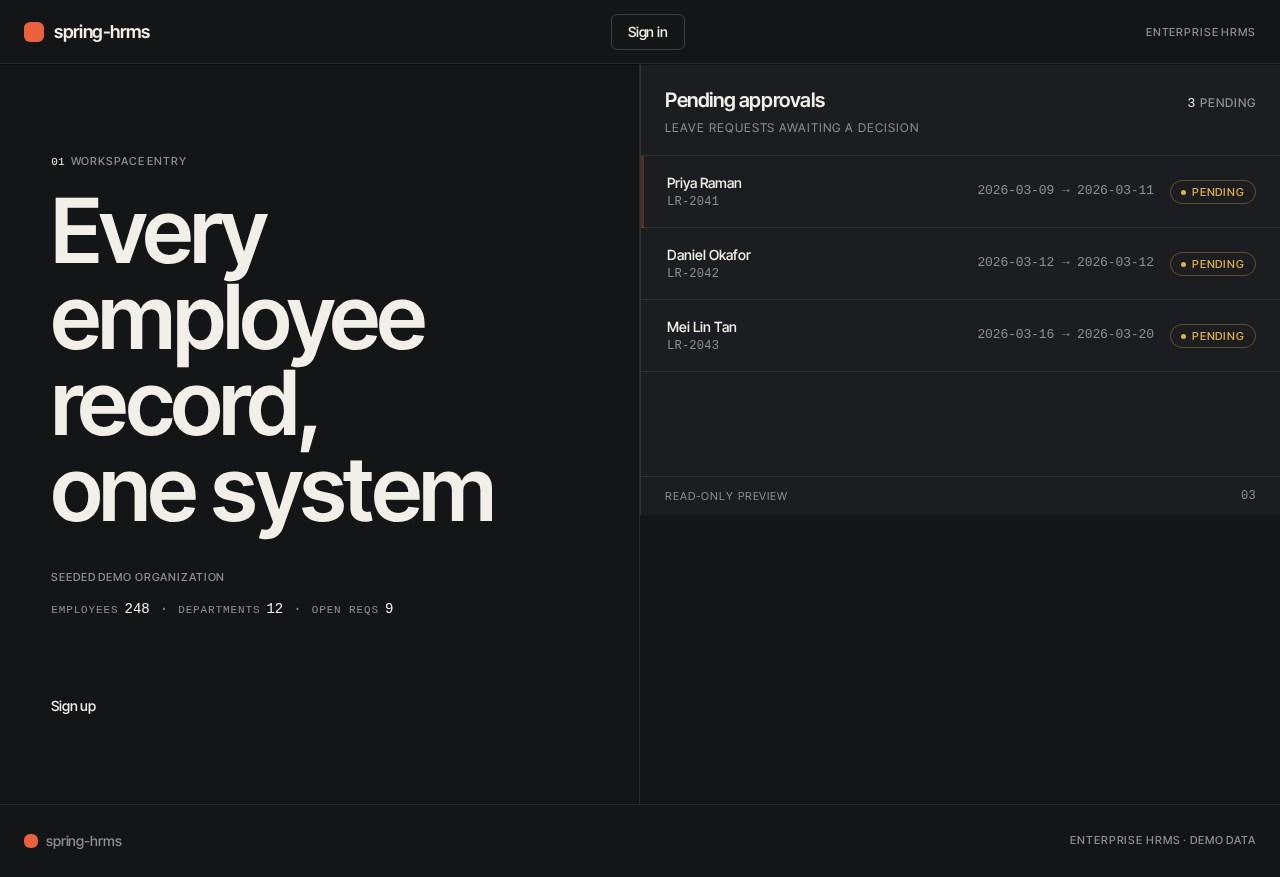
01 Workspace entry
Every employee record, one system
Pending approvals
3 pending- Priya RamanLR-20412026-03-09 → 2026-03-11Pending
- Daniel OkaforLR-20422026-03-12 → 2026-03-12Pending
- Mei Lin TanLR-20432026-03-16 → 2026-03-20Pending
01 Workspace entry
Every employee record, one system
Pending approvals
3 pending- Priya RamanLR-20412026-03-09 → 2026-03-11Pending
- Daniel OkaforLR-20422026-03-12 → 2026-03-12Pending
- Mei Lin TanLR-20432026-03-16 → 2026-03-20Pending
No comments yet. Be the first!