spoken-english
 Habibul Islam
Build **Step 1 of SARA — Learn English with AI**. Create the complete project foundation and responsive UI for a modern mobile-first English learning app. ### App Name: **SARA — Learn English with AI** Target users: beginner and intermediate English learners, especially Bengali-speaking learners. ### Important I have no coding experience. Make technical decisions yourself. Do not ask me to write code. For this step, focus ONLY on the UI, navigation, reusable components, and project structure. Do not build real AI/voice functionality yet. ### Main Navigation Create bottom navigation: * Home * Sara * Practice * Stories * Profile The **Sara** button should be the main/highlighted action. ### Home Screen Create a clean dashboard showing: "Good morning 👋" "Ready to practice English?" Cards for: * 🔥 Daily Streak * 🎙️ Speaking * 📚 Vocabulary * 📝 Daily Practice * 📖 Story of the Day Main button: **🎙️ Talk with Sara** ### Sara Screen Create a phone-call-style UI, not a chat UI. Show: * Sara avatar * Sara * AI English Tutor * Call duration * Voice waveform area * Microphone button * Mute button * End Call button * Hint button * Repeat button * Slow Speech button For now, these can be UI-only buttons. Do not create fake AI functionality. ### Practice Screen Create sections for: * Vocabulary * Grammar * Sentence Building * Speaking * Pronunciation * Listening Show today's progress. ### Stories Screen Create: * Story of the Day * Beginner * Intermediate * Advanced * Story categories * Story cards ### Profile Screen Show: * User profile * English level * Learning goal * Daily goal * Streak * Progress * Settings ### Design Make the UI: * Modern * Premium * Friendly * Clean * Calm * Educational * Mobile-first Use rounded cards, large touch targets, clear typography, simple icons, smooth animations and accessible contrast. Support: * Mobile * Tablet * Desktop * Light mode * Dark mode ### Architecture Create reusable components and a clean scalable structure so we can later add: * Authentication * Database * Speech-to-text * AI conversation * Text-to-speech * Grammar correction * Bengali explanations * Pronunciation analysis * Vocabulary * Daily practice * Stories * Progress tracking Do not remove or simplify the future **Learn with Sara voice experience**. After completing this step, verify that navigation and all screens work correctly before moving to the next step.


Comments (0)
Sign in to leave a comment
System Requirements
System Requirements Document for spoken-english
1. Introduction
The project "SARA — Learn English with AI" aims to create a modern, mobile-first English learning application targeted at beginner and intermediate English learners, particularly those who speak Bengali. The focus of this initial step is to establish the UI, navigation, reusable components, and project structure without implementing real AI or voice functionality.
2. System Overview
The SARA app is designed to provide an engaging and supportive learning environment for English learners. It features a mobile-first design with a bottom navigation bar for easy access to five main sections: Home, Sara, Practice, Stories, and Profile. The app's UI is modern, premium, and friendly, with a focus on accessibility and usability across mobile, tablet, and desktop devices in both light and dark modes.
2a. Product Interpretation and Delivery Boundary
This document outlines the requirements for the UI and navigation structure of the SARA app. The current scope excludes real AI and voice functionality, focusing instead on creating a scalable foundation for future development. The app will support responsive layouts and a humane design inspired by Yves Béhar, emphasizing warmth and approachability.
2b. Source Content Inventory
Not applicable as there is no explicit content_source directive.
2c. Page Content and Component Coverage
Home
- Dashboard Greeting: "Good morning 👋" and "Ready to practice English?"
- Cards:
- 🔥 Daily Streak
- 🎙️ Speaking
- 📚 Vocabulary
- 📝 Daily Practice
- 📖 Story of the Day
- Main Button: 🎙️ Talk with Sara
Sara
- UI Style: Phone-call-style
- Components:
- Sara avatar
- Sara
- AI English Tutor
- Call duration
- Voice waveform area
- Microphone button
- Mute button
- End Call button
- Hint button
- Repeat button
- Slow Speech button
Practice
- Sections:
- Vocabulary
- Grammar
- Sentence Building
- Speaking
- Pronunciation
- Listening
- Progress Display: Today's progress
Stories
- Content:
- Story of the Day
- Beginner, Intermediate, Advanced levels
- Story categories
- Story cards
Profile
- Content:
- User profile
- English level
- Learning goal
- Daily goal
- Streak
- Progress
- Settings
3. Functional Requirements
- As an English Learner, I should see a clean dashboard on the Home screen with a greeting and cards for Daily Streak, Speaking, Vocabulary, Daily Practice, and Story of the Day, so I can quickly access my learning activities. (explicit)
- As an English Learner, I should be able to navigate to the Sara screen and see a phone-call-style UI with various controls, so I can interact with the AI English Tutor in future updates. (explicit)
- As an English Learner, I should be able to view sections for Vocabulary, Grammar, Sentence Building, Speaking, Pronunciation, and Listening on the Practice screen, so I can track my progress in these areas. (explicit)
- As an English Learner, I should be able to explore stories by level and category on the Stories screen, so I can find content appropriate for my learning level. (explicit)
- As an English Learner, I should be able to view my profile, English level, learning goals, streak, and progress on the Profile screen, so I can monitor my learning journey. (explicit)
- As an English Learner, I should be able to navigate between Home, Sara, Practice, Stories, and Profile using the bottom navigation bar, ensuring a seamless user experience. (required_inference)
4. User Personas
- English Learner: A beginner or intermediate English learner, especially Bengali-speaking, using the app to practice English, navigate lessons, and review progress.
5. Core User Flows
-
Home Screen Access:
- The English Learner opens the app and is greeted with a dashboard showing their learning options and progress.
- They can tap on any card to access specific learning activities or use the main button to initiate a session with Sara.
-
Navigating to Sara:
- The English Learner taps the Sara button in the bottom navigation.
- They see a phone-call-style interface with controls for future interaction with the AI English Tutor.
-
Using the Practice Screen:
- The English Learner selects the Practice tab.
- They view sections for various learning activities and see their progress for the day.
-
Exploring Stories:
- The English Learner taps the Stories tab.
- They browse stories by level and category, selecting one to read.
-
Viewing Profile:
- The English Learner taps the Profile tab.
- They review their profile information, learning goals, and progress.
6. Visuals Colors and Theme
- Muse: Yves Béhar
- Palette (light mode):
- Background: #FAF9F6
- Surface: #FFFFFF
- Text: #333333
- Primary: #FF5722
- Accent: #4CAF50
- Muted: #E0E0E0
- Typography:
- Headings: Work Sans — Bold
- Body: Karla
- Scale: 1.25 modular
- Shape Language: Rounded corners and soft edges
- Layout: Single-column focus with ample whitespace
- Motion: Breathing, slow easing transitions
7. Signature Design Concept
The Home screen features a welcoming hero section with a large, friendly illustration of 'Sara'. Rounded cards with drop shadows provide depth and focus, while oversized typography invites users to engage with the app. The vibrant orange accent highlights main actions, and subtle animations guide users through transitions.
8. Interaction Model & Motion Direction
- Interaction Model: Static
- Motion Tempo: Restrained
- Hero Dimensionality: Layered_2d
- Landing Hero Motion Brief: The hero section features a large illustration of 'Sara' with rounded cards for main CTAs. Subtle breathing animations guide the user through the interface, creating a calm and inviting experience.
9. Non-Functional Requirements
- The app must support responsive layouts for mobile, tablet, and desktop devices. (explicit)
- The app must support both light and dark modes. (explicit)
- The UI must be modern, premium, friendly, clean, calm, and educational. (explicit)
10. Tech Stack
- Frontend: React or React Native [Default — not specified by user]
- Styling: CSS-in-JS or Styled Components [Default — not specified by user]
- State Management: Redux or Context API [Default — not specified by user]
11. Assumptions and Constraints
- The current scope is limited to UI, navigation, reusable components, and project structure. (explicit)
- No real AI or voice functionality will be implemented in this step. (explicit)
- The design must align with Yves Béhar's humane and warm design language. (explicit)
12. Glossary
- UI: User Interface
- AI: Artificial Intelligence
- CTA: Call to Action
- Sara: The AI English Tutor character within the app.
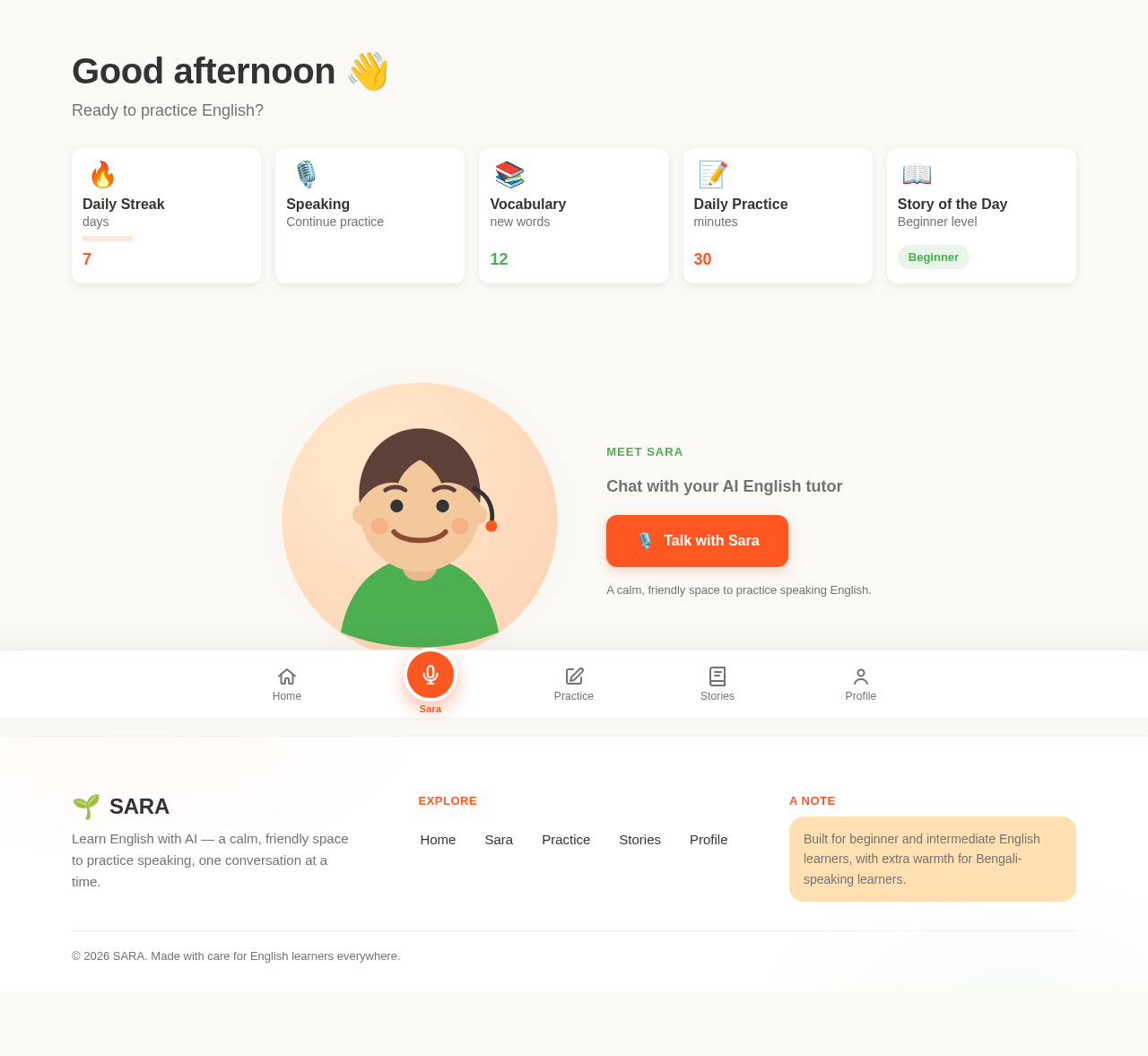
Good evening 👋
Ready to practice English?
Meet Sara
Chat with your AI English tutor
Talk with SaraA calm, friendly space to practice speaking English.
Good evening 👋
Ready to practice English?
Meet Sara
Chat with your AI English tutor
Talk with SaraA calm, friendly space to practice speaking English.
No comments yet. Be the first!