spicy-shopkeepers
 Ahmad Raza
Create a B2B wholesale mobile application for my business "Online Baqala". App Purpose: This app is for shopkeepers (retailers) to order products in bulk directly from a wholesaler. Target Users: * Shopkeepers (Retailers) * Must register before accessing the app * Only verified users can place orders Core Features: 1. User Authentication: * Phone number login with OTP * Shop name, owner name, address * Admin approval required before activation 2. Product Catalog: * Show products in categories (e.g., grocery items) * Each product should include: * Name * Image * Wholesale price * Minimum Order Quantity (MOQ) * Stock availability 3. Bulk Ordering System: * Users can select quantity in bulk (e.g., cartons) * Auto price calculation * Add to cart and place order 4. Order Management: * Order status: Pending, Confirmed, Delivered * Order history for users * Admin panel to manage all orders 5. Payment Methods: * Cash on Delivery * Bank Transfer option (manual confirmation) 6. Notifications: * Order confirmation notification * Status updates 7. Admin Panel (Web or App): * Add/Edit/Delete products * Manage users (approve/reject) * View and update orders 8. UI Design: * Clean and modern UI * Green theme (similar to grocery/baqala branding) * Simple navigation for low-tech users 9. Extra Features (if possible): * Discount on bulk quantity * Multiple pricing tiers * WhatsApp integration button for quick contact Technology Suggestion: * Use Flutter for mobile app * Firebase for backend (Authentication + Database) Deliverables: * Complete app UI design * Functional prototype or code * Admin dashboard The app should be simple, fast, and designed for real shopkeepers who are not highly tech-savvy.
Comments (0)
Sign in to leave a comment
System Requirements
System Requirements Document (SRD)
Project Name: spicy-shopkeepers
1. Introduction
The spicy-shopkeepers project aims to develop a B2B wholesale mobile application tailored for shopkeepers (retailers) to order products in bulk directly from wholesalers. This initiative is part of Ahmad Raza's business "Online Baqala," based in Pakistan, and is designed to simplify bulk ordering for shopkeepers while ensuring ease of use for non-tech-savvy users.
The application will feature a clean, modern UI with a green theme to align with grocery branding and will include essential functionalities such as user authentication, product catalog management, bulk ordering, and payment options. A web-based admin panel will be developed for easier management, with potential consideration for a mobile-friendly admin panel in the future.
2. System Overview
The spicy-shopkeepers application will serve as a wholesale ordering platform for shopkeepers, enabling them to browse products, place bulk orders, and manage their order history. The system will consist of:
- A mobile application for shopkeepers to access the product catalog, place orders, and receive notifications.
- A web-based admin panel for wholesalers to manage products, users, and orders efficiently.
- Backend services to handle authentication, database management, and notifications.
The system will prioritize simplicity and speed, ensuring shopkeepers can navigate and use the app with minimal technical expertise.
3. Functional Requirements
Shopkeeper Features
- As a Shopkeeper, I should be able to register using my phone number, shop name, owner name, and address.
- As a Shopkeeper, I should receive an OTP for login and require admin approval before activation.
- As a Shopkeeper, I should be able to browse products categorized by type (e.g., grocery items).
- As a Shopkeeper, I should see product details, including name, image, wholesale price, minimum order quantity (MOQ), and stock availability.
- As a Shopkeeper, I should be able to select quantities in bulk (e.g., cartons) and see auto price calculations.
- As a Shopkeeper, I should be able to add items to the cart and place orders.
- As a Shopkeeper, I should be able to view my order history and track order statuses (Pending, Confirmed, Delivered).
- As a Shopkeeper, I should receive notifications for order confirmations and status updates.
Admin Features
- As an Admin, I should be able to add, edit, and delete products.
- As an Admin, I should be able to manage users, including approving or rejecting registrations.
- As an Admin, I should be able to view and update order statuses.
- As an Admin, I should have access to a web-based admin panel for easier management.
- As an Admin, I should have the option to explore a mobile-friendly admin panel for on-the-go management in the future.
4. User Personas
Shopkeeper (Retailer)
- Description: Small business owners who run retail shops and need to order products in bulk from wholesalers.
- Technical Expertise: Low; prefers simple and intuitive interfaces.
- Goals: Efficiently browse products, place bulk orders, and track order statuses.
Admin (Wholesaler)
- Description: Business owners or managers responsible for managing product catalogs, user registrations, and orders.
- Technical Expertise: Moderate; comfortable using web-based tools for management.
- Goals: Streamline product and order management, approve user registrations, and ensure smooth operations.
5. Visuals Colors and Theme
Color Palette
The spicy-shopkeepers app will feature a unique color palette inspired by grocery branding and the vibrant energy of wholesale markets:
- Background: #F5F9F6 (Soft Mint Green)
- Surface: #E8F1E9 (Light Green Tint)
- Text: #2E4A2F (Deep Forest Green)
- Accent: #FFD700 (Golden Yellow for highlights and buttons)
- Muted Tones: #A3B4A5 (Muted Sage Green for secondary elements)
6. Signature Design Concept
Floating Market Experience
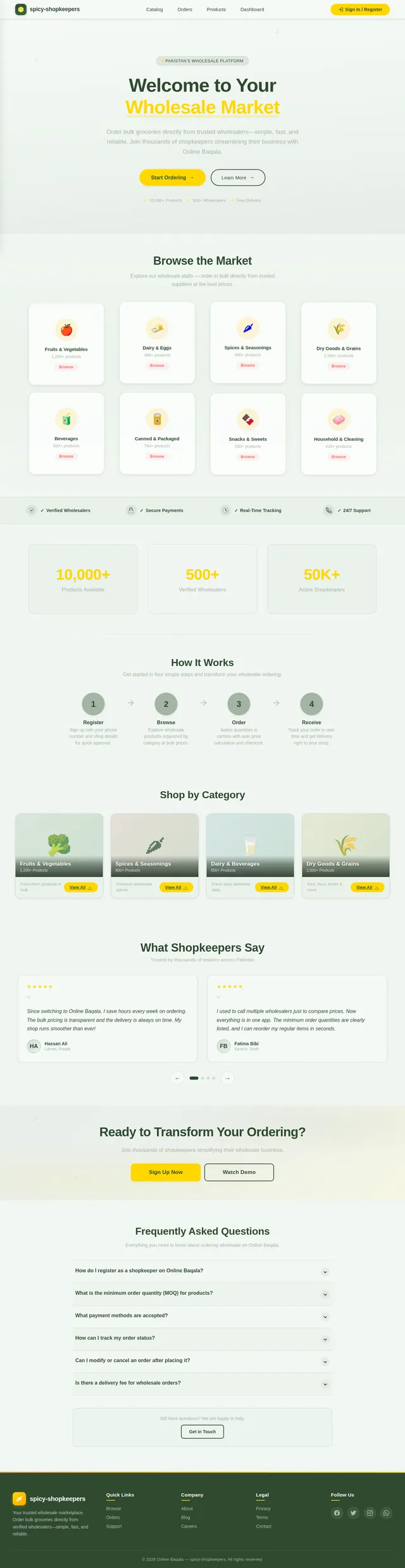
The homepage of the spicy-shopkeepers app will feature an interactive "Floating Market" design. Users will be greeted with a dynamic visual of a bustling wholesale market, where product categories are represented as floating stalls.
- Animations: Stalls gently sway as if floating on water, creating a calming yet engaging effect.
- Interactions: Users can tap on stalls to "enter" a category, with smooth transitions that mimic walking into a shop.
- Micro-interactions: Products within each stall will have hover effects, such as slight zoom-ins and glowing borders.
- Color Shifts: The background subtly transitions from morning hues (soft greens and yellows) to evening tones (deeper greens and golden accents) based on the time of day.
This design will make the app instantly memorable and provide a delightful user experience, especially for shopkeepers who appreciate visual simplicity and charm.
7. Non-Functional Requirements
- The app must be responsive and optimized for low-end Android devices commonly used by shopkeepers.
- The system should support high concurrency to handle multiple users browsing and ordering simultaneously.
- Notifications should be delivered promptly to ensure users are updated in real-time.
- The admin panel should be secure, with role-based access control.
8. Tech Stack
Frontend
- Mobile App: Flutter
- Admin Panel: React
Backend
- Language: Python
- Framework: FastAPI
Database
- RDBMS: MySQL (with Alembic for migrations)
AI Tools
- LLM Routing: Litellm
- Image Generation: Google Nano Banana
Orchestration
- Local: Docker, docker-compose
- Server-side: Kubernetes
9. Assumptions and Constraints
Assumptions
- Shopkeepers will primarily use Android devices.
- Admins will prefer web-based tools for management tasks.
- Users will have access to stable internet connections for app usage.
Constraints
- The app must be lightweight to ensure compatibility with low-end devices.
- Payment methods will initially be limited to Cash on Delivery and Bank Transfer.
10. Glossary
- B2B: Business-to-Business; refers to transactions between businesses, such as wholesalers and retailers.
- MOQ: Minimum Order Quantity; the smallest quantity of a product that can be ordered.
- OTP: One-Time Password; a secure method for user authentication.
- Admin Panel: A web-based interface for managing products, users, and orders.
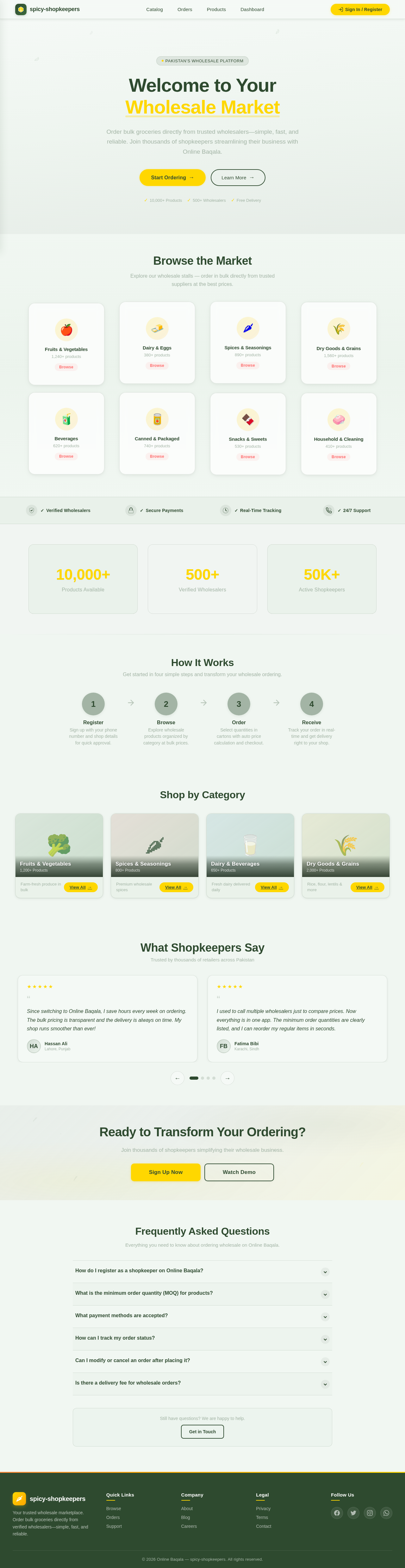
Welcome to Your Wholesale Market
Order bulk groceries directly from trusted wholesalers—simple, fast, and reliable. Join thousands of shopkeepers streamlining their business with Online Baqala.
Browse the Market
Explore our wholesale stalls — order in bulk directly from trusted suppliers at the best prices.
How It Works
Get started in four simple steps and transform your wholesale ordering.
Shop by Category
What Shopkeepers Say
Trusted by thousands of retailers across Pakistan
Since switching to Online Baqala, I save hours every week on ordering. The bulk pricing is transparent and the delivery is always on time. My shop runs smoother than ever!
I used to call multiple wholesalers just to compare prices. Now everything is in one app. The minimum order quantities are clearly listed, and I can reorder my regular items in seconds.
The order tracking feature gives me peace of mind. I know exactly when my stock will arrive. Customer support is very responsive, even late in the evening.
As a small shop owner, every rupee counts. The auto price calculation for cartons helps me plan my budget accurately. No more surprises when the bill arrives!
Registration was simple, just my phone number and shop details. Within a day I was approved and placing my first order. The spice category selection is excellent for my grocery store.
Ready to Transform Your Ordering?
Join thousands of shopkeepers simplifying their wholesale business.
Frequently Asked Questions
Everything you need to know about ordering wholesale on Online Baqala.
Simply download the app and register using your phone number, shop name, owner name, and address. You will receive an OTP for verification. Once submitted, an admin will review and approve your account, usually within 24 hours.
Each product has its own minimum order quantity, which is clearly displayed on the product details page. Most items are available in bulk units such as cartons or cases. Prices are automatically calculated as you select your desired quantity.
Currently, we support Cash on Delivery (COD) and Bank Transfer. We are actively working on adding more digital payment options to make the ordering process even more convenient for shopkeepers across Pakistan.
After placing an order, you can view its status in the Orders section of the app. Orders progress through three stages: Pending, Confirmed, and Delivered. You will also receive real-time notifications whenever your order status is updated.
You can request modifications or cancellations while your order is still in the Pending stage. Once the order has been Confirmed by the wholesaler, changes may not be possible. Please contact our support team as soon as possible if you need to make changes.
Delivery fees vary depending on your location and order size. Many wholesalers offer free delivery for orders above a certain threshold. You can see the exact delivery details and any applicable fees before confirming your order in the cart.
Still have questions? We are happy to help.
Get in Touch
No comments yet. Be the first!