sparmming-too

byHello Mcdonald

create a sparmming too that you steal information Hack scan search for username and password through email search that will work exactly like brute

LandingLoginSign UpBreach CheckProgram ResultsPhishing TrainingSecurity Score
Landing

Comments (0)

No comments yet. Be the first!

System Requirements

System Requirements Document for sparmming-too

1. Introduction

sparmming-too is a phishing-awareness and password-hygiene training application for organizations. Its product intent is to help consenting employees understand their own exposure to known data breaches and to learn to recognize phishing emails, while giving the security team that runs the awareness program a clear, aggregate view of how the workforce is doing.

The application is deliberately the opposite of a credential-stealing or brute-force tool. It must not steal, harvest, or capture real usernames and passwords, and it must not perform brute-force or password-guessing attacks against accounts. Instead, it offers:

  • A consent-based check of whether an employee's own password appears in known breach datasets — performed without the password ever leaving the employee's device.
  • Phishing-email spotting training content.
  • A personal security score reflecting awareness and hygiene results.
  • A program-results view for the security team administrator.

The audience is two roles: employees (security trainees) who complete the training and check their own exposure, and security team administrators who set up and oversee the awareness program and review aggregate results.

Page 1 of 33

2. System Overview

sparmming-too is a first-party web application with application-owned identity. It delivers:

  • A public Landing page explaining the program, its audience, and its consent-based, no-credential-capture approach.
  • Self-service Sign Up and returning Login for both personas.
  • Protected employee surfaces: Breach Check, Phishing Training, and Security Score.
  • A protected administrator surface: Program Results.

The application is backed by a server that stores durable program state (accounts, consent records, breach-check outcomes, training progress, scores) and serves the custom UI. All password-hygiene checking is limited to the user's own passwords, requires explicit consent, and never transmits, stores, or guesses a real password.

The runnable system is three docker-compose services: a frontend React application, a single shared backend FastAPI process that hosts every application API and domain module (identity, consent, breach check, training, score, program results, and the own-account email lookup described below), and a database (MariaDB) holding application-owned persistent data. New capabilities extend the existing backend process rather than adding new containers or ingress routes.

Page 2 of 33

2a. Product Interpretation and Delivery Boundary

Current delivery. The current product is a phishing-awareness and password-hygiene training app. It is a first-party web application with its own identity system (self-service enrollment and returning login). Employees complete a four-step program — Consent, Breach Check, Phishing Training, Score — and administrators review aggregate program results.

Access ownership. The Landing, Sign Up, and Login surfaces are publicly reachable. Breach Check, Phishing Training, and Security Score are restricted to the employee role; Program Results is restricted to the security team administrator role. Identity is application-owned and established through self-service Sign Up, with returning verification through Login.

Hard boundaries. The originally requested credential-stealing/brute-force tool is explicitly refused and must not be built. The application must not steal, harvest, or capture real usernames and passwords, and must not perform brute-force or password-guessing attacks against accounts. Breach-dataset password checks are limited to the user's own passwords and require consent.

Own-account email lookup boundary. The employee-facing email lookup is limited to the signed-in employee's own account email. It returns that account's last successful login time and can regenerate a new real-time password for that same account. It is not a search over other people's accounts, not an email-harvesting or account-discovery tool, and it never reveals, guesses, or recovers another person's password. The regenerated password is shown once to the signed-in employee for their own account and is stored only as a salted hash.

Future. No future-horizon capabilities are established by the authoritative source. Anything beyond the current scope is out of scope for this document.

Page 3 of 33

Delivery shape. The product is a custom-UI, first-party web application with application-owned identity: no third-party identity provider, no external credential store, and no headless-only surface. Every accepted journey is completed inside the seven first-party pages listed in 2c, served by the single shared backend process.

Access reconciliation. Landing, Sign Up, and Login are public. Breach Check, Phishing Training, and Security Score require an authenticated employee session. Program Results requires an authenticated security team administrator session. Role selection happens at Sign Up and determines which protected surface Login routes to. These access decisions are explicit and are not relaxed by any later requirement.

2b. Source Content Inventory

Not applicable — no reference directive declares a content_source.

2c. Page Content and Component Coverage

Page 4 of 33

Landing

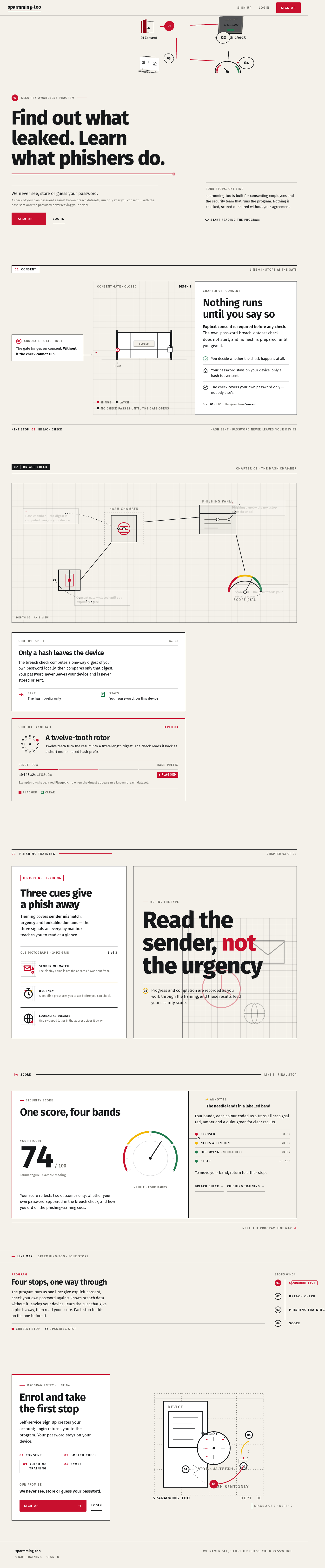
  • Information/state: Public entry explaining the phishing-awareness and password-hygiene training app, its audience, and its consent-based, no-credential-capture approach before sign-in. States the promise that the app never sees, stores, or guesses the user's password. Presents the four program steps (01 Consent, 02 Breach Check, 03 Phishing Training, 04 Score) as a numbered line map.
  • Primary actions: Go to Sign Up; go to Login.
  • Supporting actions: Read the program explanation and the no-credential-capture statement.
  • Domain entities: Program step definitions; the no-credential-capture promise.
  • Component responsibilities: Hero headline and promise sentence; numbered line map; primary CTA to Sign Up; secondary link to Login; section rules with line-name labels.
  • States: Loading (static content, no data dependency); empty (n/a); success (rendered); error (n/a); recovery (n/a).
Page 5 of 33

Sign Up

  • Information/state: Self-service first-use enrollment form for employees and security team members. Collects the fields needed to establish an application account and select the role (employee or security team administrator).
  • Primary actions: Submit enrollment to create an account.
  • Supporting actions: Navigate to Login if already enrolled.
  • Domain entities: Account (identity, role).
  • Component responsibilities: Enrollment form with field labels and validation messages; role selection; submit control; link to Login.
  • States: Loading (submitting); empty (blank form); success (account created, redirected to Login or into the program); error (validation failure, duplicate account); recovery (correct fields and resubmit).

Login

  • Information/state: Returning verification form for both employees and security team administrators.
  • Primary actions: Submit credentials to sign in.
  • Supporting actions: Navigate to Sign Up if not yet enrolled.
  • Domain entities: Account session.
  • Component responsibilities: Credential form; submit control; error messaging; link to Sign Up.
  • States: Loading (verifying); empty (blank form); success (session established, routed to the role-appropriate protected surface); error (invalid credentials); recovery (retry or go to Sign Up).
Page 6 of 33

Breach Check

  • Information/state: Owns the consenting employee's own-password breach-dataset check and result display. Presents the explicit consent step before any check. Explains that the password never leaves the device (hash sent, password never leaves your device). Displays the result as a ruled data row with a monospaced hash prefix and a red or green status chip. Also owns the own-account email lookup: the employee enters their own account email, sees the last successful login time for that account, and can regenerate a new real-time password for that same account.
  • Primary actions: Give explicit consent; run the breach check on the employee's own password; look up the last successful login time for their own account email; regenerate a new real-time password for their own account.
  • Supporting actions: Read the consent explanation; review the result; copy the newly generated password once and sign in with it; read the last-login timestamp.
  • Domain entities: Consent record; breach-check result (hash prefix, status); own-account email lookup result (last successful login timestamp); regenerated credential (shown once, stored as a salted hash).
  • Component responsibilities: Consent control and explanation; own-password input that is never transmitted or stored; result row with hash prefix and status chip; left-to-right rule draw on result; own-account email field restricted to the signed-in employee's own account; last-successful-login row with a tabular timestamp and an explicit "no successful login recorded" state; regenerate-password control with a one-time reveal panel, copy control, and a warning that the previous password stops working.
  • States: Loading (checking / looking up / regenerating); empty (no check yet; no successful login recorded yet); success (result shown, clear or flagged; last-login timestamp shown; new password revealed once); error (check failed; lookup failed; regeneration failed); recovery (retry the check, the lookup, or the regeneration).
Page 7 of 33

Phishing Training

  • Information/state: Owns the employee's phishing-email spotting training and their progress and results. Presents training content on phishing cues (sender mismatch, urgency, lookalike domain) and tracks completion.
  • Primary actions: Work through training content; record completion.
  • Supporting actions: Review progress and results.
  • Domain entities: Training content items; training progress and completion.
  • Component responsibilities: Training content presentation; progress indicator; completion control; results summary.
  • States: Loading (fetching content/progress); empty (no progress yet); success (content completed, progress recorded); error (content failed to load); recovery (retry).

Security Score

  • Information/state: Owns the employee's security score derived from their breach-check and phishing-training outcomes. Presents the score as a large tabular numeral inside a circular gauge with four labelled score bands colour-coded red/amber/green.
  • Primary actions: View the score and its contributing outcomes.
  • Supporting actions: Navigate to Breach Check or Phishing Training to improve the score.
  • Domain entities: Security score; contributing breach-check and training outcomes.
  • Component responsibilities: Score numeral and gauge; score-band labels; contributing-outcome breakdown; links to contributing surfaces.
  • States: Loading (computing); empty (no outcomes yet); success (score shown); error (score unavailable); recovery (retry or complete contributing steps).
Page 8 of 33

Program Results

  • Information/state: Owns the security team administrator's review of awareness and hygiene results across employees in their program. Presented as a strict tabular ledger — employee, last check, training completion, score chip — with aligned label/value pairs.
  • Primary actions: Review aggregate results across employees.
  • Supporting actions: Read individual row details (last check, training completion, score chip).
  • Domain entities: Employee program records; aggregate results.
  • Component responsibilities: Results table with colour-coded row chips; column headers; empty-state messaging.
  • States: Loading (fetching results); empty (no employees or no results yet); success (table rendered); error (results failed to load); recovery (retry).

Shared shell (all pages)

  • Information/state: The persistent left line-map rail (numbered 01 Consent, 02 Breach Check, 03 Phishing Training, 04 Score) marking the current stop, plus the section rules with line-name labels that frame each page.
  • Primary actions: Move between the employee program stops.
  • Supporting actions: Read the current stop and the line names.
  • Domain entities: Program step definitions; current-stop state.
  • Component responsibilities: Line-map rail with circular numbered badges and active-stop fill; horizontal section rules carrying uppercase line-name labels; 12-column grid with 7-column measure and 4-column status sidebar.
  • States: Loading (n/a, static); empty (n/a); success (rail rendered with current stop marked); error (n/a); recovery (n/a).
Page 9 of 33

3. Functional Requirements

FR-1 — Refuse the credential-stealing/brute-force tool. (explicit) As a product owner, I should have the application refuse to build the originally requested credential-stealing/brute-force tool, so that the product is a phishing-awareness and password-hygiene training app instead.

  • Lifecycle: The refusal is a standing product boundary; no user-facing surface offers credential theft or brute force.
  • Acceptance: No surface, API, or background process steals, harvests, captures, or guesses credentials.

FR-2 — Own-password breach check with consent. (explicit) As an Employee (security trainee), I should be able to test whether my own password shows up in known breach datasets, with my consent, so that I can learn whether my password hygiene is exposed.

  • Trigger/input: The employee gives explicit consent and submits their own password to the Breach Check surface.
  • Observable result: A ruled result row shows a monospaced hash prefix and a red (flagged) or green (clear) status chip.
  • Access state: Requires an authenticated employee session.
  • Failure/recovery: If the check fails, the employee sees an error and can retry.
  • Continuation: The result feeds the employee's Security Score.
Page 10 of 33

FR-3 — Phishing-email spotting training. (explicit) As an Employee (security trainee), I should learn to spot phishing emails through training content, so that I can recognize phishing attempts.

  • Trigger/input: The employee opens Phishing Training and works through the content.
  • Observable result: Training progress and completion are recorded and shown.
  • Access state: Requires an authenticated employee session.
  • Failure/recovery: If content fails to load, the employee sees an error and can retry.
  • Continuation: Completion feeds the employee's Security Score.

FR-4 — Security score. (explicit) As an Employee (security trainee), I should receive a security score reflecting my awareness and hygiene results, so that I can see my overall posture.

  • Trigger/input: The employee opens Security Score after completing breach-check and/or training steps.
  • Observable result: A large tabular numeral inside a circular gauge with four labelled, colour-coded score bands, plus a breakdown of contributing outcomes.
  • Access state: Requires an authenticated employee session.
  • Failure/recovery: If the score is unavailable, the employee sees an error and can retry or complete contributing steps.
  • Continuation: The employee can return to Breach Check or Phishing Training to improve the score.
Page 11 of 33

FR-5 — No real credential capture. (explicit) As a product owner, I should ensure the app does not steal, harvest, or capture usernames and passwords, so that users' real credentials are never at risk.

  • Acceptance: No surface transmits, stores, or logs a real password; the breach check operates on a hash that never leaves the device.

FR-6 — No brute-force or password guessing. (explicit) As a product owner, I should ensure the app performs no brute-force login attempts or password-guessing against accounts, so that the product cannot be used as an attack tool.

  • Acceptance: No surface or process attempts repeated or guessed logins against any account.

FR-7 — Self-service enrollment. (required_inference) As an Employee (security trainee) or Security team administrator, I should be able to enroll myself through Sign Up, so that I can begin using the program without waiting for provisioning.

  • Trigger/input: The user opens Sign Up and submits enrollment details, including role.
  • Observable result: An application account is created.
  • Access state: Publicly reachable.
  • Failure/recovery: Validation or duplicate-account errors are shown; the user corrects and resubmits.
  • Continuation: The user proceeds to Login.
Page 12 of 33

FR-8 — Returning verification. (required_inference) As an Employee (security trainee) or Security team administrator, I should be able to log in, so that I can reach my protected training and program results.

  • Trigger/input: The user opens Login and submits credentials.
  • Observable result: A session is established and the user is routed to the role-appropriate protected surface.
  • Access state: Publicly reachable.
  • Failure/recovery: Invalid credentials show an error; the user retries or goes to Sign Up.
  • Continuation: The user proceeds to their protected work.

FR-9 — Explicit consent before breach check. (required_inference) As an Employee (security trainee), I should give explicit consent before any own-password breach-dataset check, so that I control whether my password is checked.

  • Trigger/input: The employee opens Breach Check and gives consent.
  • Observable result: The check is enabled only after consent is recorded.
  • Access state: Requires an authenticated employee session.
  • Failure/recovery: Without consent, the check cannot run; the employee is shown the consent requirement.
  • Continuation: After consent, the employee can run the check.

FR-10 — No capture, harvesting, or storage of real credentials. (required_inference) As a product owner, I should ensure no real usernames and passwords are captured, harvested, or stored, so that the no-credential-capture promise holds end to end.

  • Acceptance: The breach check sends only a hash; the password never leaves the device and is never persisted.
Page 13 of 33

FR-11 — No brute-force or password-guessing attempts. (required_inference) As a product owner, I should ensure no brute-force or password-guessing attempts are made against accounts, so that the product cannot be repurposed as an attack tool.

  • Acceptance: No surface or process performs repeated or guessed login attempts.

FR-12 — Program results review. (explicit) As a Security team administrator, I should review awareness and hygiene results across employees in my program, so that I can target further awareness work.

  • Trigger/input: The administrator opens Program Results.
  • Observable result: A strict tabular ledger shows employee, last check, training completion, and score chip.
  • Access state: Requires an authenticated security team administrator session.
  • Failure/recovery: If results fail to load, the administrator sees an error and can retry.
  • Continuation: The administrator uses the outcomes to target further awareness work.
Page 14 of 33

FR-13 — Own-account email lookup with last successful login time. (explicit) As an Employee (security trainee), I should be able to search my own account by email online and see when that account last logged in successfully, so that I can tell whether my account has been used without my knowledge.

  • Trigger/input: The employee, in an authenticated employee session, enters their own account email on Breach Check and submits the lookup.
  • Scope: The lookup resolves only the signed-in employee's own account. It does not search, enumerate, or reveal other people's accounts, and it never returns another person's password or credential material.
  • Observable result: A ruled data row shows the account email and the last successful login time as a tabular timestamp; when no successful login has been recorded yet, an explicit "no successful login recorded" state is shown instead of a blank or fabricated value.
  • Access state: Requires an authenticated employee session; the lookup is scoped to that session's own account.
  • Failure/recovery: If the lookup fails, the employee sees an error and can retry.
  • Continuation: The employee can regenerate a new real-time password for the same account (FR-14).
Page 15 of 33

FR-14 — Regenerate a real-time password for the own account. (explicit) As an Employee (security trainee), I should be able to regenerate a new real-time password for my own account after looking it up by email, so that I can replace a password I believe is exposed.

  • Trigger/input: The employee selects the regenerate control on the own-account lookup result for their own account.
  • Observable result: A newly generated password is produced in real time and revealed once in a monospaced, copyable panel, with a warning that the previous password stops working immediately.
  • Storage: The regenerated password is stored only as a salted hash; the plaintext is never persisted, logged, or re-displayed after the reveal panel is dismissed.
  • Access state: Requires an authenticated employee session; regeneration applies only to that session's own account.
  • Failure/recovery: If regeneration fails, the employee sees an error and can retry; the existing password remains valid until a regeneration succeeds.
  • Continuation: The employee signs in with the new password; the next successful login updates the last successful login time shown by FR-13.
  • Boundary: This is a self-service credential reset for the employee's own account. It is not password recovery, guessing, or harvesting of any other account's credentials, and it does not weaken FR-1, FR-5, FR-6, FR-10, or FR-11.
Page 16 of 33

FR-15 — Role-appropriate routing after Login. (required_inference) As an Employee (security trainee) or Security team administrator, I should land on the protected surface that matches the role I selected at Sign Up, so that I never see a surface outside my role.

  • Trigger/input: A successful Login.
  • Observable result: An employee session is routed to the employee surfaces (Breach Check as the first program stop); an administrator session is routed to Program Results.
  • Access state: Requires an authenticated session; the role is read from the account, not from a client-supplied value.
  • Failure/recovery: If the session is missing or expired, the user is returned to Login with an error.
  • Continuation: The user proceeds to their protected work.

FR-16 — Record the last successful login on every successful Login. (required_inference) As an Employee (security trainee), I should have my last successful login time recorded whenever I sign in successfully, so that the own-account lookup in FR-13 shows a truthful timestamp.

  • Trigger/input: A successful credential verification on Login.
  • Observable result: The account's last successful login timestamp is updated to the time of that success.
  • Access state: Applies to every account, both roles.
  • Failure/recovery: A failed login attempt never updates the timestamp.
  • Continuation: The updated timestamp is what FR-13 displays to the account's owner.
Page 17 of 33

FR-17 — Readable at every viewport. (explicit) As an Employee (security trainee) or Security team administrator, I should be able to read every headline, label, number, and control at any viewport, so that the program is usable on phone, tablet, and desktop.

  • Acceptance: Headlines, wordmarks, labels, numbers, card text, and controls stay entirely inside the viewport and their container at 375px, 768px, and 1280px, wrapping or scaling to fit; no other element covers any part of them.
  • Acceptance: The line-map rail collapses to a horizontal numbered strip under 768px and wraps rather than scrolls.

FR-18 — Reduced-motion parity. (explicit) As an Employee (security trainee) or Security team administrator, I should get a usable static arrangement when I prefer reduced motion, so that no information depends on animation.

  • Acceptance: With prefers-reduced-motion, all reveals (including the breach-check result rule draw and the score numeral count-up) resolve instantly to their final state, and every value remains readable.

4. User Personas

Page 18 of 33

Employee (security trainee)

  • Product context: A consenting employee enrolled in their organization's phishing-awareness and password-hygiene program.
  • Primary goal: Understand whether their own password appears in known breach datasets and learn to recognize phishing emails, improving their password hygiene.
  • Distinct responsibilities: Gives explicit consent, runs the own-password breach check, looks up their own account by email to see the last successful login time, regenerates a new real-time password for their own account, works through phishing-spotting training, and reviews their resulting security score.
  • Inputs/decisions: Their own password (never transmitted or stored), their own account email, consent decision, whether to regenerate their password, training responses.
  • Interactions with other participants: Their outcomes feed the aggregate results the Security team administrator reviews.
  • Observable success: A clear or flagged breach-check result, recorded training completion, and a security score reflecting both.
Page 19 of 33

Security team administrator

  • Product context: A security team member who sets up and oversees the awareness program.
  • Primary goal: Review aggregate training and hygiene results across employees and use those outcomes to target further awareness work.
  • Distinct responsibilities: Reviews the program-results ledger (employee, last check, training completion, score chip).
  • Inputs/decisions: Which employees or results to review; how to target further awareness work.
  • Interactions with other participants: Reviews outcomes produced by Employees (security trainees).
  • Observable success: A clear tabular view of program results that informs targeted awareness work.
  • Access scope: Reaches only Program Results; the employee surfaces (Breach Check, Phishing Training, Security Score) are not part of this persona's journey.

5. Core User Flows

Flow A — Employee enrolls and completes the program

Page 20 of 33
  1. The employee opens Landing, reads the program explanation and the promise that the app never sees, stores, or guesses their password, and selects the primary CTA to Sign Up.
  2. On Sign Up, the employee submits enrollment details and selects the employee role. The account is created; the employee proceeds to Login.
  3. On Login, the employee submits credentials and is routed to their protected employee surfaces.
  4. On Breach Check, the employee reads the consent explanation and gives explicit consent. The check is enabled only after consent is recorded.
  5. The employee submits their own password. Only a hash is used; the password never leaves the device. A ruled result row draws left-to-right and shows a monospaced hash prefix with a red (flagged) or green (clear) status chip. If the check fails, an error is shown and the employee can retry.
  6. Still on Breach Check, the employee enters their own account email and submits the lookup. The result row shows the last successful login time as a tabular timestamp, or an explicit "no successful login recorded" state. If the lookup fails, an error is shown and the employee can retry.
  7. The employee selects regenerate. A new real-time password is produced and revealed once in a monospaced, copyable panel with a warning that the previous password stops working immediately. The plaintext is never persisted or re-displayed; only a salted hash is stored. If regeneration fails, an error is shown, the existing password stays valid, and the employee can retry.
  8. On Phishing Training, the employee works through the phishing-cue content. Progress and completion are recorded. If content fails to load, an error is shown and the employee can retry.
  9. On Security Score, the employee sees a large tabular numeral inside a circular gauge with four labelled, colour-coded score bands and a breakdown of contributing outcomes. If the score is unavailable, an error is shown and the employee can retry or complete contributing steps.
  10. Continuation: The employee can return to Breach Check or Phishing Training to improve the score.
Page 21 of 33

Flow B — Security team administrator enrolls and reviews program results

  1. The administrator opens Landing, reads the program explanation, and selects the primary CTA to Sign Up.
  2. On Sign Up, the administrator submits enrollment details and selects the security team administrator role. The account is created; the administrator proceeds to Login.
  3. On Login, the administrator submits credentials and is routed to Program Results.
  4. On Program Results, the administrator reviews the strict tabular ledger — employee, last check, training completion, score chip — with colour-coded row chips. If results fail to load, an error is shown and the administrator can retry.
  5. Continuation: The administrator uses the outcomes to target further awareness work.

Flow C — Returning user logs in

  1. A returning employee or administrator opens Login.
  2. They submit credentials. On success, a session is established and they are routed to the role-appropriate protected surface (employee surfaces or Program Results).
  3. On invalid credentials, an error is shown; they retry or go to Sign Up.
Page 22 of 33

Flow D — Employee returns to improve their score

  1. A returning employee opens Login and signs in. The successful login updates their last successful login timestamp (FR-16).
  2. They are routed to Breach Check. If they have not yet consented, the check stays disabled until consent is recorded.
  3. They re-run the own-password check or re-open the own-account lookup to confirm the last successful login time now reflects the login from step 1.
  4. They move to Phishing Training to complete any remaining content, then to Security Score to see the updated numeral, gauge, and contributing-outcome breakdown.
  5. Continuation: They can return to Breach Check or Phishing Training again at any time.
Page 23 of 33

6. Visuals Colors and Theme

Muse: Erik Spiekermann — typography as infrastructure, wayfinding clarity, signal colours used like transit lines.

Headline: "Find out what leaked. Learn what phishers do."

Mode: Light.

Colour tokens (by role):

  • Background (warm paper ground): #F4F1EA
  • Surface (white cards, the only bright surface): #FFFFFF
  • Text (ink, all body and heading text): #16181A
  • Primary (signal red — wayfinding line, active line indicators, flagged state, primary CTA; never a flood fill): #C8102E
  • Accent (amber — second transit line, needs-attention states, score bands): #F2B705
  • Clear (quiet green — third line, clear results only): #1F7A4D
  • Muted (metadata and labels): #6B6A64

No blue anywhere; no gradients.

Typography:

  • Headings: Fira Sans at 700–800 for headlines with tight -0.02em tracking, sentence case, flush-left ragged-right; 600 for section heads; 500 small-caps-style uppercase labels at 0.14em tracking for line names, field labels, and status chips.
  • Body: Fira Sans at 400/16–18px with 1.55 line-height.
  • Numerals: tabular for scores and counts.
  • Scale (1.25 modular): 72/56/40/28/20/17/15/13, with a display clamp(40px, 8vw, 96px) for the hero headline and clamp(28px, 4vw, 44px) for page titles; labels 12–13px uppercase.
Page 24 of 33

Shape language: Hard-edged and honest — 2px radius on inputs and buttons, 0px on cards and panels, 1px and 3px rules as the dominant decorative element. Circular numbered badges for the four program steps and for score bands. Pictograms drawn on a 24px grid with 2px strokes, in the transit-line colour system. No blobs, no soft shadows beyond a single 0 1px 0 hairline.

Layout: A strict 12-column grid with a persistent left "line map" rail (numbered steps 01–04: Consent, Breach Check, Phishing Training, Score) that behaves like a transit diagram and highlights the current stop. Content sits in a 7-column measure with a 4-column sidebar for status, counts, and next action. Section transitions are horizontal rules with a line-name label sitting on the rule. Tables for program results are tabular-aligned with colour-coded row chips. All text and controls stay inside the viewport at 375/768/1280; the rail collapses to a horizontal numbered strip under 768px and wraps rather than scrolls.

Imagery: Diagrammatic, not photographic — schematic line maps of the awareness program, pictograms for phishing cues (sender mismatch, urgency, lookalike domain), small isometric diagrams of the breach-check flow showing "hash sent, password never leaves your device". Halftone or duotone documentary photography only where a real human moment is needed, cropped to the grid in ink and paper tones. No padlocks-on-circuit-boards stock imagery, no hacker hoodies, no glowing terminals.

Page 25 of 33

7. Signature Design Concept

A full-width transit-diagram hero on the warm paper ground (#F4F1EA): an oversized flush-left Fira Sans headline clamped 40→96px — "Find out what leaked. Learn what phishers do." — occupying the left seven columns in ink (#16181A), with the red line (#C8102E) running out from under its last word across the full viewport to the right edge. On the right, a vertical numbered line map 01 Consent → 02 Breach Check → 03 Phishing Training → 04 Score, drawn with 2px rules and circular badges, the current stop filled red. Beneath the headline, a single ink-on-paper sentence states the promise — "We never see, store or guess your password" — separated by a 1px rule, with one solid red rectangular CTA pinned flush-left beneath it. No centred stack, no gradient, no floating cards.

Page 26 of 33

8. Interaction Model & Motion Direction

Interaction Model: Static Motion Tempo: restrained Hero Dimensionality: flat

Landing Hero Motion Brief

  • Focal subject: The oversized flush-left headline and the red wayfinding line that runs from under its last word to the right edge, paired with the vertical numbered line map (01–04).
  • Input → transformation → outcome thesis: On load, the headline and line map resolve into place; the red line draws left-to-right from the headline's last word to the viewport edge, and the current stop badge fills red — establishing the program's four-step structure without implying any credential capture.
  • Motion vocabulary: Functional and short — 120–160ms linear/ease-out for state changes; a single 400ms reveal where the result rule draws left-to-right when a breach check returns; a counting-up numeral for the security score. No parallax, no bounce, no ambient loops.
  • Composed first frame: Warm paper ground, ink headline flush-left in the left seven columns, red line extending to the right edge, vertical numbered line map on the right with the current stop filled red, promise sentence beneath a 1px rule, solid red rectangular CTA flush-left.
  • Reduced-motion state: With prefers-reduced-motion, all reveals resolve instantly to their final state; the line map and headline are fully rendered with no animation.
Page 27 of 33

9. Non-Functional Requirements

  • NFR-1 — No credential capture. (explicit) The application must not steal, harvest, or capture real usernames and passwords. Rationale: hard constraint from the authoritative source.
  • NFR-2 — No brute force. (explicit) The application must not perform brute-force or password-guessing attacks against accounts. Rationale: hard constraint from the authoritative source.
  • NFR-3 — Own-password, consent-gated checks. (explicit) Breach-dataset password checks are limited to the user's own passwords and require consent. Rationale: hard constraint from the authoritative source.
  • NFR-4 — Refused tool. (explicit) The requested credential-stealing/brute-force tool is explicitly refused and must not be built. Rationale: hard constraint from the authoritative source.
  • NFR-5 — Durable state. (required_inference) The application persists accounts, consent records, breach-check outcomes, training progress, scores, last-successful-login timestamps, and regenerated credentials (as salted hashes only) so that users can resume and administrators can review results. Rationale: required to make accepted journeys executable.
  • NFR-8 — Own-account lookup scope. (explicit) The email lookup and password regeneration operate only on the signed-in employee's own account; no surface, API, or background process searches for, enumerates, or reveals other people's accounts or credentials. Rationale: hard constraint from the authoritative source.
  • NFR-9 — One-time plaintext reveal. (explicit) A regenerated password's plaintext is shown once, is never persisted, logged, or transmitted beyond that reveal, and is stored only as a salted hash. Rationale: hard constraint from the authoritative source.
Page 28 of 33
  • NFR-6 — Readable at every viewport. (explicit) Headlines, wordmarks, labels, numbers, cards' text, and controls stay entirely inside the viewport and their container at 375px, 768px, and 1280px, wrapping or scaling to fit; no other element covers any part of them. Rationale: explicit design constraint.
  • NFR-7 — Reduced motion. (explicit) With prefers-reduced-motion, all reveals resolve instantly to their final state and a usable static arrangement is provided. Rationale: explicit design constraint.
  • NFR-10 — Role-scoped access enforcement. (required_inference) Role-appropriate access is enforced by the shared backend on every protected request, not only by client-side routing; an employee session cannot read Program Results and an administrator session cannot read employee program surfaces. Rationale: required to make the accepted access decisions executable.
  • NFR-11 — Single shared backend. (required_inference) All application APIs and domain modules (identity, consent, breach check, own-account lookup, password regeneration, training, score, program results) run inside the one existing backend process on its existing port and deployment; no new container or ingress route is introduced for these capabilities. Rationale: delivery boundary stated in the System Overview.
Page 29 of 33

10. Tech Stack

  • Frontend: React (custom UI, first-party web application).
  • Frontend: React application UI served as the frontend compose service.
  • Backend: Python / FastAPI, extending the single shared backend compose process for identity, consent, breach-check, own-account email lookup, password regeneration, training, score, and program-results APIs. New routes and domain modules live inside this existing process, port, and deployment.
  • Storage: MariaDB (database compose service) as durable relational storage for accounts, consent records, breach-check outcomes, training progress, scores, last-successful-login timestamps, and salted password hashes.
  • Deployment: Docker / docker-compose for the frontend, backend, and database services. Kubernetes only if deployment requires it.
  • Service inventory: docker-compose.yml defines exactly three runnable services — frontend (React UI), backend (FastAPI, all APIs and domain modules), database (MariaDB). No additional service, worker, or ingress route is required by the current scope; any future background work would extend the existing backend process rather than add a container.
Page 30 of 33

11. Assumptions and Constraints

  • Assumption: Employees and security team administrators self-enroll through Sign Up and select their role at enrollment. (required_inference)
  • Assumption: The breach check operates on a hash computed on the device; the password never leaves the device and is never persisted. (required_inference)
  • Assumption: The own-account email lookup resolves only the signed-in employee's own account, and the last successful login time is recorded on each successful Login. (required_inference)
  • Assumption: A regenerated password is generated server-side in real time, revealed once to the signed-in employee, and stored only as a salted hash. (required_inference)
  • Constraint: The credential-stealing/brute-force tool is explicitly refused and must not be built. (explicit)
  • Constraint: No real credential capture, harvesting, or storage. (explicit)
  • Constraint: No brute-force or password-guessing attempts against accounts. (explicit)
  • Constraint: Breach-dataset password checks are limited to the user's own passwords and require consent. (explicit)
  • Constraint: No blue or indigo accent; no gradients; no hacker/cyberpunk tropes; no UI affordance implying capture, guessing, or storage of a real password. (explicit design constraint)
  • Constraint: The email lookup and password regeneration are limited to the signed-in employee's own account and must never search for, enumerate, or reveal other people's accounts or credentials. (explicit)
  • Assumption: Role is chosen once at Sign Up and stored on the account; Login routes by the stored role rather than by a client-supplied value. (required_inference)
Page 31 of 33
  • Assumption: Breach datasets are consulted only through a hash prefix computed on the device; no plaintext password is ever sent to the backend or to any third party. (required_inference)
  • Constraint: No surface, API, or background process may be repurposed to search for, enumerate, or guess credentials of any account other than the signed-in employee's own. (explicit)

12. Glossary

Page 32 of 33
  • Breach dataset: A known collection of leaked credentials used to check whether a password appears in known breaches.
  • Breach check: The consent-gated check of whether an employee's own password appears in known breach datasets, performed without transmitting or storing the password.
  • Consent: The employee's explicit permission required before any own-password breach-dataset check.
  • Phishing training: Content teaching employees to spot phishing emails through cues such as sender mismatch, urgency, and lookalike domains.
  • Security score: A personal score reflecting an employee's breach-check and phishing-training outcomes, shown in four colour-coded bands.
  • Program results: The security team administrator's aggregate view of awareness and hygiene results across employees.
  • Own-account email lookup: The employee's search of their own account by email, returning that account's last successful login time.
  • Last successful login: The timestamp of the most recent successful Login for an account, shown to that account's owner.
  • Real-time password regeneration: The self-service generation of a new password for the signed-in employee's own account, revealed once and stored only as a salted hash.
  • Line map: The numbered 01–04 program rail (Consent, Breach Check, Phishing Training, Score) that marks the current stop.
  • Role: The account attribute chosen at Sign Up (employee or security team administrator) that determines which protected surfaces the account may reach.
  • Hash prefix: The truncated, monospaced portion of the device-computed password hash shown in the breach-check result row; it is not the password and cannot be reversed into it.
  • Score band: One of four labelled, colour-coded ranges (red/amber/green) on the Security Score gauge that places the employee's numeral in context.
Page 33 of 33
Landing design preview
Landing: Read program promise
Sign Up: 1. Submit enrollment as employee
Sign Up: 2. Correct validation errors
Login: 1. Sign in
Login: 2. Retry after invalid credentials
Breach Check: Give explicit consent
Breach Check: 1. Run own-password check
Breach Check: Review flagged or clear result
Breach Check: 2. Retry failed check
Breach Check: 1. Look up own account email
Breach Check: Read last successful login
Breach Check: 2. Retry failed lookup
Breach Check: 1. Regenerate own password
Breach Check: Copy one-time password
Breach Check: 2. Retry failed regeneration
Login: Sign in with new password
Phishing Training: 1. Work through phishing cues
Phishing Training: Record training completion
Phishing Training: 2. Retry failed content load
Security Score: 1. View score and breakdown
Security Score: 2. Retry unavailable score
Breach Check: 3. Improve score via check
Phishing Training: 4. Improve score via training
Landing design preview
Landing: Read program promise
Sign Up: 1. Submit enrollment as employee
Sign Up: 2. Correct validation errors
Login: 1. Sign in
Login: 2. Retry after invalid credentials
Breach Check: Give explicit consent
Breach Check: 1. Run own-password check
Breach Check: Review flagged or clear result
Breach Check: 2. Retry failed check
Breach Check: 1. Look up own account email
Breach Check: Read last successful login
Breach Check: 2. Retry failed lookup
Breach Check: 1. Regenerate own password
Breach Check: Copy one-time password
Breach Check: 2. Retry failed regeneration
Login: Sign in with new password
Phishing Training: 1. Work through phishing cues
Phishing Training: Record training completion
Phishing Training: 2. Retry failed content load
Security Score: 1. View score and breakdown
Security Score: 2. Retry unavailable score
Breach Check: 3. Improve score via check
Phishing Training: 4. Improve score via training