space-app
 ARYAN THALAPATHY
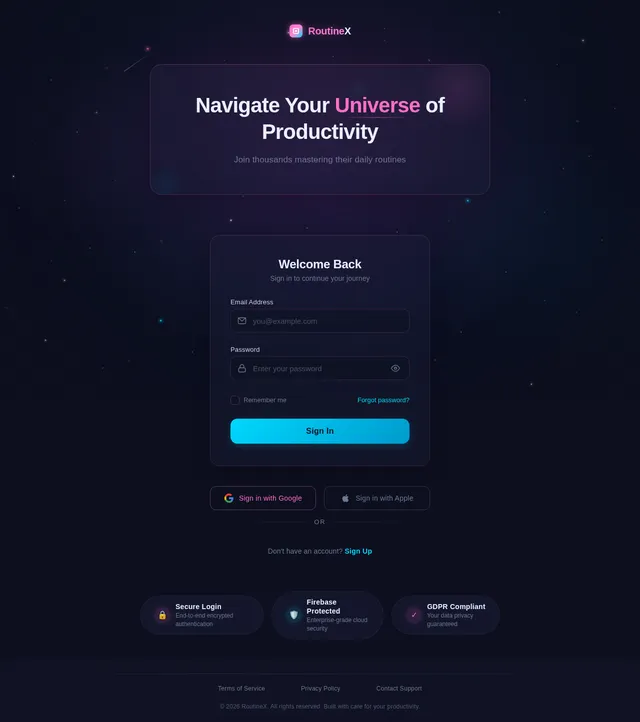
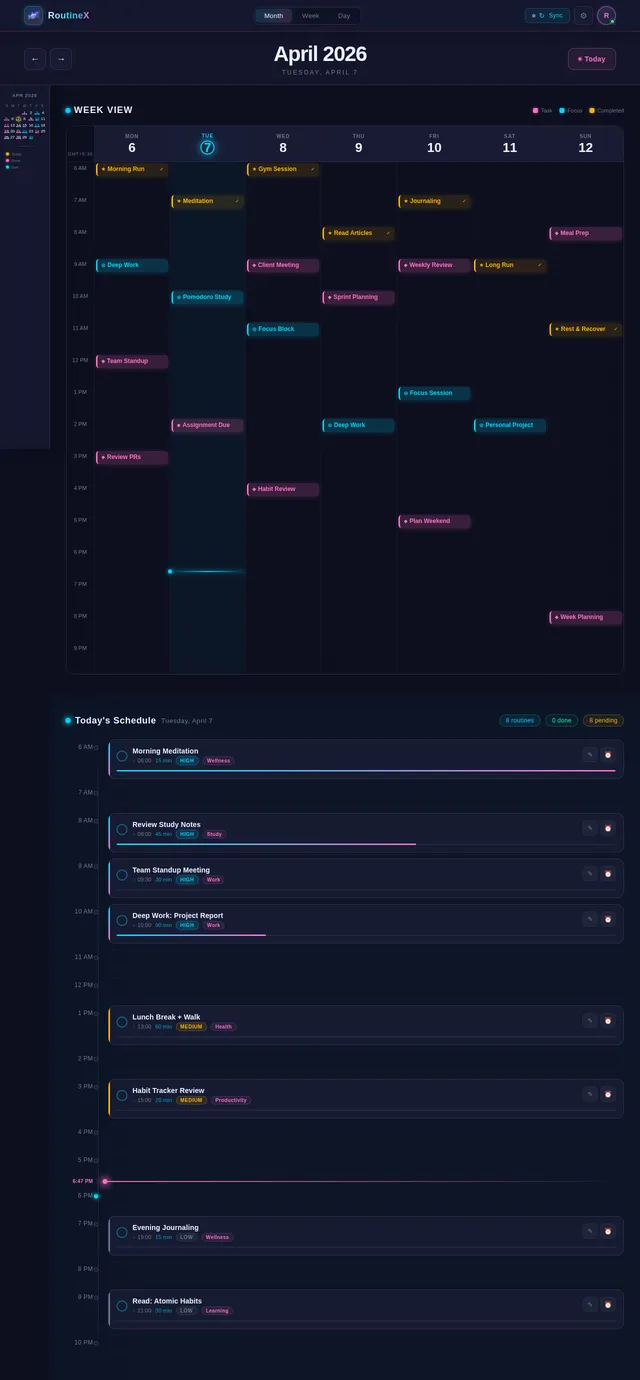
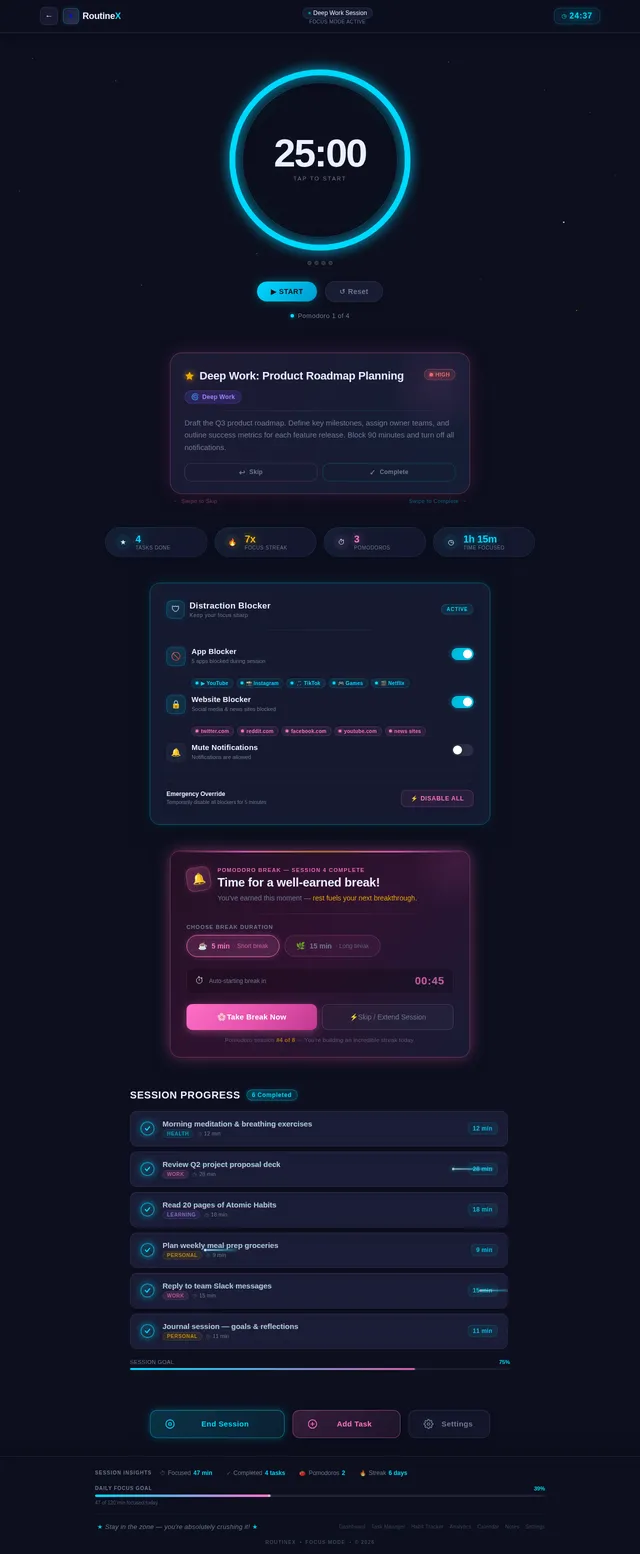
Create a modern, futuristic Daily Routine Mobile App with smooth UI/UX and high performance. The app should be visually appealing, minimalistic, and user-friendly with soft animations and glassmorphism or neon-inspired design. App Name: "RoutineX" (you can change if needed) Core Features: 1. Authentication System: - Google Sign-In integration (mandatory) - Optional email/password login - Secure user data storage - Logout option 2. Dashboard (Home Screen): - Daily overview of tasks - Greeting message (Good Morning, etc.) - Progress bar for the day - Motivational quote section 3. Task / Routine Manager: - Add, edit, delete daily routines - Set time, priority, and category (Health, Study, Work, etc.) - Repeat options (daily, weekly, custom) - Mark tasks as completed - Drag and drop to reorder tasks 4. Reminder & Notifications: - Smart reminders with notification alerts - Custom reminder tones - Snooze option 5. Calendar Integration: - Monthly and weekly view - Highlight completed and pending tasks - Sync routines with calendar 6. Habit Tracker: - Track streaks - Show consistency analytics - Visual charts for progress 7. Focus Mode: - Timer-based focus session (Pomodoro style) - Block distractions (optional feature simulation) - Track focus time 8. Analytics Dashboard: - Daily, weekly, monthly performance stats - Graphs and charts (task completion rate) - Productivity score 9. Notes Section: - Quick notes or journaling feature - Save thoughts linked to routines 10. Dark Mode / Light Mode: - Toggle theme - Futuristic neon dark theme preferred 11. Settings: - Profile management - Notification settings - Backup & restore data UI/UX Design Requirements: - Futuristic and smooth design - Glassmorphism or minimal neon theme - Smooth transitions and animations - Rounded cards and soft shadows - Clean typography - Bottom navigation bar - Responsive design for all screen sizes Tech Requirements: - Use modern frameworks (Flutter / React Native) - Firebase integration (Authentication + Firestore/Realtime DB) - Google Login API integration - Scalable and optimized performance Extra Features (Optional but recommended): - Voice command to add tasks - AI-based routine suggestions - Daily streak rewards system - Widget support for home screen Goal: The app should feel like a premium productivity app with a futuristic experience, smooth interaction, and powerful routine tracking system that helps users stay disciplined and productive.
Comments (0)
Sign in to leave a comment
System Requirements
System Requirements Document (SRD)
Project Name: RoutineX
1. Introduction
RoutineX is a modern, futuristic daily routine mobile application designed to help users stay disciplined, productive, and motivated. The app combines cutting-edge UI/UX principles, such as glassmorphism and neon-inspired design, with powerful functionality to create a premium productivity experience.
This document outlines the system requirements for RoutineX, focusing on its core features, user personas, design elements, and technical specifications. The goal is to deliver a high-performance, visually appealing, and user-friendly app that caters to a broad audience, including students, professionals, and anyone looking to optimize their daily routines.
2. System Overview
RoutineX is a mobile application that enables users to manage their daily tasks, track habits, and analyze their productivity. The app is built with a futuristic design aesthetic, featuring smooth animations, rounded cards, and clean typography. It integrates seamlessly with Google services for authentication and calendar synchronization, ensuring a secure and efficient user experience.
Key features include:
- Task and routine management with drag-and-drop functionality.
- Smart reminders and notifications.
- Habit tracking with visual analytics.
- Focus mode for distraction-free productivity.
- A motivational dashboard with quotes and progress tracking.
RoutineX is designed to be scalable, responsive, and optimized for performance, ensuring a seamless experience across all devices.
3. Functional Requirements
Core Features:
- As a User, I should be able to sign in using Google or email/password.
- As a User, I should be able to securely store my data and log out when needed.
- As a User, I should see a daily overview of my tasks on the dashboard.
- As a User, I should receive a greeting message based on the time of day.
- As a User, I should see a progress bar for my daily tasks.
- As a User, I should view a motivational quote on the dashboard.
- As a User, I should be able to add, edit, delete, and reorder my daily routines.
- As a User, I should be able to set time, priority, and category for tasks.
- As a User, I should be able to set repeat options for tasks (daily, weekly, custom).
- As a User, I should be able to mark tasks as completed.
- As a User, I should receive smart reminders with notification alerts.
- As a User, I should be able to snooze reminders.
- As a User, I should view my routines in a monthly and weekly calendar view.
- As a User, I should be able to sync my routines with my calendar.
- As a User, I should be able to track my habits and view streaks.
- As a User, I should see consistency analytics and visual charts for my habits.
- As a User, I should be able to use a timer-based focus mode (Pomodoro style).
- As a User, I should be able to block distractions during focus mode.
- As a User, I should view daily, weekly, and monthly performance stats.
- As a User, I should see graphs and charts for task completion rates.
- As a User, I should view my productivity score.
- As a User, I should be able to take quick notes or journal my thoughts.
- As a User, I should be able to toggle between dark mode and light mode.
- As a User, I should be able to manage my profile and notification settings.
- As a User, I should be able to back up and restore my data.
4. User Personas
1. Student
- Description: A college or school student looking to manage study schedules, assignments, and personal habits.
- Needs: Task prioritization, habit tracking, and focus mode for study sessions.
2. Professional
- Description: A working professional aiming to balance work tasks, meetings, and personal routines.
- Needs: Calendar integration, reminders, and analytics for productivity tracking.
3. General User
- Description: Anyone looking to improve their daily discipline and productivity.
- Needs: Easy-to-use task manager, motivational features, and habit tracking.
5. Visuals Colors and Theme
Color Palette:
- Background: #0D0F1F (Deep Midnight Blue)
- Surface: #1C1F3A (Soft Navy)
- Text: #EAF0FF (Soft White)
- Accent: #FF6EC7 (Neon Pink)
- Muted: #6C7A92 (Muted Gray-Blue)
Design Style:
- Glassmorphism with frosted glass effects.
- Neon-inspired accents for buttons and highlights.
- Smooth transitions and animations for a futuristic feel.
6. Signature Design Concept
Interactive Galaxy Dashboard
The home screen of RoutineX will resemble a galaxy map, where each task or routine is represented as a glowing star. Users can interact with the stars by tapping on them, which will trigger a smooth zoom-in animation to reveal task details. Completed tasks will transform into shooting stars, leaving a trail of light as they disappear.
- Animations: Stars will gently pulse, and the galaxy background will subtly shift colors (e.g., from deep blue to purple) based on the time of day.
- Micro-interactions: Hovering over a star will display a tooltip with the task name and priority.
- Transitions: Smooth zoom and fade effects when navigating between screens.
- Mood: A calming yet futuristic experience that inspires users to "navigate their universe of productivity."
7. Non-Functional Requirements
- The app must load within 2 seconds on all supported devices.
- The app must support both Android and iOS platforms.
- The app must handle up to 10,000 users concurrently.
- Data synchronization with the cloud must occur in real-time.
- The app must comply with GDPR and other relevant data protection regulations.
8. Tech Stack
Frontend:
- React Native for mobile app development.
Backend:
- Python with FastAPI for API development.
Database:
- MySQL for relational data storage (using Alembic for migrations).
- MongoDB for NoSQL data storage.
AI Models:
- GPT 5.4 for user-friendly responses.
- Claude 4.6 Opas for coding and academic suggestions.
AI Tools:
- LangChain for AI workflow orchestration.
- LiteLLM for LLM routing.
Orchestration:
- Docker and docker-compose for local development.
- Kubernetes for server-side orchestration.
9. Assumptions and Constraints
- The app will primarily target users in India, so the default timezone will be IST (Indian Standard Time).
- The app will require an active internet connection for most features.
- The app will use Firebase for authentication and real-time database integration.
- The initial release will focus on core features, with advanced features added in later updates.
10. Glossary
- Glassmorphism: A design trend that uses frosted glass effects for a modern and sleek look.
- Neon Theme: A design style featuring bright, glowing colors on dark backgrounds.
- Pomodoro Technique: A time management method that uses a timer to break work into intervals, typically 25 minutes long.
- GDPR: General Data Protection Regulation, a legal framework for data protection and privacy.
This concludes the System Requirements Document for RoutineX.
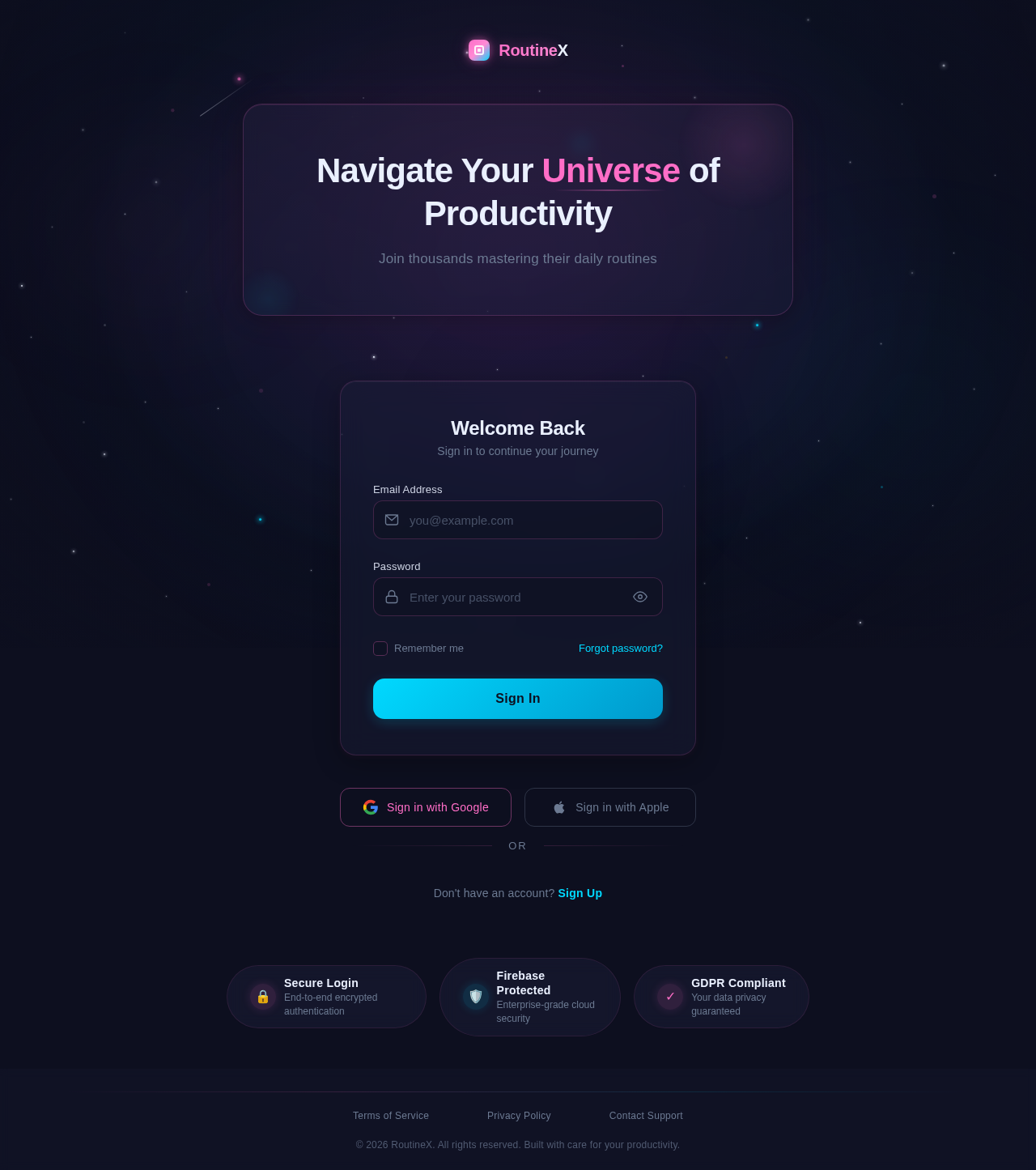
Navigate Your Universe of Productivity
Join thousands mastering their daily routines
Don't have an account? Sign Up
No comments yet. Be the first!