sonic-grossary
 Umang Suthar
create the grossary shop website


Comments (0)
Sign in to leave a comment
System Requirements
Sonic-Grossary System Requirements Document
1. Introduction
The Sonic-Grossary project aims to develop a comprehensive online platform for grocery shopping. This document outlines the system requirements for the Sonic-Grossary website, focusing on providing a seamless user experience for online ordering.
2. System Overview
Sonic-Grossary is designed to facilitate online grocery shopping for regular users. The platform will allow users to browse products, place orders, and manage their shopping activities through a user-friendly website interface. The system will support efficient order processing and provide users with a reliable shopping experience.
3. Functional Requirements
- As a User, I should be able to browse the grocery catalog to view available products.
- As a User, I should be able to search for specific grocery items using keywords.
- As a User, I should be able to add items to my shopping cart for purchase.
- As a User, I should be able to view my shopping cart to review selected items.
- As a User, I should be able to modify quantities or remove items from my cart.
- As a User, I should be able to proceed to checkout to finalize my order.
- As a User, I should be able to enter delivery details and select a delivery time.
- As a User, I should be able to make payments securely through the website.
- As a User, I should be able to receive an order confirmation and receipt via email.
- As a User, I should be able to track the status of my order online.
4. User Personas
- Regular User: A customer who uses the Sonic-Grossary platform to purchase groceries online. They require an intuitive interface for browsing, ordering, and managing their shopping activities.
5. Core User Flows
- User browses catalog -> adds items to cart -> reviews cart -> proceeds to checkout -> enters delivery details -> makes payment -> receives order confirmation -> tracks order status.
6. Visuals Colors and Theme
- primary: #2E8B57 (Sea Green)
- primary_light: #66CDAA (Medium Aquamarine)
- secondary: #FF6347 (Tomato)
- accent: #FFD700 (Gold)
- highlight: #FFA07A (Light Salmon)
- bg: #F5F5F5 (White Smoke)
- surface: rgba(255, 255, 255, 0.9)
- text: #333333 (Dark Gray)
- text_muted: #777777 (Gray)
- border: rgba(200, 200, 200, 0.5)
7. Signature Design Concept
The Sonic-Grossary homepage will feature an interactive "Grocery Aisle" concept. Users will navigate through a virtual grocery aisle where products are displayed on shelves. Hovering over items will provide detailed information, and clicking will add them to the cart. The aisle will have a smooth scrolling effect, simulating a real shopping experience. This will be implemented using framer-motion for animations and react-three/fiber for 3D effects, creating an engaging and immersive shopping environment.
8. Interaction Model & Motion Direction
The landing page will use a "parallax" interaction model, providing a layered depth effect as users scroll through the page. This will enhance the storytelling aspect of the platform, making the shopping experience visually rich and engaging. Internal pages will maintain a "static" interaction model to ensure clarity and focus on functionality.
9. Non-Functional Requirements
- The website must be responsive and accessible on various devices and screen sizes.
- The system should ensure secure transactions and protect user data.
- The platform should support high availability to handle peak shopping times.
10. Tech Stack
- Frontend: React for Web
- Backend: Python, FastAPI
- Database: MySQL or MariaDB
- Containerization: Docker, docker-compose
11. Assumptions and Constraints
- The platform will primarily serve users in India, with currency defaults set to INR.
- The system will operate within the IST timezone.
- The website will focus solely on online ordering and will not include in-store pickup options.
12. Glossary
- User: An individual who uses the Sonic-Grossary platform to purchase groceries.
- Cart: A virtual basket where users can store items they intend to purchase.
- Checkout: The process of finalizing an order by providing payment and delivery details.
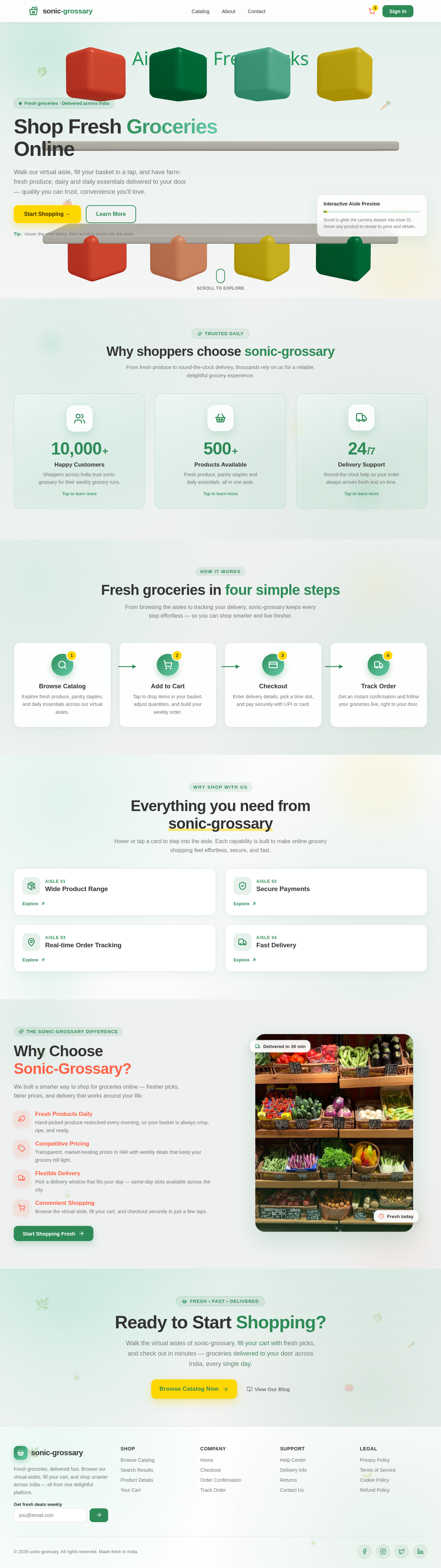
Shop Fresh Groceries Online
Walk our virtual aisle, fill your basket in a tap, and have farm-fresh produce, dairy and daily essentials delivered to your door — quality you can trust, convenience you'll love.
Tip: Hover the shelf items, then scroll to zoom into the aisle.Why shoppers choose sonic-grossary
From fresh produce to round-the-clock delivery, thousands rely on us for a reliable, delightful grocery experience.
Shoppers across India trust sonic-grossary for their weekly grocery runs.
Tap to learn moreFresh produce, pantry staples and daily essentials, all in one aisle.
Tap to learn moreRound-the-clock help so your order always arrives fresh and on time.
Tap to learn moreFresh groceries in four simple steps
From browsing the aisles to tracking your delivery, sonic-grossary keeps every step effortless — so you can shop smarter and live fresher.
Browse Catalog
Explore fresh produce, pantry staples, and daily essentials across our virtual aisles.
Add to Cart
Tap to drop items in your basket, adjust quantities, and build your weekly order.
Checkout
Enter delivery details, pick a time slot, and pay securely with UPI or card.
Track Order
Get an instant confirmation and follow your groceries live, right to your door.
Everything you need from sonic-grossary
Hover or tap a card to step into the aisle. Each capability is built to make online grocery shopping feel effortless, secure, and fast.
WhyChooseSonic-Grossary?
We built a smarter way to shop for groceries online — fresher picks, fairer prices, and delivery that works around your life.
- Fresh Products DailyHand-picked produce restocked every morning, so your basket is always crisp, ripe, and ready.
- Competitive PricingTransparent, market-beating prices in INR with weekly deals that keep your grocery bill light.
- Flexible DeliveryPick a delivery window that fits your day — same-day slots available across the city.
- Convenient ShoppingBrowse the virtual aisle, fill your cart, and checkout securely in just a few taps.

Ready to Start Shopping?
Walk the virtual aisles of sonic-grossary, fill your cart with fresh picks, and check out in minutes — groceries delivered to your door across India, every single day.
Shop Fresh Groceries Online
Walk our virtual aisle, fill your basket in a tap, and have farm-fresh produce, dairy and daily essentials delivered to your door — quality you can trust, convenience you'll love.
Tip: Hover the shelf items, then scroll to zoom into the aisle.Why shoppers choose sonic-grossary
From fresh produce to round-the-clock delivery, thousands rely on us for a reliable, delightful grocery experience.
Shoppers across India trust sonic-grossary for their weekly grocery runs.
Tap to learn moreFresh produce, pantry staples and daily essentials, all in one aisle.
Tap to learn moreRound-the-clock help so your order always arrives fresh and on time.
Tap to learn moreFresh groceries in four simple steps
From browsing the aisles to tracking your delivery, sonic-grossary keeps every step effortless — so you can shop smarter and live fresher.
Browse Catalog
Explore fresh produce, pantry staples, and daily essentials across our virtual aisles.
Add to Cart
Tap to drop items in your basket, adjust quantities, and build your weekly order.
Checkout
Enter delivery details, pick a time slot, and pay securely with UPI or card.
Track Order
Get an instant confirmation and follow your groceries live, right to your door.
Everything you need from sonic-grossary
Hover or tap a card to step into the aisle. Each capability is built to make online grocery shopping feel effortless, secure, and fast.
WhyChooseSonic-Grossary?
We built a smarter way to shop for groceries online — fresher picks, fairer prices, and delivery that works around your life.
- Fresh Products DailyHand-picked produce restocked every morning, so your basket is always crisp, ripe, and ready.
- Competitive PricingTransparent, market-beating prices in INR with weekly deals that keep your grocery bill light.
- Flexible DeliveryPick a delivery window that fits your day — same-day slots available across the city.
- Convenient ShoppingBrowse the virtual aisle, fill your cart, and checkout securely in just a few taps.
Ready to Start Shopping?
Walk the virtual aisles of sonic-grossary, fill your cart with fresh picks, and check out in minutes — groceries delivered to your door across India, every single day.
No comments yet. Be the first!